
GA 30 GPS Antenna - Gps GARMIN - Free user manual and instructions
Find the device manual for free GA 30 GPS Antenna GARMIN in PDF.


| Product type | External GPS antenna |
| Brand | Garmin |
| Model | GA 30 |
| Dimensions | 99 x 99 x 41 mm |
| Weight | 340 g |
| Material | ABS plastic with sealing gasket |
| Reception frequency | GPS L1 (1575.42 MHz) |
| Connector | BNC male |
| Cable length | 5 m |
| Power supply | Via the connected GPS receiver |
| Mounting type | Screw mounting or magnetic mount (optional) |
| Waterproof rating | IPX7 rated (submersible up to 1 meter for 30 minutes) |
| Operating temperature | -20 °C to +60 °C |
| Compatible applications | Garmin GPS receivers (GPSMAP series, echoMAP, etc.) |
| Main functions | Reception and amplification of GPS signals to improve positioning accuracy |
| Maintenance and cleaning | Wipe with a soft, damp cloth; do not use abrasive products |
| Safety instructions | Mount securely to prevent falling; do not open the housing |
| Spare parts and repairability | Parts not available separately; contact Garmin customer service in case of malfunction |
| Warranty | 1 year |
| General information | Passive antenna with built-in amplifier for better reception even under cover |
Frequently Asked Questions - GA 30 GPS Antenna GARMIN
User questions about GA 30 GPS Antenna GARMIN
0 question about this device. Answer the ones you know or ask your own.
Ask a new question about this device
Download the instructions for your Gps in PDF format for free! Find your manual GA 30 GPS Antenna - GARMIN and take your electronic device back in hand. On this page are published all the documents necessary for the use of your device. GA 30 GPS Antenna by GARMIN.
USER MANUAL GA 30 GPS Antenna GARMIN
GA 30 GPS Antenna Installation Instructions
The Garmin ^® GA 30 GPS antenna provides GPS information to your compatible Garmin chartplotter. The GA 30 connects to compatible Garmin chartplotters using a BNC connector.
Install the GA 30 antenna according to the following instructions. You need the appropriate fasteners, tools, and mounts listed in each section. These items are available at most marine dealers.

See the Important Safety and Product Information guide in the compatible Garmin chartplotter box for product warnings and other important information.

CAUTION: Always wear safety goggles, car protection, and a dust mask when drilling, cutting, or sanding. When drilling or cutting, always check for clearance on the opposite side of the surface.
Contact Garmin
Contact Garmin Product Support if you have any questions while installing the GA 30. In the USA, go to www.garmin.com/support, or contact Garmin USA by phone at (913) 397.8200 or (800) 800.1020.
In the UK, contact Garmin (Europe) Ltd. by phone at 0808 2380000.
In Europe, go to www.garmin.com/support and click Contact Support for in-country support information, or contact Garmin (Europe) Ltd. by phone at +44 (0) 870.8501241.
Product Registration
Help us better support you by completing our online registration today. Go to http://my.garmin.com. Keep the original sales receipt, or a photocopy, in a safe place.
For future reference, write the serial number assigned to your GA 30 antenna in the space provided. It is located on a sticker on the back of the unit.
Serial number
Packing List and Tools Needed
Before installing your unit, confirm that your package includes the following items. If any parts are missing, contact your Garmin dealer immediately.
Standard Package
- GA 30 antenna
- Antenna cable
• Surface-mount bracket - Pole-mount bracket
• Under-deck mount bracket
• Mounting hardware (screws and adhesive pads)
• Installation instructions
Tools Needed
- Drill and drill bits
- Hole saw, 1 in. (25 mm) (surface-mount cable hole)
- Screwdriver (surface-mount screws)
• Center punch and hammer (to mark surface-mount pilot holes) - Countersink bit (when mounting on fiberglass)
• Marine sealant (for certain mounting options)
Mounting the GA 30 Antenna
You can surface mount the GA 30 antenna, attach the antenna to a standard 1 in. OD pipe-threaded-pole marine mount (14 threads-per-inch—not included), or install the antenna under fiberglass.
Select a suitable location for the GA 30 antenna on your boat. To ensure the best reception, mount the GA 30 antenna in a location that is clearly exposed to the sky in all directions.
- Avoid mounting the GA 30 antenna in the shade of the superstructure of the boat, a radome antenna, or a mast.
- Mount the GA 30 antenna at least 3 ft. (1 m) away from (preferably above) the path of any radar beam or a VHF radio antenna.
Temporarily secure the antenna in the preferred mounting location and test it for correct operation. If you experience interference from other electronics, try a different location. When you verify correct operation, permanently mount the antenna.
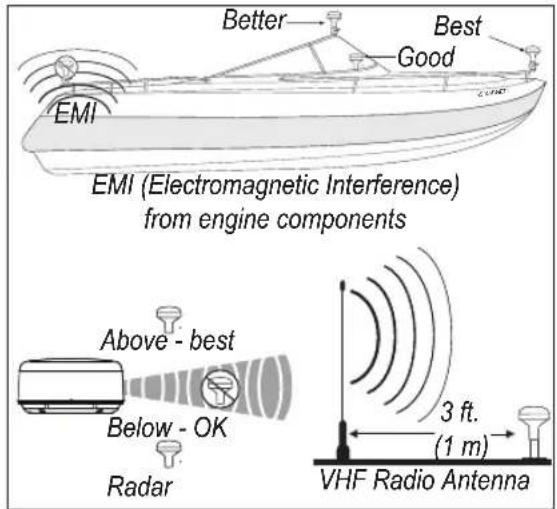
GA 30 Antenna Placement Considerations
Surface Mounting the GA 30 Antenna
1 Use the surface-mount bracket as your mounting template.
- Use a center punch to mark the three screw locations on the surface.
- Use a pencil to trace the cable hole in the center of the bracket.
-
Set the surface-mount bracket aside. Do not drill through the surface-mount bracket.
-
Drill 18 in. (3 mm) pilot holes at the three marked locations.

NOTE: If you are mounting the GA 30 on fiberglass, it is recommended that you use a countersink bit to drill a clearance counterbore through the top gelcoat layer (but no deeper). This will help to prevent cracking in the gelcoat layer when the screws are tightened.
- Use a 1 in. (25 mm) hole saw to cut the cable hole in the center.
- Place the seal pad on the bottom of the surface-mount bracket. Ensure that the screw holes align.
- Use the included M4 screws to attach the surface-mount bracket to the mounting surface.
- Route the cable through the 1 in. cable hole and connect it to the GA 30.
- Ensure that the large rubber gasket is in place on the bottom of the GA 30 antenna, place the antenna on the surface-mount bracket ①, and twist the antenna clockwise to lock it in place ②.
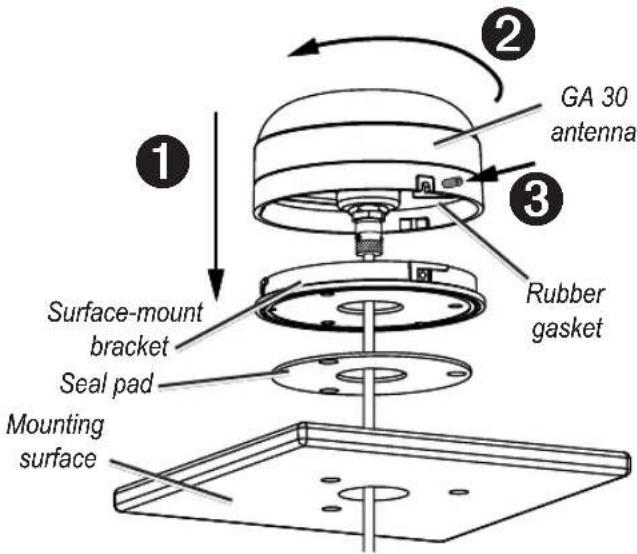
- Secure the antenna to the mounting bracket with the included M3 set screw ③.
- Route the cable away from sources of electronic interference, and connect it to your GPS device using the BNC connector.
Pole Mounting the GA 30 Antenna
With the pole-mount adapter attached to the GA 30 antenna, you can install the antenna on a standard 1 in. OD pipe-threaded-pole marine mount (14 threads per inch—not included). You can run the cable through the pole or outside the pole.
To mount the GA 30 with the cable run outside the pole:
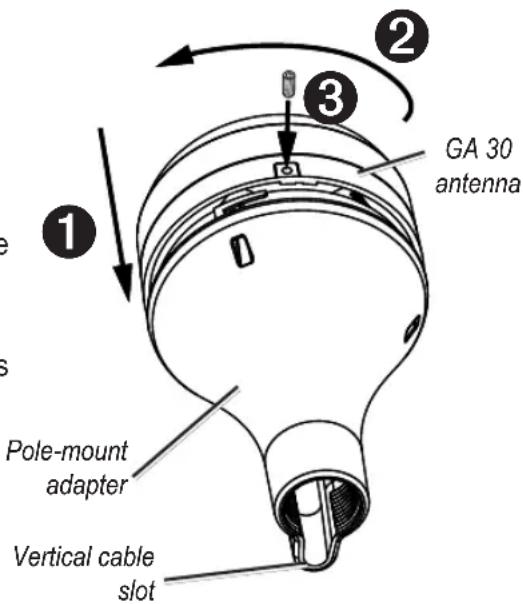
- Route the cable through the pole-mount adapter, and place the cable in the vertical slot along the base of the pole-mount adapter.
-
Thread the pole-mount adapter onto a standard 1 in. OD pipe-threaded-pole marine mount (14 threads per inch—not included). Do not overtighten the adapter.
-
Connect the cable to the GA 30 antenna.
-
Place the GA 30 antenna on the pole-mount adapter ① and twist the antenna clockwise to lock it in place ②.
-
Secure the antenna to the adapter with the included M3 set screw ③.
-
(Optional) With the GA 30 installed on the pole mount, fill the remaining gap in the vertical cable slot with a marine sealant.
-
Attach the marine pole mount to the boat if it is not already attached.
-
Route the cable away from sources of electronic interference, and connect it to your GPS device using the BNC connector.
To mount the GA 30 with the cable run through the pole:
- Position a standard 1 in. OD pipe-threaded-pole marine mount (14 threads per inch—not included) in the preferred location, and mark the approximate center of the pole.
- Drill a 34 in. (19 mm) hole for the cable to pass through.
- Fasten the pole marine mount to the boat.
- Thread the pole-mount adapter onto the pole. Do not overtighten the adapter.
- Route the cable through the pole and connect it to the GA 30 antenna.
- Place the GA 30 antenna on the pole-mount adapter ① and twist the antenna clockwise to lock it in place ②.
- Secure the antenna to the adapter with the included M3 set screw ③.
- (Optional) With the GA 30 installed on the pole mount, fill the vertical cable slot with a marine sealant.
- Route the cable away from sources of electronic interference, and connect it to your GPS device using the BNC connector.
Under-deck Mounting the GA 30 Antenna
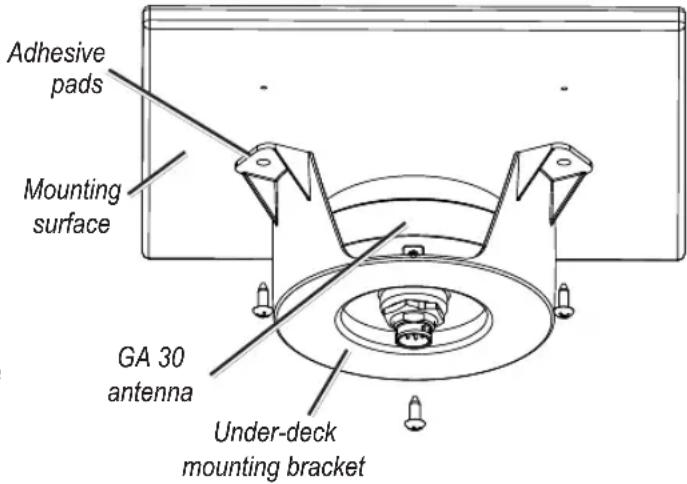
The GA 30 antenna can be mounted under a fiberglass surface with the adhesive pads attached to the under-deck mounting bracket. The GA 30 will not acquire satellite signals through metal—you can only use the under-deck mount under a fiberglass surface.
- Determine the location on the fiberglass surface where you want to mount the GA 30.
- Place the adhesive pads on the under-deck mounting bracket.
- Place the GA 30 in the underdeck mounting bracket.
- Adhere the under-deck mounting bracket to the mounting surface.
- Secure the under-deck mount to the mounting surface with screws. Use extreme care to ensure that the screws do not penetrate the upper surface of the deck.
- Connect the cable to the GA 30.
- Route the cable away from sources of electronic interference, and connect it to your GPS device using the BNC connector.
Specifications
Dimensions: 3 ^19/32 in. (91.6 mm) Diameter × 1 ^15/16 in. (49.5 mm) Height
Weight: 7.1 oz. (201 g)
Case Material: Fully gasketed, high-impact plastic alloy, waterproof to IEC 529 IPX7 standards
Operating Range: From -40°F to 176°F (from -40°C to 80°C)
Cable: Foil-shielded, center conductor 18 AWG
Connector: Antenna—Proprietary twist-lock connector
GPS unit—BNC
Dynamics: 999 knots, 40g
© 2009 Garmin Ltd. or its subsidiaries
All rights reserved. Except as expressly provided herein, no part of this manual may be reproduced, copied, transmitted, disseminated, downloaded or stored in any storage medium, for any purpose without the express prior written consent of Garmin. Garmin hereby grants permission to download a single copy of this manual onto a hard drive or other electronic storage medium to be viewed and to print one copy of this manual or of any revision hereto, provided that such electronic or printed copy of this manual must contain the complete text of this copyright notice and provided further that any unauthorized commercial distribution of this manual or any revision hereto is strictly prohibited.
Information in this document is subject to change without notice. Garmin reserves the right to change or improve its products and to make changes in the content without obligation to notify any person or organization of such changes or improvements. Visit the Garmin Web site (www.garmin.com) for current updates and supplemental information concerning the use and operation of this and other Garmin products.
Garmin ^® and the Garmin logo are trademarks of Garmin Ltd. or its subsidiaries, registered in the USA and other countries. These trademarks may not be used without the express permission of Garmin.
GARMIN ^®
© 2009 Garmin Ltd. or its subsidiaries
Garmin International, Inc.
1200 East 151 ^st Street, Olathe, Kansas 66062, USA
Garmin (Europe) Ltd.
Liberty House, Houndown Business Park, Southampton, Hampshire, SO40 9LR UK
Garmin Corporation
No. 68, Jangshu 2 ^nd Road, Shijr, Taipei County, Taiwan
www.garmin.com
Part Number 190-01139-90 Rev. A
- GA 30 GPS Antenna Installation Instructions
- Contact Garmin
- Product Registration
- Serial number
- Packing List and Tools Needed
- Standard Package
- Tools Needed
- Mounting the GA 30 Antenna
- Surface Mounting the GA 30 Antenna
- Pole Mounting the GA 30 Antenna
- To mount the GA 30 with the cable run outside the pole:
- To mount the GA 30 with the cable run through the pole:
- Under-deck Mounting the GA 30 Antenna
- Specifications
- GARMIN ®
Brand : GARMIN
Model : GA 30 GPS Antenna
Category : Gps