
MLM82S - Blender Rane - Free user manual and instructions
Find the device manual for free MLM82S Rane in PDF.


| Brand | Rane |
| Model | MLM82S |
| Product type | Signal mixer |
| Power supply | 100-240 V AC, 50/60 Hz (multivoltage) |
| Mic/line inputs | 4 x balanced XLR, mic or line level (rear switch) |
| Stereo line inputs | 4 x balanced TRS 6.35 mm, with 12 dB gain and mono switch |
| Outputs | 2 x balanced XLR, line or mic level (internal switch) |
| Phantom power | 15 V DC, switchable, disabled per input in line mode |
| Indicators | Dual-color signal/clip LED per input and output |
| Assignment selectors | For each mic/line input: A, A+B, or B |
| Mono switches | For each stereo line input, with indicator LED |
| Level controls | Potentiometers for each input and for outputs A and B |
| Applications | Hotels, churches, conferences, schools, rental, pre-mixing, recording |
| Box contents | MLM82S, power cable, user guide, safety instructions |
| Maintenance | Clean with a dry cloth; no specific maintenance required |
Frequently Asked Questions - MLM82S Rane
User questions about MLM82S Rane
0 question about this device. Answer the ones you know or ask your own.
Ask a new question about this device
Download the instructions for your Blender in PDF format for free! Find your manual MLM82S - Rane and take your electronic device back in hand. On this page are published all the documents necessary for the use of your device. MLM82S by Rane.
USER MANUAL MLM82S Rane
User Guide (English)
Introduction
The Rane MLM82S features four balanced, studio-grade, mono Mic/Line inputs with XLR jacks and 15 VDC phantom power. Each of the four Mic/Line inputs may be assigned to A, A+B or B Outputs. Independent Level/Gain Trim controls and Signal/Overload indicators are provided for each Mic/Line input. The phantom power switch and the Mic/Line switches are located on the rear panel. Phantom power is removed from any input set for Line operation. The MLM82S also features four stereo line-level inputs with 12 dB of gain. Each stereo line input features a recessed Mono switch with indicator and level control. These inputs may also be used with four Mono A inputs and four Mono B inputs. A and B output level controls set the master mix level independently for A and B outputs. The mix amplifiers feature independent overload indicators. To correct any overload condition, the entire mix can be reduced and/or individual input levels adjusted. A and B mix outputs each have an internal switch for padding the output signal to mic-level. The factory default is line-level.
With features like Mic/Line A / A+B / B switches, independent stereo Line input mono switches and additional line gain, the MLM82S is now one of the most versatile mixers in its class. It is ideal for installations requiring ease of use, compact size, low cost, high performance, and security. Applications include, but are not limited to, hotels, churches, conference rooms, schools, and rental sound systems. The studio-grade specifications of the MLM82S allow many other applications such as submixing, recording, and post-production. The Mic/Line assign switches and independent mono switches for each of the stereo Line inputs make the MLM82S a true, dual-zone capable mixer, i.e., the outputs may be thought of as two independent zones or a single stereo zone.
Features
- Four balanced XLR Mic/Line inputs
- 15V phantom power
○ Bi-color signal/overload indicators - Trimless mic stage preamplifiers
○ A / A+B / B assign switch - Four balanced TRS stereo line inputs
○ Independent Mono switch - 12 dB of Line gain
- Two balanced XLR outputs
o Independent overload indicators
o Independent Level controls - Internal pad for mic-level output
- Internal universal power supply (100-240 VAC)
Box Contents
MLM82S
Power Cable
User Guide
Safety & Warranty Manual
Support
For the latest information about this product (documentation, technical specifications, system requirements, compatibility information, etc.) and product registration, visit rane.com.
For additional product support, visit rane.com/support.
Setup
Items not listed under Introduction > Box Contents are sold separately.
This section is provided as a convenience for those in a rush. If you are experienced with this unit or other Rane products, these few words will refresh your memory. Inputs 1-4 may be mic or line-level. The choice between the two is made by setting the Line push buttons on the rear of the unit next to the Mic/Line inputs. Each microphone input may be assigned to A, B or A+B outputs using the front panel Assign switches. Inputs 5-8 are stereo line inputs which may be set to mono using the recessed Mono switches located on the front panel. Internal switches allow setting output signal levels for Mic or Line. The factory default setting is Line. If the MLM82S is connected directly to a power amplifier, equalizer, or recorder input, choose Line. If the MLM82S is connected to a microphone jack of an existing sound system, choose Mic. Once inputs, outputs, and power are properly connected, with the Output Levels counter-clockwise (off), set the input levels as high as possible without causing the Sig/OI indicators to illuminate. Then slowly raise the output levels as desired.
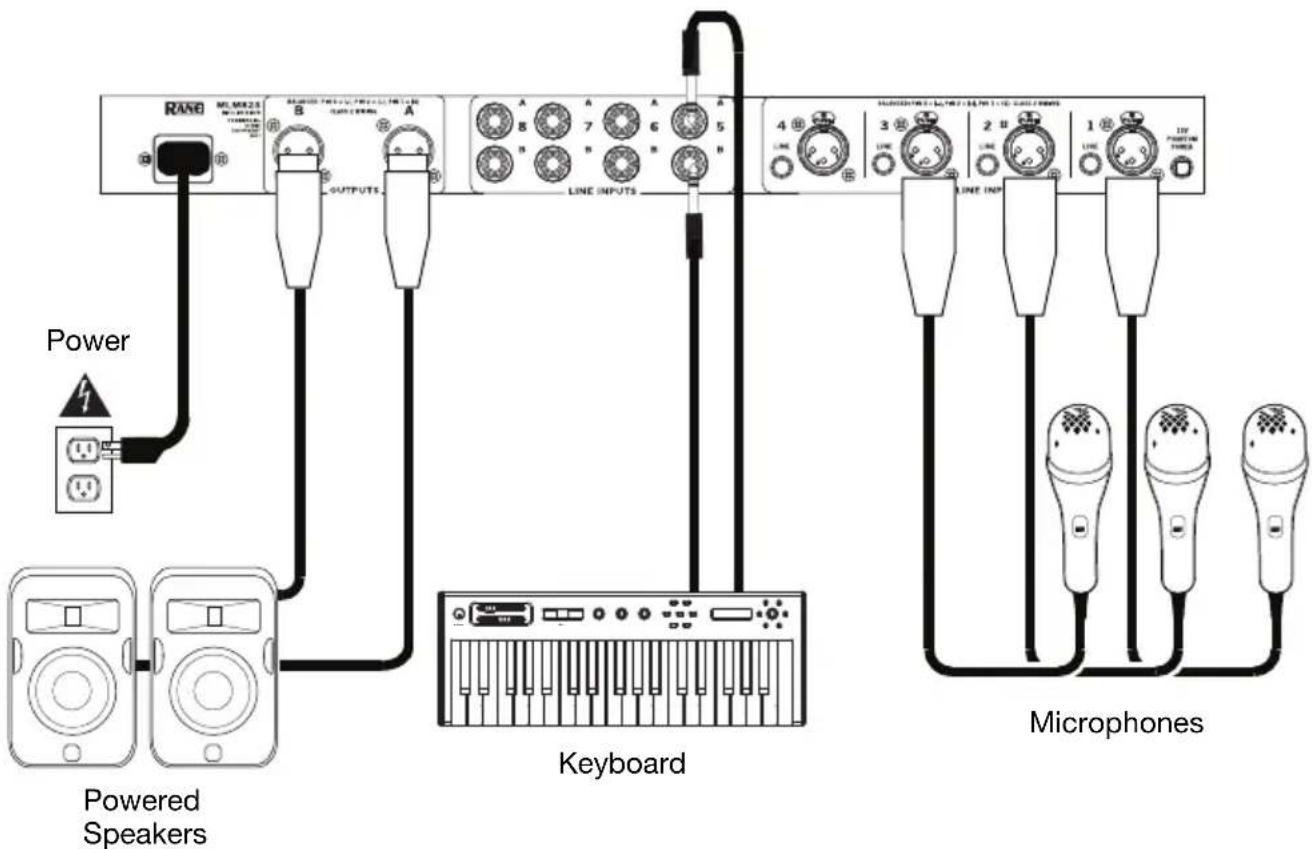
Mic/Line Inputs
The four XLR jacks provided on the MLM82S are balanced Mic/Line inputs. They will also accept unbalanced connectors. Use only shielded cable for inputs. For best noise rejection use two-conductor-plus-shielded wire, even for unbalanced operation. Connect the shield at both ends to help insure proper grounding. See the Sound System Interconnection RaneNote for all cable adaptations: rane.com/note110. Rane follows the AES recommended practice of pin 2 positive, pin 3 negative, and pin 1 to shield. Switch any input connected to a microphone to the Mic position (out) using the associated switches on the rear panel. When connecting line-level signals, switch the input to the Line position (in). A single phantom power switch is provided for the four Mic inputs. If Line is selected, phantom power is disabled for that input.
Stereo Line Inputs
The 1/4" connectors are line-level balanced/unbalanced inputs. If the MLM82S is to be used with unbalanced sources, consult the Sound System Interconnection RaneNote for proper wiring: rane.com/note110. Stereo inputs use both A and B jacks at each input. Inputs 5-8 also serve as mono inputs when the front panel Mono switch is engaged.
Outputs
The MLM82S's outputs are balanced. The same wiring conventions as the XLR inputs apply to the outputs. The type of device following the MLM82S must be considered when setting the internal Output Level switch. Choose between Line (0 dB) or Mic (-40 dB) output, the factory setting is Line. If the MLM82S is connected directly to a power amplifier input, choose line-level. If the MLM82S is connected to a microphone jack on an existing sound system, choose mic-level. For unbalanced output connections, do not tie pin 3 (i.e. “−”) to ground.
Features
Front Panel

- Signal/Overload LED: This LED illuminates green when a signal of at least -30 dBu is received, and turns red when the signal is within 3 dB of clipping. If the Overload LED illuminates, turn down the input signal to prevent the signal from distorting.
- Mono Input Level: Adjust this knob to control the level of each mono channel.
- Assign Switches: Adjust these switches to route the signal for each Mic/Line input to the A, A+B, or B outputs.
- Stereo Line Input Level: Adjust this knob to control the amount of the stereo input signal routed to the outputs.
- Mono Switch: Adjust this switch to control the mix for the A and B sides of each stereo line input together. When active, the associated LED lights and the A and B inputs for that channel will have the same level.
- Output Overload LED: This LED illuminates when within 3 dB of clipping. To avoid this, the output level control can be decreased, or the individual input level can be lowered.
- A and B Output Level Controls: Adjust these knobs to set the output level for the A and B outputs.
- Power LED: This LED is lit whenever adequate power is applied to the unit.
Rear Panel

- Mic/Line Inputs 1-4: Connect microphones or line-level devices to these balanced XLR inputs.
- Phantom Power Switch: Adjust this switch to apply 15V phantom power to any of the inputs 1-4 that are set for mic-level.
- Line Input Selectors: Adjust this to switch the sensitivity and input impedance for either mic or line-level input. If Line is chosen, phantom power is deactivated for that input.
- 1/4" Line Inputs: These stereo pairs of balanced inputs accommodate stereo line-level signals. These TRS (Tip-Ring-Sleeve) 1/4" jacks handle either balanced or unbalanced signals. In most cases, an unbalanced signal may use a mono 1/4" plug (Tip-Sleeve).
- A and B Outputs: These balanced XLR's provide the A and B mixed output. The internal output level switches allow setting the output level for mic or line-level.
- Power Connector: Connect the included power cable here.
Operation
Since numerous applications exist for the MLM82S, no single set of operational procedures control its use. Visit rane.com/note110 to view Sound System Interconnection note which explores the many configurations of the MLM82S in depth.
Internal Jumper Options
The A and B mix outputs each have internal switches for padding the output signal from line-level (factory default) to mic-level. This requires removal of the top cover to move some jumpers. This must be done with the power cable disconnected and by qualified service personnel.
Assistance technique
Technical Specifications
| Parameter | Specification | Limit | Units | Conditions/Comments |
| Inputs: TypeConnectors 1/4” TRS, XLR Tip=(+), Ring=Impedance 1/4” TRS = 20 kXLR = 1k / 96kMaximum Level 11.9 1 dBu | Active Balanced | (-), Sleeve=GND | ||
| 1% Ω | ||||
| Outputs: TypeConnectorsImpedanceMaximum Level | Active Balanced | Ω 1 kHz | ||
| XLR | ||||
| 200/100 | typ | |||
| 24 | 1 | dBu | 600 Ω load balanced | |
| Overall Gain Range | Off to +6 | -0/+2 | dB | |
| CrosstalkChannel-Channel 75 (1 kHz) max | dB | |||
| Maximum Power | 7 | W | ||
| Universal Line Voltage | 100 to 240 | 10% | VAC | 50/60 Hz |
| Dimensions | 19" x 5.3" x 1.75" / 48.3 x 13.5 x 4.4 cm | Width x Depth x Height | ||
| Weight | 4 lbs. / 1.8 kg | net | ||
Note: 0 dBu = 0.775 Vrms.
Specifications are subject to change without notice.
Trademarks & Licenses
Rane is a trademark of inMusic Brands, Inc., registered in the U.S. and other countries.
All other product names, company names, trademarks, or trade names are those of their respective owners.
Block Diagram
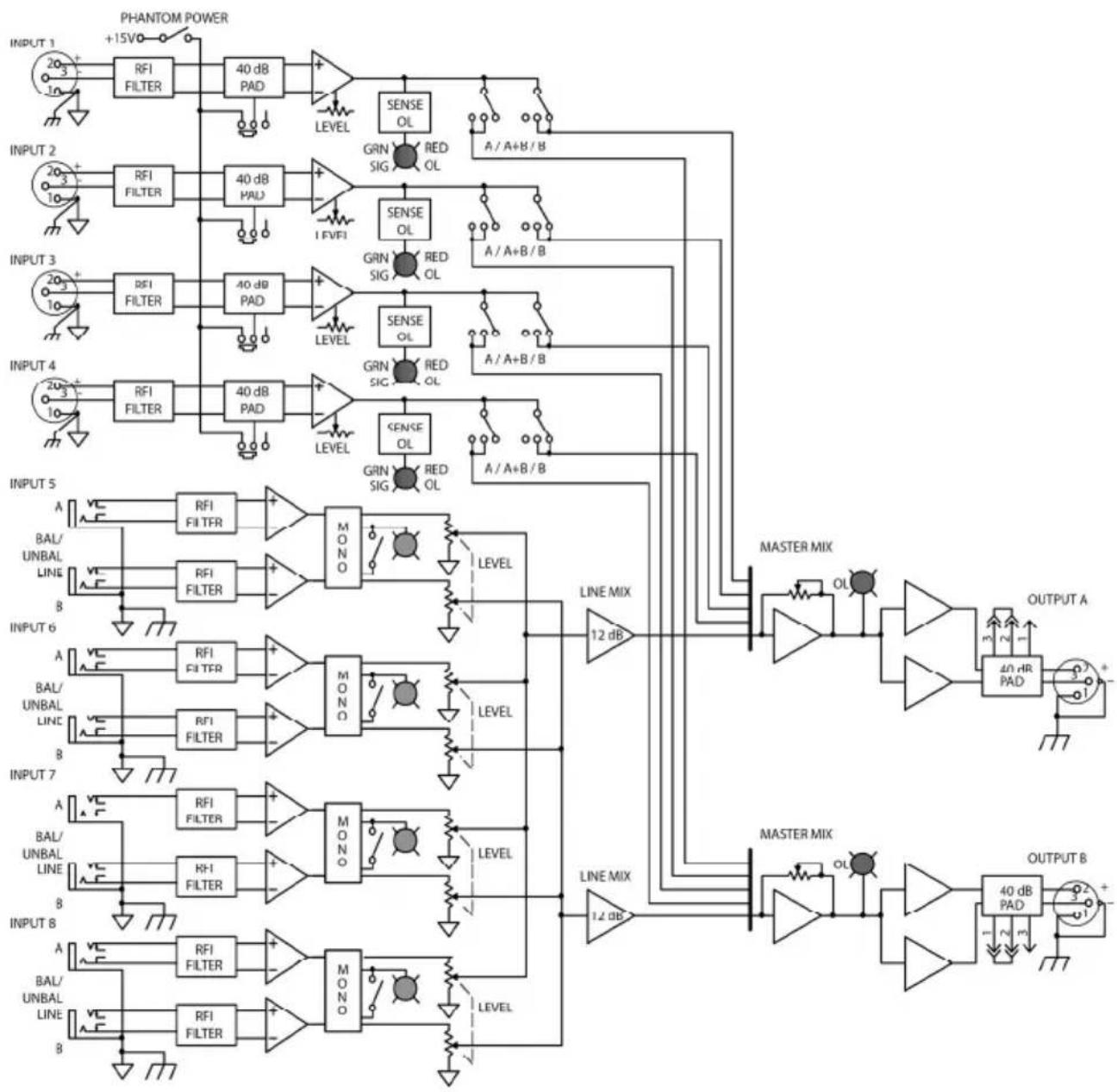
flowchart
graph TD
    subgraph INPUT 1
        A["20/3"] --> B["RFI FILTER"]
        B --> C["40 dB PAD"]
        C --> D["LEVEL"]
        D --> E["SENSE OL"]
        E --> F["A/A+B/B"]
    end
    subgraph INPUT 2
        G["20/3"] --> H["RFI FILTER"]
        H --> I["40 dB PAD"]
        I --> J["LEVEL"]
        J --> K["SENSE OL"]
        K --> L["A/A+B/B"]
    end
    subgraph INPUT 3
        M["20/3"] --> N["RFI FILTER"]
        N --> O["40 dB PAD"]
        O --> P["LEVEL"]
        P --> Q["SENSE OL"]
        Q --> R["A/A+B/B"]
    end
    subgraph INPUT 4
        S["20/3"] --> T["RFI FILTER"]
        T --> U["40 dB PAD"]
        U --> V["LEVEL"]
        V --> W["SENSE OL"]
        W --> X["A/A+B/B"]
    end
    subgraph INPUT 5
        Y["A"] --> Z["RFI FILTER"]
        Z --> AA["MONO"]
        AA --> AB["LEVEL"]
        AB --> AC["LINE MIX 12 dB"]
        AC --> AD["OUTPUT A"]
    end
    subgraph INPUT 6
        AE["A"] --> AF["RFI FILTER"]
        AF --> AG["MONO"]
        AG --> AH["LEVEL"]
        AH --> AI["LINE MIX 12 dB"]
        AI --> AJ["OUTPUT B"]
    end
    subgraph INPUT 7
        AK["A"] --> AL["RFI FILTER"]
        AL --> AM["MONO"]
        AM --> AN["LEVEL"]
        AN --> AO["LINE MIX 12 dB"]
        AO --> AP["OUTPUT B"]
    end
rane.com
Brand : Rane
Model : MLM82S
Category : Blender