
TL-PA4010P KIT - Powerline adapter TP-LINK - Free user manual and instructions
Find the device manual for free TL-PA4010P KIT TP-LINK in PDF.


| Brand | TP-Link |
| Model | TL-PA4010P KIT |
| Product Type | Powerline Network Adapter Kit |
| Maximum Speed | 600 Mbps (AV600) |
| Dimensions (per adapter) | Approximately 6.8 x 4.2 x 2.2 cm |
| Weight (per adapter) | Approximately 60 g |
| Power Supply | 100-240 V AC, 50/60 Hz |
| Power Consumption | Less than 3 W (standby), 5 W (active) |
| Connectivity | 1 Ethernet RJ-45 10/100 Mbps port per adapter |
| Pair Button | To secure the Powerline network and add adapters |
| Pass-through Socket | Yes, allows plugging other devices |
| LED Indicators | Power, Powerline, Ethernet |
| Operating Temperature Range | 0 °C to 40 °C |
| Operating Humidity | 10% to 90% non-condensing |
| Certifications | CE, RoHS |
| Care and Cleaning | Clean with a dry, soft cloth. Do not use chemicals. |
| Safety | Do not plug into a power strip. Use a direct wall outlet. Keep away from water and heat. |
| Spare Parts and Repairability | No user-serviceable parts. In case of failure, contact TP-Link support. |
| Warranty | 3-year limited warranty |
| Kit Contents | 2 Powerline adapters, 2 RJ-45 Ethernet cables, quick installation guide |
Frequently Asked Questions - TL-PA4010P KIT TP-LINK
User questions about TL-PA4010P KIT TP-LINK
0 question about this device. Answer the ones you know or ask your own.
Ask a new question about this device
Download the instructions for your Powerline adapter in PDF format for free! Find your manual TL-PA4010P KIT - TP-LINK and take your electronic device back in hand. On this page are published all the documents necessary for the use of your device. TL-PA4010P KIT by TP-LINK.
USER MANUAL TL-PA4010P KIT TP-LINK
TP-Link Technologies Co., Ltd. South Building(floors 1,3,4,5) and 28(floors 1-4), Central Science
& Technology Park, Shennan Rd, Nanshan, Shenzhen, China
TP-Link UK Limited Unit 2 & 3 Riverview (142-144), Cardiff Road, Reading, RG1 8EW
TP-Link Hellas Ltd. Marathonodromou 77, Marousi 151 24, Greece
Specifications are subject to change without notice. TP-Link is a registered trademark of TP-Link
Technologies Co., Ltd. Other brands and product names are trademarks or registered trademarks of their respective holders.
No part of the specifications may be reproduced in any form or by any means or used to make any
derivative such as translation, transformation, or adaptation without permission from TP-Link Technologies Co., Ltd. Copyright © 2018 TP-Link Technologies Co., Ltd. All rights reserved.
MADE IN CHINA
7106507904 REV2.1.1

tp-link
Quick Installation Guide
Powerline Adapter
CONTENTS
01 / Deutsch
05 / English
09 / Español
13 / Ελληνικά
17 / Français
21 / Italiano
25 / Português
29 / Suomi
33 / Nederlands
37 / Svenska
41 / Norsk
45 / Dansk
Plug and Play
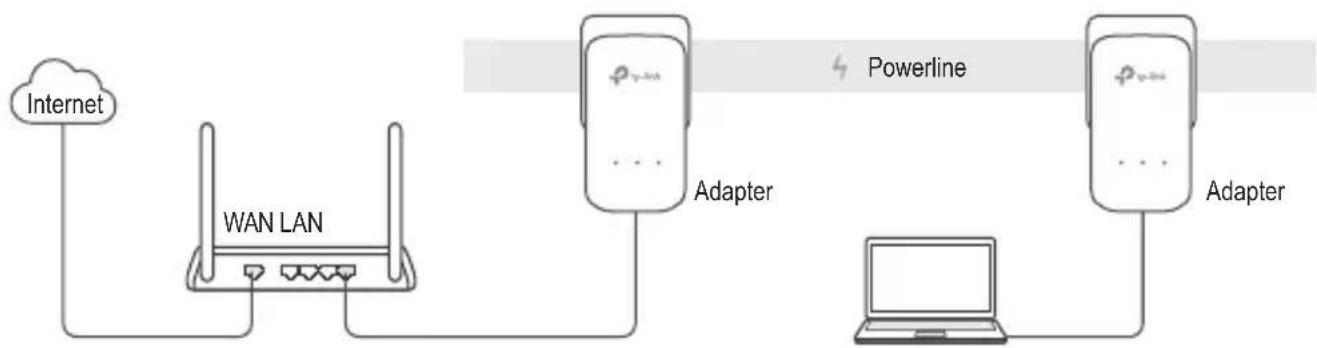
flowchart
graph LR
    A["Internet"] --> B["WAN LAN"]
    B --> C["Adapter"]
    C --> D["Laptop"]
    D --> E["Adapter"]
    style A fill:#f9f,stroke:#333
    style B fill:#ccf,stroke:#333
    style C fill:#cfc,stroke:#333
    style D fill:#fcc,stroke:#333
    style E fill:#ffc,stroke:#333
- Connect one adapter to a LAN port of your router using an Ethernet cable.
- Plug the other adapter into the wall outlets on the same electrical circuit.
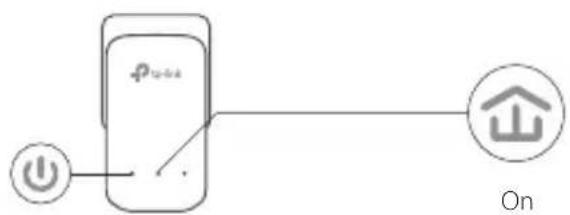
- Wait until the Powerline LED 📁 on any adapter turns on.
- Connect your computer to the adapter using an Ethernet cable.
- Enjoy!
More: To add additional Powerline adapters and extenders with the default settings, simply plug them into the wall outlets on the same electrical circuit.
English
Attention
- Plug the powerline devices directly into the wall outlets but not the power strips.
- For passthrough powerline devices, plug the power strips into the integrated electrical sockets of the powerline devices.
Secure the Powerline Network with the Pair Button
Tips: We recommend that you plug in the powerline devices near each other when pairing.
Set up a secure network:
1 Press the Pair button for 1 second on one adapter.
2 Within 2 minutes, press the Pair button for 1 second on another adapter.
3 Done.
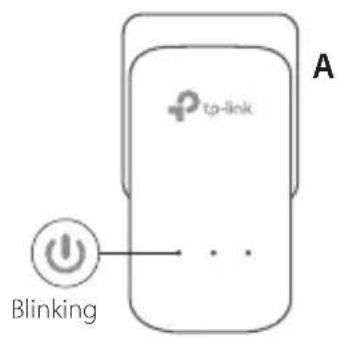
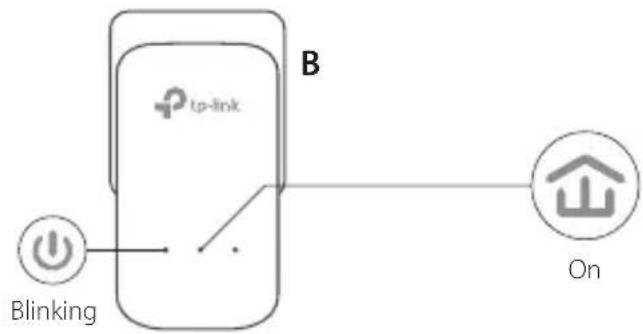
flowchart
graph TD
    A["tp-link"] -->|Blinking| B["Power icon"]
    B --> C["On button symbol"]
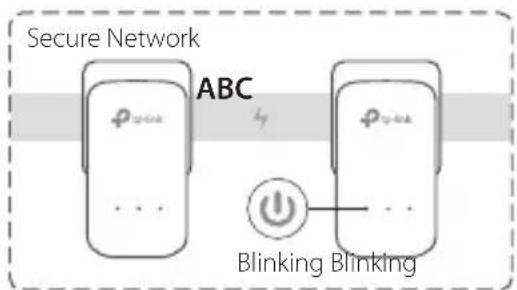
If you have more than 2 powerline devices, repeat the steps below on each additional devices to be configured:
1 Press the Pair button for 1 second on any powerline device in the secure network.
2 Within 2 minutes, press the Pair button for 1 second on the additional powerline device.
3 Done.
FAQ (Frequently Asked Questions)
Q1. How do I reset my powerline adapter?
A1. With the powerline adapter plugged into to the electrical outlet, press and hold the Pair button until the Power LED ⏻ goes off momentarily and comes back on.
A2. Use the tpPLC Utility to reset the powerline adapter.
English
Q2. How to troubleshoot if there is no internet connection in my powerline network?
A1. Make sure all powerline devices are on the same electrical circuit.
A2. Make sure all Powerline LEDs are on. If not, pair your adapters and extenders again.
A3. Make sure all hardware connections are correctly and securely connected.
A4. Check if you have an internet connection by connecting the computer directly to the modem or router.
A5. Make sure your computer's IP address is in the same segment as your router's.
Q3. What can I do if a successfully-paired powerline device does not reconnect after it has been moved to a new location?
A1. Try another socket and make sure it is on the same electrical circuit.
A2. Try to pair it again, and make sure the Powerline LED is on.
A3. Check for possible interference, such as a washer, air conditioner or other household appliances that may be too close to one of the powerline devices. Plug the appliance into the integrated electrical socket (if the powerline device has one) to remove some electrical noise.
More advanced configurations, such as firmware upgrade and QoS configuration, can be accessed through the tpPLC Utility. You can install the tpPLC Utility from the TP-Link official website.
Plug and Play
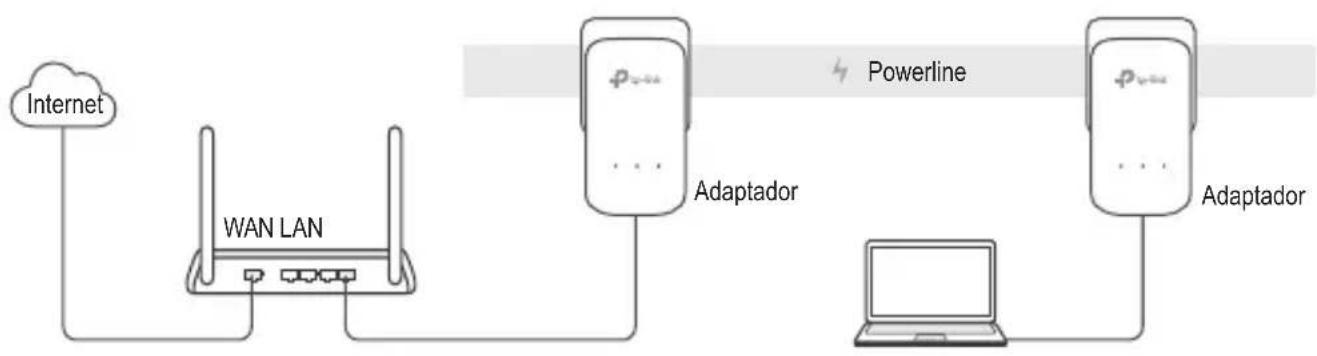
flowchart
graph LR
    A["Internet"] --> B["WAN LAN"]
    B --> C["Powerline"]
    C --> D["Adaptador"]
    D --> E["Laptop"]
    E --> F["Adaptador"]
FAQ (Perguntas Frequentes)
TP-Link hereby declares that this device is in compliance with the essential requirements and other relevant provisions of directives 2014/30/EU, 2014/35/EU, 2009/125/EC and 2011/65/EU.
The original EU declaration of conformity may be found at http://www.tp-link.com/en/ce.
Español
- Keep the device away from water, fire, humidity or hot environments.
- Do not attempt to disassemble, repair, or modify the device.
- The socket-outlet shall be installed near the equipment and shall be easily accessible.
- For passthrough devices, plug the power strips into the integrated electrical sockets of the devices, but devices of the same or another type not be stacked in normal use.
- Plug the powerline devices directly into the wall outlets but not the power strips.
Please read and follow the above safety information when operating the device. We cannot guarantee that no accidents or damage will occur due to improper use of the device. Please use this product with care and operate at your own risk.

TP-Link Three Years Limited Product Warranty
For TP-Link Branded Products Only.
THIS WARRANTY GIVES YOU SPECIFIC LEGAL RIGHTS, AND YOU MAY HAVE OTHER RIGHTS THAT VARY FROM STATE TO STATE (OR BY COUNTRY OR PROVINCE).
TO THE EXTENT ALLOWED BY LOCAL LAW, THIS WARRANTY AND THE REMEDIES SET FORTH ARE EXCLUSIVE AND IN LIEU OF ALL OTHER WARRANTIES, REMEDIES AND CONDITIONS.
TP-Link warrants the TP-Link branded hardware product contained in the original packaging against defects in materials and workmanship when used normally in according with TP-Link's guidelines for a period of THREE YEARS form the date of original retail purchase by the end-user purchaser.
Español
http://www.tp-link.com

Brand : TP-LINK
Model : TL-PA4010P KIT
Category : Powerline adapter