
Frames Tempo - Headphones BOSE - Free user manual and instructions
Find the device manual for free Frames Tempo BOSE in PDF.


| Product Type | Connected audio glasses (built-in earphones) |
| Brand | Bose |
| Model | Frames Tempo |
| Weight (approx.) | 45 g (depending on frame) |
| Dimensions | Classic sunglasses frame (width: approx. 140 mm) |
| Power Supply | Rechargeable lithium-ion battery, input 5 V = 500 mA via USB-C |
| Battery Life | Up to 5 hours of listening |
| Charging Time | Approximately 1 hour for a full charge |
| Connectivity | Bluetooth 5.0 (range up to 9 m) |
| Water Resistance | IPX4 (sweat and weather resistant) |
| Lens Material | Polycarbonate, UV 400 filters (category 2) |
| UV Protection | Blocks more than 99% of UVA and UVB |
| Controls | Finger touch surface, physical button, voice control |
| Microphone | Built-in microphone for calls and voice assistant |
| Companion App | Bose Music (iOS and Android) |
| Package Contents | Frames Tempo glasses, USB-C cable, cleaning cloth, 3 sizes of nose pads |
| Care and Cleaning | Clean with the provided cloth, without chemicals or alcohol |
| Safety | Do not wear while charging, do not immerse, moderate volume to protect hearing |
| Warranty | Limited warranty (see Bose website) |
| Spare Parts and Repairability | Replaceable nose pads, interchangeable lenses, non-removable battery |
| General Information | Manufactured for Bose Corporation, Framingham, MA, USA; EU importer: Bose Products B.V. |
Frequently Asked Questions - Frames Tempo BOSE
User questions about Frames Tempo BOSE
0 question about this device. Answer the ones you know or ask your own.
Ask a new question about this device
Download the instructions for your Headphones in PDF format for free! Find your manual Frames Tempo - BOSE and take your electronic device back in hand. On this page are published all the documents necessary for the use of your device. Frames Tempo by BOSE.
USER MANUAL Frames Tempo BOSE
Sunglasses (nonprescription) are devices that consist of spectacle frames or clips with absorbing, reflective, tinted, polarizing, or photo-sensitized lenses intended to be worn by a person to protect the eyes from bright sunlight but not to provide refractive corrections. This device is available for over the counter sale.

Refer to instructions for use.
Please read and keep all safety, security, and use instructions.
Important Safety Instructions

Bose Corporation hereby declares that this product is in compliance with the essential requirements and other relevant provisions of Directive 2014/53/EU and all other applicable EU directive requirements. The complete declaration of conformity can be found at: www.Bose.com/compliance
- Read these instructions.
- Keep these instructions.
- Heed all warnings.
- Follow all instructions.
- Do not use this apparatus near water.
- Clean only with a dry cloth.
- Only use attachments/accessories specified by the manufacturer.
- Unplug this apparatus during lightning storms or when unused for long periods of time.
- Refer all servicing to qualified personnel. Servicing is required when the apparatus has been damaged in any way, such as power-supply cord or plug is damaged, liquid has been spilled or objects have fallen into the apparatus, the apparatus has been exposed to rain or moisture, does not operate normally, or has been dropped.

WARNINGS/CAUTIONS
- Do NOT use the frames at a high volume for any extended period.
- To avoid hearing damage, use your frames at a comfortable, moderate volume level.
- Turn the volume down on your device before wearing the frames or placing them near your ears, then turn the volume up gradually until you reach a comfortable listening level.
- Use caution while driving and follow applicable laws regarding use of a mobile phone.
- Focus on your safety and that of others if you use the frames while engaging in any activity requiring your attention, e.g., while riding a bicycle or walking in or near traffic, a construction site or railroad, etc. Remove the frames or adjust your volume to ensure you can hear surrounding sounds, including alarms and warning signals.
- Do NOT use the frames if they emit any loud unusual noise. If this happens, turn the frames off and contact Bose customer service.
- Do NOT submerge or expose the frames for extended period to water, or wear while participating in water sports, e.g., swimming, waterskiing, surfing, etc.
- Remove frames immediately if you experience a warming sensation or loss of audio.

Contains small parts which may be a choking hazard. Not suitable for children under age 3.

This product contains magnetic material. Consult your physician on whether this might affect your implantable medical device.
- To reduce the risk of fire or electrical shock, do NOT expose this product to rain, liquids or moisture.
- Do NOT expose this product to dripping or splashing, and do not place objects filled with liquids, such as vases, on or near the product.
- Keep the product away from fire and heat sources. Do NOT place naked flame sources, such as lighted candles, on or near the product.
- Do NOT make unauthorized alterations to this product.
- Use this product only with an agency- approved power supply that meets local regulatory requirements (e.g., UL, CSA, VDE, CCC).
- Do not expose products containing batteries to excessive heat (e.g. from storage in direct sunlight, fire or the like).
- Do NOT wear the frames while charging.
• After each use, wipe both sides of the lenses and all parts of the frame with the cloth provided or a dry cloth.
NOTE: This equipment has been tested and found to comply with the limits for a Class B digital device, pursuant to Part 15 of the FCC Rules. These limits are designed to provide reasonable protection against harmful interference in a residential installation. This equipment generates, uses, and can radiate radio frequency energy and, if not installed and used in accordance with the instructions, may cause harmful interference to radio communications. However, there is no guarantee that interference will not occur in a particular installation. If this equipment does cause harmful interference to radio or television reception, which can be determined by turning the equipment off and on, the user is encouraged to try to correct the interference by one or more of the following measures:
- Reorient or relocate the receiving antenna.
- Increase the separation between the equipment and receiver.
- Connect the equipment into an outlet on a circuit different from that to which the receiver is connected.
- Consult the dealer or an experienced radio/TV technician for help.
Changes or modifications not expressly approved by Bose Corporation could void the user's authority to operate this equipment.
This device complies with part 15 of the FCC Rules and with ISED Canada license-exempt RSS standard(s). Operation is subject to the following two conditions: (1) This device may not cause harmful interference, and (2) this device must accept any interference received, including interference that may cause undesired operation.
This device complies with FCC and ISED Canada radiation exposure limits set forth for general population. This transmitter must not be co-located or operating in conjunction with any other antenna or transmitter.
CAN ICES-3 (B)/NMB-3(B)
PPE Regulation (EU) 2016/425
Management Regulation for Low-power Radio-frequency Devices
Article XII
According to “Management Regulation for Low-power Radio-frequency Devices” without permission granted by the NCC, any company, enterprise, or user is not allowed to change frequency, enhance transmitting power or alter original characteristic as well as performance to an approved low power radio-frequency devices.
Article XIV
The low power radio-frequency devices shall not influence aircraft security and interfere legal communications; If found, the user shall cease operating immediately until no interference is achieved. The said legal communications means radio communications operated in compliance with the Telecommunications Act.
The low power radio-frequency devices must be susceptible with the interference from legal communications or ISM radio wave radiated devices.
For Europe:
Frequency band of operation 2400 to 2483.5 MHz.
Maximum transmit power less than 20 dBm EIRP.
Maximum transmit power is below regulatory limits such that SAR testing is not necessary and exempt per applicable regulations.
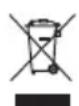
This symbol means the product must not be discarded as household waste, and should be delivered to an appropriate collection facility for recycling. Proper disposal and recycling helps protect natural resources, human health and the environment. For more information on disposal and recycling of this product, contact your local municipality, disposal service, or the shop where you bought this product.
DON'T attempt to remove the rechargeable lithium-ion battery from this product. Contact your local Bose retailer or other qualified professional for removal.

Please dispose of used batteries properly, following local regulations. Do not incinerate.
QTY: 1 EA

ManufacturedFor: Bose Corporation, 100 The Mountain Road, Framingham, MA 01701

Do not use if package is damaged.

This product does not contain natural rubber latex.

This product is provided non-sterile.


China Restriction of Hazardous Substances Table
| Names and Contents of Toxic or Hazardous Substances or Elements | ||||||
| Toxic or Hazardous Substances and Elements | ||||||
| Part Name | Lead (Pb) | Mercury (Hg) | Cadmium (Cd) | Hexavalent (CR(VI)) | Polybrominated Biphenyl (PBB) | Polybrominated diphenylether (PBDE) |
| PCBs X 0 0 0 0 0 | ||||||
| Metal Parts X 0 0 0 0 0 | ||||||
| Plastic Parts 0 0 0 0 0 0 | ||||||
| Speakers X 0 0 0 0 0 0 | ||||||
| Cables X 0 0 0 0 0 0 | ||||||
| This table is prepared in accordance with the provisions of SJ/T 11364. O: Indicates that this toxic or hazardous substance contained in all of the homogeneous materials for this part is below the limit requirement of GB/T 26572. |  | |||||
| X: Indicates that this toxic or hazardous substance contained in at least one of the homogeneous materials used for this part is above the limit requirement of GB/T 26572. | ||||||
Taiwan Restriction of Hazardous Substances Table
| Equipment name: Powered Speaker, Type designation: 431151 | ||||||
| Restricted substances and its chemical symbols | ||||||
| Unit | Lead (Pb) | Mercury (Hg) | Cadmium (Cd) | Hexavalent chromium(Cr+6) | Polybrominated biphenyls (PBB) | Polybrominated diphenylethers (PBDE) |
| PCBs | - | ○ | ○ | ○ ○ ○ | ||
| Metal Parts | - | ○ | ○ | ○ ○ ○ | ||
| Plastic Parts | ○ | ○ | ○ | ○ ○ ○ | ||
| Speakers | - | ○ | ○ | ○ ○ ○ | ||
| Cables | - | ○ | ○ | ○ ○ ○ | ||
| Note 1: “○” indicates that the percentage content of the restricted substance does not exceed the percentage of reference value of presence. Note 2: The “-” indicates that the restricted substance corresponds to the exemption. | ||||||
This product complies with ANSI Z80.3, AS/NZS 1067.1, and EN ISO 12312-1.
Tinted eyewear is not recommended to be worn for night driving.

NOT SUITABLE FOR DRIVING IN TWILIGHT OR AT NIGHT. NOT SUITABLE FOR DRIVING AT NIGHT OR UNDER CONDITIONS OF DULL LIGHT.
The product is designed to block greater than 99% UVA and UVB light energy. This product is in compliance with ANSI Z80.3.
Only lenses approved by Bose should be used with the Frames Tempo product.
Not for direct observation of the sun.
Not for protection against artificial light sources, e.g. solaria.
Not for use as eye protection against mechanical impact hazards.
When not in use, store the product in the carry case provided.
EU FILTER CATEGORY: ISO 12312-1 CAT. 2
AUSTRALIAN LENS CATEGORY: 1067.1 CAT. 2

These sunglasses provide a medium level of sun glare reduction and good UV protection.
UV Rating: UV 400 cut
Please complete and retain for your records
The frames serial number is located on the left temple, and the model/reference number is located on the right temple.
Serial number: ____
Model number: ____
Please keep your receipt with your owner's guide. Now is a good time to register your Bose product. You can easily do this by going to global.Bose.com/register

Date of Manufacture: The eighth digit in the serial number indicates the year of manufacture; “0” is 2010 or 2020.
China Importer: Bose Electronics (Shanghai) Company Limited, Part C, Plant 9, No. 353 North Riying Road, China (Shanghai) Pilot Free Trade Zone
EU Importer: Bose Products B.V., Gorslaan 60, 1441 RG Purmerend, The Netherlands
Taiwan Importer: Bose Taiwan Branch, 9F-A1, No.10, Section 3, Minsheng East Road, Taipei City 104, Taiwan Phone Number: +886-2-2514 7676
Mexico Importer: Bose de México, S. de R.L. de C.V., Paseo de las Palmas 405-204, Lomas de Chapultepec, 11000 México, D.F. Phone Number: +5255 (5202) 3545
Input Rating: 5V --- 500mA
The CMIIT ID is located on the inside front temple.

BMD0010
Security Information

This product is capable of receiving security updates from Bose automatically when connected to the Bose Music app. In order to receive security updates via the mobile application, you must complete the product setup process in the Bose Music app. If you do not complete the setup process, you will be responsible for installing security updates that Bose makes available via btu.bose.com
Apple, the Apple logo, iPad, iPhone, iPod, and Siri are trademarks of Apple Inc., registered in the U.S. and other countries. The trademark “iPhone” is used in Japan with a license from Aiphone K.K. App Store is a service mark of Apple Inc.
Use of the Made for Apple badge means that an accessory has been designed to connect specifically to the Apple product(s) identified in the badge, and has been certified by the developer to meet Apple performance standards. Apple is not responsible for the operation of this device or its compliance with safety and regulatory standards.
The Bluetooth ^® word mark and logos are registered trademarks owned by Bluetooth SIG, Inc. and any use of such marks by Bose Corporation is under license.
Google and Google Play are trademarks of Google LLC.
Bose, Bose Frames, and Bose Music are trademarks of Bose Corporation.
Bose Corporation Headquarters: 1-877-230-5639
©2020 Bose Corporation. No part of this work may be reproduced, modified, distributed, or otherwise used without prior written permission.
The following license disclosures apply to certain third-party software packages used as components in the product.
Package: Nanopb
Copyright © 2011 Petteri Aimonen
Zlib license
© 2011 Petteri Aimonen
This software is provided ‘as-is’, without any express or implied warranty. In no event will the authors be held liable for any damages arising from the use of this software.
Permission is granted to anyone to use this software for any purpose, including commercial applications, and to alter it and redistribute it freely, subject to the following restrictions:
- The origin of this software must not be misrepresented; you must not claim that you wrote the original software. If you use this software in a product, an acknowledgment in the product documentation would be appreciated but is not required.
- Altered source versions must be plainly marked as such, and must not be misrepresented as being the original software.
- This notice may not be removed or altered from any source distribution.
Package: Mbed TLS 2.16.1
© ARM Limited. All rights reserved. The Mbed TLS package is subject to the license terms reprinted below.
Apache 2.0 License
Apache License
Version 2.0, January 2004
http://www.apache.org/licenses/
TERMS AND CONDITIONS FOR USE, REPRODUCTION, AND DISTRIBUTION
1. Definitions.
“License” shall mean the terms and conditions for use, reproduction, and distribution as defined by Sections 1 through 9 of this document.
“Licensor” shall mean the copyright owner or entity authorized by the copyright owner that is granting the License.
“Legal Entity” shall mean the union of the acting entity and all other entities that control, are controlled by, or are under common control with that entity. For the purposes of this definition, “control” means (i) the power, direct or indirect, to cause the direction or management of such entity, whether by contract or otherwise, or (ii) ownership of fifty percent (50%) or more of the outstanding shares, or (iii) beneficial ownership of such entity.
"You" (or "Your") shall mean an individual or Legal Entity exercising permissions granted by this License.
“Source” form shall mean the preferred form for making modifications, including but not limited to software source code, documentation source, and configuration files.
"Object" form shall mean any form resulting from mechanical transformation or translation of a Source form, including but not limited to compiled object code, generated documentation, and conversions to other media types.
“Work” shall mean the work of authorship, whether in Source or Object form, made available under the License, as indicated by a copyright notice that is included in or attached to the work (an example is provided in the Appendix below).
"Derivative Works" shall mean any work, whether in Source or Object form, that is based on (or derived from) the Work and for which the editorial revisions, annotations, elaborations, or other modifications represent, as a whole, an original work of authorship. For the purposes of this License, Derivative Works shall not include works that remain separable from, or merely link (or bind by name) to the interfaces of, the Work and Derivative Works thereof.
“Contribution” shall mean any work of authorship, including the original version of the Work and any modifications or additions to that Work or Derivative Works thereof, that is intentionally submitted to Licensor for inclusion in the Work by the copyright owner or by an individual or Legal Entity authorized to submit on behalf of the copyright owner. For the purposes of this definition, “submitted” means any form of electronic, verbal, or written communication sent to the Licensor or its representatives, including but not limited to communication on electronic mailing lists, source code control systems, and issue tracking systems that are managed by, or on behalf of, the Licensor for the purpose of discussing and improving the Work, but excluding communication that is conspicuously marked or otherwise designated in writing by the copyright owner as “Not a Contribution.”
“Contributor” shall mean Licensor and any individual or Legal Entity on behalf of whom a Contribution has been received by Licensor and subsequently incorporated within the Work.
- Grant of Copyright License. Subject to the terms and conditions of this License, each Contributor hereby grants to You a perpetual, worldwide, non-exclusive, no-charge, royalty-free, irrevocable copyright license to reproduce, prepare Derivative Works of, publicly display, publicly perform, sublicense, and distribute the Work and such Derivative Works in Source or Object form.
- Grant of Patent License. Subject to the terms and conditions of this License, each Contributor hereby grants to You a perpetual, worldwide, non-exclusive, no-charge, royalty-free, irrevocable (except as stated in this section) patent license to make, have made, use, offer to sell, sell, import, and otherwise transfer the Work, where such license applies only to those patent claims licensable by such Contributor that are necessarily infringed by their Contribution(s) alone or by combination of their Contribution(s) with the Work to which such Contribution(s) was submitted. If You institute patent litigation against any entity (including a cross-claim or counterclaim in a lawsuit) alleging that the Work or a Contribution incorporated within the Work constitutes direct or contributory patent infringement, then any patent licenses granted to You under this License for that Work shall terminate as of the date such litigation is filed.
- Redistribution. You may reproduce and distribute copies of the Work or Derivative Works thereof in any medium, with or without modifications, and in Source or Object form, provided that You meet the following conditions:
a. You must give any other recipients of the Work or Derivative Works a copy of this License; and
b. You must cause any modified files to carry prominent notices stating that You changed the files; and
c. You must retain, in the Source form of any Derivative Works that You distribute, all copyright, patent, trademark, and attribution notices from the Source form of the Work, excluding those notices that do not pertain to any part of the Derivative Works; and
d. If the Work includes a "NOTICE" text file as part of its distribution, then any Derivative Works that You distribute must include a readable copy of the attribution notices contained within such NOTICE file, excluding those notices that do not pertain to any part of the Derivative Works, in at least one of the following places: within a NOTICE text file distributed as part of the Derivative Works; within the Source form or documentation, if provided along with the Derivative Works; or, within a display generated by the Derivative Works, if and wherever such third-party notices normally appear. The contents of the NOTICE file are for informational purposes only and do not modify the License. You may add Your own attribution notices within Derivative Works that You distribute, alongside or as an addendum to the NOTICE text from the Work, provided that such additional attribution notices cannot be construed as modifying the License.
You may add Your own copyright statement to Your modifications and may provide additional or different license terms and conditions for use, reproduction, or distribution of Your modifications, or for any such Derivative Works as a whole, provided Your use, reproduction, and distribution of the Work otherwise complies with the conditions stated in this License.
- Submission of Contributions. Unless You explicitly state otherwise, any Contribution intentionally submitted for inclusion in the Work by You to the Licensor shall be under the terms and conditions of this License, without any additional terms or conditions. Notwithstanding the above, nothing herein shall supersede or modify the terms of any separate license agreement you may have executed with Licensor regarding such Contributions.
-
Trademarks. This License does not grant permission to use the trade names, trademarks, service marks, or product names of the Licensor, except as required for reasonable and customary use in describing the origin of the Work and reproducing the content of the NOTICE file.
-
Disclaimer of Warranty. Unless required by applicable law or agreed to in writing, Licensor provides the Work (and each Contributor provides its Contributions) on an "AS IS" BASIS, WITHOUT WARRANTIES OR CONDITIONS OF ANY KIND, either express or implied, including, without limitation, any warranties or conditions of TITLE, NON-INFRINGEMENT, MERCHANTABILITY, or FITNESS FOR A PARTICULAR PURPOSE. You are solely responsible for determining the appropriateness of using or redistributing the Work and assume any risks associated with Your exercise of permissions under this License.
- Limitation of Liability. In no event and under no legal theory, whether in tort (including negligence), contract, or otherwise, unless required by applicable law (such as deliberate and grossly negligent acts) or agreed to in writing, shall any Contributor be liable to You for damages, including any direct, indirect, special, incidental, or consequential damages of any character arising as a result of this License or out of the use or inability to use the Work (including but not limited to damages for loss of goodwill, work stoppage, computer failure or malfunction, or any and all other commercial damages or losses), even if such Contributor has been advised of the possibility of such damages.
- Accepting Warranty or Additional Liability. While redistributing the Work or Derivative Works thereof, You may choose to offer, and charge a fee for, acceptance of support, warranty, indemnity, or other liability obligations and/or rights consistent with this License. However, in accepting such obligations, You may act only on Your own behalf and on Your sole responsibility, not on behalf of any other Contributor, and only if You agree to indemnify, defend, and hold each Contributor harmless for any liability incurred by, or claims asserted against, such Contributor by reason of your accepting any such warranty or additional liability.
END OF TERMS AND CONDITIONS
©2020 Bose Corporation
Licensed under the Apache License, Version 2.0 (the "License"); you may not use this file except in compliance with the License.
You may obtain a copy of the License at: http://www.apache.org/licenses/LICENSE-2.0
Unless required by applicable law or agreed to in writing, software distributed under the License is distributed on an "AS IS" BASIS, WITHOUT WARRANTIES OR CONDITIONS OF ANY KIND, either express or implied.
See the License for the specific language governing permissions and limitations under the License.
WHAT'S IN THE CARTON
Contents 13
BOSE MUSIC APP SETUP
Download the Bose Music app.... 14
Add the frames to an existing account.... 14
SWEAT AND WEATHER RESISTANCE 15
HOW TO WEAR
Check your fit.... 16
Try another nose pad size 17
Change the nose pads.... 17
POWER
Power on 19
Power off....20
Flip-to-Off....20
Auto-off using motion detection.... 20
FRAMES CONTROLS
Media playback.... 21
Volume 22
Use touch control 22
Use Press & Turn volume control.... 23
Phone calls.... 24
Call notifications 24
Access voice control.... 24
BATTERY
Charge the frames.... 25
Check the frames battery level.... 25
Hear battery notifications 25
View the battery level.... 25
FRAMES STATUS
Bluetooth ^® connection status.... 26
Battery status.... 27
Error status.... 27
BLUETOOTH CONNECTIONS
Connect using the Bluetooth menu on your mobile device 28
Disconnect a mobile device.... 29
Reconnect a mobile device.... 29
Clear the frames device list.... 29
CARE AND MAINTENANCE
Store the frames.... 30
Maintain the frames.... 31
Replacement parts and accessories.... 32
Limited warranty 32
Serial and model/reference number locations.... 32
TROUBLESHOOTING
Try these solutions first 33
Other solutions 33
LABEL SYMBOLS
Symbols and descriptions 36
CONTENTS
Confirm that the following parts are included:
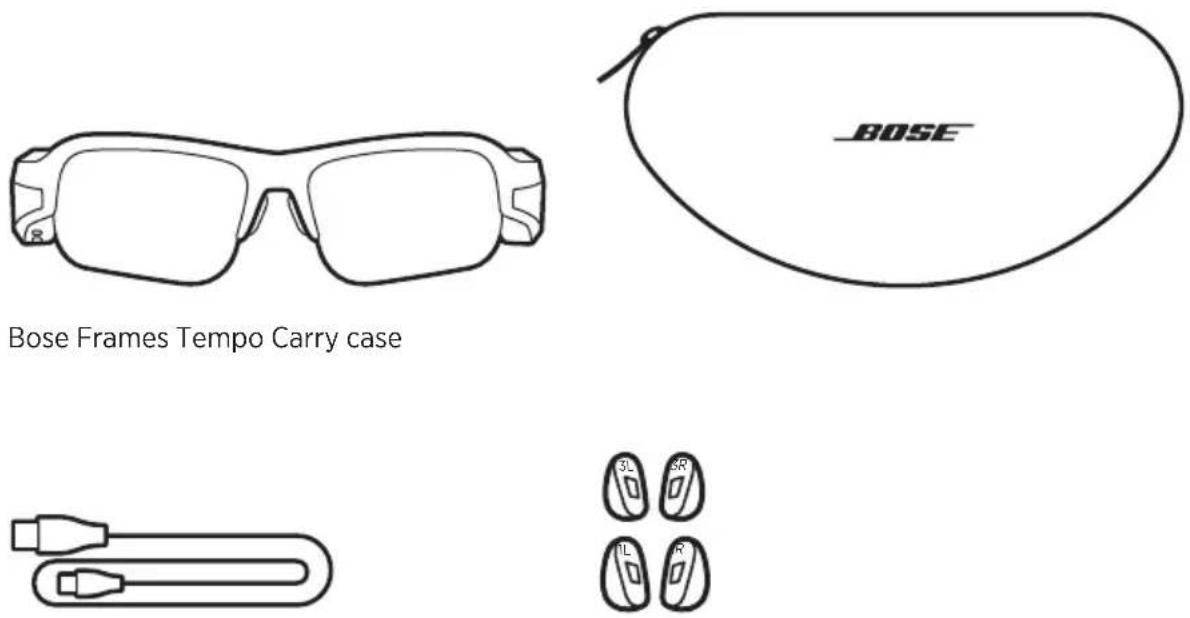
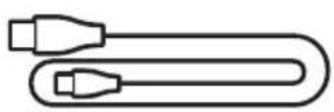
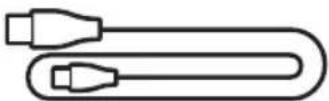
Charging cable Nose pads (sizes 1 and 3)
NOTE: Size 2 nose pads are attached to the frames. For help identifying the nose pad sizes, see page 17.
Cleaning cloth
NOTE: If any part of the product is damaged, don't use it. Contact your authorized Bose dealer or Bose customer service.
Visit: worldwide.Bose.com/Support/Tempo
The Bose Music app lets you set up and control the frames from any mobile device, such as a smartphone or tablet.
Using the app, you can customize power and volume settings, choose your voice prompt language, and get new features.
NOTE: If you have already created a Bose account in the app for another Bose product, see “Add the frames to an existing account” (below).
DOWNLOAD THE BOSE MUSIC APP
- On your mobile device, download the Bose Music app.
text_image
BOSE MUSIC
text_image
GET IT ON Google Play- Follow the app instructions.
ADD THE FRAMES TO AN EXISTING ACCOUNT
- Press and hold the button on the right temple until you hear "Ready to connect" or see the status light blink blue.
- In the Bose Music app, from the My Bose screen, tap +.
NOTES:
- If the app can't find the frames, see “Bose Music app can't find frames” on page 33.
-
To return to the My Bose screen, tap 6 in the top-left corner of the screen.
-
Follow the app instructions.
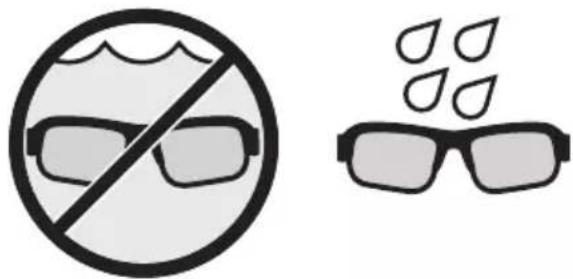
The frames are rated IPX4 water resistant. They are designed to be sweat and weather resistant against drops of water but aren't meant to be submerged under water.
CAUTIONS:
- Do NOT swim or shower with the frames.
- Do NOT submerge the frames.
natural_image
Two safety symbols: a circle with a diagonal line and glasses, and a pair of eyeglasses with droplets above (no text or labels)NOTE: IPX4 is not a permanent condition, and resistance might decrease as a result of normal wear.
CHECK YOUR FIT
Move your head up and down to check that you're using the best nose pad size.
NOTES:
- If the frames don't feel comfortable and secure, see "Try another nose pad size" on page 17.
- When riding a bike, wear the frames over your helmet strap.
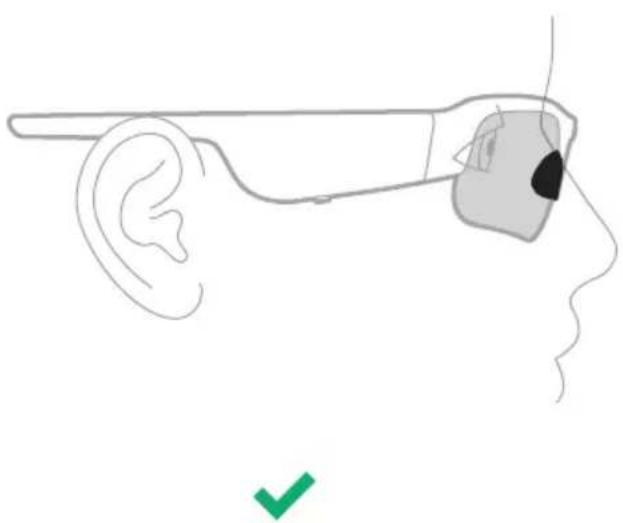
PROPER FIT
natural_image
Line drawing of a human ear with a medical device in the ear area, showing anatomical positioning (no text or symbols)When the frames fit:
• The nose pads comfortably rest on the sides of your nose.
- The lenses comfortably rest over your eyes and don't move when you smile.
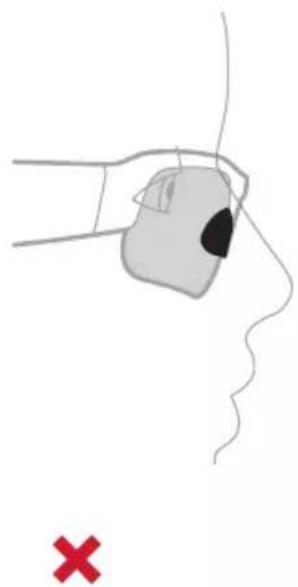
IMPROPER FIT
natural_image
Illustration of a hand holding an electronic device with a black dot on the nose, pointing to a human face (no text or symbols present)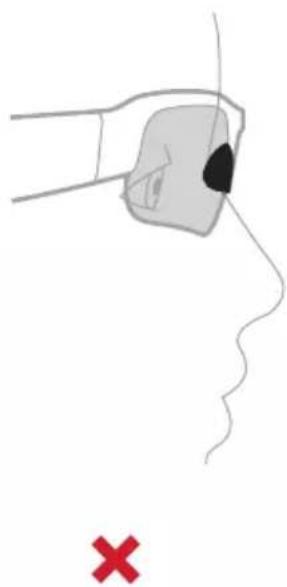
natural_image
Illustration of a hand holding a small object near the nose, with a red X mark below (no text or symbols)When the frames don't fit:
• The lenses might sit too low or too high on your face.
• The lenses might sit too close or too far from your face.
TRY ANOTHER NOSE PAD SIZE
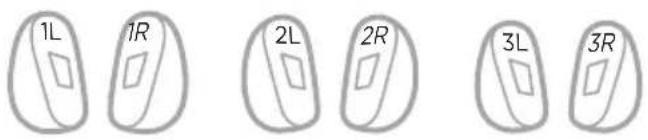
Size 2 nose pads come attached and additional sizes are in the box.
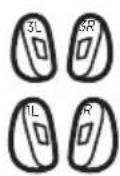
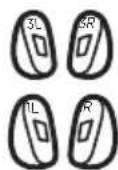
The size is marked on the inside of each nose pad with a 1, 2, or 3. Each nose pad is also marked with an L (left) and an R (right).
text_image
1L 1R 2L 2R 3L 3RCHANGE THE NOSE PADS
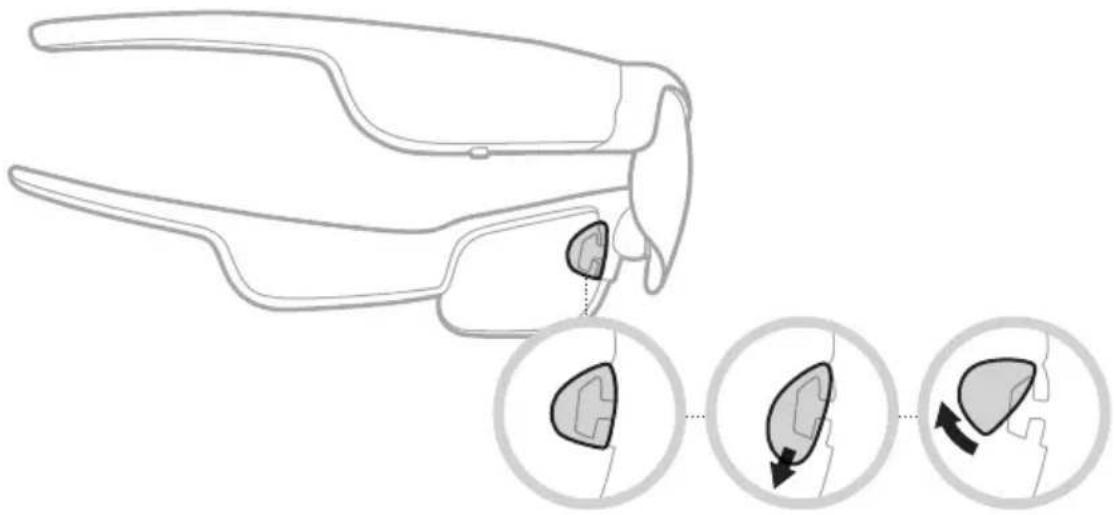
- Using the provided cleaning cloth, firmly pull the bottom of the nose pad down and away from the frames.
natural_image
Line drawing of a pair of eyeglasses with three circular insets showing internal components (no text or symbols)-
Choose a new nose pad size.
-
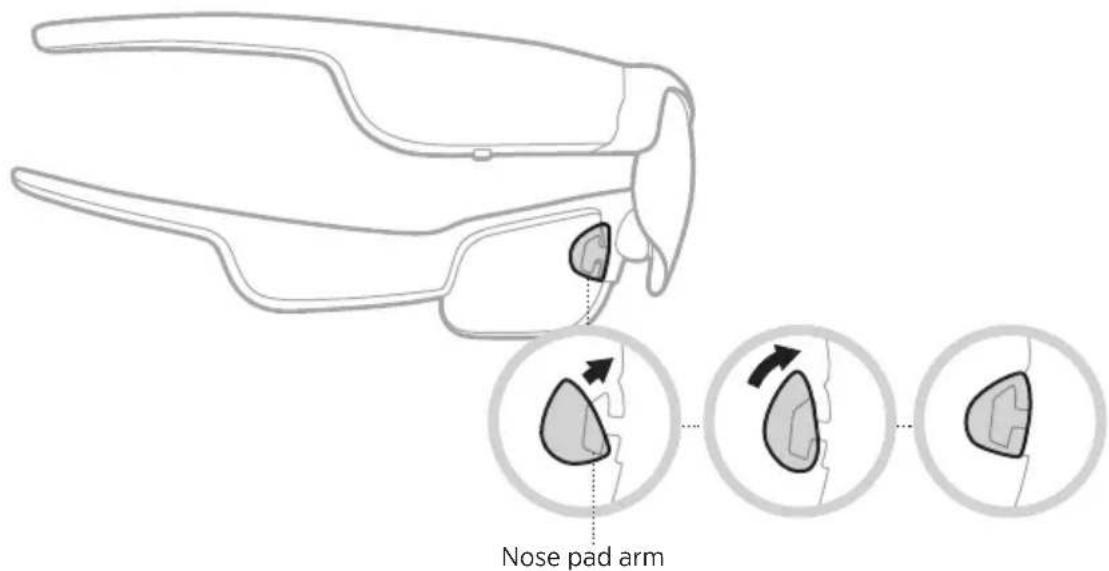
Align the bottom of the nose pad hole with the bottom of the nose pad arm.
-
Push the nose pad up then in towards the frames until you feel it click into place.
NOTE: Make sure you're attaching the R and L nose pad to the correct side of the frames.
text_image
Nose pad arm- Check your fit (see page 16).
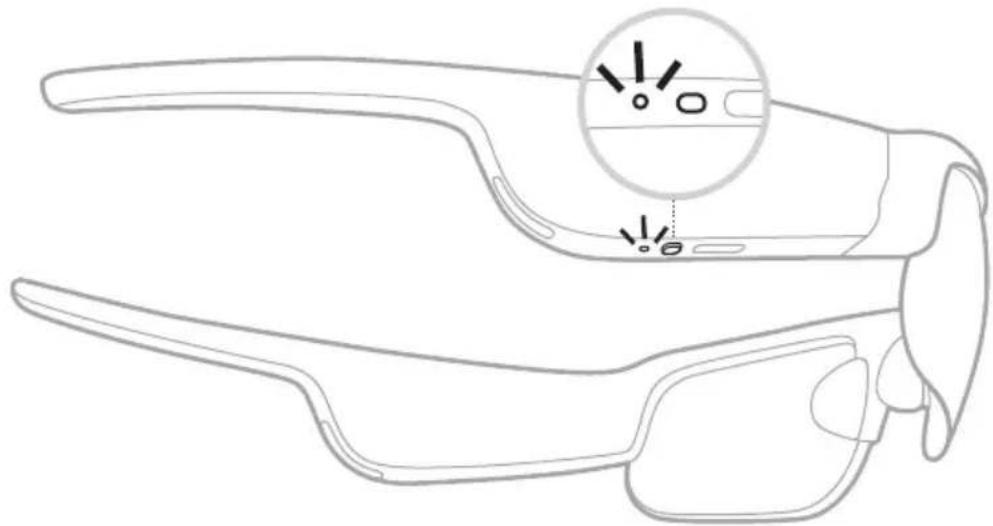
POWER ON
Press the button on the right temple.
The status light blinks white twice then glows according to Bluetooth connection status (see page 26). A voice prompt announces the battery level and Bluetooth connection status.
natural_image
Line drawing of a smart glasses with an inset showing eye contact details (no text or symbols)POWER OFF
Press and hold the button until you hear a tone.
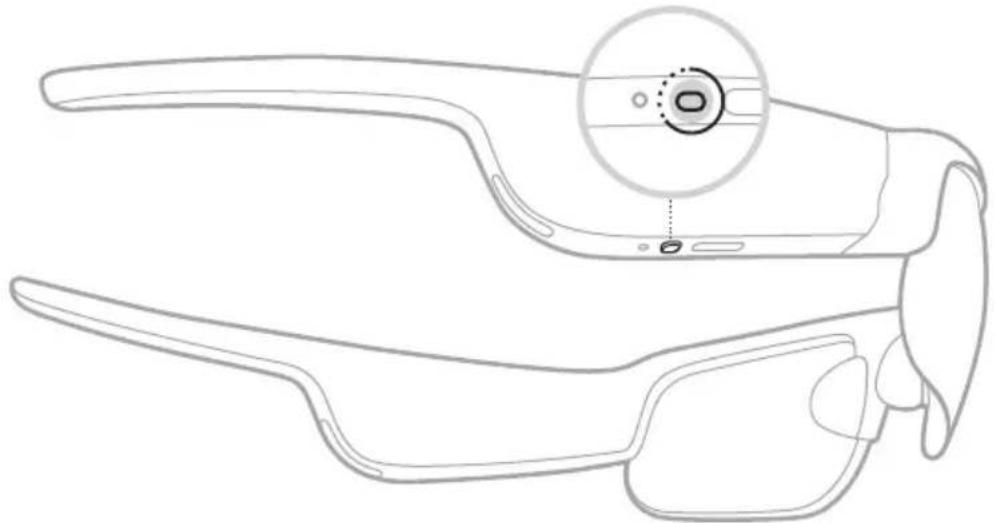
natural_image
Line drawing of a smart glasses with an inset highlighting a circular feature (no text or symbols present)The status light blinks white twice then fades to black.
Flip-to-Off
Flip the frames upside down for 2 seconds.
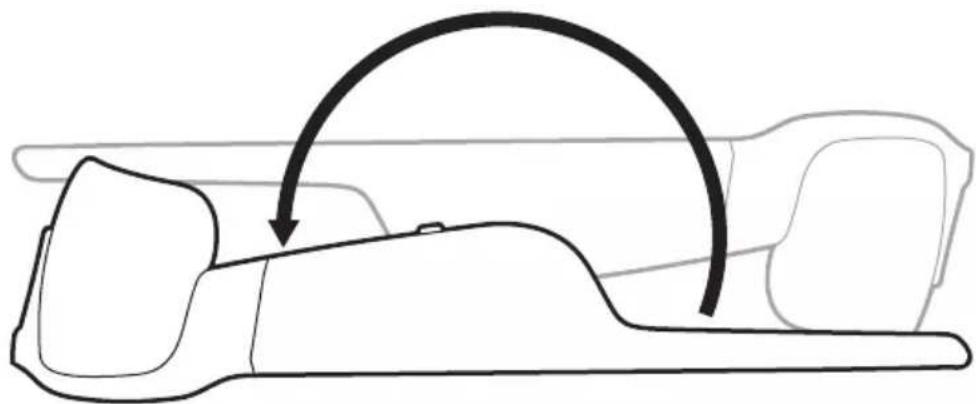
natural_image
Line drawing of a car interior with a curved arrow indicating motion or movement (no text or symbols)The status light blinks white twice then fades to black.
NOTE:
• After the frames power off, you can move them in any orientation.
- You can disable Flip-to-Off in the Bose Music app. You can access this option from the Settings menu.
Auto-off using motion detection
The frames use motion detection to identify when they aren't being used. When the frames haven't moved for 10 minutes, they automatically power off.
NOTE: You can disable motion detection in the Bose Music app. You can access this option from the Settings menu.
Use the button and touch surface on the right temple to control media playback, volume, phone calls, and voice control.
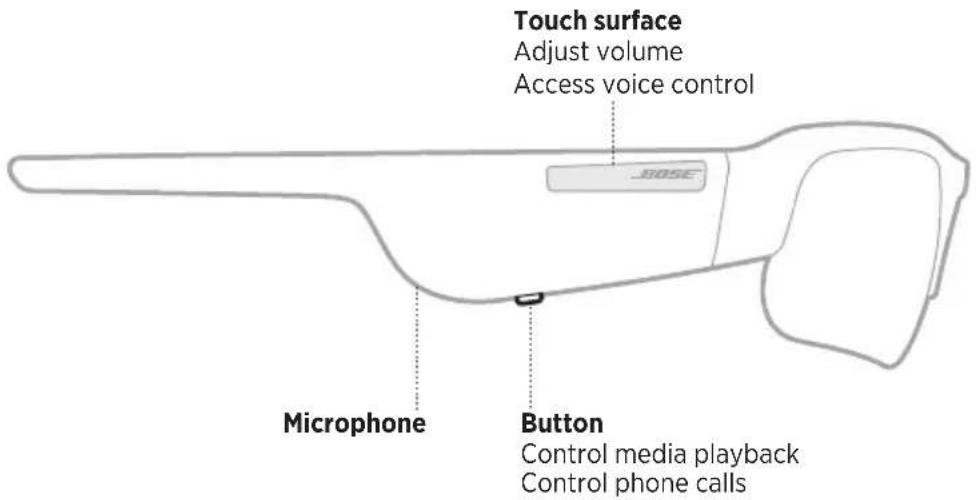
text_image
Touch surface Adjust volume Access voice control ROSE Microphone Button Control media playback Control phone callsMEDIA PLAYBACK
CONTROL WHAT TO DO
| Play/Pause Press the button. | |
| Skip forward Double-press the button. | |
| Skip backward Triple-press the button. |
VOLUME
You can adjust the volume by swiping on the touch surface, or you can enable Press & Turn volume control in the Bose Music app (see page 23).
NOTE: Enabling Press & Turn volume control disables swiping on the touch surface.
Use touch control
Increase volume
Swipe forward on the touch surface.
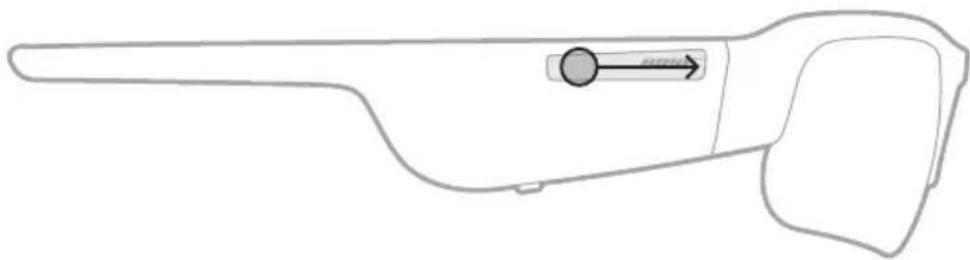
natural_image
Line drawing of a mechanical tool or device with a circular component and directional arrow (no text or symbols)NOTE: You hear a tone when the volume reaches the maximum level.
Decrease volume
Swipe backward on the touch surface.
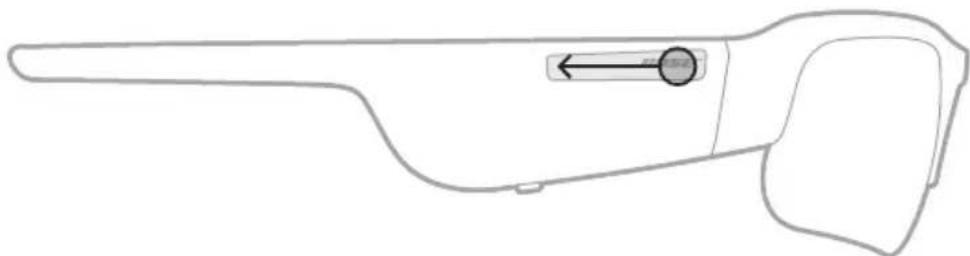
natural_image
Line drawing of a mechanical tool or device with a circular component and directional arrow (no text or symbols)NOTE: You hear a tone when the volume reaches the minimum level.
Use Press & Turn volume control
You can set the frames to use Press & Turn volume control. Access this option from the Settings menu in the Bose Music app.
NOTE: Enabling Press & Turn volume control, disables swiping on the touch surface.
Adjust volume
Press and hold the touch surface while turning your head to the right (to increase) or left (to decrease).
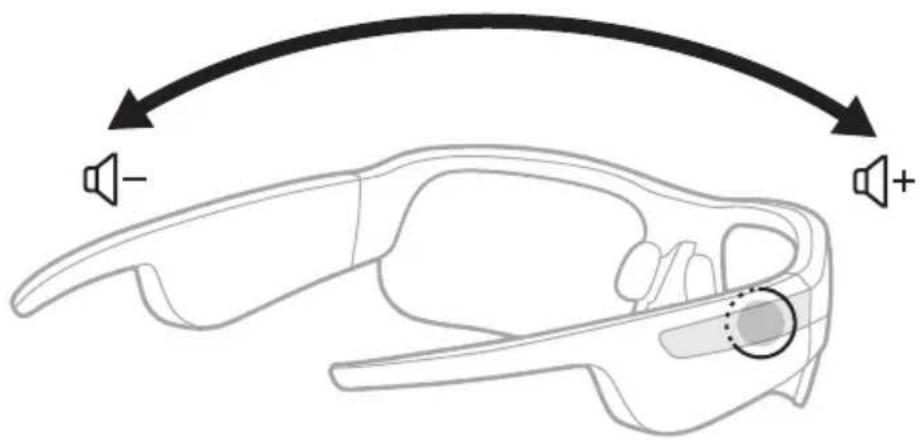
text_image
Diagram of a car head with sound wave indicators and directional arrows indicating sound directionNOTES:
• To change the volume in larger intervals, turn your head slowly.
- You hear a tone when the volume reaches the maximum or minimum level.
PHONE CALLS
CONTROL WHAT TO DO
| Answer/End a call Press the button. | |
| Decline an incoming call Double-press the button. | |
| Answer a second incoming call and put the current call on hold | While on a call, press the button. |
| Decline a second incoming call and stay on the current call | While on a call, double-press the button. |
Call notifications
A voice prompt announces incoming callers and call status.
NOTE: To stop call notifications, disable voice prompts using the Bose Music app. You can access this option from the Settings menu.
ACCESS VOICE CONTROL
The frames microphone acts as an extension of the microphone in your mobile device. Using the touch surface on the right temple, you can access the voice control capabilities on your device to make/take calls or ask Siri or your Google Assistant to play music, tell you the weather, give you the score of a game, and more.
Double-tap the touch surface to access voice control on your device.
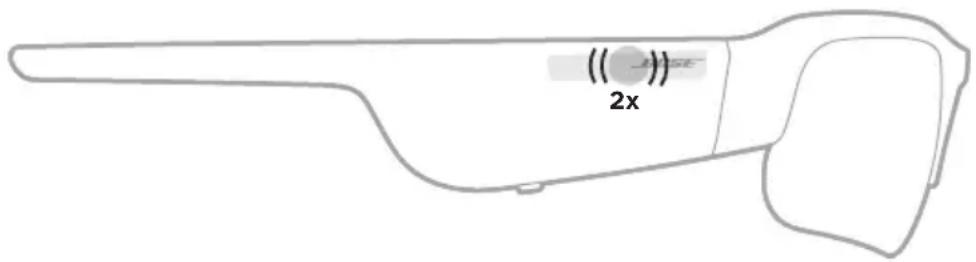
text_image
(( ) SE 2xYou hear a tone that indicates voice control is active.
CHARGE THE FRAMES
- Connect the small end of the USB cable to the USB-C port.
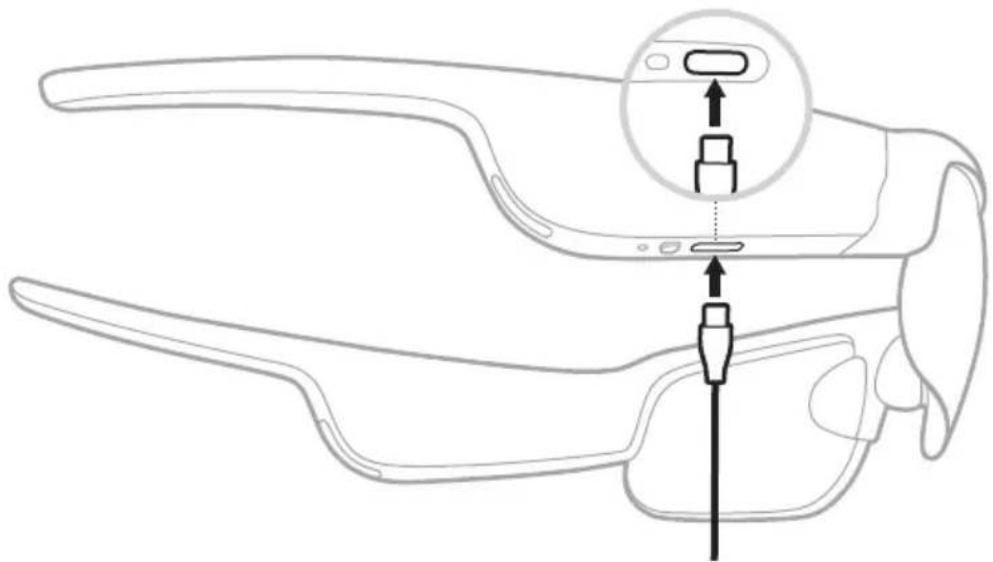
text_image
Diagram of a smart glasses headset with labeled sensor port and connector, showing internal structure and assembly.- Connect the other end to a USB-A wall charger (not provided).
CAUTION: Use this product only with an agency-approved power supply that meets local regulatory requirements (e.g., UL, CSA, VDE, CCC).
While charging, the status light blinks white. When the battery is fully charged, the status light glows solid white (see page 27).
NOTES:
- The frames don't play audio while charging.
- Don't wear the frames while charging.
CHECK THE FRAMES BATTERY LEVEL
Hear battery notifications
Each time you power on the frames, a voice prompt announces the battery level.
While using the frames, a voice prompt announces if the battery needs to be charged.
View the battery level
- Check the home screen in the Bose Music app.
- When the status light blinks red, the frames need to be charged.
The frames status light is located on the right temple.
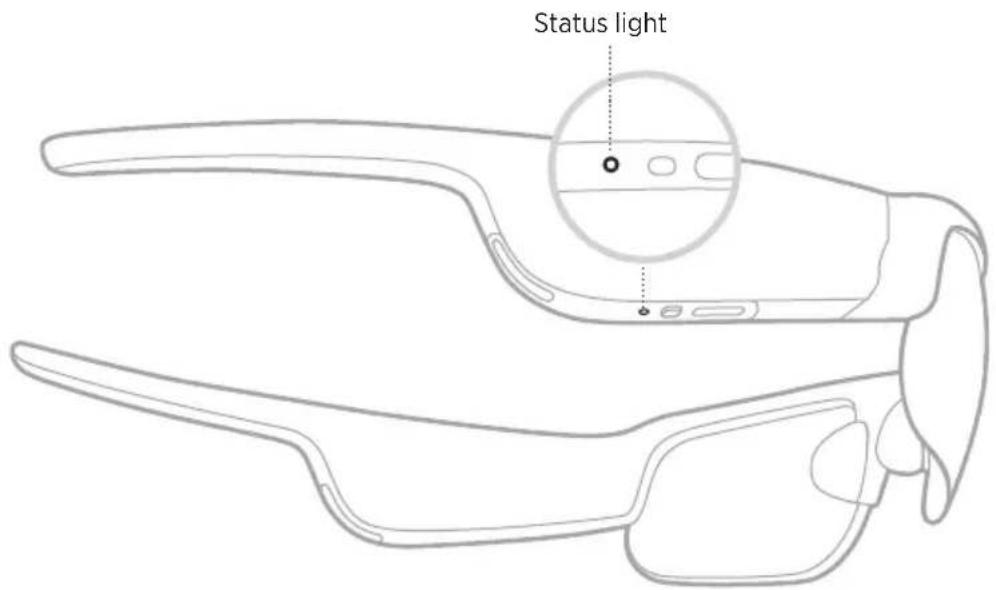
text_image
Status lightBLUETOOTH CONNECTION STATUS
Shows the Bluetooth connection status of mobile devices.
LIGHT ACTIVITY SYSTEM STATE
| Slowly blinks blue Ready to connect | |
| Quickly blinks blue Connecting | |
| Solid blue (10 seconds) Connected |
BATTERY STATUS
Shows the frames battery charge status.
LIGHT ACTIVITY SYSTEM STATE
| Blinks red (10 seconds) Need to charge | |
| Blinks white Charging | |
| Solid white Full charge |
ERROR STATUS
Shows the error status.
LIGHT ACTIVITY SYSTEM STATE
| Blinks red and white (repeated) Error - contact Bose customer service |
CONNECT USING THE BLUETOOTH MENU ON YOUR MOBILEDEVICE
You can store up to eight devices in the frames device list. You can connect and play audio from only one device at a time.
NOTE: To get the best experience, set up and connect your mobile device using the Bose Music app (see page 14).
- With the frames powered on, press and hold the button on the right temple until you hear "Ready to connect" or see the status light blink blue.
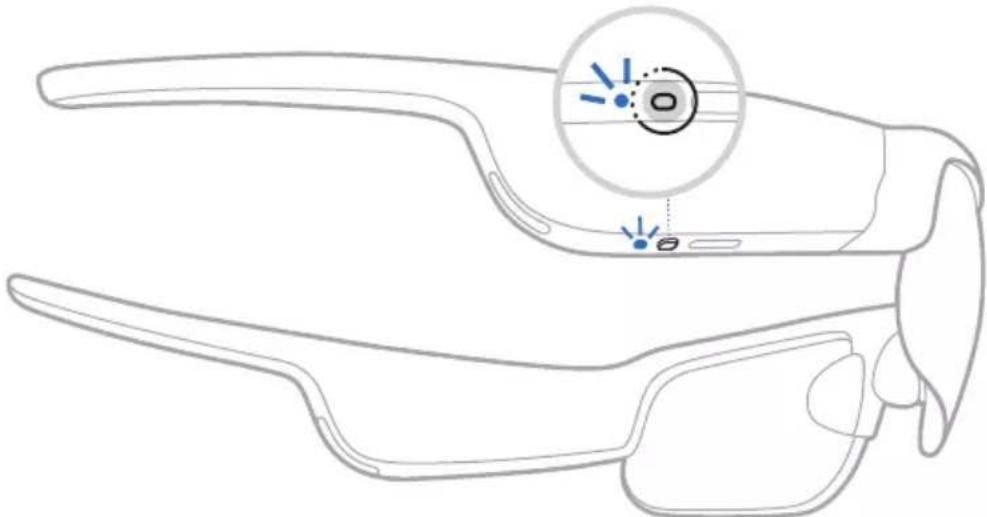
natural_image
Line drawing of a pair of smart glasses with a magnified inset showing the lens (no text or symbols)- On your device, enable the Bluetooth feature.
NOTE: The Bluetooth feature is usually found in the Settings menu.
- Select your frames from the device list.
NOTE: Look for the name you entered for your frames in the Bose Music app. If you didn't name your frames, the default name appears.
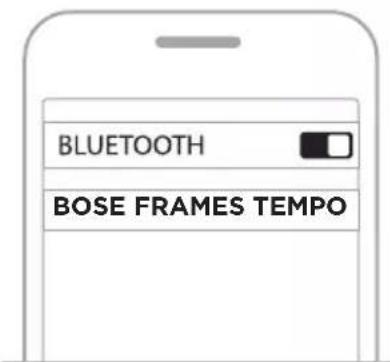
text_image
BLUETOOTH BOSE FRAMES TEMPOOnce connected, you hear "Connected to
DISCONNECT A MOBILE DEVICE
Use the Bose Music app to disconnect your mobile device.
TIP: You can also use Bluetooth settings to disconnect your device. Disabling the Bluetooth feature disconnects all other devices.
RECONNECT A MOBILE DEVICE
When powered on, the frames try to connect with the most recently-connected device.
NOTE: The device must be within range (30 ft or 9 m) and powered on.
CLEAR THE FRAMES DEVICE LIST
- With the frames powered on, press and hold the button on the right temple for 10 seconds until you hear "Bluetooth device list cleared" or see the status light slowly blink blue.
- Delete your frames from the Bluetooth list on your device.
All devices are cleared, and the frames are ready to connect.
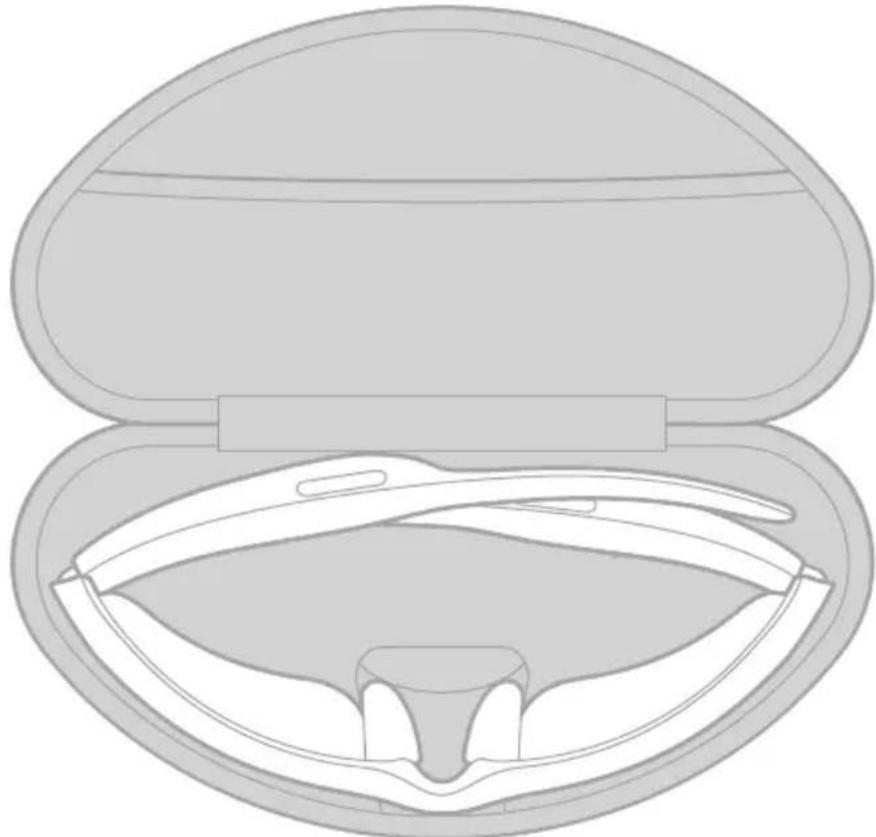
STORE THE FRAMES
The frames collapse for easy, convenient storage.
- Fold the temples inward towards the lenses so the temples lay flat.
- Place the frames in the case with the lenses facing towards the front of the case.
natural_image
Cross-sectional diagram of a medical device with open lid and internal cavity (no text or labels)NOTES:
• Make sure to power off the frames when not in use.
- Before storing the frames for more than a few months, make sure the battery is fully charged.
MAINTAIN THE FRAMES
COMPONENT CARE INSTRUCTIONS
| Frames | After each use, wipe both sides of the lenses and all parts of the frame with the provided cleaning cloth or a dry cloth.CAUTIONS:Do NOT use any sprays near the frames.Do NOT use any solvents, chemicals, or cleaning solutions containing alcohol, ammonia, or abrasives.Do NOT allow liquids to spill into any openings. |
| Nose pads Wipe each nose pad with a dry cloth. | |
REPLACEMENT PARTS AND ACCESSORIES
Replacement parts and accessories can be ordered through Bose customer service.
Visit: worldwide.Bose.com/Support/Tempo
NOTE: For information about how to replace lenses, refer to the instructions provided with your lens accessories.
LIMITED WARRANTY
The frames are covered by a limited warranty. Visit our website at global.Bose.com/warranty for details of the limited warranty.
To register your product, visit global.Bose.com/register for instructions. Failure to register will not affect your limited warranty rights.
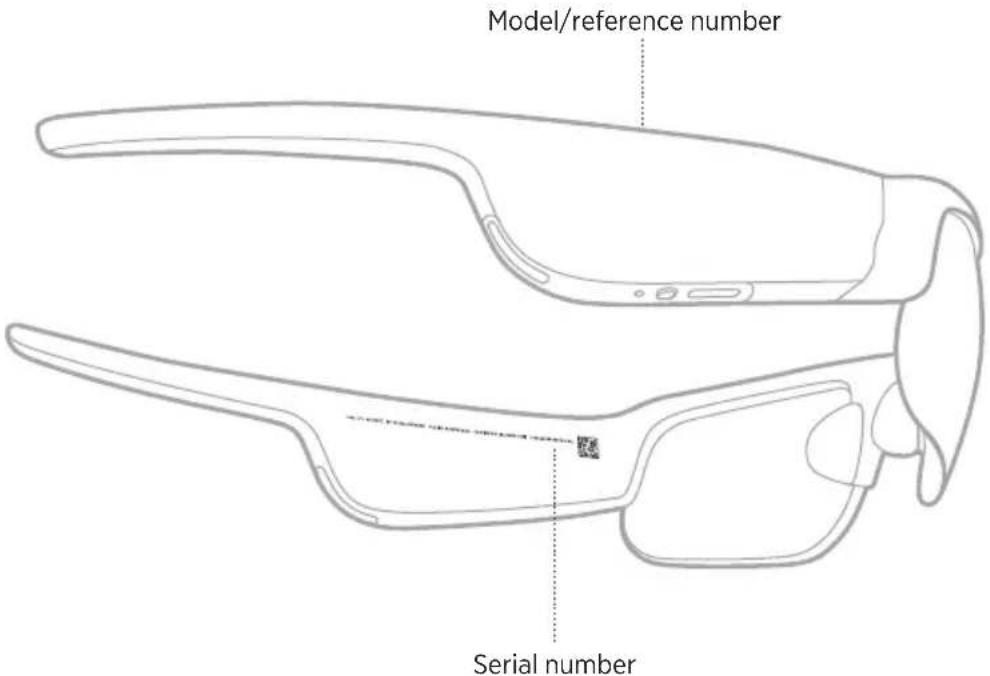
SERIAL AND MODEL/REFERENCE NUMBER LOCATIONS
The serial number is located on the inner left temple, and the model/reference number is located on the inner right temple.
text_image
Model/reference number Serial numberTRY THESE SOLUTIONS FIRST
If you experience problems with the frames:
• Power on the frames (see page 19).
- Charge the battery (see page 25).
- Check the state of the status lights (see page 26).
- Make sure your mobile device supports Bluetooth connections.
- Download the Bose Music app and run available software updates.
- Increase the volume on the frames, your mobile device, and/or your audio/streaming app.
- Connect another mobile device (see page 28).
OTHER SOLUTIONS
If you could not resolve your issue, see the table below to identify symptoms and solutions to common problems. If you are unable to resolve your issue, contact Bose customer service.
Visit: worldwide.Bose.com/Contact
PROBLEM WHAT TO DO
| Frames don’t connect with mobile device | On your device:Turn theBluetoothfeature off and then on.Delete the frames from theBluetoothlist on your device. Connect again (see page 28).Move your device closer to the frames and away from any interference or obstructions.Connect a different mobile device (see page 28).To see how-to videos, visit:worldwide.Bose.com/Support/TempoClear the frames device list (see page 29). Connect again (see page 28). |
| Bose Music app doesn’t work on device | Make sure the Bose Music app is compatible with your device.Uninstall the Bose Music app on your device then reinstall the app (see page 14). |
| Bose Music app can’t find frames | Power on the frames (see page 19).Press and hold the button on the right temple until you hear “Ready to connect” or see the status light blink blue.In the Bose Music app, run available software updates. |
PROBLEM WHAT TO DO
| Intermittent Bluetooth connection | Clear the frames device list (see page 29). Connect again (see page 28).Move the mobile device closer to the frames. |
| No sound | Press play on your mobile device to make sure audio is playing.Move your device closer to the frames and away from any interference or obstruction.Use a different music source.Connect a different device (see page 28). |
| Poor sound quality | Use a different music source.Connect a different mobile device.Move the device closer to the frames and away from any interference or obstructions.Turn off any audio enhancement features on your device or your audio/streaming app. |
| Microphone isn’t picking up sound | Make sure the microphone opening on the right temple isn’t blocked.Try another phone call.Try another compatible device. |
| Frames don’t charge | Secure both ends of the charging cable.If the frames have been exposed to high or low temperatures, let the frames return to room temperature and then try charging again.Try a different USB wall charger. |
PROBLEM WHAT TO DO
| Frames don’t respond to touch control | Make sure you are touching the correct touch surface (see page 21).Make sure your hands are dry.If your hair is wet, make sure it isn’t interfering with the touch surface.If wearing gloves, remove them before tapping the touch control surface. |
| Can’t adjust volume by swiping the touch surface | Make sure Press & Turn volume control is disabled in the Bose Music app. You can access this option from the Settings menu.Make sure you are swiping the correct touch control surface (see page 21).Make sure your hands are dry.If your hair is wet, make sure it isn’t interfering with the touch surface.If wearing gloves, remove them before tapping the touch control surface. |
| Can’t adjust volume using Press & Turn volume control | Make sure Press & Turn volume control is enabled in the Bose Music app. You can access this option from the Settings menu.Make sure you’re touching the correct touch control surface (see page 21).Make sure you turn your head while pressing the touch surface.Make sure your hands are dry. |
| Device not responding to button presses | For multi-press functions: vary speed of presses.Make sure your music app supports the function.Power off and then power on your frames.On your device:Turn theBluetoothfeature off and then on.Delete the frames from theBluetoothlist on your device. Connect again (see page 28).Try another compatible device. |
SYMBOLS AND DESCRIPTIONS
SYMBOL DESCRIPTION
 | CE certification mark |
 | Choking hazard |
| [800] | Catalogue number |
 | China ROHS battery |
| [500] | Customer support |
 | Date of manufacture |
| [800] | Documentation |
 | Do not use if package is damaged |
 | Does not contain latex |
| [689] | Downloads |
 | Energy efficiency verification |
 | FCC certification |
| [T504] | Forum |
| [800] | Good protection against sunglare |
 | Green Dot trademark symbol |
 | Japan battery recycling |
| [689] | KCC certification |
| [800] | Keep dry |
| [800] | Magneticinterference |
| [800] | Manufacturer |
SYMBOL DESCRIPTION
| [6XZW] | NCC certification |
| [2T48] | NOM NYCE certification |
 | Non-sterile |
| [HKG4] | NOT SUITABLE FOR DRIVING IN TWILIGHT OR AT NIGHT |
 | Phone |
 | Regulatory compliance mark |
 | Refer to instructions for use |
 | Security information |
 | Serial number |
 | Singapore IMDA compliance |
 | Taiwan battery recycling |
| [22TH] | Temperature limit |
| [2X6Z] | Videos |
 | Warnings/Cautions |
 | Waste of electrical and electronic equipment directive symbol |
Management Regulation for Low-power Radio-frequency Devices
Artikel XII
Fremstilletfor: Bose Corporation, 100 The Mountain Road, Framingham, MA 01701

Importør i Kina: Bose Electronics (Shanghai) Company Limited, Part C, Plant 9, No. 353 North Riying Road, Kina (Shanghai) Pilot Free Trade Zone
Importør i EU: Bose Products B.V., Gorslaan 60, 1441 RG Purmerend, Holland
Importør i Taiwan: Bose Taiwan Branch, 9F-A1, No.10, Section 3, Minsheng East Road, Taipei City 104, Taiwan Telefonnummer: +886-2-2514 7676
Importar i Mexico: Bose de México, S. de R.L. de C.V., Paseo de las Palmas 405-204, Lomas de Chapultepec, 11000 México, D.F. Telefonnummer: +5255 (5202) 3545
Inputklassifikation: 5V --- 500 mA
HVAD INDEHOLDER AESKEN
Indhold 10
OPSÆTNING AF BOSE MUSIC-APPEN
Download Bose Music-appen.... 11
Vend for at slukke.... 17
natural_image
Line drawing of a pair of eyeglasses with no text or symbolsnatural_image
Two safety symbols: a circle with a no-smoking face and glasses, and a pair of eyeglasses emitting droplets (no text or labels)natural_image
Line drawing of a human ear with a device in the ear area, showing no text or symbolsnatural_image
Illustration of a hand holding an electronic device with a black dot on the nose, pointing to a curved line (no text or symbols present)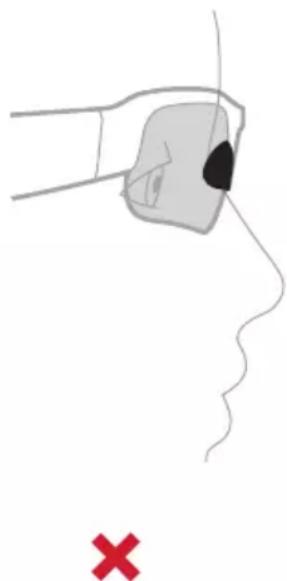
natural_image
Illustration of a hand holding a small object near the nose, with a red X mark below (no text or symbols)natural_image
Diagram of a pair of eyeglasses with three circular insets showing internal components (no text or symbols)natural_image
Line drawing of a smart glasses with an inset showing eye contact details (no text or symbols)SLUK
natural_image
Line drawing of a smart glasses with an inset showing a circular detail on the upper edge (no text or symbols present)natural_image
Line drawing of a car interior with a curved arrow indicating motion or movement (no text or symbols)natural_image
Line drawing of a mechanical tool or device with a central circular component and an arrow indicating direction (no text or symbols)natural_image
Line drawing of a mechanical tool or device with a central arrow and circular mark (no text or symbols)text_image
Diagram of a bird's head with sound wave indicators and directional arrows, showing sound waves labeled - and +.NOTER:
text_image
(( )ISE 2xtext_image
Diagram of a smart glasses headset with labeled sensor port and connector, showing internal structure and assembly.natural_image
Line drawing of two smart glasses with a magnified inset showing a camera lens (no text or symbols)natural_image
Cross-sectional diagram of a medical device with open lid and internal cavity (no text or labels)NOTER:
Hergestelltfür: Bose Corporation, 100 The Mountain Road, Framingham, MA 01701

China-Import: Bose Electronics (Shanghai) Company Limited, Part C, Plant 9, No. 353 North Riying Road, China (Shanghai) Pilot Free Trade Zone
EU-Import: Bose Products B.V., Gorslaan 60, 1441 RG Purmerend, Niederlande
Taiwan-Import: Bose Taiwan Branch, 9F-A1, No.10, Section 3, Minsheng East Road, Taipei City 104, Taiwan Telefonnummer: +886-2-2514 7676
Mexiko-Import: Bose de México, S. de R.L. de C.V., Paseo de las Palmas 405-204, Lomas de Chapultepec, 11000 México, D.F. Telefonnummer: +5255 (5202) 3545
natural_image
Line drawing of two eyeglasses and a closed camera case (no text or symbols)Bose Frames Tempo Transport-Etui
natural_image
Two safety symbols: a circle with no crossed-out glasses and a pair of eyeglasses emitting droplets (no text or labels)natural_image
Line drawing of a human ear with a medical device in the ear area, showing no text or symbolsnatural_image
Illustration of a hand holding an electronic device with a black dot on the nose, pointing to a red X symbol (no text or labels present)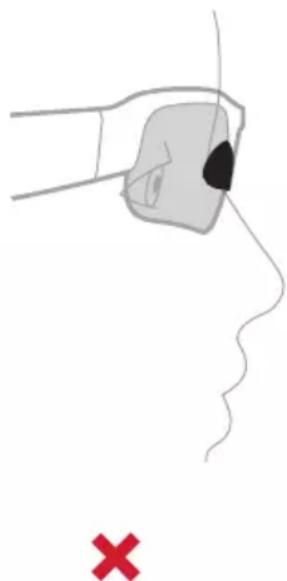
natural_image
Illustration of a hand holding a small object near the nose, with a red 'X' symbol below (no text or labels)natural_image
Diagram of a pair of eyeglasses with three circular insets showing internal components (no text or symbols)natural_image
Line drawing of a smart glasses with an inset showing eye contact details (no text or symbols)AUSSCHALTEN
natural_image
Line drawing of a smart glasses with an inset showing a circular detail on the upper edge (no text or symbols present)natural_image
Line drawing of a car seat with an arrow indicating motion or movement (no text or symbols)natural_image
Line drawing of a firearm with a circular arrow pointing to the handle (no text or symbols)natural_image
Line drawing of a mechanical tool or device with a central circular component and an arrow indicating direction (no text or symbols)text_image
Diagram of a transparent object with speaker icons and directional arrows indicating sound or sound movement.HINWEISE:
text_image
Diagram of a smart glasses headset with labeled component and insertion point, showing internal structure and assembly.natural_image
Line drawing of a pair of smart glasses with a magnified inset showing the lens and screen (no text or symbols)natural_image
Cross-sectional diagram of a medical device with open lid and internal cavity (no text or labels)HINWEISE:
Importeur in China: Bose Electronics (Shanghai) Company Limited, Part C, Plant 9, No. 353 North Riying Road, China (Shanghai) Pilot Free Trade Zone
Importeur in de EU: Bose Products B.V., Gorslaan 60, 1441 RG Purmerend, Nederland
Importeur in Taiwan: Bose Taiwan Branch, 9F-A1, No.10, Section 3, Minsheng East Road, Taipei City 104, Taiwan Telefoonnummer: +886-2-2514 7676
Importeur in Mexico: Bose de México, S. de R.L. de C.V., Paseo de las Palmas 405-204, Lomas de Chapultepec, 11000 México, D.F. Telefoonnummer: +5255 (5202) 3545
Ingangsspecificaties: 5 V = 500 mA
natural_image
Two safety symbols: a circle with a no-smoking sign and glasses, and a pair of eyeglasses emitting droplets (no text or labels)natural_image
Line drawing of a human ear with a medical device in the ear area, showing no text or symbolsAls de bril past:
natural_image
Illustration of a hand holding an electronic device with a black dot on the nose, pointing to a red X symbol (no text or labels present)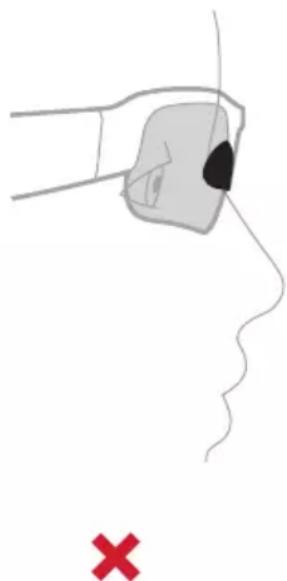
natural_image
Illustration of a hand holding a small object near the nose, with a red 'X' symbol below (no text or labels)natural_image
Diagram of a pair of eyeglasses with three circular insets showing internal components (no text or symbols)natural_image
Line drawing of a smart glasses with an inset showing eye contact details (no text or symbols)UITSCHAKELEN
natural_image
Line drawing of a smart glasses with an inset showing a circular detail (no text or symbols)natural_image
Line drawing of a car seat with an arrow indicating motion or movement (no text or symbols)natural_image
Line drawing of a mechanical tool or device with a circular component and directional arrow (no text or symbols)natural_image
Line drawing of a mechanical tool or device with a central arrow and circular mark (no text or symbols)text_image
Diagram of a bird's head with sound wave indicators and directional arrows, showing sound waves labeled '−' and '+'.OPMERKINGEN:
text_image
Diagram showing a device's internal structure with labeled parts and an inset highlighting the connector.natural_image
Line drawing of a pair of smart glasses with a magnified inset showing the lens (no text or symbols)natural_image
Cross-sectional diagram of a medical device with open lid and internal cavity (no text or labels)OPMERKINGEN:
Fabricadopara: Bose Corporation, 100 Mountain Road, Framingham, MA 01701

Importador en China: Bose Electronics (Shanghai) Company Limited, Part C, Plant 9, No. 353 North Riying Road, China (Shanghai) Pilot Free Trade Zone
natural_image
Line drawing of two eyeglasses and a closed camera case (no text or symbols)Bose Frames Tempo Estuche
Visite: worldwide.Bose.com/Support/Tempo
natural_image
Two safety symbols: a circle with a diagonal line and glasses, and a pair of eyeglasses emitting droplets (no text or labels)natural_image
Line drawing of a human ear with a medical device in the ear area, showing no text or symbolsnatural_image
Illustration of a hand holding an electronic device with a black dot on the nose, pointing to a human face (no text or symbols present)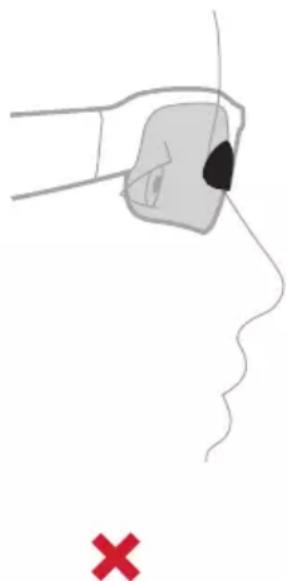
natural_image
Illustration of a hand holding a small object near the nose, with a red X mark below (no text or symbols)natural_image
Diagram of a pair of eyeglasses with three circular insets showing internal components (no text or symbols)natural_image
Line drawing of a smart glasses with an inset showing eye contact details (no text or symbols)APAGAR
natural_image
Line drawing of a smart glasses with an inset highlighting a circular feature (no text or symbols)natural_image
Line drawing of a car seat with an arrow indicating motion or movement (no text or symbols)natural_image
Line drawing of a firearm with a circular arrow pointing to the shoulder (no text or symbols)natural_image
Line drawing of a mechanical tool or device with a central circular component and an arrow indicating left motion (no text or symbols)text_image
Diagram of a bird's head with sound wave indicators and directional arrows indicating sound directionNOTAS:
text_image
(( )JSE 2xtext_image
Diagram of a smart glasses headset with labeled sensor port and connector, showing internal structure and assembly.natural_image
Line drawing of two smart glasses with a magnified inset showing a circular icon labeled 'O' (no text or symbols on the main image)natural_image
Cross-sectional diagram of a medical device with open lid and internal cavity (no text or labels)NOTAS:
Visite: worldwide.Bose.com/Support/Tempo
Visite: worldwide.Bose.com/Contact
PROBLEMA QUÉ HACER
Maahantuoja Kiinassa: Bose Electronics (Shanghai) Company Limited, Part C, Plant 9, No. 353 North Riying Road, China (Shanghai) Pilot Free Trade Zone
Maahantuoja EU:ssa: Bose Products B.V., Gorslaan 60, 1441 RG Purmerend, The Netherlands
Maahantuoja Taiwanissa: Bose Taiwan Branch, 9F-A1, No.10, Section 3, Minsheng East Road, Taipei City 104, Taiwan Puhelin: +886-2-2514 7676
Maahantuoja Meksikossa: Bose de México, S. de R.L. de C.V., Paseo de las Palmas 405-204, Lomas de Chapultepec, 11000 México, D.F. Puhelinnumero: +5255 (5202) 3545
Tuloarvot: 5 V = 500 mA
natural_image
Line drawing of a pair of eyeglasses with no text or symbolsBose Frames Tempo Suojakotelo
text_image
BOSEnatural_image
Two safety symbols: a circle with a diagonal line and glasses, and a pair of eyeglasses emitting droplets (no text or labels)natural_image
Line drawing of a human ear with a medical device in the ear area, showing anatomical positioning (no text or symbols)natural_image
Two identical line drawings of a human face with a black dot marking the nose area, marked with red X symbols below (no text or labels)natural_image
Line drawing of a pair of eyeglasses with three circular insets showing ear and jaw movement (no text or symbols)natural_image
Line drawing of a smart glasses with an inset showing eye contact details (no text or symbols)VIRRAN KATKAISEMINEN
natural_image
Line drawing of a smart glasses with an inset highlighting a circular component (no text or symbols present)natural_image
Line drawing of a car seat with an arrow indicating motion or movement (no text or symbols)natural_image
Line drawing of a mechanical tool or device with a central circular component and an arrow indicating direction (no text or symbols)natural_image
Line drawing of a mechanical tool or device with a central arrow and circular marker (no text or symbols)text_image
Diagram of a transparent eye with speaker icons and directional arrows indicating sound or sound movement.HUOMAUTUKSIA:
text_image
(( ) JSE 2xtext_image
Diagram of a smart glasses headset with labeled sensor port and connector, showing internal structure and assembly.natural_image
Line drawing of a pair of smart glasses with a magnified inset showing the camera lens (no text or symbols present)natural_image
Cross-sectional diagram of a medical device with open lid and internal cavity (no text or labels)HUOMAUTUKSIA:
NE PAS UTILISER CE PRODUIT POUR CONDUIRE AU CRÉPUSCULE OU DE NUIT. NE PAS UTILISER CE PRODUIT POUR CONDUIRE AU CRÉPUSCULE OU DE NUIT.
CONNEXIONS BLUETOOTH
natural_image
Line drawing of a pair of eyeglasses with no text or symbolsBose Frames Tempo Étui de transport
text_image
BOSE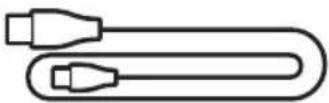
Consultez le site worldwide.Bose.com/Support/Tempo
natural_image
Two safety symbols: a circle with a diagonal line and glasses, and a pair of eyeglasses emitting droplets (no text or labels)natural_image
Line drawing of a human ear with a dental implant, showing anatomical positioning (no text or symbols)natural_image
Illustration of a hand holding an electronic device with a black dot on the nose, pointing to a human face (no text or symbols present)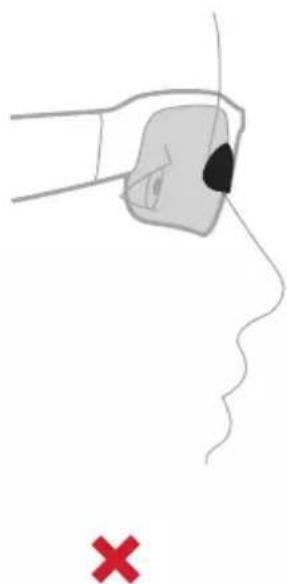
natural_image
Illustration of a hand holding a small object near the nose, with a red 'X' symbol below (no text or labels)natural_image
Diagram of a pair of eyeglasses with three circular insets showing internal anatomical changes (no text or labels)natural_image
Line drawing of a smart glasses with an inset showing eye contact details (no text or symbols)MISE HORS TENSION
natural_image
Line drawing of a smart glasses with an inset showing a circular component (no text or symbols)natural_image
Line drawing of a car interior with a curved arrow indicating motion or movement (no text or symbols)natural_image
Line drawing of a mechanical tool or device with a circular component and directional arrow (no text or symbols)natural_image
Line drawing of a mechanical tool or device with a central arrow and circular mark (no text or symbols)text_image
Diagram of a bird's head with sound wave indicators and directional arrows, showing speaker placement and sound direction.REMARQUES :
text_image
Diagram of a smart glasses headset with labeled component and insertion point, showing internal structure and assembly.natural_image
Line drawing of a smart glasses with an inset showing a circular icon labeled 'O' (no text or symbols on the main diagram)natural_image
Cross-sectional diagram of a medical device with open lid and internal cavity (no text or labels)REMARQUES :
Consultez le site worldwide.Bose.com/Support/Tempo
Consultez le site worldwide.Bose.com/Contact
PROBLÈME ACTION
Fabbricatoper: Bose Corporation, 100 The Mountain, Framingham, MA 01701

Importatore per la Cina: Bose Electronics (Shanghai) Company Limited, Part C, Plant 9, No. 353 North Riying Road, China (Shanghai) Pilot Free Trade Zone
Importatore per l'UE: Bose Products B.V., Gorslaan 60, 1441 RG Purmerend, Paesi Bassi
Importatore per Taiwan: Bose Taiwan Branch, 9F-A1, No.10, Section 3, Minsheng East Road, Taipei City 104, Taiwan Numero di telefono: +886-2-2514 7676
Importatore per il Messico: Bose de México, S. de R.L. de C.V., Paseo de las Palmas 405-204, Lomas de Chapultepec, 11000 México, D.F. Numero di telefono: +5255 (5202) 3545
Assorbimento in entrata: 5 V — 500 mA
Visitare: worldwide.Bose.com/Support/Tempo
natural_image
Two safety symbols: a circle with a diagonal line and glasses, and a pair of eyeglasses emitting droplets (no text or labels)natural_image
Line drawing of a human ear with a dental implant, showing anatomical positioning (no text or symbols)natural_image
Illustration of a hand holding an electronic device with a black dot on the nose, pointing to the face (no text or symbols present)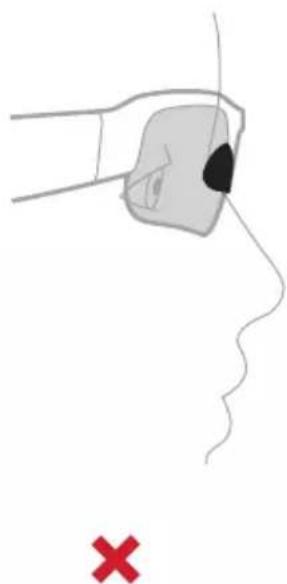
natural_image
Illustration of a hand holding a small object near the nose, with a red 'X' symbol below (no text or symbols on the diagram itself)natural_image
Line drawing of a pair of eyeglasses with three circular insets showing internal components (no text or symbols)text_image
Portanasellonatural_image
Line drawing of a pair of smart glasses with a magnified inset showing eye contact details (no text or symbols)SPEGNIMENTO
natural_image
Line drawing of a smart glasses with an inset showing a circular detail (no text or symbols)natural_image
Line drawing of a car seat with an arrow indicating motion or movement (no text or symbols)natural_image
Line drawing of a mechanical tool or device with a central circular component and an arrow indicating direction (no text or symbols)natural_image
Line drawing of a mechanical tool or device with a central arrow and circular mark (no text or symbols)text_image
Diagram of a bird's head with sound wave indicators and directional arrows, showing sound waves labeled - and +.NOTE:
text_image
Diagram of a smart glasses headset with labeled component and insertion point, showing internal structure and assembly.natural_image
Line drawing of a pair of smart glasses with a magnified inset showing the lens and screen (no text or symbols)natural_image
Cross-sectional diagram of a medical device with open lid and internal cavity (no text or labels)NOTE:
Visitare: worldwide.Bose.com/Support/Tempo
Visitare: worldwide.Bose.com/Contact
PROBLEMA AZIONE
Kínai importôr: Bose Electronics (Shanghai) Company Limited, Part C, Plant 9, No. 353 North Riying Road, Kína (Shanghai) Pilot Free Trade Zone
EU-importör: Bose Products B.V., Gorslaan 60, 1441 RG Purmerend, Hollandia
Tajvani importör: Bose Taiwan Branch, 9F-A1, No.10, Section 3, Minsheng East Road, Taipei City 104, Tajvan. Telefonszám: +886-2-2514 7676
Mexikói importör: Bose de México, S. de R.L. de C.V., Paseo de las Palmas 405-204, Lomas de Chapultepec, 11000 México, D.F. Telefonszám: +5255 (5202) 3545
natural_image
Line drawing of two eyeglasses: a full-face display case and a closed-framed 'BOSE' case (no text or symbols on the glasses themselves)Bose Frames Tempo Hordtok
natural_image
Two safety symbols: a circle with a diagonal line and glasses, and a pair of eyeglasses emitting droplets (no text or labels)natural_image
Line drawing of a human ear with a medical device in the ear area, showing anatomical positioning (no text or symbols)natural_image
Illustration of a hand holding an electronic device with a black dot on the nose, pointing to a human face (no text or symbols present)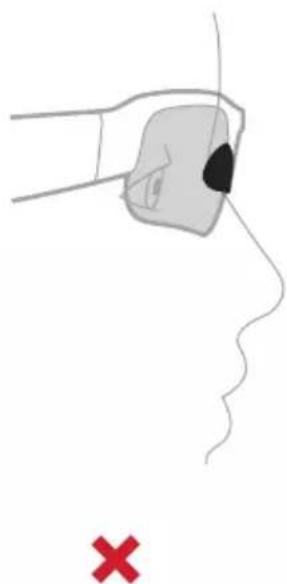
natural_image
Illustration of a hand holding a small object near the nose, with a red 'X' symbol below (no text or labels)natural_image
Diagram of a pair of eyeglasses with three circular insets showing internal anatomical changes (no text or labels)natural_image
Line drawing of a smart glasses with an inset showing eye contact details (no text or symbols)KIKAPCSOLÁS
natural_image
Line drawing of a smart glasses with an inset showing a circular detail (no text or symbols)natural_image
Line drawing of a car seat with an arrow indicating motion or movement (no text or symbols)natural_image
Line drawing of a firearm with a circular arrow pointing to the handle (no text or symbols)natural_image
Line drawing of a firearm with an arrow pointing to the shoulder (no text or symbols)text_image
Diagram of a car head with sound wave indicators and directional arrows, showing speaker positions and a highlighted circular area.MEGJEGYZÉSEK:
text_image
Diagram of a smart glasses headset with labeled component and insertion point, showing internal structure and assembly.natural_image
Line drawing of a smart glasses with an inset showing a circular icon labeled 'O' (no text or symbols on the main diagram)natural_image
Cross-sectional diagram of a medical device with open lid and internal cavity (no text or labels)MEGJEGYZÉSEK:
Management Regulation for Low-power Radio-frequency Devices
Artikkel XII
Produsertfor: Bose Corporation, 100 The Mountain Road, Framingham, MA 01701

Importor for Kina: Bose Electronics (Shanghai) Company Limited, Part C, Plant 9, No. 353 North Riying Road, Kina (Shanghai) Pilot Free Trade Zone
Importør for EU: Bose Products B.V., Gorslaan 60, NL-1441 RG Purmerend, Nederland
Importør for Taiwan: Bose Taiwan Branch, 9F-A1, No.10, Section 3, Minsheng East Road, Taipei City 104, Taiwan Telefonnummer: +886-2-2514 7676
Importor for Mexico: Bose de México, S. de R.L. de C.V., Paseo de las Palmas 405-204, Lomas de Chapultepec, 11000 México, D.F. Telefonnummer: +5255 (5202) 3545
Inngangsspenning: 5 V --- 500 mA
STELL OG VEDLIKEHOLD
Oppbevare solbrillene 27
natural_image
Line drawing of a pair of eyeglasses with no text or symbolsnatural_image
Two safety symbols: a circle with a diagonal line and glasses, and a pair of eyeglasses emitting droplets (no text or labels)natural_image
Line drawing of a human ear with a dental implant, showing anatomical positioning (no text or symbols)natural_image
Illustration of two hand positions with a black dot marking the nose area, marked with red X symbols (no text or symbols on the figures themselves)natural_image
Line drawing of a pair of eyeglasses with three circular insets showing internal components (no text or symbols)natural_image
Line drawing of a smart glasses with an inset showing eye contact details (no text or symbols)SLÅ AV
natural_image
Line drawing of a smart glasses with an inset highlighting a circular component (no text or symbols)natural_image
Line drawing of a car seat with an arrow indicating motion or movement (no text or symbols)natural_image
Line drawing of a firearm with a circular arrow pointing to the handle (no text or symbols)natural_image
Line drawing of a mechanical tool or device with a central circular component and an arrow indicating left motion (no text or symbols)text_image
Diagram of a bird's head with sound wave indicators and directional arrows, showing sound waves labeled '−' and '+'.MERKNADER:
text_image
(( JSE 2xtext_image
Diagram showing a device's internal structure with labeled parts and an inset highlighting a key component.text_image
StatuslysSTATUS FOR BLUETOOTH-TILKOBLING
Viser Bluetooth-tilkoblingsstatusen for mobilenheter.
LYSAKTIVITET SYSTEMSTATUS
natural_image
Line drawing of a pair of smart glasses with a magnified inset showing the lens and eye (no text or symbols)KOBLE TIL MOBILENHETER PÅ NYTT
natural_image
Cross-sectional diagram of a medical device with open lid and internal cavity (no text or labels)MERKNADER:
Importer — Chiny: Bose Electronics (Shanghai) Company Limited, Part C, Plant 9, No. 353 North Riying Road, China (Shanghai) Pilot Free Trade Zone
Importer — UE: Bose Products B.V., Gorslaan 60, 1441 RG Purmerend, The Netherlands
Importer — Tajwan: Bose Taiwan Branch, 9F-A1, No.10, Section 3, Minsheng East Road, Taipei City 104, Taiwan Numer telefonu: +886-2-2514 7676
Importer — Meksyk: Bose de México, S. de R.L. de C.V., Paseo de las Palmas 405-204, Lomas de Chapultepec, 11000 México, D.F. Numer telefonu: +5255 (5202) 3545
Zasilanie: 5 V — 500 mA
natural_image
Line drawing of two eyeglasses: a full-face lenses and a closed-framed box labeled 'BOSE' (no text or symbols on the lenses themselves)Bose Frames Tempo Futeral
natural_image
Two safety symbols: a circle with a diagonal line and glasses, and a pair of eyeglasses emitting droplets (no text or labels)natural_image
Line drawing of a human ear with a medical device in the ear area, no text or symbols presentnatural_image
Illustration of a hand holding an electronic device with a black dot on the nose, pointing to a human face (no text or symbols present)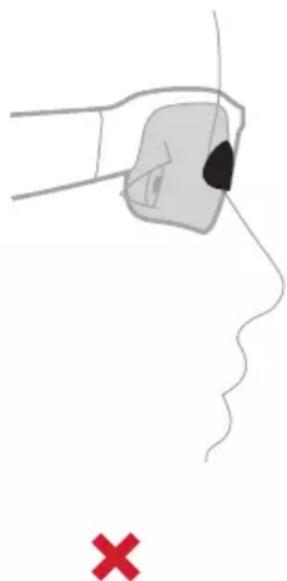
natural_image
Illustration of a hand holding a small object near the nose, with a red 'X' symbol below (no text or labels)natural_image
Diagram of a pair of eyeglasses with three circular insets showing internal components (no text or symbols)natural_image
Line drawing of a smart glasses with an inset showing eye contact details (no text or symbols)WYŁĄCZANIE ZASILANIA
natural_image
Line drawing of a smart glasses with an inset showing a circular detail (no text or symbols)natural_image
Line drawing of a car seat with an arrow indicating motion or movement (no text or symbols)natural_image
Line drawing of a mechanical tool or device with a circular component and directional arrow (no text or symbols)natural_image
Line drawing of a mechanical tool or device with a central arrow and circular mark (no text or symbols)text_image
Diagram of a bird's head with sound wave indicators and directional arrows, showing speaker placement and sound direction.UWAGI:
text_image
Diagram of a smart glasses headset with labeled sensor port and connector, showing internal structure and assembly.natural_image
Line drawing of a pair of smart glasses with a magnified inset showing the lens and screen (no text or symbols)natural_image
Cross-sectional diagram of a medical device with open lid and internal cavity (no text or labels)UWAGI:
Kinaimportör: Bose Electronics (Shanghai) Company Limited, Part C, Plant 9, No. 353 North Riying Road, China (Shanghai) Pilot Free Trade Zone
EU-importör: Bose Products B.V., Gorslaan 60, 1441 RG Purmerend, Nederländerna
Taiwanimportör: Bose Taiwan Branch, 9F-A1, No.10, Section 3, Minsheng East Road, Taipei City 104, telefonnummer Taiwan: +886-2-2514 7676
Mexikoimportör: Bose de México, S. de R.L. de C.V., Paseo de las Palmas 405-204, Lomas de Chapultepec, 11000 México, D.F. Telefonnummer: +5255 (5202) 3545
Märkdata: 5 V — 500 mA
VAD FINNS I FÖRPACKNINGEN
Innehåll.... 10
INSTALLATION AV BOSE MUSIC-APPEN
Ladda ner Bose Music-appen.... 11
natural_image
Line drawing of a pair of eyeglasses with rounded lenses and black trim (no text or symbols)Bose Frames Tempo Fodral
text_image
BOSEnatural_image
Two safety symbols: a circle with a diagonal line and glasses, and a pair of eyeglasses with droplets above (no text or labels)natural_image
Line drawing of a human ear with a medical device in the ear area, showing no text or symbolsnatural_image
Illustration of a hand holding an electronic device with a black dot on the nose, pointing to a red X symbol (no text or labels present)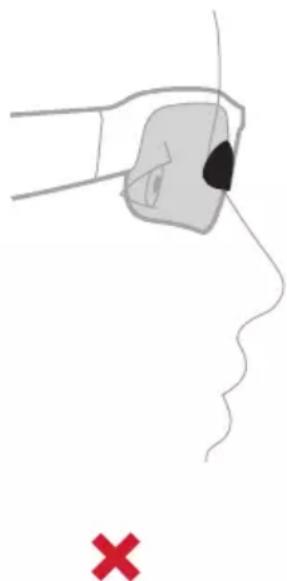
natural_image
Illustration of a hand holding a small object near the nose, with a red 'X' symbol below (no text or labels)natural_image
Diagram of a pair of eyeglasses with internal components and three circular insets showing progressive changes in the lens area (no text or symbols present)natural_image
Line drawing of a smart glasses with an inset showing eye contact details (no text or symbols)STÄNGA AV
natural_image
Line drawing of a smart glasses with an inset showing a circular detail (no text or symbols)natural_image
Line drawing of a car interior with a curved arrow indicating motion or movement (no text or symbols)natural_image
Line drawing of a mechanical tool or device with a circular component and directional arrow (no text or symbols)natural_image
Line drawing of a mechanical tool or device with a circular component and directional arrow (no text or symbols)text_image
Diagram of a bird's head with sound wave indicators and directional arrows, showing speaker placement and sound direction.TÄNK PÅ FÖLJANDE:
text_image
(( )JSE 2xtext_image
Diagram of a smart glasses headset with labeled sensor port and connector, showing internal structure and assembly.natural_image
Line drawing of a pair of smart glasses with a magnified inset showing the lens and eye (no text or symbols)- Aktivera Bluetooth-funktionen på din enhet.
natural_image
Cross-sectional diagram of a medical device with open lid and internal cavity (no text or labels)TÄNK PÅ FÖLJANDE:
natural_image
Line drawing of a pair of eyeglasses with no text or symbolsBose Frames Tempo
text_image
BOSEกล่องบรรจุเพื่อพกพา
natural_image
Two safety symbols: a circle with a diagonal line and glasses, and a pair of eyeglasses emitting droplets (no text or labels)natural_image
Line drawing of a human ear with a device in the ear area, showing no text or symbolsnatural_image
Illustration of a hand holding an electronic device with a black dot on the nose, pointing to a curved line (no text or symbols present)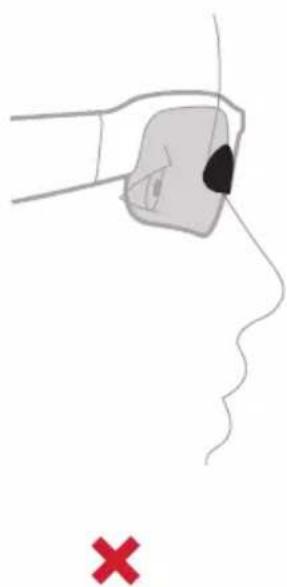
natural_image
Illustration of a hand holding a small object near the nose, with a red 'X' symbol below (no text or labels)natural_image
Line drawing of a pair of eyeglasses with three circular insets showing internal components (no text or symbols)natural_image
Line drawing of a pair of smart glasses with a magnified inset showing eye contact details (no text or symbols)ปิดเครื่อง
natural_image
Line drawing of a smart glasses with an inset highlighting a circular feature (no text or symbols present)natural_image
Line drawing of a car seat with an arrow indicating motion or movement (no text or symbols)natural_image
Line drawing of a mechanical tool or device with a circular component and directional arrow (no text or symbols)natural_image
Line drawing of a mechanical tool or device with a central circular feature and an arrow indicating direction (no text or symbols)text_image
Diagram of a bird's head with sound wave indicators and directional arrows indicating sound directionหม้ายเหตุ:
text_image
Diagram showing a device's internal structure with labeled ports and an arrow indicating assembly or connection point.text_image
We see your smart devicenatural_image
Line drawing of a pair of smart glasses with a magnified inset showing light reflections (no text or symbols)natural_image
Cross-sectional diagram of a medical device with open lid and internal cavity (no text or labels)หมายเหตุ:
제조 위탁사: Bose Corporation, 100 The Mountain Road, Framingham, MA 01701

중국 수입업체: Bose Electronics (Shanghai) Company Limited, Part C, Plant 9, No. 353 North Riying Road, China (Shanghai) Pilot Free Trade Zone
EU 수입업체: Bose Products B.V., Gorslaan 60, 1441 RG Purmerend, The Netherlands
대만 수입업체: Bose Taiwan Branch, 9F-A1, No.10, Section 3, Minsheng East Road, Taipei City 104, Taiwan 전화 번호: +886-2-2514 7676
멕시코 수입업체: Bose de México, S. de R.L. de C.V., Paseo de las Palmas 405-204, Lomas de Chapultepec, 11000 México, D.F. 전화 번호: +5255 (5202) 3545
입력 정격: 5V --- 500mA
natural_image
Line drawing of a pair of eyeglasses with no text or symbolsnatural_image
Two safety symbols: a circle with a diagonal line and glasses, and a pair of eyeglasses with droplets above (no text or labels)natural_image
Line drawing of a human ear with a medical device attached, showing anatomical positioning (no text or symbols)Frames가 맞을 경우:
natural_image
Illustration of a hand holding an electronic device with a black eye on the nose, pointing to a red X symbol (no text or labels present)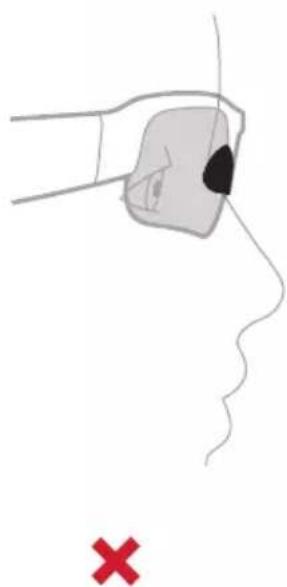
natural_image
Illustration of a hand holding a small object near the nose, with a red X mark below (no text or symbols)Frames가 맞을 않을 경우:
natural_image
Line drawing of a pair of eyeglasses with three circular insets showing internal components (no text or symbols)natural_image
Line drawing of a pair of smart glasses with a magnified inset showing eye contact details (no text or symbols)전원 끄기
natural_image
Line drawing of a smart glasses with an inset showing a circular component highlighting a key area (no text or symbols present)natural_image
Diagram of a car interior showing a curved arrow indicating motion or movement, with no text or symbols present.natural_image
Line drawing of a mechanical tool or device with a central circular component and an arrow indicating direction (no text or symbols)natural_image
Line drawing of a mechanical tool or device with a central circular component and an arrow indicating direction (no text or symbols)text_image
Diagram of a car head with sound wave indicators and directional arrows, showing speaker placement and sound direction.참고:
text_image
Diagram showing a device's internal structure with labeled parts and an inset highlighting the connector.natural_image
Line drawing of a pair of smart glasses with a magnified inset showing the camera lens (no text or symbols present)natural_image
Cross-sectional diagram of a medical device with open lid and internal cavity (no text or labels)참고:
制造:Bose Corporation, 100 The Mountain Road, Framingham, MA 01701

如包装破损请勿使用。

本产品不含有天然橡胶胶乳。

本产品以非无菌方式提供。


中国危险物质限用表
natural_image
Line drawing of a pair of eyeglasses with no text or symbolsBose Frames Tempo 便携包
text_image
BOSE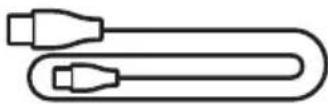
充电线缆 鼻垫(1和3号尺寸)
请访问:worldwide.Bose.com/Support/Tempo
natural_image
Two safety symbols: a circle with a diagonal line and glasses, and a pair of eyeglasses emitting droplets (no text or labels)natural_image
Line drawing of a human ear with a dental implant, showing anatomical positioning (no text or symbols)太阳眼镜佩戴合适时:
natural_image
Illustration of a hand holding a small object near the nose, with a red 'X' symbol below (no text or labels)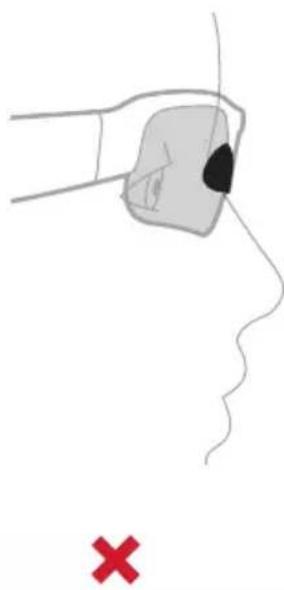
natural_image
Simple line drawing of a hand holding a small object near the nose, with a red 'X' symbol below (no text or labels)太阳眼镜佩戴不合适时:
natural_image
Line drawing of a pair of eyeglasses with three circular insets showing ear and jaw movement (no text or symbols)natural_image
Line drawing of a pair of smart glasses with a magnified inset showing eye contact details (no text or symbols)关闭电源
按住一个按钮,直到听到提示音。
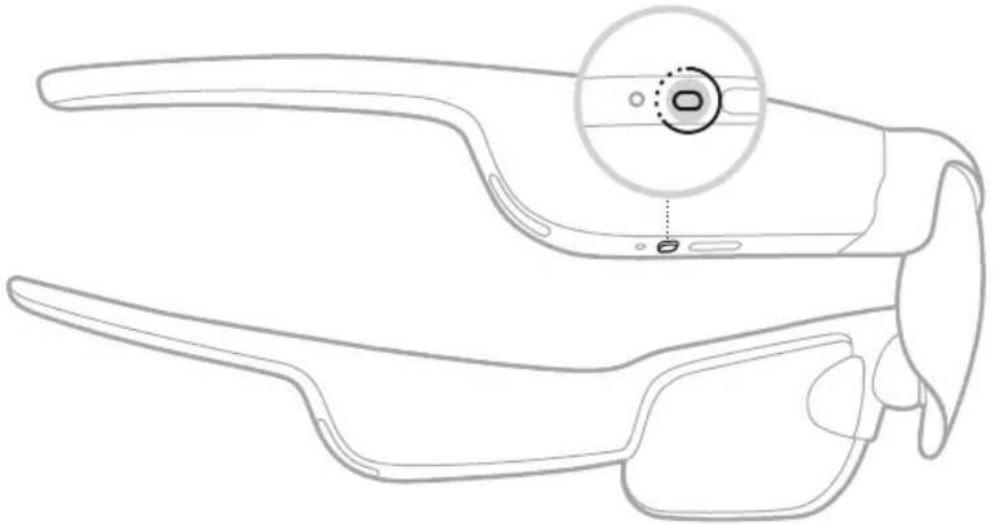
natural_image
Line drawing of a pair of smart glasses with a magnified inset showing the lens and adjustment point (no text or symbols)状态指示灯闪烁白色光两次,然后渐暗。
倒置关闭
将太阳眼镜倒置 2 秒钟。
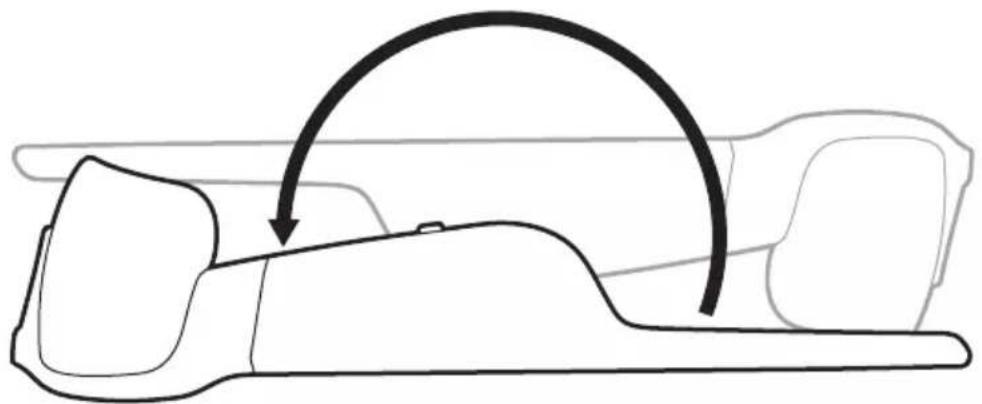
natural_image
Line drawing of a car interior with a curved arrow indicating motion or movement (no text or symbols)状态指示灯闪烁白色光两次,然后渐暗。
注意:
natural_image
Line drawing of a mechanical tool or device with a circular component and directional arrow (no text or symbols)natural_image
Line drawing of a mechanical tool or device with a central circular component and an arrow indicating direction (no text or symbols)text_image
Diagram of a car head with sound wave indicators and directional arrows indicating sound direction注意:
natural_image
Line drawing of a pair of eyeglasses with an inset showing a connector (no text or symbols)natural_image
Line drawing of a pair of smart glasses with a magnified inset showing the lens and screen (no text or symbols)natural_image
Cross-sectional diagram of a medical device with open lid and internal cavity (no text or labels)注意:
请访问:worldwide.Bose.com/Support/Tempo
请访问:worldwide.Bose.com/Contact
问题 解决方法
製造:Bose Corporation, 100 The Mountain Road, Framingham, MA 01701

如包裝破損,請勿使用。

本產品不含乳膠。

本產品是作為無菌產品提供的。


中國危險物質限用表
natural_image
Line drawing of a pair of eyeglasses with no text or symbolsBose Frames Tempo 便攜包
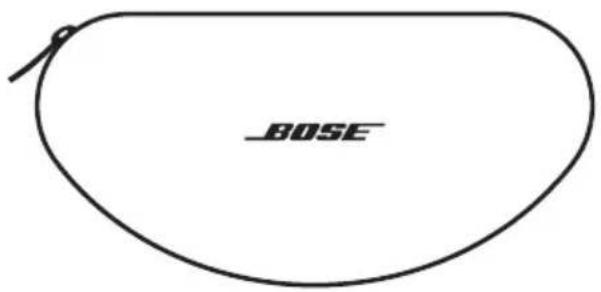
text_image
BOSE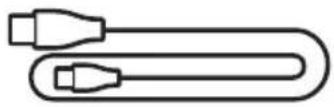
充電纜線 鼻墊(1和3號尺寸)
請造訪:worldwide.Bose.com/Support/Tempo
natural_image
Two safety symbols: a circle with a diagonal line and glasses, and a pair of eyeglasses emitting raindrops (no text or labels)natural_image
Line drawing of a human ear with a dental implant, showing anatomical positioning (no text or symbols)如果太陽眼鏡適合:
natural_image
Illustration of a hand holding an electronic device with a black dot on the nose, pointing to a curved line (no text or symbols present)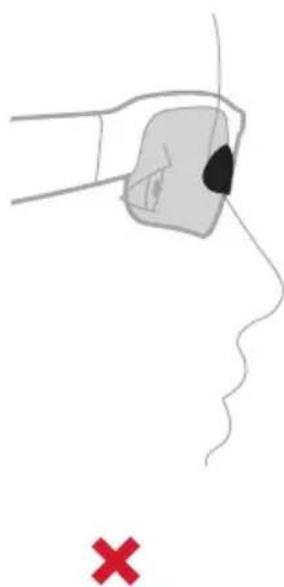
natural_image
Illustration of a hand holding a small object near the nose, with a red 'X' symbol below (no text or labels)如果太陽眼鏡不適合:
natural_image
Line drawing of a pair of eyeglasses with three circular insets showing internal components (no text or symbols)natural_image
Line drawing of a pair of smart glasses with an inset showing facial features (no text or symbols)關閉電源
按住按鈕,直到聽到提示音。
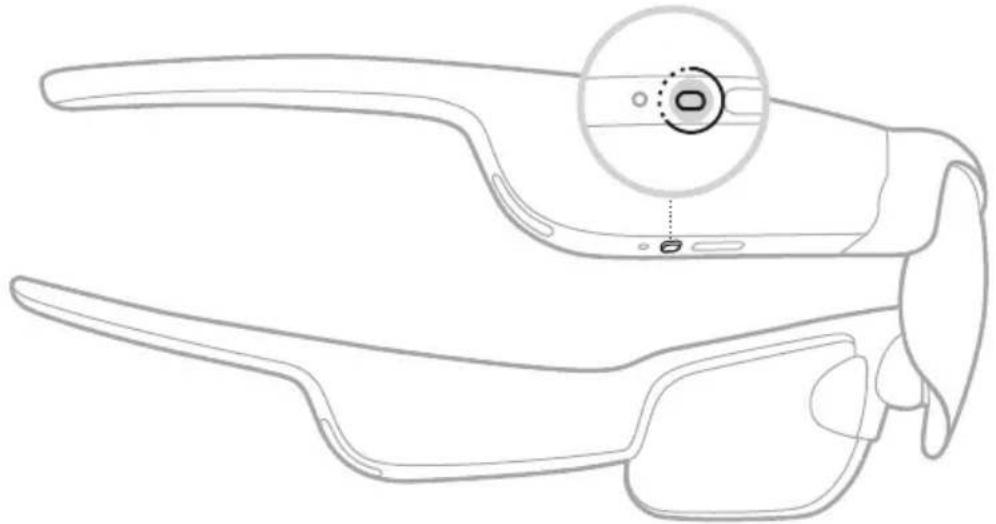
natural_image
Line drawing of a pair of smart glasses with a highlighted circular component (no text or symbols)狀態指示燈閃爍白色光兩下,然後漸暗。
倒置可關閉
將太陽眼鏡倒置 2 秒鐘。
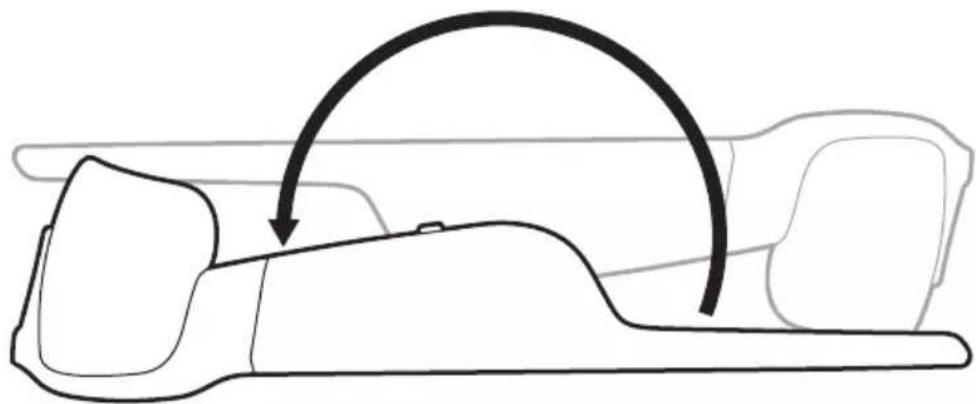
natural_image
Line drawing of a car seat with an arrow indicating motion or movement (no text or symbols)狀態指示燈閃爍白色光兩次,然後漸暗。
注意:
natural_image
Line drawing of a mechanical tool or device with a circular component and directional arrow (no text or symbols)注意:您會在音量調到最高時聽到提示音。
降低音量
在觸控表面上向後滑動。
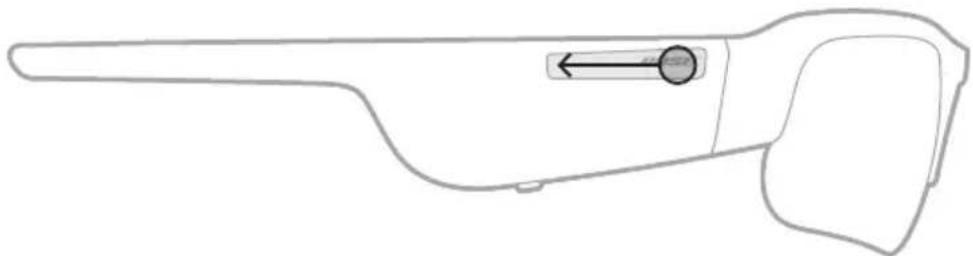
natural_image
Line drawing of a mechanical tool or device with a central circular component and an arrow indicating direction (no text or symbols)注意:您會在音量調到最低時聽到提示音。
使用「按下並轉頭」音量控制
text_image
Diagram of a transparent eye with speaker icons and directional arrows indicating sound or sound flow.注意:
text_image
Diagram showing a device's internal structure with labeled parts and an inset highlighting the connector.natural_image
Line drawing of a pair of smart glasses with a magnified inset showing the camera lens (no text or symbols present)natural_image
Cross-sectional diagram of an open cosmetic device with internal cavity (no text or symbols)注意:
請造訪:worldwide.Bose.com/Support/Tempo
請造訪:worldwide.Bose.com/Contact
問題 解決方法
製品供給先: Bose Corporation, 100 The Mountain Road, Framingham, MA 01701

中国における輸入元: Bose Electronics (Shanghai) Company Limited, Part C, Plant 9, No. 353 North Riying Road, China (Shanghai) Pilot Free Trade Zone
EUにおける輸入元: Bose Products B.V., Gorslaan 60, 1441 RG Purmerend, The Netherlands
台湾における輸入元: Bose Taiwan Branch, 9F-A1, No.10, Section 3, Minsheng East Road, Taipei City 104, Taiwan Phone Number: +886-2-2514 7676
Bose Corporation Headquarters: 1-877-230-5639
natural_image
Two safety symbols: a circle with a diagonal line and glasses, and a pair of eyeglasses emitting droplets (no text or labels)natural_image
Line drawing of a human ear with a medical device in the ear area, showing no text or symbolsnatural_image
Two identical line drawings of a human face with a shaded region and black patches, marked with red Xs (no text or symbols)natural_image
Line drawing of a pair of eyeglasses with three circular insets showing internal components (no text or symbols)natural_image
Line drawing of a pair of smart glasses with a magnified inset showing eye contact details (no text or symbols)電源オフ
natural_image
Line drawing of a smart glasses with an inset highlighting the lens area (no text or symbols present)natural_image
Diagram of a car's side profile showing the head and torso with an arrow indicating motion (no text or labels)natural_image
Line drawing of a mechanical tool or device with a circular component and directional arrow (no text or symbols)natural_image
Line drawing of a mechanical tool or device with a central circular component and an arrow indicating left motion (no text or symbols)text_image
Diagram of a car head with sound wave indicators and directional arrows indicating sound direction注:
text_image
((J)SE 2xtext_image
Diagram showing a device's internal structure with labeled parts and an inset highlighting the connector.natural_image
Line drawing of a pair of smart glasses with a magnified inset showing the lens and adjustment points (no text or symbols)BLUETOOTH接続の状態
natural_image
Line drawing of a pair of smart glasses with a magnified inset showing the camera lens (no text or symbols present)natural_image
Cross-sectional diagram of a medical device with open lid and internal cavity (no text or labels)注:
No. 353 North Riying Road, China (Shanghai) Pilot Free Trade Zone
Bose Products B.V., Gorslaan 60, 1441 RG Purmerend, The Netherlands : المستورد في الاتحاد客户提供
Bose Taiwan Branch, 9F-A1, No.10, Section 3, Minsheng East Road, :المستورد في تايوان
+886-2-2514 7676 : Taipei City 104, Taiwan
المسجلة في Cities App Store, Apple Inc., iOSi, iPod, iPhone, iPad, Apple App Store. Exporting app stores are in the United States. Exporting apps are in the United States. Exporting apps are in the United States. Exporting apps are in the United States. Exporting apps are in the United States. Exporting apps are in the United States. Exporting apps are in the United States. Exporting apps are in the United States. Exporting apps are in the United States. Exporting apps are in the United States. Exporting apps are in the United States. Exporting apps are in the United States. Exporting apps were in the United States. Exporting apps were in the United States. Exporting apps were in the United States. Exporting apps were in the United States. Exporting apps were in the United States. Exporting apps were in the United States. Exporting apps were in the United States. Exporting apps were in the United States. Exporting apps were in the United States. Exporting apps were in the United States. Exporting apps were in the United States. Exporting apps were also in the United States. Exporting apps were also in the United States. Exporting apps were also in the United States. Exporting apps were also in the United States. Exporting apps were also in the United States. Exporting apps were also in the United States. Exporting apps were also in the United States. Exporting apps were also in the United States. Exporting apps were also in the United States. Exporting apps were also in the United States. Exporting apps were not in the United States. Exporting apps were not in the United States. Exporting apps were not in the United States. Exporting apps were not in the United States. Exporting apps were not in the United States. Exporting apps were not in the United States. Exporting apps were not in the United States. Exporting apps were not in the United States. Exporting apps were not in the United States. Exporting apps were not in the United States. Exporting apps were also in the United States. Exporting apps were also in the United States. Exporting apps were also in the United States. Exporting apps were also in the United States. Exporting apps were also in the United States. Exporting apps were also in the United States. Exporting apps were also in the United States. Exporting apps were also in the United States. Exporting apps were also in the United States. Exporting apps were again in the United States. Exporting apps were again in the United States. Exporting apps were again in the United States. Exporting apps were again in the United States. Exporting apps were again in the United States. Exporting apps were again in the United States. Exporting apps were again in the United States. Exporting apps were again in the United States. Exporting apps were again in the United States. Exporting apps were again in the United States. Exporting apps were also in the United States. Exporting apps were also in the United States. Exporting apps were also in the United States. Exporting apps were also in the United States. Exporting apps were also in the United States. Exporting apps were also in the United States. Exporting apps were also in the United States. Exporting apps were also in the United States. Exporting apps were also in the United States. Exporting apps were second to that of App Store, Apple Inc., and App Store was also being used for App Store applications and App Store applications (which includes a general application).
natural_image
Line drawing of a pair of eyeglasses with no text or symbolsnatural_image
Two symbolic icons: a pair of glasses with raindrops above one, and a circle with a diagonal line crossed out (no text or symbols)مال العادي. ملاحظة:
natural_image
Line drawing of a hand holding an object over a human face, with no text or symbols present.
natural_image
Line drawing of a pair of eyeglasses with three circular insets showing internal components (no text or symbols)( Renewable Bluetooth ) ( Renewable Bluetooth ) ( Renewable Bluetooth ) ( Renewable Bluetooth )
natural_image
Line drawing of a pair of smart glasses with a magnified inset showing eye contact details (no text or symbols)إيقاف الطاقة
natural_image
Line drawing of a smart glasses with an inset showing a circular detail (no text or symbols)natural_image
Line drawing of a car interior showing a curved arrow indicating motion or movement (no text or symbols)natural_image
Line drawing of a mechanical tool or device with a circular component and directional arrow (no text or symbols)الأقصى. ملاحظة:
خفض مستوى الصوت
natural_image
Line drawing of a mechanical tool or device with a circular component and an arrow indicating direction (no text or symbols)ى الأدنى. ملاحظة:
text_image
Diagram of a car head with sound wave indicators and directional arrows indicating sound directionملاحظات:
• سك بطع.
• ی مستوى.
المكالمات الهاتفية
الحل التحكم
text_image
Diagram showing a device's internal structure with labeled parts and an inset highlighting the connector.natural_image
Line drawing of a pair of smart glasses with a magnified inset showing the camera lens (no text or symbols present)چهازک.. 2 شغ
- onc staying Educational Management Policy (EC) 2017: https://doi.org/10.10345689.
natural_image
Cross-sectional diagram of a medical device with open lid and internal cavity (no text or labels)ملاحظات:
text_image
Black and white barcode image with vertical lines856768-0010