
EFK 3290-92 X - Range hood GRAM - Free user manual and instructions
Find the device manual for free EFK 3290-92 X GRAM in PDF.


| Product Type | Range Hood |
| Brand | Gram |
| Model | EFK 3290-92 X |
| Color | Stainless Steel |
| Width | 90 cm (35.4 inches) |
| Depth | 50 cm (19.7 inches) |
| Height | 75-130 cm (adjustable) |
| Net Weight | 15 kg |
| Power Supply | 220-240 V / 50 Hz |
| Motor Power | 250 W |
| Extraction Rate (Max) | 720 m³/h |
| Noise Level (Max) | 65 dB(A) |
| Number of Speeds | 3 + Intensive |
| Control Type | Electronic Touch Control |
| Lighting | 2 x 1.5 W LED |
| Filter Type | Aluminum Grease Filter + Optional Carbon Filter |
| Installation Type | Wall-mounted Chimney |
| Energy Class | A (EU) (Estimated) |
| Safety Features | Auto Shut-off Timer, Overheat Protection |
| Maintenance | Grease filter: Clean monthly; Carbon filter: Replace every 3-6 months |
| Spare Parts Availability | Filters, bulbs available via Gram service |
Frequently Asked Questions - EFK 3290-92 X GRAM
User questions about EFK 3290-92 X GRAM
0 question about this device. Answer the ones you know or ask your own.
Ask a new question about this device
Download the instructions for your Range hood in PDF format for free! Find your manual EFK 3290-92 X - GRAM and take your electronic device back in hand. On this page are published all the documents necessary for the use of your device. EFK 3290-92 X by GRAM.
USER MANUAL EFK 3290-92 X GRAM
Before using the appliance, please carefully read this manual!
OPERATING INSTRUCTIONS - EMFANG
THANK YOU FOR PURCHASING A GRAM APPLIANCE
DEAR CUSTOMER!
You are now a user of a kitchen extractor hood. This hood has been designed and manufactured specially with a view to satisfying your expectations and it will certainly constitute a fitting element of a modern kitchen. The modern structural solutions and the newest technologies used in production of this hood guarantee its high effectiveness and good appearance.
Please read these instructions carefully before installing the hood. They will help you avoid mistakes during installation and operation of the hood.
We wish you a lot of satisfaction from choosing our kitchen extractor hood.
Symbols appearing in these instructions have the following meaning:

Important information concerning proper operation of the appliance and your personal safety.

Risks resulting from improper operation of the appliance. Activities that must be performed by a qualified technician.

Tips on how to use the appliance.

Information on how to protect the environment.

This indicates actions that must not be performed by the user.
TABLE OF CONTENTS
GUIDELINES CONCERNING THE SAFETY OF USE 5
INSTALLATION
8
OPERATION
AND
MAINTENANCE
13
ENVIRONMENTAL
PROTECTION
15

The appliance is intended for household use only.
The manufacturer reserves the right to introduce changes which do not affect the operation of the appliance.

●The manufacturer will accept no responsibility for any damage due to installation or operation not conforming to these instructions.
● Cooker hood is designed to remove cooking odours. Do not use cooker hood for other purposes.
- Connect the cooker hood operating in extraction mode to a suitable ventilation duct (do NOT connect the cooker to smoke or flue gas ducts, which are in use). It requires installation of the air extraction duct to the outside. The duct length (typically 120 or 150mm in diameter) should not exceed 4-5 m. The air exhaust duct is also required for telescopic and under furniture cooker hoods operating in air recirculation mode.
● Cooker hood operating in air recirculation mode requires the installation of an activated charcoal filter. In this case, installing an extractor duct is not required, however it is recommended to install an air guide vane. (chimney cooker hoods only).


The cooker hood features independent lighting and exhaust fan that can be operated at one of several speeds.
Depending on the type, the hood is designed to be permanently attached to a vertical wall over a gas or electric stove (chimney and universal hoods); on the ceiling over a gas or electric stove (island hoods); on the vertical built-in furniture over a gas or electric stove (telescopic and built-in hoods). Before installing, make sure that the wall/ceiling structure is strong enough to suspend the hood. Some hoods are very heavy.
For details of the installation distance above an electric hob please refer to product technical sheet. If the installation instructions of the gas cooker specify a greater distance, this must be taken into account (Fig. 1a).
Do not leave an open flame under the hood. When the pots are removed from the burner, set the minimum flame. Always make sure that the flame does not ex-

tend outside the pot, because it causes unwanted loss of energy and a dangerous concentration of heat.
Any food cooked in fat shall be constantly monitored, since overheated fat can ignite very easily. Pull the plug of the power cord from a wall socket before any filter cleaning or repair operation. The textile grease filter should be replaced, and the aluminium filter should be cleaned at least every one month in connection with the existing fire danger (saturated fat is very flammable). If any other non-electric devices are used in the same room as the hood (e.g. liquid fuel ovens, flow-through or volumetric water heaters), it is necessary to provide appropriate ventilation (air supply). Safe operation is possible when during simultaneous operation of the hood and combustion devices dependent on air supply the negative pressure of not more than 0.004 milibar is


maintained at the location of these devices inside the room (this point does not apply when the hood is used as an odour absorber).
Do not lean on hood. The hood should be frequently cleaned inside and on the outside surfaces (at least once a month). See "Cleaning section" in this manual.
- If the power wire gets broken, it should be replaced with a new one in a specialist repair shop.
- If the power wire gets broken, it should be replaced with a new one in a specialist repair shop. Make sure the appliance can be easily disconnected from the mains, either by pulling the plug out of the mains socket, or by switching the two-pole switch off. This appliance is not intended for use by persons (including children) with reduced physical, sensory or mental capabilities, or lack of experience and knowledge, unless they have been given supervision or instruction concerning use of the appliance by a person responsible for their safety. Children should be su-

pervised to ensure that they do not play with the appliance.
- Check if the voltage indicated on the rating plate corresponds to the local power supply parameters. Before installing, unwind and straighten the power cord. Warning! The packaging materials (polyethylene bags, small pieces of foamed poly-
styrene etc.) should be kept away from children while unpacking.
NOTE: Before connecting the hood to the mains power supply, always check that the power cord is properly installed and is not trapped by the appliance. It is recommended to make sure the hood operates correctly before installation.
INSTALLATION
Elements
Kitchen hood consists of the following elements (Pic. 2a):
1-Internal chimney
2-External chimney
3-Control panel
4-Lighting
Installation
Step-by-step appliance installation is shown on page 9-12
Setting the air extractor mode of operation of the hood
In the extractor mode, air is discharged to the outside by a special conduit. In that setting, any carbon filters shall be removed. The hood should be connected to the opening discharging air to the outside by means of a rigid or flexible conduit of
120 mm diameter, which should be purchased in a shop selling installation materials.
A qualified installer should be commissioned to make the connection.
Setting the odour absorber mode of operation of the hood
In this option filtered air returns to the room through openings in the front of the hood. In this setting it is necessary to install the carbon filter. It is recommended to install the air guide (availability depending on model).
Fan speeds
The lowest and medium speeds should be used under normal conditions and with low concentration of fumes. The maximum speed should be used in case of high concentration of kitchen fumes, e.g. during frying or grilling.
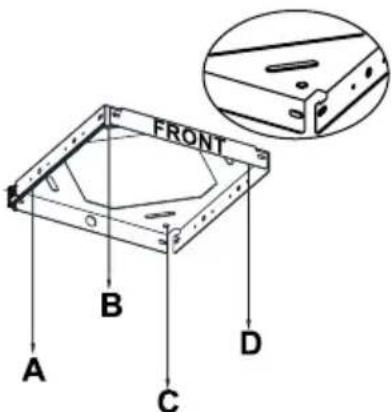
A) Installation of ceiling connection plate
Front sticker (picture 3) on ceiling connection plate and control panel of chimney hood should have the same direction.
1) Drill 10mm holes from A,B,C,D points. 2) Drive 10mm wall plugs into A,B,C,D holes. 3) Fix ceiling connection plate to ceiling by using 4 screws (5.5 x 45). Wall plugs, screws and ceiling connection plate are given with chimney hood - picture 3
Pic. 3
B) Installation of cornerpieces:
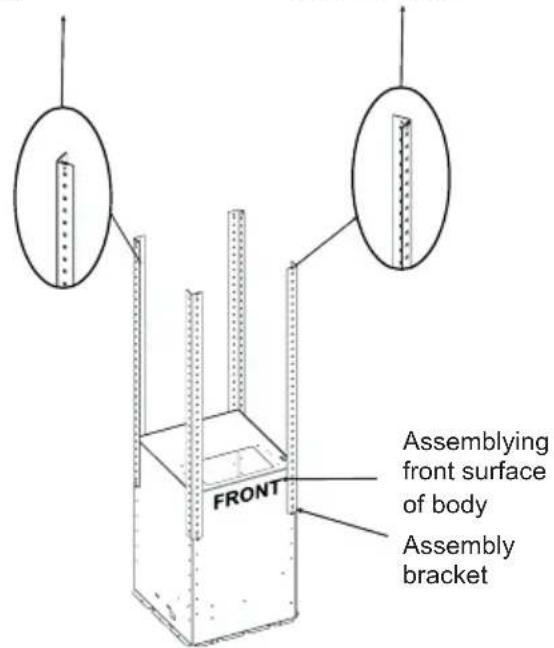
Front sticker (picture 4) shows where front side of chimney hood should be installed. Front cornerpieces should be left and right directions. Back cornerpieces should be extroverted. Screw 4 cornerpieces to motor block. Hanging bar should have same directions with ceiling connection plate. Regulating the length of chimney hood with these cornerpieces.
C) Installation of chimneys to motor cabinet:
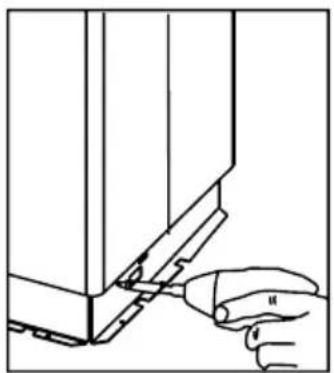
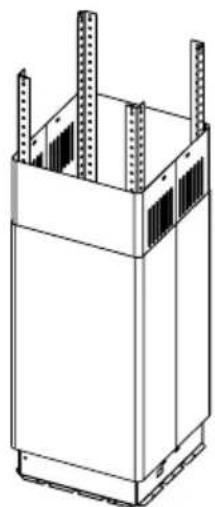
Please put internal chimney in external chimney. For temporary connection between chimneys please use a screw on motor cabinet. (So chimneys will not drop while you install motor cabinet to ceiling connection plate.) Mount the chimneys on this screw. (Screw holes of internal chimney should befit the side of motor cabinet.) Picture 5, 5a, 5b
Pic. 5
Front bracket connection, left and right up front
Back bracket connection, up-front
Pic. 4
Pic. 5a Pic. 5b
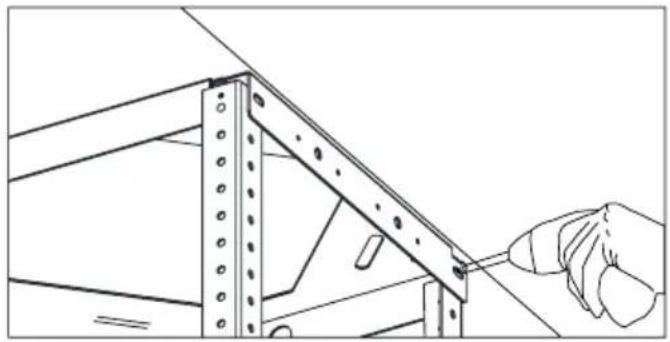
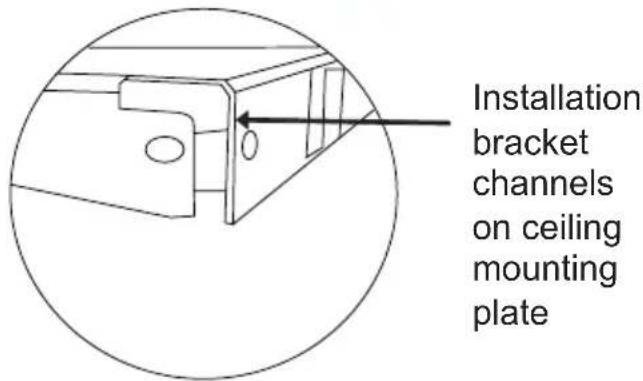
D) Placing Motor Cabin to Hanging Bar
Place fixed hanging sticks on hanging bar through the channels. Fix parts together via 3,5x9,5 screws (Picture 7).
Pic. 8
Pic. 7
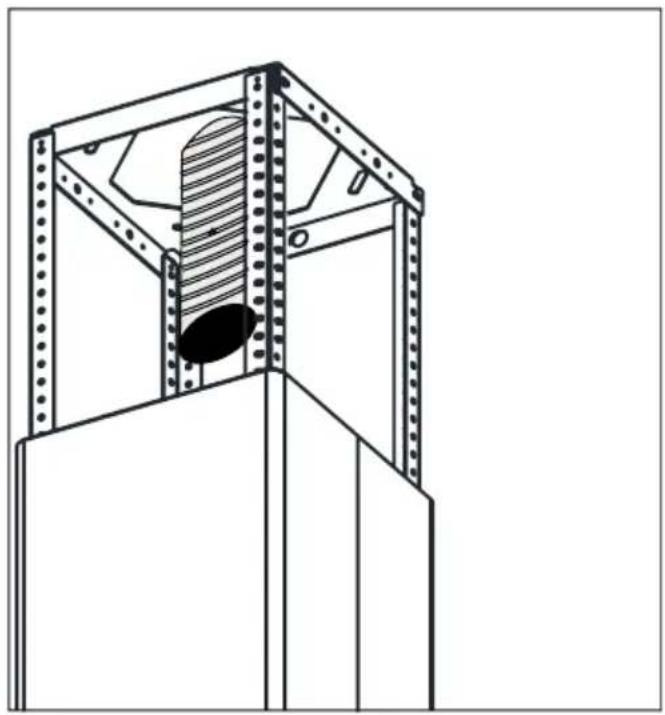
E) Installing Aluminum Flexible Pipe
Connect aluminum flexible pipe to outlets on the product and kitchen wall. Ensure connection will not lose while your product is operated on maximum airflow level (Picture 8).
F) Metal frames installation
Using screws from installation kit, mount frames to hanging sticks (Pic. 9).
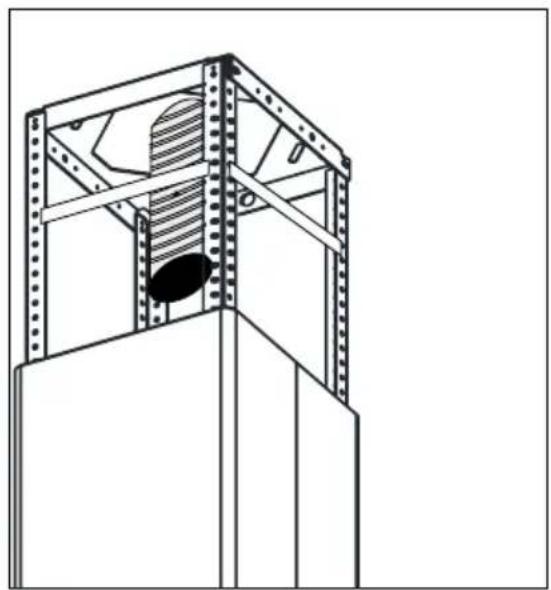
Fig. 9
G) Fixing Internal Chimney
Pull internal chimney up, align holes and fix by 3,5x9,5 nickel coated screws as shown in Picture 10.
Assembling bracket hole on the Ceiling Connection Sheet
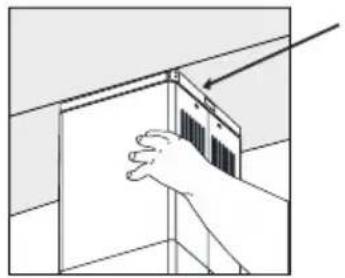
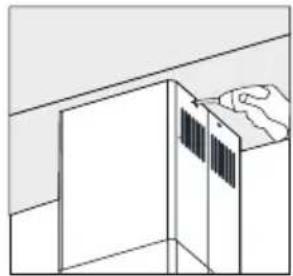
Pic. 10
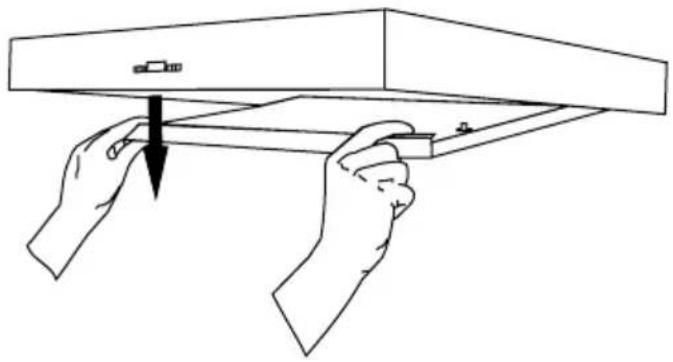
Pic. 11
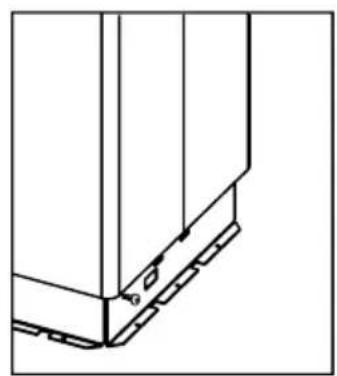
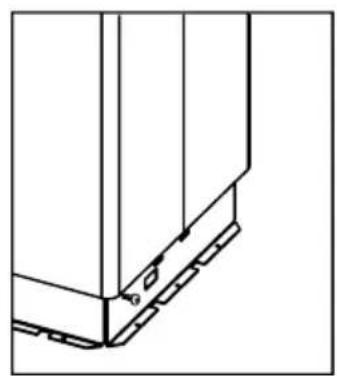
I) Fixing Motor Cabin on Product Body
Place hanging hooks on product body onto channels on motor cabin. Fix them together with 3.5x9.5 screws (Picture 12a-12b)
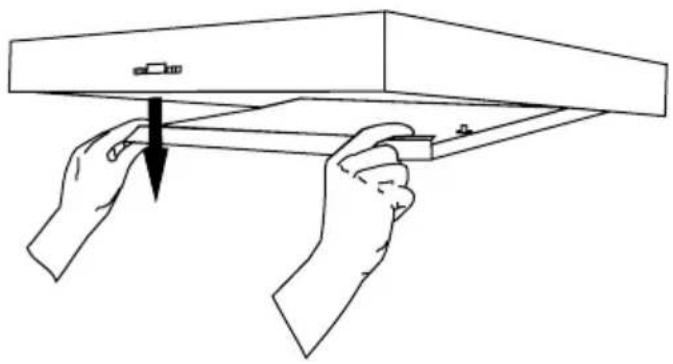
H) Removing split extraction plate
To remove split extraction plate, pull it down holding left and right upper points - Picture 11.
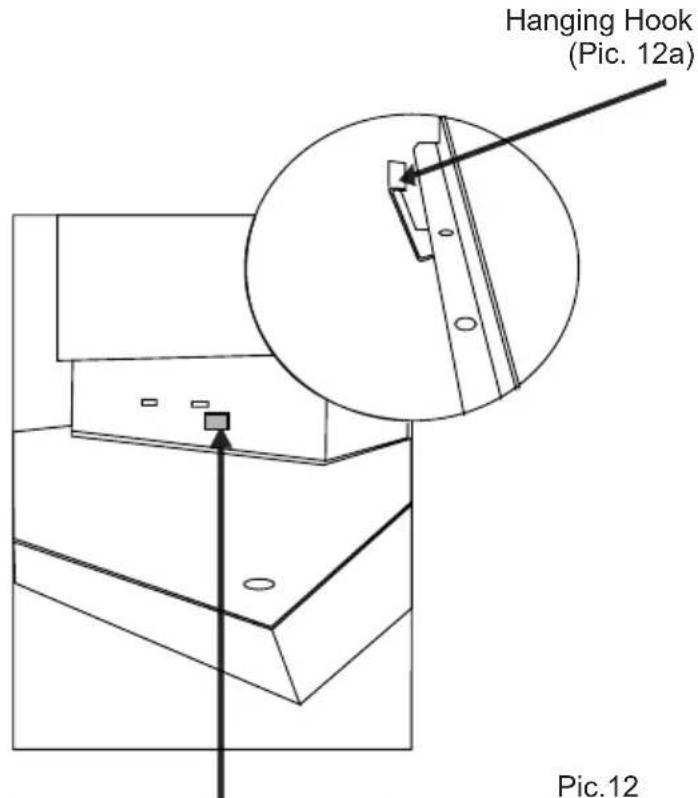
Hanging hook channel on motor cabin (Picture 12b)
INSTALLATION
Pic. 13
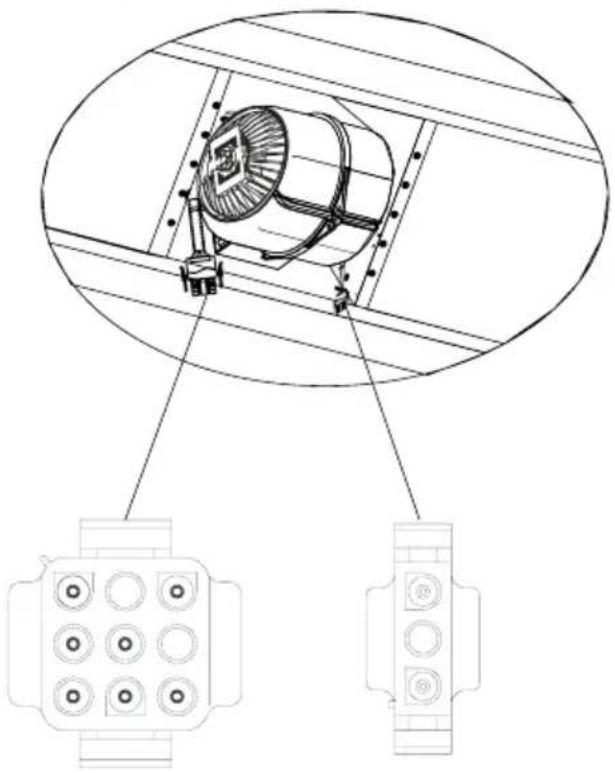
K) Making Connections
Connect 220V power supply socket with corresponding motor socket. Place aluminum cassette filters when connections are done. (Picture 14)
Pic. 15
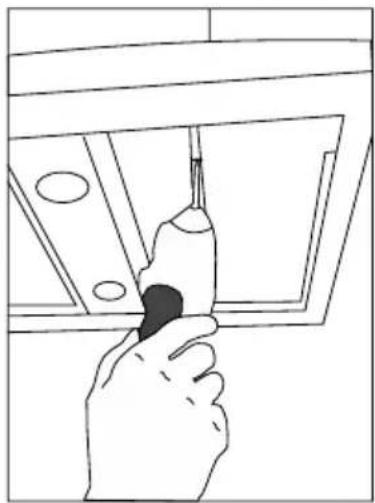
J) Fixing Motor Cabin on Product Body (2)
Using 3.5 x 9.5mm bolts mount both elements (Pic. 13).
Pic. 14
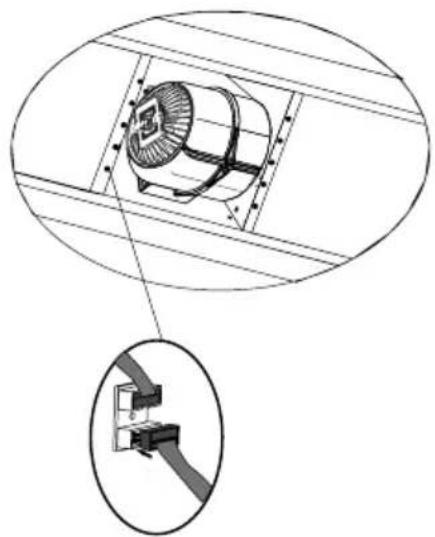
L) Making Connections (2)
Connect the white plug (supply) into the correct socket. See Picture 15.
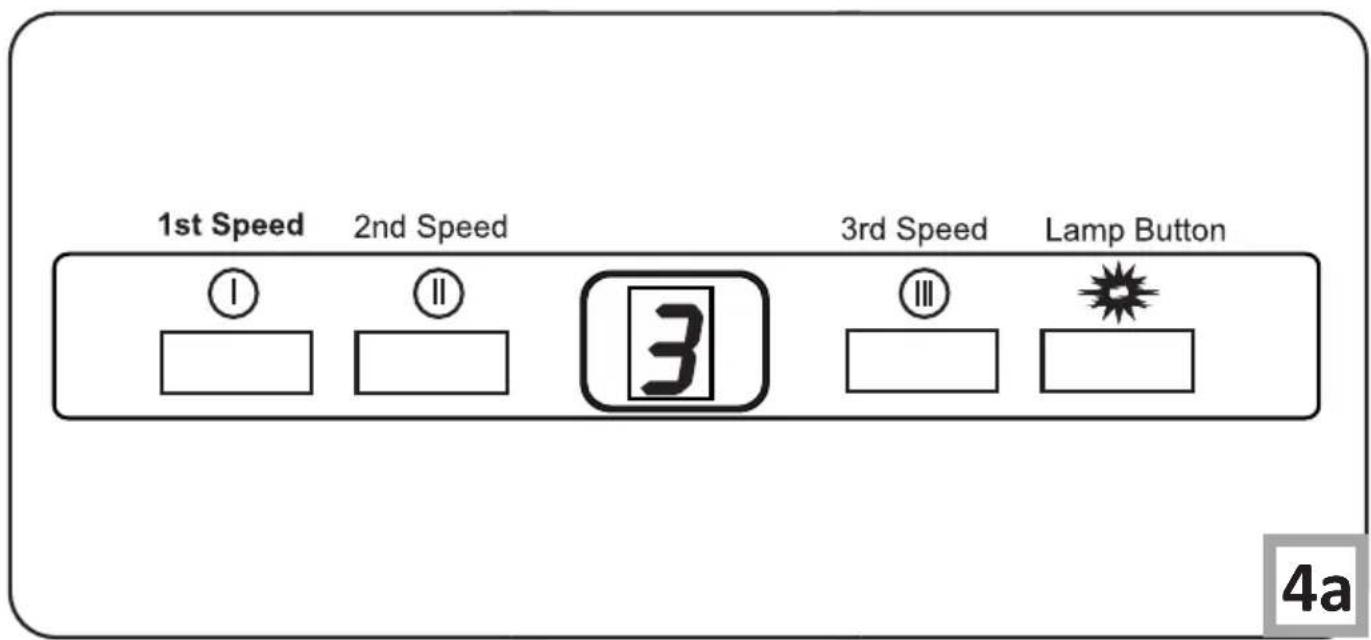
Use the control panel to control your cooker hood (Pic. 4a).
OPERATION
Control Panel
The appliance has 3 fan speeds. Depending on cooking intensity and the amount of steam, you can choose low, medium, or high fan speed. Buttons on the front panel are used for turning the appliance on.
To remove any residual odours and vapour from the kitchen, it is recommended to use this function of the hood for several minutes after cooking.
Light
Your cooker hood features LED light. Press the "🔥" button on the control panel (Pic. 4a) to turn the light on or off.
Regular maintenance and cleaning of the device will ensure faultless operation and help extend the life of the unit. Attention should be paid to replacing grease and carbon filters according to instructions.
Aluminium grease filter
Cleaning
Clean the filter when the display shows "" approximately every 2-3 weeks.
To clear the above symbol (once the filter is cleaned and re-installed), hold the "" button for 3 seconds (make sure the hood is not operating). "E" symbol will be shown on the display and the appliance will operate normally.
If you want to use your appliance while the "C" symbol is still displayed, press the "☐" button. The speed indication will appear for 1 second, and then the "C" symbol and the motor will keep running.
NOTE: The "C" symbol appears after 60 hours of the motor operation.
Clean the grease filter by washing it in a dishwasher (maximum washing temperature of 60°C) or by hand using a mild detergent or soap.
To replace:
Dismantling of aluminium grease filter is shown on Figure 5.
Acrylic filter is used in some models. This filter should be replaced at least once every two months or more frequently if the appliance is used intensively.
Charcoal filter (only the recirculation version)
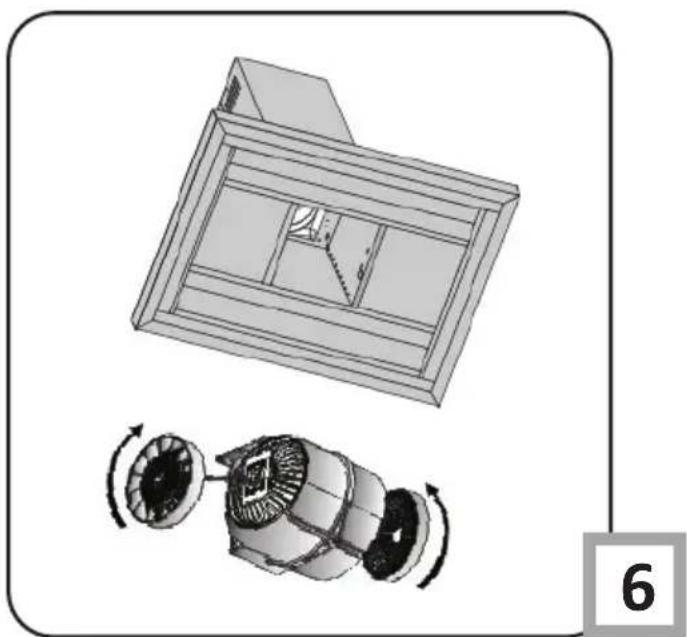
Operation - Carbon filters can be used only when the hood is not connected to any ventilation duct. Filters with active carbon can absorb odours until they are saturated. They cannot be washed or regenerated and should be replaced at least every 2 months or more frequently in case of very intensive use.
Replace:
Dismantling of charcoal filter is shown on Figure 6.
Lighting
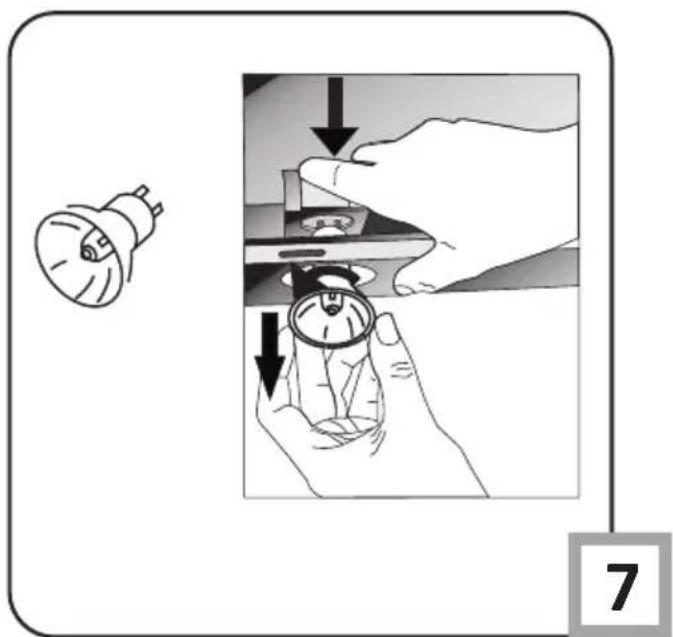
See Figure 7 for details how to replace lights. Use incandescent / halogen / LED modules of the same specification as those factory-installed in the appliance.
Cleaning
Normal hood cleaning:
- Do not use a soaked cloth, sponge, or water jet.
- Do not use solvents or alcohol, as they may tarnish lacquered surfaces.
- Do not use caustic substances, especially for cleaning stainless steel.
- Do not use a rough or abrasive cloth.
It is recommended to use a damp cloth and a neutral detergent.
Aluminium filters may be washed in the dishwasher. The colour of aluminium filters may change after several washings. This is normal and it is not necessary to renew the filters.

RECYCLING OF THE PACKAGING
Our packaging is made of environmentally friendly materials, which can be reused:
● The external packaging is made of cardboard/foil ● The FCKW free shape of foamed polystyrene (PS) ● Polyethylene (PE) foils and bags
ELIMINATION / DISPOSAL OF THE EQUIPMENT
If the appliance is no longer in use, cut the connecting cable off the used equipment before scrapping. We also recommend that the appliance is locked or render it useless so that the appliance presents no danger to children while being stored for disposal. This appliance is marked with a symbol of the crossed out waste container in conformance with the European Directive 2002/96/EC. Such

marking informs that the equipment may not be kept together with other waste coming from the household after the period of its use. The user is obliged to dispose of the appliance at the waste collection point authorised by the local authority. The local waste collection points, shops and communal units form an appropriate system enabling the disposal of the equipment.
Handling the used electrical and electronic equipment and any hazardous substances contained therein in a correct manner is vital to avoid damage the local natural environment. Therefore care and responsibility should always be taken in the disposal of these products
Manufacturer's Declaration
The manufacturer hereby declares that this product meets the requirements of the following European directives:
• Low Voltage Directive 2014/35/EC • Electromagnetic Compatibility (EMC) Directive 2014/30/EC • ErP Directive 2009/125/EC • Directive RoHS 2011/65/EC
and has thus been marked with the symbol and been issued with a declaration of compliance made available to market regulators.
GOOD LUCK WITH YOUR NEW GRAM RECEIVER
Image 5
Image 7
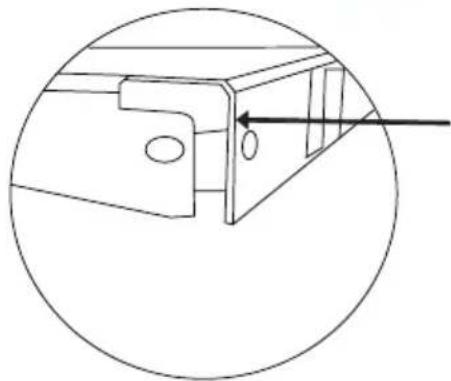
Image 8
Fig. 9
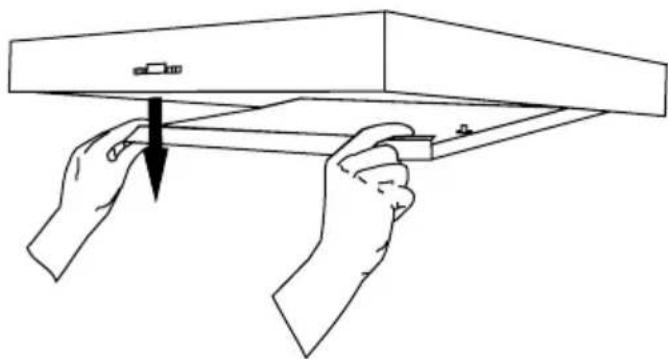
Image 10
Image 12
K) Connection to the mains
Image 14
Image 13
Figure 5a Figure 5b
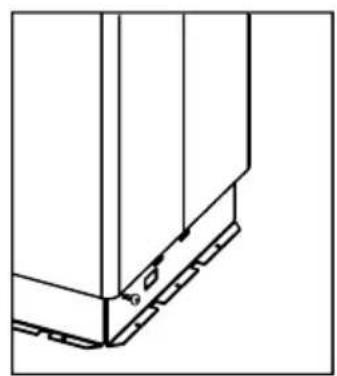
Figure 8
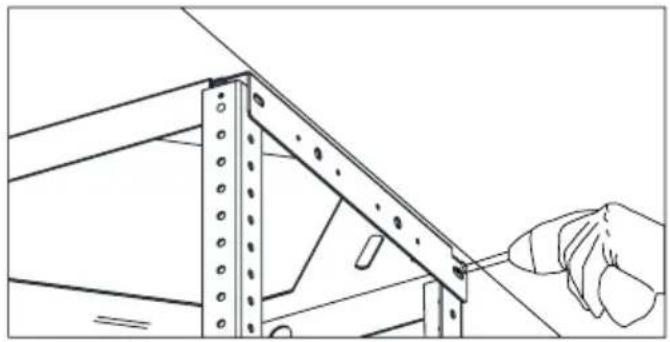
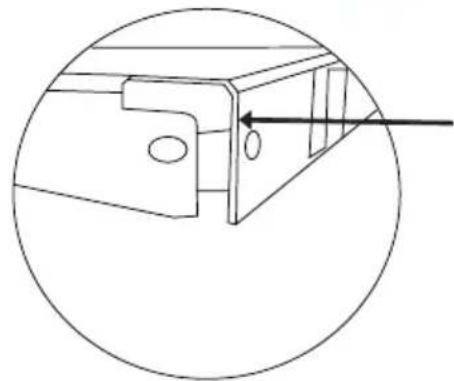
Figure 9
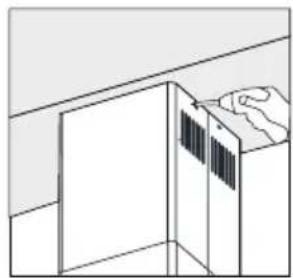
Figure 10
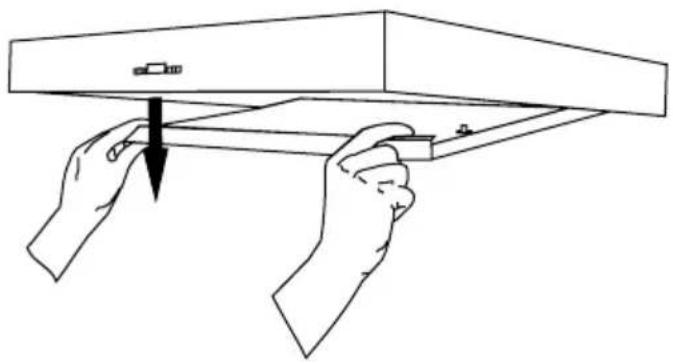
Figure 11
Figure 13
K) Connections
Figure 15
Figure 14
L) Connections (2)
THANK YOU FOR PURCHASING A GRAM PRODUCT
DEAR CUSTOMER!
TABLE OF CONTENTS
SAFETY INSTRUCTIONS 41
INSTALLATION 44
USE AND MAINTENANCE 49
ENVIRONMENTAL PROTECTION 51

Figure 5
Figure 5a Figure 5b
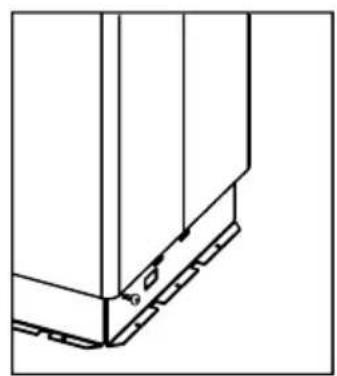
Figure 8
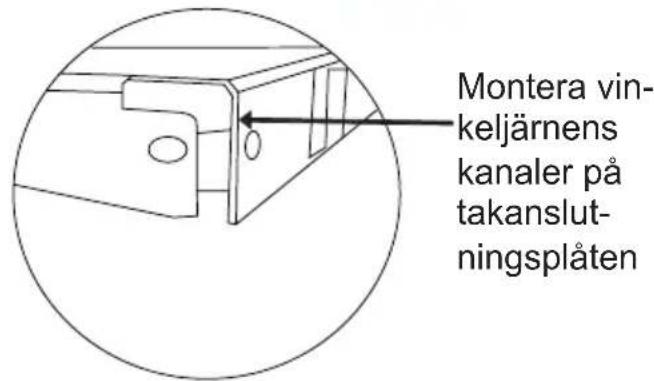
G) Fix the inner chimney
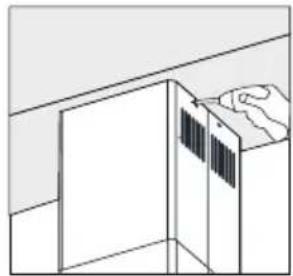
H) Remove the split extraction panel
K) Connection
L) Connection (2)
Connect the white connector (power supply) to the correct socket. Figure 15
THANK YOU FOR PURCHASING A GRAM PRODUCT
DEAR CUSTOMER!
USE AND MAINTENANCE 61
ENVIRONMENTAL PROTECTION 63

Figure 5a Figure 5b
INSTALLATION
D) Attach the motor housing to the suspension rod
Figure 7
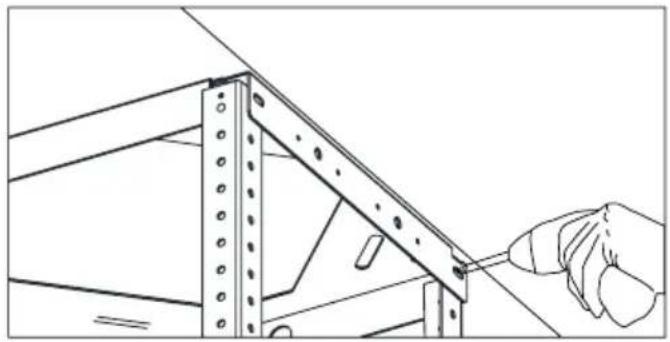
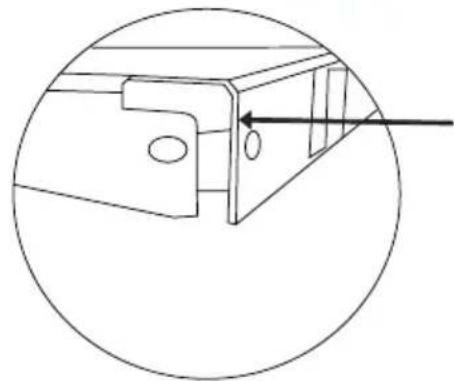
Figure 9
G) Attach the inner duct
Figure 11
Figure 13
K) Connect
Connect the 220V socket to the corresponding motor plug. Insert the aluminum cassette filters once the connections are made. (Figure 14)
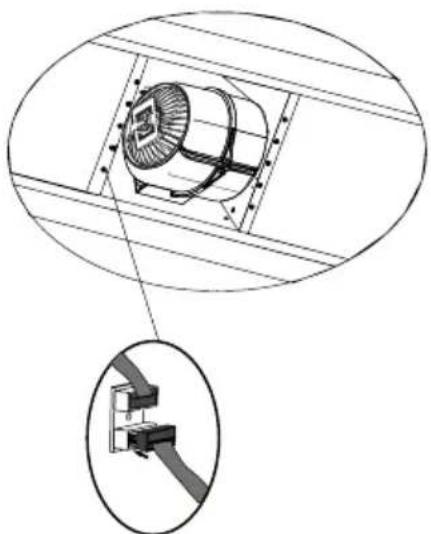
Figure 15
J) Attach the motor housing to the hull (2)
Use 3.5 x 9.5 mm bolts to attach both components (Figure 13).
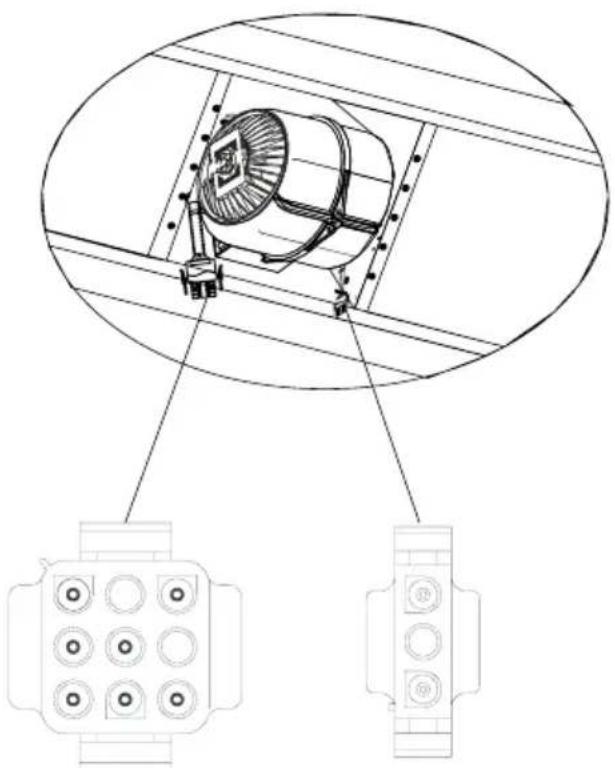
Figure 14
L) Connect (2)


- THANK YOU FOR PURCHASING A GRAM APPLIANCE
- DEAR CUSTOMER
- TABLE OF CONTENTS
- GUIDELINES CONCERNING THE SAFETY OF USE
- INSTALLATION
- ELEMENTS
- SETTING THE AIR EXTRACTOR MODE OF OPERATION OF THE HOOD
- FAN SPEEDS
- INSTALLATION OF CEILING CONNECTION PLATE
- INSTALLATION OF CORNERPIECES
- INSTALLATION OF CHIMNEYS TO MOTOR CABINET
- PLACING MOTOR CABIN TO HANGING BAR
- INSTALLING ALUMINUM FLEXIBLE PIPE
- METAL FRAMES INSTALLATION
- FIXING INTERNAL CHIMNEY
- FIXING MOTOR CABIN ON PRODUCT BODY
- REMOVING SPLIT EXTRACTION PLATE
- MAKING CONNECTIONS
- FIXING MOTOR CABIN ON PRODUCT BODY (2)
- MAKING CONNECTIONS (2)
- OPERATION
- CONTROL PANEL
- LIGHT
- ALUMINIUM GREASE FILTER
- CHARCOAL FILTER (ONLY THE RECIRCULATION VERSION)
- LIGHTING
- CLEANING
- RECYCLING OF THE PACKAGING
- ELIMINATION / DISPOSAL OF THE EQUIPMENT
- MANUFACTURER'S DECLARATION
- GOOD LUCK WITH YOUR NEW GRAM RECEIVER
- CONNECTION TO THE MAINS
- CONNECTIONS
- CONNECTIONS (2)
- THANK YOU FOR PURCHASING A GRAM PRODUCT
- FIX THE INNER CHIMNEY
- REMOVE THE SPLIT EXTRACTION PANEL
- CONNECTION
- CONNECTION (2)
- ATTACH THE MOTOR HOUSING TO THE SUSPENSION ROD
- ATTACH THE INNER DUCT
- CONNECT
- ATTACH THE MOTOR HOUSING TO THE HULL (2)
- CONNECT (2)
Brand : GRAM
Model : EFK 3290-92 X
Category : Range hood