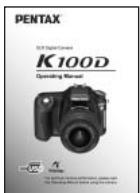
USER MANUAL K100D PENTAX
natural_image
Black Pentax K100 DSLR camera with visible lens and control buttons (no text or symbols on body)


Appareil photo.... 14
natural_image
Line drawing of a rectangular electronic component or housing (no text or symbols)
natural_image
Simple line drawing of a circular ring or washer (no text or symbols)
natural_image
Line drawing of a USB cable with two connectors (no text or symbols)
Câble USB
I-USB17
natural_image
Line drawing of a coiled cable with connectors (no text or symbols)
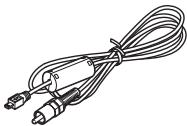
Câble vidéo
I-VC28
natural_image
Simple line drawing of a circular object with concentric rings (no text or symbols)
natural_image
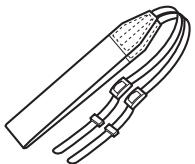
Line drawing of a mechanical clamp or connector with a dotted band (no text or symbols)
Courroie
O-ST53
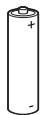
Piles alcalines AA ^* (quatre)
natural_image
Diagram of a mechanical rope knot with directional arrows indicating motion (no text or symbols)
natural_image
Diagram of a car suspension system with rope and directional arrows indicating motion (no text or symbols)
natural_image
Diagram of a battery assembly with multiple cylindrical components and a switch, no text or symbols present
3

natural_image
Diagram of a device's internal structure showing a panel inserted into a housing (no text or symbols present)
natural_image
Technical diagram of a mechanical device with internal components and directional arrows indicating movement (no text or symbols)


natural_image
Diagram of a PCHTAX DSLR camera with lens assembly shown, no text or symbols present
4
natural_image
Line drawing of a Pentax DSLR camera with lens and scroll arrows (no text or symbols)

natural_image
Line drawing of a car interior showing a door and vent (no text or symbols)
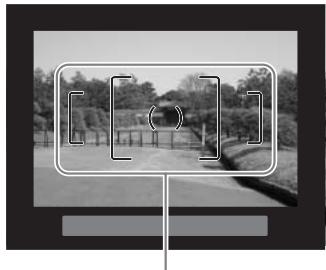
natural_image
Black-and-white photo of a rural road with fence and trees, no visible text or symbols
Mire AF

natural_image
Diagram of a car interior showing airflow direction and control buttons (no text or symbols)
Aide-mémoire
natural_image
Illustration of a person adjusting a camera lens, showing the lens being held (no text or symbols present)
Position horizontale
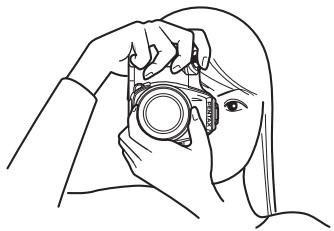
natural_image
Line drawing of a person adjusting a camera (no text or symbols)
Position verticale

natural_image
Illustration of a person holding a Pentax DSLR camera (no text or symbols visible)
natural_image
Illustration of a person holding a DSLR camera, no text or symbols present
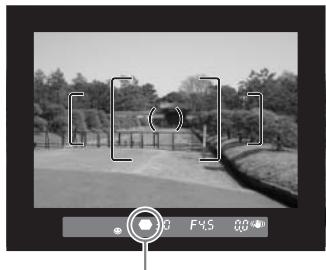
natural_image
Grayscale outdoor scene with fence and trees, no visible text or symbols
natural_image
Illustration of a person holding a DSLR camera, with an arrow pointing to the camera (no text or symbols present)

natural_image
Top: Pentax camera with display screen and control panel; Bottom: Supprimer outdoor scene with trees and path (no text or symbols on main image)
natural_image
Simple diagram showing a downward arrow pressing into a rectangular block on a surface (no text or symbols)
natural_image
Diagram showing a downward arrow pressing into a rectangular block on a surface, with hatched areas below (no text or symbols)
natural_image
Black-and-white photo of three tomatoes on a checkered surface (no text or symbols)
natural_image
Black-and-white photo of three apples on a checkered tablecloth (no text or symbols)


natural_image
Illustration of a person holding a Pentax DSLR camera (no text or symbols visible)

natural_image
Black-and-white outdoor scene with a fence and trees, no visible text or symbols
Téléobjectif
![[ ( ) ]](/content/2019/11/87276/images/a215fd04d0dba7427fd74b2491ca33574bc53a0c206000ab0c52f3958fd84599.jpg)
natural_image
Cartoon illustration of a girl with long hair looking downward, surrounded by floating objects (no text or symbols)
natural_image
Illustration of a girl with long hair looking downward at a tree (no text or symbols)
natural_image
Mechanical assembly diagram showing a lever mechanism with a directional arrow (no text or labels)
natural_image
Black-and-white photo of three smiling people holding phones, no visible text or symbols

natural_image
Line drawing of a PENTAX DSLR camera with no text or symbols on the body (pure technical diagram)

natural_image
Diagram of a car air vent with directional arrows indicating airflow or movement (no text or symbols)
natural_image
Mechanical assembly diagram showing a lever mechanism with a directional arrow (no text or labels)
natural_image
Diagram of a car air vent with directional arrows indicating airflow or movement (no text or symbols)
natural_image
Black-and-white outdoor scene with a paved path, trees, and a fence (no visible text or symbols)
natural_image
Black-and-white photo of a park with trees, a fence, and a pavilion (no visible text or symbols)
2
natural_image
Exterior view of a traditional Japanese-style building with tiled roof and wooden gate (no signage)
natural_image
Black-and-white outdoor scene with trees, a paved path, and a camera lens (no readable text or symbols)
natural_image
Black-and-white outdoor scene with a paved path, trees, and a fence (no visible text or symbols)
Diaporama
natural_image
Black-and-white outdoor scene with a paved path, trees, and a fence (no visible text or symbols)
3
natural_image
Line drawing of a DSLR camera connected to a monitor via cable (no text or symbols)
natural_image
Black-and-white photo of a fluffy white dog sitting on grass, with no visible text or symbols in the main image area.
7
natural_image
Black-and-white outdoor scene with a paved path, fence, and trees (no visible text or symbols)
natural_image
Black-and-white outdoor scene with a fence, trees, and a paved path (no visible text or symbols)
natural_image
Black-and-white collage of historical European-style buildings and rivers, no visible text or symbols
natural_image
Black-and-white outdoor scene with a paved path, trees, and a fence (no visible text or symbols)
2
natural_image
Illustration of a person holding a DSLR camera, with no visible text or symbols
natural_image
Grayscale outdoor scene with fence and trees, no visible text or symbols
natural_image
Illustration of a person standing beside a large industrial structure with smoke rising, no visible text or symbols
natural_image
Line drawing of a woman standing in front of a bridge structure, no text or symbols present

natural_image
Illustration of a person holding a Pentax DSLR camera (no text or symbols visible)
natural_image
Black-and-white outdoor photo showing a fence and trees, with no visible text or symbols on the main subject.
natural_image
Line drawing of a person holding a Pentax camera (no text or symbols present)
natural_image
Illustration of a fountain with water spray and trees in the background (no text or symbols)
natural_image
Illustration of a snowman with steam rising from a chimney, surrounded by snow-covered trees (no text or symbols)
natural_image
Close-up of a textured, irregularly shaped object against a blurred background (no text or symbols visible)
natural_image
Black-and-white close-up of a poppy flower with small daisies in the background (no text or symbols)
Profondeur de champ
natural_image
Pure geometric diagram with grid and central circle (no text or symbols)

natural_image
3D wireframe surface plot showing a smooth, curved peak (no text or symbols)
natural_image
Simple diagram with a central circle and three vertical lines, no text or symbols present
natural_image
Diagram of a car dashboard with directional arrows indicating rotation or movement (no text or symbols)
Signal d'exposition
Signal d'exposition
natural_image
Diagram of a car dashboard with directional arrows indicating rotation or movement (no text or symbols)
Signal d'exposition
natural_image
Diagram of a car dashboard with directional arrows indicating rotation (no text or symbols)
natural_image
Black-and-white landscape illustration featuring a winding river, trees, and rolling hills under a cloudy sky (no text or symbols)
Exposition normale
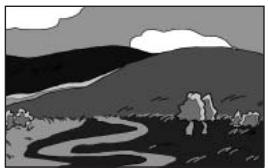
natural_image
Black-and-white landscape illustration featuring a winding river, distant hills, and a cloudy sky (no text or symbols)
Sous-exposition
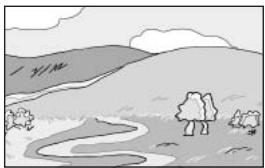
natural_image
Simple landscape illustration with a winding river, hills, and scattered trees under a cloudy sky (no text or symbols)
Surexposition
natural_image
Illustration of a person sitting at a table with flowers and a vase, displayed within a smartphone camera interface (no text or symbols on the main image)
$$
F = 1 5. 6 \div 5. 2 = 3
$$
natural_image
Line drawing of a DSLR camera setup with tripod-mounted camera and coiled cable (no text or symbols)
natural_image
Line drawing of three camera setup configurations: tripod-mounted, two mounted with speakers and a DSLR camera connected via coiled cables (no text or symbols)

natural_image
Illustration of a hand using a tool to clean or brush the lens of a Pentax DSLR camera (no text or symbols present)
natural_image
Line drawing of a camera with lens and mounted sensor (no text or symbols)
natural_image
Line drawing of a backpack with a circular button and zipper (no text or symbols)
Divers
natural_image
Line drawing of a rectangular electronic component or housing with a recessed cavity (no text or symbols)
natural_image
Line drawing of a mechanical clamp or connector with two curved bands and a central handle (no text or symbols)
Compression : ★★★ (excellent) = 1/3, ★★ (très bon) = 1/6, ★ (bon) = 1/12
Bouton Av (correction IL/Av) 99
Bouton ↓UP
Bouton ▶ (Lecture) 99, 101
Bouton MENU 99,100
Bouton OK 99, 101
Bouton o-n (Protection) 101
Informations capture 17, 18
Mode programme P 139
Mode sans cordon 162
Mode synchro flash hautes vitesses .. 162
Mode unique AF.S 127
Molette de zoom 99
Multizone 136
Musée 51
N
Nocturne (mode pose B) 146
Nom Fichier 176
NTSC. 175
Nuageux (balance blancs) 118
Piles Ni-MH rechargeables 26
Pixels 115
Pixels enregistrés ...... 31, 115
Point AF 128
Portrait 50
Superposer zone AF 21, 128
Suppr ttes images 80
For customers in USA
STATEMENT OF FCC COMPLIANCE
This device complies with Part 15 of the FCC Rules. Operation is subject to the following two conditions: (1) This device may not cause harmful interference, and (2) this device must accept any interference received, including interference that may cause undesired operation. Changes or modifications not approved by the party responsible for compliance could void the user's authority to operate the equipment.
This equipment has been tested and found to comply with the limits for a Class B digital device, pursuant to part 15 of the FCC Rules.
These limits are designed to provide reasonable protection against harmful interference in a residential installation. This equipment generates, uses and can radiate frequency energy and, if not installed and used in accordance with the instructions, may cause harmful interference to radio communications. However, there is no guarantee that interference will not occur in a particular installation.
If this equipment does cause harmful interference to radio or television reception, which can be determined by turning the equipment off and on, the user is encouraged to try to correct the interference by one or more of the following measures:
- Reorient or relocate the receiving antenna.
- Increase the separation between the equipment and receiver.
- Connect the equipment into an outlet on a circuit different from that to which the receiver is connected.
* Consult the dealer or an experienced radio/TV technician for help.
For customers in Canada
This Class B digital apparatus meets all requirements of the Canadian Interference - Causing Equipment Regulations.
According to 47CFR, Parts 2 and 15 for
Class B Personal Computers and Peripherals
We:
PENTAX Imaging Company
A Division of PENTAX of America, Inc.
Located at:
600 12 ^th Street, Suite 300
Golden, Colorado 80401 U.S.A.
Phone: 303-799-8000 FAX: 303-790-1131
Declare under sole responsibility that the product identified herein complies with 47CFR Parts 2 and 15 of the FCC rules as a Class B digital device. Each product marketed is identical to the representative unit tested and found to be compliant with the standards. Records maintained continue to reflect the equipment being produced can be expected to be within the variation accepted, due to quantity production and testing on the statistical basis as required by 47CFR §2.909. Operation is subject to the following two conditions: (1) This device may not cause harmful interference, and (2) This device must accept any interference received, including interference that may cause undesired operation. The above named party is responsible for ensuring that the equipment complies with the standards of 47CFR §15.101 to §15.109.
Product Name: PENTAX Digital Still Camera
Model Number: K100D
Contact person: Customer Service Manager
Date and Place: June, 2006, Colorado
PENTAX Imaging Company A Division of PENTAX of America, Inc.
(Headquarters)
600 12th Street, Suite 300 Golden, Colorado 80401, U.S.A.
(Distribution & Service Center)
16163 West 45th Drive, Unit H Golden, Colorado 80403, U.S.A.
(http://www.pentaximaging.com)
PENTAX Canada Inc. 1770 Argentina Road Mississauga, Ontario L5N 3S7, CANADA (http://www.pentax.ca)

for your
precious moments