
T5 - Loudspeaker EDIFIER - Free user manual and instructions
Find the device manual for free T5 EDIFIER in PDF.


| Product type | Active subwoofer |
| Brand and model | Edifier T5 |
| Output power | 70 W |
| Frequency response | 38 Hz – 200 Hz |
| Low-pass filter (crossover) | 50-150 Hz (adjustable) |
| Phase switch | 0° or 180° |
| Audio inputs | 1 x line input (RCA) |
| Audio outputs | 1 x line output (RCA) for main speaker |
| Power indicator | Green (on), red (standby) |
| Auto standby mode | After 5 minutes without signal |
| Power supply | Mains (power cable included) |
| Intended use | Indoor only |
| Operating temperature | 0°C to 35°C |
| Dimensions (approx.) | 280 x 280 x 300 mm (W x D x H) |
| Weight (approx.) | 7 kg |
| Maintenance and cleaning | Disconnect before cleaning; use a dry cloth, no chemicals |
| Safety | Do not open, do not expose to water, do not block ventilation |
| Spare parts and repairability | Repair by authorized personnel only; no user-serviceable components |
| Included accessories | power cable, user manual |
Frequently Asked Questions - T5 EDIFIER
User questions about T5 EDIFIER
0 question about this device. Answer the ones you know or ask your own.
Ask a new question about this device
Download the instructions for your Loudspeaker in PDF format for free! Find your manual T5 - EDIFIER and take your electronic device back in hand. On this page are published all the documents necessary for the use of your device. T5 by EDIFIER.
USER MANUAL T5 EDIFIER
Important safety instruction
-
Please read the instructions carefully. Keep it in safe place for future reference.
-
Use only accessories approved by the manufacturer.
-
Install the instrument properly by following the instructions in the device connection section.
-
Using the product in a 0-35°C environment is recommended.
-
To reduce the risk of fire and electric shock, do not expose the product to rain or moisture.
-
Do not use this product near water. Do not immerge the product into any liquid or have it exposed to dripping or splashing.
-
Do not install or use this product near any heat source (e.g. radiator, heater, stove, or other devices that generate heat).
-
Do not place any object filled with liquids, such as vases on the product; neither should any open fire, such as lighted candles be placed on the product.
-
Do not block any ventilation openings. Do not insert any object into ventilation openings or slots. It may cause fire or electric shock.
-
Keep sufficient clearance around the product to maintain good ventilation (minimum 5cm is recommended).
-
Do not force a plug into the jack. Before connection, check for blockage in the jack and whether the plug matches the jack and is oriented to the right direction.
-
Keep the provided accessories and parts (such as screws) away from children to prevent from being swallowed by mistake.
-
Do not open or remove the housing yourself. It may expose you to dangerous voltage or other hazardous risks. Regardless the cause of damage (such as damaged wire or plug, exposure to liquid splash or foreign object falling in, exposure to rain or moisture, product not working or being dropped, etc.), the repair has to be performed by an authorized service professional immediately.
-
Before cleaning the product with dry cloth, always turn off the product and disconnect the power plug first.
-
Never use strong acid, alkali, gasoline, alcohol, or other chemical solvents to clean the product surface. Use only neutral solvent or clear water for cleaning.

Excessively loud music may lead to hearing loss. Please keep the volume in a safe range.

Correct Disposal of this product. This marking indicates that this product should not be disposed with other household wastes throughout the EU. To prevent possible harm to the environment or human health from uncontrolled waste disposal, recycle it responsibly to promote the sustainable reuse of material resources. To return your used device, please use the return and collection systems or contact the retailer where the product was purchased. They can take this product for environmental safe recycling.

Use only with the cart, stand, tripod, bracket, or table specified by the manufacturer, or sold with the apparatus. When a cart is used, use caution when moving the cart/apparatus combination to avoid injury from tip-over.
Important safety instruction
Power warning:
- Place the product near the power outlet for easy use.
- Before use, make sure that the operating voltage is the same as your local power supply. Correct operating voltage can be found on the product plate.
- For safety purpose, unplug the product during lightning storms or when unused for extended periods of time.
- Under normal conditions, the power supply may get hot. Please keep good ventilation in the area and exercise caution.
- Safety warning labels on the housing or bottom of the product or power adaptor.

This symbol is to alert the user to the presence of un-insulated dangerous voltage within the product's enclosure that may be of sufficient magnitude to constitute a risk of electric shock to persons.

This symbol is to warn the user not to disassemble the enclosure of the product and there is no user-replaceable part inside. Take the product to an authorized service center for repair.

This symbol indicates that the product is for indoor use only.

This symbol indicates that the product is a CLASS II or double insulated electrical device with no earth requirement.
The MAINS plug is used as the disconnect device, the disconnect device shall remain readily operable.
Unpack the box
Box Contents


Power cable

3.5mm - RCA audio cable

RCA to RCA audio cable

User manual
Illustration

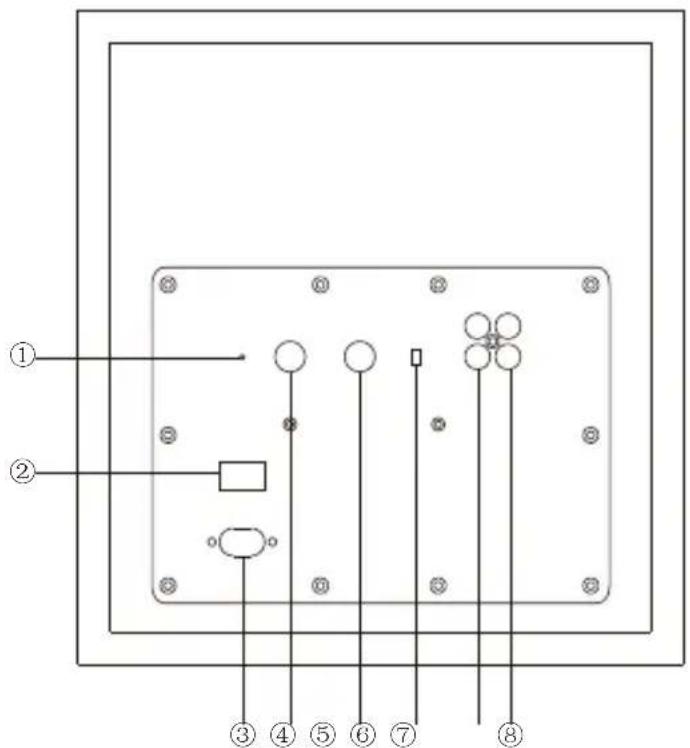
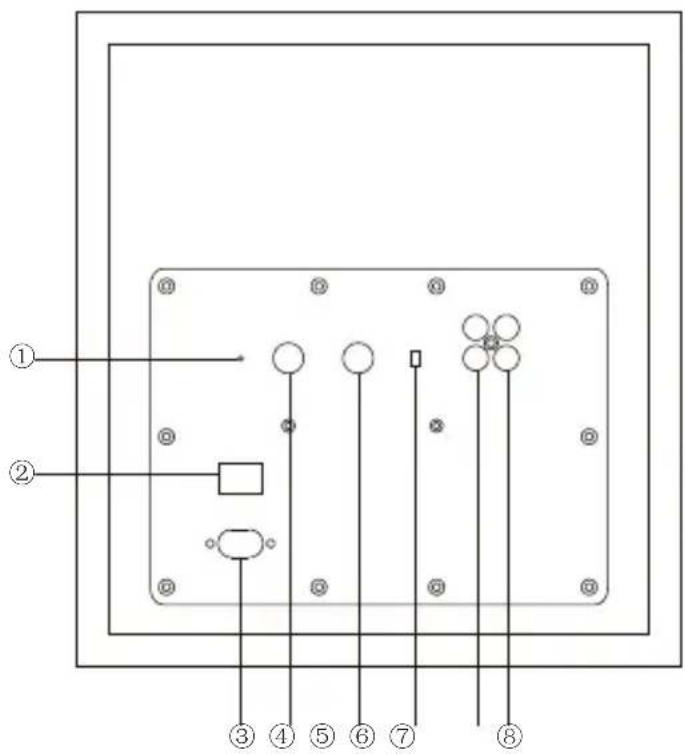
- Power indicator
Power on: green
Standby: red (unit will enter standby mode following 5 minutes sans signal)
- Power switch
- Power cable connector
- Volume adjustment
- Low frequency bandwidth
- Phase selection
- Signal input
- Signal output
Operational Guide

Note:
- Be sure to unplug the power cables of subwoofer and audio source device from the wall outlet prior to any connections.
- This product is a powered subwoofer that can be connected to audio source devices with low levels or pre-stage signal output (such as powered amplifier, DVD, Blu-ray player, TV, PC, mobile phone, Pad, set top box, TV box and game console etc.), but CANNOT BE CONNECTED to rear power output terminal of powered amplifier device.
Connections:
Connection 1:
"Subwoofer Output" connection:
If audio source device has the port like "Sub Out", "Woofer Out", "SW Out" or "LFE Out", namely the line output port specialized for connecting subwoofer, please connect this output port to "Signal In" port on the subwoofer using audio cable.
Connection 2:
"Left and Right Sound Channel Output" connection:
If audio source device has no dedicated subwoofer output port but has left and right sound channel line output port (LINE OUT) (or FL/FR output port on the devices supporting 5.1/7.1 channels), please connect this left and right sound channel line's output port to "Signal In" port on the subwoofer using audio cable, then connect "Signal Out" port on the subwoofer to audio input port on the powered main speaker.
Volume Adjustment:
To achieve optimum listening effect, ensure the subwoofer's volume is reasonably matched with that of the main speaker. Please set the subwoofer's volume to the minimum level prior to adjustment.
If connected by connection 1:
1) Set Bass Adjustment of audio source device to the "middle" or "0 dB" position (if have).
2) Play audio source containing low frequency components and adjust the main speaker's volume to an appropriate level &
3) Gradually increase the subwoofer's volume until it can be matched with that of the main speaker;
After adjustment is finished, adjusting the audio source device's master volume can control the subwoofer and other speaker's volume simultaneously.
Operational Guide
If connected by connection 2:
1) On the audio source device play audio source containing low frequency components and adjust the audio source's volume to 50% level;
2) Adjust the main speaker's volume to an appropriate level; &
3) Gradually increase the subwoofer's volume until it can be matched with that of the main speaker;
After the adjustment is finished, adjusting the audio source device's master volume can control the subwoofer and other speaker's volume simultaneously.
Low Frequency Bandwidth Adjustment:
This adjustment determines the crossover point inputting to the subwoofer. Bass signal below the crossover point will be “handed over” to the subwoofer for playing. If audio source device can set the crossover point, please rotate the “low frequency bandwidth” knob on the subwoofer to the rightmost, and the crossover point is determined by the audio source device; If audio source device cannot set the crossover point, please adjust the “low frequency bandwidth” knob to select an appropriate crossover point.
Generally, if the main speaker connected to the subwoofer is a larger speaker (such as above 4 inches), setting the crossover point to 50-90Hz is more reasonable; if the main speaker is a smaller one (such as below 4 inches), setting the crossover point to 90-150Hz is more appropriate. The smaller the speaker, the higher the crossover frequency should be.
After the entire audio system is connected properly, please adjust the low frequency bandwidth and the subwoofer's volume until the subwoofer and other speaker achieve smooth bass combination.
Phase selection:
Acoustically match the subwoofer's output with that of the main speaker. Please select the "0" or "180" degree phase and observe which phase can obtain much subwoofer output at the listening position.
Specifications / Troubleshooting
Specifications
Power output: 70W
Frequency response: 38Hz-200Hz
There is no restriction of use.
Troubleshooting
No sound
- Ensure audio source is playing and all cables are firmly connected.
- Ensure signal output of audio source is set correctly.
- Check the volume levels on speakers and audio source player.
- Please turn speakers off and restart them.
Noise coming from speakers
Edifier speakers generate little noise, while the background noise of some audio devices are too high. Please unplug audio cables and turn the volume up, if no sound can be heard at 1 meter away from the speaker, then there is no problem with this product.
To learn more about EDIFIER, please visit www.edifier.com
For Edifier warranty queries, please visit the relevant country page on www.edifier.com and review the section titled Warranty Terms.
USA and Canada: service@edifier.ca
South America: Please visit www.edifier.com (English) or www.edifierla.com (Spanish/Portuguese) for local contact information.
Consignes de securite importantes
Caisson de basses

Câble audio RCA - 3,5mm

Câble audio RCA - RCA


Cable de audio 3,5mm-RCA

Cable de audio RCA a RCA
Manual de usuario
Ilustraciones
Subwoofer

Netzkabel

Bedienungsanleitung
Illustrationen
- Stromanzeige
Eingeschaltet: grün
Subwoofer

Cavo audio RCA da 3,5mm

Manuale dell'utente

- Spia di accensione
Accensione: verde
Cabo de áudio RCA de 3,5mm

Manual do utilizador
Ilustrações

Manual Edition 1.1, May 2019
IB-200-T00050-02
Edifier International Limited
P.O. Box 6264
General Post Office
Hong Kong
Tel: +852 2522 6989
Fax: +852 2522 1989
www.edifier.com
© 2019 Edifier International Limited. All rights reserved.
Printed in China
NOTICE:
For the need of technical improvement and system upgrade, information contained herein may be subject to change from time to time without prior notice.
Products of EDIFIER will be customized for different applications. Pictures and illustrations shown on this manual may be slightly different from actual product. Picture for reference only, actual product prevails.


- IMPORTANT SAFETY INSTRUCTION
- POWER WARNING
- UNPACK THE BOX
- ILLUSTRATION
- OPERATIONAL GUIDE
- NOTE
- CONNECTIONS
- VOLUME ADJUSTMENT
- LOW FREQUENCY BANDWIDTH ADJUSTMENT
- PHASE SELECTION
- SPECIFICATIONS / TROUBLESHOOTING
- SPECIFICATIONS
- TROUBLESHOOTING
- NO SOUND
- NOISE COMING FROM SPEAKERS
- CONSIGNES DE SECURITE IMPORTANTES
- ILUSTRACIONES
- ILLUSTRATIONEN
- ILUSTRAÇÕES
- NOTICE
Brand : EDIFIER
Model : T5
Category : Loudspeaker