
iF330BT - Loudspeaker EDIFIER - Free user manual and instructions
Find the device manual for free iF330BT EDIFIER in PDF.


| Product Type | Wireless Bluetooth Speaker |
| Brand | Edifier |
| Model | iF330BT |
| Color | Black (typical) |
| Dimensions (W x H x D) | Approx. 250 x 120 x 90 mm |
| Weight | Approx. 1.2 kg |
| Power Supply | DC 12V 1.5A (adapter included) |
| Battery Type | Built-in rechargeable lithium-ion |
| Battery Life | Up to 8 hours (varies by volume) |
| Bluetooth Version | 4.0 |
| Bluetooth Range | Up to 10 meters (33 ft) |
| Audio Inputs | 3.5mm AUX, USB (for playback) |
| Output Power | 2 x 5W RMS |
| Frequency Response | 60 Hz - 20 kHz |
| Controls | Volume, Play/Pause, Next/Previous, Pairing button |
| Cleaning Instructions | Wipe with a soft dry cloth; do not use abrasive cleaners |
| Safety Warnings | Keep away from water and heat sources; do not disassemble |
| Spare Parts Availability | Contact Edifier support for replacement adapter or battery |
| Repair Information | Do not attempt self-repair; contact authorized service center |
| General Info | Designed for home or portable use; supports hands-free calling |
Frequently Asked Questions - iF330BT EDIFIER
User questions about iF330BT EDIFIER
0 question about this device. Answer the ones you know or ask your own.
Ask a new question about this device
Download the instructions for your Loudspeaker in PDF format for free! Find your manual iF330BT - EDIFIER and take your electronic device back in hand. On this page are published all the documents necessary for the use of your device. iF330BT by EDIFIER.
USER MANUAL iF330BT EDIFIER
16th Floor, Tower 2.
Lipco Centre,
89 Queensway
Hong Kong
Tel: +852 2522 6989
Fax: +852 2522 1989
www.edifer-international.com
© 2012 Edifier International Limited. All rights reserved.
Printed in China
NOTICE:
For the need of technical improvement and system upgrade, information contained herein may be subject to change from time to time without prior notice.
Products of Edifier will be customized for different applications. Pictures and illustrations shown on this manual may be slightly different from actual product. If any difference is found, the actual product prevails.
Important safety instruction
WARNING: To reduce the risk of fire or electric shock, do not expose this apparatus to rain or moisture.
Thank you for purchasing this Edifier product. For generations, Edifier tries to provide powered speaker products to satisfy the need of our end customers, even the most demanding ones. This product can add to your home entertainment, personal computer, and mini home theater great sound performance. Please read this manual carefully to obtain the best of this system.

The lightning flash with arrowhead inside their angle, is intended to alert the user to the presence of un-insulated dangerous voltage within the product's enclosure that may be of a sufficient magnitude to constitute a risk of electric shock to person

To prevent the risk of electric shock, do not remove cover (or back). No user-serviceable Parts inside. Refer servicing to qualified Service personnel only.

The cacclamation point inside the triangle is intended to alert the user to the presence of important operating and maintenance (servicing) instructions in the literature accompanying the product.
- Read these instructions.
-
Here all warraros.
-
Do not use this apparatus near water.
-
Do not brock any ventilation on openings. Install in accordance with the manufacturer's instructions.
- Do not install near any heat sources such as radiators, heat registers, gloves, or other apparatus (including amplifiers) that produce heat.
-
Do not detect the safety purpose of the polarized or grounding-type plug. A polarized plug has two blades with one wider than the other. A grounding-type plug has two blades and a third grounding plug. The wide blade or the third prong are provided for your safety. If the provided plug does not fit into your outlet, consult an electrician for replacement of the obsolete outlet.
-
Protect the power cord from being walked on or pinched particularly at plugs, convenience receptades, and the point where they exit from the apparatus.
-
Only use attachments/accessories specified by the manufacturer.
-
Using this apparatus, during lighting storms or when unused for
-
Refer all servicing to qualified service personnel. Servicing is required when the apparatus has been damaged in any way, such as power-supply cord or plug is damaged, liquid has been spilled or objects have fallen into the apparatus, the apparatus has been exposed to rain or moisture, does not operate normally, or has been dropped.
- The MAINS plug or an appliance coupler is used as the disconnect device, the disconnect device shall remain readily operable
Note: The marking is located on the bottom enclosure of the speaker. There is a rechargeable Li-ion battery in the remote control. The battery shall not be exposed to excessive heat such as sunshine, fire or the ice. Cancer or explosion if the battery is incorrectly replaced. Replace only with the same or equivalent type. The MAINS plug or an appliance coupler is used as the disconnect device, the disconnect device shall remain readily operable
FCC Caution:
"Changes or modifications not expressly approved by the past responsible for compliance could void the user's authority to operate the equipment."
FCC statement:
* This device complies with Part 15 of the FCC Rules. Operation is subject to the following two conditions:
(1) this device may not cause harmful interference, and (2) this device must accept any interference received, including interference that may cause undesired operation.
1
English
Important safety instruction
This equipment has been tested and found to comply with the limits for a Class B digital device, pursuant to part 15 of the FCC Rules. These limits are designed to provide reasonable protection against harmful interference in a residential installation. This equipment generates, users and can radiate radio frequency energy and, if not installed and used in accordance with the instructions, may cause harmful interference to radio communications. However, there is no guarantee that interference will not occur in a particular installation. If this equipment does cause harmful interference to radio or television reception, which can be determined by turning the equipment all and on, the user is encouraged to try to correct the maintenance by one or more of the following measures: —Rearont or relocate the receiving antenna. —Increase the separation between the equipment and receiver. Connect the equipment into an outlet on a circuit different from that to which the receiver is connected. —Consult the dealer or an experienced radio/TV technician for help.
IC statement:
This device complies with Industry Canada license-exempt RSS standard(s). Operation is subject to the following two conditions:
(1) this device may not cause interference, and (2) this device must accept any interference, including interference that may cause undesired operation of the device. This Class 【B】 digital apparatus complies with Canadian ICLS-003.
Use only with the cart, stand, tripod, bracket, or table specified by the manufacturer, or sold with the apparatus. When a cart is used, use caution when moving the cart/apparatus combination to avoid injury from tip-over.

Correct Disposal of this product. This marking indicates that this product should not be disposed with other household wastes throughout the EU. To prevent possible harm to the environment or human health from uncontrolled waste disposal, recycle it responsibly to promote the sustainable reuse of material resources. To return your used device, please use the return and collection systems or contact the retailer where the product was purchased. They can take this product for environmental safe recycling.

This equipment is a Class II or double insulated electrical appliance. It has been designed in such a way that it does not require a safety connection to electrical earth.
Unpack the Box
Box contents:

Remote control (installed at the bottom of the speaker)

User manual

Power adapter (12V/20W)

3.5mm \~ 3.5mm audio cable
Illustrations

![AUX: AUX input (PC sound card, MP3/MP4 player etc.) DC IN [17V]: Connect to power adapter Rear view](/content/2026/05/1017651/images/ea14fa1a09ff831903b8d58861c3602fabb85bc024bc5ed135720ec406a58898.jpg)

Operational guide
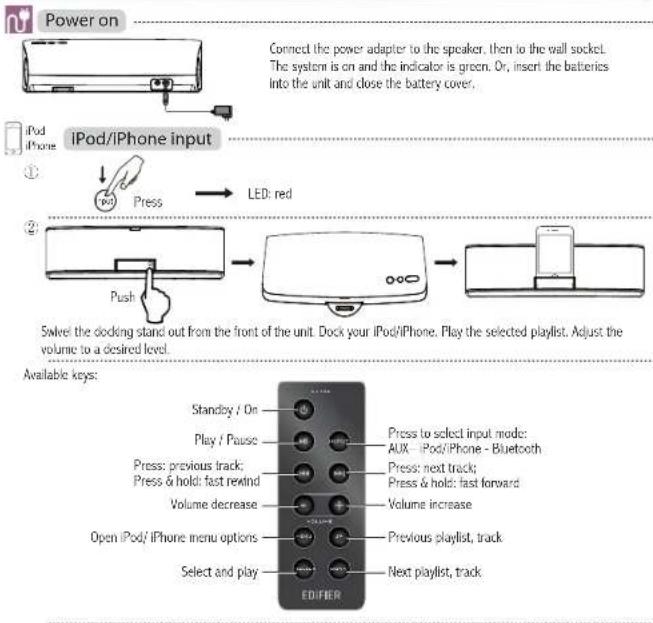
5
English
Operational guide
[NO TEXT]
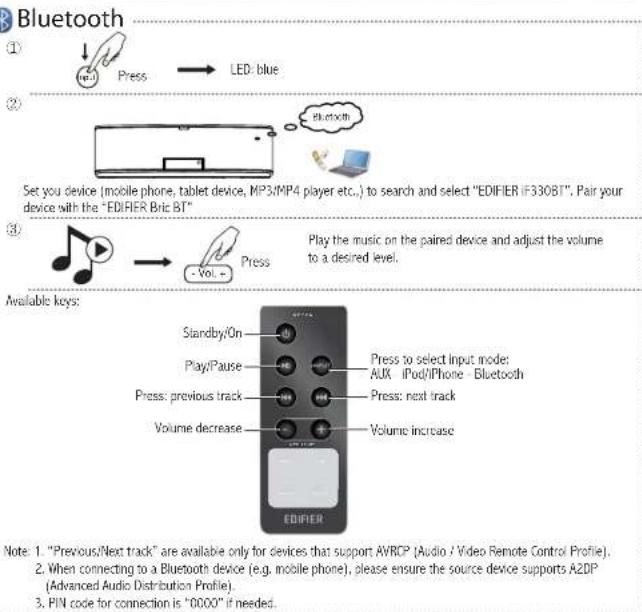
6
English
Operational guide

AUX input
①

ess

LED: green
②
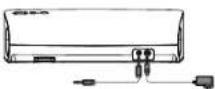
Connect the AUX on back panel to the external PC sound card, MP3/MP4 player or other audio source with the 3.5mm to 3.5mm audio cable.
③


Play the connected device and adjust the volume to a desired level.
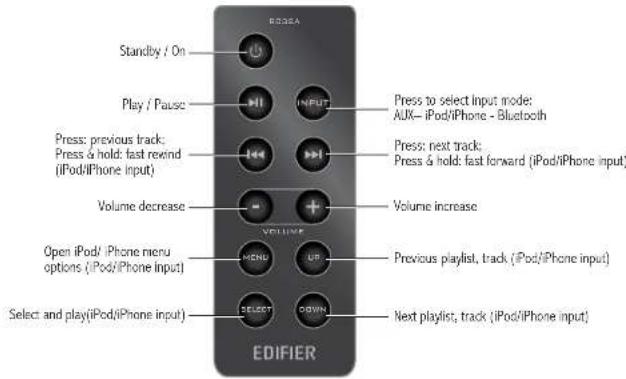
Available keys:
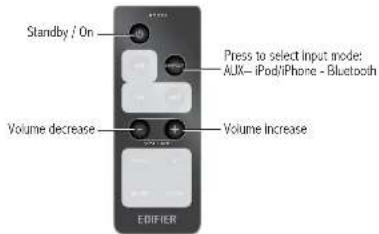
7
English
Operational guide for remote control
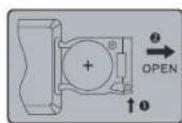
Battery loading: Please refer to the illustration on the right side to open the battery compartment, insert the included AA size, CR 2025 battery and close the compartment.
Note: 1. Do not place the remote control in places that are hot and humid.
- Remove the batteries when unused for long period of time.
- The battery (battery or batteries or battery pack) should not be exposed to excessive heat such as direct sun, fire or similar.
Specifications
Power output: RMS 6W × 2 (THD + N=10%, f0=1KHz, DRC off)
Signal to noise ratio: ≥80dBA
Distortion: ≤0.5% (@1/4 output)
Frequency response: 200Hz\~20KHz (@+/-6db)
Input type: AUX / iPod / iPhone / Bluetooth
Input sensitivity: iPod: 800mV ± 50mV (THD + N=1%)
Adjustment: Buttons on the top of speaker, remote control
Speaker unit: 2¾ inch (70mm), magnetically shielded, 8ohm
Dimension: 300(W) × 90(H) × 133(D) mm
Net Weight: Approx. 1.1 kg
Gross Weight: Approx. 1.4kg
Troubleshooting
■ Not all speakers function:
Please first check if the speaker wires are connected securely; then check if the Line-in connectors are reversed; check also if the audio source is at fault.
■ One satellite speaker does not function when playing CD from computer:
This kind of phenomena is prone to happen on new computer systems that one satellite does not function when playing CD, but system works fine when playing WAV formatted files.
This is mainly due to the fault connection of CD-ROM and sound card, that one channel of signal is shorted to the ground. Please refer to the manual of CD-ROM and sound card to adjust the wire connection.
■ System does not work at all:
-
Please check if power is connected, and if the wall outlet is switched on.
-
Please check if the amplifier is still in STBY mode.
-
Please check if the master volume is turned to minimum.
-
Please check if the audio input cable is connected correctly.
-
Please check if there is signal from audio frame.
-
Please check if there is signal from audio source.
■ Noise coming from speakers:
Amplifier circuitry of this product generates little noise, while the background noise of some VCD/DVD player or computer sound card are too high. Please keep the system in active mode and remove the audio source, if no sound can be heard at 1 meter away from the system, then there is no problem with this product.
■ Magnetic interference:
This system is complete magnetically shielded, and can be placed near TV or monitor. But since magnet of the subwoofer driver is large, some magnetism leakage is inevitable when the system is too close to the monitor, and it is recommended to keep a 1 meter distance between the speaker system and monitor or TV set.
If you have any further questions or concerns regarding Edifier Products:
Dear Customer
Thank you for purchasing this Edifier product. For the Edifier warranty applicable for this product, we refer you to the Edifier website www.edifier.com warranty terms
Edifier website www.edifier-international.com/warranty-jennis. Please visit our website at: www.edifier.com, or email Edifier Support for further assistance
at: main@edifier.com, if you prefer, you may contact us by phone, Toll Free: 1-877-EDIFIER (334-3437).
Tamanho: 300 (L) × 90 (A) × 133 (P) mm


Brand : EDIFIER
Model : iF330BT
Category : Loudspeaker