
SLS 2200 C2 - Chargeur pour appareil mobile SILVERCREST - Free user manual and instructions
Find the device manual for free SLS 2200 C2 SILVERCREST in PDF.


| Product Type | Solar charger for mobile devices |
| Brand | SilverCrest |
| Model | SLS 2200 C2 |
| Battery Type | Lithium polymer |
| Battery Capacity | 3.7 V / 2200 mAh |
| Input Voltage / Current | 5 V, max. 0.5 A |
| Output Voltage / Current | 5 V, max. 1 A |
| Charging Time (Solar Panel) | Approx. 22–30 hours (depending on sunlight intensity) |
| Charging Time (USB Cable) | Approx. 6–7 hours |
| Operating Temperature | +5°C to +45°C |
| Storage Temperature | 0°C to +50°C |
| Dimensions (without accessories) | Approx. 14.4 x 7.5 x 2.1 cm |
| Weight (without accessories) | Approx. 135 g |
| Input Port | Micro-USB |
| Output Port | USB-A |
| Solar Panel | Yes, with charging indicator LED |
| Suction Cups | 4 included, attachable via brackets for flat surfaces or glass |
| Battery Charge Indicator | 4 LEDs show charge level (25% increments) |
| Automatic Shut-off | After 10 seconds if no device connected |
| Compatible Devices | Devices requiring charging current between 60 mA and 1 A |
| Safety Certifications | EMC Directive 2004/108/EC, RoHS Directive 2011/65/EU |
| Warranty | 3 years from date of purchase |
Frequently Asked Questions - SLS 2200 C2 SILVERCREST
User questions about SLS 2200 C2 SILVERCREST
0 question about this device. Answer the ones you know or ask your own.
Ask a new question about this device
Download the instructions for your Chargeur pour appareil mobile in PDF format for free! Find your manual SLS 2200 C2 - SILVERCREST and take your electronic device back in hand. On this page are published all the documents necessary for the use of your device. SLS 2200 C2 by SILVERCREST.
USER MANUAL SLS 2200 C2 SILVERCREST
Operating instructions
SE
SOLCELLSLADDARE
Bruksanvisning
LT
SAULÈS ENERGIJOS IKROVIKLIS
Naudojimo instrukcija
FI
AURINKOKENNOLATURI
Käyttöohje
PL
ŁADOWARKA SOLARNA
Instrukcja obstugi
DE AT CH
SOLARLADEGERÄT
Bedienungsanleitung
IAN 273516
FI SE
PL LT
GB IE
Before reading, unfold the page containing the illustrations and familiarise yourself with all functions of the device.
FI
GB/IE Operating instructions Page 1
| FI | Käyttöohje | Sivu | 21 | |
| SE | Bruksanvisning | Sidan | 41 | |
| PL | Instrukcja | obstugi | Strong | |
| LT | Naudojimo | instrukcija | ||
| DE/AT/CH Bedienungsanleitung Seite | 101 | |||
1
9

natural_image
Three identical white circular objects with concentric rings, arranged vertically (no text or symbols)10

natural_image
Coiled black cable with a white connector at the top (no text or symbols visible)11
Contents
Introduction....2
Information concerning these operating instructions ..... 2
Copyright 2
Notes on trademarks 2
Intended use 3
Warnings used 3
Safety 4
Basic safety guidelines 4
Description of components 7
Operation 7
Unpacking 7
Check the package contents 8
Disposal of packaging materials 8
Attaching the suction cups 9
Charging with the solar panel 11
Charging with the USB cable 12
Handling and operation....13
Switch the device on/off 13
Display charge level 13
Compatible devices 14
Charging external devices 14
Troubleshooting....15
Cleaning....16
Storage when not in use .... 16
Disposal....17
Appendix 18
Technical data 18
Notes on the Declaration of Conformity 19
Warranty 19
Service 20
Importer 20
Introduction
Information concerning these operating instructions
Congratulations on the purchase of your new device.
You have selected a high-quality product. The operating instructions are part of this product. They contain important information about safety, usage and disposal. Before using the product, familiarise yourself with all operating and safety instructions. Use the product only as described and for the specified areas of application.
Keep these operating instructions as a reference and store them near the product. Please also pass on these operating instructions to any future owner.
Copyright
This documentation is protected by copyright.
Any copying or reproduction, including in the form of extracts, or any reproduction of images (even in a modified state), is permitted only with the written authorisation of the manufacturer.
Notes on trademarks
USB ^® is a registered trademark of USB Implementers Forum, Inc.
All other names and products may be trademarks or registered trademarks of their respective owners.
Intended use
This information technology device is designed solely for the charging of batteries in mobile phones, MP3 players, digital cameras or other battery-powered devices. To do this, the device converts sunlight into electrical energy and stores it in its internal battery. The device is not intended for any other purpose, nor for use beyond the scope described. The device is not intended for use in commercial or industrial environments. The manufacturer accepts no responsibility for damage caused by failure to observe these instructions, improper use or repairs, unauthorised modifications or the use of unapproved replacement parts. The risk shall be borne solely by the user.
Warnings used
The following warning notice types are used in these operating instructions:

DANGER
A warning notice at this hazard level indicates a potentially hazardous situation.
Failure to avoid this hazardous situation could result in severe injuries or even death.
▶ Follow the instructions in this warning notice to avoid the risk of death or serious injury.

CAUTION
A warning notice at this hazard level indicates a potential for property damage.
Failure to avoid this situation could result in property damage.
▶ Follow the instructions in this warning notice to prevent property damage.
NOTE
▶ A note provides additional information that will assist you in using the device.
Safety
This section contains important safety instructions for using the product. This product complies with statutory safety regulations. Improper use may result in personal injury and property damage.
Basic safety guidelines
To ensure safe operation of the product, follow the safety guidelines set out below:
This device may be used by children aged 8 years and above and by persons with limited physical, sensory or mental capabilities, or lack of experience and knowledge, provided that they are under supervision or have been told how to use the device safely and are aware of the potential risks. Children must not use the device as a plaything. Cleaning and user maintenance tasks may not be carried out by children unless they are supervised.
- Check the device for visible external damage before use. Do not operate a device that has been damaged or dropped.
- Do not expose the device to water spray or dripping water, and do not place liquid-filled objects such as vases or open drink containers on or near the device.
DANGER! Be sure to provide sufficient air circulation to avoid a heat build-up. Never cover the device! Risk of fire!
■ Never operate the device in the vicinity of naked flames (e.g. candles), and do not place burning candles on or next to the device. This will help to prevent fires.
■ Do not operate the device near heat sources such as radiators or other heat-generating devices.
■ Never expose the device to extreme heat. This particularly applies to storage in a car. Extreme temperatures can occur in car interiors and glove compartments during long periods of immobilisation. Remove electrical and electronic devices from the vehicle.
DANGER! Never open the housing of the device. There are no user-serviceable or replaceable components inside the device.
- Do not make any unauthorised modifications or alterations to the device.
All repairs must be carried out by authorised specialist companies or by the Customer Service department. Improper repairs may put the user at risk. It will also invalidate any warranty claims.
■ Repairs to the device during the warranty period may only be carried out by a customer service department authorised by the manufacturer. Otherwise, no warranty claims will be held for any subsequent damages.
■ Switch the device off immediately and disconnect any connected charging cables from the device if you smell fumes or notice any smoke. Have the device checked by a qualified specialist before using it again.
If you are using a USB power supply, the mains socket used must always be easily accessible so that the USB power supply can be quickly disconnected from the socket in a hazardous situation. You should also observe the operating instructions for the USB power supply.
DANGER! Mishandling the batteries can cause fires, explosions, leakages or other hazards! Do not throw the device into a fire, since the integrated battery may explode.
■ Comply with all conditions for and prohibitions on use for battery-powered devices in locations with specific hazard risks, such as petrol stations, aeroplanes, hospitals, etc.
DANGER! Do not allow children to play with the packaging material! Keep all packaging materials away from children. Risk of suffocation!
Description of components
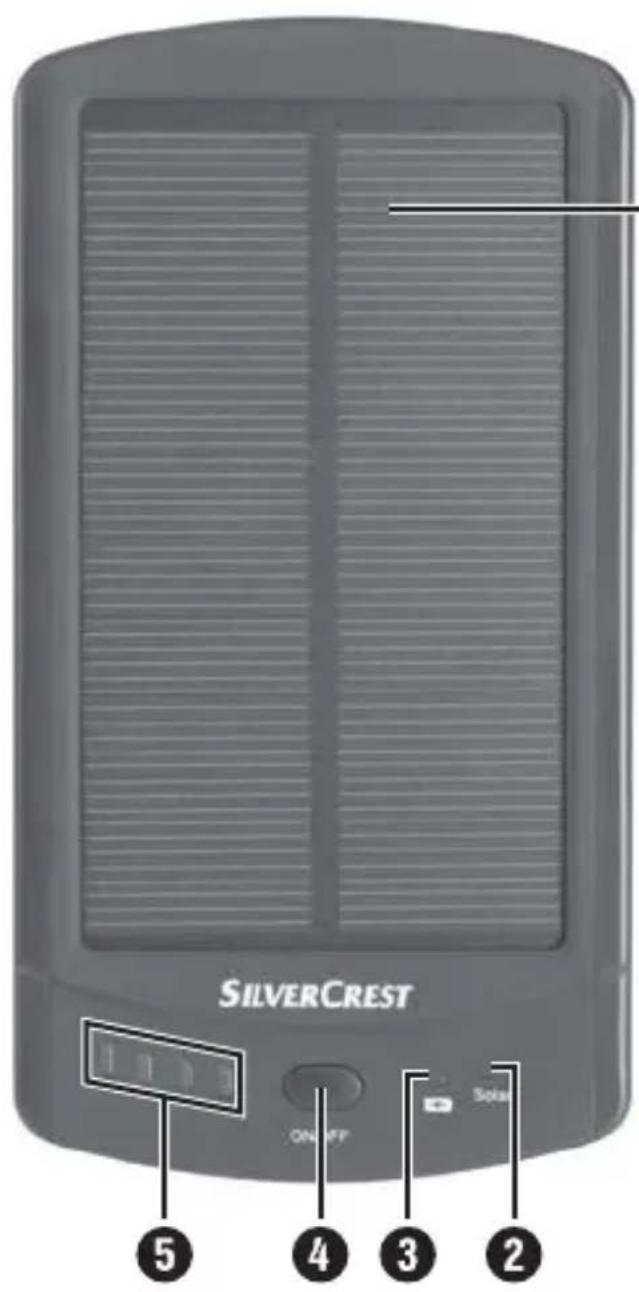
(See fold-out page for illustrations)
1 Solar panel
2 Solar LED
3 (5 V USB active output)
4 ON/OFF button
5 Charge level LEDs
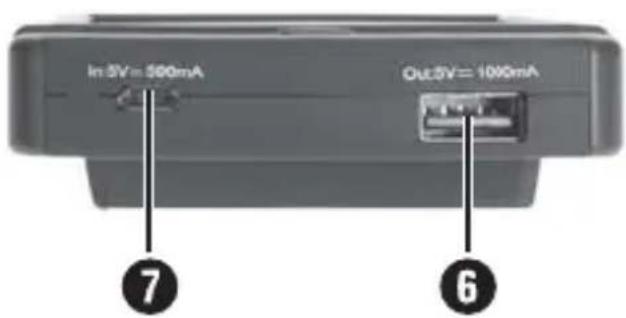
6 USB port (output: 5 V =1000 mA)
⑦ Micro-USB port (input: 5 V = 500 mA)
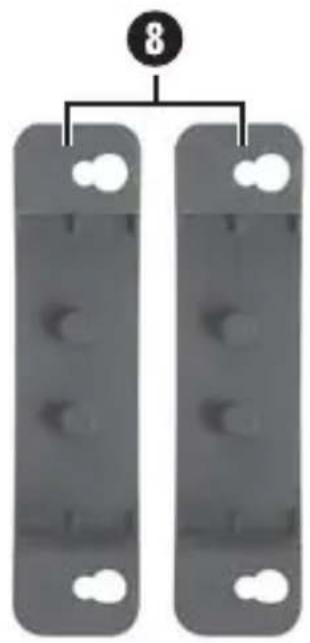
8 Brackets for suction cups
9 Suction cups
10 USB cable (USB to micro-USB)
⑪ Operating instructions
Operation
Unpacking
◆ Remove all parts and the operating instructions from the packaging.
◆ Remove all packaging material.
Check the package contents
(See fold-out page for illustrations)
The product includes the following components:
- Solar charger SLS 2200 C2
- USB cable
- 2 x brackets for suction cups
- 4 x suction cups
• These operating instructions
NOTE
▶ Check the package for completeness and for signs of visible damage.
▶ If the delivery is incomplete or damage has occurred as a result of defective packaging or during transport, contact the Service hotline (see section Service).
Disposal of packaging materials
The packaging protects the device from damage during transport. The packaging materials have been selected for their environmental friendliness and ease of disposal, and are therefore recyclable.

Returning the packaging into the material cycle conserves raw materials and reduces the amount of waste generated. Dispose of packaging materials that are no longer needed in accordance with applicable local regulations.
Attaching the suction cups
NOTE
To make sure that the suction cups hold firmly, the surface must be completely free of dust, oil and grease.
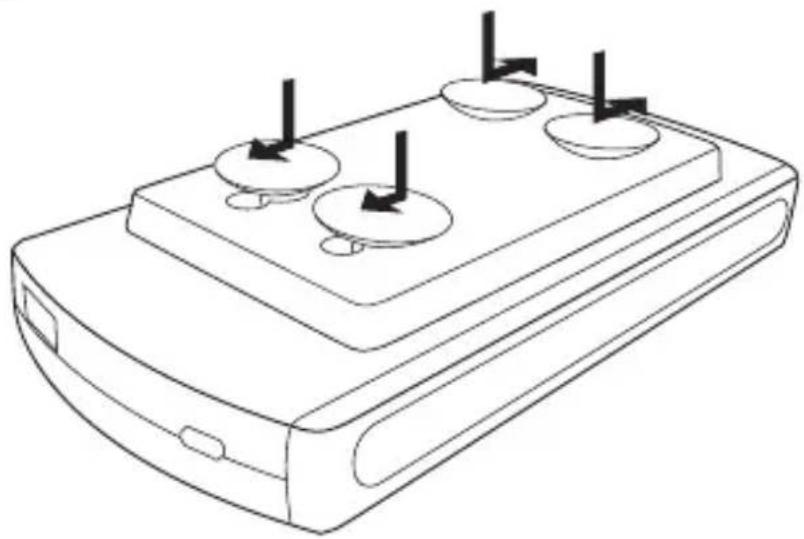
Variant A
Variant A is suitable for attaching the device to a flat, level surface.
- Attach all four suction cups to the underside of the device, as shown in "Figure A".
♦ Push the suction cups 9 into the large holes.
Now fasten the suction cups by sliding them into the narrow openings.
natural_image
Line drawing of a rectangular electronic device with three circular ports and three vertical arrows indicating direction (no text or symbols)Figure A
You can now attach the device on a flat, level using the suction cups ⑨
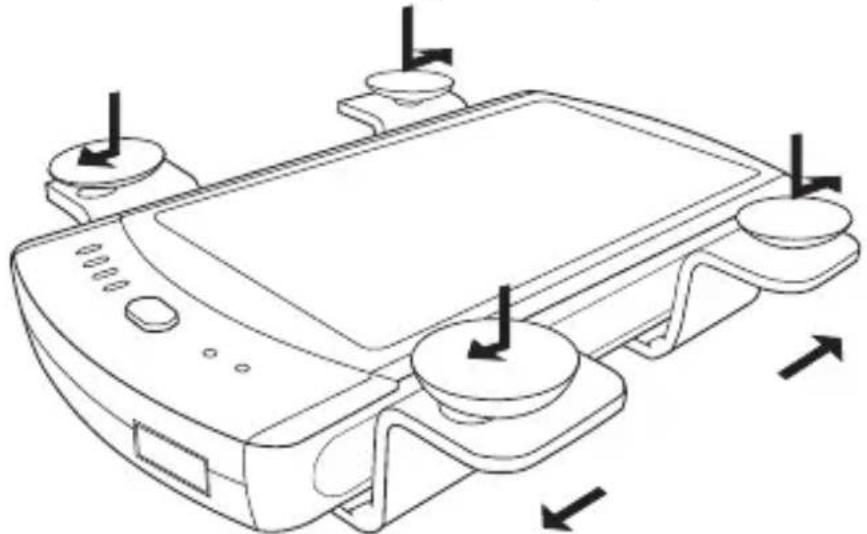
Variant B
Variant B is suitable for attaching the device to a pane of glass.
◆ Attach the four suction cups ⑨ to the two brackets ⑧, as shown in "Figure B".
♦ Push the suction cups into the large holes.
Now fasten the suction cups ^9 by sliding them into the narrow openings.
Now mount the bracket 8 on the underside of the device by pushing the retaining lugs into the corresponding slots on the rear of the device and locking them in place.
natural_image
Line drawing of a device with control buttons and directional arrows indicating movement or force (no text or symbols)Figure B
You can now attach the device to a pane of glass using the suction cups ⑨
Charging with the solar panel

CAUTION
▶ Ensure that the ambient temperature does not exceed 45^ C. This is particularly important when using the device inside a motor vehicle.
You can charge the battery of the device with the solar panel ①. Ensure that the solar panel ① is receiving sufficient sunlight. As soon as there is sufficient sunlight, the solar LED ② lights up orange to show that the battery is being charged. If the solar LED ② does not light up, there is not enough sunlight available. In this case, change the location of the device or place the device in direct sunlight. Once the solar LED ② lights up green, the battery is fully charged.
Charging with the USB cable
If there is no sunlight available, you can charge the battery of the device with the USB cable 10. To do this, connect the micro-USB plug of the charging cable to the device's micro-USB port 7. Connect the USB plug of the USB cable 1 to a USB port on your computer. The charging progress will be indicated by means of the charge level LEDs 5.
| Charge level LEDs 5 | Charge level |
| One LED is flashing < 25% | |
| One LED is on, the second LED is flashing 25–49% | |
| Two LEDs are on, the third LED is flashing 50–74% | |
| Three LEDs are on, the fourth LED is flashing 75–99% | |
| All LEDs are on 100% |
NOTE
Some computers deactivate the power supply to the USB ports when they are switched off. If the solar charger's battery is not being charged, check to see whether your computer is turned on.
Alternatively, you can charge the battery of the solar charger with an external USB power supply (not supplied). To do this, use the USB cable 10 supplied with the product. You can purchase a suitable 5 V USB power adapter with an output of at least 500 mA from most electronics stores.
Handling and operation
Switch the device on/off
Switching on
◆ Press the ON/OFF button 4 briefly to switch on the device. The charge level LEDs 5 light up for about 10 seconds. The LED lights up blue as long as a connected device is being charged.
Automatic switch-off
If no device is connected for charging within 10 seconds, the charger switches off automatically to conserve its battery.
Switching off
◆ Press and hold the ON/OFF button ^4 for at least 3 seconds to switch off the device and stop the charging process. The LED goes out.
Display charge level
◆ Press the ON/OFF button ^4 briefly to show the charge level of the battery for a few seconds. The charge level LEDs ^5 show you the charge level.
| Charge level LEDs 5 | Charge level |
| All LEDs are on 100% | |
| Three LEDs are on 75–99% | |
| Two LEDs are on 50–74% | |
| One LED is on 25–49% | |
| One LED is flashing < 25% | |
| All LEDs off 0% |
Compatible devices
You can use the solar charger to charge end devices that require a charging current of at least 60 mA and a maximum of 1 A.
If the connected end device requires a current of less than 60 mA or more than 1 A, the solar charger will switch itself off immediately after being switched on with the ON/OFF button ^4 . In this case, check the charger's suitability for your end device on the basis of the technical data of your end device.
Charging external devices
Connect the charging cable of your end device to the USB port ⑥ on the solar charger and to your end device.
If charging does not start automatically, press the ON/OFF button ④ briefly to start the charging process.
The LED lights up for as long as the connected device is being charged. Once your device is fully charged, the solar charger switches off. To interrupt the charging process, you can disconnect the end device. If your end device is not fully charged and the LED goes out during charging, this means the solar charger's battery is discharged. The solar charger's battery must be recharged again before you can charge end devices.
Simultaneous charging of the built-in battery and a connected device is only possible in solar operation. Simultaneous charging of the built-in battery via the micro-USB port ⑦ and a connected device is not possible.
Troubleshooting
A connected device is not charging.
◆ Press the ON/OFF button 4 briefly to start the charging process
- The solar charger's battery is empty. Charge the battery.
◆ No connection to the device. Check the connection.
The solar charger can be used for end devices that require a charging current of no more than 1 A. If the connected end device requires a current of more than 1 A, the solar charger will switch itself off immediately after being switched on with the ON/OFF button ^4 . In this case, check the charger's suitability for your end device on the basis of the technical data of your end device.
The solar charger's battery is not charging via the solar panel.
◆ Check that the solar panel ^1 is receiving sufficient sunlight.
The solar charger's battery is not charging via the USB cable.
◆ Connection is faulty. Check the connection.
Some computers deactivate the power supply to the USB ports when they are switched off. If the solar charger's battery is not being charged, check to see whether your computer is turned on.
NOTE
If the above-mentioned solutions do not resolve the problem, please contact Customer Service (see chapter Service).
Cleaning

CAUTION
Damage to the device!
▶ To avoid irreparable damage to the device, ensure that no moisture can penetrate the device during cleaning.
▶ Do not use caustic, abrasive or solvent-based cleaning materials. These can damage the surfaces of the device.
- Clean the surfaces of the device with a soft, dry cloth. For stubborn dirt, use a slightly damp cloth with a mild detergent.
Storage when not in use
If you do not intend to use the device for a long time, store it in a clean, dry place away from direct sunlight.
If the solar charger is not going to be used for some time, the battery should be recharged at regular intervals. This helps to preserve battery performance.
Disposal
The adjacent symbol of a crossed-out wheelie bin means that this device is subject to Directive 2012/19/EU. This directive states that this device may not be disposed of in the normal household
waste at the end of its useful life, but must be handed over to specially set-up collection locations, recycling depots or disposal companies.
This disposal is free of charge for the user. Protect the environment and dispose of this device properly.
You can obtain further information from your local disposal company or the city or local authority.
Appendix
Technical data
| Integrated battery | 3.7 V/2200 mAh (lithium polymer) |
| Input voltage/current 5 V | ——, max. 0.5 A |
| Output voltage, current 5 V | ——, max. 1 A |
| Minimum discharge current 60 mA | |
| Charging time, battery– Solar panel– USB cable | approx. 22–30 hours* approx. 6–7 hours |
| Operating temperature +5°C to +45°C | |
| Storage temperature 0°C to +50°C | |
| Relative humidity(no condensation) | 10%-70% |
| Dimensions (without accessories) | approx. 14.4 x 7.5 x 2.1 cm |
| Weight (without accessories) approx. | 135 g |
* The charging time is highly dependent on the level of sun exposure (intensity). This can be influenced by the season, cloud cover or location. Any of these factors can lead to longer charging times.
Notes on the Declaration of Conformity
This device complies with the basic requirements and other relevant provisions of the EMC Directive 2004/108/EC and the RoHS Directive 2011/65/EU.
The complete original Declaration of Conformity is available from the importer.
Warranty
This device is provided with a 3-year warranty valid from the date of purchase. This device has been manufactured with care and inspected meticulously prior to delivery.
Please retain your receipt as proof of purchase. In the event of a warranty claim, please contact your Customer Service unit by telephone. This is the only way to guarantee free return of your goods.
NOTE
The warranty only covers claims for material and manufacturing defects, not for transport damage, worn parts or damage to fragile components such as buttons or rechargeable batteries.
This product is intended solely for private use and not for commercial purposes. The warranty shall be deemed void in cases of misuse or improper handling, use of force and modifications/repairs which have not been carried out by one of our authorised Service centres.
Your statutory rights are not restricted by this warranty. The warranty period is not prolonged by repairs effected under the warranty. This also applies to replaced and repaired components.
Any damage and defects present at the time of purchase must be reported immediately after unpacking, but no later than two days after the date of purchase.
Repairs carried out after expiry of the warranty period shall be subject to charge.
Service

Service Great Britain
Tel.: 0871 5000 720 (£ 0.10/Min.)
E-Mail: kompernass@lidl.co.uk
IAN 273516

Service Ireland
Tel.: 1890 930 034
(0,08 EUR/Min., (peak))
(0,06 EUR/Min., (off peak))
E-Mail: kompernass@lidl.ie
IAN 273516
Importer
KOMPERNASS HANDELS GMBH
BURGSTRASSE 21
44867 BOCHUM
GERMANY
www.kompernass.com
Sisällysluettelo
Johdanto 22
natural_image
Line drawing of a device with three circular ports and three vertical arrows indicating flow or movement (no text or symbols)Kuva A
natural_image
Line drawing of a device with control knobs and buttons, showing directional arrows (no text or symbols)Kuva B
KOMPERNASS HANDELS GMBH
BURGSTRASSE 21
44867 BOCHUM
GERMANY
www.kompernass.com
natural_image
Line drawing of a rectangular electronic device with three circular ports and three vertical arrows indicating direction (no text or symbols)Bild A
natural_image
Line drawing of a device with control knobs and buttons, showing directional arrows (no text or symbols)Bild B
KOMPERNASS HANDELS GMBH
BURGSTRASSE 21
44867 BOCHUM
GERMANY
www.kompernass.com
Spis treści
Wstep....62
natural_image
Line drawing of a device with three circular ports and three vertical arrows indicating flow or movement (no text or symbols)Rysunek A
natural_image
Line drawing of a device with directional arrows indicating movement or force (no text or symbols present)Rysunek B
KOMPERNASS HANDELS GMBH
BURGSTRASSE 21
44867 BOCHUM
GERMANY
www.kompernass.com
Turinys
Ivadas....82
natural_image
Line drawing of a rectangular electronic device with three circular ports and three vertical arrows indicating direction (no text or symbols)A paveikslélis
natural_image
Line drawing of a device with control buttons and directional arrows indicating movement or force (no text or symbols)B paveikslėlis
KOMPERNASS HANDELS GMBH
BURGSTRASSE 21
44867 BOCHUM
GERMANY
www.kompernass.com
Inhaltsverzeichnis
Einführung 102
natural_image
Line drawing of a device casing with three circular ports and three arrows indicating direction (no text or symbols)Abbildung A
natural_image
Line drawing of a device with control buttons and directional arrows indicating movement or force (no text or symbols)Abbildung B
KOMPERNASS HANDELS GMBH
BURGSTRASSE 21
44867 BOCHUM
GERMANY
www.kompernass.com
KOMPERNASS HANDELS GMBH
BURGSTRASSE 21
44867 BOCHUM
DEUTSCHLAND / GERMANY
www.kompernass.com
Last Information Update · Tietojen tila · Informationsstatus