133 OXYGEN, 70 OXYGEN - Tablet ARCHOS - Free user manual and instructions
Find the device manual for free 133 OXYGEN, 70 OXYGEN ARCHOS in PDF.


User questions about 133 OXYGEN, 70 OXYGEN ARCHOS
0 question about this device. Answer the ones you know or ask your own.
Ask a new question about this device
Download the instructions for your Tablet in PDF format for free! Find your manual 133 OXYGEN, 70 OXYGEN - ARCHOS and take your electronic device back in hand. On this page are published all the documents necessary for the use of your device. 133 OXYGEN, 70 OXYGEN by ARCHOS.
USER MANUAL 133 OXYGEN, 70 OXYGEN ARCHOS
Congratulations for the purchase of an ARCHOS device! This quick start guide helps you to start using your device properly. If you have more questions concerning the use of your device, visit us at:

twitter.com/archos

www.facebook.com/archos
Blog
https://blog.archos.com/

http://faq.archos.com/

www.archos.com, click Support > After-sales support

www.archos.com, click Support > Downloads > Declaration of conformity
As we are often updating and improving our products, your device's software may have a slightly different appearance or modified functionality than presented in this quick start guide.
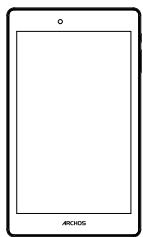

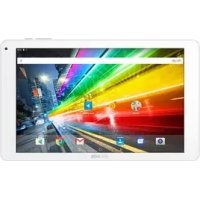
ARCHOS 70 Oxygen
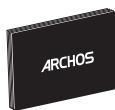
Charger adapter
Quick start guide
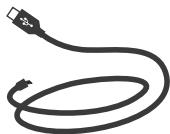
Charging cable
Warranty, legal and safety notice
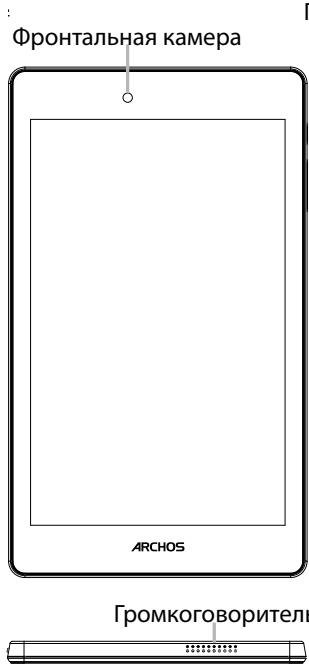
Describing your device

Your device is running Android 6.0 operating system. Updates could be offered to improve the device's performance. To check if any update is available, go to: Settings > About tablet > Check for update.
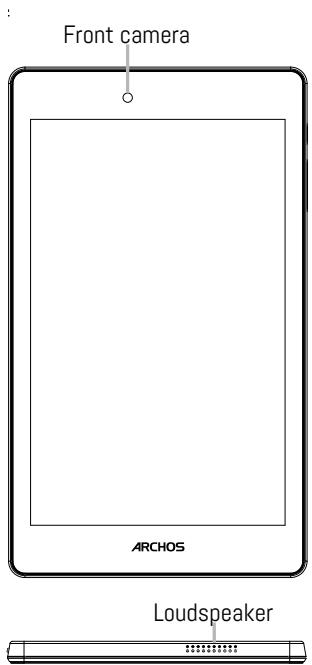
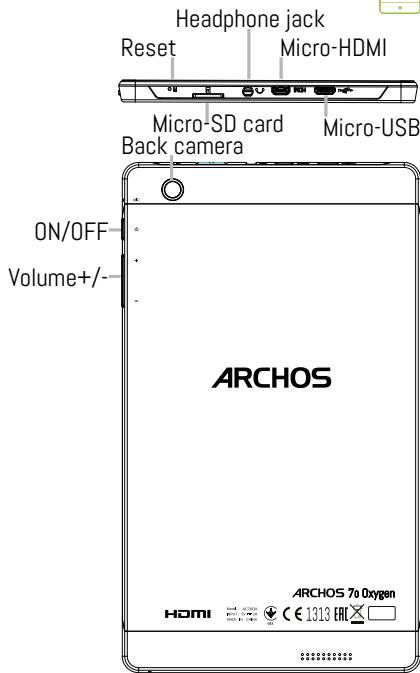
Charging your battery completely
Plug the charging cable in the Micro-USB port and the adapter in a power outlet.
Leave the device until the battery is fully charged.
Turning ON
- Press and hold the ON/OFF button to turn on the device.
- Follow the instructions to set up your device: language, WiFi, copy your data, enter your name, set up email, protect your phone, notifications to be shown, Google services, third party apps.
NOTE: You can skip some steps and define them later from the Settings app.
Activating WiFi connection
- Touch and pull down the status bar to display it.
- Touch again the bar to reveal the quick settings.
- Select the WiFi icon to activate the WiFi connection
- Select "WiFi" below the WiFi icon.
- Touch the name of network you want to connect to.
Private networks are shown with a lock icon and will require you to enter your password.
Hints & tips
Moving a home screen item: Touch and hold your finger onto it until the positioning gridlines appear, then slide it to the desired location, and release your finger.
Removing a home screen item: Touch and hold it, slide your finger towards the top of the screen and drop it over the Remove icon.
Uninstalling an item: From the All apps screens, touch and hold it, slide your finger towards the top of the screen and drop it over Uninstall bin.
Creating application folders: Drop one app icon over another on a home screen and the two icons will be combined.
Changing your wallpaper: Hold your finger on a home screen at an empty location, then choose from the list: Wallpaper.
Widgets: Hold your finger on a home screen at an empty location, then choose from the list: Widgets.
Securing your device: Define a lock screen to protect your privacy. Select the Settings app, then Security. Choose a screen lock.
Android device manager: When your device is lost, you can use the android device manager page (https:// www.google.com/android/devicemanager) to erase all your contents, to lock the device, to locate the device or to make it ring.
Scheduled power on&off: Schedule power on & off to set when the device turns off and turn on. For example, you can set it for sleep time.

Troubleshooting
- If your device is frozen:
Press the ON/OFF button for 10 seconds.
-
If your device doesn't turn on:
-
Charge your device.
- Press the ON/OFF button for 10 seconds.
- If your device functioning is too slow:
Close all apps which are not currently used.
- If your WiFi reception is too low:
Make sure you are not far from the WiFi hotspot.
Update the firmware of the device: http://www.archos.com/support.
Reset and redefine your connection parameters.
Contact your WiFi connection provider.
- If your device has dysfunctions:
Reinitialize your device. Go to Settings > Backup & reset > Factory data reset. If you can't have access to the settings for any reason, consult our FAQs about the reinitialization process.
For more answers about your technical difficulties, do not hesitate to visit: faq.archos.com
Contactez-nous
www.archos.com, click Support > After-sales support

www.archos.com, cliquez Support > Telechargesments > Déclaration de conformité
PpncoeHnHytecb KHaM!
Iop3dpabJIeM C npno6peTeHnem yctpoCTBa ARCHOS! DaanHoe KpaTkoe pyKOBoCTBO no npimHeHIO NOMOKeT C nepBbIX MNHT ppaBnIbHO PONb3OBAtbcr yctpoiCTBOM. EcIny BaB O3HNKHyT dpYrne BOpPOcbl OTHOCNTJIbHO npimHeHnE 3TOr yctpoiCTBa, NOcETNe Be6- CaITbl:

twitter.com/archos

www.facebook.com/archos
Blog
https://blog.archos.com/

http://faq.archos.com/

Ha ctpaHnce www.archos.com BbIepeHte MeHIO POndepKka >PoclenpOdaJxna HpoDepKka

Ha cTpaHnue www.archos.com BbI6epnte MeHIO POndEprKka > 3aRpy3Kn > DeKlapauncooTBETCTBn
Поскову мы ча tcообнам endem n COBepHcTBeyem CBOU n3dJIy, nporpaMMHoe 6eCneueHHe Ha BaWe yCTpoIcTBe MOxTe He3HaunTeNbHO OTIIuATbCS IO BHeuHemy BnDy nIiФyHKUHOJIbHOCtN OT ppeCTaBLeHHORO B DaHHOM KpaTKOM pyKOBoIcTBe.
ARCHOS 70 Oxygen

AaTep 3apAnHOrO yctPoIcTbA
KpaTkoe pyKOBoDCTBO
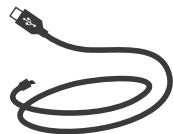
Ka6eIb 3apJHnOуCTpoIcTba
TapaHTnN nHCTpyKcnn no 6e3OpacHOCTn
DaHnOe ycTpoiCTBO
pa6oTaet POD
ynpaBLeHnEM
onepaauonHO
CnCTembl Android 6.0.
Moryt npedlaatbca
OBHOBLeHn,
no3BOJIoUne
yLyuHTb
KcNpIyaTaUOnHHbIe
xapaKTepeNCTNKu
ycTpoiCTBa.
DJIpyPobepKn
HaIIuYnO6HOBLeHn
BbIPOJHnTE nepeXoJ:
Settings > About tablet
Check for update
(HacTpoiKn > O
IIaanHeTe PpOBepntb
HaIIuYne o6HOBLeHn).
CobetbI NO IcNoJIb3OBAHnIO
BnJxTeIyepKINBaIeTnaneuHaIaBHOM3KpaHeBpyCTOMMeCTe,3aTeM Bbl6epNTeN3 CnNcKa: Widgets (BnJxTeI).
3auneta yctpoinCTBa: aKTNBnpyuTe 6IbOKnPOBky eKpaHa dIy 3aunTbI KOHnDHeNznaJIbHoCTn. 3aynCTnTe npInLoxehne Settings (HacTpoKn), 3aTeM Bbl6epnTe Security (Be3oNaChOCTb).
BbI6epnte 6JIOKINPOBky 3KpaHa.
YdaJIeHHoe ynpaBHeHne Android: ecIN BaIe ycTpoiCTBO yTePraHO, Bbl MoKeTe BOcPOJb3OBAtBCa CTpaHnueydaJIeHHoro ynpaBHeHne Android (https://www.google.com/android/ devicemanager), uTo6bI cTepeTb C Hero BCE coOpjKmOE, 3a6IOKIpOBaTb ycTpoiCTBO, hAItn erO MecTONoLOXeHne nn 3aCTaBnTb ycTpoiCTBO 3BOHnTb.
BkIIOUeHne I BbIKIOUeHne IIO paCnIcaHIO: 3aJaIte paCnIcaHne BKIOUeHne I BbIKIOUeHne, yTO6bl yCTpoiCTBO BbIKIOUaIOcb I BKIOUaIOcb I Ha3HaueHHO BpEm. HApPIMep, MOxHO 3aIIaHINPOBaT bBbIKIOUeHne yCTpoiCTBa Ha BpEm cHa.

Ponck nyctpaheHne HeucnpabHocte
- Ecnu yctpojCTBO 3aBnCIO:
Haxmnte KhoNkY BKJ./BbIKJ. Ha 10 cKeyni.
- Ecni yctpoiCTBO He BKJIIOuaeTc:
1.3apndTe yctpoiCTBO.
2. HaxmTe KhoNkBy BKJ./BblKJl. Ha 10 ceKyni.
- Ecni yctpoiCTBO pa6oTaE CTNIuKOM MeJneHNO:
3aKpoIte npuIoxeHn, KOToPbIe He IcNoIb3yIOTcB DaHHbMOMeHT.
- EcIn KaueCTBO CBa3n Wi-Fi cInuKOM Hn3Koe:
Y6eIntecb, yTO Bbl He haxoIntecb CInlukOM daIeKO OT TOUKN IOCTyNa Wi-Fi.
06HOBInTe MUNKpOIpPorpamMy yCToPoIcTbA:http://www.archos.com/support.
C6poCbTe n 3aJaIte 3aHOBO npaMeTpbl NpOKnJIoueHn.
CbXntecb c npoBaaipepom nooknloueHna Wi-Fi.
- Ecnn yctpoiCtBO yHKUOHNpyeT HeipabuJIbHO:
BbIOpHnTe NOBToPHyIO INHnIaIIIN3aIInO yCTpoIcTBA. IpeEiDnTe B Settings > Backup & reset > Factory data reset (HacToPoIKn > C6poc N BOscTaHOBLeHne > C6poc K 3aBOIDCKIM HAcToPoIKaM).
Ecnn no KaKm-ln6o npuHnAm doCTypa K hAcTpoiKaM HeT, cm. OINcaHne pOcecca NOBTOPOHn HnIuaJIa3aCmN B pa3dene YaCTO 3aDaBaEmbIX BONPCOB N OTBeTOB.
National restrictions
This device is intended for home and office use in all EU countries (and other countries following the EU directive 1999/5/EC) without any limitation except for the countries mentioned below:
| Country | Restriction | Reason/remark |
| Bulgaria | None | General authorization required for outdoor use and public service |
| France | Outdoor use limited to 10 mW e.i.r.p. within the band 2454-2483.5 MHz | Military Radiolocation use. Refarming of the 24 GHz band has been ongoing in recent years to allow current relaxed regulation. Full implementation planned 2012 |
| Italy | None | If used outside of own premises, general authorization is required. |
| Luxembourg | None | General authorization required for network and service supply (not for spectrum) |
| Norway | Implemented | This subsection does not apply for the geographical aera within a radius of 20 km from the centre of Ny-Alesund |
| Russian | None | Only for indoor applications |
Federation
Note: Frequency 2454-2483.5MHZ are restricted to indoor use in France.
Consult the declaration of conformity on http://www.archos.com/products/declaration_conformity.html Archos company (Contact adress : ARCHOS SA 12 Rue Ampère 91430 Igny France) declares that this device is in compliance with the essential requirements and other relevant provisions of Directive 1999/5/EC: http://www.archos.com/support/download/conformity/CE_DOC_AC700X.pdf Par la présente, ARCHOS (adresse de contact : ARCHOS SA 12 Rue Ampère 91430 Igny France) déclare que l'appareil est conforme aux exigences essentielles et aux autres dispositions pertinentes de la directive 1999/5/CE. La déclaration de conformité peut être consultée sur le site : http://www.archos. com/support/download/conformity/CE_DOC_AC700X.pdf