
ColumbiaVac KC100 - Air conditioner Eldom - Free user manual and instructions
Find the device manual for free ColumbiaVac KC100 Eldom in PDF.


| Product Type | Portable Air Conditioner |
| Brand | Eldom |
| Model | ColumbiaVac KC100 |
| Color | White |
| Cooling Capacity | 9000 BTU/h (approx. 2.6 kW) |
| Heating Capacity | Not applicable (cooling only) |
| Energy Efficiency Ratio (EER) | 2.6 |
| Power Supply | 220-240 V ~ 50 Hz |
| Power Consumption | 900 W |
| Airflow Rate | 350 m³/h |
| Noise Level | ≤ 65 dB(A) |
| Refrigerant | R290 (propane) |
| Dimensions (W x D x H) | 700 x 350 x 400 mm |
| Weight | 25 kg |
| Drainage Type | Self-evaporating (no bucket) |
| Timer | 24-hour programmable |
| Remote Control | Yes |
| Filter | Washable pre-filter |
| Casters | Yes, for mobility |
| Condenser Drain | Continuous drain option |
| Operating Temperature Range | 18°C - 35°C |
| Certifications | CE, RoHS |
| Included Accessories | Exhaust hose, window kit, remote control |
| Maintenance | Clean filter every 2 weeks; drain condensate if needed; store in dry place |
| Safety | Use grounded outlet; keep air intake clear; do not use extension cord; avoid obstructing exhaust |
| Spare Parts Available | Filter, remote control, exhaust hose |
Frequently Asked Questions - ColumbiaVac KC100 Eldom
User questions about ColumbiaVac KC100 Eldom
0 question about this device. Answer the ones you know or ask your own.
Ask a new question about this device
Download the instructions for your Air conditioner in PDF format for free! Find your manual ColumbiaVac KC100 - Eldom and take your electronic device back in hand. On this page are published all the documents necessary for the use of your device. ColumbiaVac KC100 by Eldom.
USER MANUAL ColumbiaVac KC100 Eldom
KC100
KLIMATOR PRZENOŚNY
PORTABLE AIR COOLER
PŘENOSNE VENTILATOR
MOBILER VENTILATOR MIT LUFTKÜHLUNGS
natural_image
Line drawing of a portable air heater with cooling fins and wheels (no text or symbols)3
natural_image
Technical line drawing of a mechanical housing or enclosure with mounting feet and internal compartments (no text or symbols)4
natural_image
Pure diagram of a door handle with two curved arrows pointing inward (no text or symbols)5
natural_image
Close-up of a mechanical component with arrows indicating directional movement (no text or symbols visible)
Before first use, please thoroughly read the entire manual
- Connect the connection cable only to mains whose electrical parameters are compatible with the parameters on the nameplate.
- Pay attention not to add too many receivers to one power circuit.
- For domestic use only.
- Place the appliance on a flat and dry surface.
- Do not put your fingers or any objects into the inlet or outlet opening.
- Do not place the appliance on curtains.
- Always keep the operating appliance within sight, particularly in the vicinity of children.
- Never leave the operating appliance unattended.
- The appliance can be used by children aged 8 and older, by persons with limited physical and mental capabilities, and by persons who have no experience nor knowledge of the equipment, only under supervision or if instructed on the safe use of the appliance in way that guarantees that the associated risks are understood. Children should not play with the appliance. Children should not clean nor maintain the appliance unattended.
- Do not spray insecticides or similar products in the vicinity of the operating appliance.
- Do not use the appliance in high temperatures (above 40^ C), in places with high humidity (e.g. bathrooms), or in explosive areas.
- Use only clean, cold tap water or water with low mineral content at a temperature not exceeding 40^ C,
- Do not use in the open air.
- Do not carry or lift during operation.
- Do not touch the ultrasonic converter during operation.
- Place the appliance away from heat sources (radiators, stoves, etc.).
- Do not pour flavour additives (oils, etc.) or chemicals into water,
-
Do not start the humidification feature if the water container is not installed in the appliance.
-
Do not place the appliance near vents or electrical devices.
- Do not insert any objects into the humidifier nozzle.
- Keep hands, face, and other parts of the body away from the nozzle when the appliance is switched on.
- Do not cover the humidifier nozzle when the appliance is switched on.
- Disconnect the appliance from the mains, before emptying the container or moving the appliance.
- Before switching the appliance on, make sure that all its parts have been properly installed. Do not switch the appliance on if it is not completely assembled
- Do not cover the protective mesh.
- Do not hang clothes or other objects on the appliance.
- Do not use the appliance if the connecting cable is damaged. To avoid any risks, replace the damaged cable at an authorised Manufacturer's Servicing Point.
- The appliance can be repaired only at an authorised servicing centre. Any upgrades or the use of non-original spare parts or components is forbidden and poses a hazard for the user.
- Eldom Sp. z o. o. is not liable for any damage resulting from improper use of the appliance.
Special instructions
- Place the appliance on a hard and stable surface.
- Do not place the appliance on a carpet, wood flooring or on any surface that may be damaged by water or moisture.
- When placing the appliance, make sure that the power plug is always accessible.
- The appliance should always be placed upright.
- Do not cover the air outlet and inlet.
Front
- Control panel
- Handles
- Vertical blinds
- Horizontal ventilation louvres
- Housing
- Wheels
Back
- Filter
- Filter cover
- Container
- Lock
Additional accessories
- Cooling cartridges - 2 pcs.
TECHNICAL DATA
- Power output: 65W
- Power-supply voltage: 220-240V \~ 50Hz
- Tank capacity: 4l
- Air-flow rate: 120m ^3 /h
- Capacity assumed for the room: 15m ^2
INTENDED USE
The device is designed to improve thermal comfort in living spaces.
Using the fan, hot ambient air is forced through the cartridges, which are constantly moistened with water, so absorbing the heat in the natural evaporation process. This allows refreshing cool air to flow out from the air conditioner. Cooling efficiency can be increased by fitting frozen cartridges, filled with water, in the water tank.
CONTROL PANEL
Buttons
„1“, „2“, „3“ - switching on the unit/fan speed selection
„0“ - switching off the unit
„COOL" - cooling function on/off switch
„SWING“ - oscillation of vertical ventilation louvres on/off switch
ASSEMBLY
Unpack the device and assemble the individual components before first use.
Pull the tank (9) out of the device body and remove all components.
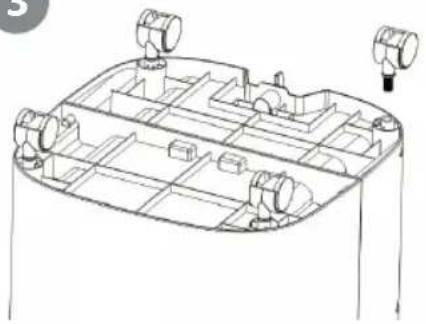
Slide the tank back into place. Then turn the device upside down, place it on a soft surface (e.g. on a carpet) and install the wheels - Fig. 3
Flip the device into the correct position. Check that the filter is installed in the device (see the "FILTER" section).
NOTE
Do not turn the unit on without a correctly installed filter (7) and tank (9).
NOTE
The cooling cartridges (11) are empty. Fill and freeze them before use.
DEVICE FUNCTIONING
The air flow from the air conditioner should not be directed straight at persons.
The cold-air flow can be controlled by means of blinds.
The movement of the vertical blinds (3) is switched on by pressing the "SWING" button.
The horizontal blinds (4) are set manually.
OPERATION
Place the device on a flat, stable, surface.
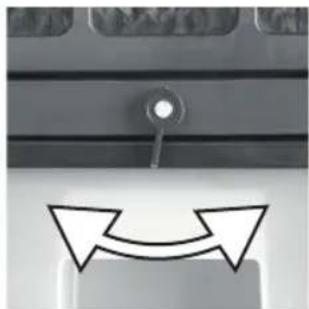
Turn the lock knob (10) to the left (Fig. 4), remove the water tank (9) from the device body (5), and pour in the water.
NOTE
Do not exceed the maximum level marked on the tank (9).
When using cooling cartridges (11), first put them in the tank (9), and only then pour the water in, without exceeding the maximum level
Press the "0" switch to check if the unit is switched off and then connect the unit to a power network compliant with the parameters specified on the unit.
Press "1", "2", or "3" switch to switch on the unit and select the fan speed.
To switch the unit off press the "0" switch.
FUNCTIONS
COOLING
Press the "COOL" button.
Press the "COOL" button again to deactivate the function.
NOTE
Before activating this function, check that there is water in the tank, and check whether the water level is sufficient during operation.
The unit with the cooling function switched on will not operate without water.
OSCILLATION
Only vertical blinds rotate automatically.
To activate the oscillation, press the "SWING".
Press the "SWING" button again to deactivate the function.
CLEANING AND MAINTENANCE
NOTE
Before carrying out any maintenance or repair work, switch off the device and disconnect it from the power supply.
It is recommended to clean the water tank (9) regularly.
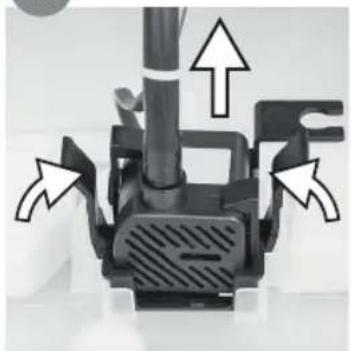
The tank (9) can be completely removed from the device, after pulling out the pump - Fig. 5. Clean the casing with a soft, damp, cloth. Do not use chemical solvents (e.g. benzene, alcohol, gasoline) as this could damage the surface or deform the entire casing. Do not immerse the device in water or any other liquid. Do not spray the device with water.
FILTER
The filter (7) should be checked regularly. To do this, first remove the screws securing the filter cover (8) and then remove the filter cartridge (7). If a replacement is necessary, remove the used filter from the cartridge and replace it with a new one.
Note
Do not turn the unit on without a correctly installed filter (7).
THE END OF THE DEVICE'S OPERATING CYCLE
Turn the device off. Empty the tank (9). Remove the filter (7), and, after thorough drying, install it in the device. Wrap the device in a plastic bag and store it in a dry place.
BEZPEČNOSTNÍ DOPORUČENÍ
- The appliance is made of materials which can be recycled.
It should be handed over to the applicable collection point for the recycling of electrical and electronic equipment.
GUaRaNTEE
- The device is intended for private household use,
- It may not be used for professional applications
- The guarantee shall become void if the unit is improperly operated.
CZ
OCHRaNá ŽIVOTNÍHO PROSTŘEDÍ
KARTA GWARANCYJNA
WAŻNA Z DOWODEM ZAKUPU
KLIMATOR PRZENOŚNY KC100
- KC100
- Before first use, please thoroughly read the entire manual
- Special instructions
- Front
- Back
- Additional accessories
- TECHNICAL DATA
- INTENDED USE
- CONTROL PANEL
- Buttons
- ASSEMBLY
- NOTE
- DEVICE FUNCTIONING
- OPERATION
- FUNCTIONS
- COOLING
- OSCILLATION
- CLEANING AND MAINTENANCE
- FILTER
- THE END OF THE DEVICE'S OPERATING CYCLE
- BEZPEČNOSTNÍ DOPORUČENÍ
- GUaRaNTEE
- CZ
- OCHRaNá ŽIVOTNÍHO PROSTŘEDÍ
- KARTA GWARANCYJNA
Brand : Eldom
Model : ColumbiaVac KC100
Category : Air conditioner