
FreeTalk 2W - Walkie-talkie Evolveo - Free user manual and instructions
Find the device manual for free FreeTalk 2W Evolveo in PDF.


| Product type | Walkie-talkie / Two-way radio |
| Brand | Evolveo |
| Model | FreeTalk 2W |
| Dimensions (approx.) | 120 x 55 x 35 mm |
| Weight (approx.) | 150 g (with batteries) |
| Power source | 3x AA batteries (not included) or rechargeable battery pack (optional) |
| Frequency band | UHF 400-470 MHz |
| Number of channels | 16 |
| Transmit power | 2 W (ERP) |
| Range (max.) | Up to 5 km (open area, line of sight) |
| Privacy codes | CTCSS / DCS (38/83 codes) |
| Voice-activated transmission (VOX) | Yes, adjustable sensitivity |
| Monitor function | Yes |
| Keypad lock | Yes |
| Battery low indicator | Yes (LED and beep) |
| Hands-free operation | Headset jack (not included) |
| Maintenance and cleaning | Wipe with a soft, dry cloth. Do not use harsh chemicals or immerse in water. |
| Safety precautions | Do not use near explosive atmospheres. Keep away from small children. Stop use if damaged. |
| Spare parts and repairability | Contact retailer or manufacturer for spare batteries or chargers. No user-serviceable parts inside. |
| General information | Compact and rugged design for outdoor activities. Complies with EU regulations. |
Frequently Asked Questions - FreeTalk 2W Evolveo
User questions about FreeTalk 2W Evolveo
0 question about this device. Answer the ones you know or ask your own.
Ask a new question about this device
Download the instructions for your Walkie-talkie in PDF format for free! Find your manual FreeTalk 2W - Evolveo and take your electronic device back in hand. On this page are published all the documents necessary for the use of your device. FreeTalk 2W by Evolveo.
USER MANUAL FreeTalk 2W Evolveo
natural_image
Two Evolved walkiehers with green digital displays and black case covers, displayed on a black base (no visible text or symbols on devices)CZ
SK
EN
HU
RO
Obsah / Content / Tartalom / Indice
Česky, 3
Slovensky, 9
English 15
Magyar 21
Română 27
CZ
SK
EN
HU
RO
Vážený zákazníku,
Copyright © Abacus Electric, s.r.o.
www.evolveo.com
www.facebook.com/EvolveoCZ
Copyright © Abacus Electric, s.r.o.
www.evolveo.com
www.facebook.com/EvolveoCZ
thank you for choosing the EVOLVEO FreeTalk 2W.
We believe you will enjoy a lot of fun and happiness.
3. Instruction For Use
This set includes 2 walkie-talkie units: there are communication devices which operate on 400\~470MHz. They come with 8 main channels and 38 CTCSS and 83 DCS sub-channels as well as back-lit LCD screen, enabling you to communicate over several kilometers free-of-charge (up to 15 km in open areas).
Note: Please read the user manual carefully before using the equipment and retain for future consultation!
2. Key Functions
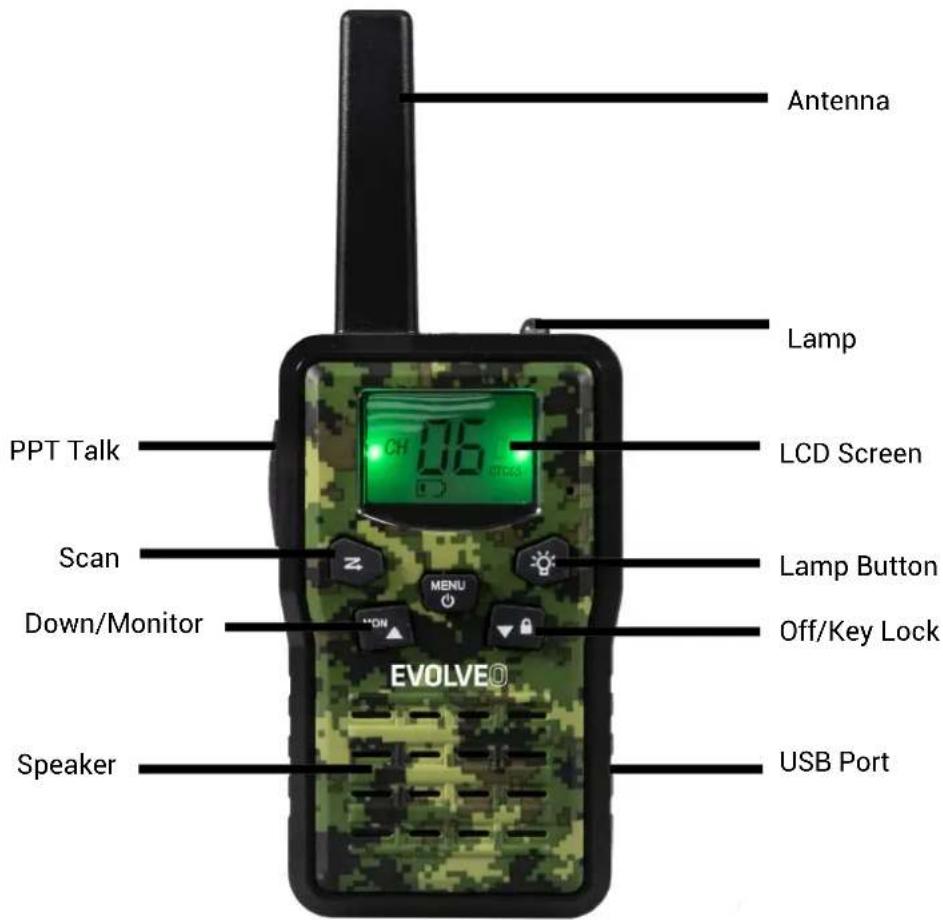

3. Before Use the device
3.1 Removing the belt clip
Before insert batteries into the device, first remove the belt clip latch away from the device.
3.2 Installing and charging the Batteries
1, This Device use with lithium battery. Please only charging the default batteries.
2, After placing batteries into correct positions, replace the battery cover.
3, Insert USB cable to charging it. The full charging time is about 6 hours.
4. Using the device
4.1 Turning the device on/off
Switch on the device: Press and hold on the 8 seconds then you will hear a beep sound. Switch off the device: Press and hold on the 13 seconds then you will hear a beep sound.
4.2 Adjusting the volume
There are 8 levels volume adjustable.
To increase the volume, press the Up ▲ button. And press the Down ▼ button to decrease the volume.
4.3 Low Battery Indication
The device can detect the low battery level when the battery voltage goes low. When battery voltage is low, the battery icon will flash and a beep will be heard to indicate that the batteries need to be replaced.
4.4 Receiving/transmitting communications:
The devices are in "Reception" mode when it is turned ON and no transmitting. When a signal is received on the current channel, the LCD will display in reception.
When you press the PTT (push to talk) button, the devices switches to "Transmission" mode.
Hold the device in a vertical position with the Mic(microphone) 3-5cm away from your mouth. While holding the PTT button, speak into the microphone in a normal tone of voice.
Release the PTT button when you have finished transmitting.
For others to receive your transmission, they must be on the same channel with you.
Note: 1, The talking range will depend on your surroundings and environment. It will be affected by obstructions such as hills or buildings.
2, Don't try to use two devices which are less than 1.5m (5 feet) apart. Otherwise, you may experience interference.
4.5 Changing Channels
Press the MENU button one time, the channel number will flash on the display.
Press the up ▲/down ▼ button to change the channel.
Press the PTT button to confirm and return to stand-by mode.
Note: if no button is pressed within 10 seconds during setting, the device will return to stand-by mode.
4.6 CTCSS (Continues Tone Coded Squelch System)
Press the MENU button twice, the current CTCSS code will flash on the display. Press the up▲/down▼ button to change the 38 available codes.
Press the PTT button to confirm and return to stand-by mode.
License free radio's operating on the 400-470MHz frequency band, the device has 8 available radio channels. If there are many device users near you, there is a chance that some of the users are operating on the same radio channel.
When using CTCSS, a low frequency tone (between 67-250Hz) will be transmitted along with the voice signal. There are 38 available tones to choose form.
You are free to choose one of the 38 available sub-channels. Due to filtering, these sub-channels will generally not be audible so they will note disturb the communication.
4.7 DCS Sub-channels
The device comes with 83 DSC sub-channels on each main channel.
Press the MENU button 3 times, the current DCS code will flash on the display. Press the up▲/down▼ button to change the 83 available codes. The default DSC code is closed.
4.8 VOX (Hands free function)
Press the MENU button 4 times, the current VOX setting will flash on the display and the VOX icon will display,
Press UP▲ button to set the VOX sensitivity level between 1 and 3 level (level 3 is the high sensitive level).
Press down ▼ button until "OF" appears on the display to turn VOX OFF.
Press the PTT button to confirm and return to stand-by mode.
In VOX mode, the radio will transmit a signal when it is activated by your voice or other sound around you.
VOX Operation is not recommended if you plan to use your device in a noisy or windy environment.
Note: VOX mode will be over ride when you press the PTT button.
4.9 Setting the Call tones
The device has 10 call tones.
Press the MENU button 5 times, "CA" is displayed and on the current call tone.
Press the UP ▲/Down ▼ button to change another call tones.
Press the PTT button to confirm and return to stand-by mode.
4.10 Key Tone On/Off
You can on/off the key tone when press the buttons.
Press the MENU button 6 times, "KO" will be displayed.
Press the UP ▲/Down ▼ button disable the key tone ON/OFF.
Press The PTT button to confirm your selection and return to the stand-by mode.
4.11 Roger Beep On/Off
After the PTT button us released, the device will send out a roger beep to confirm that have stopped talking.
1, Press the MENU button 7 times, "RO" will be displayed.
2,Press the UP ▲/Down ▼ button disable the roger beep ON/OFF.
3, Press The PTT button to confirm your selection and return to the stand-by mode.
4.12 Dual Channel Monitor(DCM)
Enables you to scan the current channel and another channel alternately.
To set another channel and start Dual Channel Monitor:
- Press the MENU button 8 times until the "DCM" icon appears. The "OF" icon will flash.
- Press the UP ▲/Down ▼ button to select the channel "ON" then press MENU.
- The Channel NO. will flash, press the UP▲/Down▼ button to select another channel you would like to use.
- Press the PTT button to confirm your selection and return to the stand-by mode. The two channel NO. will flash and alternate display.
4.13 Scanning for an active radio channel
Press Z button: The "SCAN" function indicator will appear on the display and the channel will scan continuously one by one. Once an active channel is found, the scanning will stop and you can listen to the transmission.
When the transmission is on the found channel stop, the scanning will resume automatically.
Note: If you press PTT button while listening to a found channel, the device will go back to stand-by mode on the found channel.
4.14 Monitor
Press and hold the MON/UP▲ button about 3 seconds to active monitor.
Release the MON/UP ▲ button return to stand by mode.
4.15 Sending a call tone
Press the PTT button one time quickly, the call tone will be transmitted on the setting channel.
4.16 Backlit display
Press any button except for the Lamp and PTT button to activate the back light of the LCD display. The back light will light on about 5 seconds.
4.16 Earpiece connection
The device can be used with earpiece (If there is earpiece packed together with the device).
The connector is located on the top of the device.
Insert the earpiece plug into the connector (2.5mm jack).
There is a small "PTT" button on the earpiece that has the same function as the PTT button on the device.
When you use the PTT button from the earpiece, you must also use the microphone from the earpiece to talk.
Note: Do not connect other earpieces, it may damage your device.
4.17 Battery saving function
When the device has not been used for 6 seconds, the economy mode is automatically activated. This does not affect the reception of transmission and the stand by mode is automatically re-activated as soon as a signal is detected.
4.18 Built-in Flash light
Your device has a built-in flash light that can be used in sending light signals or for our lighting needs.
4.19 Lock & Unlock the device
Press and hold LOCK/ Down ▼ button for 3 seconds to lock the device.
Press and hold LOCK/Down▼ button for 3 seconds to unlock the device.
5. Technical specifications
| Frequency | 446MHz |
| Transmission Power | <0.5 (446MHz) |
| Channel number | 5 channels (CH.no 1-5) |
| Sub-code | CTCSS 38 and DCS 83 |
| Range | Up to 9 km in open fields |
| Frequency | 448MHz |
| Transmission Power | 2W (448MHz) |
| Channel number | 3 channels (CH.no 6-8) |
| Sub-code | CTCSS 38 and DCS 83 |
| Range | Up to 15 km in open fields |
| Type | FM-F3E |
| Channel spacing | 12.5 KHz |
| Battery Type | 1300mAh Lithium Battery BL-5C, 3.7V, 4.8Wh |
To use 2W of transmission power, make sure that the legislation allows you to do so. For the CZ and SK market, the channels at 448MHz are open for this power!
6. Channel and Frequency (MHz)
Europe (8CHS)
| Ch. Frequency | Ch. Frequency | Ch. Frequency | |||
| 7 | 446.00625 | 4 | 446.04375 | 7 | 448.57 |
| 8 | 446.01875 | 5 | 446.05625 | 8 | 448.61 |
| 9 | 446.03125 | 6 | 448.49 | ||
TROUBLESHOOTING
First read "Discussion" at
https://eshop.evolveo.com/evolveo-freetalk-2w--pmr-two-way-radio-with-0-5-and-2-w/or contact EVOLVEO Technical Support.
TECHNICAL SUPPORT
www.evolveo.com/en/support
The warranty DOES NOT APPLY to:
• using the device for other purposes than it was designed to
- installing a firmware other than the one installed on your device
• electrical or mechanical damage caused by improper use
- damage caused by natural elements such as fire, water, static electricity, power surges etcetera
• damage caused by an unauthorized repair
- unreadable serial number
- the battery capacity drops after 6 months of using (6-months battery life warranty)

Disposal
The symbol of crossed out wheelie bin on the product, within the literature or on the packaging reminds you that in the European Union, all electric and electronic products, batteries and accumulators must be stored as assorted waste after the end of their service life. Do not throw these products into the unsorted municipal waste.


DECLARATION OF CONFORMITY
Hereby, the company Abacus Electric s.r.o. declares that the EVOLVEO FreeTalk 2W is in compliance with the requirements of the standards and regulations, relevant for the given type of device.
Find the complete text of Declaration of conformity at http://ftp.evolveo.com/ce/
Planá 2, 370 01, Czech Republic
Made in China
Copyright © Abacus Electric, s.r.o.
www.evolveo.com
www.facebook.com/EvolveoCZ
All rights reserved.
Design and specification may be changed without prior notice.

Tisztelt Vásárló!
Copyright © Abacus Electric, s.r.o.
www.evolveo.com
www.facebook.com/EvolveoCZ
Minden jog fenntartva.
Copyright © Abacus Electric, s.r.o.
www.evolveo.com
www.facebook.com/EvolveoCZ

- Obsah / Content / Tartalom / Indice
- Instruction For Use
- Key Functions
- Before Use the device
- Removing the belt clip
- Installing and charging the Batteries
- Using the device
- Turning the device on/off
- Adjusting the volume
- Low Battery Indication
- Receiving/transmitting communications:
- Changing Channels
- CTCSS (Continues Tone Coded Squelch System)
- DCS Sub-channels
- VOX (Hands free function)
- Setting the Call tones
- Key Tone On/Off
- Roger Beep On/Off
- Dual Channel Monitor(DCM)
- Scanning for an active radio channel
- Monitor
- Sending a call tone
- Backlit display
- Earpiece connection
- Battery saving function
- Built-in Flash light
- Lock & Unlock the device
- Technical specifications
- Channel and Frequency (MHz)
- TROUBLESHOOTING
- TECHNICAL SUPPORT
- The warranty DOES NOT APPLY to:
- Disposal
- DECLARATION OF CONFORMITY
Brand : Evolveo
Model : FreeTalk 2W
Category : Walkie-talkie