
AIR 30 MULTI - Gps Navitel - Free user manual and instructions
Find the device manual for free AIR 30 MULTI Navitel in PDF.


| Product Type | Multifunctional portable wireless compressor with jump starter and LED flashlight |
| Brand | Navitel |
| Model | AIR 30 MULTI |
| Dimensions (net) | 163 x 95 x 43 mm |
| Weight (net) | 835 g |
| Battery Type | Lithium-polymer |
| Battery Capacity | ≥10000 mAh (38.48 Wh) |
| Charging Input | USB-C: 5V/2A, 9V/1.5A, 12V/1.2A |
| USB-A Output | 5V, 2-3A |
| Maximum Air Pressure | 150 PSI (accuracy ±1.5%) |
| Compressor Capacity | Up to 30 L/min |
| Starting Current | 500A (peak 1000A) |
| Engine Start Capacity | Petrol up to 3L, Diesel up to 2.5L; up to 15 starts per charge (2L engine) |
| Flashlight Brightness | 100 lm |
| Flashlight Modes | Steady, Strobe, SOS |
| Charging Time | Up to 3 hours (0-100%) |
| Operating Temperature | -10°C to 50°C |
| Overheat Protection | Automatic shut-off when overheating |
| Auto Shut-off | After 90 seconds of inactivity, or when target pressure reached |
| Package Contents | Compressor, air hose, jump starter wires, 12/24V car charger, USB-C cable, nozzle adapter kit, storage case, user manual, warranty card |
Frequently Asked Questions - AIR 30 MULTI Navitel
User questions about AIR 30 MULTI Navitel
0 question about this device. Answer the ones you know or ask your own.
Ask a new question about this device
Download the instructions for your Gps in PDF format for free! Find your manual AIR 30 MULTI - Navitel and take your electronic device back in hand. On this page are published all the documents necessary for the use of your device. AIR 30 MULTI by Navitel.
USER MANUAL AIR 30 MULTI Navitel
cz Úvod
Einleitung
Sissejuhatus
Kallis ostja! Täname, et ostsite NAVITEL® toote.
Dear customer! Thank you for purchasing this NAVITEL® product.
NAVITEL AIR 30 MULTI is a multifunctional portable wireless compressor with features that allow to start a car with a dead battery, as well as to charge mobile devices. Please read this user manual carefully before using the device.
Package contents Device layout
• NAVITEL AIR 30 MULTI multifunctional portable compressor
• Air hose
- Jump starter wires
• 12/24V car charger
- USB-C cable
- Nozzle adapter kit
- Storage case
- User manual
• Warranty card
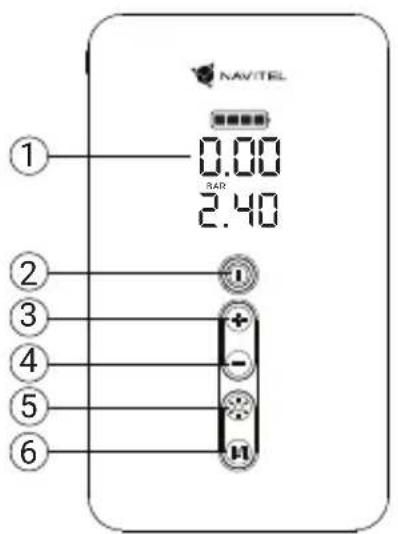
- LCD screen
- Power button
- Pressure increase button
- Pressure decrease button
- LED lamp switch button
- Mode switch button
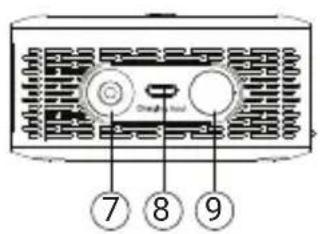
- Air hose port
- USB-C charging port
- LED flashlight
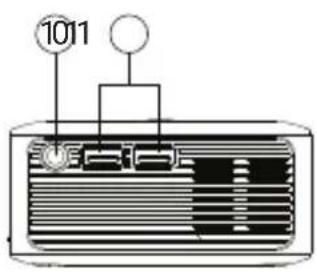
- End-to-end power port (plug)
- 5V/2A USB outputs for mobile device charging
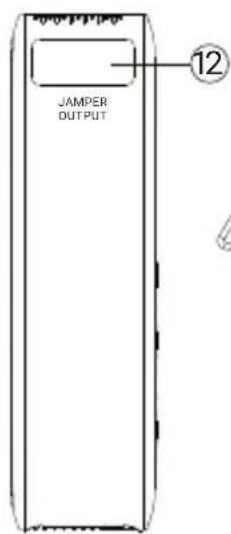
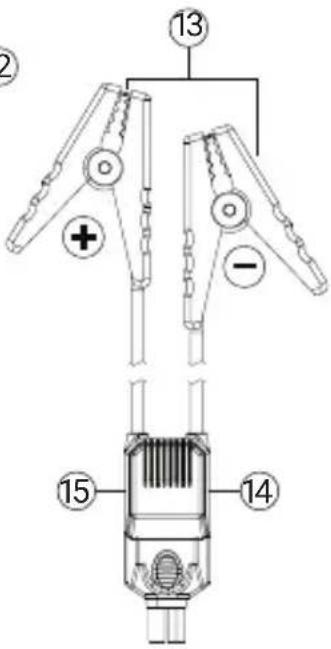
- Jump starting wires port
- Battery clamps (red - positive, black - negative)
- Reverse polarity indicator (Red)
- Correct polarity indicator (Green)
Specifications
| Maximum air pressureAccurate | Up to 150 PSI±1.5% |
| Battery power 38.48 Wh | |
| Battery capacity ≥10000 mAh | |
| Battery type Lithium-polymer | |
| USB-C input 5V/2A; 9V/1.5A; 12V/1.2A | |
| USB-A output 5V 2A~3A | |
| Voltage Up to 16.8 V (max.) | |
| Compressor capacity Up to | 30 l/min |
| Air hose length 30 cm | |
| Starting current 500A | |
| Peak current 1000A |
| Started engine volume, l. | Patrol engine - up to 3l Disel engine -up to 2,5l |
| Number of engines starts on 1 battery charge | up to 15 times (for 2l engine displacement) |
| Flashlight operating modes flashlight, strobe, SOS | |
| Flashlight brightness 100 lm | |
| Charging time Up to 3 hours (0-100%) | |
| Operating temperature -10°C - 50°C | |
| Dimensions, net 163 x 95 x 43 mm | |
| Weight, net 835 g | |
Tire inflation
- Firstly connect the air hose to the compressor and then to the tire
- Hold down the power button for a few seconds to turn on the compressor. A built-in LCD screen will display the current tire pressure.
- Press the mode switch button to select one of the preset modes.
- Hold down the mode switch button to enter manual pressure input mode. The current pressure figure must start blinking. Next, press the mode switch button to select the required pressure measurement unit. To increase or decrease the desired pressure, use respective buttons on your compressor. When it is set, the current tire pressure indicator should flash three times followed by "0" displayed in all digits of the device LCD.
- Press the power button to commence tire inflation. This process will automatically stop when the set pressure is reached. To terminate it manually, press the power button again.
- Hold down the power button for a few seconds to switch off the compressor. The device also turns off automatically after 90 seconds of inactivity.
NOTE. When inflating objects other than a car tire, be sure to check the current pressure manually. Switch off the air pump when you feel that the pressure is correct in order to prevent accidental overpressure.
NOTE. The compressor has an overheating protection system. The device turns off automatically when its temperature gets too high. Before further use, wait for a while until your air pump cools down.
Jump starter mode
- Connect the jump starter cable to connector 12 (for connecting the starting wires) on the device.
- Make sure that NAVITEL AIR 30 MULTI is at least half charged.
- If vehicle battery is completely drained, make sure that NAVITEL AIR 30 MULTI is at least 75% charged.
- Open the car hood and fasten positive (red) and negative (black) clamps to the corresponding contacts on the dead battery.
- Start the engine. If successful, remove the clamps from battery contacts as soon as possible and take away the NAVITEL AIR 30 MULTI. Primarily remove the negative clamp and then detach the positive one.
NOTE. To successfully start your car, its engine must be started within 30 seconds after connecting the NAVITEL AIR 30 MULTI to the battery.
Use of led flashlight
- To turn the LED flashlight on, press and hold its respective power button for one second.
-
The flashlight has three operation modes:
-
Bright mode;
- Pulse mode;
- Emergency (SOS) mode.
To select a mode, press the flashlight switch button.
- To switch the LED light off, press and hold its respective power button for one second.

NAVITEL
NAVITEL AIR 30 MULTI
Battery charge level
Indicator light on the LCD shows the remaining battery power:
4 bars: battery voltage is approximately 15.6-16.8V.
3 bars: battery voltage is approximately 14.8-15.6V
2 bars: battery voltage is approximately 14.0-14.8V
1 bar: battery voltage is approximately 13.2-14.0V
When battery voltage drops below 13.2V, the battery symbol will flash.
When pressing the power button with battery voltage below 12.6V without load, "LO" will be displayed on device LCD. In this case, the NAVITEL AIR 30 MULTI must be turned off and charged.
Charging the NAVITEL AIR 30 MULTI
- Connect the USB-C cable to the device charging port.
- Connect other end of the USB-C cable to the USB port of the charger you are currently using.
- When charging is done, disconnect the cable from the compressor and charger.
NOTE. FC 3.0 fast charging is available if the power adapter and cable support this technology. Do not operate your device while charging. 12V power adapter with a plug connector provides end-to-end power to the compressor without charging it. We recommend to use NAVITEL USP 45 SLIM and NAVITEL USP 55 PRO car power adapters to feed your device.
Factory reset
- Turn on the device.
- Simultaneously press and hold the LED light switch and mode switch buttons for three seconds.
- LCD screen will update depicted information when the device settings are reset to factory.
Safety precautions
- Fully charge the battery before using NAVITEL AIR 30 MULTI for the first time.
- Do not expose your device to strong mechanical stress.
- Do not disassemble the device or repair it yourself.
EN
- Do not expose the compressor to moisture, fire or high temperature. Exposure to fire or high temperature can lead to decrease in device durability, as well as to ignition or explosion.
- Do not allow children to come into contact with the device.
- Do not short clamps with each other and do not let the negative clamp to come into contact with metal parts of the vehicle.
NAVITEL s.r.o. hereby declares that the device NAVITEL AIR 30 MULTI is compatible with the European directive EMC 2014/30/EU.
Note. The package, appearance, specifications that do not change the overall functionality of the device may be changed by the manufacturer without prior notice
Bevezetés
Levads
Úvod
Введение
Brand : Navitel
Model : AIR 30 MULTI
Category : Gps