F1471SF - INSTALLATION MANUAL - Washing machine MIELE - Free user manual and instructions
Find the device manual for free F1471SF - INSTALLATION MANUAL MIELE in PDF.


User questions about F1471SF - INSTALLATION MANUAL MIELE
0 question about this device. Answer the ones you know or ask your own.
Ask a new question about this device
Download the instructions for your Washing machine in PDF format for free! Find your manual F1471SF - INSTALLATION MANUAL - MIELE and take your electronic device back in hand. On this page are published all the documents necessary for the use of your device. F1471SF - INSTALLATION MANUAL by MIELE.
USER MANUAL F1471SF - INSTALLATION MANUAL MIELE
Operating and Installation Instructions
Freezer with Ice/Water Dispenser F 1471 SF
To prevent accidents
and appliance damage
read these instructions
before
installation or use.
en - US, CA
M.-Nr. 07 360 780
IMPORTANT SAFETY INSTRUCTIONS 4
Guide to the freezer 8
Control panel for freezer 9
Control panel for Ice/Water Dispenser 9
Before use 10
Turning the appliance On/Off 10
Settings 11
Custom settings 11
Turning the button sound On/Off 12
Turning off for longer periods of time 13
Alarm 14
Temperature alarm 14
Door alarm 14
Setting the temperature 15
Using the freezer efficiently 17
Freezing food. 17
Defrosting 18
Cooling drinks quickly 18
SuperCool 20
Ice/Water Dispenser 21
Safety lock 25
Lighting 25
Settings 26
Anti-condensation heater. 26
Anti-clumping. 27
Button sound 27
Automatic defrost 28
Adjusting the interior fittings 29
Cleaning and care 31
Cleaning the interior and accessories 31
Appliance door 32
Aluminum frames 32
Ice cube container 32
Drip tray 32
Ventilation slits 33
Door seals 33
Water filter 36
Exchanging the water filter 37
Filter Performance Data Sheet 40
Frequently asked questions 42
After sales service 48
Caring for the environment 50
Installation 51
Installation site 51
Installation options 53
Dimensions 55
Door dimensions (open 115^ 56
Installing the appliance 58
Before you begin 58
RemoteVision module installation 60
Preparing the installation niche 61
Sliding the appliance into the installation niche 64
Aligning the appliance. 65
Attaching the appliance to the installation niche 66
Aligning the Ice/Water Dispenser 68
Attaching the frame and the shelf 70
Plumbing 71
Electrical connection 74
RemoteVision 75
IMPORTANT SAFETY INSTRUCTIONS
When using the appliance, follow basic safety precautions, including the following:
Read all instructions before installation and use to prevent accidents and machine damage.
This appliance is intended for residential use only. Use only as described in this Operating manual.
This appliance is for household use only. Use this appliance only for its intended use as described in this manual. Any other use could be dangerous.
This appliance complies with current safety requirements. Improper use of the appliance can cause personal injury and material damage.
Keep these operating instructions in a safe place and pass them on to any future user.
Electrical safety
Before installation, make sure that the voltage and frequency listed on the data plate correspond with the household electrical supply. This data must correspond to prevent injury and machine damage. Consult a qualified electrician if in doubt.
Before installation or service, disconnect the power supply to the work area by unplugging the unit, "tripping" the circuit breaker or removing the fuse.
Do not use an extension cord to connect this appliance to electricity. Extension cords do not guarantee the required safety of the appliance (e.g., danger of overheating).
Be certain your appliance is properly installed and grounded by a qualified technician. To guarantee the electrical safety of this appliance continuity must exist between the appliance and an effective grounding system. It is imperative that this basic safety requirement be met. If there is any doubt, have the electrical system of the house checked by a qualified electrician.
Only connect power to the appliance when all installation and plumbing work is complete.
Installation
This appliance is top-heavy and must be secured to prevent the possibility of tipping forward. Keep the door closed until the appliance is completely installed and secured per installation instructions.
Before installing the appliance, check for externally visible damage. Do not operate a damaged appliance.
This appliance must be installed and connected in compliance with the installation instructions.
The appliance must be properly installed before operation to ensure that no electrical components are accessible.
Installation work and repairs should only be performed by a trained technician in accordance with national and local safety regulations. Repairs and other work by unqualified persons could be dangerous.
Installation must comply with local plumbing regulations and state laws.
Connection to the water supply and any repairs to the ice maker must only be carried out by a suitably qualified person.
Before making plumbing connections, ensure the appliance is disconnected from the mains electricity supply.
Do not operate any appliance with a damaged cord or plug, or if the appliance has been damaged in any manner. Contact Miele's Technical Service Department.
This equipment is not designed for maritime use or for use in mobile installations such as recreational vehicles or aircraft.
Do not install the freezer in a room with too low an ambient temperature, e.g., a garage, as this may lead to the appliance switching off for longer periods so that it cannot maintain the required temperature.
In appliances with an automatic ice maker, avoid contact with the moving parts of the ejector mechanism, or with the heating element located on the bottom of the ice maker. Do not place fingers or hands on the automatic ice making mechanism while the freezer is plugged in.
The ice cube maker is not suitable for connection to a hot water supply.
Do not use water that is microbiologically or chemically unsafe or of unknown quality without adequate disinfection or other treatment before or after the filter is used; the filter alone is not an adequate safeguard.
IMPORTANT SAFETY INSTRUCTIONS
Use
- Persons who lack physical, sensory or mental abilities, or experience with the machine should not use it without supervision or instruction by a responsible person.
To reduce the risk of injury, do not allow children to play in, on or near the appliance, especially in the door hinge area.
After your freezer is in operation, do not touch the cold surfaces in the freezer compartment, particularly when hands are damp or wet. Skin may adhere to these extremely cold surfaces.
Avoid contact with the moving parts of the ejector mechanism, or with the heating element located on the bottom of the ice maker. Do not place fingers or hands on the automatic ice making mechanism while the appliance is plugged in.
Do not refreeze frozen foods which have thawed completely.
Do not store or use gasoline or other flammable vapors and liquids in the vicinity of this or any other appliance.
To avoid serious illness or death, do not deactivate the water filter display.
Do not use sharp-edged objects to remove frost and ice, or separate frozen foods and remove ice trays. They will damage the evaporator, causing irreversible damage to the appliance.
Do not use defrosting sprays or de-icers, as they might contain substances which could damage the plastic parts or which could cause a build-up of gases and pose a danger to health.
Do not use any oils or grease on the door seal, as these will cause the seal to deteriorate and become porous with time.
Do not block the ventilation gaps in the plinth or the top of the appliance housing unit, as this can impair the efficiency of the appliance, increase the electricity consumption and cause damage to the appliance.
Never use a steam cleaner to clean the appliance. Pressurized steam could damage electrical components and cause a short circuit.
Before using the Ice/Water dispenser it is important to flush the lines and clean the part thoroughly.
Disposal of your old appliance
Before disposing of an old appliance, first make the door latch or lock unusable.
Take off the door.
Leave the shelves in place so that children may not easily climb inside.
Consult with your municipal policy on recycling.
Be careful not to damage any part of the pipework while awaiting disposal by:
- puncturing the refrigerant channels in the evaporator.
- bending any pipework.
- scratching the surface coating.
Splashes of refrigerant can damage the eyes.
- Your old freezer may have a cooling system that used CFCs
(chlorofluorocarbons). CFCs are believed to harm stratospheric ozone.
If you intentionally release this CFC refrigerant, you can be subject to fines and imprisonment under provisions of environmental legislation. Make sure the CFC refrigerant is removed and disposed of by a qualified technician.
SAVE THESE INSTRUCTIONS
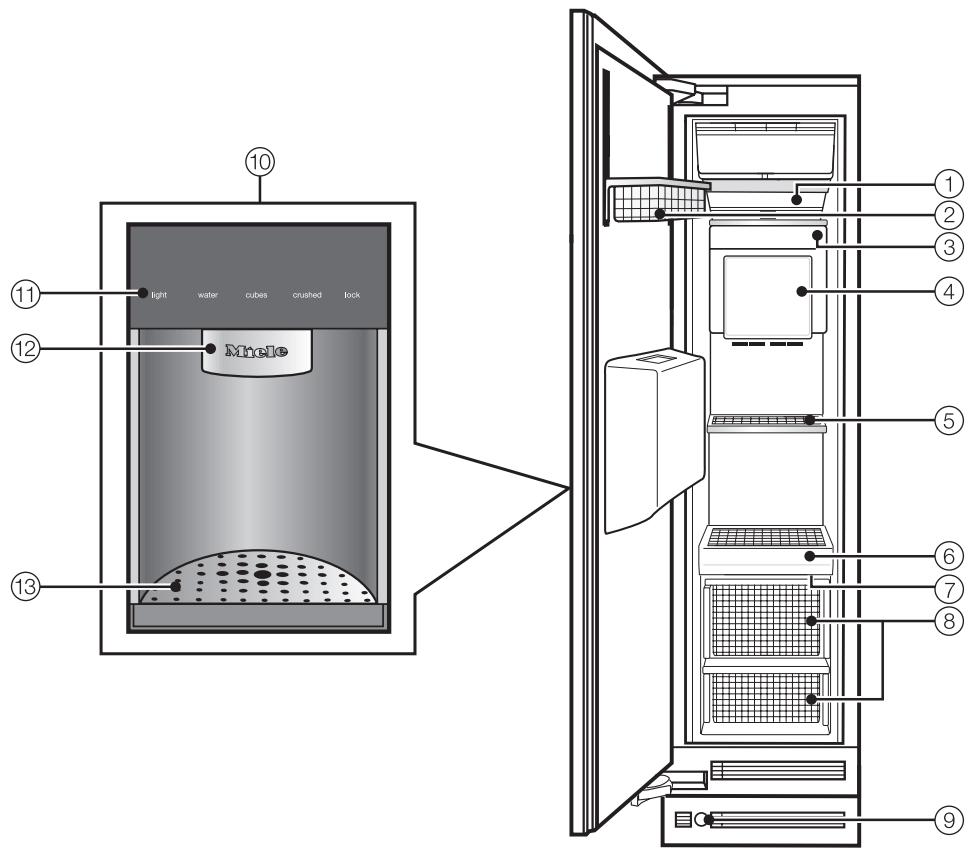
① Interior lighting
② Door shelf
③ Ice cube maker
④ Ice cube container
⑤ Interior shelf
⑥ Control panel for the Freezer
⑦ Main switch to turn the appliance On/Off
⑧ Freezer baskets
⑨ Water filter
10 Ice / Water Dispenser
① Control panel for Ice / Water Dispenser
Dispenser
⑬ Drip tray with cover
Control panel for freezer

super
ice
4
alarm
5
filter
6
① Access button "!” activates the control panel
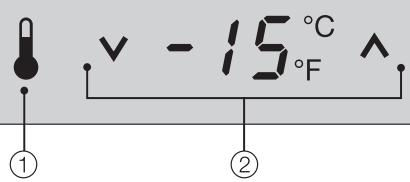
(2) Temperature display
- Temperature is set to the desired
temperature in the freezer
(3) On/Off sensor button for the SuperCool function
④ On/Off sensor button for the Ice/Water dispenser
⑤ Sensor button for the temperature and/or door alarm
⑥ Water filter change indicator
- Only visible when the relevant function is activated
Control panel for Ice/Water Dispenser

light
water

cubes

crushed

lock
① Lighting sensor button
② Water sensor button
③ Ice cube sensor button
④ Crushed ice sensor button
⑤ Safety lock sensor button
Before using for the first time
The stainless steel surface of the appliance is protected with a plastic film, which protects it during shipping.
Do not remove this protective film until the appliance has been completely installed.
After removing the protective film clean the exterior surface with the supplied stainless steel agent. This will aid in preventing resoiling.
Clean the inside of the appliance and the accessories with a mild solution of warm water and liquid dish soap. Dry with a soft cloth.
After installing the appliance, wait at least 30 minutes before switching the appliance on. During transport, fluids in the freezer system may have shifted and will need some time to settle.
Turning the appliance On/Off
Open the appliance door.
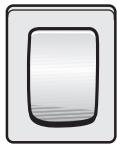
- Turn the appliance On/Off with the main switch.
The main switch is located on the right-side underneath the control panel.
Once on, the appliance begins cooling. When the door is open, the interior lights come on.

The access button will light in the control panel.
The preset temperatures (factory default settings) are reached after a few hours. Do not put any food in the appliance until the preset temperatures are reached.
Turning off the appliance with the main switch does not safely isolate it from the power supply.
Using the settings
When a sensor button has been selected with a finger touch, it will appear yellow.
A de-selected button will appear white.
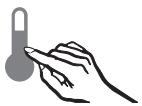
Touch the access button " 串 " so it turns yellow.
On the control panel you will see additional sensor buttons to operate the appliance.
These buttons allow you to:
- adjust the temperature,
- select the SuperCool function, or
- turn the Ice/Water Dispenser On/Off.
For additional information, see the corresponding sections in this manual.
To leave the settings menu, touch the access button " 串 " so it turns white. The last settings entered are stored. If the access button is not pressed the display will go out after approx. 30 secs.
The other sensor buttons now disappear from the control panel.
Custom settings
In the custom settings mode you can select and change functions. The function possibilities are described in the respective chapters of this manual.
| Function | Display text |
| Temperature °C - °F | °F |
| RemoteVision Module settings | r |
| Button sound on/off | b |
| Confirm filter changes | h |
| Exit Custom Settings mode | c |
Turning the button sound On/Off
If you prefer the buttons to be silent when touched the button sound can be turned off.
Touch the access button "?" so it turns yellow.
Note the position of the button, but do not touch.
Touch the access button " again so it turns white.
Only the access button "l" is visible.
-
Place one finger on the position of the button and hold (the button will not be visible).
While holding down the button, press the access button "0" once. Keep holding the button down until the following appears in the display (approx. 5 seconds). -
Tap the button until b appears in the display.
Touch the access button "0" to confirm. - By touching the button, you can choose between:
b D:Button sound is off
b1:Button sound is on
b-: Return to menu.
Touch the access button "I" to confirm the setting.
- Tap the button until you see c in the display.
Touch the access button "".
You have now left the Custom settings mode.
Note : the button sound of the Ice/Water dispenser must be turned off separately.
When you are in the Custom settings mode the door alarm is turned off automatically. Once the door is closed it is reactivated.
Turning off for longer periods of time
If the appliance is not going to be used for an extended time (for example, during a vacation) some precautions need to be taken:
- Shut off the water supply line, (several hours before switching off the appliance)
Take all food out of the appliance
Turn the appliance off
Unplug the appliance
Empty the ice cube container
Clean the interior
Remove and discard the water filter (secure the filter cap)
Leave the door open to prevent odors
The appliance is equipped with an alarm system, to ensure that the temperature does not rise unnoticed because of energy loss or an open door.
The alarm system is always operational, it does not need to be switched on.
Temperature alarm
If the temperature becomes too warm, an alarm sounds and the "alarm" indicator turns red and flashes.
The temperature display shows the highest temperature reached during the alarm.
The alarm will sound and the display will flash if:
- too much warm air flows into the appliance, for example when food is being loaded, re-arranged, or taken out.
- large amounts of food are being frozen at once.
- the power fails.
Turning the temperature alarm Off
As soon as the alarm condition is corrected, the alarm signal turns off and the affected zone stops flashing in the display. The "alarm" indicator goes out.
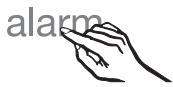
To turn the alarm off early, press the "alarm" sensor button.
The alarm signal turns off. The "alarm" indicator remains red and the corresponding appliance zone continues to flash until the alarm condition is corrected.
If the temperature in the freezer zone reaches 0^ F (-18^ C) or higher, check that food has not defrosted.
Door alarm
If the appliance door is left open, an alarm signal will sound and the "alarm" indicator will turn red after five minutes.
Turning the door alarm Off
Once the door is closed the alarm turns off and the "alarm" indicator goes out. If the door has not been closed properly, the alarm will sound again after five minutes.
To turn the alarm off early, press the "alarm" sensor button. The "alarm" indicator and signal will turn off.
Setting the temperature
Touch the access button "I" so it turns yellow.

Use the and buttons next to the temperature display to set the temperature warmer or colder.
Tap the and sensor buttons to raise/lower the temperature 1^ , or hold it down to move through the temperature range more quickly.
The temperature display on the control panel always shows the desired temperature.
Temperature range
The temperature can be set within the following range:
7^ to -11^ (-14°C to -24°C).
When the Ice/Water dispenser is turned on the temperature is adjustable within the following range:
0^ to -11^ (-18°C to -24°C).
To freeze fresh food and store frozen food for an extended period of time, a temperature of 0^ (-18^) is suggested.
The room temperature and the installation location can affect the time it takes for the appliance to drop to the coldest temperature. If the room temperature is too high, it may not be possible for the appliance to reach the lowest temperature.
Temperature unit (Fahrenheit/Celsius)
The temperature can be displayed in degrees Fahrenheit (°F) or Celsius (°C).
Touch the access button "?" so it turns yellow.
Note the position of the button, but do not touch.
Touch the access button "I" again so it turns white.
Only the access button "I" is visible.
- Place one finger on the position of the button and hold (the button will not be visible).
While holding down the button, press the access button "1" once. Keep holding the button down until the following appears in the display (approx. 5 seconds).
- Tap the button until t appears in the display.
Touch the access button "I" to confirm. - By touching the V button you can select either Fahrenheit or Celsius for the temperature display.
Fahrenheit
1: Celsius
: return to menu.
Touch the access button "I" to confirm the setting.
- Tap the button until a c appears in the display.
Touch the access button "B".
You have left the Custom settings mode.
When you are in the Custom settings mode the door alarm is turned off automatically. Once the door is closed it is reactivated.
Freezing food
Fresh food should be frozen as quickly as possible. This helps maintain the nutritional value, vitamin content, appearance and taste of the food.
Never refreeze partially or fully defrosted food. Consume defrosted food as soon as possible, it will lose its nutritional value and spoil if left for too long. Do not refreeze defrosted food unless it has been cooked.
Before placing food in the freezer
- When you are planning to freeze large amounts of food (more than 4 12 lbs [2kg] ), switch on the SuperCool function ahead of time (see "SuperCool"). This will provide the food already in the freezer with a protective boost of cold air.
Placing food in the freezer
Food to be frozen can be placed anywhere in the freezer.
The freezer baskets can hold a maximum of 35 lbs (16 kg) of frozen food.
- Spread the food to be frozen across the bottom of the freezer basket or across the shelves, so that it will freeze through to the core as quickly as possible.
- When placing items in the freezer, make sure the packaging and containers are dry, to keep them from sticking together when frozen.
When freezing, try not to let frozen food come into contact with fresh food, this could cause the frozen food to defrost.
Defrosting
Frozen food can be defrosted in different ways:
- in a microwave oven,
- at room temperature,
- in the refrigerator (the cold given off by the frozen food helps to keep the other food cold),
- in a steam oven.
Poultry It is especially important to observe proper hygiene when defrosting poultry. Never save the liquid from defrosted poultry. Drain it away and promptly wash the container, the sink and your hands. Danger of salmonella poisoning.
Fruit should be defrosted at room temperature in its packaging, or in a covered bowl.
Most vegetables can be cooked while still frozen. Simply place directly into boiling water or hot oil.
Cooling drinks quickly
To cool drinks quickly, switch on the SuperCool function. See "SuperCool" for more information.
Do not leave bottles in the freezer for more than 1 hour, closed containers could burst.
Freezing tips
- The following are examples of foods suitable for freezing:
Fresh meat, poultry, game, fish, vegetables, herbs, fresh fruit, pastry/dough, leftovers, and a range of pre-cooked meals. - The following examples of foods not suitable for freezing:
Lettuce, radishes, sour cream, mayonnaise, eggs in their shells, onions, whole raw apples and pears. - To retain color, taste and vitamin C, vegetables should be trimmed, washed, and blanched.
To blanch: bring a large saucepan of water to a boil, then submerge the vegetables in rapidly boiling water for 2-3 minutes, depending on type.
Remove, and plunge into ice-cold water to cool quickly. Drain and pack for freezing. - Lean meat freezes better than fatty meat, and can be stored for considerably longer.
- To prevent chops, steaks, cutlets or rolled meats from freezing together in solid blocks when packed, separate with a sheet of plastic freezer wrap.
-
Do not season fresh foods or blanched vegetables before freezing. Cooked food can be lightly seasoned before freezing, but care should be taken as the taste of some spices alters when frozen.
-
Do not place hot foods or drinks in the freezer. This causes already frozen food to thaw, and increases the energy consumption considerably. Allow hot foods and drinks to cool down before placing them in the freezer.
Packing tips
Unsuitable packing material
- wrapping paper
- greaseproof paper
- cellophane
- garbage bags
- plastic shopping bags
Suitable packing material
- plastic freezer bags/wrap
- aluminum foil
- freezer containers
To help prevent freezer burn, expel as much air as possible from bags, etc., before sealing them.
- Close the packaging tightly with
- plastic clips
- twist ties
- rubber bands
Mark the package to indicate the contents and the date of freezing.
When the SuperCool function is activated, the appliance is cooled as cold as possible (to a factory-preset temperature).
SuperCool
The SuperCool function is ideal for freezing large quantities of unfrozen food. Ideally the function should be switched on 4 - 6 hours before the food is placed in the freezer.
If the max. freezing capacity is used, 24 hours are recommended.
This helps food to freeze quickly and retain its nutrients, vitamins, flavor and appearance.
Switching on SuperCool

- Touch the SuperCool sensor so that it turns yellow.
The temperature now begins to fall, with maximum cooling performance.
The new temperature setting appears in the display -22^ (-30^) .
Switching off SuperCool
The SuperCool function automatically switches off after approx. 52 hours. The sensor button turns white, and the appliance continues running at normal power.
To save energy, you can switch off the SuperCool function once the food is sufficiently chilled.
- Touch the SuperCool sensor so that it turns white.
The temperature display returns to the original temperature setting.
The appliance now continues running at normal power.
For the automatic ice/water dispenser to operate, it must be connected to the household power and water supply.
Use sturdy glass when dispensing water or ice - risk of injury from broken glass!
Keep fingers clear of the dispenser opening. Risk of injury!
Turning on the Ice/Water Dispenser
Once the freezer has cooled to a freezing temperature, the ice cube tray filles with water. Cold air is blown directly over the tray.
As soon as the cubes are frozen they fall into the ice cube container.
When the ice cube container is full, the ice maker switches off automatically.
The ice cube maker produces:
- cold water
- ice cubes
crushed ice. - Be sure the ice cube container is under the ice maker and has been inserted as far as possible.
Do not place any bottles or food for rapid cooling in the ice cube container. The ice maker could become blocked or damaged.
Open the freezer door.
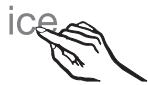
Touch the "ice" button so it turns yellow.
Close the freezer door.
The ice/water dispenser is now ready for use.
light
水
cubes
crushed
lock
Turn on the Ice/Water dispenser with a finger touch to the control panel or by passing your hand under the dispenser to activate it via the light sensor.
All of the touch controls for the Ice/Water Dispenser should now appear white.
If this is not the case, the Safety Lock is activated i.e. "lock" will appear yellow. See "Safety Lock".
If "lock" is blinking, the drip tray needs to be emptied (see "Cleaning and care")!
Dispensing water
Place a suitable cup on the drip tray.
water

Press and hold the "water" button.
As long as you hold in the "water" button, water will flow from the dispenser.
The water from the dispenser is cooled to a palatable temperature. If you would like the water colder, place ice cubes in the glass before dispensing water.
Dispensing (crushed) ice
Place a suitable cup on the drip tray.
cubes
crushed
Press and hold the "cubes" or "crushed" button.
As long as you hold in the desired button, ice will fall from the dispenser.
Release the button when the jar is almost full. Ice in the discharge may cause the cup to overflow or block the discharge.
The ice cube maker can produce approx. 150 ice cubes within 24 hours.
As soon as the drip tray indicator signals that the drip tray is full, the current operation will automatically stop.
Empty out the drip tray using a sponge or dish towel.
After the appliance is turned on for the very first time, it can take up to 24 hours for the first ice cubes to drop out of the ice cube maker and collect in the container.
Whenever the appliance has been out of service for an extended period of time discard the ice/water production of the first 24 hours after switching on the ice/water dispenser!
If the ice/water dispenser is not used for more than 2 minutes or the freezer door is opened, Standby mode is activated and the lighting for the ice/water dispenser will go out.
After activating the ice/water dispenser it will take a few seconds for the water and/or ice to be dispensed.
Using the Ice/Water Dispenser for the first time
Before using the Ice/Water Dispenser for the first time, you must flush then fill appliance water lines with water.
- Open the freezer door.
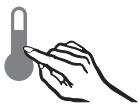
Touch the "Access" button so it turns yellow.
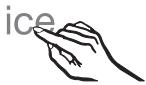
- Touch the "ice" sensor button so it turns yellow.
Close the appliance door.
The "water" button on the control panel of the Ice/Water Dispenser flashes white.
- Place a large container under the dispenser.
water
- Touch the "water" button until it flashes yellow.
water
- Touch and hold the "water" button again.
This activates the flushing function, which uses approximately 1.6 gallons (6 liters) of water.
You can interrupt the flushing process at any time to empty the container, by taking your finger off the "water" button. During this time, the "water" button will flash yellow again.
As soon as the flushing process is complete, you will hear a beep, and the buttons on the control panel will turn white.
You can now use the Ice/Water Dispenser.
Safety lock
The Ice/Water dispenser can be locked to prevent unwanted use.
lock
Touch the "lock" button so it turns yellow.
The Ice/Water dispenser buttons are now locked.
To unlock the buttons:
- Touch the "lock" button so it turns white.
Lighting
In order to turn the Ice/Water dispenser lighting on or off:
light
- Touch the "light" button so it turns yellow (lighting on) or white (lighting off).
If the Ice/Water dispenser is not used for longer than 2 minutes, it switches into standby mode, and the Ice/Water dispenser lighting turns off.
Turning off the Ice/Water dispenser
The water supply line must be shut off several hours before the appliance or ice maker is switched off.
- Open the freezer door.
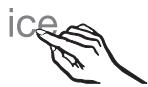
- Touch the sensor button for the ice maker so that it turns white.
Settings
The following settings on the Ice/Water dispenser can be adjusted:
Entering the settings mode

- Touch and hold the "lock" button (appears white).

At the same time tap the "light" button.
Hold the "lock" button for approx. 4 seconds until the "lock" and "light" buttons turn yellow.
The lighting color of other buttons indicates their On/Off setting.
Release both buttons.
Anti-condensation heater
A heater behind the cover of the Ice/Water dispenser ensures that frost and ice do not build-up. To save energy, you can turn the heater Off.
This feature is turned off by factory default.
To turn the anti-condensation heater on:

- Touch the "water" button until it turns yellow.
Anti-clumping
The anti-clumping feature ensures that crushed ice or ice cubes do not freeze together. A noise will be heard periodically to indicate that the feature is working. If the sound disturbs you, the feature can be turned off.
Note: Disabling the anti-clumping feature can result in the formation of ice clumps in the dispenser.
This feature is turned on by factory default.
To turn the anti-clumping feature off:

- Touch the "cubes" button until it turns white.
Button sound
If you prefer the buttons to be silent when touched, the button sound can be turned off.
This feature is turned on by factory default.
To turn button sound off:
cubes
crushed
- Touch the "crushed" button until it turns white.
Exiting the settings mode
light
- Touch the "light" button or do not touch any buttons for one minute.
The freezer defrosts automatically.
The moisture generated in the appliance collects in the evaporator. It is automatically defrosted and dissipated by the condenser periodically.
This automatic defrosting system enables the freezer to remain permanently ice-free, while ensuring that the food stored in the freezer stays frozen.
Moving the shelves
The shelves can be adjusted according to the height of the food.
Using both hands, grasp the shelf from underneath and lift slightly so that the rear of the shelf is slightly above the mountings.
Pull the shelf forward.
- Move the shelf to the desired height, then insert the (rear) hooks into place.
Make sure the shelf is level.
Door shelf
For easier loading, unloading and cleaning the door shelf can be shifted or completely removed.
Using both hands, grasp the door shelf by the frame, lift it upward a bit, then tip it slightly forward.
- Slide the tipped shelf up or down along the side-rails, and click it back into place at the desired location.
Make sure that the basket is level.
Removing the door shelf:
- Slide the shelf upwards all the way to the top of the side-rails until it can be removed.
Replacing the door shelf: - Insert the freezer basket at the top of the side-rails and slide it down into the desired position.
Adjusting the interior fittings
Freezer baskets
For easier loading, unloading, and cleaning, the freezer baskets can be shifted or completely removed.
Pull the basket forward until resistance is felt.
On the hinged-side of the door is a safety lock, which must be turned to a horizontal position before the drawer can be removed.
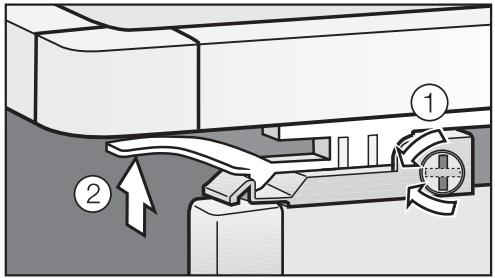
Using a suitable object, turn the safety lock to a horizontal position ①.
On both sides of the basket, pull the latches ② upward and lift the basket out of the freezer.
Replacing the freezer basket
Fully extend the telescopic tracks.
- Lay the basket onto the tracks so that it connects in the front and back.
Turn the safety lock back to the vertical position.
Slide the freezer basket in.
To reduce the risk of electrical shock, disconnect the appliance from the power supply by shutting off the power main, tripping the circuit breaker or unplugging the power cord before maintenance.
Never use cleaning agents containing abrasive substances such as sand, soda, acids, chlorides or chemical solvents. Non-abrasive cleaning agents are also unsuitable, as they can cause matte areas to appear.
Stainless steel surfaces can be cleaned using a non-abrasive stainless steel cleaner (available from Miele).
Only use a mild solution of warm water and liquid dish soap to clean this appliance.
Do not use a steam cleaner to clean this appliance. Pressurized steam could penetrate electrical components and cause a short circuit.
Do not allow water to get into the electronic unit or lights.
Before cleaning
Use the main switch to turn the appliance off completely.
The main switch is located on the right side underneath the control panel.
Unplug the power cord.
- Remove any food from the appliance and store it in a cool place.
Take out any removable parts, e.g., shelves, baskets.
Cleaning the interior and accessories
Use a mild solution of warm water and liquid dish soap. Wash all accessories and drawers by hand. Do not wash in a dishwasher.
Clean the appliance as needed.
After washing, wipe down the interior and accessories with a clean wet cloth, then dry with a soft cloth. Leave the appliance door open for a short time, so the moisture can evaporate.
Appliance door
Stainless steel surfaces can be cleaned using a non-abrasive stainless steel cleaner.
To help prevent resoiling, a conditioner for stainless steel can also be used. Apply sparingly with even pressure.
Aluminum frames
The frames of the door bins and shelves are made of aluminum.
Clean with a mild solution of warm water and liquid dish soap.
Aluminum is susceptible to scratches and nicks, treat with care.
The aluminum frames may become discolored or otherwise altered if soiling is not cleaned away promptly.
Do not use stainless steel cleaners; lime removers; scouring pads, such as pot scrubbers; or used sponges that still contain abrasive cleanser residue to clean the frames.
Ice cube container
Pull out the ice cube container.
Empty and clean the ice cube container with lukewarm water.
Thoroughly dry the container and the anti-clumping screw to prevent new ice cubes from sticking.
To re-insert push the ice cube container all the way back onto the supports until it locks into position.
If the container cannot be pushed all the way back, twist the anti-clumping screw in the container.
Drip tray
The drip tray collects excess water.
lock
As soon as the drip tray is full, the "lock" button on the Ice/Water dispenser control panel will flash. A sensor located in the drip tray detects when the drip tray is full.
The drip tray must be emptied and cleaned. However, to prevent odors, the drip tray should be cleaned daily.
When the "lock" button flashes yellow:
Remove the drip tray cover.
- Empty and clean the drip tray using a sponge or kitchen towel.
Replace the tray cover.
The "lock" button is now white again.
Ventilation slits
- Check the ventilation slits in the base panel regularly. Remove any dirt/dust with a vacuum cleaner or brush. Clean as needed.
Door seals
Do not use any oils or grease on the door seals. This may cause the seals to deteriorate and become porous over time.
Clean the door seals with warm water and dry thoroughly.
After cleaning
- Return all shelves and accessories.
Plug in the appliance and turn it on with the main switch. - Switch on the SuperCool function. The freezer section will cool down quickly.
Once the temperature is cold enough, place food in the freezer.
Changing the light bulb
The lighting automatically switches off after the door has been open for approx. 10 minutes. This is not a fault.
If the light does not come on when the door is opened briefly, the light bulb should be changed.
Use the main switch to turn the appliance off.
To reduce the risk of electric shock, disconnect the appliance from the power supply by unplugging or tripping the circuit breaker.
Upper lighting
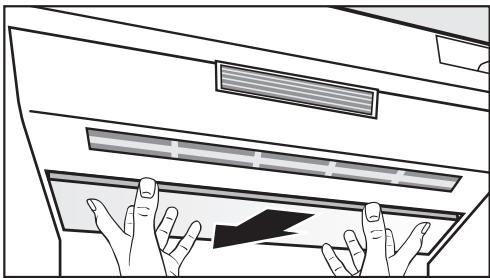
- Grasp the front of the light cover with both hands, and slide it back.
Carefully pull the cover forward and out.
Never touch a halogen bulb with bare fingers.
When inserting a glass halogen bulb always hold with a soft cloth.
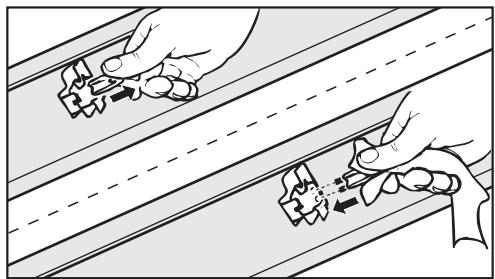
Remove the defective light bulb.
- Place the new bulb in the socket. Halogen bulb type: 20 W/12 V/socket GY 6.35.
- Slip the rear of the light cover back into position, then pull it forward and into place.
Side lighting
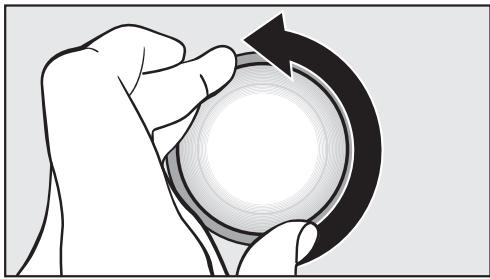
Turn the light cover counterclockwise and pull out.
Never touch a halogen bulb with bare fingers.
When inserting a glass halogen bulb always hold with a soft cloth.
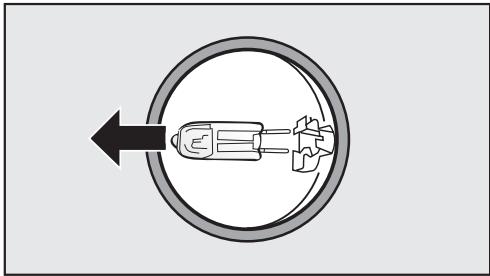
Pull the defective light bulb from the socket.
Place the new bulb in the socket. Halogen bulb type: 5 W/12 V/socket G 4.
Put the light cover back on and turn clockwise into place.
Restore power to the appliance.
Ice/Water Dispenser Lighting
Do not remove the light cover for the dispenser lighting. Should the lighting covers be damaged or need to be removed due to damage, do not look directly or with an optical instrument at the lighting.
The lighting automatically switches off if the dispenser is not used for an extended period of time. This is not a fault.
If the light does not come on when the dispenser is used again, the light bulb should be changed.
The dispenser lighting should only be repaired or replaced by Miele Technical Service.
The water filter improves the taste and smell of ice cubes by removing chlorine and other substances from the incoming tap water.
It is important to change the water filter regularly.
To avoid serious illness or death, do not use water that is microbiologically or chemically unsafe or of unknown quality without adequate disinfection or other treatment before or after use of a filter.
Note:
- After installing a new water filter and switching on the ice maker, discard the first 24 hours' worth of ice production.
- If the ice maker has not been used for a prolonged time discard any ice cubes in the freezer, empty the container and discard the ice production of the next 24 hours.
- If the appliance or ice maker have not been routinely used for several weeks or months, or if the ice cubes have an unpleasant odor, change the water filter.
Note: Air trapped in the system may cause water and the filter cartridge to eject forcefully. Use caution when removing.
Depending on how many ice cubes are produced, the filter will need to be changed approximately every 6 months.
filter
- When the filter indicator turns red, the filter will need to be changed soon.
Replacement filters can be ordered from Miele.
- When the red filter indicator flashes, it is time to change the filter.
Exchanging the water filter
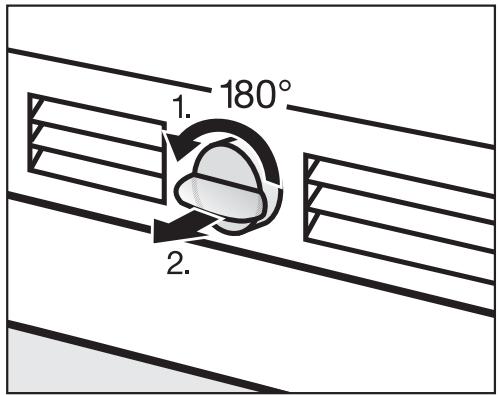
Push in and rotate the filter cap on the base panel of your appliance counterclockwise 180^ , 1.
Pull the used filter cartridge out of the appliance, 2.
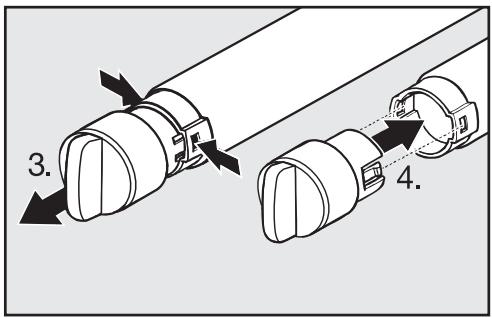
Remove the cap from the used filter, 3.
Take a new filter cartridge out of the packaging and remove the protective cap.
Push the cap onto the new filter cartridge, 4.
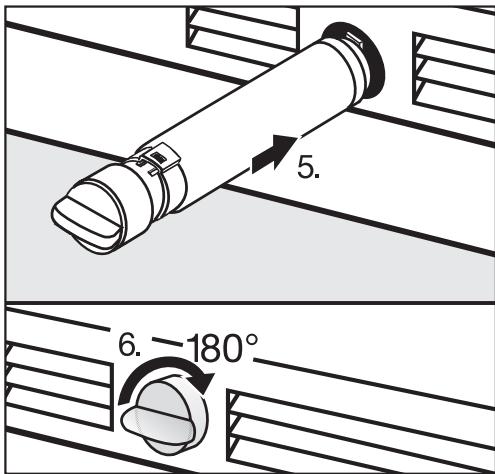
Push the filter cartridge with cap, in a horizontal position, all the way into the opening in the base panel, 5.
- Rotate the filter cartridge clockwise 180^ until the cap is in a horizontal position, 6.
filter
The filter change needs to be confirmed before the "filter" indicator will go out. See "Re-setting the filter indicator".
Whenever you replace the filter, the system must be re-set. This will ensure the indicator light for the next filter change will come on at the right time.
Re-setting the filter indicator
filter
The filter indicator still flashes in the display.
Touch the access button " 串 " so it turns yellow.
Note the position of the button, but do not touch.
Touch the access button " again so it turns white.
Only the access button "l" is visible.
- Place one finger on the position of the button and hold (the button will not be visible).
While holding down the button, press the access button "?" once. Keep holding the button down until the following appears in the display (approx. 5 seconds).
- Tap the button until an h appears in the display.
Touch the access button "I" again.
By touching the button you can select the following settings:
h0 : filter is installed
h 1: filter is not installed (external filter)
h2:filter change confirmed
h: return to menu
- Tap the button until h≥ appears in the display.
h 1 should only be selected if an external filter or bypass cartridge is being used. See "Deactivating the water filter".
Press and hold the access button "for 2 seconds to confirm the filter change.
The filter is now reset.
- Tap the button until h - appears in the display.
Touch the access button "I". - Tap the button until c appears in the display.
Touch the access button "B".
You have left the Custom settings mode.
The "filter" indicator is no longer visible on the control panel.
When you are in the Custom settings mode the door alarm is turned off automatically. Once the door is closed it is reactivated.
After installing a new water filter discard the first 24 hours of ice production.
Deactivating the water filter
The ice cube maker in this appliance can be operated without the installed water filter, for example if the household water supply already uses a water filter.
If you choose this option, it is important to insert a bypass cartridge. Only then can the performance of the appliance be ensured.
To purchase a bypass cartridge, contact Miele.
State of California
Department of Public Health
Water Treatment Device
Certificate Number
06-1775
Date Issued: March 10, 2006
Date Revised: April 3, 2008
Trademark/Model Designation
9000 077095
Miele 07134220
Replacement Elements
9000 077104
07134220
Manufacturer: Cuno, Incorporated
The water treatment device(s) listed on this certificate have met the testing requirements pursuant to Section 116830 of the Health and Safety Code for the following health related contaminants:
Microbiological Contaminants and Turbidity
Cysts
Turbidity
Organic Contaminants
None
Inorganic/Radiological Contaminants
None
Rated Service Capacity: 740 gals
Rated Service Flow: 0.75 gpm
Conditions of Certification:
Do not use where water is microbiologically unsafe or with water of unknown quality, except that systems certified for cyst reduction may be used on disinfected waters that may contain filterable cysts.
Performance Data Sheet For Filter Model 07134220
Using Replacement Cartridge 07134220
This system has been tested according to NSF/ANSI Standards 42 and 53 for the reduction of the substances listed below. The concentration of the indicated substances in water entering the system was reduced to a concentration less than or equal to the permissible limit for water leaving the system, as specified in NSF/ANSI 42 and 53.

System tested and certified by NSF International in Model 07134220 against NSF/ANSI Standard 53 for the reduction of Cysts and Turbidity and against Standard 42 for the reduction of Chlorine Taste and Odor; Nominal Particulate Class I.
Note that while the testing was performed under standard laboratory conditions, actual performance may vary.
To a capacity of 739.68 gallons (2800 liters).
| Substance | Average Influent Concentration | Influent Challenge Concentration mg/L | Product Water Concentration | Average % Reduction | Maximum Permissible Product Water Concentration | Max. Effluent | Min. % Reduction | NSF Test |
| Cysts* | 166500 | Minimum 50,000/L | 1 | 99.99 | 99.95 | 1 | 99.99 | 516458-05 |
| Turbidity | 10.7 | 11 + 1 NTU | 0.31 | 97.09 | 0.5 NTU | 0.49 | 95.42 | 516456-05 |
| Particulate Class I Particle size: > 0.5 to < 1 um | 5700000 | At least 10,000 particles/ml | 30583 | 99.52 | ≥ 85% | 69000 | 98.9 | 511079-03 |
| Chlorine taste and odor | 1.9 | 2.0 mg/L ± 10% | 0.05 | 97.3 | ≥ 50% | 0.06 | 96.84 | 511081-03 |
- Based on the use of Cryptosporium parvum oocysts
| Application Guidelines/Water Supply Parameters | |
| Water pressure | 30-120 psi (207 - 827 kPa) |
| Water temperature* | 33°F - 100°F (0.6°C - 38°C) |
| Service flow | 0.75 gpm (2.83 lpm) |
CAUTION: To avoid property damage due to water leakage, you MUST read and follow these operating instructions before installation and use of this product.
WARNING: Do not use with water that is microbiologically unsafe or of unknown quality without adequate disinfection before or after the system. Systems certified for cyst reduction may be used on disinfected waters that may contain filterable cysts.
NSF is a registered trademark of NSF International. CUNO is a trademark of 3M Company used under license. © 2007 3M Company. All rights reserved.
IMPORTANT: Must be installed and operated in accordance with application guidelines.
Failure to do so may void warranty. Change filter at least every 6 months.
Flush new cartridge for 3 minutes.
For estimated costs of replacement elements please visit your local appliance dealer or parts distributor.

a 3M company
CUNO Engineered Products, Inc. 1000 Apollo Road
Eagan, MN 55121-2240 U.S.A.
Frequently asked questions
With the aid of the following guide minor problems can be corrected without a service call.
Repairs should only be carried out by a qualified and trained person in strict accordance with local and national safety regulations. Unauthorized repairs could cause personal injury or machine damage and may void the warranty.
Problems with temperature
| Issue | Possible fault | Solution |
| The freezer does not get cold. | The machine is not turned on. | Check whether the appliance is switched on at the main switch. The access button must be lit up. |
| The machine is not plugged in. | Check that the plug is correctly inserted in the power outlet. | |
| Check that the fuse has not tripped. | Reset the circuit breaker. | |
| The temperature is set incorrectly. | Check the display. | |
| The temperature is too low. | Select a warmer temperature. | See "Selecting the correct temperature". |
| The SuperCool function is still on. | SuperCool automatically shuts off after 52 hours. | |
| The door is not closed. | Check that the door has been closed properly. | |
| A large amount of food is being frozen at the same time. | This makes the compressor run longer, causing the temperature to fall automatically. | |
| The freezer is too warm. | The room temperature is lower than the ambient temperature for which the appliance is designed. | Raise the temperature of the room. Operating the appliance in a room that is too cold will cause the cooling system to switch off for too long, causing the freezer section to become too warm. |
| General problems | ||
| Issue | Possible fault | Solution |
| Water is flowing out of the appliance. | Close the shut-off valve immediately. | |
| Check whether the water pipe in the appliance is defective. | Contact Miele Technical Service. | |
| Check whether the water pressure is too low. | Contact a plumber. | |
| Check whether the correct water valve has been installed. | Self-tapping valves and 3/16" (4.76 mm) saddle valves reduce the water pressure and can block the pipe. | |
| The door will not open. | This is not a fault. The suction caused by opening and closing the door too many times in succession prevents it from opening. | Wait a few minutes, then try again. It should now open without force. |
| The compressor kicks on very frequently and for too long. | The ventilation slits are covered or dusty. | Clean with a vacuum or brush. |
| The door has been opened too frequently, or a large amount of unfrozen food has been put in at once for freezing. | Once the freezer gets down to the set temperature the compressor will turn off. | |
| The door is not closed. | Check that the door has been closed properly. | |
Frequently asked questions
| Alarm / Indicator warnings | ||
| Issue | Possible fault | Solution |
| The alarm is going off. | The appliance door(s) have been open for longer than 5 minutes. | Close the door. |
| The alarm is ringing and the "alarm" indicator is flashing. | The door is not closed. | Once the alarm condition has been corrected, the alarm will turn off and the "alarm" indicator will stop flashing. |
| A large amount of fresh food is being frozen at the same time. | ||
| There has been a power failure. | The temperature indicator will indicate the highest temperature reached during the alarm. Check that food has not defrosted. | |
| The filter display is red. | This is a warning that the water filter needs to be changed soon. | Order replacement filters from Miele. |
| The filter display is flashing red. | The water filter needs to be changed. | See "Exchanging the water filter". |
| The "Lock" indicator flashes in the display. | The drip tray of the Ice/Water Dispenser is full. | Empty the drip tray by soaking up the water with a sponge or dish cloth. |
| Problems with the ice/water dispenser | ||
| Issue | Possible fault | Solution |
| The ice maker will not switch on. | The appliance is not plugged in. | Check that the appliance is connected to the power supply. |
| The ice maker is not producing any ice. | When the appliance is turned on for the very first time, it can take up to 10 hours for the first ice cubes to drop out of the ice cube maker and collect in the container. | |
| The appliance is not turned on. | Check that the appliance is switched on. | |
| The water supply line was not primed (purged of air) before the appliance was used for the first time. | Contact Miele. | |
| Check if: - the Ice/Water dispenser is switched on. - the water supply line is open. - there are ice cubes stuck together and blocking the exit. - the ice cube container is in the right position. - the freezer compartment temperature is too high. - the water pressure is too low. The water pressure must be between 25 and 120 psi (1.72-8.25 bar). | See "Ice/Water Dispenser" and/or "Plumbing" for more information. | |
| Check whether the correct water valve has been installed. | Self-tapping valves and 3/16" (4.76 mm) saddle valves reduce the water pressure and can block the pipe. | |
Frequently asked questions
| Problems with the ice/water dispenser | ||
| Issue | Possible fault | Solution |
| The ice cubes are small. | Other domestic appliances that use water are in operation. | Avoid using such items as a dishwasher, washing machine or shower at the same time. |
| Check whether the water filter needs changing. | See "Water filter" for more information. | |
| Check the water pressure. The water pressure must be between 25 and 120 psi (1.72-8.25 bar). | Consult a plumber. | |
| Check whether the correct water valve has been installed. | Self-tapping valves and \( ^3/16 \) (4.76 mm) saddle valves reduce the water pressure and can block the pipe. | |
| The Ice/Water has an unpleasant odor/flavor. | When ice is stored for an extended period it may absorb odors, which affects the taste. | Use the ice maker more frequently. |
| Check if the ice cube container is dirty. | Clean the container. | |
| Unsealed packages in the freezer will transfer odor/flavor particles to the ice cubes. | Check that food has been packed in airtight containers. | |
| The Ice/Water dispenser is not producing ice or water. | The Safety Lock is activated. | See "Ice/Water Dispenser - Safety Lock". |
| The ice maker is not producing enough ice or the ice cubes are misshapen. | Check the water pressure. The water pressure must be between 25 and 120 psi (1.72-8.25 bar). | Contact a plumber. |
| Check that the freezer temperature is not too low. | See "Selecting the correct temperature". | |
| Change the water filter. | See "Water filter". | |
| The Ice/Water dispenser does not appear to be running. | The appliance is not plugged in. | Check that the appliance is connected to the power supply. |
| Check that the freezer is connected to the water supply. | See "Plumbing". | |
| The freezer temperature is too high. | See "Setting the temperature". | |
| Ice is forming in the supply hose to the ice maker. | Check the water pressure. The water pressure must be between 25 and 120 psi (1.72-8.25 bar). | Contact a plumber. |
| Check whether the freezer compartment temperature is too high. | See "Selecting the correct temperature". | |
| A noise is heard periodically from the Ice/Water Dispenser. | The Anti-clumping feature is activated. | See "Anti-clumping" for more information or to deactivate. |
In the event of a fault which you cannot easily fix yourself, please contact the Miele Technical Service Department at the address on the back of this booklet.
When contacting the Technical Service Department, please quote the model and serial number of your appliance given on the data plate inside the appliance.
MieleCare
(USA only)
MieleCare, our Extended Service Contract program; gives you the assurance of knowing that your appliance investment is covered by 5 years of worry-free ownership.
MieleCare is the only Extended Service Contract in the industry that guarantees repairs by a Miele Authorized Service Provider using genuine Miele parts. Only genuine Miele parts installed by factory-trained professionals can guarantee the safety, reliability and longevity of your Miele appliance.
Please note that unless expressly approved in writing by the Miele Service department, Extended Service Contracts offered by other providers for Miele products will not be recognized by Miele. Our goal is to prevent unauthorized (and untrained) service personnel from working on your Miele products, possibly doing further damage to them, you and/or your home.
To learn more about MieleCare Extended Service Contracts, please contact your appliance dealer or visit us online at:
http://miele.com/mielecare
Installation instructions
To prevent accidents and machine damage read these instructions
before
installation or use.
Disposal of packing materials
The cardboard box and packing materials are biodegradable and recyclable. Please recycle.
Ensure that any plastic wrappings, bags, etc., are disposed of safely and kept out of the reach of babies and young children. Danger of suffocation!
Disposal of an old appliance
Old appliances contain materials that can be recycled. Please contact your local recycling center about the possibility of recycling these materials.
Before discarding an old appliance, disconnect it from the electrical supply and cut off the power cord to prevent it from becoming a hazard.
Have the appliance installed by a qualified technician, according to the enclosed installation instructions.
WARNING
This appliance is top-heavy and must be secured to prevent it from tipping forward.
Keep the door closed until the appliance is completely installed and secured as per the installation instructions.
Empty weight of your machine:
F 1471 SF 364 lbs (165 kg)
Installation site
The appliance should be installed in a dry, well ventilated room.
Do not install the appliance:
- outdoors,
- in an environment with dripping water,
- in rooms which are at risk of frost.
The installation location should not be exposed to direct sunlight, nor near a heat source, such as an oven, radiator, etc.
The ambient temperature should not drop below 55^ (13^) or rise above 110^ (43^) , otherwise malfunctions may occur.
If installation next to a heat source is unavoidable, use a suitable insulating plate or observe the following minimum distances from the heat source:
- 1^1 / _4^ (3 cm) from an electric cooktop or oven.
- 12'' (30 cm) from a gas cooktop or oven.
Base
A fully loaded appliance is very heavy. The load-bearing capacity of your floor must meet the following requirements:
F 1471 SF 558 lbs (253 kg)
To ensure that the appliance is installed securely and functions properly, the base must be flat, level and made of a hard, rigid material.
If in doubt, contact Miele.
Furniture/fixtures
The new appliance will be mounted securely to adjacent and overhead furniture/fixtures.
For this reason it is essential that all attachable furniture/fixtures are connected securely to the base or the wall by suitable means.
Ventilation
The air intake and outlet must not be blocked or covered in any way. They also need to be dusted/cleaned on a regular basis.
Installation niche
To ensure safe, trouble-free installation and the best possible cosmetic result, check to be sure that the installation space complies with the installation dimensions. See "Niche dimensions".
The side walls of the installation cavity must be plumb.
The minimum thickness of the side walls and the top wall must be 5 / 8 (16 mm).
The minimum thickness of the toe-kick cover must be 12 (13 mm). A thickness of 34 (19 mm) is recommended.
Installation options
There are many different installation options. These are limited only by the design of the kitchen.
The door hinge cannot be exchanged.
Single column
The appliance can be installed at any preferred location in the kitchen.
However, be sure the door will open and close properly in the chosen location.
Side-by-side
This appliance can be installed "side-by-side" with another fridge/freezer using a "Merging Kit".
The "Merging Kit" can be obtained from Miele.
Contact Miele or your dealer for specific information about which combinations will work with your appliance.
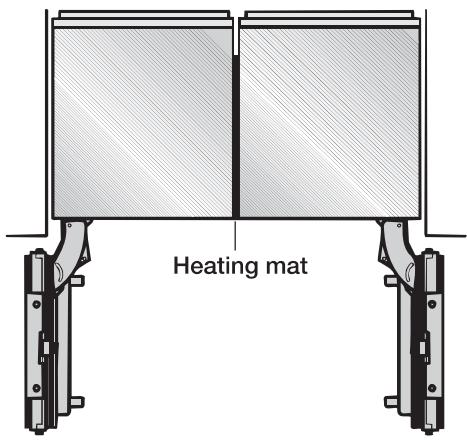
... without partition
If the appliances are installed directly next to each other (without a partition), they will need to be attached together. A heating mat must also be installed. This will help avoid condensation and prevent damage.
For instructions on how to attach the appliances and install the heating mat, please refer to the instructions included in the "Merging Kit" available from Miele.
... with partition
The minimum thickness of the partition is 58 (16 mm).
If there is a partition between the adjacent appliances, then each appliance is to be individually installed within its own niche.
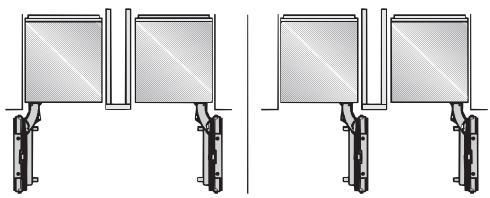
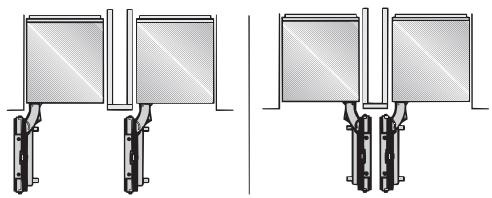
A heating mat must only be installed if the partition wall is less than 6'' (160 mm) wide.
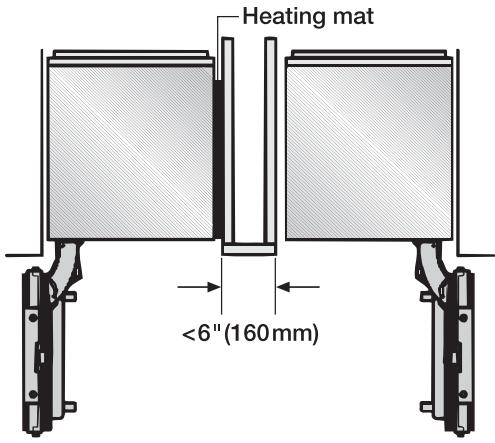
For instructions on how to install the heating mat please refer to the instructions included in the "Merging Kit".
The "Merging Kit" can be obtained from Miele.
Side panels
If one side of the appliance is visible, a side panel must be used.
The side panel must be firmly secured to the wall, the floor and the overhead furniture/ fixtures before the appliance is placed in the cavity.
The dimensions of the side panel are taken from the opposite wall of the installation space. During installation, ensure that the cavity is square and the measurements are correct.
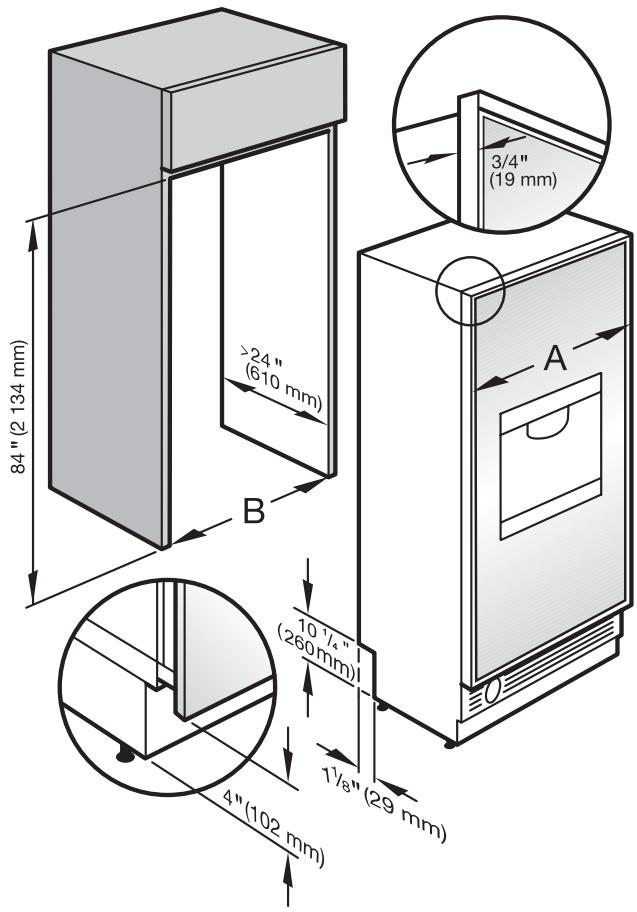
Niche dimensions
| A | B | |
| F 1471 SF | 18 1/2" (469.8 mm) | 18" (457 mm) |
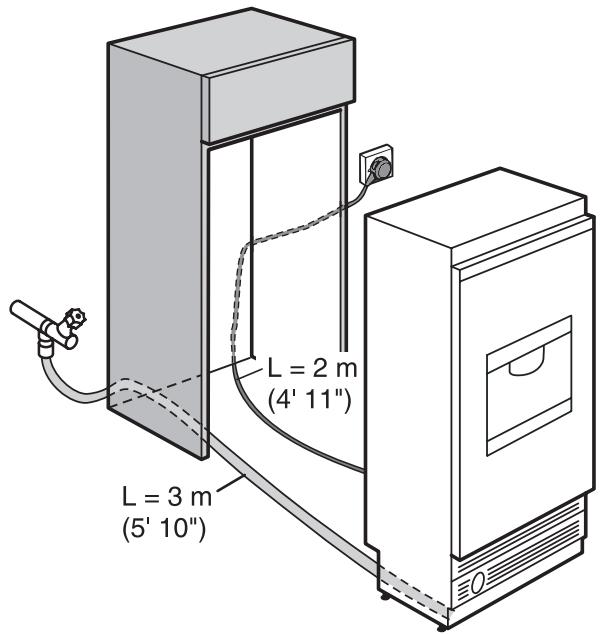
Power supply and water connection
Door dimensions (open 115^ )
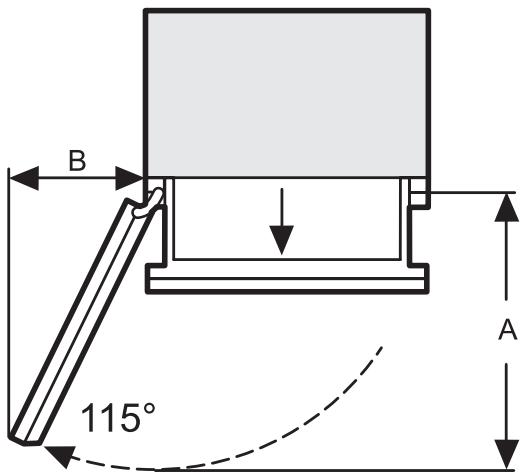
| A | B | |
| F 1471 SF | 20 11/16" (525 mm) | 9 3/16" (234 mm) |
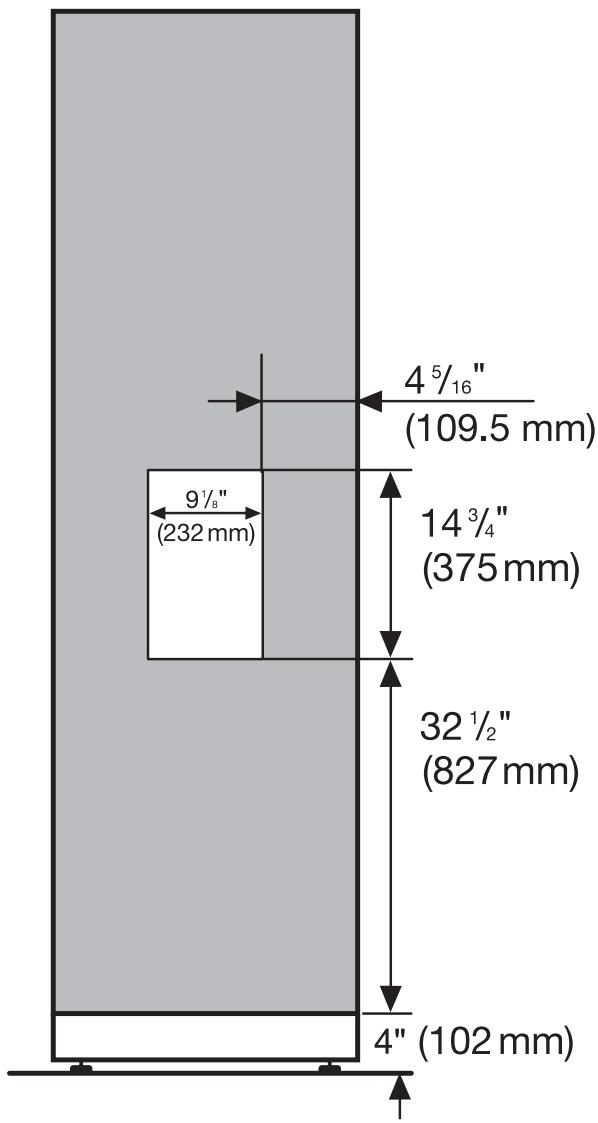
Before you begin
Read these instructions completely and carefully.
Have the appliance installed by a qualified technician, according to the enclosed installation instructions.
To reduce the risk of injury or damage to the product, two people should be used for installation.
These installation instructions are intended for use by qualified installers. In addition to these instructions, the appliance must be installed in accordance with all local codes, or in the absence of a local code.
In the USA, in accordance with the National Electric Code, ANSI/NFPA 70 - latest edition/State and Municipal codes and/or local codes.
- In Canada, in accordance with the Canadian Electric code C22.1 - latest edition/Provincial and Municipal codes and/or local codes.
Tools needed for installation
- Cutter with adjustable blade
- Cordless screwdriver T 20
- Torx screwdriver T 20
- Hammer drill for drilling holes in wall or floor
- Wood drills in different sizes
- Hammer
- Open end wrench 1/2 (SW 13 mm)
- Box-end wrench
- 5 / 16" (8 mm) hex nut driver
- Adhesive tape
Multi-grip pliers - Level
Metal tape measure - Square
Other
- Stepladder
- Dolly, hand truck
- Wooden beam (cross section min. 3'' × 4'' [75 mm x 100 mm] as an alternative tilt protection, length depends on the width of the installation cavity)
- Wood screws in different sizes
Optional Tool
- "Merging Kit" for side-by-side installation.
Check the installation niche
To ensure a safe, trouble-free installation and the best possible cosmetic result, check to be sure that the installation space complies with the installation requirements.
Check the base (see "Installation").
Check the dimensions of the cavity.
Check that the cavity is square.
- Check the location of the power outlet.
Check the location of the water connection (see "Plumbing").
- Check that all furniture parts in the vicinity of the appliance are securely connected to the wall.
- Check that the adjacent furniture/ fixtures do not collide with the open door.
Before installation
Caution - the appliance is very heavy. Use caution when unpacking and opening the door, danger of tipping.
To protect the base from damage during installation, attach a hard board, linoleum, etc., to the floor in front of the intended installation location.
Take the supplied accessories out of the protective packaging.
There are transportation safety devices inside the appliance to protect the shelves and storage compartments until installation is complete. Do not remove them, or parts may be damaged.
Check the appliance for damage in transit.
Do not install the appliance if it is visibly damaged. If in doubt, contact your dealer.
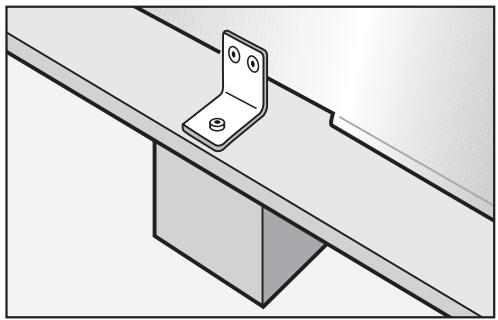
Loosen the bracket that holds the appliance to the pallet.
Caution! The appliance is no longer secured and may be unstable.
From the rear of the appliance carefully lift it from the pallet.
Once the appliance is on the ground it can be wheeled around.
RemoteVision module installation
Always disconnect the appliance from the power supply when performing installation, maintenance or service work.
Install the RemoteVision module before placing the appliance in its installation niche.
Once connected the RemoteVision module will increase the energy consumption of the appliance.
The slot for the RemoteVision module is located in the lower area of the back of your appliance.
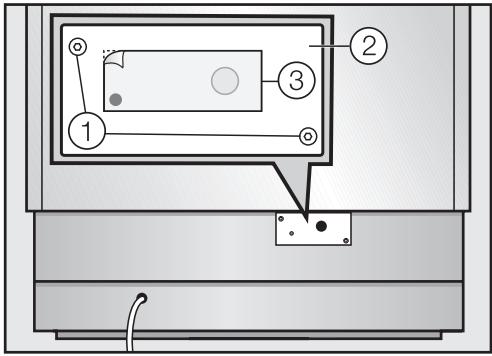
- Unscrew the screws ① on the cover ② and pull off the sticker ③ .
Remove the cover ②.
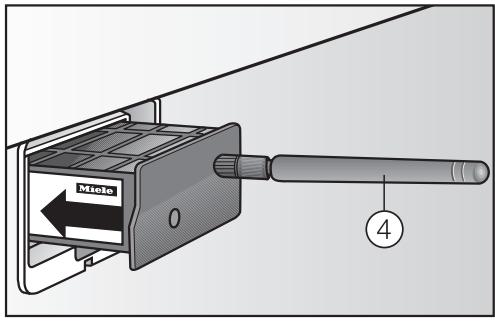
Push the module into the slot until it locks into place.
- Connect the appliance to the power supply and turn it on. After several seconds the indicator light will come on.
The indicator light will display different colors one after the other; any control light at the end indicates that the module was correctly installed.
If the indicator light does not come on, installation of the module was unsuccessful. In that case, repeat the process. If that does not correct the problem, contact Miele.
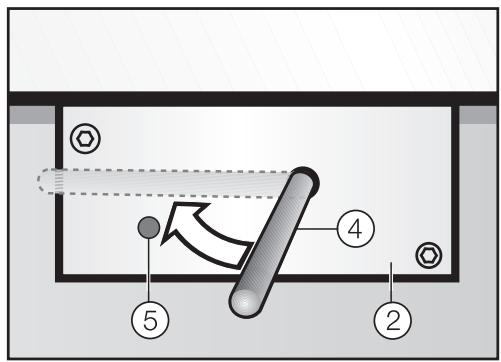
Pull the antenna ④ straight out.
Guide the cover ② over the antenna ④ and screw on the cover.
Angle the antenna ④ so that it faces to the right or left.
If necessary, disconnect the power supply and continue installing the appliance.
Preparing the installation niche
Keep the appliance door closed until it is securely fastened in the niche. Tipping hazard.
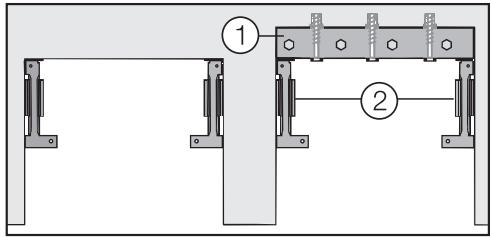
If the installation niche is deeper than the appliance, a solid wooden beam ① can be placed behind the anti-tip brackets ② so the appliance can be securely attached to the base or wall.
The length of the wooden beam ① should be to the width of the installation space.
If possible, always screw the wooden beam into existing studs.
Mounting Accessories
The mounting accessories needed for installing the appliance into the niche are included in the packaging. Several plastic bags are included which are numbered alphabetically.
The bag needed for each step will be marked with its respective letter.

Use the included Torx screwdriver to tighten the screws.
Anti-tip brackets
The anti-tip brackets help keep the appliance safely secured to the installation niche to prevent tipping.
Two anti-tip brackets are recommended for each appliance or appliance combination (side-by-side).
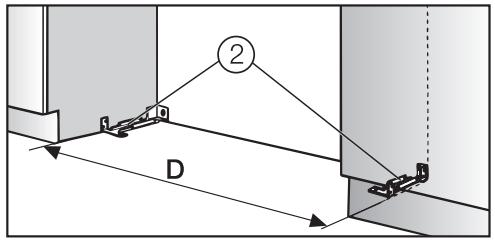
The distance "D" between the anti-tip brackets ② is the width of the appliance.

Position the anti-tip brackets ② on the left and right walls of the appliance niche.
■ Mark the holes through the anti-tip brackets ② on the floor of the installation niche.
Set the brackets aside.
Assure that there are no electrical wires or plumbing in the area which the screws could penetrate - risk of injury and damage.

Drill pilot holes:
- 1/8'' (3 mm) for 5 x 60 mm wood screws
- 1 / _16^ (2 mm) for 4 x 15 mm wood screws

Tightly secure the anti-tip brackets in the niche.
Be certain that the screws penetrate through the flooring and into the wall plate a minimum of 3 / 4'' (19 mm).
Securing an alternative anti-tip device
If the anti-tip brackets cannot be attached securely, an alternative anti-tip device can be used.
Ensure that there is no "give" between the appliance and the anti-tip device.
If possible, always screw the wooden beam to existing studs.
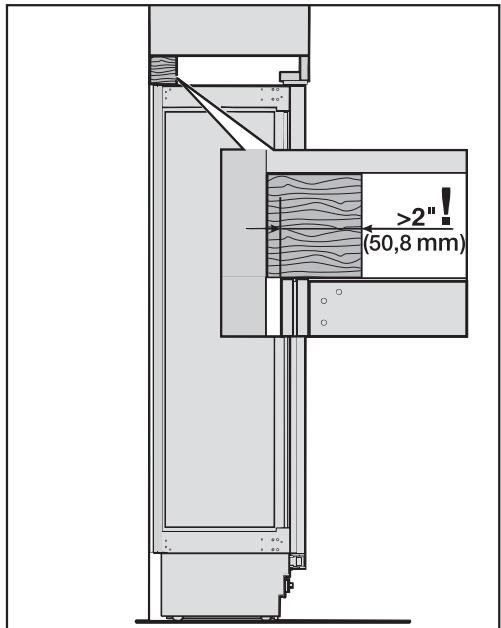
Cut a wooden beam
(cross section min. 3'' × 4''
[75 mm x 100 mm]) to the required length.
The length is equal to the width of the installation niche.
-
If the installation niche is deeper than the appliance, select a beam with a larger cross section, or attach two beams.
-
The beam must cover the appliance by at least 2'' (50.8 mm).
■ Mark the installation height (lower edge of the beam) on the rear wall of the niche.
Select screws according to the
thickness of the wooden beam.
Example: 3 12 screw for 2x4 beam.
Determine the number of screws
based on the cavity width, to ensure
that the beam will be attached
securely.
■ Locate wall studs near the rear wall
of the cavity and mark drill holes in
the beam.
Pre-drill the wooden beam.
- Attach the wooden beam to the rear
wall of the niche.
If a side-by-side installation is desired, connect the two appliances together. See the Installation Manual included with the "Merging Kit".
Now prepare the water connection from the appliance to the main supply line (see "Plumbing").
Sliding the appliance into the installation niche
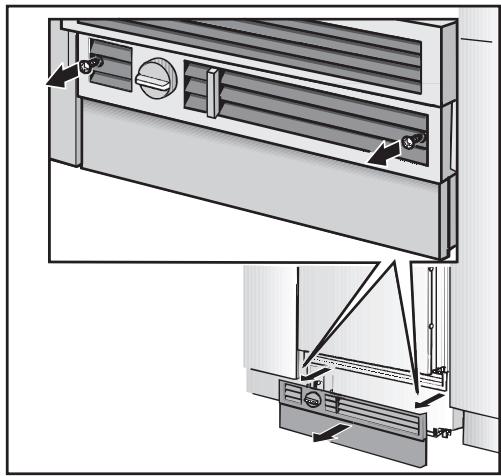
Unscrew the plinth.
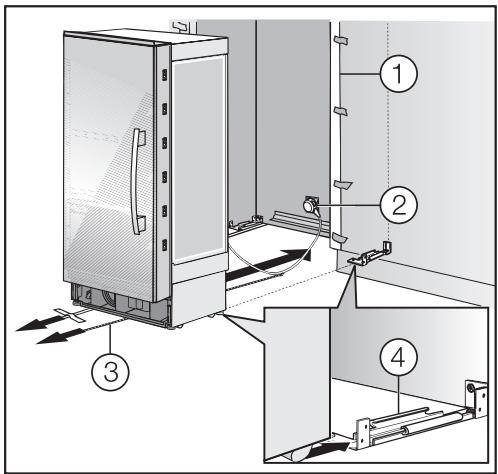
To protect the corners of the installation space, attach the supplied edge protector ① on both sides with adhesive tape.
Plug the appliance into the power outlet ②.
The plug of the appliance should be easily accessible after installation. If the plug is not accessible after the appliance has been installed, disconnection from the power supply should be completed via the circuit breaker.
In the case of side-by-side installations, a separate outlet must be used for each appliance.
- To prevent the power cord from becoming caught: Tie a piece of string to the middle of the power cord and feed it forward under the appliance. When sliding the appliance in, pull the cable forward ③.
- Carefully slide the appliance into the space until the height-adjustable wheels interlock with the anti-tip brackets ④.
If resistance is felt when attempting to slide the appliance into the installation niche - for example, because the floor is uneven,
- Turn the rear adjustable wheels slightly outward (see "Aligning the appliance"), then push the appliance in.
Be careful not to damage the water pipe or power cord attached to the floor.
Remove the edge protector ①.
Aligning the appliance
Align the appliance with the surrounding cabinets.
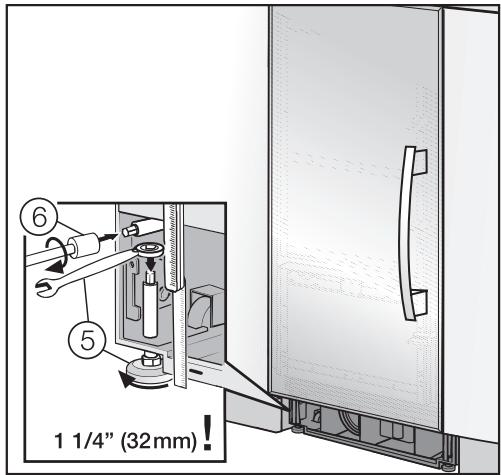
The height-adjustable feet at the front and rear can all be adjusted from the front.
- Front: with an open-ended wrench 12 (SW 13).
The feet can be adjusted from the top and bottom ⑤.
Rear: with a 5 / _16'' (8 mm) hex nut driver via flexible shaft ⑥.
A mark is located on the appliance base and is used as a standard gauge for height adjustment. When adjusting the height, align this mark at 1 14 (32 mm) above the floor.
■ Unscrew the height-adjustable feet until the mark on the base has reached the indicated guide dimension 1 14 (32 mm).
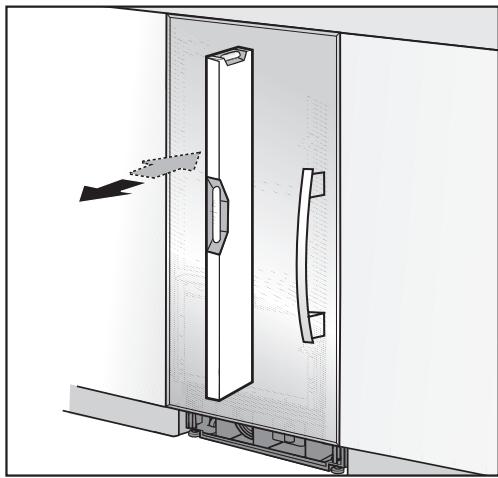
- Check that the appliance is level with the surrounding cabinets.
Note:
- Do not twist or jam the appliance inside the niche. When unscrewing the height-adjustable feet, proceed gradually, alternating between left and right.
- The adjustment of the rear feet is aided if the appliance is lifted at the rear (tipped forward slightly).
- If using a wooden beam as an alternative anti-tip device, rotate the appliance all the way toward the wooden beam.
- Do not use a power tool to adjust the rear feet!
Attaching the appliance to the installation niche
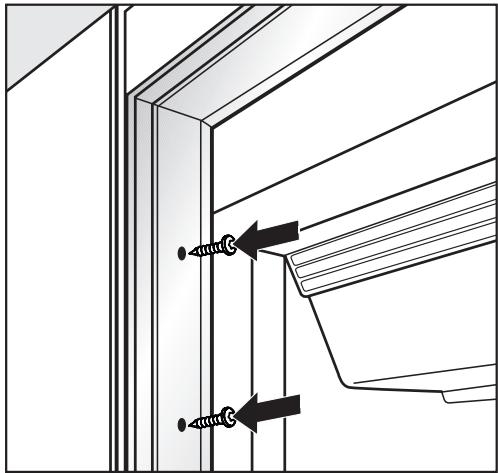
Open the appliance door.

Fasten the appliance on the left and right hand sides with the 3 (supplied) wood screws.
If there is a fairly large gap above the appliance, cut a wooden beam to fit exactly and place it in the gap.
Now connect the water supply to the appliance (see "Plumbing").
Attaching the toe-kick cover
The maximum height of the toe-kick cover is 4'' from the top of the floor. Do not cover the ventilation slits in the plinth. Risk of damage to the appliance.
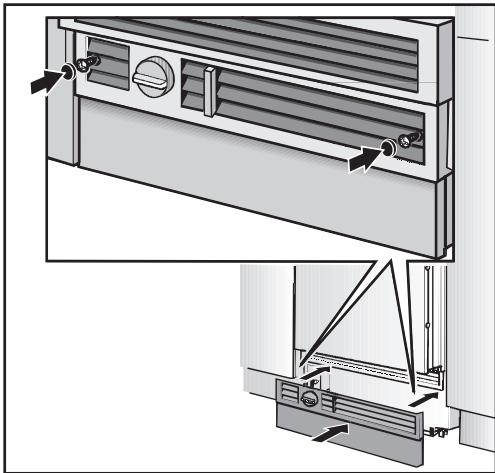
If required, cut the toe-kick cover to the required length and height.
- Attach the plinth to the appliance.

Put the included cover plates in place.
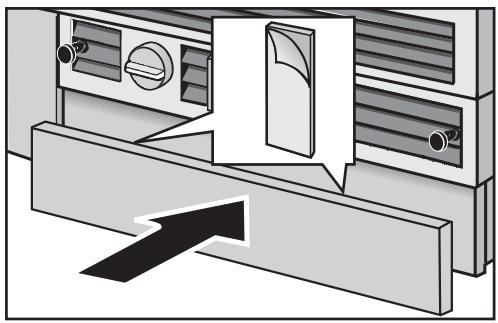
Remove the foil from the adhesive strips.
- Attach the toe-kick cover to the plinth.
Mounting the air separator
The air separator on the inside of the freezer door keeps the supply and exhaust air separate. This prevents warm exhaust air from flowing into the machine, optimizing the energy performance of the unit.
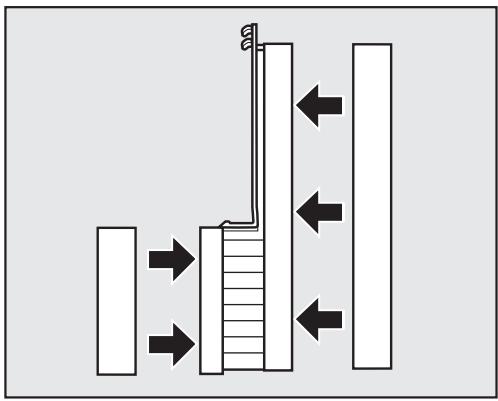
If necessary, shorten the three parts of the air separator.
Insert the foam pieces back into the sides.
Open the freezer door.
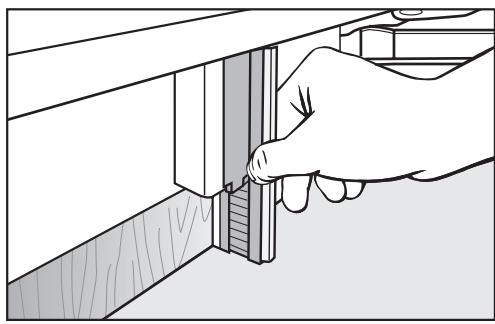
- Wedge the air separator at the bottom of the freezer door, so it connects in place.
Aligning the Ice/Water Dispenser
If necessary the depth of the Ice/Water dispenser can be aligned from inside the custom door cut-out. This allows the dispenser to be aligned with the custom door to achieve the best possible appearance.
Disconnect the appliance from the power supply.
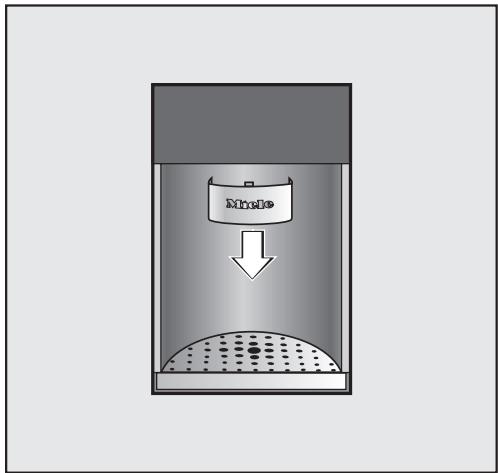
Press the dispenser back and pull downwards to remove.
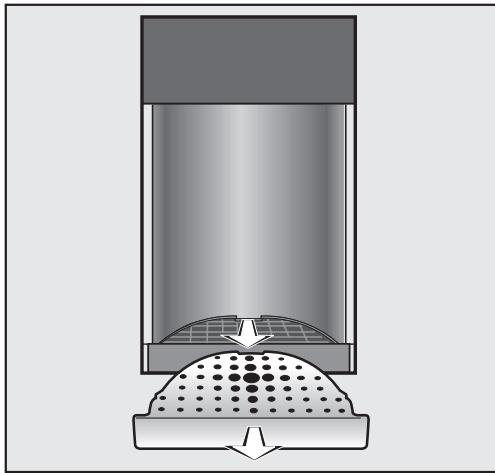
- Remove the cover and the plastic grill.
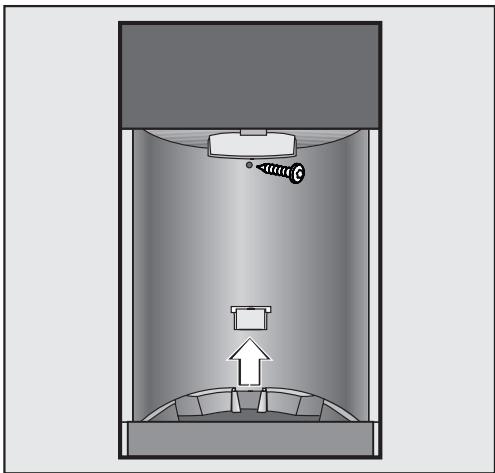
- Remove the screw from the rear casing, then lift the tab on the drip tray up and off.
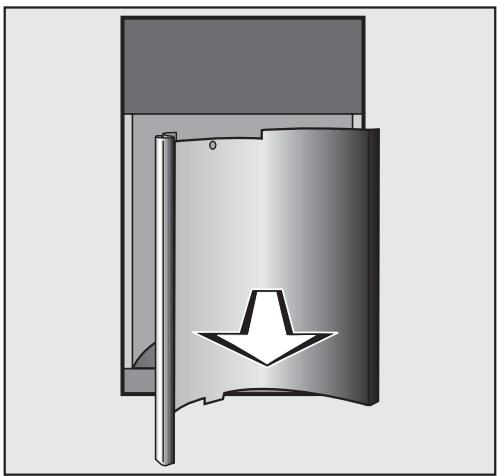
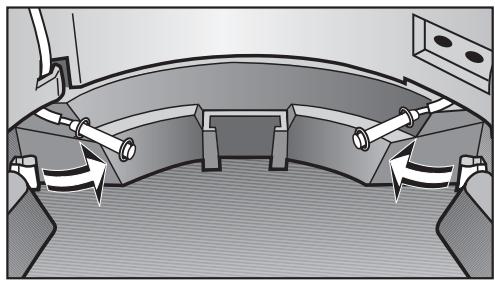
Pull the rear cover forward and out.
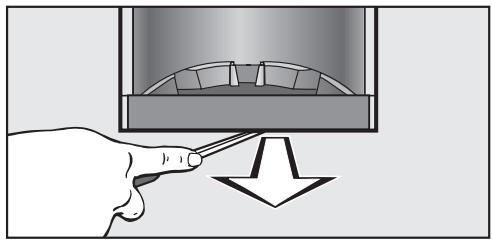
Unclip the water sensors and carefully bend them upwards.
- Carefully remove the drip tray using a screwdriver if necessary.
Once the drip tray has been removed, the four aligners can be accessed to adjust the Ice/Water Dispenser to your liking.
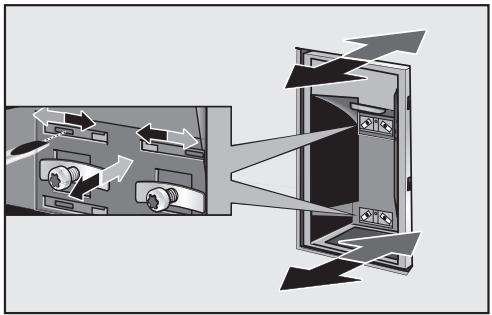
- Loosen the screws of the four clamps.
Insert a screwdriver into one of the four slots and push sideways until the dispenser is aligned with the custom door (the gray arrow will adjust to the rear; the black arrow will adjust front).
Re-tighten the screws of the clamps.
Insert the drip tray back into place, then clip the water sensors back onto the drip tray. - Replace the rear cover, panel and screw.
Replace the drip tray and cover.
Finish by putting the plastic grill, cover, and dispenser back into place.
Attaching the frame and the shelf
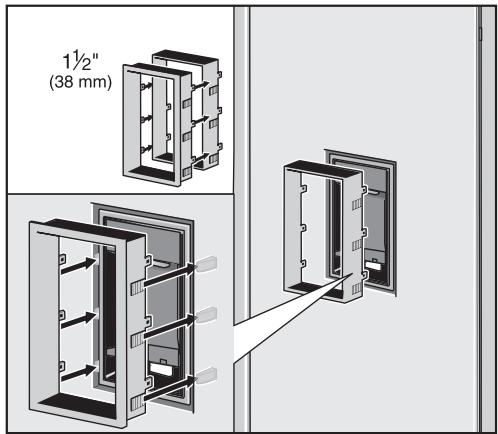
For ^3 / _4 " (19 mm) thick custom doors:
- Slide the cover frame onto the Ice/Water Dispenser and press until it is flush with the door surface (be sure the word "TOP" on the cover frame is upward).
For 1^1 / 2^ / (38 mm) thick custom doors:
Press the extension frame onto the cover frame. - Slide the cover frame onto the dispenser and press until it is flush with the door surface (be sure the word "TOP" on the cover frame is upward).
Insert the cover frame.
All plumbing work should be carried out by a suitably qualified and competent person, in accordance with all applicable local and national regulations.
The water quality must conform to country requirements for drinking water.
- The appliance is only suitable for connection to the cold water supply.
- The water pressure must be between 25 and 120 psi (1.72-8.25 bar).
- A separate shut-off valve must be installed, so that the water supply can be interrupted as needed.
- The maximum outer diameter of the water pipe (without fittings): 3 / 8'' (10 mm).
The shut-off valve for the water connection must not be located behind the appliance. It is recommended to place the shut-off valve directly next to the appliance (base unit) or in another easily accessible location.
Preparing the water connection
The connection to the household water supply must be installed before the appliance is installed.
Turn off the main water valve to prevent damage caused by leaking water.
- Attach the connecting pipe to the shut-off valve, according to the instructions supplied by the manufacturer of the ice cube maker installation kit.
Install the connecting pipe. Always observe the indicated clearance dimensions to prevent damage to the connecting pipe when pushing in the appliance.
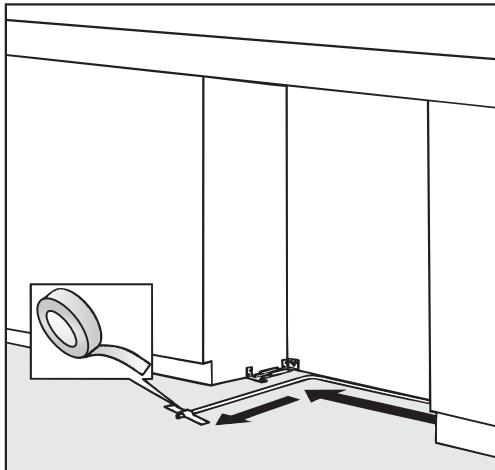
- Secure the connecting pipe to the floor with adhesive tape.
- You may now proceed to install the appliance. See "Installing the appliance".
Connecting the water supply
When connecting the water pipe to the solenoid valve of the appliance, follow the instructions supplied by the manufacturer of the ice cube maker installation kit.
When bending the water pipe, be sure not to kink it, otherwise there is a risk of leaks and water damage. Use bending aids.
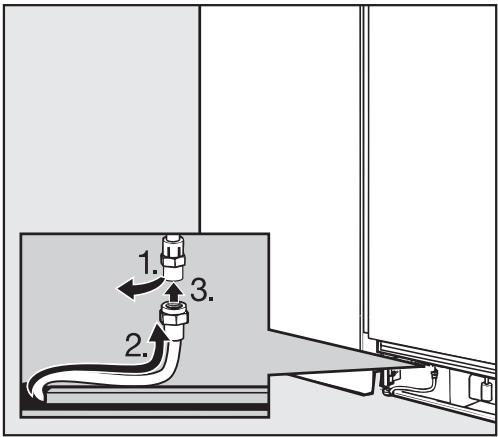
Remove the cap from the appliance connection, 1.
Bend the water pipe to suit the location of the connection on the appliance, 2.
Push the union nut and seal onto the water pipe.
Push the end of the water pipe into the appliance connection and screw on the union nut, 3. First tighten by hand.
- Then use an open-ended wrench to tighten the union nut. Do not over tighten.
- Open the shut-off valve and the main water connection. Check for leaks at the connection for the shut-off valve and to the appliance.
Switch the appliance on.
After a maximum of 10 hours the first ice cubes will drop out of the ice cube maker and collect in the drawer.
Avoid the risk of electrical shock
- Plug into a grounded 3-prong outlet.
- Do not move the ground plug.
- Do not use an adapter.
- Do not use an extension cord.
Failure to follow these instructions can result in death, fire, or electrical shock.
Improper connection of the equipment grounding conductor may result in electric shock. If you are in any doubt as to whether the appliance has been properly grounded, have the appliance checked by a qualified electrician or service technician.
Installation, repairs and other work by unqualified persons could be dangerous.
Before installing the appliance, verify that the voltage, load and circuit rating information found on the data plate match the household electrical supply.
If there are any questions regarding the electrical connection of this appliance to the power supply, please consult a licensed electrician or call the Miele Technical Service.
USA1-800-999-1360
CDN1-800-565-6435
The appliance comes with a UL-listed, 3-wire power supply cord.
The appliance requires a 3-wire receptacle.
The receptacle must be installed by a licensed electrician only.
In the case of side-by-side installations, a separate outlet must be used for each appliance. Ideally, the power outlet should be next to the appliance and easily accessible. Do not connect the appliance to the power supply by an extension cord. Extension cords do not guarantee the required safety of the appliance (danger of overheating).
If any changes are needed to the household wiring or power supply, this work must be performed by a qualified electrician.
Miele's RemoteVision Wi-Fi technology creates a 'virtual link' between your appliance and our monitoring center. If a fault occurs, Miele's client service center will be notified and contact you, or another trusted individual identified on your call roster, in order to gain access to your appliance to fix the problem.
For information on set-up and installation of the RemoteVision module see the "Installation" section of this manual.
Be sure your wireless system meets the following requirements
- A wireless router that supports an IEEE 802.11b protocol
- Windows XP® or newer operating system, Mac® OS X 10.3 or higher
- Cable or DSL modem
-
Microsoft® Internet Explorer 6 or higher, Safari 2.0 or higher, Firefox 1.5 or higher
-
Please note that each wireless router manufacturer supplies their own device drivers and setup programs. Due to the differences in manufacturers, exact router setup instructions are not included in this manual. Wording and instructions may vary.
Accessing the RemoteVision control panel
Touch the access button "I" so it turns yellow.
Note the position of the button, but do not touch.
Touch the access button "I" again so it turns white.
Only the access button "l" is visible.
- Place one finger on the position of the button and hold (the button will not be visible).
While holding down the button, press the access button "0" once. Keep holding the button down until the following appears in the display (approx. 5 seconds).


Access to the Custom settings mode is now active for approximately 10 seconds.
- Tap the button until r appears in the display.
Touch the access button "I" to confirm.
See the table on the following page for a description of each setting in the display.
Use the or buttons to select the RemoteVision options.
The module has been connected to the network when r appears in the display. If r does not appear, refer to the "Network options" section of the XKM 2000 Installation Instruction manual.
Press and hold the access button "f" for 2 seconds to confirm the change.
To return to the main menu, tap the V button until a solid r - appears in the display.
Press the access button "I" to confirm.
- Tap the button until a c appears in the display.
Touch the access button "B".
You have left the Custom settings mode.
When you are in the Custom settings mode the door alarm is turned off automatically. Once the door is closed it is reactivated.
MasterCool control panel options for RemoteVision
| Status indicators | Description of function |
| Flashing r- | Module booting phase |
| Flashing r- | Not connected to network |
| Flashing r- | Connection to network established, no IP address assigned |
| Solid r- | Connected to network |
| Flashing r- | In Ad-Hoc Mode, not connected |
| Flashing r- | In Ad-Hoc Mode, connected |
| Selectable options | Description of function |
| r - | Back |
| r 2 | Reboot the module |
| r 3 | Reset to factory settings |
| r 4 | Enter Ad-Hoc Mode |
Note: If you cannot select any option (other than r - "Back", the module has not been installed correctly.
U.S.A. Miele, Inc.
National Headquarters
9 Independence Way Princeton, NJ 08540
Phone: 800-843-7231
609-419-9898
Fax: 609-419-4298 www.miele.com
Technical Service & Support Nationwide
Phone: 800-999-1360 Fax: 888-586-8056
TechnicalService@mieleusa.com
Canada Miele Limited
Headquarters and Showroom
161 Four Valley Drive Vaughan, ON L4K 4V8
Phone: 800-643-5381
905-660-9936
Fax: 905-532-2290
www.miele.ca
info@miele.ca (general enquiries)
professional@miele.ca (commercial enquiries)
MieleCare National Service
Phone: 800-565-6435
905-532-2272
Fax: 905-532-2292
customercare@miele.ca (technical enquiries)