
Intense Pure Air PU4025 - Air purifier TEFAL - Free user manual and instructions
Find the device manual for free Intense Pure Air PU4025 TEFAL in PDF.


User questions about Intense Pure Air PU4025 TEFAL
0 question about this device. Answer the ones you know or ask your own.
Ask a new question about this device
Download the instructions for your Air purifier in PDF format for free! Find your manual Intense Pure Air PU4025 - TEFAL and take your electronic device back in hand. On this page are published all the documents necessary for the use of your device. Intense Pure Air PU4025 by TEFAL.
USER MANUAL Intense Pure Air PU4025 TEFAL
natural_image
Two Tefal air purifiers, one with a digital display and Chinese text, the other with a logo and 'OPTUR' branding (no visible text beyond branding)INTENSEPUREAIRPU4025/PU6025
www.tefal.com
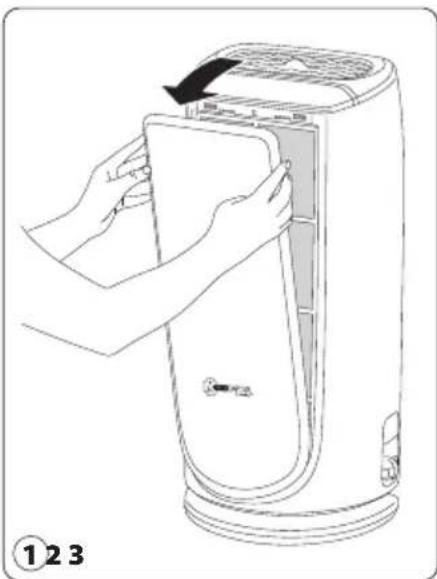
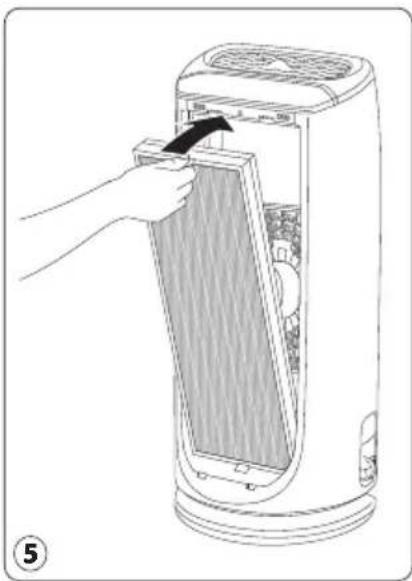
DISASSEMBLING/REASSEMBLING FILTERS
natural_image
Line drawing of a hand inserting a device into a device with a black arrow indicating the process (no text or symbols present)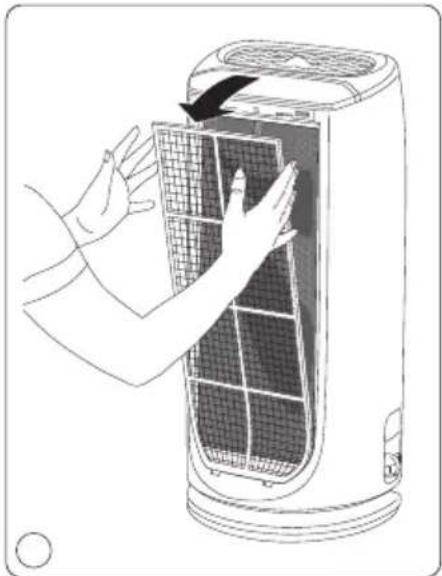
natural_image
Illustration of hands installing or adjusting a grid-patterned air conditioner unit (no text or symbols visible)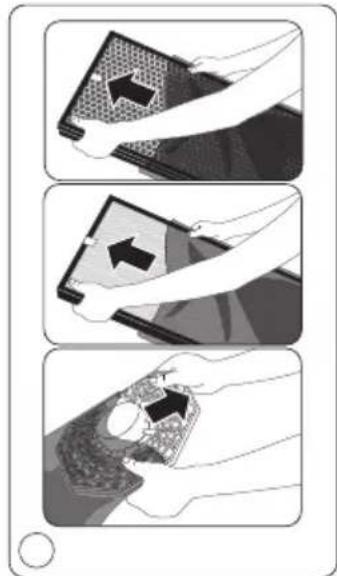
natural_image
Three-step illustration showing a hand holding a patterned object, with arrows indicating direction of movement (no text or symbols)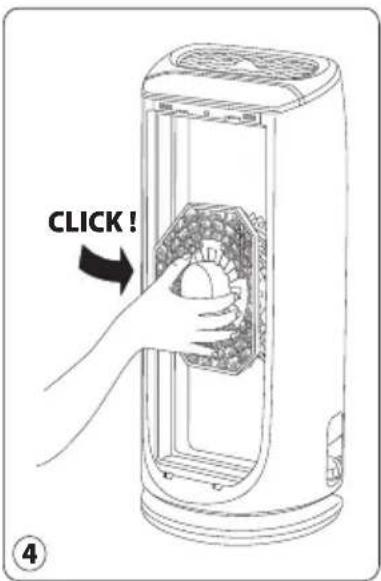
natural_image
Illustration of a hand inserting a fan into a portable air conditioner unit (no text or symbols visible)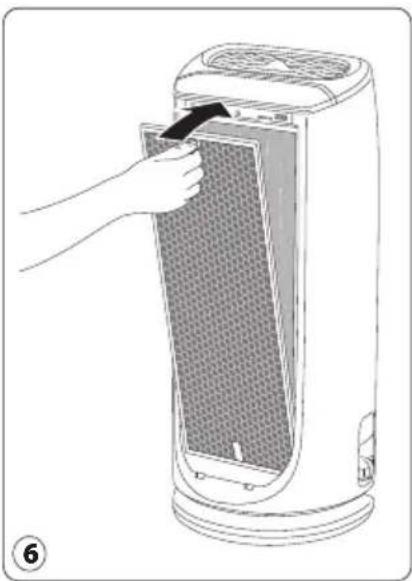
natural_image
Illustration of a hand inserting a filter into a power heater (no text or symbols visible)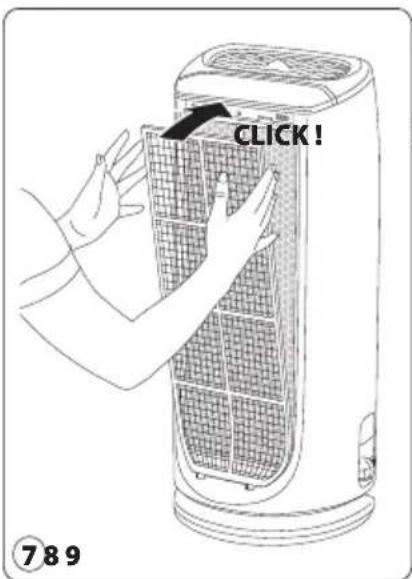
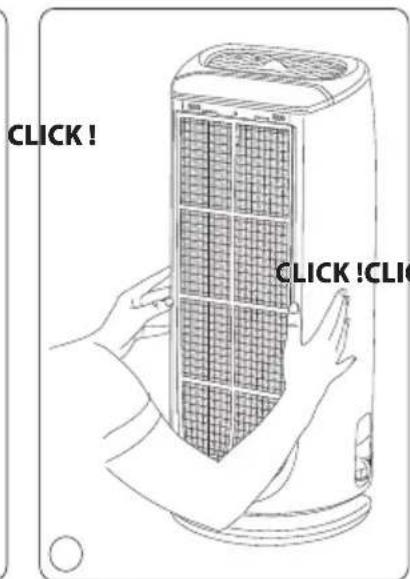
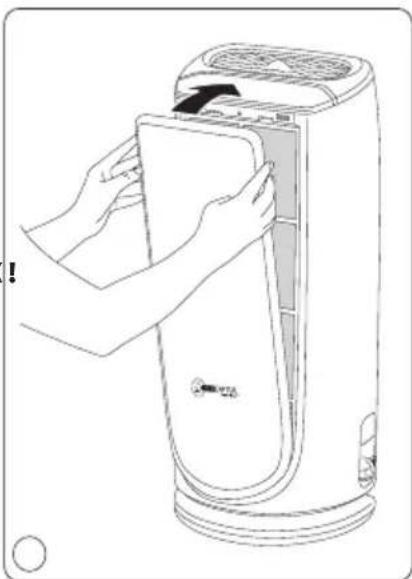
natural_image
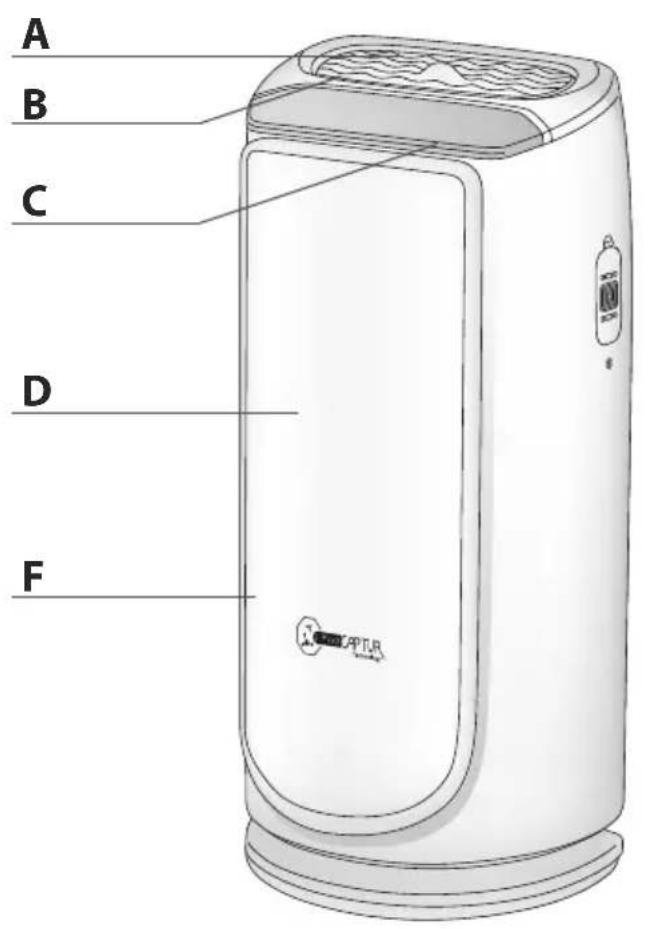
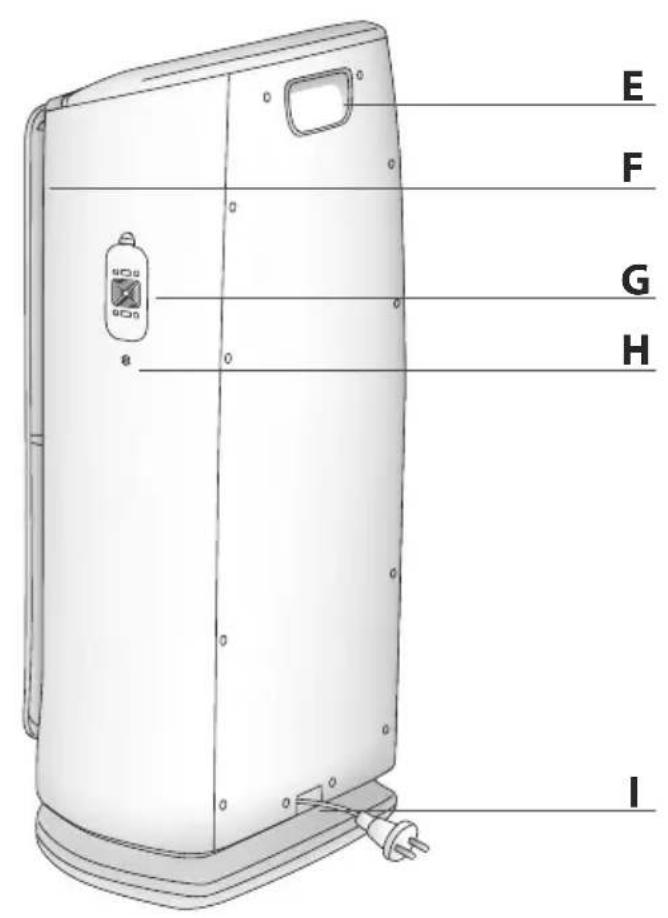
Line drawing of a hand inserting a paper into a portable air purifier (no text or symbols)H Gas sensor (PU6025 only)
I Power cord outlet
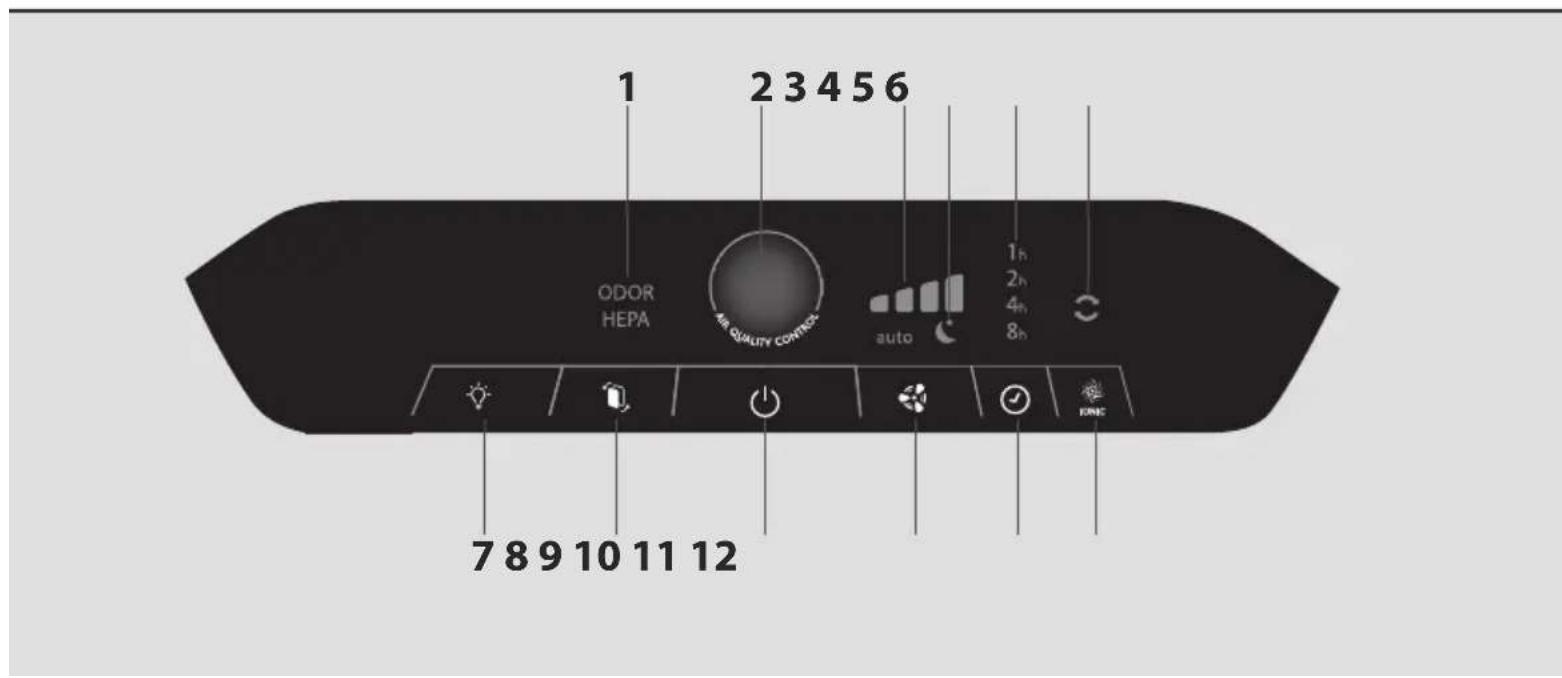
Control panel Lights
1 Filter replacement indicator
2 Air quality indicator
3 Filtration speed
4 Mode
5 Timer / delayed start
6 lonizer function
Control buttons
7 Light
8 Filter reset
9 Start
10 Mode/filtration speed selection
11 Timer / delayed start setting
12 lonizer function
Read the instructions for use and safety carefully before use and keep them for future reference.
SAFETY TIPS
It is essential that you read these instructions carefully and observe the following recommendations:
- For your safety, this appliance complies with the applicable standards and regulations (low voltage, electromagnetic compatibility, environmental directives, etc.).
- This appliance should not be used by persons (including children) with reduced physical, sensory or mental capacities or lack of experience and knowledge, unless they are supervised or have been given instructions beforehand concerning use of the appliance by a person responsible for their safety.
- Children should be supervised to ensure they do not play with the appliance.
- The appliance can be used by children aged 8 and over and persons with a lack of experience or knowledge or reduced physical, sensory or mental capacities, provided they are supervised, have been trained on the safe use of the appliance and are aware of the risks involved. Children must not play with the appliance.
- If the power cord is damaged, it must be replaced by the manufacturer, its after-sales service or a similarly qualified person so as to avoid any danger.
- Children should not clean or perform maintenance on the appliance without being supervised.
- For maintenance operations, please refer to the "Maintenance" section.
- Keep the appliance and its power cord out of the reach of children aged under 8.
- This appliance is designed for domestic use only. It should not be used for industrial purposes.
- The warranty will be invalidated if damage occurs due to incorrect use.
- Do not operate this appliance in a very dusty and/or humid place or in a location with fire hazards.
- Before use, always make sure that the appliance, plug and power cord are in good condition.
- Never insert objects into the appliance (e.g. needles, etc.).
- Do not pull on the power cord or the appliance, even to unplug it from the wall power outlet.
- Unroll the full length of the cord before use.
VERY IMPORTANT
Do not cover the air inlets or the outlet grid.
Do not touch the appliance with wet hands.
Never allow any liquid to enter the appliance.
Never use the appliance in a humid place.
Never use the appliance close to a heat source.
Never place anything on the appliance or insert anything into it.
Do not use the appliance close to flammable objects or products (curtains, aerosols, solvents, etc.).
Never use the appliance in an inclined or horizontal position. Place the appliance on a flat, stable surface.
In the case of prolonged absence: switch the appliance off using the button (9) and unplug it.
Switch off and unplug your appliance before moving it.
Unplug the air purifier during assembly and cleaning.
EN
OPERATING PRINCIPLE
The new Intense Pure Air purifier from Tefal enables you to breathe up to 99.97% pure air in your home and protect your health with 4 filtration levels as described below. Each level is essential and traps characteristic pollutants:
LEVEL 3:
HEPA FILTER
• Fine particles (PM2.5)
- Pollen
- Dust mites
• Animal allergens
• Mold
- Bacteria / viruses
LEVEL 4:
NANOCAPTUR FILTER
- Formaldehyde

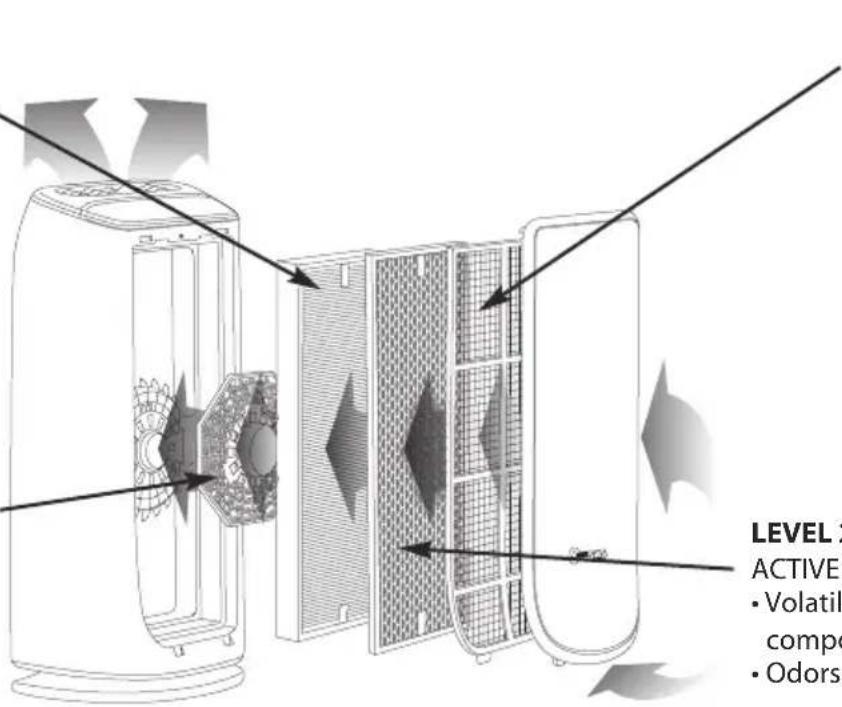
LEVEL 1:
PRE-FILTER
• Dust
- Hair
• Fur
• Lint
LEVEL 2:
ACTIVE CARBON FILTER
• Volatile organic components (VOCs)
- Odors / gases

« HOW TO ACHIEVE CLEANER INDOOR AIR »
In addition to using your Intense Pure Air purifier, here are some tips on how to improve the quality of your indoor air:
- Ventilate the rooms for at least 10 min. every day, in summer and winter
- Maintain your ventilation system
- Limit the use of household products
• Do not smoke indoors - Avoid home fragrances, incense sticks, scented candles, etc.
- Ventilate whenever any work is being conducted in your home and for several weeks afterwards
- Avoid green plants that are allergenic or need frequent watering
WHERE TO INSTALL THE APPLIANCE
Place the purifier on a flat, stable surface in the room requiring treatment.
To allow the air to circulate freely, avoid placing the appliance behind curtains, below a window, item of furniture or shelf unit, or close to any other obstacle, and leave at least 50 cm of free space on each side of the appliance.
BEFORE USING THE APPLIANCE FOR THE FIRST TIME
Make sure that the plastic packaging protecting the filters has been removed before using the appliance.
Also make sure that:
• The voltage of your electrical installation corresponds to the one indicated on the appliance.
Your appliance can be used with a power plug without an earth connection. It is a class II appliance (double electrical insulation),
• The appliance is positioned in the house as described above,
• The air inlet and outlet grids are completely unobstructed,
- Ensure the 4 filters and front panel have been correctly installed (See section "Disassembling/Reassembling filters").
This appliance is fitted with a device that automatically prevents it from operating if the front door is not correctly assembled.
Inserting and replacing the filters
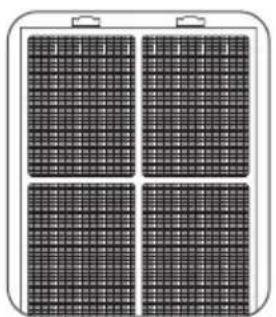
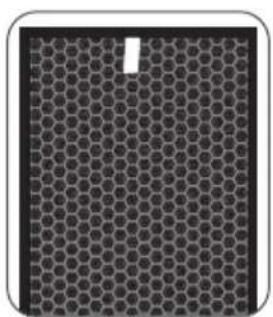
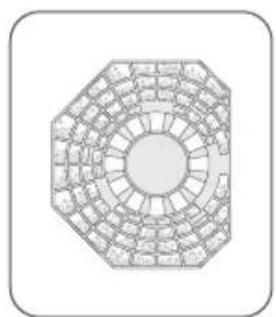
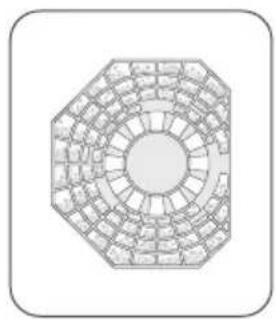
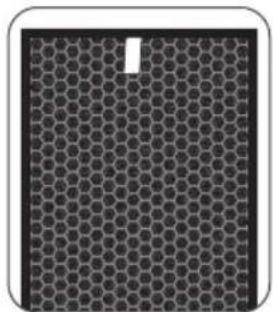
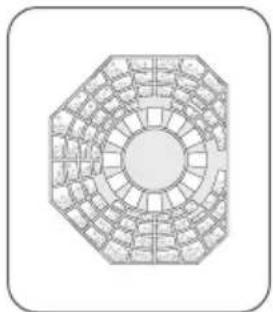
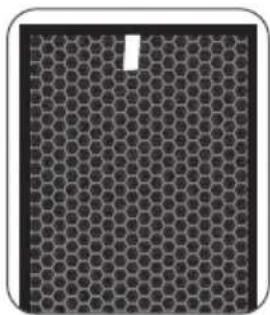
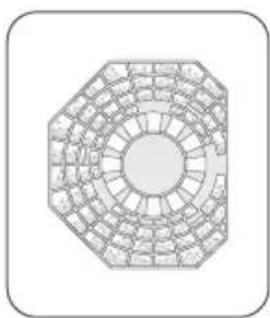
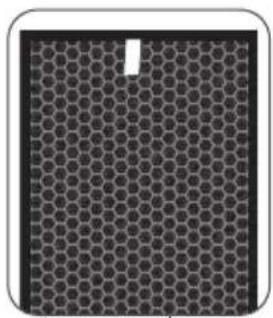
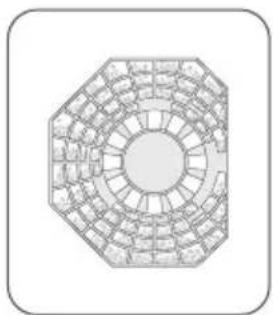
This appliance is equipped with 4 types of filters:
natural_image
Four identical black-and-white grid panels arranged in a 2x2 grid, enclosed in a rounded rectangular frame with two handles (no text or symbols)Pre-filter Active carbon filter NanoCaptur
natural_image
Close-up of a hexagonal grid pattern with a small white dot in the center (no text or symbols)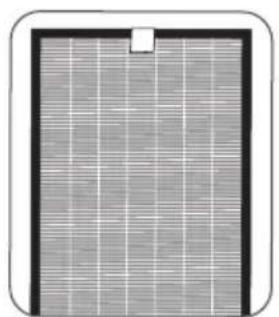
natural_image
Close-up of a rectangular electronic component with grid pattern and mounting bracket (no visible text or symbols)HEPA filter
natural_image
Octagonal architectural diagram of a circular grid structure (no text or symbols)filter
NB: For optimum performance of the appliance, only use filters provided by TEFAL.
To replace the filters, follow the instructions in the section "Disassembling/Reassembling filters".
Please note: certain filters may emit a temporary slight odour, due to the transport and storage conditions.
SWITCHING THE APPLIANCE ON
Connect the power cord and press the start button (9).
Your appliance will be preset to automatic mode the first time you turn it on.
Thanks to its infrared particles sensor and its gas sensor (model PU6025 only), it detects the level of pollution in the room and automatically adjusts the filtration speed accordingly.
A light changes color to indicate the quality of air in the room.
| Air quality Color of light | Filtration speed (in auto mode) | |
| Excellent Blue |  | |
| Average Purple |  | |
| Poor Red |  | |
EN
Setting the pollution sensors
The appliance is preset to medium sensitivity.
If the air quality indicator remains:
- poor after 2 hours in operation although the air seems to be purified
- excellent for more than 1 hour although the air seems to be polluted
you can adjust the sensor sensitivity as follows:
- When the air purifier is off, hold down the filtration speed setting button for 2 seconds:
- Set the sensitivity by briefly pressing the filtration speed setting button:
 + Blue + Purple + Red + Blue + Purple + Red |  |  |
| Low sensitivity Medium sensitivity High sensitivity | ||
- Select high sensitivity if the air purifier indicates excellent air quality for more than 1 hour although the air seems to be polluted.
- Select low sensitivity if the air purifier continues to indicate poor air quality even though it has been operating for more than 2 hours and the air seems sufficiently purified.
- The new setting is applied if no button is pressed for 10 seconds.
OPERATION
Start

Briefly press this button to switch the air purifier on or off.
Mode/filtration speed selection

auto Automatic: In this operating mode, the filtration speed automatically adjusts according to the air quality detected by the particles sensor and the gas sensor (model PU6025 only). This mode is recommended for general use.
Night: The filtration speed of your appliance is adjusted for a whisper quiet air flow during the night. The light intensity of the appliance is also reduced. If pollution is detected, the filtration speed increases slightly to purify your air but remains quiet to avoid disturbing your sleep.
Manual: In this operating mode, you can manually select 1 of the 4 filtration speeds.
Light

You can change the light intensity of the appliance as you wish or according to the time of day.
| Press Ambient light Air quality indicator Control panel | |||
| 1 Light up Light up Light up | |||
| 2 Moderate light Moderate light Moderate light | |||
| 3 Off Moderate light Moderate light | |||
| 4 Off Off Moderate light | |||
Ionizer function

The ionizer function releases negative ions into the air. This function is switched off by default. To activate it, briefly press button 12.
Timer / delayed start

If the appliance is on: you can use this button to define the operating duration. Briefly press the button to select the number of operating hours desired (1, 2, 4 or 8) and the appliance will automatically turn off at the end of the selected period.
If the appliance is off: briefly press the button to set the appliance to turn on in a certain number of hours (1, 2, 4 or 8).
3D pure air function (adjustable grid)
You can adjust the position of the air outlet grid manually, as desired. For an optimum, even flow of purified air in the room, set the angle to 45^ ; for maximum comfort, set the angle to 90^ .
MAINTENANCE
Always switch the appliance off with the button (9) and unplug it before conducting any maintenance operation.
You can clean the appliance with a slightly damp cloth.
IMPORTANT: Never use abrasive products which could damage your appliance's appearance.
Filters
| Filter | Action | Cycles |
| Pre-filter | Clean | Every 2 to 4 weeks |
| Active carbon filter | Replace | Every 12 months |
| HEPA filter | Replace | Every 3 years |
| NanoCaptur filter | Replace | Color changing(see Color chart on filter) |
This data is based on an average use of 8 hours per day at speed 2.
The recommended frequency for cleaning and replacing the filters may vary depending on the duration of use and the operating environment.
- A ""HEPA"" light indicates when the HEPA filter needs to be replaced. The 'Odor' light display indicates when the carbon filter needs replacing.
- The NanoCaptur filter contains translucent granules which change color according to the formaldehyde absorption rate. Refer to the color chart on the inside of the panel or the filter itself to establish the filter saturation rate.Once the saturation rate has reached its maximum, the filter must be replaced. You have to check the filter saturation rate every six months.
- The pre-filter can be re-used: remove the dust using a vacuum cleaner or wash with water.
CAUTION:
The appliance's efficiency can be reduced if the pre-filter is not cleaned regularly.
Never use a pre-filter that is still damp.
The pre-filter is the only filter which can be re-used and washed with water. The HEPA, NanoCaptur and active carbon filters cannot be cleaned and re-used. Never wash with water.
To replace the filters, follow the instructions in the section "Disassembling/Reassembling filters".
Your replacement filters are available under the following codes:
| Filter Code PU4025 Code PU6025 | ||
| HEPA filter XD6070 XD6071 | ||
| Active carbon filter XD6060 XD6061 | ||
| NanoCaptur filter XD6080 XD6081 | ||
IMPORTANT: Resetting the filters
The reset light flashes when a filter needs to be replaced. Once the filter has been replaced, hold down the reset button for 2 seconds.
Forced reset:
If you have replaced a filter before its end of life, force the reset of the filter replacement cycle:

- Hold the reset button for 2 seconds.
- Press the reset button briefly to select the filter you have changed.
- After selecting the filter to reset, hold the reset button for 2 seconds. The electronic meter is then reset.
- If no button is activated for 10 seconds in forced reset mode, the reset mode is canceled.

- Avoid handling used filters if you suffer from allergies or asthma.
- Wear gloves when changing the filters, or wash your hands well afterwards.
- Put used filters directly into a closed, air-tight bag before throwing them away to avoid spreading pollutants.
Pollution sensors
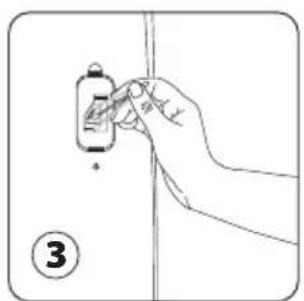
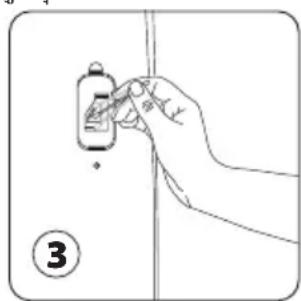
The particles sensor and gas sensor (model PU6025 only) need to be cleaned regularly (every 2 months) and appropriately.
Make sure you turn off and unplug the appliance before cleaning the pollution sensors and follow the recommendations below:
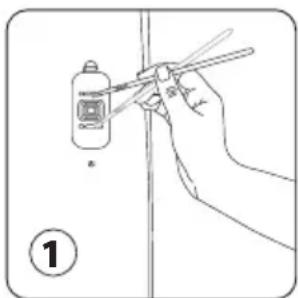
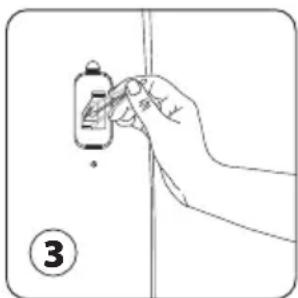
- Clean the air inlet and outlet using a soft brush or cloth.
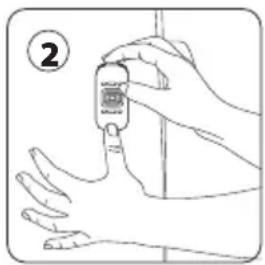
- Open the sensor cover located on the right-hand side of the appliance.
- Lightly wet a cotton swab and remove any dust from the lens and the inlet/outlet. Wipe using a dry cotton swab.
- Clean the gas sensor using a soft brush or vacuum cleaner.
natural_image
Hand holding chopsticks near a small bottle, no text or symbols visible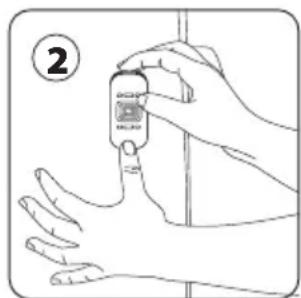
natural_image
Line drawing of a hand holding a small object near a vertical line, no text or symbols present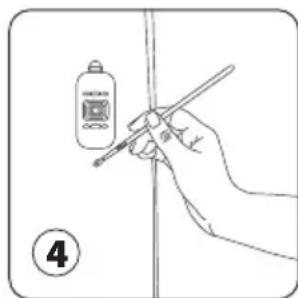
IMPORTANT:
Never use a detergent or metal object to clean the sensors.
The efficiency of the sensors may be reduced if not cleaned regularly.
Cleaning frequency varies depending on the operating environment of the appliance. If it is used in a dusty environment, clean the sensors more frequently.
STORAGE
When you are not using the appliance, store it in a cool, dry place.
IN THE EVENT OF A PROBLEM
- Never dismantle your appliance yourself. A poorly repaired appliance can cause risks for the user.
- Check the troubleshooting table below before contacting an approved Service Center:
| Problem Check Solution | ||
| The appliance will not switch on. | Is the power cord connected? | Connect the power cord to a plug with the correct voltage. |
| Are all the display elements off? | Press the start button and select the required function. | |
| Is there a power outage? | You can use your purifier once the power turns on again. | |
| Is the front door closed? Close the front door properly. | ||
| The air flow does not change automatically. | Is the appliance in manual mode? Select the correct operating mode. | |
| The flow is a lot weaker than before. | Does the filter need to be cleaned or replaced? | Check the filter cleaning and replacement frequencies and clean/replace the filter(s) if necessary. |
| There is an unpleasant smell coming from the air outlet. | Is the sensor lens covered with dust? | Check the filter cleaning and replacement frequencies and clean/replace the filter(s) if necessary. |
| The air quality light does not change color. | Does the light still indicate poor air quality? | Clean the sensor lens. |
| Does the light still indicate poor air quality? | Set the sensor sensitivity to "low" or "medium". | |
| Does the light still indicate excellent air quality? | Set the sensor sensitivity to "high" or "medium". | |
WARRANTY
Contact an approved Service Center if:
- your appliance has been dropped
- your appliance or its power cord is damaged
- your appliance is not working properly
LET'S HELP PROTECT THE ENVIRONMENT!
i Your appliance contains valuable materials which can be recovered or recycled.
Leave it at a local waste collection point or take to an approved service center so that it can be processed.
DESCRIPTION
產品說明
A 夜燈功能
B 可調較的排氣柵
C 控制面板
D 前門板
E 手把
F 進氣口
G 微粒感測器
H 氣體感測器(僅限於
PU6025)
I 電源線出口
燈號
1 濾網更換指示燈
2 空氣質素指示燈
3 過濾速度
4 模式
5 計時器/定時開啟
6 負離子功能
控制按鈕
7 燈光
8 重置濾網
9 運行
10 模式/過濾速度選擇
11計時器/定時開啟設定
12 負離子功能
natural_image
Diagram of a multi-stage air purifier with internal components and airflow direction arrows (no text or labels)第一層:
natural_image
Four identical black-and-white grid panels arranged in a 2x2 grid, each with two handles (no text or symbols visible)natural_image
Close-up of a hexagonal grid pattern with a small white mark in the center (no text or symbols)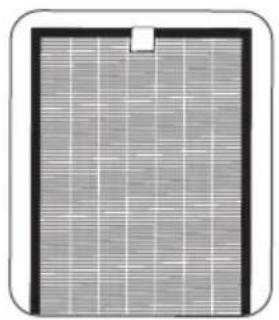
natural_image
Close-up of a rectangular solar panel with grid pattern and mounting bracket (no text or symbols)HEPA濾網
natural_image
Geometric diagram of a circular grid pattern resembling a traditional Chinese architectural or mechanical structure (no text or symbols)濾網
natural_image
Line drawing of a hand holding chopsticks near a small bottle, with a numbered label (1) in the corner (no text or symbols on the diagram itself)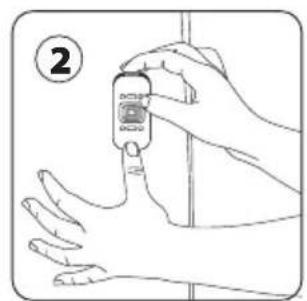
natural_image
Illustration of a hand holding a small blood glucose meter with a digital display, no text or symbols present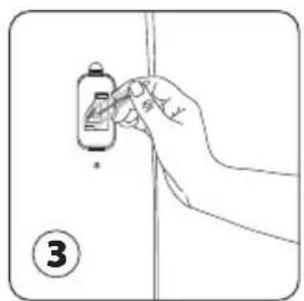
natural_image
Hand holding a small electronic device with a screen, against a plain background (no text or symbols)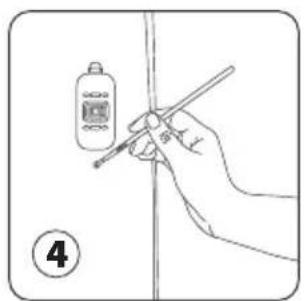
重要提示:
natural_image
Diagram of a dual-camera air purifier with internal structure and airflow direction arrows (no text or symbols)1단계:
프리필터
natural_image
Four-panel solar panel array with grid patterns, no visible text or symbols프리필터 액티브카본 필터 나노 캡쳐
natural_image
Close-up of a hexagonal grid pattern with a small white square cutout in the top-right corner (no text or symbols)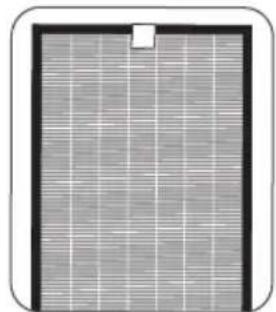
natural_image
Close-up of a rectangular solar panel with visible grid lines and a small hole (no text or symbols)헤파필터
natural_image
Top-down architectural diagram of a circular building facade with symmetrical grid layout (no text or symbols)(Nanocaptur)필터
natural_image
Hand holding chopsticks near a small bottle, no text or symbols visible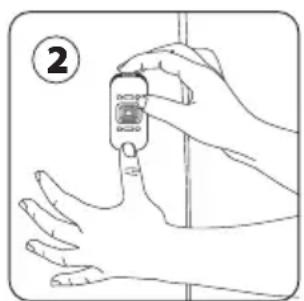
natural_image
Illustration of a hand holding a small object with a label circled (no text or symbols on the object itself)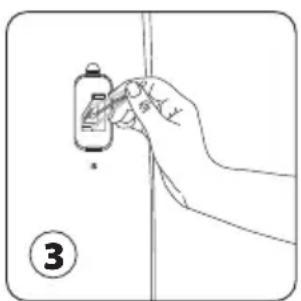
natural_image
Hand holding a small object with a label, no visible text or symbols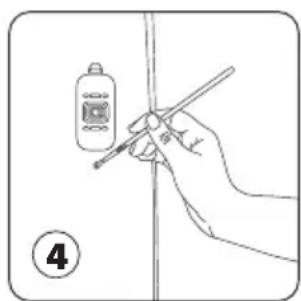
natural_image
Hand holding a pen and a digital thermometer above a vertical line, no text or symbols present중요사항:
natural_image
Hand holding chopsticks near a small bottle, no text or symbols visible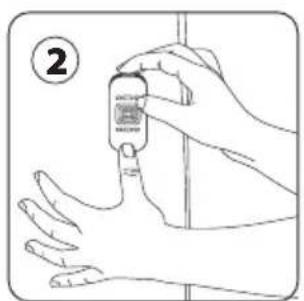
natural_image
Line drawing of a hand holding a small object near a vertical line, with number 3 in the corner (no text or symbols on the object itself)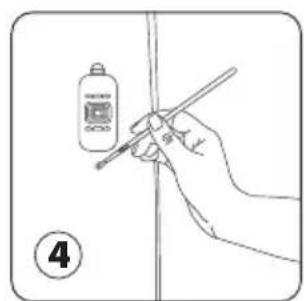
هلم:
natural_image
Octagonal architectural diagram of a traditional Chinese architectural structure (no text or symbols)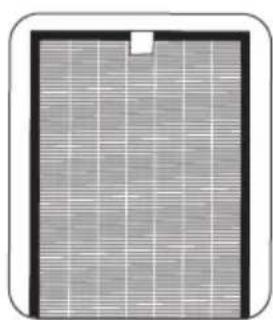
natural_image
Close-up of a solar panel with grid pattern and mounting bracket (no text or symbols)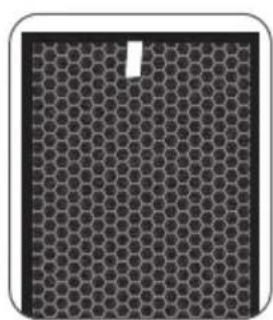
natural_image
Close-up of a hexagonal grid pattern with a small white mark, no text or symbols present.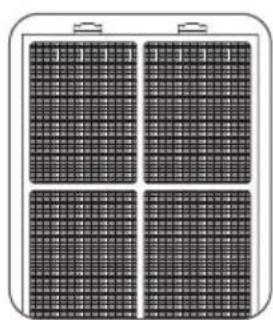
natural_image
Four identical black-and-white grid panels arranged in a square pattern, each with a handle (no text or symbols visible)natural_image
Diagram of a device interior showing airflow or ventilation system with no visible text or symbolsУРОВЕНЬ 1:
ФИЛЬТР
ПРЕДВАРИТЕЛЬ
НОЙ ОЧИСТКИ
natural_image
Four identical black-and-white grid panels arranged in a 2x2 grid, enclosed in a rounded rectangular frame (no text or symbols)natural_image
Close-up of a hexagonal grid pattern with a small white cutout in the top-left corner (no text or symbols)natural_image
Close-up of a rectangular solar panel with grid lines and a small hole, no visible text or symbols.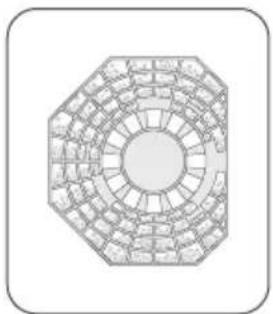
natural_image
Geometric diagram of a circular arrangement of rectangular tiles or tiles, no text or symbols presentnatural_image
Hand holding chopsticks near a small bottle, no text or symbols visible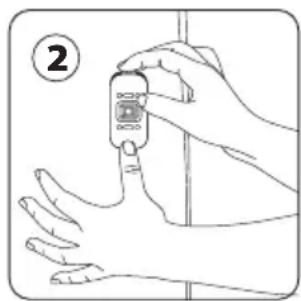
natural_image
Line drawing of a hand holding a blood glucose meter, no text or symbols present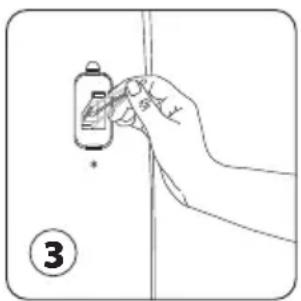
natural_image
Hand holding a small object with a label, no visible text or symbols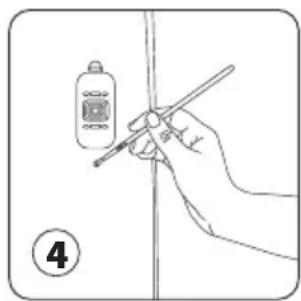
natural_image
Hand holding a pen and ruler inside a digital thermometer, no text or symbols visibleВАЖНО!
natural_image
Four identical rectangular panels with grid patterns, each mounted on a base (no text or symbols visible)Pra-penapis
natural_image
Close-up of a hexagonal grid pattern with a small white dot in the top-right corner (no text or symbols)natural_image
Close-up of a solar panel with visible grid lines and mounting holes (no text or symbols)Penapis HEPA
natural_image
Geometric diagram of a circular grid pattern with concentric rings and radial segments, no text or symbols present.Penapis NanoCaptur
natural_image
Illustration of hands holding a small object with a label (2), no text or symbols present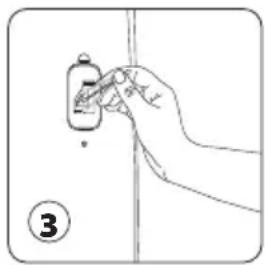
natural_image
Hand holding a small object with a pointer, no visible text or symbols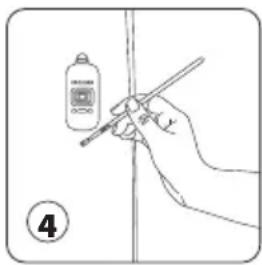
PENTING:
natural_image
Four-panel grid of black rectangular panels with handles, no text or symbols visibleแผนกรองชื่นแรก
natural_image
Close-up of a hexagonal grid pattern with a small white cutout in the center (no text or symbols)natural_image
Close-up of a rectangular panel with grid lines and a small hole, no visible text or symbolsแผนกรอง HEPA
natural_image
Octagonal architectural diagram of a traditional Chinese stone stele with circular grid layout (no text or symbols)natural_image
Line drawing of a hand holding chopsticks near a small bottle, with a numbered label (1) in the corner (no text or symbols on the diagram itself)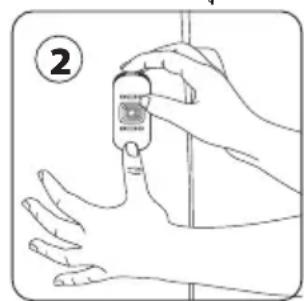
natural_image
Line drawing of a hand holding a small object with a numbered label (3) nearby, no text or symbols present.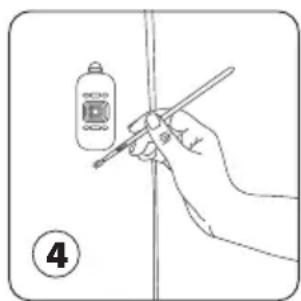
natural_image
Line drawing of a hand holding a pen, writing on a vertical line (no text or symbols present)สำคัญ: