
CK-9090 - Multicooker Concept - Free user manual and instructions
Find the device manual for free CK-9090 Concept in PDF.


| Product Type | Multicooker |
| Brand | Concept |
| Model | CK-9090 |
| Power Supply | 220-240 V ~ 50 Hz |
| Power Consumption | 1500 W |
| Functions | Fondue, Defrost, Boil, Slow Cook, Steam, Braise, Roast, Grill, Fry, Baking |
| Temperature Range | 40°C to 240°C (Grill max) |
| Timer Range | 1 minute to 9 hours 59 minutes |
| Heating Bin | Removable, with maximum oil level mark |
| Accessories | Lid, Steaming grill, Frying basket with handle, Spoon, Fondue forks, Cake form with lid, Grid |
| Control | Rotary temperature knob, digital display, timer +/- buttons, Start/Stop button |
| Safety Features | Automatic shut-off when temperature knob turned to OFF; double press Start/Stop to stop; heat-resistant handle |
| Cleaning | Hand wash removable parts; do not immerse base or lid in water; not dishwasher safe |
| Warranty | 24 months |
| Material | Stainless steel heating bin, plastic body |
Frequently Asked Questions - CK-9090 Concept
User questions about CK-9090 Concept
0 question about this device. Answer the ones you know or ask your own.
Ask a new question about this device
Download the instructions for your Multicooker in PDF format for free! Find your manual CK-9090 - Concept and take your electronic device back in hand. On this page are published all the documents necessary for the use of your device. CK-9090 by Concept.
USER MANUAL CK-9090 Concept
natural_image
White concept SHI rice cooker with digital display and control knobs (no visible text or symbols on main body)CK 9090
CZ SK PL HU EN
concept
PODĚKOVÁNÍ
UPOZORNĚNÍ PŘED PRVNÍM POUŽITÍM
natural_image
Line drawing of a rectangular container with internal supports and a lid, no text or symbols presentObr. 1
NÁVOD K OBSLUZE
Start / Stop
natural_image
Line drawing of a square basin filled with a mesh grid (no text or symbols)Obr. 2

natural_image
Close-up of a kitchen electric cooker with a lid and control panel (no visible text or symbols)Grill – Opékání
natural_image
Line drawing of a woven basket with handle and side panel, labeled 'Obr. 3' (no other text or symbols)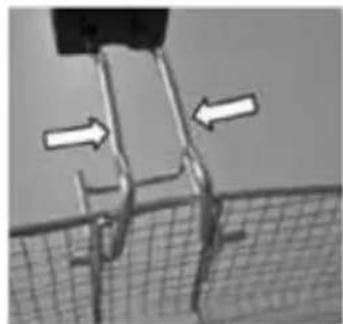
natural_image
Close-up of a mechanical component with two white arrows indicating direction, no visible text or symbolsObr. 4

natural_image
Symbol of a trash bin crossed out by two crossed lines, with no text or labels present.UPOZORNENIE PRE PRVÝM POUŽITÍM
natural_image
Line drawing of a cooking pot with a lid and side dish (no text or symbols)Obr. 1
NÁVOD NA POUŽITIE
Start / Stop
natural_image
Line drawing of a square basket with a grid pattern on top (no text or symbols)Obr. 2

natural_image
Close-up of a kitchen microwave oven with a black lid and digital display (no visible text or symbols)Grill - Opekanie
natural_image
Line drawing of a woven basket with handle and side handles, labeled 'Obr. 3' (no other text or symbols)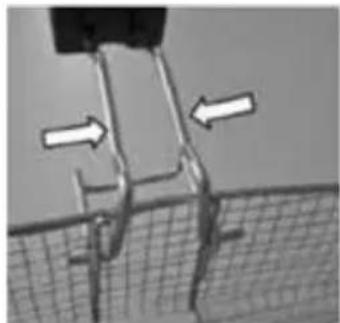
natural_image
Diagram showing a mechanical or structural component with two white arrows indicating direction, no visible text or symbols.Obr. 4

natural_image
Symbol of a trash bin crossed with no text or labels, accompanied by a solid black rectangle below (no text or symbols present)natural_image
Line drawing of a rectangular container with internal supports and a lid, no text or symbols presentRys. 1
INSTRUKCJA OBSŁUGI
Start / Stop
natural_image
Line drawing of a square basket with a grid-patterned interior (no text or symbols)Rys. 2
natural_image
Close-up of a kitchen appliance with a black lid and digital display (no visible text or symbols)Grill – Opiekanie
natural_image
Line drawing of a woven basket with handle and side panel, labeled 'Rys. 3' (no other text or symbols)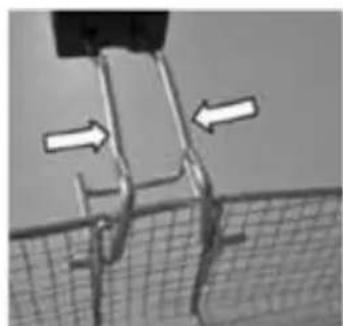
natural_image
Diagram showing a mechanical or structural component with two white arrows pointing to specific areas, no text or symbols present.Rys. 4
natural_image
Symbol of a trash bin crossed with no text or labels, accompanied by a black rectangular block below (no text or symbols present)TUDNIVALÓK AZ ELSŐ HASZNÁLAT ELÖTT
natural_image
Line drawing of a rectangular container with internal supports and a lid, no text or symbols present- ábra
HASZNÁLATI UTASÍTÁS:
Start / Stop
natural_image
Line drawing of a square basin filled with a mesh grid (no text or symbols)- ábra

natural_image
Close-up of a kitchen microwave oven with a lid and control panel (no visible text or symbols)Grill – Gillezés:
natural_image
Line drawing of a woven basket with handle and label '3. ábra' (no other text or symbols)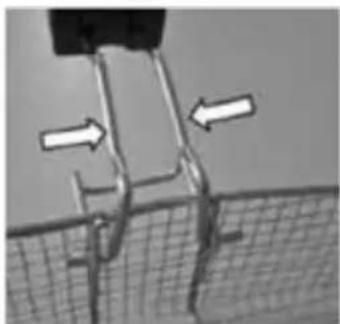
natural_image
Diagram showing a mechanical or structural component with two white arrows indicating direction, no visible text or symbols.natural_image
Symbol of a trash bin with no text or labels, crossed by two crossed lines and a solid black rectangle below (no text or symbols present)Thank you for purchasing a Concept product. We hope you will be satisfied with our product throughout its service life.
Please study the entire Operating Manual carefully before you start using the product. Keep the manual in a safe place for future reference. Make sure other people using the product are familiar with these instructions.
| Technical parameters | |
| Voltage 220–240 V ~ 50 Hz | |
| Input 1500 W | |
| Maximum volume of oil as indicated by the line | |
IMPORTANT SAFETY INSTRUCTIONS
• Never use this appliance in another way than described in this operating manual.
- Remove all packaging and marketing materials from the appliance before you use it for the first time.
• Make sure the mains voltage corresponds to the values on the rating plate. Use grounded wall outlets only.
- Do not leave the unit unattended while it is turned on, or even only plugged into the wall outlet.
- The appliance is not designed for operation by an external time controller switch or by a separate system of remote control.
- Only place the appliance on a stable and heat-resistant surface detached from other heat sources.
• The temperature of accessible surfaces may rise while the appliance is in use.
• Do not cover the unit. There is a risk of overheating.
- Keep the minimum safe distance of at least 10 cm between the unit and flammable materials, such as furniture, curtains, lace, blankets, paper, clothing, and so on.
- Do not put anything on the unit while it is in operation.
- Before you fill the appliance with oil or fat and connect it to mains, make sure all the parts are completely dry and no water drops have remained in the heating bin. Never pour water into hot oil.
• Make sure not to overfill the basket, as hot oil or fat might boil over the edge of the bin.
• Never move a unit that is switched on or has hot contents in it.
- Do not touch the surface while it is hot. Use the handles and knobs.
- Keep the appliance clean; prevent foreign bodies from entering the openings. They might damage or short-circuit the appliance, or set it on fire.
• Unplug the appliance from the wall outlet when not in use.
- When disconnecting the appliance from the power outlet, never pull the power cord. Grasp the plug and disconnect it by pulling.
- Do not allow children or unskilled persons to handle the appliance; always use it out of the reach of these individuals.
- Persons with limited movement capacity, reduced sensory perception, insufficient mental capacity or those who are unaware of the proper handling should use the product only under the supervision of a responsible, aware person.
• Exercise utmost caution when using the unit while children are nearby.
• Never allow anyone to use the appliance as a toy.
• Make sure the power cord does not hang over the edge of the working area where children might reach it.
- Do not use the appliance out of doors and on wet surfaces as there is a risk of electric shock.
• Use only accessories recommended by the manufacturer.
- Never use the appliance with a damaged power cord or plug; contact an authorised service centre immediately to have the defective components repaired or replaced.
- Do not pull or move the product by grasping the power cord.
- Keep the appliance away from heat sources, such as radiators, ovens, etc. Do not expose the unit to direct sunlight or moisture.
• Do not touch the appliance with wet or damp hands. - Turn off the product and disconnect the plug from the mains outlet before installing accessories, performing maintenance, or in the event of failure.
• The appliance is intended for household use only; it is not designed for commercial application. - Do not immerse the power cord, the plug, or the appliance in water or other liquids.
• Always connect the power cord to the appliance first, then to the wall socket. - Check the appliance and power cord for damage regularly. Never turn the appliance on if damaged.
- Turn the unit off, unplug the power cord from the wall outlet, and let the unit cool down before cleaning and after use.
- After you finish work, set the temperature controller to minimum and disconnect the unit from the mains. Do not pour the oil from the heating bin until it has cooled down completely.
- Never pour cold water into the heating bin while it is hot.
- Never add water to hot oil.
- Do not attempt to repair the appliance. Contact an authorised service centre.
Failure to follow the manufacturer's instructions may lead to refusal of warranty repair.
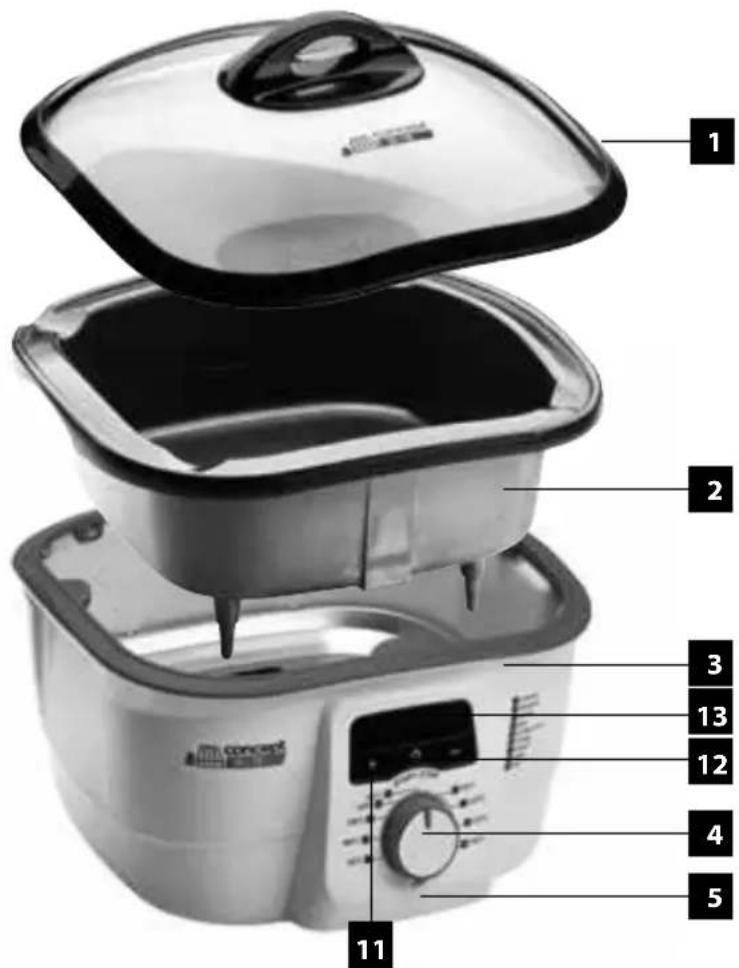
PRODUCT DESCRIPTION
1 Lid
2 Removable heating bin
3 Base
4 Temperature control knob
5 Heating indicator
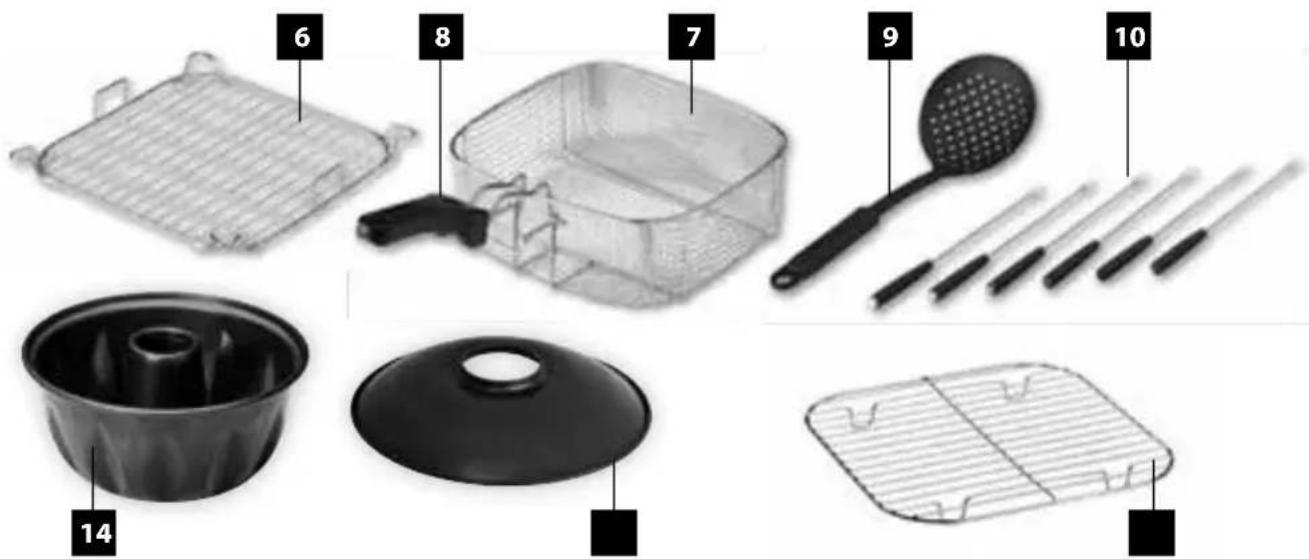
6 Steaming grill
7 Frying basket
8 Basket handle
9 Spoon
10 Fondue forksMode selector
11 Timer buttons
12 ON/OFF switch
13 Display
14 Cake form
15 The lid of the form
16 Grid
PRIOR TO FIRST USE
- Before first use make sure that the product shows no damage. Remove all packing and marketing materials.
- Wipe the outer surfaces of the appliance with a damp cloth.
- Wash the basket, heating bin and lid in hot water with detergent, rinse and let dry.
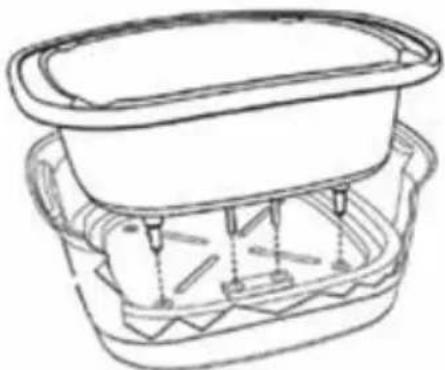
• The control panel is to be cleaned with a damp cloth only. - Insert the heating bin back to the base (Fig. 1).
- Make sure the mains voltage corresponds to the values on the rating plate.
- Always connect the power cord to the appliance first, then to the wall socket.
- If the lid is opened during frying, some hot steam will escape. Maintain a safe distance (risk of steam burns).
- Always dry the food before frying. French fries or frozen food might cause excessive oil frothing and boiling over.
• Never fill the bin above the indicated maximum level.
natural_image
Line drawing of a container with a lid and side handles, no text or symbols presentFig. 1
OPERATING INSTRUCTIONS
Start / Stop
- Connect the power, you will hear the a sound. The LED screen is on and the display show 0:00. The unit into standby mode.
- Select the time you need, then press the Start/Stop button on the control panel, the unit will start working. Double press this button, it stop and return to standby mode. There will stop the working if you turn the temperature knob to 'OFF' position during it working.
Time
- Press" + ", "-" button on the control panel to adjust the time. For each press, the time shall be changed for 1 minute. When press this button without release, the time shall be changed for 10 minutes. The maximum working hour is 9 hours 59 minutes.
Temperature
- The rotary temperature knob uses nine positions: OFF, Fondue, Defrost, Boil, Slow cook, Stram, Braise, Roast, Grill, Fry. Temperature may be se anywhere between the minimum 40°C and maximum values 240°C for Grill. After the function has been selected, the heat kontrol indicator lights up. The light goes off when the required temperature in reached.
Cooking in the Concept
• Use the temperature control knob to select the function required.
- The heat indicator light powers on and off repeatedly. It remains on only when the device is warming up to build or maintain the desired temperature.
- The time for preparation of food varies and depends on the quantity and type of ingredients used.
• Always remember to switch the unit off after cooking.
Fondue
- Put all ingredients you wish to use for preparation of fondue into the bin.
- Set the temperature control knob to Fondue.
- Set time
• Use the fondue forks to dip food in the fondue. - When you are not using the appliance, turn the control knob to OFF; if you are not using the appliance for a longer time, unplug it from mains.
Defrost
• Put all the ingredients you wish to prepare into the heating bin and cover with the lid.
• Set the temperature control knob to Defrost.
- Set time
• Do not lift the cover so the temperature in the bin does not change.
- Never overfill the bin.
- When you are not using the appliance, turn the control knob to OFF; if you are not using the appliance for a longer time, unplug it from the mains.

Surprise your friends and treat them with cheese, meat, or chocolate fondue...
Braise
- Put all the ingredients you wish to prepare into the heating bin and cover with the lid.
- Set the temperature control knob to Braise.
- Set time
- Do not lift the cover so the temperature in the bin does not change.
• Never overfill the bin. - When you are not using the appliance, turn the control knob to OFF; if you are not using the appliance for a longer time, unplug it from the mains.

Use the Braise setting to prepare braised vegetable and meat dishes or fruit purées.
Boil
• Put all the ingredients you wish to boil into the heating bin and cover with the lid.
- Set the temperature control knob to Boil.
- Set time
• Do not lift the cover so the temperature in the bin does not change.
• Never overfill the bin.
- When you are not using the appliance, turn the control knob to OFF; if you are not using the appliance for a longer time, unplug it from the mains.

Use the Boil setting for preparation of pasta, potatoes, rice, vegetables, soups, sauces, dumplings, etc.
Slow cook
- Put all the ingredients you wish to prepare into the heating bin and cover with the lid.
- Set the temperature control knob to Slow cook.
- Set time
• Do not lift the cover so the temperature in the bin does not change.
• Never overfill the bin. - When you are not using the appliance, turn the control knob to OFF; if you are not using the appliance for a longer time, unplug it from the mains.
Steam
• Pour water in the heating bin (the level must not touch the grill).
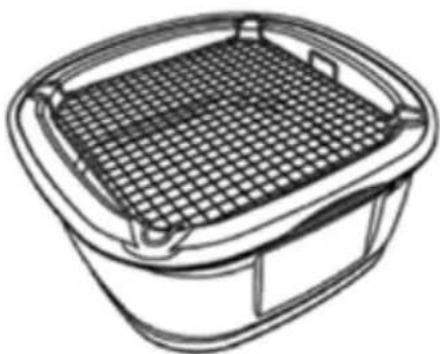
• Install the steaming grill onto the heating bin (Fig. 2).
• Put the ingredients on the grill and cover with the lid.
• Set the temperature control knob to Steam.
- Set time
• Do not lift the cover so the temperature in the bin does not change.
• Make sure there is enough water in the heating bin.
- When you are not using the appliance, turn the control knob to OFF; if you are not using the appliance for a longer time, unplug it from the mains.
• Proceed with extra caution when handling the hot grill.
natural_image
Line drawing of a square basket with a grid-patterned interior (no text or symbols)Fig. 2

The Steam setting is used for preparation of vegetable and fruit dishes in steam as well as for heating of dishes – e.g. fruit or plain dumplings.
Roast
• Set the temperature control knob to Roast.
- Put the ingredients into the heating bin and cover with the lid.
- Set time
• Add a little fat for roasting.
- When you are not using the appliance, turn the control knob to OFF; if you are not using the appliance for a longer time, unplug it from the mains.
Baking in the cake form
• Turn the regulator to 180^ C and preheat about 4 minutes.
- Place the grid on the bottom of the pot.
- Pour the cake dough into the cake form, cover the cake form with lid and insert the form on the rack. Cover the pot wit the glass lid and do not lift during baking time.
- Press +/- to set the time required for preparation of the cake. - about 45-50 minutes. If necessary, extend the baking time.
- When you are not using the appliance, turn the control knob to OFF; if you are not using the appliance for a longer time, unplug it from the mains.
natural_image
Close-up of a kitchen electric oven with a black lid and digital display (no visible text or symbols)Grill
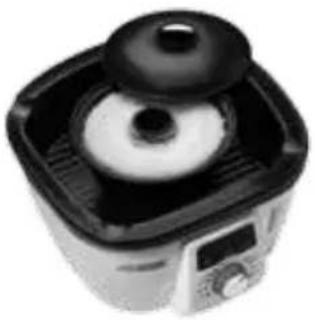
- Set the temperature control knob to Grill.
- Put the ingredients into the heating bin and cover with the lid.
- Set time
• Use no or very little fat for grilling. - When you are not using the appliance, turn the control knob to OFF; if you are not using the appliance for a longer time, unplug it from the mains.
Fry
- Put oil in the heating bin. Observe the level indicated by the mark in the bin.
- Set the temperature control knob to Fry.
- Set time
- Cover the bin with the lid and wait until the oil has warmed enough; the heating indication light turns off. Now put the ingredients in the basket and immerse in oil.
- Do not fill the basket higher than the maximum level indicated on the side.
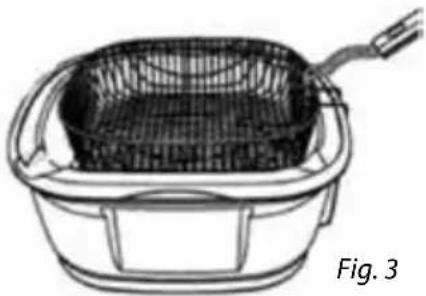
• Use the handle for moving the basket. - Press the flexible rods of the holder together and drive the ends into the openings as shown in Figure 3.
• After frying, you may hook the basket on the bin edge to let the hot oil drip (see Fig. 4)
• Proceed with extra caution when handling the hot basket. - When you are not using the appliance, turn the control knob to OFF; if you are not using the appliance for a longer time, unplug it from the mains.
- Never pour water into hot oil. - Frying of larger quantities of food may cause the oil to cool down quickly; it may take a while until the temperature is restored.
- The design of the pot has been improved in the controls and output to allow a wide scale of functions for preparation of a variety of dishes. When a large volume of oil is used for preparation of dishes (e.g. frying), the time required for warming up is longer. You may wish to prepare several smaller batches of frozen food (e.g. potato chips) instead.
natural_image
Line drawing of a woven basket with handle and side panel, labeled Fig. 3 (no text or symbols on the diagram itself)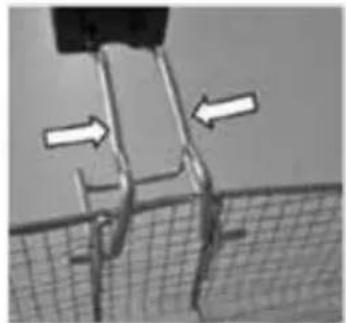
natural_image
Close-up of a mechanical component with arrows indicating direction, no visible text or symbolsFig. 4

Use the Fry setting for excellent side dishes such as chips and croquettes; you may also fry cauliflower, mushrooms, etc. evenly on all sides.
The design of the pot has been improved in the controls and output to allow a wide scale of functions for preparation of a variety of dishes. When a large volume of oil is used for preparation of dishes (e.g. frying), the time required for warming up is longer. You may wish to prepare several smaller batches of frozen food (e.g. potato chips) instead.
CLEANING
Clean the appliance after every use to prevent the accumulation of grease, burnt-on food remnants, and unpleasant odours.
Do not immerse the power cord, plug, or base of the appliance in water or other liquid. Do not clean the lid and base in a dishwasher.
Prior to any cleaning, make sure the appliance has cooled down and is disconnected from the mains.
Never pour cold water into the bin while it is hot.
Wash the heating bin, lid, basket, grill, forks, and spoon in hot water with detergent.
Clean the base of the appliance with a wet cloth only. Do not use steel wool, abrasive agents or solvents to clean the appliance.
Allow all components to dry thoroughly prior to assembling the appliance.
MAINTENANCE
• Never pour cold water into the heating bin while it is hot.
- Do not use steel wool, abrasive agents or solvents to clean the appliance.
- Only use utensils that are made from wood or heat-resistant plastic.
- Never submerge the base in water or other liquids.
- Wipe it with a damp, clean cloth only.
• Never pour water into hot oil.
Any faults or defects caused by unsuitable or insufficient maintenance are not warranted.
TROUBLESHOOTING
| Problem Solution | |
| The temperature is too high or too low | Use the temperature control knob to set the temperature as required. Rotate to the right to increase temperature, rotate to the left to bring it down. |
REPAIR & MAINTENANCE
Any extensive maintenance or repair that requires access to the inner parts of the product must be performed by an expert service centre.
ENVIRONMENTAL PROTECTION
• Packaging materials and obsolete appliances should be recycled.
• The transport box may be disposed of as sorted waste.
• Polyethylene bags shall be handed over for recycling.
Appliance recycling at the end of its service life:
A symbol on the product or its packaging indicates that this product should not go into household waste. It must be taken to the collection point of an electric and electronic equipment recycling facility. By making sure this product is disposed of properly, you will help prevent the negative effects on the environment and human health that would otherwise result from inappropriate disposal of this product. You can learn more about recycling this product from your local authorities, a household waste disposal service or in the shop where you bought this product.
concept 7×7
7 ways for 7 days
Tipy na vaření
Sýrové fondue
concept 7×7 7 ways for 7 days
Tipy na varenie
Čokoládové fondue
concept 7×7 7 ways for 7 days
concept 7×7 7 ways for 7 days
Főzési ötletek

The manufacturer (or importer) is responsible for ensuring the product complies with the requirements of applicable legal regulations as well as those of the relevant technical standards. Moreover, they are responsible for ensuring the product has the properties the manufacturer described in documents related to the goods or those reasonably expected by the customer with regard to the nature of the goods or based on advertising produced by the manufacturer, and further they are responsible for ensuring the product is fit for the purpose proposed by the manufacturer or that a product of the same type is normally used for.
The quality warranty term is 24 months from product takeover by the customer.
The warranty does not apply to wear and tear caused by regular use. The customer shall not be entitled to any warranty claims if, prior to taking the product over, they knew the product contained a defect or if the defect is attributable to the customer.
The warranty specifically does not apply:
- if the product installation, operation and service conditions stipulated in the product operating manual have not been adhered to,
- to malfunctions caused due to mechanical, heat or chemical damage, short circuit, over voltage or incorrect installation,
• to malfunctions caused by an inexpert third-party intervention,
• to malfunctions caused by natural disaster, - to malfunctions caused by insufficient or inappropriate maintenance in violation of the operating manual, including malfunctions caused by water and other sediments,
- to changes in colour of the heating surface or to scratching of the surface caused as a result of using the products in an unusual manner,
• to appearance and functional changes caused by exposure to sunlight, thermal radiation of water and other sediments, - if the service life of certain product parts expires, e.g. for accumulators, bulbs, etc.
The warranty does not apply to any products and services provided along with the product (gifts, promotional articles, etc.).
Filing a complaint
A complaint against a product defect must be fi led as soon as identifi ed, yet no later than before the end of the warranty term.
The customer must file a product complaint with the dealer from which they have purchased the product, or with any authorised service centre, a list of which is included in the product package, or available at www.my-concept.com.
While fi ling a product complaint, the product must be duly cleaned and securely packed so as to prevent any damage during its transport to an authorised service centre, where relevant, unless the product is delivered in person.
The customer must submit proof of having concluded a purchase contract for the product by producing the receipt.
While fi ling their complaint, the customer must indicate the noted defect and identify the preferred complaint application method.
Complaints processing
As long as the noted defect may be removed, the user has the right to have the defect duly removed free of charge on a timely basis.
Where such a procedure is not reasonable with regard to the nature of the defect, the user may require to be supplied a new defect-free product (replacement), or, where the defect applies to a part of the product only, replacement of the part concerned. However, if replacement of the product or any part thereof is not proportionate with regard to the nature of the defect, especially if the defect can be removed without undue delay, the customer has the right to have the defect removed free of charge.
If the noted defect is not removable, or if the customer becomes entitled to replacement of the product or a part thereof, yet the replacement is not possible, for example due to the product having been sold out, the customer has the right to return the product (withdrawal from the contract).
The customer shall have the right to a new product (replacement) or to replacement of a part of the product even if the defect can be removed, provided they cannot properly use the product due to repeated occurrence of the defect or due to a high number of such defects. In such a case, the customer also has the right to return the product (by withdrawing from the contract).
If the product is not returned (the customer does not withdraw from the contract), or if the customer does not apply the right to a new defect-free product (replacement), to replacement of a part thereof or to repair of the product, they may request a reasonable discount. The customer also has a right to a reasonable discount if a new defect-free product cannot be supplied to them, or if a product part cannot be replaced or the product repaired unless the situation is remedied within a reasonable time limit, or if remedying the situation would create major discomfort on the part of the customer.
The seller, authorised service centre or a staff member authorised by them must decide about each complaint immediately or within three business days in complicated cases. This term does not include a reasonable period of time, depending on the type of product concerned, required for the defect to be assessed by an expert. A complaint, including defect removal, must be dealt with without any undue delay, yet no later than within 30 calendar days of the complaint fi ling date, unless the seller and the customer agree on a later deadline.
On returning the product (withdrawing from the contract) the customer must return any accessories and documents supplied along with the product.
The customer does not have the right to keep the defective parts and components of the product replaced as part of a repair of the product.
This shall be without prejudice to any other rights the customer may have in relation to the purchase of the product.
Remark: Complaints against products damaged in transport are governed by the carrier's complaints procedure.
Manufacturer
Jindřich Valenta - ELKO Valenta
Vysokomýtská 1800, 565 01 Choceň
Czech Republic
tel.: +420 465 471 433
fax +420 465 473 304
Company ID No. 13216660
email: servis@my-concept.cz
www: www.my-concept.com
Product data
| Model: | |
| Production number: | |
| Date of purchase: Seal and signature of vendor: | |
concept
Jindřich Valenta – ELKO Valenta Czech Republic
Vysokomýtská 1800, 565 01 Choceň
Tel. +420 465 322 895, Fax: +420 465 473 304
www.my-concept.cz

ELKO Valenta – Slovakia, s.r.o.
Hurbanova 1563/23, 911 01 Trenčín
Tel.: +421 326 583 465, Fax: +421 326 583 466
www.my-concept.sk

Elko Valenta Polska Sp. Z. o. o.


- PODĚKOVÁNÍ
- UPOZORNĚNÍ PŘED PRVNÍM POUŽITÍM
- NÁVOD K OBSLUZE
- Start / Stop
- Grill – Opékání
- UPOZORNENIE PRE PRVÝM POUŽITÍM
- NÁVOD NA POUŽITIE
- Grill - Opekanie
- INSTRUKCJA OBSŁUGI
- Grill – Opiekanie
- TUDNIVALÓK AZ ELSŐ HASZNÁLAT ELÖTT
- HASZNÁLATI UTASÍTÁS:
- Grill – Gillezés:
- IMPORTANT SAFETY INSTRUCTIONS
- PRODUCT DESCRIPTION
- PRIOR TO FIRST USE
- OPERATING INSTRUCTIONS
- Time
- Temperature
- Cooking in the Concept
- Fondue
- Defrost
- Braise
- Boil
- Slow cook
- Steam
- Roast
- Baking in the cake form
- Grill
- Fry
- CLEANING
- MAINTENANCE
- TROUBLESHOOTING
- REPAIR & MAINTENANCE
- ENVIRONMENTAL PROTECTION
- Appliance recycling at the end of its service life:
- concept 7×7
- Tipy na vaření
- Sýrové fondue
- concept 7×7 7 ways for 7 days
- Tipy na varenie
- Čokoládové fondue
- Főzési ötletek
- Filing a complaint
- Complaints processing
- Manufacturer
- concept
- Jindřich Valenta – ELKO Valenta Czech Republic
- ELKO Valenta – Slovakia, s.r.o.
- Elko Valenta Polska Sp. Z. o. o.
Brand : Concept
Model : CK-9090
Category : Multicooker