
SWM 101 - Hi-Fi System SENCOR - Free user manual and instructions
Find the device manual for free SWM 101 SENCOR in PDF.


| Type | Hi-Fi System |
| Brand | Sencor |
| Model | SWM 101 |
| Dimensions (W x H x D) | Approx. 250 x 120 x 250 mm (main unit) |
| Weight | Approx. 3.5 kg (main unit) |
| Power Supply | AC 230 V ~ 50 Hz |
| Power Consumption | 30 W (max) |
| Output Power | 2 x 10 W RMS |
| Frequency Range | FM: 87.5 - 108 MHz; AM: 530 - 1710 kHz |
| Supported Media | CD, CD-R, CD-RW, MP3 disc |
| Audio Inputs | AUX (3.5 mm jack), USB (for MP3 playback) |
| Audio Outputs | Headphone (3.5 mm jack), Speaker terminals |
| Speaker Impedance | 4 ohms |
| Display | LCD with backlight |
| Remote Control | Included |
| Additional Features | Digital tuner with RDS, sleep timer, clock alarm |
| Cleaning Instructions | Wipe with a soft dry cloth. Do not use liquid cleaners. |
| Safety Notes | Keep away from water and heat sources. Unplug when not in use. |
| Repairability | Refer to service manual; user replaceable fuses only. |
| Accessories Included | Remote control, FM antenna, AM loop antenna |
Frequently Asked Questions - SWM 101 SENCOR
User questions about SWM 101 SENCOR
0 question about this device. Answer the ones you know or ask your own.
Ask a new question about this device
Download the instructions for your Hi-Fi System in PDF format for free! Find your manual SWM 101 - SENCOR and take your electronic device back in hand. On this page are published all the documents necessary for the use of your device. SWM 101 by SENCOR.
USER MANUAL SWM 101 SENCOR
1 Reads MP3/WMA files from USB memory, transmits musical signals via the FM tuner in your car so you can enjoy music from your car stereo player.
2 Supports external audio players (mp3 players, CD, VCD, players, etc.).
3 Transmits 199 frequencies (from 88,1 - 107,9 MHz).
4 Power is supplied by the car cigarette lighter (DC 12 V - 24 V).
5 Offers several equalizer settings - Live, Rock, Classical, Normal, POP.
6 Frequency and musical zone setting
7 Infrared remote control makes your driving safe.
8 Unique design, excellent sound quality*, superb experience.
* USB connection. Analogue sound quality (audio connection input) is less than a digital sound connection, due to necessary conversions.
Technical specification:
Excellent sound quality with full duplex communication.
FM range: 88,1 - 107,9 MHz (total of 199 channels)
Selectivity: 40 dB
Frequency response 35 Hz - 20 kHz
Installation options: Plug & drive: easy connection into vehicle cigarette lighter.
Supports: USB, audio cable (line-in)
Audio input: 2,5 mm stereo jack/plug
Operational voltage: DC 12 V - 24 V
Installation:
- Insert the unit into the socket of car lighter.
- Adjust the transmitting frequency of the unit to correspond channel between FM 88,1 - 107,9 MHz
- Set the car fm channel the same with unit channel, then the unit could play music of FLASH disk, or other audio source through line-in.
Using your player with or without remote control:
LED display.
- Current frequency display under normal playing state.
- To adjust the volume, press and hold the NEXT/VOL+ or PREV/VOL- button on the panel and the LED display will show the current volume setting.
- To change the track number press and release the NEXT/PREV button on the panel or on the remote control.
- To activate the channel selection function, press the CH button on the panel or on the remote control. Then press and release the NEXT/VOL+ or PREV/VOL- on the panel or the CH+/CH- button on the remote control and the display will show the changed frequency.
- When pressing the Play button on the panel or on the remote control during normal playback, the LED display will show the number of the track playing.
- Press the EQ key, LED display the current EQ mode. (E-0: Normal, E-1: Rock. E-2: POP, E-3: Classical, E-4: Live).
Buttons on the panel
- CH button: Short pressing of this button activates or selects the desired frequency. In this phase you can move the frequency by 0,1 MHz by pressing the NEXT/VOL+ or PREV/VOL-button. After selecting the frequency, confirm your choice with short pressing of the CH button.
- NEXT/VOL+ and the PREV/VOL-: Short pressing of this button will move or skip to the next or previous track. Long pressing will adjust the volume setting.
- PLAY key: Play or Pause by short press, long press to change the circulation mode (ONE, ALL, RANDOM).
Remote Control
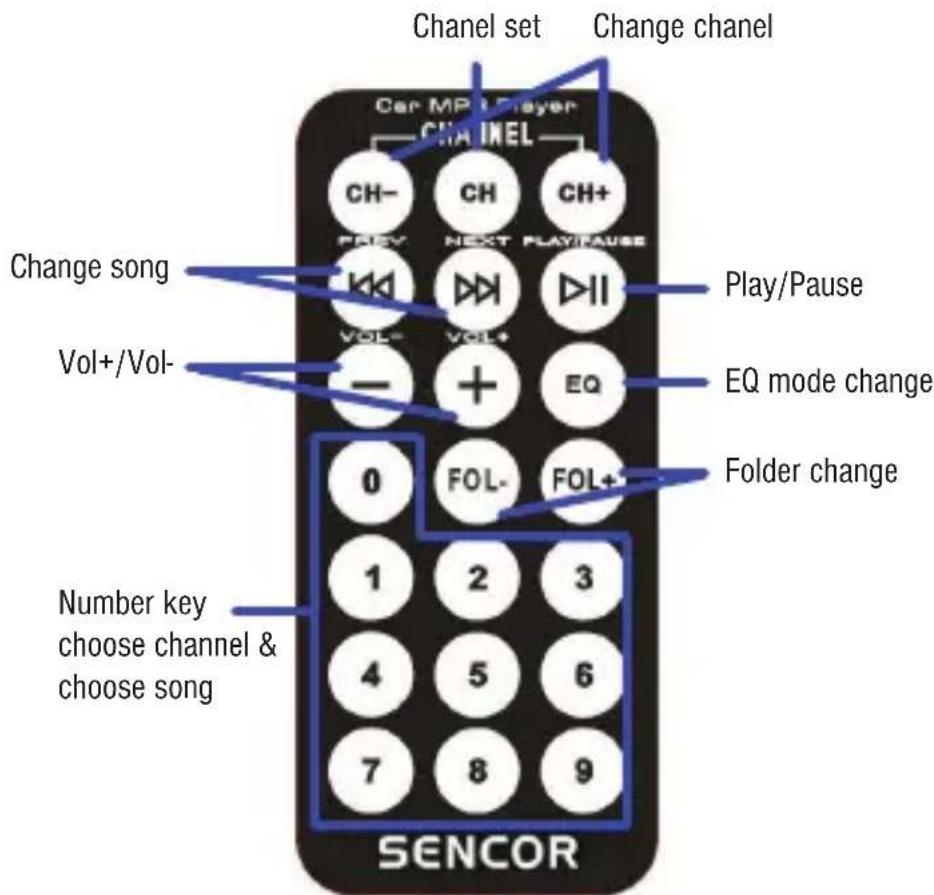
- CH+/CH- key: Adjusting the frequency with 0,1 MHz by short press
- CH key: Set the channel after adjusting CH + / CH- or inputting the channel by number key.
- PRVE/NEXT key: Select the previous song or the next song.
- +/- Key: Add the volume or reduce the volume.
- PLAY key: Play or Pause by short press
- EQ key: EQ optional, Normal, Rock; POP; Classical; Live;
- FOL+/FOL-: Select the music file folder one by one.
- Number key: Select the song number directly by press the number key; select the channel directly by press the number first, then press the CH key.
INSTRUCTIONS AND INFORMATION REGARDING THE DISPOSAL OF USED PACKAGING MATERIALS
Dispose of packaging material at a public waste disposal site.
natural_image
Symbol of a trash bin crossed with two crossed lines, no text or numbers presentDISPOSAL OF USED ELECTRICAL AND ELECTRONIC APPLIANCES
The meaning of the symbol on the product, its accessory or packaging indicates that this
product shall not be treated as household waste. Please, dispose of this product at your applicable collection point for the recycling of electrical & electronic equipment waste. Alternatively in some states of the European Union or other European states you may return your products to your local retailer when buying an equivalent new product. The correct disposal of this product will help save valuable natural resources and help in preventing the potential negative impact on the environment and human health, which could be caused as a result of improper liquidation of waste. Please ask your local authorities or the nearest waste collection centre for further details. The improper disposal of this type of waste may fall subject to national regulations for fines.
For business entities in the European Union
If you wish to dispose of an electrical or electronic device, request the necessary information from your seller or supplier.
Disposal in other countries outside the European Union
If you wish to dispose of this product, request the necessary information about the correct disposal method from local government departments or from your seller.

This product meets all the basic EU regulation requirements that relate to it.
Changes to the text, design and technical specifications may occur without prior notice and we reserve the right to make these changes.
1. Funkce
natural_image
Symbol of a trash bin crossed with no text or numbers, representing waste sorting or disposal (no text present)LIKVIDACE POUŽITÝCH ELEKTRICKÝCH A ELEKTRONICKÝCH ZAŘÍZENÍ
natural_image
Symbol of a trash bin crossed with no text or numbers, representing waste sorting or restriction (no text present)LIKVIDÁCIA POUŽITÝCH ELEKTRICKÝCH A ELEKTRONICKÝCH ZARIADENÍ
natural_image
Symbol of a trash bin crossed with two crossed lines, no text or numbers presentHASZNÁLT ELEKTROMOS ÉS ELEKTRONIKUS BERENDEZÉSEK MEGSEMMISÍTÉSE
natural_image
Symbol of a trash bin crossed out by two crossed lines, with no text or numbers present.
- Technical specification:
- Installation:
- Using your player with or without remote control:
- LED display.
- Buttons on the panel
- INSTRUCTIONS AND INFORMATION REGARDING THE DISPOSAL OF USED PACKAGING MATERIALS
- DISPOSAL OF USED ELECTRICAL AND ELECTRONIC APPLIANCES
- For business entities in the European Union
- Disposal in other countries outside the European Union
- Funkce
- LIKVIDACE POUŽITÝCH ELEKTRICKÝCH A ELEKTRONICKÝCH ZAŘÍZENÍ
- LIKVIDÁCIA POUŽITÝCH ELEKTRICKÝCH A ELEKTRONICKÝCH ZARIADENÍ
- HASZNÁLT ELEKTROMOS ÉS ELEKTRONIKUS BERENDEZÉSEK MEGSEMMISÍTÉSE
Brand : SENCOR
Model : SWM 101
Category : Hi-Fi System