
SWM 160 R - Hi-Fi System SENCOR - Free user manual and instructions
Find the device manual for free SWM 160 R SENCOR in PDF.


| Product Type | Hi-Fi System |
| Brand | Sencor |
| Model | SWM 160 R |
| Dimensions (W x H x D) | 430 x 140 x 360 mm |
| Weight | 5.5 kg |
| Power Supply | 230 V AC, 50 Hz |
| Power Consumption | 35 W |
| Radio Tuner | FM/AM with 40 preset stations |
| CD Player | Compatible with CD, CD-R, CD-RW |
| USB Port | USB 2.0 for MP3 playback |
| Bluetooth | Version 5.0, range up to 10 m |
| Audio Output | 2 x 20 W RMS speakers |
| Speaker Impedance | 4 ohms |
| Frequency Response | 60 Hz – 20 kHz |
| Display | LCD with white backlight |
| Remote Control | Included (batteries not included) |
| AUX Input | 3.5 mm stereo jack |
| Headphone Output | 3.5 mm stereo jack |
| Antenna | FM wire antenna included |
| Cleaning Instructions | Wipe with a soft, dry cloth. Do not use solvents. |
| Safety Warnings | Do not expose to water or moisture. Unplug during storms. |
| Spare Parts Availability | Contact Sencor authorized service centers |
| Repair Service | Refer to the warranty card for service information. |
| Documentation | User manual available for free download |
Frequently Asked Questions - SWM 160 R SENCOR
User questions about SWM 160 R SENCOR
0 question about this device. Answer the ones you know or ask your own.
Ask a new question about this device
Download the instructions for your Hi-Fi System in PDF format for free! Find your manual SWM 160 R - SENCOR and take your electronic device back in hand. On this page are published all the documents necessary for the use of your device. SWM 160 R by SENCOR.
USER MANUAL SWM 160 R SENCOR
- Read and Play the MP3/WMA format from the SD/MMC card and USB flash disk
• LCD Displays audio file information and frequency
• LINE-IN function that enables you to enjoy music from the external Audio device such as CD, Media player
• LINE-OUT jack - Rotary joint design convenient for you to adjust the device's position
• 199 preset channels within 88.1-107.9 MHz. - Car cigar socket power supply (12V\~24V DC power)
- Restore the last frequency, track number and volume when you restart the device
- Many EQ options: Normal, Rock, Pop, Classic, Soft, Jazz, DBB, SRS
- Many circulation mode: All, One, Folder, Random
Specifications:
Excellent sound quality.
FM transmitting range: 88.1-107.9 MHz
The sound channel separation: 40 dB
Frequency response: 35 Hz-20 KHz
Installation options: Plug & drive: Easy plug-in into cigarette lighter
Support: SD/MMC, USB
Audio Input the interface: 2.5 mm stereo jack
Audio Output: 2.5 mm stereo jack
Working voltage: DC 12 V\~24 V
Working temperature: -15 °C-50 °C
Keys & Display
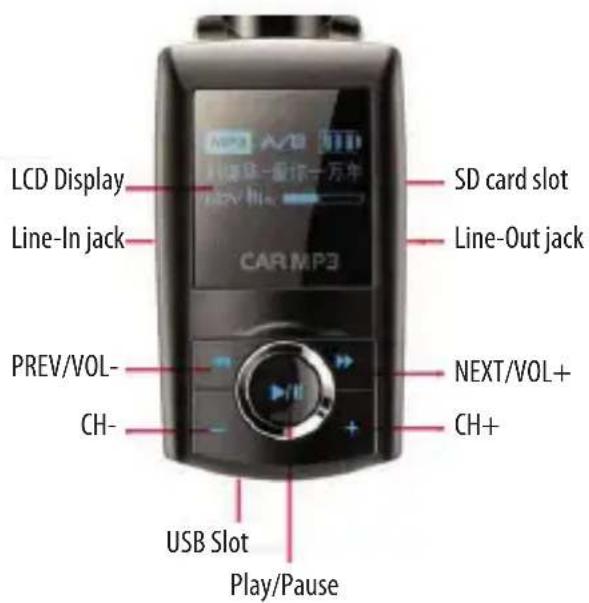
Basic Operations:
Play/Pause: press the ▶/■ key to play the MP3/WMA file. To pause during playback, press the ▶/■ key. To resume, press it again.
Previous/Next: Press the I◀◀ key to play the previous track or press the ▶▶I key to play the next track.
Switch Channel: Press the "+" or "-" key to switch the open channels. When you switch to a certain channel, the display show the frequency is indicated on the display.
Note: There are 199 preset channels: 88.1-107.9 MHz
Adjust Volume: Press and hold the "I◀◀" decrease volume, or press and hold the "▶▶I" key to increase volume.
Play Music through USB Flash disk
- Plug the USB flash disk that stores MP3 files into the USB port.
- Insert the device into the cigarette lighter socket to draw 12 V\~24V Power.
- Press the "+" key or "-" key to select the preset channel without signal interference. You see the selected frequency indicated on the display.
- Tune the car FM radio to the same channel as indicated on the display.
- Now you can enjoy your MP3/WMA music by controlling the keys on the device. For detail information about operation, see "Basic Operation" section.
Play music on a memory card
This device can read audio files stored on a SD/MMC memory card, and transmit the audio signals to a FM radio for your listening.
- Plug a memory card that stores audio files into the card slot beside the USB port.
- Insert the device into the cigarette lighter socket to draw 12 V\~24V Power.
Press the "+" key or "-" key to select the preset channel without signal interference. You see the selected frequency indicated on the display. - Tune the car FM radio to the same channel as indicated on the display.
- Now you can enjoy your MP3/WMA music by controlling the keys on the device. For detail information about playback operation, see "Basic Operation" section.
Note: If a removable disk and a memory card are both inserted properly, only the audio files on the removable disk is transmitted and played.
Play music on an extra audio player
The device supports LINE-IN feature that enables you to enjoy the music from an external audio device such as CD, MD player, etc. The external audio source comes into the device through the line-in jack and is transmitted to the FM tuner by the built-in FM transmitter. You enjoy the music through the FM stereo audio system.
- Connect one end of the LINE-IN cable to the line-in jack of the device and connect the other end to the earphone jack of the external audio device.
- Turn on the external audio player and play the music.
- Press the "+" key or "-" key to select the open channels without signal interference. You see the selected frequency indicated on the display.
- Tune the car FM radio to the same channel as indicated on the display.
- Now you can enjoy music with keys on the audio player.
Note: All keys except channel switch are unavailable when you use the line-in function. You can only use the keys on the extra audio player to control the playback
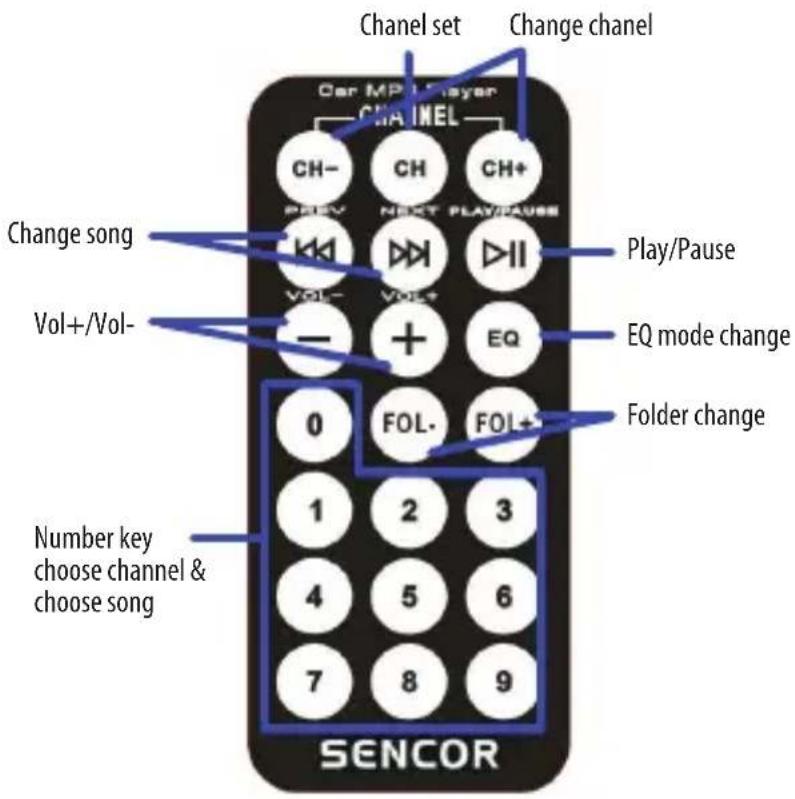
Remote Control Function:
- CH key: Set the frequency after selecting the frequency directly by number key.
- FL+/FL-key: change the playing folder one by one.
- CH+/CH- key: Adjusting the frequency with 0.1MHz by short press, with 1 MHz by long press
- PREV/NEXT key: Select previous or next song.
- +/- key: Volume Turn up or Turn down
- PLAY key: Play or Pause by short press; long press to change the circulation mode (All, One, Random, Folder)
- Number key: Select song by figure under normal playing state, select frequency after entering into the frequency state.
- Short press EQ key: Change the playing EQ mode (Normal, Rock, Pop, Classic, Soft, Jazz, DBB, SRS)
- Long press EQ key: Select circulation mode. (ALL, SINGLE, FOLDER, NORMAL, RANDOM)
Notice
- Operation voltage for the device is 12V\~24V. Too high or too low voltage could cause the device damaged or failed, please insert the unit with USB or SD card to the car cigarette lighter socket after starting up.
- For the sake of safety, please insert the USB flash disk or memory card before you plug the device into the car cigar socket.
- The device may not support some USB flash disks or memory card.
- If the device cannot read data from USB flash disk or memory card, try to reinsert the USB flash disk/memory card, or reinsert the device into the cigarette lighter socket. If problem persist please use another USB flash disk or another card.
- Frequency of the car FM tuner should be the same as that of the device.
- Do not pull out or insert a USB flash disk or memory card while the device is being powered by the car cigarette lighter. If you want to, remove the device from the socket first and insert or remove the disk or card before you re-power the device.
- The progress may be slow when the USB flash disk or memory card stores too many audio fi les.
Safety Fuse Replacement
When the device cannot work properly, it may due to the safety fuse failure. Please replace the safety fuse following these steps if necessary:
- Remove the device from the cigarette lighter socket.
- Twist the tip of the cigar plug.
- Remove the bad safety fuse and insert a new one (Extra in the package)
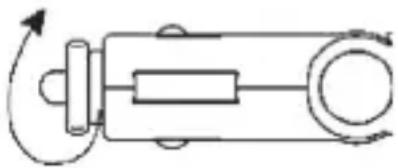
natural_image
Pure mechanical diagram showing a lever mechanism with no text or symbolsDisposal of Used Electrical & Electronic Equipment
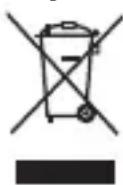
The meaning of the symbol on the product, its accessory or packaging indicates that this product shall not be treated as household waste. Please, dispose of this equipment at your applicable collection point for the recycling of electrical & electronic equipments waste. In the European Union and Other European countries which there are separate collection systems for used electrical and electronic product. By ensuring the correct disposal of this product, you will help prevent potentially hazardous to the environment and to human
health, which could otherwise be caused by unsuitable waste handling of this product. The recycling of materials will help conserve natural resources. Please do not therefore dispose of your old electrical and electronic equipment with your household waste. For more detailed information about recycling of this product, please contact your local city office, your household waste disposal service or the shop where you purchased the product.


Brand : SENCOR
Model : SWM 160 R
Category : Hi-Fi System