
CDR 699 USB - CD Player ECG - Free user manual and instructions
Find the device manual for free CDR 699 USB ECG in PDF.


| Product Type | Portable CD Player with Radio |
| Model | CDR 699 USB |
| Brand | ECG |
| Dimensions | 208 × 208 × 122 mm |
| Weight | 1.5 kg |
| Power Supply | AC 110 V / 220 V ~ 50/60 Hz or DC 9 V (6× LR14 batteries, not included) |
| Radio Bands | AM 520–1710 kHz, FM 87.5–108 MHz |
| Laser Wavelength | 760–800 nm |
| Music Output Power | 2 × 1.2 W RMS |
| Disc Support | Audio CD, MP3 CD (CDR 699 USB only) |
| USB Playback | Yes (CDR 699 USB only) |
| Functions | CD/MP3/USB playback, radio (AM/FM), AUX input, programming (up to 20 tracks), repeat modes |
| Speaker Configuration | Two built-in speakers (left and right) |
| Headphone Jack | 3.5 mm stereo jack |
| AUX Input | 3.5 mm stereo jack |
| Antenna | Telescopic antenna for FM |
| Display | LCD display with track and function indicators |
| Battery Compartment | 6× UM-2 / LR14 (1.5 V) |
| Protection Features | Laser safety, anti-static discharge, overheating protection |
| Maintenance | Clean discs with soft cloth; remove batteries if not used for long periods |
| Disposal | Recycle according to local WEEE regulations |
Frequently Asked Questions - CDR 699 USB ECG
User questions about CDR 699 USB ECG
0 question about this device. Answer the ones you know or ask your own.
Ask a new question about this device
Download the instructions for your CD Player in PDF format for free! Find your manual CDR 699 USB - ECG and take your electronic device back in hand. On this page are published all the documents necessary for the use of your device. CDR 699 USB by ECG.
USER MANUAL CDR 699 USB ECG
natural_image
Black and blue ECG portable radio with digital display and speaker grille (no visible text or symbols on device body)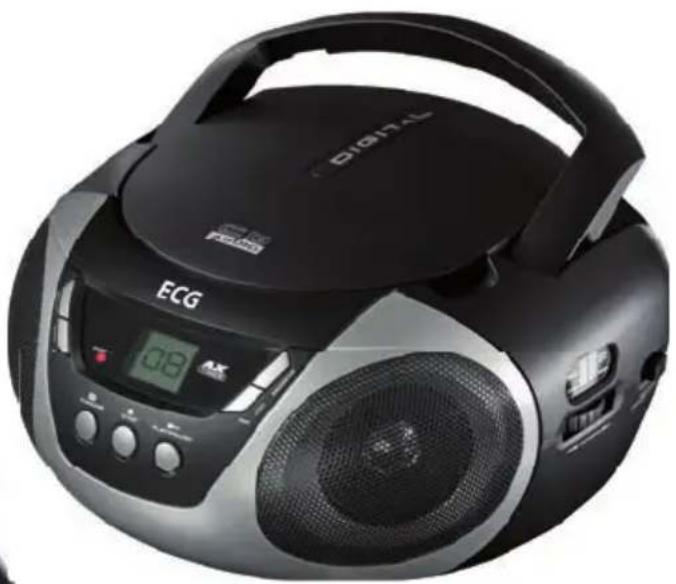
natural_image
Black digital portable electronic device with ECG logo and control panel (no visible text or symbols on body)CDR 699 USB / CDR 699
natural_image
Diagram of a device with three panels and an arrow indicating direction (no text or symbols)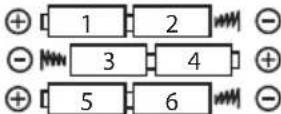
6 x UM-2 / LR14 (1,5 V)
POSLECH RÁDIA
natural_image
Diagram of a device with three panels and an arrow pointing to one panel (no text or symbols)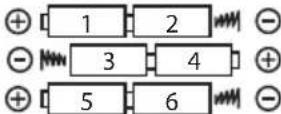
6× UM-2 / LR14 (1,5 V)

POČÚVANIE RÁDIA
natural_image
Diagram of a device with three panels inside a circular frame, no text or symbols present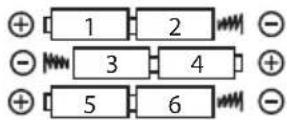
6 x UM-2 / LR14 (1,5 V)
SŁUCHANIE RADIA
Pasmo odbiornika AM 520–1710 kHz
FM 87,5–108 MHz
natural_image
Diagram of a device with three stacked units inside a circular housing, no text or symbols present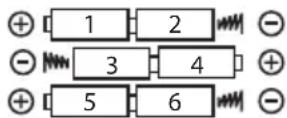
6 db UM-2 / LR14 (1,5 V)
A RÁDIÓ HALLGATÁSA
natural_image
Diagram of a mechanical or electrical component with concentric circular layers and a central rectangular block (no text or symbols)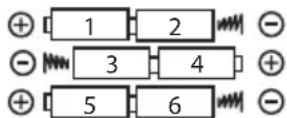
6 x UM-2 / LR14 (1,5 V)
RADIOHÖREN
Read carefully and save for future use!
Warning: The safety measures and instructions, contained in this manual, do not include all conditions and situations possible. The user must understand that common sense, caution and care are factors that cannot be integrated into any product. Therefore, these factors shall be ensured by the user/s using and operating this appliance. We are not responsible for damage caused during transportation, by improper use, voltage fluctuation or by changing or modifying any part of the appliance.
To protect against a risk of fire or electric shock, basic precautions shall be taken while using electrical appliances, including the following:
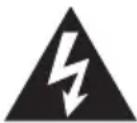
The symbol of lightning with arrow in an equilateral triangle is supposed to alert the user to the presence of “uninsulated voltage” inside the device, which can be sufficiently strong to cause injury to a person.
ATTENTION
RISK OF INJURY BY ELECTRIC SHOCK! DO NOT OPEN!
WARNING
If you want to lower the risk of electric shock, do not open the cover or the rear panel of the device. There are no components inside, which could be repaired by the user. Always contact trained personnel of the service centre.

The exclamation mark in an equilateral triangle is intended to inform the user that in the literature accompanying the device are many important instructions for its operation and maintenance (or service).
- Prevent dripping and splashing water on the device and water getting in the device. You will lower the risk of fire and the risk of electric shock.
- The electrical outlet to which the device is connected serves to disconnect the device from power and has to be accessible at all times.
- You will find the type label on the bottom of the device.
- Warning symbols are printed on the rear panel of the device. Please, pay attention to these symbols and follow the instructions in this manual.
- Do not expose the batteries to excessive temperatures, for example to direct sunlight, fire, etc.
Warning: This product uses invisible laser beams. Avoid direct exposure to beam.

Attention: Using controls, settings or procedures contrary to this manual may result in a risk of dangerous radiation exposure.
Loud audio
EN
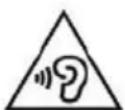
WARNING:
Excessive acoustical pressure from headphones can cause hearing damage. Avoid prolonged listening to loud audio to prevent damage to your hearing.
DESCRIPTION
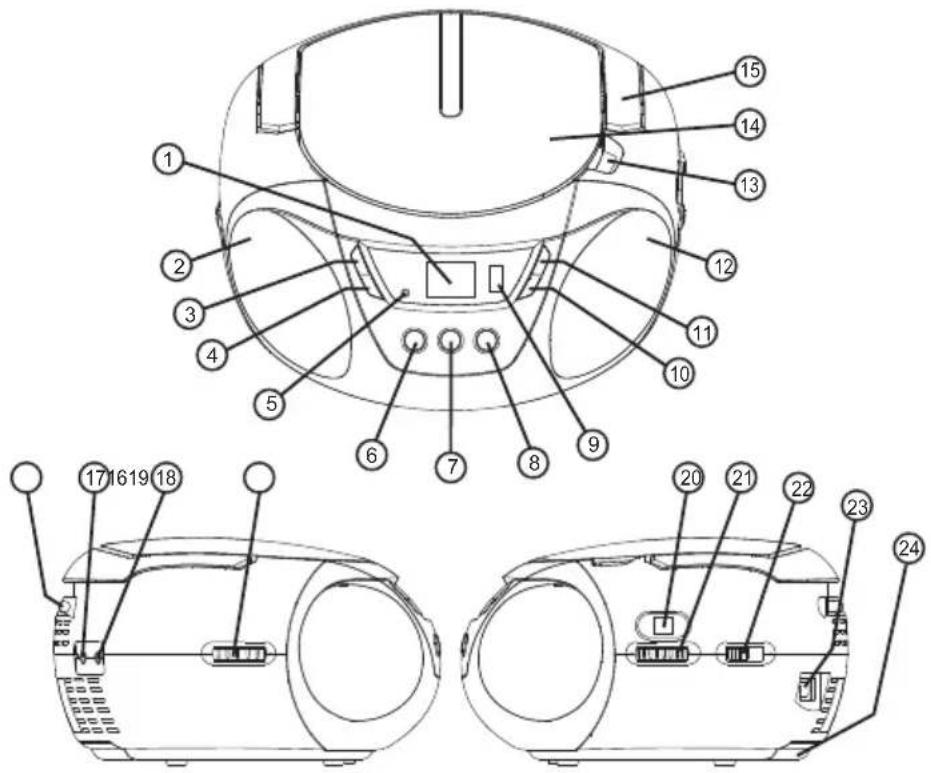
Location of controls
- LCD display
- Speaker (left)
- REPEAT button
- BACK button
- LED POWER indicator
- FOLDER+ / SKIP +10 (CDR 699 USB) button RANDOM (CDR 699) button
- STOP button
- PLAY/PAUSE/USB (CDR 699 USB) button PLAY/PAUSE (CDR 699) button
- USB (CDR 699 USB only) jack
- NEXT button
- PROGRAM button
- Speaker (right)
-
Space to open the CD tray
-
CD tray door
- Handle
- Telescopic antenna (FM)
- Input jack AUX IN
- Headphones jack
- Volume control
- Radio tuning window
- Radio tuner
- Functions switch (OFF/CD/MP3/USB/AUX/AM/FM) (CDR 699 USB) Functions switch (OFF/CD/AUX/AM/FM) (CDR 699)
- AC power cord plug
- Battery compartment
POWER
Power supply
Make sure that the operating voltage of the device corresponds to the voltage of the power supply. Plug the power cord into the wall outlet.
Important!
When you do not use the device, do not forget to switch it off, so that you do not waste electricity.
Battery operation
Open the battery compartment and insert 6 batteries size LR14 (UM-2). Observe the correct polarity of the batteries, otherwise the device will not function.
Important: If you will power the device exclusively from the wall outlet or if you do not plan to use the device for more than a month, remove the batteries to prevent damage to the device caused by battery leakage.
BOTTOM VIEW
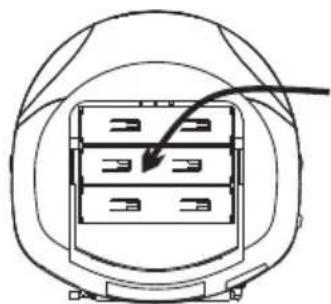
natural_image
Diagram of a device with three panels inside a circular housing, no text or symbols present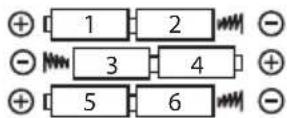
6 x UM-2 / LR14 (1,5 V)
Tune the desired station by turning the tuner.
Adjust the telescopic antenna (FM) or the location of the device (AM) to achieve optimal reception.
Set the volume control to the desired level.
If you want to switch off the radio, move the function switch to "OFF".
HEADPHONES JACK
This device is equipped with 3,5 mm headphones jack, suitable for most standard headphones (not included).
When you connect the headphones to the device, the built-in speakers will be automatically disconnected.
When you unplug the headphones, the speakers start functioning again.
INSERTING AND REMOVING A DISC
- Make sure prior to opening the battery compartment that the disc stopped (does not turn). Always stop the disc by pressing STOP before opening the disc tray.
- Place the CD on the disc tray with the label facing up. Push on the centre of the disc so that it "clicks" on the spindle.
• After placing the disc on the disc tray, gently close the door downwards in such a way that it locks closed.
• CD is now ready to be played. - When removing the disc, proceed in similar way. Put one finger at the centre of the disc (axis), the thumb at the edge of the disc and remove it gently upward.
- IMPORTANT: When handling the discs, hold them always by the edges in order that you do not leave fingerprints on their surface and do not smudge them. If that happens, clean the disc using special cleaning cloth or cleaning set.
PLAYING CD
- Insert the disc as described above.
- Move the functions switch to "CD/MP3/USB/AUX" (CDR 699 USB) / "CD/AUX" (CDR 699) position.
- The CD turns briefly and the display shows the total number of tracks on the disc.
- You can stop playing the disc any time during playing by pressing the PLAY/PAUSE button. Press again PLAY/PAUSE to restart playing from the place where you interrupted the playback.
- You can stop playing any time during playback by pressing the STOP button. When you start playing again, the disc starts playing at track 1.
-
You can skip during the playback one track ahead or one track back by pressing the BACK/NEXT buttons.
-
When you hold BACK/NEXT during playback, you will move fast ahead or back within the played song.
REPEAT FUNCTION
You can select between different repeat modes when you press the REPEAT button.
If you want to repeat the song, which you just played, press REPEAT. Flashing symbol ⇌ REPEAT ≈ appears. If you want to repeat all the songs on the disc, press the REPEAT button twice. Symbol ⇌ is displayed continuously.
PROGRAMMING OF THE CD PLAYER
- You can program playback of at least 20 tracks in any order.
- Prior to programming, do not forget to press the STOP button.
- Press the PROGRAM button. The display shows symbol (flashing) and information "P01" indicating that the device is ready to save the first track in memory (position 1).
- Press the NEXT button, or BACK to select the number of the song, which you want to save to the first position in the program and then press the PROGRAM button to confirm your selection.
- After you press the PROGRAM button, the device moves to the next position in the program (e.g. for the 2nd position, "P02" is displayed).
- Repeat the previous two steps to select the next songs, which you want to include in the program. Do not forget to press the PROGRAM button after each selection.
- Press PROGRAM after programming in all the desired songs.
- The symbol remains on the display indicating that the program is saved in the memory of the device.
- Press the PLAY button to start playback of the program saved in the memory.
- Press BACK/NEXT button to skip to the previous/next song in the program.
- If you want to erase the program from the memory, simply press the STOP button twice (symbol P disappears) or switch the device off.
PLAYING MP3 DISCS (Only for CDR 699 USB)
- Insert the MP3 disc and close the door of the disc tray.
- Move the function switch to "CD/MP3/USB/AUX" position.
-
The disc will turn and the device will perform a complete inventory of the disc's content and calculate the total number of tracks. The display will show the total number of tracks on the disc. Then it starts playback of the first song on the disc and the display shows the number of the played track (☐☐ I).
-
If the disc contains folders (see later), the display shows the number of the folder every 5 seconds (e.g. F01, F02, etc.)
-
You can skip during the playback one track ahead or one track back by pressing the BACK/NEXT buttons.
-
MP3 discs usually contain more folders containing individual tracks (e.g. the songs of one album always in a separate folder).
-
If the MP3 CD does not contain any folders, you can use the FOLDER +/SKIP 10 button to skip 10 songs forward. This is a useful feature, especially if the disc contains large number of songs and you want to jump quickly to a certain concrete song.
Press shortly (several times) the FOLDER +/SKIP 10 button to move close to the desired song and then, using the BACK/NEXT buttons move to the desired song.
- If the songs on the MP3 CD are ordered in folders, you can press and hold (for about 2 seconds) the FOLDER +/SKIP 10 button to select the folder, which you want to play.
Always, when you press and hold (for about 2 seconds) the FOLDER +/SKIP 10 button, the player skips to the first track in the following folder. The display shows alternately the song number and the folder number.
Note: The "folder" feature works only for MP3 discs with folders. If there are no folders on the disc, the long pressing of the FOLDER +/SKIP 10 causes skipping 10 songs ahead.
PLAYING MP3 SONGS FROM USB DRIVES (For CDR 699 USB only)
- Insert the USB Flash drive in the USB port.
- Move the functions switch in the "CD/MP3/USB/AUX" position.
- The display shows the total number of folders (if there are folders on the USB drive) and the total number of songs. Then, the first track on the disc starts playing and the display shows the number of the currently played song (☐☐ I).
- You can skip during the playback one track ahead or one track back by pressing the BACK/NEXT buttons.
- You can also use the FOLDER +/SKIP 10 button, the same way as with MP3 CDs.
Switching from CD/CD-MP3 mode to USB mode
- Press the STOP button.
- Insert the USB drive in the USB port.
- Press and hold the PLAY/PAUSE/USB button, until the display shows "USB". The first song starts to play.
Switching from USB mode to CD/CD-MP3 mode
- Press the STOP button.
- Press and hold for about 2 seconds the PLAY/PAUSE/USB button.
- The disc will turn and the device will perform a complete inventory of the disc's content and calculate the total number of tracks. The display will show the total number of tracks on the disc. The first song on the disc starts to play.
NOTES ABOUT USB (For CDR 699 USB only)
The format of the MP3 title names
When naming the MP3 songs, please use only the English alphabet letters (A to Z) and numbers (0 to 9). Using characters “_” (underlining) or “” (space) can result in unreadable files or incorrect sorting.
Note: Even though this device is fully compatible with USB 1.1 and USB 2.0 standards, a small percentage of USB drives (about 5%) may be unreadable for this device, because of failure of the manufacturer of the USB drives to comply with standards.
Disconnecting the USB drive
Never disconnect a USB drive when playing MP3 songs from the USB disc. Always press STOP first, and then hold for 2 seconds the PLAY/PAUSE/USB button to switch the device into a CD mode. You will prevent this way a possible damage of the music file or of the memory device.
Attention:
This device does not support MP3 players because of their fundamental software incompatibility. It is possible to use "USB keychains" (USB flash drives) only for playing MP3 songs.
Important
Do not use USB extension cables to connect a USB drive to the device. These cables can transmit interference that disrupts the transmission of data and prevents a normal use of the USB port. Always connect the USB drive to the USB port DIRECTLY, without an extension cable.
USING THE EXTERNAL AUDIO INPUT AUX
You can connect an audio output of an external device to this input, for example a CD player, and listen to the audio of the external device using the amplifier and the speakers of this device.
- Use a standard stereo cable to connect the external device (not included) with connectors for 3,5 mm jack. Connect the headphones output or line output of the external device with the AUX input of this device.
- Move the functions switch in the "CD/MP3/USB/AUX" (CDR 699 USB) / "CD/AUX" (CDR 699) position.
- Turn on the external device (e.g. a CD player).
- Start playback on the external device and set the volume to a desired level on this device.
- When you finish listening to the external device playback, do not forget to turn off this device as well.
TECHNICAL SPECIFICATIONS
The radio bandwidth AM 520–1710 kHz
FM 87.5–108 MHz
The wavelength of the laser 760–800 nm
Musical output 2 × 1,2 W (RMS)
Power: AC 110 V / 220 V \~ 50/60 Hz
DC 9 V —— (6× battery UM-2 / LR14)
(Batteries not included)
Power: 15 W
Dimensions: 208 × 208 × 122 mm
Weight: 1.5 kg
Protection against discharge of static electricity
- Static electricity discharge can cause malfunction of the device. In that case, it is necessary to reset the device.
- If a discharge of static electricity happens on the surface of the device, close to buttons, USB port or other parts of the device, the device can interrupt its activity or stop suddenly. This way, the device with its internal components is protected from damage. Please, disconnect and reconnect power to reset the device when this happens and thus renew its normal functioning.
USE AND DISPOSAL OF WASTE
Wrapping paper and corrugated paperboard – deliver to scrapyard. Packing foil, PE bags, plastic elements – throw into plastic recycling containers.
DISPOSAL OF PRODUCTS AT THE END OF LIFETIME
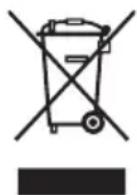
Disposal of electric and electronic equipment (valid in EU member countries and other European countries with an implemented recycling system)
The represented symbol on the product or package means the product shall not be treated as domestic waste. Hand over the product to the specified location for recycling electric and electronic equipment. Prevent negative impacts on human health and the environment by properly recycling your product.
Recycling contributes to preserving natural resources. For more information on the recycling of this product, refer to your local authority, domestic waste processing organization or store, where you purchased the product.
This product complies with EU directive requirements on electromagnetic compatibility and electrical safety.
Changes in text and technical parameters reserved.
08/05

K+B Progres, a.s. (dále jen K+B), IČO: 61860123

- CDR 699 USB / CDR 699
- POSLECH RÁDIA
- POČÚVANIE RÁDIA
- SŁUCHANIE RADIA
- A RÁDIÓ HALLGATÁSA
- RADIOHÖREN
- Read carefully and save for future use!
- ATTENTION
- WARNING
- Loud audio
- WARNING:
- DESCRIPTION
- Location of controls
- POWER
- Power supply
- Important!
- Battery operation
- HEADPHONES JACK
- INSERTING AND REMOVING A DISC
- PLAYING CD
- REPEAT FUNCTION
- PROGRAMMING OF THE CD PLAYER
- PLAYING MP3 DISCS (Only for CDR 699 USB)
- PLAYING MP3 SONGS FROM USB DRIVES (For CDR 699 USB only)
- Switching from CD/CD-MP3 mode to USB mode
- Switching from USB mode to CD/CD-MP3 mode
- NOTES ABOUT USB (For CDR 699 USB only)
- The format of the MP3 title names
- Disconnecting the USB drive
- Attention:
- Important
- USING THE EXTERNAL AUDIO INPUT AUX
- TECHNICAL SPECIFICATIONS
- Protection against discharge of static electricity
- USE AND DISPOSAL OF WASTE
- DISPOSAL OF PRODUCTS AT THE END OF LIFETIME
Brand : ECG
Model : CDR 699 USB
Category : CD Player