
Air Dots 1 - Headphones Krüger&Matz - Free user manual and instructions
Find the device manual for free Air Dots 1 Krüger&Matz in PDF.


| Product Type | True Wireless Stereo (TWS) Earbuds |
| Model | Air Dots 1 |
| Brand | Krüger&Matz |
| Earbud Dimensions (each) | Approx. 23 x 18 x 16 mm |
| Charging Case Dimensions | Approx. 62 x 45 x 24 mm |
| Weight (each earbud) | Approx. 4 g |
| Weight (charging case) | Approx. 35 g |
| Battery Capacity (earbuds) | 50 mAh each |
| Battery Capacity (case) | 500 mAh |
| Music Playback Time (earbuds) | Up to 4 hours (single charge) |
| Total Playback with Case | Up to 20 hours |
| Charging Interface | Micro USB |
| Charging Time (earbuds) | Approx. 1.5 hours |
| Charging Time (case) | Approx. 2 hours |
| Bluetooth Version | 5.0 |
| Bluetooth Range | Up to 10 m |
| Speaker Driver | 6 mm dynamic driver |
| Frequency Response | 20 Hz – 20 kHz |
| Impedance | 32 Ω |
| Microphone | Built-in, omnidirectional |
| Water Resistance | IPX4 (splash-proof) |
| Controls | Touch controls (play/pause, track skip, volume, call) |
| Voice Assistant Support | Yes (Siri, Google Assistant) |
| Compatibility | Bluetooth-enabled devices (iOS, Android, Windows) |
| Cleaning | Wipe with soft dry cloth; avoid liquids. |
| Safety Warning | Do not expose to extreme temperatures or moisture beyond rating. |
| Spare Parts | Replacement earbuds and charging case available via official service. |
| Repair Information | Contact Krüger&Matz support for repairs; do not disassemble. |
| General Information | Designed for wireless listening with comfortable fit. |
Frequently Asked Questions - Air Dots 1 Krüger&Matz
User questions about Air Dots 1 Krüger&Matz
0 question about this device. Answer the ones you know or ask your own.
Ask a new question about this device
Download the instructions for your Headphones in PDF format for free! Find your manual Air Dots 1 - Krüger&Matz and take your electronic device back in hand. On this page are published all the documents necessary for the use of your device. Air Dots 1 by Krüger&Matz.
USER MANUAL Air Dots 1 Krüger&Matz
Wireless earphones KMP-AD1

BEDIENUNGSANLEITUNG
DE
OWNER'S MANUAL
EN
INSTRUKCJA OBSŁUGI
PL
MANUAL DE UTILIZARE
RO
- Minimize the volume on your audio device before connecting the earphones in order to avoid hearing damage from sudden exposure to excessive volume. Keep the volume at a reasonable level throughout entire time of using the earphones. To prevent damage to your hearing, do not raise the volume too high.
- Do not use the earphones in places where the inability to hear ambient sound presents a serious risk (such as at railroad crossings, train stations, construction sites or on roads where vehicles and bicycles are traveling). Never use the earphones while driving a car, riding a motorcycle or bicycle or operating any other vehicle, as it may cause potential risk to your safety.
- Wireless devices can cause interference in aircraft. Please make sure that your earphones are powered off in flight.
- Follow any special regulations in force in any area such as hospitals and always switch off your earphones whenever it forbidden to use it or, when it may cause interference or danger.
- Follow basic safety precautions while using the earphones.
- Stop using the earphones if you feel a tinnitus, hearing discomfort, irritation or have other adverse reactions.
- Do not subject the earphones to strong impact.
- Keep this product away from children.
- Protect this product from moisture, humidity, water and any other liquid. Avoid using/ storing it in extreme temperatures. Do not expose it to direct sunlight and sources of heat.
- Never use this device if it is damaged.
- Use only authorized accessories.
- Do not use fast charger to charge the case.
- Do not attempt to repair this device yourself. In case of damage, contact with an authorized service point for checkup/ repair.
- Turn off the earphones before cleaning.
- Clean this device with soft, slightly damp cloth. Do not use any abrasives or chemical agents to clean this product.
PRODUCT DESCRIPTION
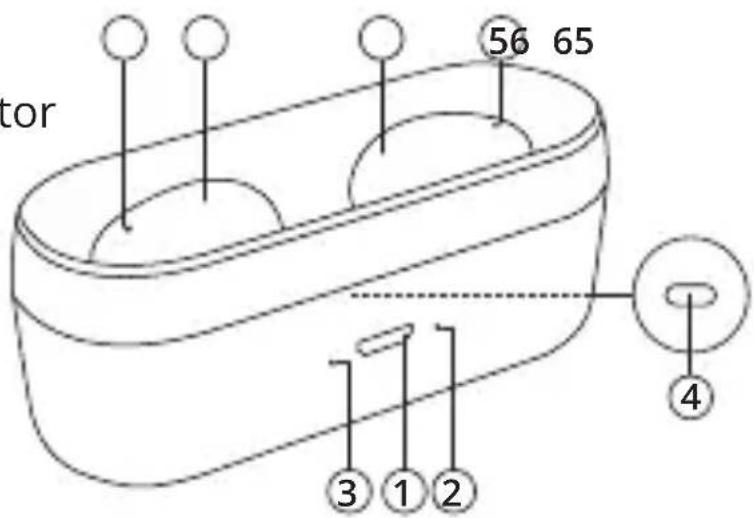
1.micro USB charging port
- Earphone charging indicator
3.Charging case indicator
- Button (manually start charging)
5.LED indicator
6.MFB button
PAIRING
- Remove the earphones from the charging case. The earphones should turn on automatically. The earphones should automatically pair with each other. LED should flash red and blue.
- If the battery in the charging case is empty or if the earphones will not turn on automatically, it is required to turn on the earphones manually by pressing the MFB for 3 seconds on both earphones.
- After the earphones pair with each other, they will enter Bluetooth pairing mode (blue LED on the right (master) earphone flashes every 2 seconds).
- Enable the Bluetooth function on the external device and search for new Bluetooth devices.
- Select and connect with this device (KMP-AD1). Voice prompt indicates successful pairing. LED on right earphone goes off.
Notes:
• Every time the earphones are switched on, they will connect to last connected device automatically. Please note, your device must be on with Bluetooth function turned on.
- If the earphones are not connected to any device, they will automatically power off after about 3 minutes.
OPERATION
| Function Operation | |
| Play/pause Tap once | on any earphone |
| Next track | Tap three times on the left earphone (slave) |
| Previous track | Tap three times on the right earphone (master) |
| Decrease volume | Tap two times on the left earphone (slave) |
| Increase volume | Tap two times on the right earphone (master) |
| Answer/end call Tap once | on any earphone |
| Reject call | Tap and hold for about 1 second on any earphone |
| Enable voice assistant | Tap and hold for about 2 seconds on any earphone |
CHARGING
EARPHONES
The charging case has a built-in battery. When it is fully charged, it is possible to charge earphones maximally 3 times.
- Place both earphones in the charging case. Make sure to align the charging contacts correctly on the earphones the charging case. Charging should start automatically.*
- During charging red LED on the earphones is on. When the battery is fully charged, red LED goes off.
- During charging blue LED on the charging case is on. When charging is finished, blue LED goes off.
* If charging does not start automatically, you can press the button on the charging case to start manually.
CHARGING CASE
Use charging case to store and charge your earphones.
- Insert one plug of the USB cable to the micro USB port of the charging case. Insert the other plug to the compatible PC USB port or AC adapter.
- During charging red LED on the charging case flashes. When the battery is fully charged, red LED is on.
3.It takes about 2 hours to fully charge the battery.*
* When earphones with not fully charged battery are placed inside the case during charging, charging time may increase.
SPECIFICATION
- Speaker size: 6 mm
•Magnet: neodymium
• Frequency response: 20 Hz - 20 kHz
•Impedance: 32 Ohm
•S/N ratio: >=92 dB
•THD: <1% (1 kHz) - Bluetooth version: 5.0
- Bluetooth range: up to 10 m
- Bluetooth profiles: A2DP, AVCTP, AVRCP, HFP, HSP, SPP, GAP, SDP, L2CAP
•Built in microphone
•Microphone sensitivity: -38 dB +/-3 dB
•Voice call management
•Music playback
-Playback time: up to 4 h
•Talk time: up to 4 h
•Standby time: up to 150 h - Battery capacity: 35 mAh (earbuds); 300 mAh (charging case)
•Charging voltage: 5 V/1 A
•In set: charging case, USB cable, user's manual
LEARN MORE
For more information on this product, go to
www.krugermatz.com.
Visit www.krugermatz.com website for more products and accessories.
In case of any doubts or questions reach out to our Frequent Asked Questions section.
Lechpol Electronics Sp. z o.o. Sp.k. hereby declares that Wireless Earphones KMP-AD1 is consistent with directive 2014/53/UE.
Full text of the EU Declaration of Conformity is available at following Internet address: www.lechpol.eu.

English
Correct Disposal of This Product (Waste Electrical & Electronic Equipment)

(ApplicableintheEuropeanUnionandotherEuropeancountries with separate collection systems) This marking shown on the product or its literature, indicates that it should not be disposedwithother household wastesatthe end of its working life. To prevent possible harm to the environment or human health from uncontrolled waste disposal, please separate this from other types of wastes and recycle it responsibly to promote the sustainable reuse of material resources. Household users should contact either the retailer where they purchased this product, or their local government office, for details of where and how they can take this item for environmentally safe recycling. Business users should contact their supplier and check the terms and conditions of the purchase contract. This product should not be mixed with other commercial wastes for disposal.
Made in China for LECHPOL ELECTRONICS Sp. z o.o. Sp.k., ul. Garwolińska 1, 08-400 Miętne.
KWESTIE BEZPIECZEŃSTWA


www.krugermatz.com
Krüger&Matz is a registered trademark
Brand : Krüger&Matz
Model : Air Dots 1
Category : Headphones