KM0616 - Headphones Krüger&Matz - Free user manual and instructions
Find the device manual for free KM0616 Krüger&Matz in PDF.


| Product Type | Wireless Over-Ear Headphones |
| Brand | Krüger&Matz |
| Model | KM0616 |
| Dimensions (folded) | 18 x 15 x 8 cm |
| Weight | 250 g |
| Power Source | Built-in rechargeable lithium-ion battery, 300 mAh |
| Battery Life | Up to 20 hours (typical usage) |
| Charging Time | Approx. 2 hours via micro-USB |
| Wireless Connectivity | Bluetooth 5.0, up to 10 m range |
| Driver Unit | 40 mm dynamic |
| Frequency Response | 20 Hz - 20 kHz |
| Impedance | 32 Ω |
| Controls | On-ear buttons for power, volume, playback, and calls |
| Microphone | Built-in omnidirectional |
| Features | Foldable design, adjustable headband, soft ear cushions |
| Cleaning | Wipe with a soft dry cloth; avoid liquids |
| Safety | Do not use at high volume for extended periods to prevent hearing damage |
| Replacement Parts | Ear cushions available separately |
| Package Contents | Headphones, micro-USB charging cable, user manual |
Frequently Asked Questions - KM0616 Krüger&Matz
User questions about KM0616 Krüger&Matz
0 question about this device. Answer the ones you know or ask your own.
Ask a new question about this device
Download the instructions for your Headphones in PDF format for free! Find your manual KM0616 - Krüger&Matz and take your electronic device back in hand. On this page are published all the documents necessary for the use of your device. KM0616 by Krüger&Matz.
USER MANUAL KM0616 Krüger&Matz
- Bluetooth-Profile: HSP, HFP, A2PD, AVRCP
Read the instruction manual before first use and keep it for future reference.
- Minimize the volume on your audio device before connecting the headphones in order to avoid hearing damage from sudden exposure to excessive volume. Keep the volume at a reasonable level throughout entire time of using the headphones. To prevent damage to your hearing, do not raise the volume too high.
- Do not use the headphones in places where the inability to hear ambient sound presents a serious risk (such as at railroad crossings, train stations, construction sites or on roads where vehicles and bicycles are traveling). Never use the headphones while driving a car, riding a motorcycle or bicycle or operating any other vehicle, as it may cause potential risk to your safety.
- Stop using the headphones if you feel a tinnitus, hearing discomfort, irritation or have other adverse reactions.
- Do not attempt to repair this device yourself. In case of damage, contact with an authorized service point for check-up/repair.
- Do not subject the headphones to strong impact.
- Clean this device with soft, slightly damp cloth. Do not use any abrasives or chemical agents to clean this product.
- Protect this product from moisture, humidity, water and any other liquid. Avoid using/storing it in extreme temperatures. Do not expose it to direct sunlight and sources of heat.
- Never use this device if it is damaged.
- Use only authorized accessories.
- Please note, provided usage time is only for reference and represents approximate maximum time and may differ based on numerous factors.
Product description
| 1. |  | • Press to go to previous song • Press and hold to increase volume |
| 2. |  | • Press to go to next song • Press and hold to decrease volume |
| 3. |  | • Press to play/pause/resume music playback |
| 4. • | Press and hold for about 3 seconds to turn headphones on (LED indicator will light up)• Press and hold for about 5 seconds to turn headphones off (hold the button until the LED indicator lights off)• Press to answer/end call• Press and hold to reject the call• Press twice to redial last call |
| 5. AUX input 3,5 mm input | |
| 6. Micro USB Micro USB port (charging) | |
| 7. LED indicator LED indicator (charging / pairing) | |
| 8. Microphone Microphone | |

Bluetooth mode - Pairing
- Keep the devices in near distance (preferably within 1 meter).
- Make sure the headphones are off. Press and hold the button for about 7 seconds to turn the headphones on and enter pairing mode automatically (blue and red light will blink alternatively).
- Turn on the Bluetooth on your phone (or other device), and search for external devices.
- Pair with the headphones (KM0616). Input default password "0000" if necessary.
Note:
- when connecting with the same device for the second time, just turn the headphones on, turn on the phone and enable Bluetooth function; the headphone will connect with the device automatically.
- When in Bluetooth mode, when there is an incoming call the headphones will switch to call automatically.
- Please note, playback time/talk time as well as Bluetooth range depends on various numerous factors, and my differ from the stated value.
- when successfully paired, LED indicator flashes blue every 2 seconds.
- If the headphones are not connected to any device, they will automatically power off after about 5 minutes.
AUX mode
To enter AUX mode, just plug in the cable. The headphones will enter AUX mode automatically; then start the playback from the external device.
Note:
- the built-in microphone of the headphone will not work when under the AUX mode.
- playlist management and volume control in AUX mode are available only on the external device.
Charging
When the battery is low, the LED indicator will flash red and emit a sound every 10 seconds. Connect the headphones to AC charger or a computer USB port. Red LED keeps lighting during charging. Once the charging is completed, the LED indicator turns blue.
Note:
- use only original accessories to charge the headphones.
- charge the headphones at least once every 3 months to keep its battery in good condition.
- the headphone's battery must be charged in order to use them in Bluetooth mode. However, when using in AUX mode, the headphones will work even if the battery is empty.
Specification
- Speaker size: 40 mm
- Magnet: neodymium
• Frequency response: 20 Hz \~ 20 kHz
• Impedance: 32 Ω ± 15% (at 1 kHz) - S/N ratio: 80 dB
• Sensitivity: 108 db ± 3 dB (at 1 kHz) - Nominal input power: 20 mW
• Maximum input power: 30 mW - Bluetooth: 4.0
- Bluetooth range: up to 10 m
- Bluetooth profiles: HSP, HFP, A2PD, AVRCP
• Supported formats: SBC, MP3, AAC
• Built in microphone - Microphone sensitivity: -42 dB ± 3 dB
• Voice call management - Playback time: up to 6 h
- Talk time: up to 6 h
• Standby time: up to 185 h - Ports: AUX-in (3,5 mm), micro USB (charging)
• Battery capacity: 185 mAh
• Power supply: 5 V, 150 mA
LEARN MORE
For more information on this product, go to www.krugermatz.com.
Visit www.krugermatz.com website for more products and accessories.
In case of any doubts or questions reach out to our Frequently Asked Questions section.
"The LECHPOL ELECTRONICS Sp. z o.o. Sp.k. company declares that product KM0616 is consistent with the essential requirements and other relevant provisions of directive 2014/53/UE. The proper declaration for download from www.lechpol.eu"
Z
English
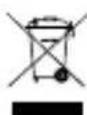
Correct Disposal of This Product
(Waste Electrical & Electronic Equipment)


(Applicable in the European Union and other European countries with separate collection systems) This marking shown on the product or Its literature, indicates that It should not be disposed with other household wastes at the end of its working life. To prevent possible harm to the environment or human health from uncontrolled waste disposal, please separate this from other types of wastes and recycle it responsibly to promote the sustainable reuse of material resources. Household users should contact either the retailer where they purchased this product, or their local government office, for details of where and how they can take this item for environmentally safe recycling. Business users should contact their supplier and check the terms and conditions of the purchase contract This product should not be mixed with other commercial wastes for disposal.
Made in China for LECHPOL ELECTRONICS Sp. z o.o. Sp.k., ul. Garwolińska 1, 08-400 Miętne.
natural_image
Completely black image with no visible content or text.
line
| X | Y | |---|---| | 0 | 0 | | 1 | 1 | | 2 | 2 | | 3 | 3 | | 4 | 4 | | 5 | 5 | | 6 | 6 | | 7 | 7 | | 8 | 8 | | 9 | 9 | | 10 | 10 | | 11 | 11 | | 12 | 12 | | 13 | 13 | | 14 | 14 | | 15 | 15 | | 16 | 16 | | 17 | 17 | | 18 | 18 | | 19 | 19 | | 20 | 20 | | 21 | 21 | | 22 | 22 | | 23 | 23 | | 24 | 24 | | 25 | 25 | | 26 | 26 | | 27 | 27 | | 28 | 28 | | 29 | 29 | | 30 | 30 | | 31 | 31 | | 32 | 32 | | 33 | 33 | | 34 | 34 | | 35 | 35 | | 36 | 36 | | 37 | 37 | | 38 | 38 | | 39 | 39 | | 40 | 40 | | 41 | 41 | | 42 | 42 | | 43 | 43 | | 44 | 44 | | 45 | 45 | | 46 | 46 | | 47 | 47 | | 48 | 48 | | 49 | 49 | | 50 | 50 | | 51 | 51 | | 52 | 52 | | 53 | 53 | | 54 | 54 | | 55 | 55 | | 56 | 56 | | 57 | 57 | | 58 | 58 | | 59 | 59 | | 60 | 60 | | 61 | 61 | | 62 | 62 | | 63 | 63 | | 64 | 64 | | 65 | 65 | | 66 | 66 | | 67 | 67 | | 68 | 68 | | 69 | 69 | | 70 | 70 | | 71 | 71 | | 72 | 72 | | 73 | 73 | | 74 | 74 | | 75 | 75 | | 76 | 76 | | 77 | 77 | | 78 | 78 | | 79 | 79 | | 80 | 80 | | 81 | 81 | | 82 | 82 | | 83 | 83 | | 84 | 84 | | 85 | 85 | | 86 | 86 | | 87 | 87 | | 88 | 88 | | 89 | 89 | | 90 | 90 | | 91 | 91 | | 92 | 92 | | 93 | 93 | | 94 | 94 | | 95 | 95 | | 96 | 96 | | 97 | 97 | | 98 | 98 | | 99 | 99 | | Note: The actual values in the CSV data are not provided in the code. The code generates random values between integers of two decimal numbers from a normal distribution. It is a representation of the data structure and format. I have used placeholders for the values.
www.krugermatz.com
Krüger&Matz is a registered trademark

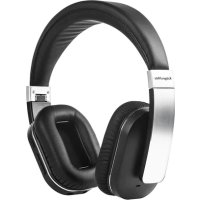
Brand : Krüger&Matz
Model : KM0616
Category : Headphones