EVO-12T - Fan Evolar - Free user manual and instructions
Find the device manual for free EVO-12T Evolar in PDF.


| Product Type | Tower Fan |
| Brand | Evolar |
| Model | EVO-12T |
| Dimensions (HxWxD) | 110 cm x 30 cm x 30 cm |
| Weight | 4.5 kg |
| Power Supply | 220-240V ~ 50/60Hz |
| Power Consumption | 45 W |
| Speed Settings | 3 speeds (Low, Medium, High) |
| Oscillation | 80° wide-angle oscillation |
| Remote Control | Yes, with battery included |
| Timer | 1-7 hours sleep timer |
| Noise Level | ≤ 55 dB (max speed) |
| Blade Diameter | 12 inches (30 cm) |
| Material | ABS plastic body with metal grille |
| Safety Features | Overheat protection, tip-over switch |
| Cleaning Instructions | Wipe with damp cloth; do not immerse |
| Warranty | 2 years limited warranty |
| Accessories Included | Remote control, user manual |
| Additional Functions | Natural wind mode, night mode |
Frequently Asked Questions - EVO-12T Evolar
User questions about EVO-12T Evolar
0 question about this device. Answer the ones you know or ask your own.
Ask a new question about this device
Download the instructions for your Fan in PDF format for free! Find your manual EVO-12T - Evolar and take your electronic device back in hand. On this page are published all the documents necessary for the use of your device. EVO-12T by Evolar.
USER MANUAL EVO-12T Evolar
natural_image
Front view of a white electric fan with mesh grille and base (no visible text or symbols)Handleiding tafelventilator 12" 30CM:
Elektrische schema:
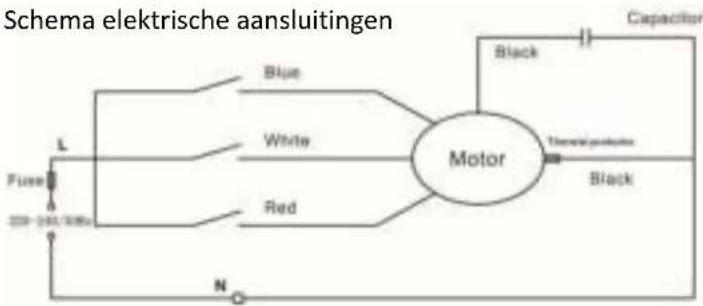
flowchart
graph LR
    A["Fuse"] --> B["L"]
    B --> C["Blue"]
    B --> D["White"]
    B --> E["Red"]
    C --> F["Motor"]
    D --> F
    E --> F
    F --> G["Capacitor"]
    G --> H["Black"]
    H --> I["Thermal protection"]
    I --> J["Black"]
    J --> K["N"]
Specificatie:
Nominale spanning: 220V
Frequente: 50Hz
natural_image
Two circular diagrams with grid patterns, one larger and one smaller, labeled 'FIGURES3' (no text or symbols on diagrams)GEBRUIKSAANWIJZING
VENTILATORREGELING (AAN/UIT & SNELHEID)
natural_image
Simple line drawing of a rectangular object with rounded ends, labeled 'FIGURE4' at bottom (no other text or symbols)ZWENKFUNCITE
KANTELBEDIENING
ONDERHOUD INSTRUCTIES
natural_image
Front view of a white electric fan with mesh grille and base (no visible text or symbols)Manual table fan:
Installation and operation Manual
Evolar EVO-12T
User Manual table fan Evolar EVO-12T
(Before use read and save these instructions carefully)
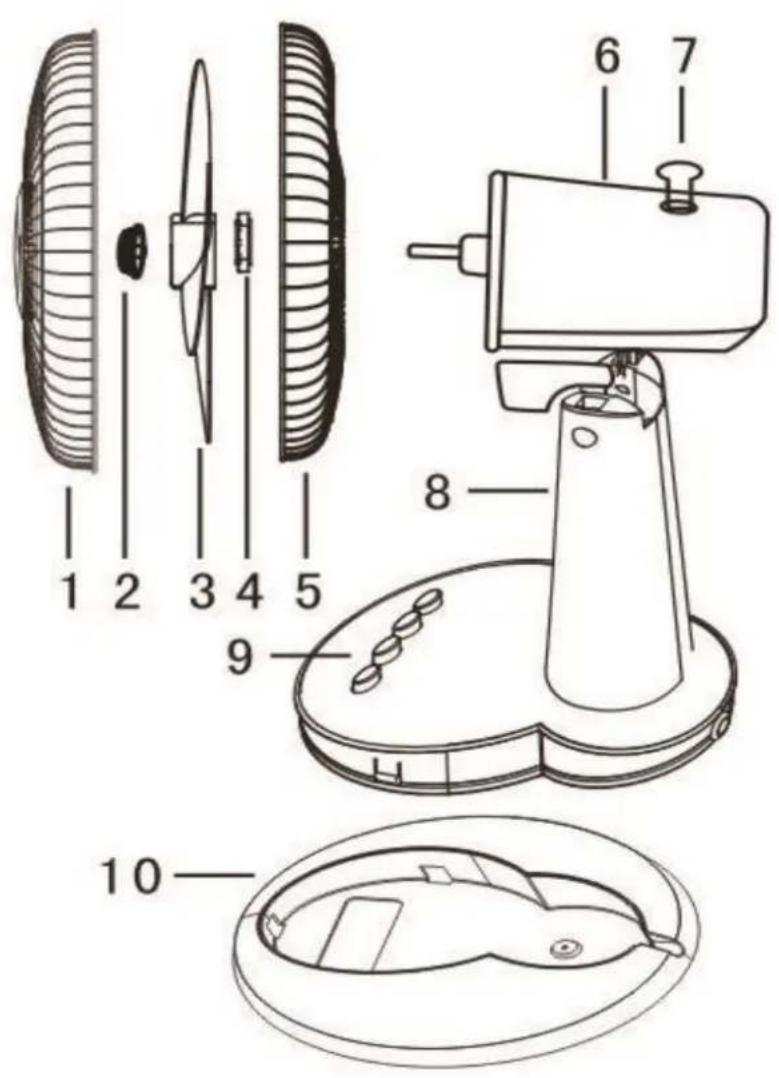
Assemble diagram:
Onderdelenlijst:
- Front guard
- Spinner
- Blade
- Nut
- Rear guard
- Motor
- Oscillation switch
- Base
- Speed switches
- Chassis
Wiring diagram:

flowchart
graph TD
    A["Power Source L"] --> B["Blue"]
    A --> C["White"]
    A --> D["Red"]
    E["Capacitor"] --> F["Motor"]
    G["Black"] --> F
    H["N"] --> I["Ground"]
    style F fill:#f9f,stroke:#333
    style I fill:#ccf,stroke:#333
SPECIFICATION:
Rated voltage: 220V
Rated frequency: 50Hz
Input power: 35W
Size Fan: 12" 30CM
Rules for safe operation:
- Before use read these installation and operation manual carefully
- Please match the power with the rated voltage and frequency of the fan.
- Don't insert fingers, pencils or any other objects through the grille when the fan is running.
- Disconnect always the power when you move the fan.
- Unplug the power plug before cleaning the fan.
OVER-HEAT PROTECTION FUNCTION:
A thermostat is built in the motor of the fan. The fuse will be automatically cut out when the motor temperature exceeds the limit caused by any accidents. The plastic pieces will be well protected for burning out and distortion.
ASSEMBLY INSTRUCTIONS
BASE AND CHASSIS ASSEMBLY:
- Remove the base and the chassis from the box
- Click the chassis in the basis and screw it to the bottom
BLADE AND GRILLES ASSEMBLY:
- Remove the spinner and the plastic nut from the front side of the motor shaft. Then tighten the plastic nut. (FIGURE 1)

-
Remove the PVC sleeve on the shaft. Insert the ventilation blade into the shaft. Make sure the stopper pin is clipped in to the groove of the blade. Screw the spinner counter clockwise tot tighten the blades. (FIGURE 2)
-
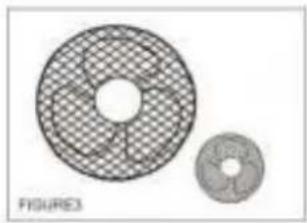
Hold the front guard to make sure that the trademark is level and that the front guard are centred over the rear guard. Then push all the safety clips into their places. (FIGURE 3)

natural_image
Two circular diagrams with grid patterns, one larger and one smaller, labeled 'FIGURES3' (no text or symbols on the diagrams themselves)OPERATION INSTRUCTIONS
FAN SPEED CONTROLL (ON/OFF & SPEED)
Use the speed switches to switch the fan on and off. Press the switch to turn on the required speed. The fan has four speed positions: 0 = off, 1 = low, 2 = medium, 3 = high (FIGURE 4)
OSCILLATION CONTROL
To make the fan move (oscillation function) press the oscillation button. This button is located at the top of the motor housing. To move the air flow, press the oscillation button. You can click the oscillation button to move the fan to the required position. (FIGURE 5)
TILT CONTROL
Unscrew the till knob, adjust the fan head to the desired angle by holding the fan head, then tighten the knob (FIGURE 6)

natural_image
Simple line drawing of a rectangular object with rounded ends, labeled 'FIGURE4' at bottom (no other text or symbols)

MAINTENANCE INSTRUCTIONS
The fan requires little maintenance. Do not attempt to repair the fan yourself. If the fan is damaged or damaged, contact the supplier or go to an authorized repair company.
MAINTENANCE:
- Disconnect the fan from the power supply before cleaning, assembling or disassembling the fan.
- To ensure adequate air circulation to the motor, keep vents at the rear of the motor housing room dust and dirt free. You can use a vacuum cleaner to clean these vents. Always remove the plug from the power socket before cleaning the fan. Don't dissemble the fan to remove the dust.
- Wipe the outer ports with a soft cloth soaking. Do not use abrasive detergent or solvents to avoid scratching the surface.
- Do not allow water or any other liquid in to the motor housing or interior parts.
- If the power cord is damaged, the fan can not be used at all times. Request a specialist to repair the fan.
- Never replace parts on the fan.
SUPPORT
All available information and parts can be found on www.evolar.nl
- Elektrische schema:
- Specificatie:
- GEBRUIKSAANWIJZING
- VENTILATORREGELING (AAN/UIT & SNELHEID)
- ZWENKFUNCITE
- KANTELBEDIENING
- ONDERHOUD INSTRUCTIES
- User Manual table fan Evolar EVO-12T
- Assemble diagram:
- Onderdelenlijst:
- Wiring diagram:
- SPECIFICATION:
- Rules for safe operation:
- OVER-HEAT PROTECTION FUNCTION:
- ASSEMBLY INSTRUCTIONS
- BASE AND CHASSIS ASSEMBLY:
- BLADE AND GRILLES ASSEMBLY:
- OPERATION INSTRUCTIONS
- FAN SPEED CONTROLL (ON/OFF & SPEED)
- OSCILLATION CONTROL
- TILT CONTROL
- MAINTENANCE INSTRUCTIONS
- MAINTENANCE:
- SUPPORT
Brand : Evolar
Model : EVO-12T
Category : Fan