
TH810T - Thermostat Cotech - Free user manual and instructions
Find the device manual for free TH810T Cotech in PDF.


| Brand | Cotech |
| Model | TH810T |
| Product Type | Plug-in Thermostat |
| Measuring Range | 5°C to 30°C |
| Accuracy | ±1°C |
| Power Supply | 230 V AC, 50/60 Hz |
| Max Load (Art. 18-2168) | 2990 W (13 A) |
| Max Load (Art. 36-1181) | 3680 W (16 A) |
| Current Draw | 21 mA |
| Display | Digital LCD showing ambient and set temperature |
| Activation Modes | Frost guard (falling temperature) and Heat guard (rising temperature) |
| Temperature Setting | Adjustable via ▲ and ▼ buttons (5°C to 30°C) |
| Reset Function | Press [Reset] to restore factory default settings |
| Indicator Lamp | Red: socket off; Green: socket on |
| Safety Features | Safety shuttered and earthed |
| Battery | Built-in rechargeable; displays "LO" when low; recharge for at least 10 hours |
| Usage | Indoor use only |
| On/Off Switch | Yes, to turn thermostat on/off |
| Unit Conversion | Press ▲ and ▼ simultaneously to switch between °C and °F |
| Activation Delay | Thermostat activates after temperature remains at set point for at least 10 seconds |
| Deactivation Delay | Deactivates after temperature rises 1°C above activation point for at least 10 seconds |
Frequently Asked Questions - TH810T Cotech
User questions about TH810T Cotech
0 question about this device. Answer the ones you know or ask your own.
Ask a new question about this device
Download the instructions for your Thermostat in PDF format for free! Find your manual TH810T - Cotech and take your electronic device back in hand. On this page are published all the documents necessary for the use of your device. TH810T by Cotech.
USER MANUAL TH810T Cotech
natural_image
White electrical outlet with a digital display showing 'RM' and 'Reset' buttons (no text or symbols on the socket itself)Art.no
18-2168
36-1181
Model
TH850T-UK
TH850T
Ver. 20131101
Plug-in Thermostat
Art. no 18-2168 Model TH850T-UK
36-1181
TH850T
Please read the entire instruction manual before using the product and save it for future reference. We reserve the right for any errors in text or images and any necessary changes made to technical data. If you have any questions regarding technical problems please contact our customer services.
1. Description
- This thermostat is designed to be used indoors either as a frost guard (to prevent frost damage) or to regulate air conditioning units and prevent the temperature from becoming too high.
- Simple to use – preset as a frost guard set to activate at +5 °C. Only needs to be reprogrammed if it is to be used to regulate an air conditioning unit or if you wish to alter the activation temperature.
• Max power 18-2168: 2990 W, 13 A (36-1181: 3680 W, 16 A). -
Easy to change function and activation temperature.
• Measuring range: 5–30 °C. -
Indicator lamp function:
-
Not on: The thermostat is turned off at the power switch.
- Shines red: The temperature has not reached the activation temperature and the socket on the thermostat is turned off.
-
Shines green: The temperature has reached the activation temperature and the socket on the thermostat is turned on.
-
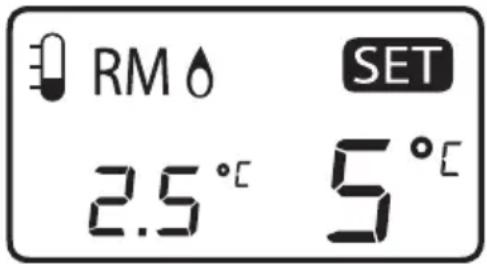
Ambient temperature (23.8 °C in picture).
-
◆ This symbol is displayed* if the thermostat is set to activate when the temperature drops (frost guard).
-
✿ This symbol is displayed* if the thermostat is set to activate when the temperature rises (heat guard).
-
The set activation temperature is also displayed (+5 °C is preset at the factory).
-
[Reset] Press this button to reset to the factory default settings.
-
[▼] Lower the activation temperature.
-
[▲] Raise the activation temperature.
-
[On/off switch: Turn the thermostat on/off.

*Note! The symbol is only displayed when the temperature has reached the set activation temperature or if you turn the thermostat off using its on/off switch [5] (remember to turn the thermostat back on again!).
2. An example of use
Situation: The plug-in thermostat is to be used as a frost guard and switch on an electric radiator in a room when the ambient temperature falls below +5 °C.
- Plug the thermostat into a wall socket.
- Plug the electric radiator into the socket on the thermostat and make sure that the electric radiator is switched on.
-
The display shows the current ambient temperature in ^ C and the set activation temperature (factory preset to +5 ^ C). The plug-in thermostat will now control the on/off switching of the electric radiator.
-
As long as the temperature is normal, the indicator lamp (1) will be red and the electric radiator will not be switched on.
- If the ambient temperature drops below +5 °C, the plug-in thermostat will activate and turn the electric radiator on.
- ♂ (3) will be displayed and the green indicator lamp (1) will come on for as long as the electric radiator is switched on.
3. Function
- The plug-in thermostat is designed to be used indoors to control the on/off switching of heating/cooling appliances in case of rising/falling ambient temperature.
- When sold, the plug-in thermostat is set to work as a frost guard and activate when the ambient temperature falls below +5 °C. If you wish to alter the activation temperature (or use the thermostat to activate a cooling unit) the setting must be changed.
- Press the arrow buttons [▲] and [▼] simultaneously to change the display units from °C to °F.
Indicator lamp function
- Not on: The thermostat is turned off at the power switch.
- Shines red: The temperature has not reached the activation temperature and the socket on the plug-in thermostat is turned off.
- Shines green: The temperature has reached the activation temperature and the socket on the plug-in thermostat is turned on.
Frost guard mode
If the activation temperature is set to +5 °C and the ambient temperature falls, the plug-in thermostat will activate when the ambient temperature has fallen below and been below +5 °C for at least ten seconds (the temperature might fall even lower before the thermostat activates).
The plug-in thermostat will be activated until the ambient temperature has risen one degree from when it was activated and has been so for at least ten seconds.
This means that the displayed temperature is not always the same as the activation temperature.
Note! The plug-in thermostat has a built-in temperature margin in order to compensate for normal variations in temperatures such as when a door or window is opened. It can take between 1 and 3 minutes for the plug-in thermostat to react to a temperature change.
Note!
- You, the user, bear full responsibility for ensuring that nothing freezes.
• The plug-in thermostat will not work during power cuts or if a fuse has blown. - The amount of heat needed to prevent freezing depends on a number of factors such as the size of the room, outdoor temperature, etc.
- The operation of the plug-in thermostat and the temperature of the room should be checked regularly.
- The operation of the plug-in thermostat also depends on its placement: high/low, position in the room, etc.
4. Setup
4.1 Activation during falling temperatures (for controlling a heating unit)
- The default factory setting is for the thermostat to activate when the temperature falls.
-
The activation temperature is preset to +5 °C. The arrows [▲] and [▼] can be used to change the activation temperature.
-
When the ambient temperature falls below the set activation temperature (3) is displayed, the green indicator lamp (1)

shines and the socket on the thermostat is active for as long as the ambient temperature is below the activation temperature.
- As long as the ambient temperature is higher than the set activation temperature the red indicator lamp on the plug-in thermostat will shine and its socket will be deactivated.
Note! If the indicator lamp is not on: Press [⏻] to switch the plug-in thermostat on.
4.2 Activation during rising temperatures (for controlling a cooling unit)
-
Press [⏻] and [▲] simultaneously for 3 seconds to change the function of the plug-in thermostat so that it activates when the temperature is rising, ⚙4) appears on the display.
-
Press [☐] to switch the plug-in thermostat on and then use the arrow button [▲] to set your desired activation temperature (+5 °C is preset).

-
When the set activation temperature has been reached, it will take 3 minutes before the plug-in thermostat activates at which time (4) is displayed, the green indicator lamp (1) comes on and the socket on the thermostat is active for as long as the ambient temperature is higher than the set activation temperature.
-
As long as the ambient temperature is lower than the set activation temperature the red indicator lamp on the plug-in thermostat will shine and its socket will be deactivated.
Note! If the indicator lamp is not on: Press [⏻] to switch the plug-in thermostat on.
4.3 Changing the function
- Plug the thermostat into a wall socket.
-
Hold [φ] and then press [▲] for 3 seconds several times to change to the desired function:
-
Activation during falling temperatures (frost guard). ⬆ (3) is shown on the display.
- Activation during rising temperatures (heat guard). 📄 is shown on the display.
Note! If the indicator lamp is not on: Press ⏻ to switch the plug-in thermostat on.
4.4 Changing the activation temperature
Use the arrow buttons [▲] and [▼] to set the desired activation temperature.
The activation temperature can be set from +5 °C to +30 °C.
5. Disposal
Follow local ordinances when disposing of this product.
If you are unsure how to proceed, contact your local authority.
6. Troubleshooting
| “LO” appears on the display when the battery is low and needs to be recharged. | Plug the thermostat into a wall socket and let it recharge for at least 10 hours. The battery should be continuously connected to a power point to give it an optimal working life. The rechargeable battery is built-in and not replaceable. |
| Nothing is shown on the display. | Plug the thermostat into a wall socket and let it recharge for at least 10 hours. |
| The temperature is not shown on the display. | Press [Reset] (6) to reset the default factory settings (frost guard with activation temperature +5 °C). |
| The indicator lamp is not on. | The plug-in thermostat is not switched on; press [⏻] to switch it on. |
7. Specifications
Measuring range 5–30 °C
Accuracy ± 1 °C
Voltage 230 V AC, 50/60 Hz
Max power 18-2168: 2990 W (13 A)
36-1181: 3680 W (16 A)
Current draw 21 mA
Additional information Intended for indoor use. Safety shuttered and earthed.
Temperaturvakt
Art. nr 18-2168 Modell TH850T-UK
36-1181
TH850T
2. Bruk
temperaturen er lavere enn den innstilte brytetemperaturen.
2. Käyttöesimerkki
2. Praxisbeispiel
Postal 10 – 13 Market Place
Kingston Upon Thames
Surrey
KT1 1JZ
Deutschland

- Plug-in Thermostat
- Description
- An example of use
- Function
- Indicator lamp function
- Frost guard mode
- Note!
- Setup
- Activation during falling temperatures (for controlling a heating unit)
- Activation during rising temperatures (for controlling a cooling unit)
- Changing the function
- Changing the activation temperature
- Disposal
- Troubleshooting
- Specifications
- Temperaturvakt
- Bruk
- Käyttöesimerkki
- Praxisbeispiel
- Deutschland
Brand : Cotech
Model : TH810T
Category : Thermostat