
MH850T - Thermostat Cotech - Free user manual and instructions
Find the device manual for free MH850T Cotech in PDF.


| Product Type | Programmable Thermostat |
| Brand | Cotech |
| Model | MH850T |
| Dimensions (H x W x D) | 120 x 80 x 25 mm |
| Weight | 0.2 kg |
| Power Supply | 2 x AAA batteries (not included) |
| Display | LCD backlit display |
| Temperature Control Range | 5°C to 35°C |
| Accuracy | ±0.5°C |
| Programmable | 7-day programmable with 4 time periods per day |
| Heating/Cooling Modes | Heating, cooling, auto, and manual override |
| Frost Protection | Built-in frost protection function |
| Key Lock | Child lock function |
| Mounting | Wall mount with screws and anchors included |
| Compatibility | Compatible with most gas, oil, and electric heating systems |
| Wireless Connectivity | No (wired thermostat) |
| Battery Life | Approximately 1 year under normal use |
| Maintenance | Clean with a soft, dry cloth; avoid liquids |
| Safety Features | Overheat protection, low battery indicator |
| Spare Parts Available | Battery compartment cover, wall plate, screws |
| Repairability | Replace batteries; other repairs by qualified technician only |
| Operating Environment | Indoor use only, 0°C to 40°C, <90% RH non-condensing |
| Certifications | CE, RoHS |
| Package Contents | Thermostat, mounting screws, wall anchors, user manual |
Frequently Asked Questions - MH850T Cotech
User questions about MH850T Cotech
0 question about this device. Answer the ones you know or ask your own.
Ask a new question about this device
Download the instructions for your Thermostat in PDF format for free! Find your manual MH850T - Cotech and take your electronic device back in hand. On this page are published all the documents necessary for the use of your device. MH850T by Cotech.
USER MANUAL MH850T Cotech
Read the entire instruction manual carefully and make sure that you fully understand it before you use the equipment. Keep the manual for future reference.
Viktig information:
ART.NO
18-1245
36-1109
MODEL
MH850T-UK
MH850T
Ver. 20180925
Original instructions
Bruksanvisning i original
Originalbruksanvisning
Please read the entire instruction manual before using the product and then save it for future reference. We reserve the right for any errors in text or images and any necessary changes made to technical data. In the event of technical problems or other queries, please contact our Customer Services (see address details on the back).
Safety
- The product is intended for indoor use only.
- Never expose the product to high temperatures, heavy vibrations, blows, damp or wet conditions.
- Make sure that the electrical socket that the product is plugged into is easily accessible in case it and the connected product need to be quickly disconnected from the mains electricity.
- Do not connect products of this type to each other.
- Do not cover the product.
Buttons and functions
- [Power switch]
- LED indicator for showing that the thermostat has power and whether or not the outlet of the thermostat is energised.
- Ambient temperature
- Symbol that indicates that the thermostat is set to energise a heater
- Symbol that indicates that the thermostat is set to energise a cooling fan/air conditioner
- Temperature at which the connected load device is activated
- Factory reset button
- [▼] Lower the activation temperature
- [▲] Raise the activation temperature
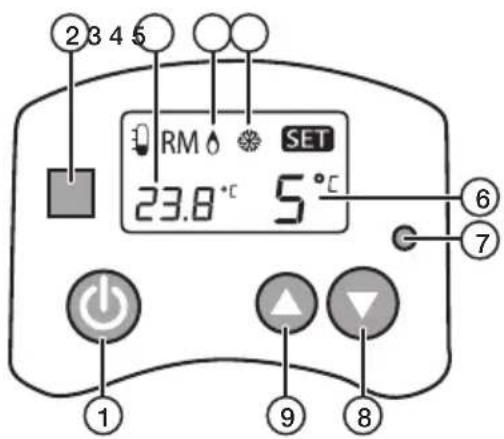
Operating instructions
The thermostat has two operating modes:
- It can be used to switch on a heater when the temperature in the room drops.
- It can be used to switch on a cooler when the temperature in the room rises.
The way to change operating modes is explained in the Changing operating mode section below.
The built-in battery
- The thermostat has a built-in battery which saves the settings if there is a power cut. The battery also powers the display so that you can unplug the thermostat to change the settings more easily.
- The battery is charged when the thermostat is plugged into a wall socket. Plug the thermostat into a wall socket and let the battery charge for 2 hours before using the thermostat for the first time. After that you can remove it from the wall socket to make settings.
Switching on/off
Press [💡] to switch the thermostat on/off.
- When the thermostat is plugged into a wall socket and is switched on/off the LED indicator (2) shows the status as follows:
- Light off: off.
- Red: on (waiting for the temperature to reach the set level).
- Green: the temperature has reached the set level and the socket of the thermostat is energised.
- When the thermostat is not plugged into a wall socket and is switched on/off the LED indicator is deactivated. The display shows (provided that the built-in battery is charged) whether the thermostat is on or off.
- On: both the ambient room temperature (3) and set activation temperature (6) are displayed. The heater and cooler (4 and 5) symbols are not displayed.
- Off: the ambient room temperature (3) and one of the symbols (4 or 5) is displayed depending on the thermostat settings.
Changing the operating mode
- Switch the thermostat on by pressing [💡]. The set temperature on the display goes out and the current symbol is displayed. Snowflake (5) or flame (4) depending on how the thermostat is set.
- Hold in [⏻] and [▲] at the same time until the symbol changes.
- Hold the button in again to change back to the previous symbol.
If you want to switch a heater on when the temperature falls
The factory default setting of the thermostat is an activation temperature of 5 °C . If you are happy with this setting, all you need to do is:
- Plug the thermostat into a wall socket. It will switch on automatically and the LED indicator will shine red.
- Plug a heater (electric fire, radiator, etc.) into the socket of the thermostat.
- Switch the heater on. When the temperature has fallen to 5 °C, the power from the wall socket passes through the thermostat and energises the heater plugged into the thermostat. The indicator then shines green.
If you want to change the temperature setting from the factory default setting
- Switch the thermostat on by pressing [💡].
- Press or hold in [▲] or [▼] to set the temperature.
- The new temperature has now been set, you do not need to confirm it in any way.
If you want to switch a cooler on when the temperature rises
- Switch the thermostat off and check that the snowflake symbol is displayed.
- If the flame symbol is displayed, change it to the snowflake by holding in [⏻] and [ ▲ ] at the same time until the snowflake appears.
- Switch the thermostat on.
- Press or hold in [▲]/[▼] and set the desired temperature for when you want the connected air cooler/cooling fan to be switched on.
- Plug the thermostat into a wall socket.
- Plug the air cooler/cooling fan into the socket of the thermostat.
- Turn the air cooler/cooling fan on. When the ambient temperature has risen to the set activation temperature, the power from the wall socket passes through the thermostat and energises the cooling device plugged into the thermostat. The indicator then shines green.
Note: When the temperature has risen to the set activation temperature there is a delay of about 3 min before the socket of the thermostat is energised.
Care and maintenance
- If it is dusty, the thermostat should be removed from the wall socket and vacuum-cleaned.
- If it is not to be used for an extended period, the thermostat should be unplugged from the wall socket and stored in a dry, dust-free environment, out of children's reach.
Troubleshooting guide
| The connected heater/cooler doesn’t come on. | Check that the heater/cooler is switched on and intact.Try plugging the heater/cooler into another electrical outlet without the thermostat to make sure that it works.Make sure that the mains lead of the connected heater/ cooler is undamaged and securely connected to the socket of the thermostat.Check that the LED indicator on the thermostat lights as it should. Refer to the Switching On/off section above.If not:- Is the thermostat properly connected to the wall socket?- Is the wall socket live? |
| The display is fuzzy or blank. | The built-in battery of the thermostat needs to be charged.Plug the thermostat into a wall socket for 2 hours to charge the battery. |
| If the thermostat operates abnormally in some other way. | Charge the battery and reset the thermostat to its factory default settings by carefully pressing the factory reset button (7). |
Responsible disposal
This symbol indicates that this product should not be disposed of with general household waste. This applies throughout the entire EU. In order to prevent any harm to the environment or health hazards caused by incorrect waste disposal, the product must be handed in for recycling so that the material can be disposed of in a responsible manner. When recycling your product, take it to your local collection facility or contact the place of purchase. They will ensure that the product is disposed of in an environmentally sound manner.

natural_image
Symbol of a trash bin crossed with no text or numbers, representing waste sorting or disposal (no text present)Specifications
Power supply 230 V AC, 50/60 Hz
Temperature range 5–30 °C
Max load 3680 W (16 A)
Internal current draw 21 mA
Accuracy ±1 °C
Temperaturvakt
ART.NR
18-1245
MODELL
MH850T-UK
36-1109
MH850T
Användning
natural_image
Symbol of a trash bin crossed with no visible text or labelsSpecifikationer
Nätanslutning 230 V AC, 50/60 Hz
Temperaturområde 5–30 °C
Bruk
natural_image
Symbol of a trash bin crossed with no text or labels, accompanied by a solid black rectangle below (no text or symbols present)Spesifikasjoner
Nettspenning 230 V AC, 50/60 Hz
Temperaturområde 5–30 °C
Käyttö
Benutzung
natural_image
Symbol of a trash bin crossed out by two crossed lines, with no text or labels present.Technische Daten
10 – 13 Market Place
Kingston Upon Thames
Surrey
KT1 1JZ
DEUTSCHLAND
Kundenservice Hotline: 040 2999 78111
E-Mail: kundenservice@clasohlson.de
Homepage
www.clasohlson.de
Postanschrift

- Viktig information:
- Safety
- Buttons and functions
- Operating instructions
- The built-in battery
- Switching on/off
- Changing the operating mode
- If you want to switch a heater on when the temperature falls
- If you want to change the temperature setting from the factory default setting
- If you want to switch a cooler on when the temperature rises
- Care and maintenance
- Troubleshooting guide
- Responsible disposal
- Specifications
- Temperaturvakt
- Användning
- Specifikationer
- Bruk
- Spesifikasjoner
- Käyttö
- Benutzung
- Technische Daten
- DEUTSCHLAND
Brand : Cotech
Model : MH850T
Category : Thermostat