FT-0205 - Weather Station Cotech - Free user manual and instructions
Find the device manual for free FT-0205 Cotech in PDF.


| Product Type | Weather Station |
| Brand | Cotech |
| Model | FT-0205 |
| Dimensions (approx) | 150 x 80 x 20 mm |
| Weight (approx) | 200 g |
| Power Supply | 2 x AAA batteries (not included) or USB cable |
| Display Type | LCD with backlight |
| Indoor Temperature Range | -10°C to 50°C (14°F to 122°F) |
| Indoor Humidity Range | 20% to 95% RH |
| Barometric Pressure Range | 960 to 1060 hPa |
| Wireless Sensor | Included (outdoor sensor) |
| Transmission Range | Up to 100 m (open area) |
| Weather Forecast | 7-day prediction with icons |
| Radio-Controlled Clock | DCF-77 / WWVB (selectable) |
| Additional Functions | Moon phase, temperature/humidity trend, comfort indicator |
| Maintenance | Clean with a soft dry cloth; avoid liquids |
| Safety Notes | Do not immerse in water; keep away from heat sources |
| Spare Parts / Repairability | Only batteries user-replaceable; for other issues contact Cotech support |
Frequently Asked Questions - FT-0205 Cotech
User questions about FT-0205 Cotech
0 question about this device. Answer the ones you know or ask your own.
Ask a new question about this device
Download the instructions for your Weather Station in PDF format for free! Find your manual FT-0205 - Cotech and take your electronic device back in hand. On this page are published all the documents necessary for the use of your device. FT-0205 by Cotech.
USER MANUAL FT-0205 Cotech
Weather Station with USB
natural_image
Close-up of a weather monitoring instrument with no visible text or symbols
Important:
Read the entire instruction manual carefully and make sure that you fully understand it before you use the equipment. Keep the manual for future reference.
Viktig information:
Original instructions
Bruksanvisning i original
Originalbruksanvisning
USB Wireless Weather Station
Art. no 36-7959 Model FT-0205 (Indoor unit), FT020 (Outdoor unit)
Please read the entire instruction manual before using the product and then save it for future reference. We reserve the right for any errors in text or images and any necessary changes made to technical data. In the event of technical problems or other queries, please contact our Customer Services (see address details on the back).
Table of Contents
Safety 4
Contents 5
Fasteners: 5
Product description......6
Indoor unit....6
Outdoor unit 8
Installation....9
Inserting batteries....9
Outdoor unit 9
Indoor unit....9
Scanning for the outdoor unit sensors and checking their operation....10
Anemometer....11
Rain sensor....11
Thermometer/Hygrometer....11
Indoor unit....12
Key to the display....12
Settings/adjustments 14
Max/min....17
Clearing recorded readings....17
Histogram, weather forecast and moon phase....17
Display backlight....19
Alarm 19
Calibration....21
Installation 22
Choosing a location....22
Software (WeatherHome) 25
System requirements....25
Installation 25
Instructions for use 25
Care and maintenance 29
Troubleshooting guide....30
Responsible disposal....30
Specifications....31
Sensor data....31
Wireless transmission....31
Indoor unit....31
Outdoor unit 31
Safety
- The weather station indoor unit must not be exposed to rain or moisture.
- The product must not be dismantled or modified in any way.
- The product is not intended to be used as a reference device and Clas Ohlson will not be held liable for any damage which may result from inaccurate readings.
- Since the solar panel for the outdoor unit does not charge the batteries, rechargeable batteries should not be used. High quality alkaline batteries or lithium batteries should be used. Do not mix old and new batteries and or mix alkaline batteries with lithium batteries. When replacing batteries, always change all the batteries at the same time.
- When you change the batteries on the indoor unit, the recorded data (histogram) and saved max and min values will be deleted.
- Do not subject the product to shocks or impacts.
- Appropriate personal safety equipment must be used while working on a roof while installing the outdoor unit.
- Do not stay on the roof in the event of a thunderstorm.
Contents


natural_image
Line drawing of a weathering instrument with no text or symbols
natural_image
Simple line drawing of a vertical cylindrical object with a numbered circle on top (no text or symbols)
natural_image
Technical line drawing of a mechanical housing component (no text or symbols)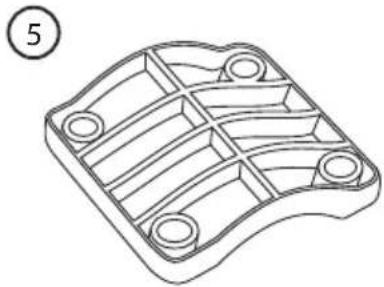
natural_image
Technical line drawing of a mechanical component with internal channels and mounting holes (no text or symbols)
natural_image
Simple line drawing of an electrical adapter with a plug and cable (no text or symbols)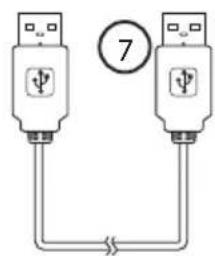

- Indoor unit
- Outdoor unit with sensors for wind speed, wind direction, rainfall, temperature and humidity
- Arm for mounting the outdoor unit
- Bracket for arm
- Bracket for mast attachment
- Mains adapter
- USB cable
- CD with software (WeatherHome)
Fasteners:
- M5 machine screw and nut for mast attachment
- M3 machine screw and nut for outdoor unit attachment
- Wood screw for wall/roof attachment

Product description
Indoor unit

- [SNOOZE/LIGHT]
Press to activate the snooze function/change the display brightness. Hold in to turn the display light on/off.
- [CHANNEL/+]
Press to change the value/advance.
Hold in to manually scan for a sensor.
- [MODE/SET]
Press to change the display mode/confirm selection. Hold in to enter settings mode.
- [MAX/MIN/ALARM]
Press to display the max/min readings. Hold in to display the set alarm limits.
- [HISTORY/-]
Press to change the value/go back or select the histogram. Hold in to set the alarm and button sound.
-
Hanging hole
-
USB connection
-
DC 6.0 V
-
Battery cover
-
Table stand
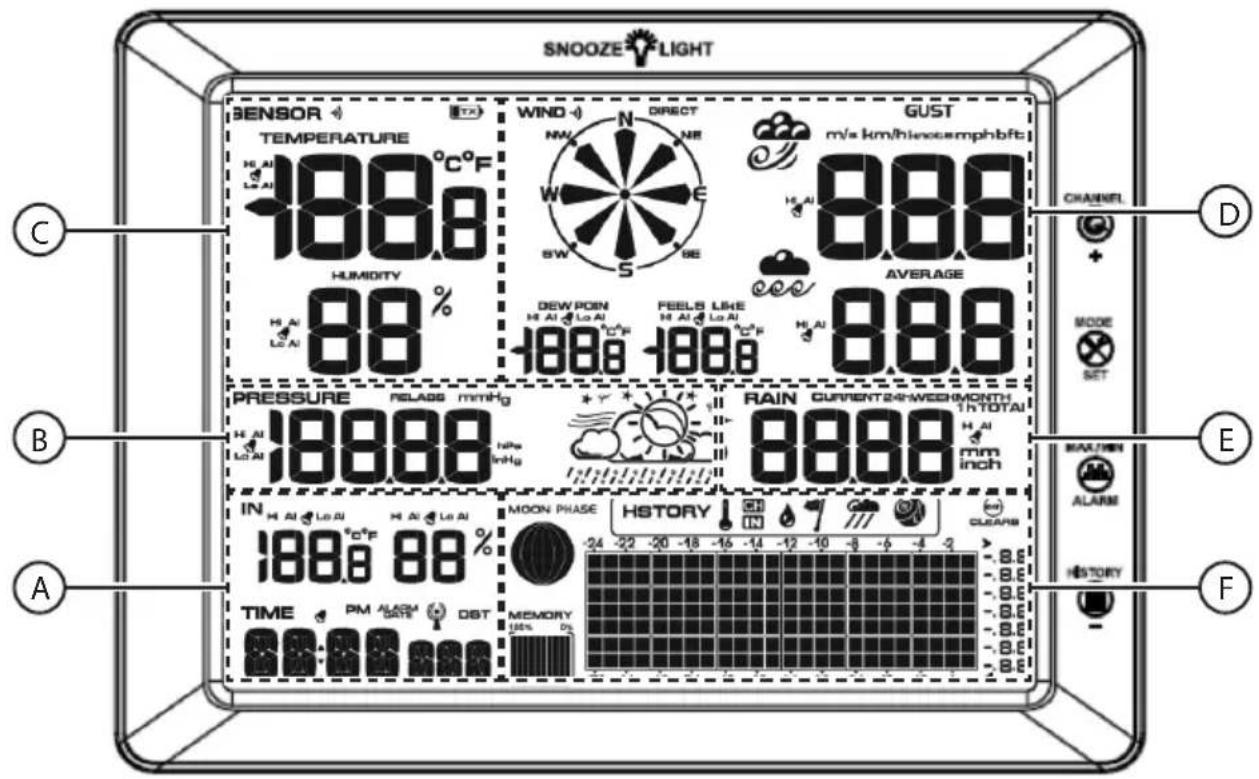
A) "IN" Indoor temperature and humidity
"TIME" Time/date/day
B) "PRESSURE" Atmospheric pressure and weather forecast
C) "TEMPERATURE" Outdoor temperature
"HUMIDITY" Outdoor humidity
D) "WIND" Wind direction
"GUST" Wind speed
"AVERAGE" Average wind speed
"DEW POINT" Dewpoint
"FEELS LIKE" Perceived temperature
E) “RAIN” Rainfall
F) "HISTORY" Histogram (24- or 72-hour data graph)
"MOON PHASE" Phase of the moon
Outdoor unit
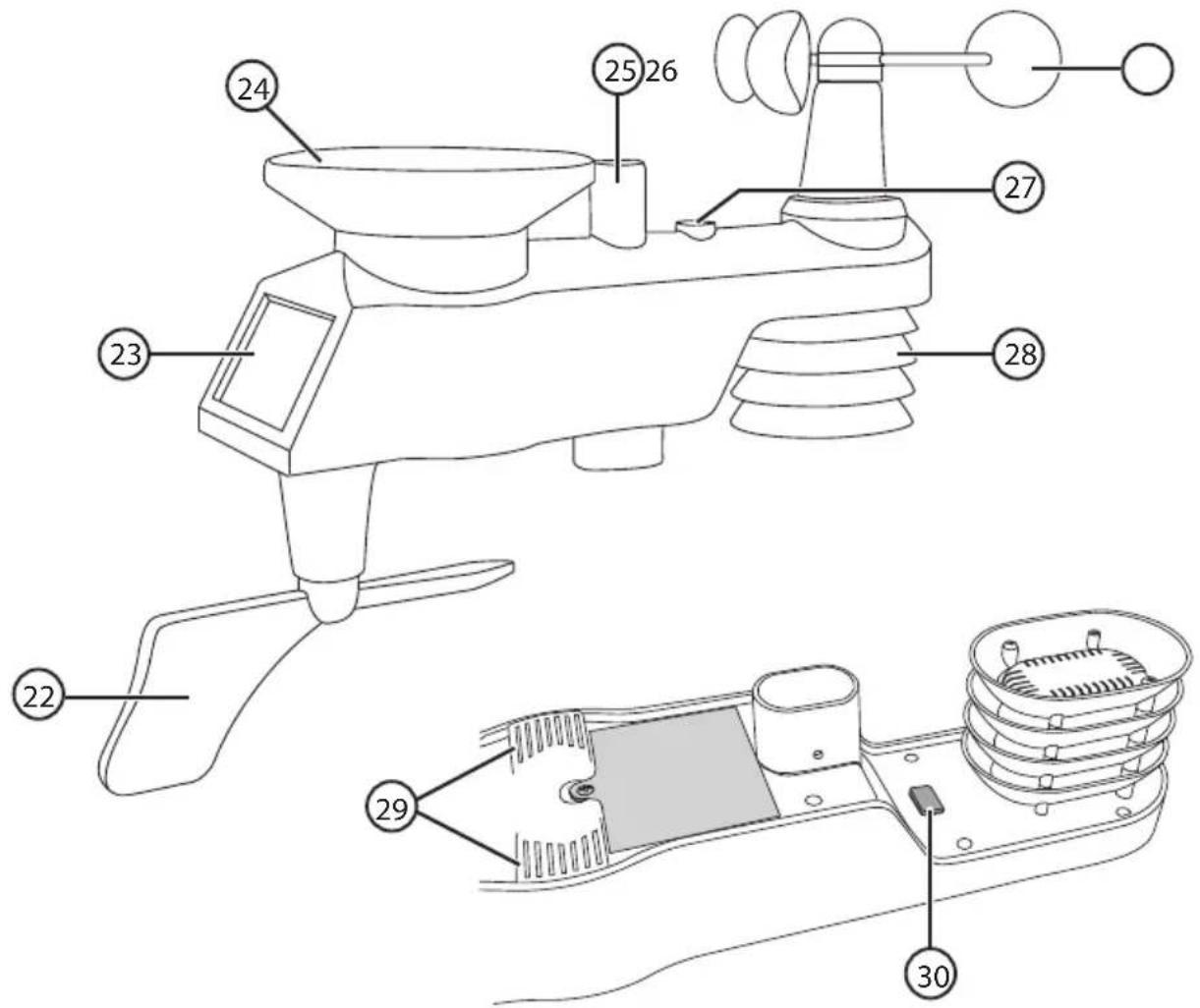
- Sensor for wind direction
- Solar panel
- Rainwater collector
- Aerial
- Anemometer (wind speed sensor)
- Spirit level
- Sensor for temperature and humidity (thermometer/hygrometer)
- Rain gauge drain holes
- LED indicator and [ RESET ] button
Installation

flowchart
graph LR
    A["Unpack and check contents"] --> B["Insert batteries into the outdoor unit"]
    B --> C["Switch on the indoor unit and wait until the outdoor unit has been registered"]
    C --> D["Make weather station settings and check the function of the sensors"]
    D --> E["Mount the outdoor unit in a suitable location"]
Inserting batteries
Note:
Insert batteries into the outdoor unit before switching on the indoor unit. As soon as the indoor unit is switched on, it will begin to automatically search for the sensors on the outdoor unit. When inserting batteries into the units, note the markings in the battery compartments to ensure correct polarity.
Outdoor unit
- Unscrew the retaining screw and remove the battery compartment cover.
- Insert 3 × AA/LR6 batteries. The LED indicator will light for 3 seconds and then flash every 16 seconds to indicate when data is transmitted from the unit.
- If the LED indicator does not flash after the batteries have been inserted, press [RESET] to reset the unit.
- Refit the battery cover and tighten the retaining screw.

natural_image
Technical line drawing of a mechanical component with a circular housing and cylindrical housing (no text or symbols)Indoor unit
Note:
- Make sure that the outdoor unit is functioning before switching the indoor unit on.
- Make sure that the outdoor unit is located a distance of between 1.5 m and 30 m from the indoor unit. If the outdoor unit is too close or too far away, the indoor unit may have trouble receiving the data signals.
- As soon as the indoor unit is switched on, it will begin to automatically scan for the sensors on the outdoor unit (the symbol will light). Do not press any buttons until all the sensors have been registered otherwise the scan will be discontinued.
- The indoor unit can be powered either by batteries or the mains using the included mains adapter.
Battery operation

- Press in the catch and remove the battery cover.
- Insert 3 × AAA/LR03 batteries. Note the polarity markings in the battery compartment to ensure correct insertion.
- Refit the battery cover.
Mains operation
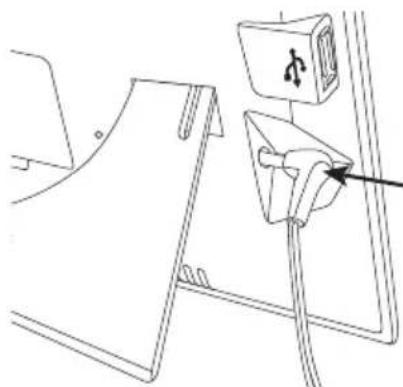
- Connect the mains adapter to the DC 6.0 V input socket and to a 230 V mains electricity socket. AC ON will be appear on the display screen for 3 seconds.
- If the mains adapter is disconnected and the weather station goes over to battery operation, AC OFF will appear on the display screen.
- Remember to unplug the mains adapter from the wall socket during heavy thunder storms to protect the weather station.
natural_image
Line drawing of a cable installation with a plug and socket (no text or symbols)Scanning for the outdoor unit sensors and checking their operation
As soon as the indoor unit is switched on, it will begin to scan automatically for any sensors in the vicinity. The scan will be indicated by the lighting up.
When the symbol is no longer illuminated, the operation of the sensor can be tested.
i Information
If during the scan the indoor unit can't find, or loses contact with the outdoor unit “--.-” will appear on the display. Try scanning for the sensors manually:
In normal display mode, hold in [ CHANNEL/+ ] for 3 seconds. “” will appear on the display.
Anemometer
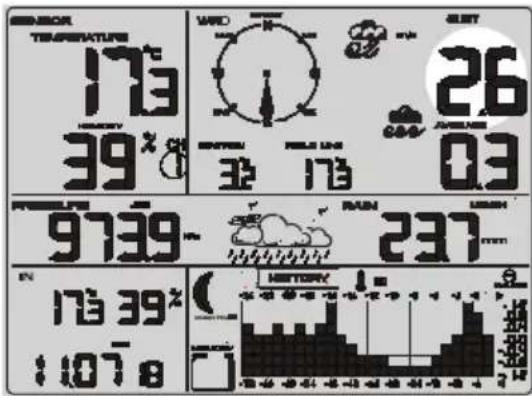
Test the operation of the anemometer by spinning the cups. Check that the speed indicated on the display changes in relation to the speed of the cups.
Rain sensor
Rock the outdoor unit from side to side and listen for clicking sounds. Each click represents 0.3 mm rainfall. Check that the reading indicated on the display changes as the outdoor unit is rocked.

Test the operation of the wind direction sensor by moving the weather vane. Check that the direction indicated on the display changes as the weather vane is turned.

bar
| Metric | Value | | :--- | :--- | | Temperature (°C) | 173 | | Humidity (%) | 107 | | Day of Week (hours) | 39 | | Hourly Average Temperature (°C) | 9739 | | Humidity (%) | 237 | | Day of Week (hours) | 173 | | Hourly Average Humidity (%) | 0.3 | | Day of Week (hours) | 26 | | Humidity (%) | 48 | | Day of Week (hours) | 52 | The chart displays two sets of values: Temperature and Humidity. The Temperature values are shown in the top row, and the Humidity values are shown in the bottom row. The Day of Week values are not explicitly labeled on the chart but are included in the visual field.Thermometer/Hygrometer
Place the outdoor unit close to the indoor unit and leave it for about 30 minutes for it to acclimatise to the new ambient temperature. Compare the temperature and humidity readings from both units. The temperature readings should not differ more than 1 °C (accuracy ±0.5 °C) and the humidity readings should not differ by more than 6 % (accuracy ±3 %).
If the difference in the readings is outside these limits, the accuracy can be adjusted by calibrating the indoor unit. Refer to the Calibration section.

Indoor unit
Key to the display
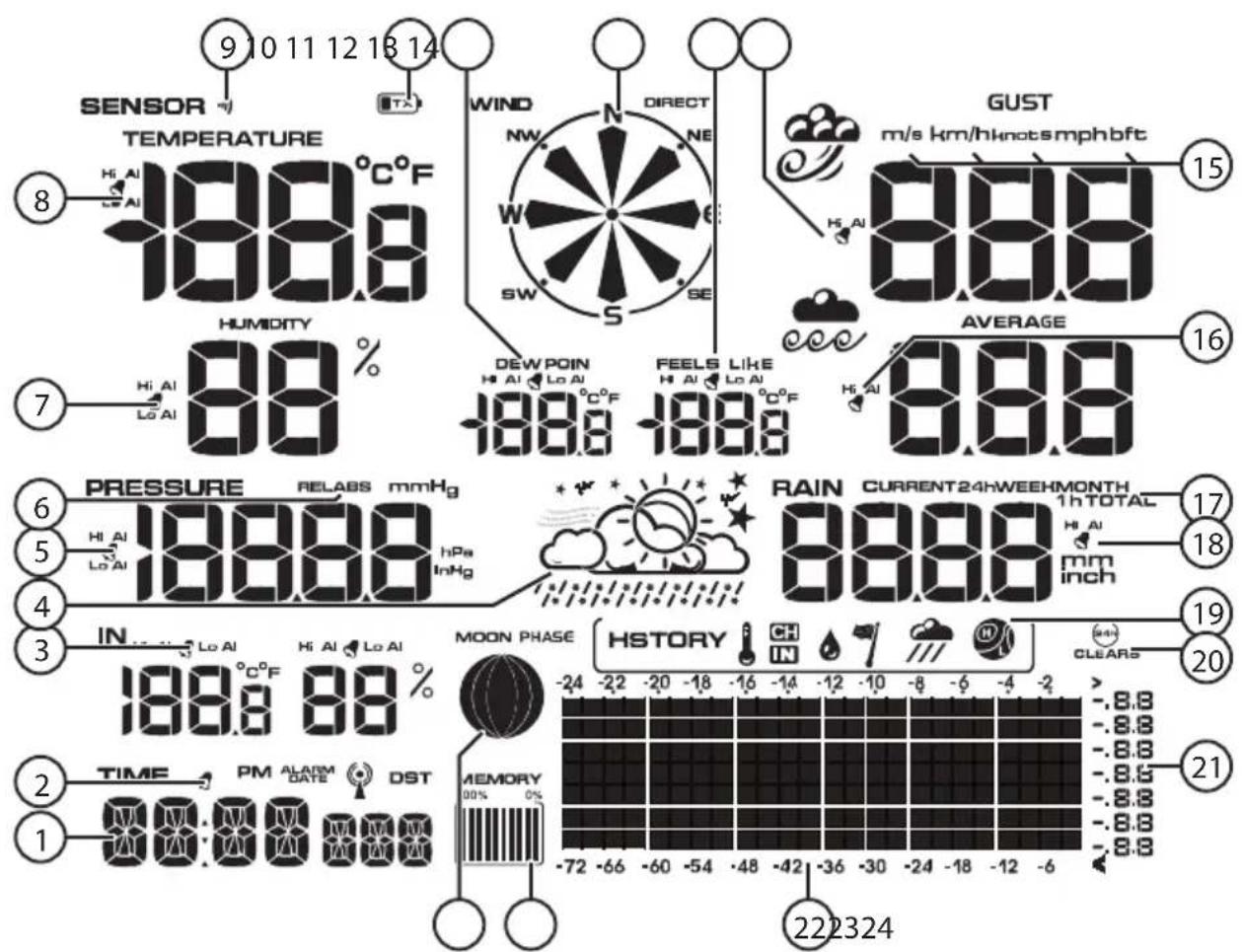
- Time/date/day
- Alarm symbol for the clock
- Alarm symbol for indoor temperature and humidity
- Weather forecast, storm warning
- Alarm symbol for atmospheric pressure
- Display mode indicator for relative or absolute atmospheric pressure
- Alarm symbol for outdoor humidity
- Alarm symbol for outdoor temperature
- Signal indicator for the outdoor unit – illuminates when measurement data is received and when scanning for a sensor
- Low battery warning indicator, outdoor unit
- Alarm symbol for the dew point
- Wind direction
- Alarm symbol for perceived temperature
- Alarm symbol for wind speed
- Unit of measurement for wind speed
- Alarm symbol for average wind speed
- Rainfall measurement period
- Alarm symbol for rainfall
- Selected histogram indicator
- Automatic clearing of saved max/min readings activation indicator
- Histogram measurement scale
- Time axis for histogram (24- or 72-hour clock display).
- Memory usage indicator
- Moon phase indicator
Settings/adjustments
Set the time, date, units of measurement, limits and display lighting.
- In normal mode, hold in [MODE/SET] for 3 seconds to enter the settings mode.
- Press or hold in [CHANNEL/+ ] or [HISTORY/-] to change the value. Confirm each stage with [MODE/ SET].
- You can return to normal display mode at any time by pressing [ SNOOZE/LIGHT ] (12).

flowchart
graph LR
    A["FMT<br>• 12H<br>• 24H"] --> B["TIME<br>• Hour<br>• Minute"]
    B --> C["DATE<br>• DDMMyy<br>• MMDDyy<br>• Month<br>• Day<br>• Year"]
    C --> D["CLR<br>• ON<br>• OFF"]
    D --> E["UNIT SET<br>• Temperature<br>• Wind speed<br>• Rain<br>• Pressure"]
    F["Threshold<br>• WEATHER<br>• STORM"] --> G["Forecast<br>• Sunny<br>• Partly cloudy<br>• Cloudy<br>• Rainy"]
    G --> H["REC<br>• 16s, 32s, 48s<br>• 1 – 240 min"]
    H --> I["Backlight Color<br>• LED<br>• IN<br>• OUT<br>• USE<br>• LOWER<br>• UPPER<br>• BRIGHT"]
- FMT: Select either 12- or 24-hour time display (24-hour is default).
• TIME: Set the hours and minutes.
- DATE:
- Set the order of how the day, month and year are displayed: DDMMyy or MMDDyy
- Month setting
- Day setting
- Year setting
- CLR:
- Select ON if you want the max/min readings to be set to zero every night (at midnight). "CLEARS 24" is shown in the display.
- Select OFF if you wish to delete the saved readings manually. Refer to the Clearing readings section.
- UNIT SET:
- Temperature: Set the unit of measurement in which the temperature is to be displayed: °C or °F
- Wind speed: Set the unit of measurement in which the wind speed is to be displayed: m/s, km/h, knots, mph or btf (Beaufort scale)
- Rain: Set the unit of measurement in which the rainfall is to be displayed (mm or inches)
- Pressure: Set which unit of measurement the atmospheric pressure is displayed in (hPa, inHg or mmHg)
- Threshold:
- WEATHER: Threshold value for positive and negative pressure changes: 2–4 mBar/h (default=2). A lower value makes weather forecast indications more sensitive to changes in pressure. In areas subject to large changes in pressure a higher value is recommended.
- STORM: Threshold value for negative pressure changes: 3–9 mBar/h (default=4). A lower value makes storm warning indications more sensitive to changes in pressure. In areas subject to large changes in pressure a higher value is recommended. When the pressure has fallen constantly for 3 hours (The cloud & rain symbol will flash).
- Forecast: Weather forecast indication based on the current weather conditions. Selection options: sunny, partly cloudy, cloudy or rain (default=partly cloudy).
- REC: Data measurement frequency: 16, 32, 48 sec or 1–240 min (default=30 min)
| No Colour “OUT” Temp (°C) “IN” Temp (°C) | |||
| 1 White <(-12.0) | <(14.5) | ||
| 2 Pink | (-12.0)..(-6.5) | (14.5)..(16.0) | |
| 3 Purple | (-6.5)..(-1.0) | (16.0)..(17.5) | |
| 4 Blue | (-1.0)..(4.5) | (17.5)..(19.5) | |
| 5 Dark-blue | (4.5)..(10.0) | (19.5)..(21.0) | |
| 6 Dark-green | (10.0)..(15.5) | (21.0)..(23.0) | |
| 7 Green | (15.5)..(21.0) | (23.0)..(24.5) | |
| 8 Yellow | (21.0)..(26.5) | (24.5)..(26.0) | |
| 9 Orange | (26.5)..(32.0) | (26.0)..(27.0) | |
| 10 | Red | (32.0)..(37.5) | (27.0)..(29.0) |
| 11 | Dark-red | >(37.5) | >(29.0) |
- LED: The backlight of the indoor unit display can change colour depending on the outside temperature (OUT) or indoor temperature (IN). Alternatively the colour can be fixed (USE) (default=OUT). Since the range of temperatures varies depending on where in the world one is the temperature range can be adjusted, refer to the table.
- OUT
- LOWER Set the limit for the lowest outdoor temperature (default=-12.2).
- UPPER Set the limit for the highest outdoor temperature (default= 37.8).
- IN
- LOWER Set the limit for the lowest indoor temperature (default= 14.4).
- UPPER Set the limit for the highest indoor temperature (default= 28.9).
- USE Manual setting for the backlight: Select from 11 different colours.
- BRIGHT Adjust the backlight brightness to a setting from 1 (min) to 8 (max).
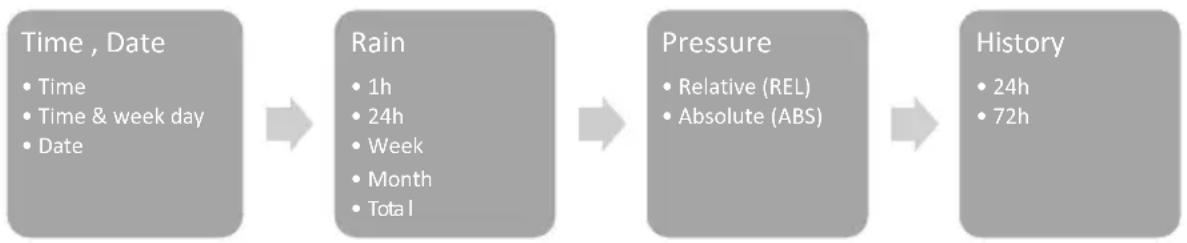
Changing the display mode for the time/date and weather data.
- In normal display mode, press [MODE/SET] repeatedly to select between time/date, rainfall, atmospheric pressure and histogram.
- Press [CHANNEL/+ ] or [HISTORY/-] to change the display mode.
- You can return to normal display mode at any time by pressing [SNOOZE/LIGHT].
flowchart
graph LR
    A["Time, Date\n• Time\n• Time & week day\n• Date"] --> B["Rain\n• 1h\n• 24h\n• Week\n• Month\n• Total"]
    B --> C["Pressure\n• Relative (REL)\n• Absolute (ABS)"]
    C --> D["History\n• 24h\n• 72h"]
- "TIME" Select between displaying time, time and day or date.
- “RAIN” Select whether to display the rainfall per hour, week, month or total rainfall.
- "PRESSURE" Select between display of relative or absolute atmospheric pressure. REL or ABS will appear on the display respectively.
- "HISTORY" Select either 24-o 72-hour clock display.
i Information about the atmospheric pressure
The weather station can display the atmospheric pressure in different ways, ABS absolute (actual pressure at current altitude) and REL relative (what the pressure would be at sea level).
- The relative value is used by meteorologists to be able to compare the atmospheric pressure at different locations.
- The normal atmospheric pressure at sea level varies depending on the geographical location but is usually approximately 1013.2 hPa. A pressure of under 990 hPa is regarded as low pressure and over 1020 hPa is regarded as high pressure.
- Since atmospheric pressure decreases with altitude, values for relative atmospheric pressures are generally higher than their absolute counterparts.
Sound settings for buttons and alarms
In normal mode, hold in [ HISTORY/- ] for 3 seconds to switch the sound on/off. BUZZON (On) or BUZZOFF (Off) will appear on the display respectively.
When the sound is switched off, no noise will be heard when buttons are pressed and any alarms emitted by the weather station will be silent (only the alarm symbols will flash).
Max/min
- In normal display mode, press once on [ MAX/MIN/ALARM ]. MAX will appear on the display and the maximum recorded readings of the rainfall, wind speed, atmospheric pressure, temperature and humidity will be shown.
- Press [MAX/MIN/ALARM] once more. MIN will appear on the display and the minimum recorded readings of the rainfall, wind speed, atmospheric pressure, temperature and humidity will be shown.
Pressing [ HISTORY/- ] while in max/min display mode will toggle between displaying the readings for the rainfall and the atmospheric pressure.
Clearing recorded readings
Note:
Clearing the saved max/min readings sets the readings of all the sensors to zero.
- In normal mode, press [MAX/MIN/ALARM] repeatedly to select MAX or MIN.
- Hold in [MODE/SET] for 3 seconds (CLR will flash) to clear the max and min readings respectively.
For automatic clearing of max/min readings every night at midnight, refer to the Settings/adjustments (CLR) section.
Rainfall
- In normal display mode, press [MODE/SET] twice to select the display mode for rainfall.
- Press repeatedly on [CHANNEL/+ ] or [ HISTORY/- ] to select the display mode.
- Hold in [MODE/SET] for 3 seconds to clear the selected reading.
Memory
To clear the memory of the weather station, refer to the Software (WeatherHome) section.
Histogram, weather forecast and moon phase
Histogram
The weather station can display data recorded 24 or 72 hours back in time. Refer to the Changing the display mode for the time/date and weather data section.
The vertical axis of the graph shows the changes in the measured data over time compared with the current reading. The current reading (the column furthest to the right) always displays 0.
E.g. when looking at a temperature histogram: If the column shows 0.4 it represents a historical temperature 0.4 degrees higher than the current temperature.
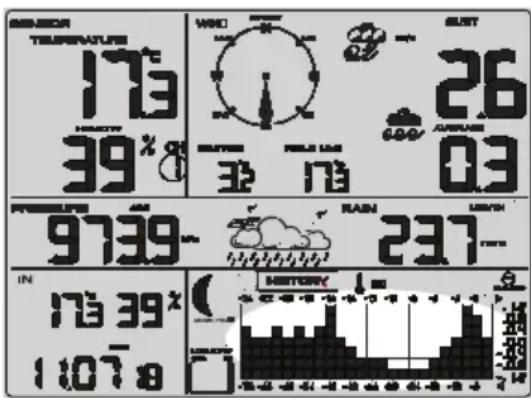
In normal display mode, press [ HISTORY/- ] repeatedly to toggle between the following histograms:
Indoor temperature
7 Wind
Indoor humidity

Rainfall
CH Outdoor temperature

Atmospheric pressure
CH Outdoor humidity
Weather forecast
The weather station will measure the atmospheric pressure and generate a weather forecast for the coming 12–24 hours.
The following symbols will be displayed depending on the current changes in atmospheric pressure and the set limits (refer to the Settings/adjustments section).

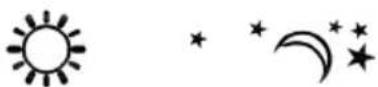


Sun Stars/moon Sunny spells Cloudy Rain
At night (between 19:00 and 07:00) the Stars/moon symbol will be shown instead of the Sun.
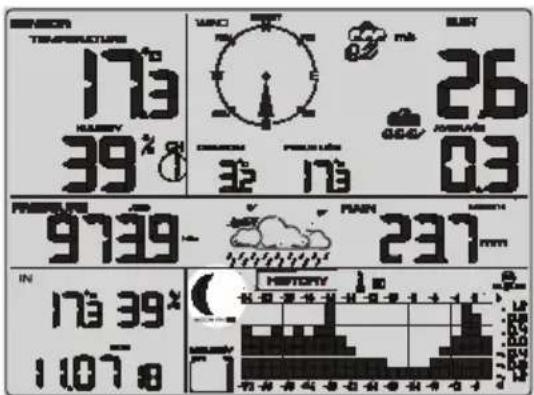
Phases of the moon
The displayed phase of the moon is based on the current date. The correct phase of the moon will only be shown if the correct date has been set, refer to the Settings/adjustments section.
Display backlight
Press [ SNOOZE/LIGHT ] to activate the display backlight.
The light will come on for 5 seconds.
Continuous backlight
- Hold in the button for 2 seconds. The backlight will come on and LED ON will appear on the display.
- Hold in the button again to switch the backlight off. LED OFF will show on the display.
- If the indoor unit is running on battery power, the backlight is automatically switched off after 30 minutes to save power.
- When the backlight is set to be on continuously, it can be dimmed by pressing [SNOOZE/LIGHT]. BRIGHT 1 will appear on the display. Press the button once more to return to the set brightness level.
Adjusting the brightness
- Press [SNOOZE/LIGHT] twice. "BRIGHT" appears on the display and the set brightness level will flash.
- Press [CHANNEL/+ ] or [HISTORY/-] to change the brightness from 1 (dimmest) to 8 (brightest). Confirm your selection by pressing [MODE/SET].
For additional backlight settings, refer to the Settings/adjustments section.
Alarm
The weather station can be set to sound an alarm if the sensors measure weather conditions outside set limits.
When an alarm sounds the weather station will emit an audible signal and the alarm symbol next to the data that is outside of the limits will flash.
The sound of the alarm can be switched off if only visible alerts are desired.
Refer to the Sound settings for buttons and alarms section.
Viewing the set limits
- In normal display mode, hold in [ MAX/MIN/ALARM ] for 3 seconds to enter the alarm mode. "HI" will be shown together with the set max value.
- Press [ MAX/MIN/ALARM ] to display the set min value. "LOW" is shown on the display.
- Press [SNOOZE/LIGHT] or wait 30 seconds to return to normal display mode.
When viewing the current set limits, press [MODE/SET] to change the display mode between relative (REL) or absolute (ABS) atmospheric pressure and 1 hour (1h) or 24 hours (24h) rainfall.
Setting the alarm
- In normal display mode, hold in [ MAX/MIN/ALARM ] for 3 seconds. "HI" will appear on the display.
- Hold in [MODE/SET] for 3 seconds to enter the alarm set mode.
- Press or hold in [CHANNEL/+ ] or [HISTORY/-] to change the value.
- Activate or deactivate the alarm by pressing [ MIN/MAX/ALARM ]. Select ON or OFF. The 🔔 symbol comes on to indicate that the alarm is activated.
- Confirm each step with [MODE/ SET].
- You can now return to normal display mode by pressing [ SNOOZE/LIGHT ] twice.
Alarm Clock
• Hour
- Minute

Rainfall
• 1h, high
- 24h, high

Wind
- Gust, high
- Speed, high
Outdoor
- Temp
• high - low
- Humidity
• high - low
- Feels like
• high - low
- Dew point
• high - low

Pressure
- Absolute
• high - low
- Relative
• high - low

Indoor
- Temp,
• high - low
- Humidity
• high -
low
-
Alarm Clock: Set the alarm clock (hours, minutes).
- Rainfall: Set the alarm limits for rainfall (1 hour "1h", 24 hours "24h")
- Wind: Set the alarm limit for the wind speed "GUST" and the average wind speed "AVERAGE"
-
Outdoor: Set the upper "HI" and lower "LOW" alarm limits for the outdoor thermometer/hygrometer.
-
Temperature: Set the alarm limits for the outdoor temperature
- Humidity: Set the alarm limits for the humidity
- Feels like: Set the alarm limits for the perceived temperature
- Dew point: Set the alarm limit for the dew point
- Pressure: Set the upper and lower alarm limits for the atmospheric pressure.
- Absolute: Set the alarm limits for absolute pressure
- Relative: Set the alarm limits for relative pressure
- Indoor: Set the upper and lower alarm limits for the indoor temperature and humidity
- Absolute: Set the alarm limits for absolute pressure
- Relative: Set the alarm limits for relative pressure
Snooze
- When the alarm sounds, press [ SNOOZE/LIGHT ] to temporarily mute the alarm for 5 minutes. The alarm symbol will continue to flash.
- To silence the alarm permanently, press one of these buttons; [CHANNEL/+], [MODE/SET], [MAX/MIN/ALARM] or [HISTORY/-].
Calibration
- If the weather station sensors provide incorrect readings they can be adjusted. In order to be able to calibrate the sensors precisely you will need to have reference readings from sensors or instruments that you know provide you with accurate readings.
- Relative humidity readings are always in the range of 10–99 %. The weather station cannot be adjusted to accept readings outside this range.
-
Press [CHANNEL/+ ] or [HISTORY/-] to increase or decrease the selected value respectively. Holding in the button for 3 seconds will change the value quicker.
-
Press [ MAX/MIN/ALARM ] to reset the adjusted value to zero.
-
To finish the calibration and return to normal display mode, press [SNOOZE/LIGHT] or wait for 30 seconds.
Temperature
-
In normal display mode, press and hold in [MODE/SET] and [CHANNEL/+ ] at the same time for about 5 seconds to enter the calibration mode. The indoor temperature reading will start to flash.
-
Adjust the value to your reference value. The value can only be adjusted in increments of 0.1 °C. Confirm using [ SET/MODE ].
-
The outdoor temperature reading will start to flash. Adjust the values in the same way as in point 2.
Relative humidity
-
In normal display mode, press and hold in [MODE/SET] and [HISTORY/-] at the same time for about 5 seconds to enter the calibration mode. The indoor humidity reading will start to flash.
-
Adjust the value to your reference value. The value can be adjusted in increments of 1 %. Confirm using [ SET/MODE ].
-
The outdoor humidity reading will start to flash. Adjust the values in the same way as in point 2.
Wind speed, rain and atmospheric pressure
- In normal display mode, press and hold in [MODE/SET] and [MAX/MIN/ALARM] at the same time for about 5 seconds to enter the calibration mode. The value for the wind speed calibration factor will begin to flash (default=1).
- Adjust the factor to a value in the range 0.75–1.25 where: calibrated wind speed = calibration factor x measured wind speed.
- Press [MODE/SET] once more to adjust the value for the amount of rainfall. The value for the rainfall calibration factor will begin to flash (default=1).
- Adjust the factor to a value in the range 0.75–1.25 where: calibrated rainfall = calibration factor x measured rainfall.
- Press [MODE/SET] once more to adjust the value for absolute atmospheric pressure. The absolute atmospheric pressure reading will start to flash.
- Adjust the value to your reference value. The value can be adjusted in increments of 0.1 hPa.
- Press [MODE/SET] once more to adjust the value for relative atmospheric pressure. The relative atmospheric pressure reading will start to flash.
- Adjust the value to your reference value. The value can be adjusted in increments of 0.1 hPa.
Installation

Information
We recommend that you familiarise yourself with the indoor and outdoor units before you install them in their working locations. This will allow you to calibrate the sensors and test the operation of the weather station.
Choosing a location
Things to consider before choosing where to install the outdoor unit:
- The rain sensor should be cleaned every 3 months and the batteries should be replaced every year. Make sure that the outdoor unit is mounted in an accessible location.
- Make sure that the operation of the outdoor unit is not hindered by nearby structures such as trees and buildings. A rule of thumb is to install it at a distance of at least four times the height of nearby obstacles. E.g. if a nearby building is 6 m in height, the outdoor unit should be installed 4 × 6 = 24 m away from the building.
- Avoid radiant heat from surrounding buildings, roofs, etc.
- Test the operation of the outdoor unit in the intended location before installing it. The range can also be affected by the type of obstacles located between the indoor unit and the outdoor unit (e.g. a concrete wall will interfere with the signal more than a plasterboard wall).
- Other wireless equipment using the same frequency band (433 MHz) can reduce the transmission range.
If you experience range problems, try the following:
- Turn off any other existing wireless equipment to check whether this is the cause of the problem.
- Reduce the distance between the units.
- Reduce the number of obstacles (walls, furniture, etc) between the units.
Indoor unit
- The indoor unit has built-in temperature, humidity and atmospheric pressure sensors. The unit should therefore not be positioned where it might be affected by heat from heaters, cookers, fireplaces or other sources of heat.
- Avoid placing the unit next to metal objects such as metal window frames as this may cause interference with reception.
- The indoor unit can be used with the table stand (21) or hung on a wall using the hanging hole (17).
Outdoor unit
When you install the outdoor unit make sure that it is horizontal by using the built-in spirit level (27).
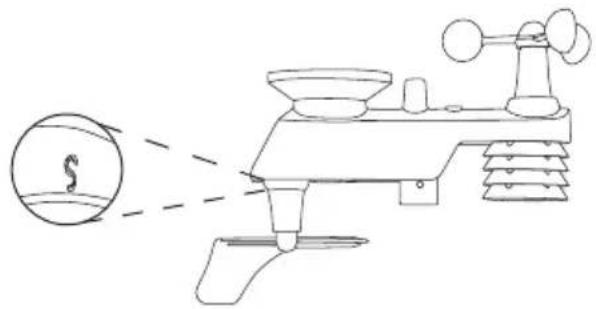
- Orientate the marking on the weather vane. Make sure that the "S" mark is facing south.
natural_image
Diagram of a scientific instrument with a circular element and dashed lines indicating light or motion (no text or symbols)
natural_image
Line drawing of a laboratory instrument with tripod, beaker, and gauges (no text or labels)
natural_image
Technical line drawing of a mechanical device with no visible text or symbols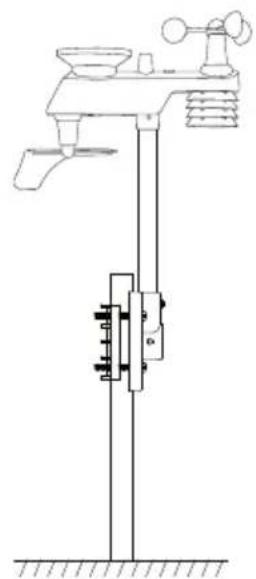
natural_image
Technical line drawing of a weather monitoring device with no visible text or symbols- Choose whether you are going to mount the sensor with the bracket horizontal, vertical or on a mast pole.

- Fit together the outdoor unit, arm and bracket and fasten them using the M3 screws and nuts.
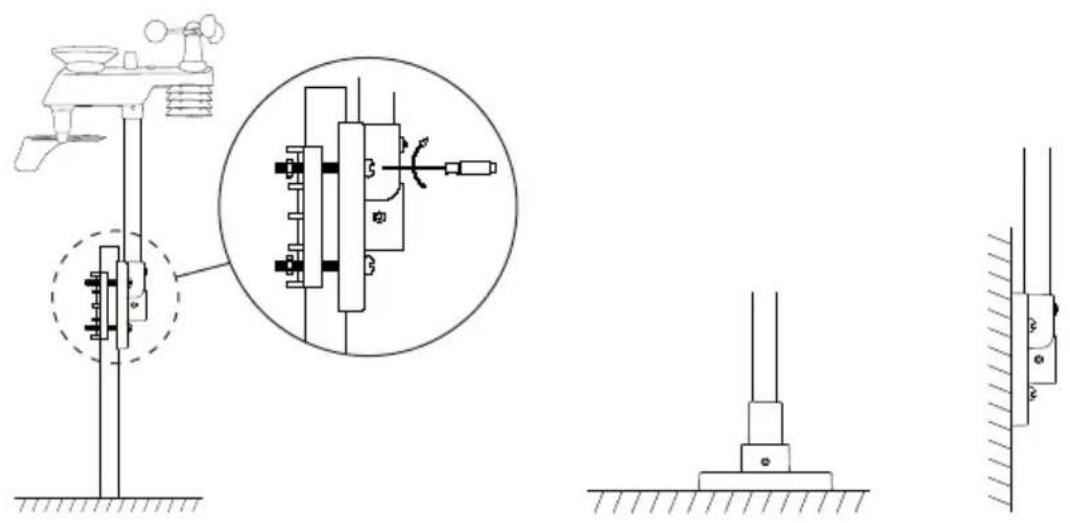
- – When fastening the outdoor unit to a mast, use the M5 screws and nuts and attach the bracket to the mast pole using the mast attachment bracket.
- When mounting the bracket horizontally or vertically, use fasteners suitable for the mounting surface material.
Software (WeatherHome)
With the software Weather Home you can use a computer to view measurement data in real-time, set the indoor unit, set alarms and clear the max/min readings.
System requirements
Computer PC with CD reader and available USB port
Operating system Windows NT4 (Service Pack >= 6a), Windows 2000, Windows XP, Windows Vista, Windows 7–10
Processor Pentium III 500 MHz or higher
Memory Minimum 128 MB, recommended 256 MB
Installation
- Connect the included USB cable to a vacant USB port on your computer and to the USB connection (18) on the indoor unit.
- Make sure that you have administrator rights for the operating system.
- Insert the supplied CD into your computer CD drive. If the installation does not start automatically: open the File Explorer file manager, localise the CD and run "WeatherHome.exe".

- Follow the instructions in the installation program and install Weather Home.
Instructions for use
Open the program called Weather Home.
- The main page shows current readings and histograms.
- Display or hide graphs by clicking on the names above the graphs.

line
| Metric | Value | |--------|-------| | Temperature (°C) | 27.4 | | Humidity (%) | 16 | | Flow (mm/h) | 6.4 | | Time (min) | 2.1 | | Temperature (°C) | 27.4 | | Humidity (%) | 16 | | Flow (mm/h) | 6.4 | | Time (min) | 2.1 | | Temperature (°C) | 27.4 | | Humidity (%) | 16 | | Flow (mm/h) | 6.4 | | Time (min) | 2.1 | | Temperature (°C) | 28.4 | | Humidity (%) | 16 | | Flow (mm/h) | 6.4 | | Time (min) | 2.1 | | Temperature (°C) | 28.4 | | Humidity (%) | 16 | | Flow (mm/h) | 6.4 | | Time (min) | 2.1 | | Temperature (°C) | 28.4 | | Humidity (%) | 20 | | Temperature (°C) | 27.4 | | Humidity (%) | 20 | | Flow (mm/h) | 6.4 | | Time (min) | 2.1 | | Flow (mm/h) | 2.1 | | Time (min) | 2.1 | | Temperature (°C) | 27.4 | | Humidity (%) | 27.4 | | Humidity (%) | 20 | | Temperature (°C) | 28.4 | | Humidity (%) | 16 | | Temperature (°C) | 27.4 | | Humidity (%) | 20 | | Temperature (°C) | 28.4 | | Humidity (%) | 20 | | Temperature (°C) | 27.4 | | Humidity (%) | 20 | | Temperature (°C) | 28.4 | | Humidity (%) | 20 | | Temperature (°C) | 27.4 | | Humidity (%) | 20 | | Temperature (°C) | 28.4 | | Humidity (%) | 20 | | Temperature (°C) | 27,40,000,000,000,000,000,000,000,000,000,000,000,000,000,000,000,000,000,000,000,000,000,000,000,000,000,0Menu
File Exit Exit Weather Home.
Edit Setting Settings for units of measurement, backlighting, display of measurement data, date format and more.
Alarm Activating/deactivating the alarm.
Setting the alarm limits.
Max/min Display of max/min history
Language Setting the language.
History View Analysis and export of recorded measurement data (.csv or .pdf).
History manage Clearing of PC database and indoor unit memory.
Help About WeatherHome Shows which version of software is installed
Settings
The window shows current settings in the indoor unit. The settings determine how the measurement data is displayed. Make any desired setting changes and click [Save] to save or [Cance] to exit without saving.

Unit Settings for the units of measurement.
Display Display settings for time and date (Time, Date), histogram (Graph) atmospheric pressure (Pressure), rainfall period (Rainfall) and choices for the rolling display of outdoor temp/hygrometer sensor (Channel Circle).
Backlight Backlight setting on/off (Auto). Brightness setting (Bright) Choice of whether the colour of the display is to have one colour or change colour depending on the current outdoor/indoor temperature (Color By). Choice of colour scale (Color Index, Indoor/Outdoor Temperature), refer to the Settings/adjustments section.
Forecast Limits for the weather forecast and storm warning, refer to the Settings/adjustments section.
Record Interval Data measurement frequency.
Max/Min Choice of whether the max/min readings are to be deleted automatically every day (Daily) or whether they are to be deleted manually (History).
Buzzer Choice of whether the sound (button presses and alarms) is to be on or off.
Setting the alarm (Alarm)
Set the alarm limits and activate/deactivate the alarm. Make any desired changes and click [ Save ] to save or [ Cance ] to exit without saving.
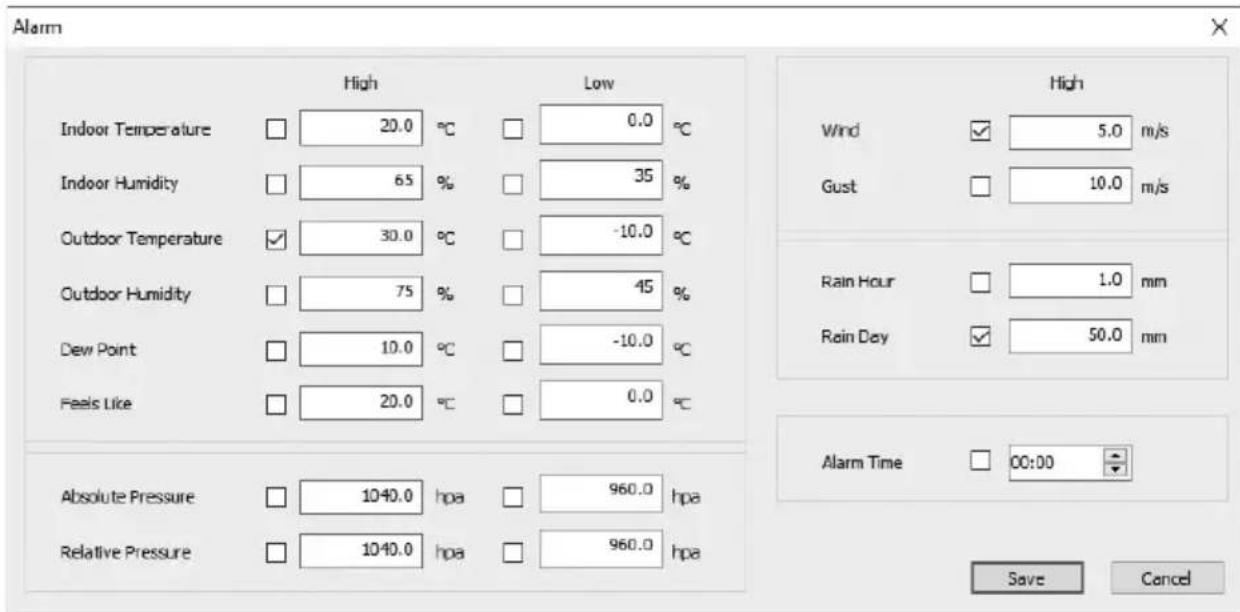
In the pictured example, the indoor unit will sound an alarm if the outdoor temperature exceeds 30 °C , the average wind speed exceeds 5 m/s and if the rainfall during one day exceeds 50 mm.
Highest and lowest measured readings (Max/Min)

other
| Metric | Indoor Temperature (°C) | Indoor Humidity (%) | Indoor Dew Point (°C) | Indoor Feels Like (°C) | Outdoor Temperature (°C) | Outdoor Humidity (%) | Outdoor Dew Point (°C) | Outdoor Feels Like (°C) | Pressure Absolute (hpa) | Pressure Relative (hpa) | Wind (bft) | Wind Hours (in) | Rain Day (in) | Rain Month (in) | Rain Fall (in) | | :--- | :--- | :--- | :--- | :--- | :--- | :--- | :--- | :--- | :--- | :--- | :--- | :--- | :--- | :--- | :--- | | Max: ■ | | Min: ■ | | | | | | | | | | | | | | | Daily Max Min | | | | | | | | | | | | | | | | Reset | | Reset | | Exit | | | | | | | | | | | | | | | | | Noise Level (dBm) | | Indoor: 22.4 °C | | Indoor: 21.0 °C | | Indoor: 29 % | | Indoor: 26 % | | Outdoor: 22.1 °C | | Outdoor: 21.3 °C | | Dew Point: 3.2 °C | | Dew Point: 1.1 °C | | Feels Like: 22.1 °C | | Feels Like: 21.3 °C | | Rain Hour: 0.04 in | | Rain Day: 0.04 in | | Rain Week: 0.04 in | | Rain Month: 3.90 in | The chart displays the daily maximum minimum temperature and humidity for indoor and outdoor conditions at different times. The data is presented in a table format with two columns: 'Temperature' and 'Humidity'. The 'Wind' column contains both 'Wind' and 'Wind' values for indoor and outdoor conditions. The 'Rain' column contains 'Rain Hour' and 'Rain Day' values for indoor and outdoor conditions. The 'Rain' column contains 'Rain Hour' and 'Rain Day' values for outdoor conditions. The 'Wind' column contains 'Wind' and 'Wind' values for indoor and outdoor conditions. The 'Wind' column contains 'Wind' and 'Wind' values for indoor and outdoor conditions. The 'Wind' column contains 'Wind' and 'Wind' values for indoor and outdoor conditions. The 'Rain' column contains 'Rain Hour' and 'Rain Day' values for indoor and outdoor conditions. The 'Rain Hour' column contains 'Rain Hour' and 'Rain Day' values for indoor and outdoor conditions. The 'Rain Day' column contains 'Rain Hour' and 'Rain Day' values for indoor and outdoor conditions. The 'Rain' column contains 'Rain Hour' and 'Rain Day' values for indoor and outdoor conditions.The highest values are coloured red and the lowest blue.
- Press [Reset] to clear all the data.
- Press [Exit] to close the window.
(i) Note: Clearing the saved max/min readings sets the readings of all the sensors to zero.
Viewing saved weather data (View)

line
| Date | Temperature (°C) | |---|---| | 2018-05-29 10:50... | 25.0 | | 2018-05-29 10:52... | 25.0 | | 2018-05-29 10:54... | 25.0 | | 2018-05-29 10:56... | 25.0 | | 2018-05-29 10:58... | 25.0 | | 2018-05-29 10:58... | 25.1 | | 2018-05-29 11:00... | 25.1 | | 2018-05-29 11:02... | 25.1 | | 2018-05-29 11:04... | 25.0 | | 2018-05-29 11:08... | 25.0 | | 2018-05-29 11:08... | 25.0 | | 2018-05-29 11:10... | 24.9 | | 2018-05-29 11:13... | 24.9 | | 2018-05-29 11:13... | 24.9 | | 2018-05-29 11:14... | 24.9 | | 2018-05-29 11:16... | 24.9 | | 2018-05-29 11:18... | 24.9 | | 2018-05-29 11:23... | 24.7 | | 2018-05-29 11:23... | 24.7 | | 2018-05-29 11:24... | 24.7 | | 2018-05-29 11:26... | 24.7 | | 2018-05-29 11:28... | 24.7 | | 2018-05-29 11:30... | 24.7 | | 2018-05-29 11:32... | 24.7 | | 2018-05-29 11:34... | 24.6 | | 2018-05-29 11:36... | 24.6 | | 2018-05-29 11:38... | 24.6 | | 2018-05-29 11:40... | 24.6 | | 2018-05-29 11:42... | 24.6 | | 2018-05-29 11:44... | 24.6 | | 2018-05-29 11:46... | 24.6 | | 2018-05-29 11:48... | 24.6 | | 2018-05-29 11:50... | 24.6 | | End of Start (End of Start) | Not labeled (e.g., 'Temperature (°C)' indicates a specific value). The chart displays a single data series with values ranging from approximately -37°C to +37°C. The chart includes a secondary axis for 'Temperature (°C)' and 'Chl Temp (°C)', but no explicit numerical data is plotted on the graph itself.When the indoor unit is connected to a computer and Weather Home is running, the memory of the unit is saved onto the program database.
- To view the weather data for a chosen period:
- Set the start date and time.
- Set the finish date and time.
- Press [Update] to retrieve the data from the database.
- Select which type of data is to be shown on the scroll down list (Chart): temperature, humidity, atmospheric pressure, wind or rain.
- Display or hide graphs by ticking/unticking the respective boxes.
- Choose whether you wish the data to be displayed as a graph and/or in list form by selecting [List], [Chart], [List/Chart] or [Chart/List].
-
Analyse graph:
-
Enlarge a part of the graph by highlighting the area (hold in the left mouse button and drag the mouse down to the right).
-
Scroll the graph by holding in the right mouse button and dragging the mouse sideways.
-
Return to full view by holding in the left mouse button and dragging the mouse up to the left.
- Export data as .pdf or .csv (comma-separated text for viewing in Excel etc):
- Press [Export].
- Select the file type you want and where the file is to be saved. Press [Save].
- Press [Exit] to close the window.
Clearing the database and memory of the indoor unit (History Manage)
Select "History/History Manage" in the menu.
If you want to save the database before you clear it:
-
Localise the database WeatherHome.mdb. (E.g. in Windows 10 it will be in the folder "C:\ProgramData\WeatherHome")
-
Copy the database to another folder and/or rename it as e.g. "January 2019.mdb".
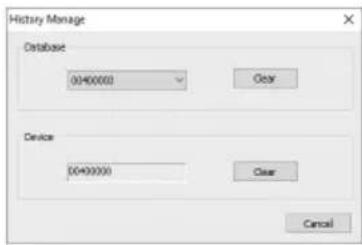
- Clear the database by pressing [Clear] Database.
- Clear the memory of the indoor unit by pressing [ Clear ] Device.
Care and maintenance
- Clean the product by wiping it with a damp cloth. Use only mild cleaning agents, never solvents or corrosive chemicals.
- Remove the batteries if the weather station is not to be used for a long time. Old batteries can begin to leak and damage the product.
- Inspect and clean the rain sensor every 3 months or when required.

natural_image
Technical line drawing of a mechanical device with directional arrows indicating motion or force (no text or symbols)- Turn the rain funnel in the direction of the arrow and lift it up to remove it.
- Check that the rain gauge moves freely and that the drain holes (18) are unblocked.
- Refit the rain funnel and turn it until it is seated properly.
Troubleshooting guide
| The outdoor unit sensors send no data to the indoor unit.“--.-” is displayed. | When the indoor unit has lost contact with a sensor “--.-” or “--” will appear on the display.To scan for the sensors: Hold in [ CHANNEL/+ ] for 3 seconds. The symbol will show while scanning takes place.Check the distance between the indoor and outdoor unit. They should be 1.5–30 m apart.Try placing the outdoor unit higher up.Check that the outdoor unit LED indicator flashes every 16 seconds.Insert new batteries into the outdoor unit. Lithium batteries are recommended for use in cold climates.Check the batteries in the indoor unit are not discharged. Even if the indoor unit runs off the mains, discharged batteries may cause problems detecting the outdoor unit.Make sure that the wireless signal is not disrupted by nearby metal structures.Move the indoor unit away from other electronic devices such as routers, computers and TV sets. |
| The temperature/humidity readings of the indoor and outdoor units are different when they are placed beside each other. | Let the sensors stabilise for an hour. The temperature readings should not differ more than 1 °C (accuracy ±0.5 °C) and the humidity readings should not differ by more than 6 % (accuracy ±3 %).Adjust the values in the indoor unit, refer to the Calibration section. |
| Poor display contrast. Insert | new batteries into the unit. |
| The display shows rain even when it is not raining. | Make sure that the outdoor unit is securely mounted.If the unit is not rigidly mounted, e.g. is attached to a loose mast pole, it may send erroneous readings. |
Responsible disposal
This symbol indicates that the product should not be disposed of with general household waste. This applies throughout the entire EU. In order to prevent any harm to the environment or health hazards caused by incorrect waste disposal, the product must be handed in for recycling so that the material can be disposed of in a responsible manner. When recycling your product, take it to your local collection facility or contact the place of purchase. They will ensure that the product is disposed of in an environmentally sound manner.

natural_image
Symbol of a trash bin crossed out by a diagonal line, with no text or labels present.Specifications
Sensor data
| Sensor Measuring range Accuracy Resolution | |||
| Indoor temperature | 0–60 °C ±0.5 °C 0 | 0.1 °C | |
| Outdoor temperature | -40 to 60 °C ±0.5 | °C 0.1 °C | |
| Indoor humidity | 10–99 % ±3 % (in the range 20–90 %) | 1 % | |
| Outdoor humidity | 10–99 % ±3 % (in the range 20–90 %) | 1 % | |
| Rain 0–9999 mm <15 mm: ±1 mm | 15–9999 mm: ±7 % | <1000 mm (0.3 mm) >1000 mm (1 mm) | |
| Wind direction | 0–360° 8-point compass 45° | ||
| Wind speed 0–50 m/s 2–10 m/s: | ±3 m/s 10–50 m/s: ±10 % | 0.1 m/s | |
| Atmospheric pressure | 300–1100 hPa ±3 | hPa 0.1 hPa | |
Wireless transmission
Frequency range 433 MHz
Range, open area 100 m
Indoor unit
Batteries 3 × LR03/AAA
Operating time Approx. 12 months
Mains adapter Input: 100–240 V AC, 50/60 Hz
Output: 5.9 V, 500 mA ⊕—○—○
Dimensions 157 × 210 × 26 mm
Outdoor unit
Update frequency Every 16 seconds
Batteries 3 × LR6/AA
Operating time Approx. 12 months (depending on weather conditions)
Dimensions 330 × 150 × 280 mm
natural_image
Line drawing of a weathering instrument with no text or symbols
natural_image
Simple line drawing of a vertical cylindrical object with a numbered circle above it (no text or symbols on the object itself)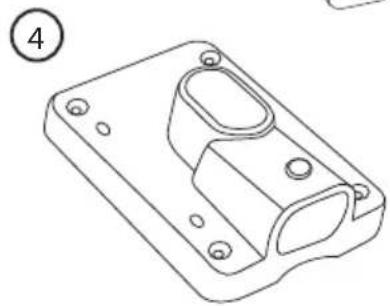
natural_image
Technical line drawing of a mechanical housing component (no text or symbols)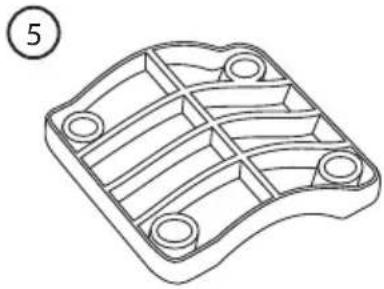
natural_image
Technical line drawing of a mechanical component with internal channels and mounting holes (no text or symbols)
natural_image
Simple line drawing of an electrical adapter with a plug and cable (no text or symbols)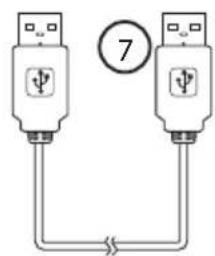

natural_image
Technical line drawing of a mechanical component with a circular housing and cylindrical housing (no text or symbols)Inomhusenhet
Obs!
natural_image
Line drawing of a cable installation or electrical plug with a switch symbol (no text or labels)- Temperature
- Wind speed
- Rain
- Pressure
Threshold
WEATHER
• STORM
Forecast
- Sunny
- Partly cloudy
- Cloudy
- Rainy
REC
• 16s, 32s, 48s
- 1 – 240 min
Backlight Color
• LED
• IN
• OUT
• USE
• 1h, high
• 24h, high

Wind
- Gust, high
- Speed, high
Outdoor
- Temp
• high - low
- Humidity
• high - low
- Feels like
- high
- low
- Dew point
• high - low

Pressure
- Absolute
• high
- low
- Relative
- high
- low

Indoor
natural_image
Diagram of a scientific instrument with a circular arrow labeled 'S' pointing to its surface, showing no text or symbols beyond the arrow.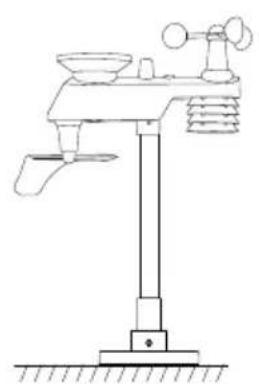
natural_image
Line drawing of a weather station instrument with tripod, fan, and scale (no text or labels)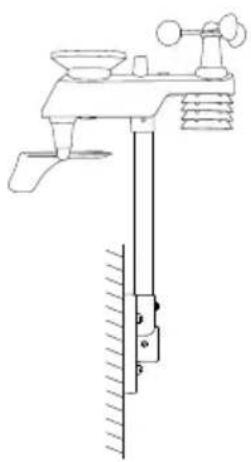
natural_image
Technical line drawing of a mechanical device with no visible text or symbols
natural_image
Technical line drawing of a weather monitoring device with no visible text or symbolsUnit
natural_image
Technical line drawing of a weather instrument with directional arrows indicating movement (no text or symbols)natural_image
Symbol of a trash bin crossed with no text or numbers, representing waste sorting or disposal (no text present)Specifikationer
Givardata
| Givare Mätområde Noggrannhet | Upplösning | ||
| Temperatur inomhus | 0–60 °C ±0,5 °C | 0,1 °C | |
| Temperatur utomhus | -40 till 60 °C ±0,5 °C 0,1 °C | ||
| Luftfuktighet inomhus | 10–99 % ±3 % (mellan 20–90 %) 1 % | ||
| Luftfuktighet utomhus | 10–99 % ±3 % (mellan 20–90 %) 1 % | ||
| Regn 0-9999 mm | <15 mm: ±1 mm | 15-9999 mm: ±7 % | <1000 mm (0,3 mm) >1000 mm (1 mm) |
| Vindriktning 0–360 ° 8-stegs kompass 45° | |||
| Vindhastighet | 0–50 m/s | 2–10 m/s: ±3 m/s10–50 m/s: ±10 % | 0,1 m/s |
| Lufttryck | 300-1100 hPa | ±3 hPa | 0,1 hPa |
Trådlös överföring
Frekvensområde 433 MHz
natural_image
Line drawing of a weathering instrument with no text or symbols
natural_image
Simple line drawing of a vertical cylindrical object with a numbered circle above it (no text or symbols on the object itself)
natural_image
Technical line drawing of a mechanical housing component (no text or symbols)
natural_image
Technical line drawing of a mechanical component with internal channels and mounting holes (no text or symbols)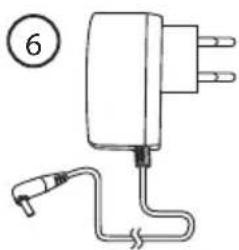
natural_image
Simple line drawing of an electrical adapter with a terminal and cable (no text or symbols)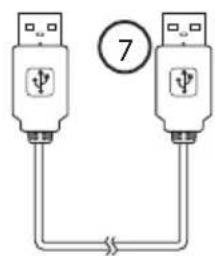

natural_image
Technical line drawing of a mechanical component with a circular housing and cylindrical housing (no text or symbols)Innendørsenhet
Obs!

natural_image
Line drawing of a cable installation or electrical plug with a switch and connector (no text or symbols)- Temperature
- Wind speed
- Rain
- Pressure
Threshold
WEATHER
• STORM
Forecast
- Sunny
- Partly cloudy
- Cloudy
- Rainy
REC
• 16s, 32s, 48s
- 1 – 240 min
Backlight Color
• LED
• IN
• OUT
• USE
- LOWER
• UPPER
• BRIGHT
• 1h, high
• 24h, high

Wind
- Gust, high
- Speed, high
Outdoor
- Temp
• high - low
- Humidity
• high - low
- Feels like
• high - low
- Dew point
• high - low

Pressure
- Absolute
• high - low
- Relative
- high
- low

Indoor
natural_image
Diagram of a scientific instrument with a circular element and dashed lines indicating light or diffusion (no text or symbols)
natural_image
Line drawing of a weather station with tripod, tripod, and tripod gauges (no text or labels)
natural_image
Technical line drawing of a mechanical device with no visible text or symbols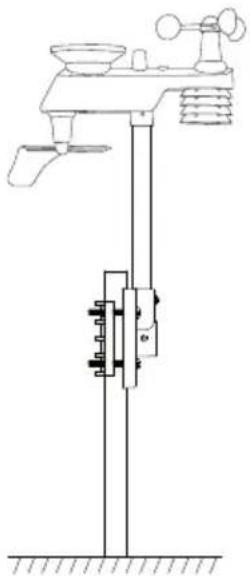
natural_image
Technical line drawing of a laboratory apparatus with no visible text or symbolsline
| Metric | Value | |--------|-------| | V | 1.4 | | Wind | 5.8 | | Heat | 0.7 | | Wind | 0.4 | | Wind | 0.2 | | Temperature Change Year | - | | Decum | 0.5 | | Absorption Time | 0.5 | | Mass Loss | 0.5 | | Flow | 6.1 | | Day | 6.1 | | Week | 2.1 | | Month | 2.1 | | End | 2.1 |Meny
File Exit Avslutt Weather Home.
Help About WeatherHome Vise installert programvareversion.
Innstillinger (Settings)
natural_image
Technical line drawing of a weather instrument with directional arrows indicating movement (no text or symbols)natural_image
Symbol of a trash bin crossed with a diagonal line, no text or numbers presentSpesifikasjoner
Giverdata
| Sensor/giver Måleområde Nøyaktighet Oppløsning | |||
| Innetemperatur | 0–60 °C ±0,5 °C | 0,1 °C | |
| Temperatur utendørs | -40–60 °C ±0,5 | °C 0,1 °C | |
| Luftfuktighet innendørs | 10–99 % ±3 % (i området 20–90 %) 1 % | ||
| Luftfuktighet utendørs | 10–99 % ±3 % (i området 20–90 %) 1 % | ||
| Regn 0-9999 mm | <15 mm: ±1 mm | 15-9999 mm: ±7 % | <1000 mm (0,3 mm)>1000 mm (1 mm) |
| Vindretning 0–360 ° 8-trinns kompass 45° | |||
| Vindhastighet | 0–50 m/s | 2–10 m/s: ±3 m/s10–50 m/s: ±10 % | 0,1 m/s |
| Lufttrykk | 300-1100 hPa | ±3 hPa | 0,1 hPa |
Trådløs overføring
Frekvensområde 433 MHz
natural_image
Line drawing of a weathering instrument with no text or symbols
natural_image
Simple line drawing of a vertical cylindrical object with a numbered circle on top (no text or symbols)
natural_image
Technical line drawing of a mechanical housing component (no text or symbols)
natural_image
Technical line drawing of a mechanical component with internal channels and mounting holes (no text or symbols)
natural_image
Simple line drawing of an electrical adapter with a plug and cable (no text or symbols)

natural_image
Technical line drawing of a mechanical component with a circular inset showing a hole (no text or symbols)Sisäyksikkö
△ Huom!

natural_image
Line drawing of a cable installation with a switch and connector (no text or symbols)• 1h, high
• 24h, high

Wind
- Gust, high
- Speed, high
Outdoor
- Temp
• high
- low
- Humidity
• high
- low
- Feels like
- high
- low
- Dew point
• high
- low

Pressure
- Absolute
• high - low
- Relative
• high - low

Indoor
natural_image
Diagram of a scientific instrument with a circular arrow labeled 'S' pointing to its surface, showing components like a funnel, sphere, and base (no text or symbols present)
natural_image
Line drawing of a weather station with tripod, fan, and scale (no text or labels)
natural_image
Technical line drawing of a laboratory apparatus with a vertical column and supporting components (no text or labels)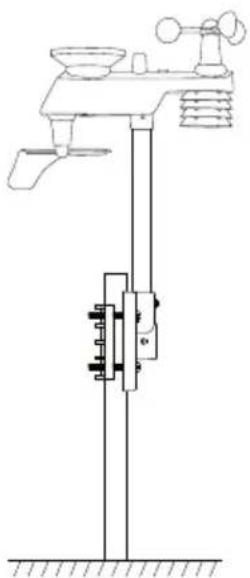
natural_image
Technical line drawing of a mechanical device with no visible text or symbolsline
| Metric | Value | | :--- | :--- | | Temperature (°C) | 28.5 | | Humidity (%) | 51 | | Wind (W·m) | 0.7 | | Wind (J·m) | 0.7 | | Radial (mm) | 0.3 | | Radial (rad) | 0.3 | | Pressure (KPa) | 101.5 | | Abchex (KPa) | 101.5 | | Absorbance (%) | 1.4 | | Peak Time (min) | 0.1 | | Peak Duration (min) | 0.1 | | Peak Current (A) | 0.1 | | Peak Voltage (V) | 0.1 | | Peak Current (A) | 0.1 | | Peak Voltage (A) | 0.1 | | Peak Current (A) | 0.1 | | Peak Voltage (A) | 0.1 | | Peak Current (A) | 0.1 | | Peak Voltage (A) | 0.1 | | Peak Current (A) | 0.1 | | Peak Voltage (A) | 0.1 | | Peak Current (A) | 0.1 | | Peak Voltage (A) | 1.2 | | Peak Current (A) | 0.8 | | Peak Voltage (A) | 0.8 | | Peak Current (A) | 0.8 | | Peak Voltage (A) | 0.8 | | Peak Current (A) | 0.8 | | Peak Voltage (A) | 0.8 | | Peak Current (A) | 0.8 | | Peak Voltage (A) | 0.8 | | Peak Current (A) | 0.8 | | Peak Voltage (A) | 0.8 | | Peak Total (kPa) | 101.5 | | Total Current (kPa) | 101.5 | | Total Voltage (kPa) | 101.5 | | Total Current (kPa) | 101.5 | | Total Voltage (kPa) | 101.5 | | Total Current (kPa) | 101.5 | | Total Voltage (kPa) | 101.5 | | Total Current (kPa) | 101.5 | | Total Voltage (kPa) | 101 | | Total Current (kPa) | 101 | | Total Voltage (kPa) | 101 | | Total Current (kPa) | 101 | | Total Voltage (kPa) | 101 | | Total Current (kPa) | 101 | | Total Voltage (kPa) | 101 | | Total Current (kPa) | 101 | | Total Voltage (kPa) | 101 | | Total Current (kPa) | 101 | | | Total Voltage (kPa) | 101 | | Total Current (kPa) | 101 | | Total Voltage (kPa) | 101 | | Total Current (kPa) | 101 | | Total Voltage (kPa) | 101 | | Total Current (kPa) | 101 | | Total Voltage (kPa) | 101 | | Direct history sample at 29/26/23 [DCA34] total mass ratio W * ConnectedValikko
File Exit Lopeta Weather Home.
natural_image
Technical line drawing of a mechanical device with directional arrows indicating motion or force (no text or symbols)natural_image
Line drawing of a weathering instrument with no text or symbols
natural_image
Simple line drawing of a vertical cylindrical object with a numbered circle above it (no text or symbols on the object itself)
natural_image
Technical line drawing of a mechanical housing component (no text or symbols)
natural_image
Technical line drawing of a mechanical component with internal channels and mounting holes (no text or symbols)
natural_image
Simple line drawing of an electrical adapter with a plug and cable (no text or symbols)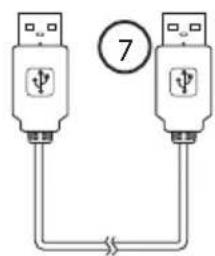

natural_image
Technical line drawing of a mechanical component with no visible text or symbolsInnenmodul
Obs!
natural_image
Line drawing of a cable installation or electrical plug with a switch, no text or symbols present• Time
- Time & week day
- Date

Rain
• 1h
• 24h
- Week
• Month
• Total

Pressure
- Relative (REL)
- Absolute (ABS)

History
• 24h
• 72h
natural_image
Simple line drawings of weather symbols including sun, moon, clouds, and rain (no text or labels)natural_image
Diagram of a scientific instrument with a circular source and dashed lines indicating light or diffusion (no text or symbols)
natural_image
Technical line drawing of a weather monitoring station with tripod, tripod, and sensor components (no text or labels)
natural_image
Technical line drawing of a laboratory apparatus with funnel, tripod, and vertical support (no text or labels)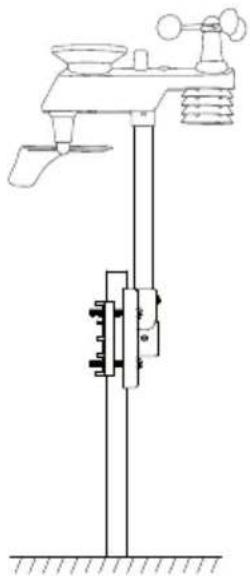
natural_image
Technical line drawing of a mechanical device with no visible text or symbols
natural_image
Technical line drawing showing two mechanical assembly configurations: one with vertical rods and base, the other with a vertical rod mounted on a wall (no text or symbols)natural_image
Technical line drawing of a mechanical device with a dial and directional arrows indicating motion (no text or symbols)natural_image
Symbol of a trash bin crossed with no visible text or labelsTechnische Daten
Sensordaten
Declaration of Conformity
This declaration of conformity is issued under the sole responsibility of the manufacturer.
has been manufactured in full compliance with the requirements of the RE-directive 2014/53/EU and relevant harmonized standards
har tillverkats i full överensstämmelse med kraven i 2014/53/EU och relevanta harmoniserade standarder / har blitt produsert i full overensstemmelse med kravene i 2014/53/EU og relevante harmoniserte standarder / on valmistettu noudattaen kokonaisuudessaan koskevan direktiivin 2014/53/EU ja asiaankuuluvat yhdenmukaistetut standardit / hat in voller Übereinstimmung mit den Anforderungen der 2014/53/EU und einschlägigen harmonisierten Normen hergestellt wurde.
Reference to harmonized standards used, or reference to the specifications in which declaration of conformity is declared:
Hänvisning till de harmoniserade standarder som använts eller hänvisningar till de specifikationer som försäkran om överensstämmelse deklareras: / Referere til harmoniserte standarder som brukes, eller henvisninger til spesifikasjonene der samsvarserklæring er erklärt: / Viittaus yhdenmukaistettuihin standardeihin tai viittaus eritelmiin, jossa vaatimustenmukaisuusvakuutus on julistettu: / Referenz verwendet harmonisierten Normen oder Bezugnahme auf die Spezifikationen, in der Konformitätserklärung wird erklärt:
Article 3.1a (safety): EN 62479:2010
Article 3.1b (EMC): EN 301489-1 v2.2.3(2019-11) EN 301489-3 v2.1.1(2019-03)
Article 3.2 (Radio): EN 300220-1 v3.1.1(2017-02) EN 300220-2 v3.2.1(2018-06)
Signed for and on behalf of:
Henrik Alfredsson
Product Quality & Compliance Manager
Insjön, Sweden, 2019-12-16
CLAS OHLSON AB, SE-793 85 INSJÖN, SWEDEN
SVERIGE
KUNDTJÄNST Tel: 0247/445 00
E-post: kundservice@clasohlson.se
INTERNET
www.clasohlson.se
BREV Clas Ohlson AB, 793 85 INSJÖN
NORGE
KUNDESENTER Tlf.: 23 21 40 00
E-post: kundesenter@clasohlson.no
INTERNETT
www.clasohlson.no
POST Clas Ohlson AS, Postboks 485 Sentrum, 0105 OSLO
SUOMI
ASIAKASPALVELU Puh.: 020 111 2222
POSTAL Clas Ohlson Ltd, Aquilla House (First floor),
1 Becketts Wharf, Lower Teddington Road,
Hampton Wick, Kingston Upon Thames, KT1 4ER
DEUTSCHLAND
KUNDENSERVICE Hotline: 040 2999 78111
E-Mail: kundenservice@clasohlson.de
HOMEPAGE
www.clasohlson.de
POSTANSCHRIFT
Clas Ohlson GmbH, Valentinskamp 88
20355 Hamburg


- Weather Station with USB
- USB Wireless Weather Station
- Table of Contents
- Safety
- Contents
- Fasteners:
- Product description
- Indoor unit
- Outdoor unit
- Installation
- Inserting batteries
- Note:
- Battery operation
- Mains operation
- Scanning for the outdoor unit sensors and checking their operation
- i Information
- Anemometer
- Rain sensor
- Thermometer/Hygrometer
- Key to the display
- Settings/adjustments
- - Threshold:
- Changing the display mode for the time/date and weather data.
- i Information about the atmospheric pressure
- Sound settings for buttons and alarms
- Max/min
- Clearing recorded readings
- Rainfall
- Memory
- Histogram, weather forecast and moon phase
- Histogram
- Weather forecast
- Phases of the moon
- Display backlight
- Continuous backlight
- Adjusting the brightness
- Alarm
- Viewing the set limits
- Setting the alarm
- Alarm Clock
- Wind
- Outdoor
- Pressure
- Indoor
- Snooze
- Calibration
- Temperature
- Relative humidity
- Wind speed, rain and atmospheric pressure
- Information
- Choosing a location
- Things to consider before choosing where to install the outdoor unit:
- If you experience range problems, try the following:
- Software (WeatherHome)
- System requirements
- Instructions for use
- Menu
- Settings
- Setting the alarm (Alarm)
- Viewing saved weather data (View)
- Clearing the database and memory of the indoor unit (History Manage)
- Care and maintenance
- Troubleshooting guide
- Responsible disposal
- Specifications
- Wireless transmission
- Inomhusenhet
- Obs!
- Threshold
- Forecast
- REC
- Backlight Color
- Unit
- Specifikationer
- Trådlös överföring
- Innendørsenhet
- Meny
- Innstillinger (Settings)
- Spesifikasjoner
- Trådløs overføring
- Sisäyksikkö
- △ Huom!
- Valikko
- Innenmodul
- Rain
- History
- Technische Daten
- Declaration of Conformity
- SVERIGE
- NORGE
- SUOMI
- DEUTSCHLAND
Brand : Cotech
Model : FT-0205
Category : Weather Station