
FTD-DC - Fan Cotech - Free user manual and instructions
Find the device manual for free FTD-DC Cotech in PDF.


| Product Type | Tower Fan with Remote Control |
| Model | FTD-DC |
| Brand | Cotech |
| Dimensions (Height) | 91 cm |
| Weight | 3.3 kg |
| Power Supply | 220–240 V, 50/60 Hz |
| Power Consumption | 25 W |
| Standby Power Consumption | 0.67 W |
| Remote Control Battery | 1 × CR2032 (included) |
| Fan Speeds | 8 speeds (1–8) |
| Operating Modes | Normal, Interval, Sleep |
| Oscillation (Swing) | Yes, on/off button |
| Timer | 30 minutes to 8 hours (30-min intervals) |
| Display | LED display showing temperature, speed, timer |
| Air Filter | Removable, clean with vacuum |
| Max Airflow | 28.72 m³/min |
| Max Air Velocity | 2.99 m/s |
| Sound Power Level | 61.76 dB(A) |
| Service Value | 1.14 (m³/min)/W |
| Safety Features | Overheat protection, automatic shut-off timer |
| Indoor Use Only | Yes |
| Cleaning | Wipe with damp cloth; do not use solvents |
| Disposal | Recycle according to local regulations |
| Included Accessories | Remote control, user manual |
Frequently Asked Questions - FTD-DC Cotech
User questions about FTD-DC Cotech
0 question about this device. Answer the ones you know or ask your own.
Ask a new question about this device
Download the instructions for your Fan in PDF format for free! Find your manual FTD-DC - Cotech and take your electronic device back in hand. On this page are published all the documents necessary for the use of your device. FTD-DC by Cotech.
USER MANUAL FTD-DC Cotech
natural_image
Modern vertical digital tower with black and white panels, mounted on a white base (no visible text or symbols)Important information:
Read the entire instruction manual carefully and make sure that you fully understand it before you use the equipment. Keep the manual for future reference.
Viktig information:
Original instructions
Bruksanvisning i original
Originalbruksanvisning
Tower Fan with Remote Control
Art.no 18-1396 Model FTD-DC
36-6627 FTD-DC
Please read the entire instruction manual before using the product and then save it for future reference. We reserve the right for any errors in text or images and any necessary changes made to technical data. In the event of technical problems or other queries, please contact our Customer Services (see address details on the back).
Safety
- Never use the product if the mains lead, plug or any other part is damaged or does not work properly.
- The product must only be connected to a standard domestic 220–240 V, 50/60 Hz electrical supply.
- Never attempt to repair or modify the product in any way.
- Never use the product if it does not work properly or if the housing, mains lead or plug is damaged in any way.
- If the mains lead is damaged in any way it must be replaced by a qualified electrician.
- The product is only intended for indoor use in a dry, clean environment. Never position the product in such a way that it might fall into water or other liquid.
- Never position the product in such a way that it comes into contact with hot surfaces.
• Always unplug the product from the power point when it is not in use.
- Never lay the mains lead over hot surfaces, sharp edges or corners.
- The product is only intended for personal domestic use and only in the manner described in this instruction manual.
- Never poke your fingers or foreign objects through the grille while the fan is operating.
- Never leave children unsupervised in the vicinity of the product.
- Never expose the product to water or other liquids.
- Do not turn on the power before the product is completely assembled. The product must only be used in the upright position, never horizontally or when it is lying on its side.
- Never turn the product off by pulling the plug out of the wall socket. Turn off the product using the power button and then unplug it from the wall socket.
- Make sure that the product is completely assembled before using it for the first time.
- Never use the product in areas where explosive gases or substances are stored.
- Do not use the product in excessively humid or dusty environments or in environments in which the temperature exceeds 40 °C.
- Persons (including children) whose physical, sensory or mental capability or lack of experience and knowledge which renders them incapable of using the product in a safe way, must not be allowed to use the product without proper supervision or instruction.
- Never let children play with the product.
Product description
- Control panel
- LED display. Displays the current temperature when the tower fan is connected to the mains. Also displays the speed setting and timer setting.
- Air outlet
- Remote control holder
- Removable air-intake filter
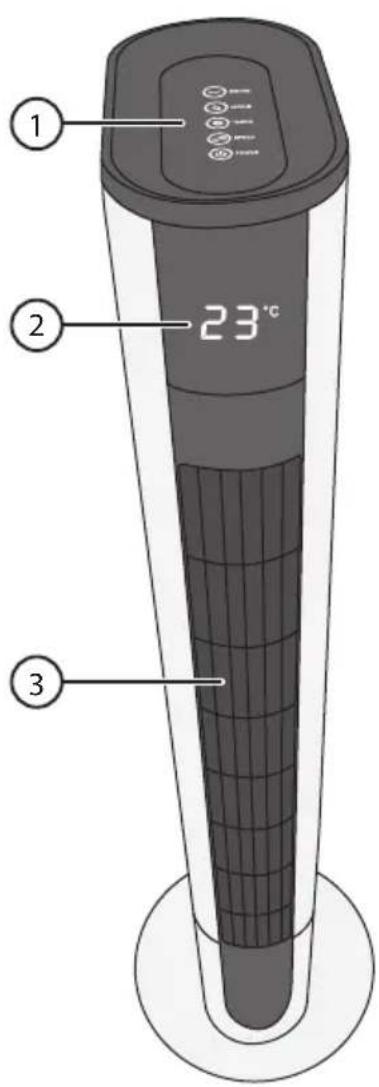
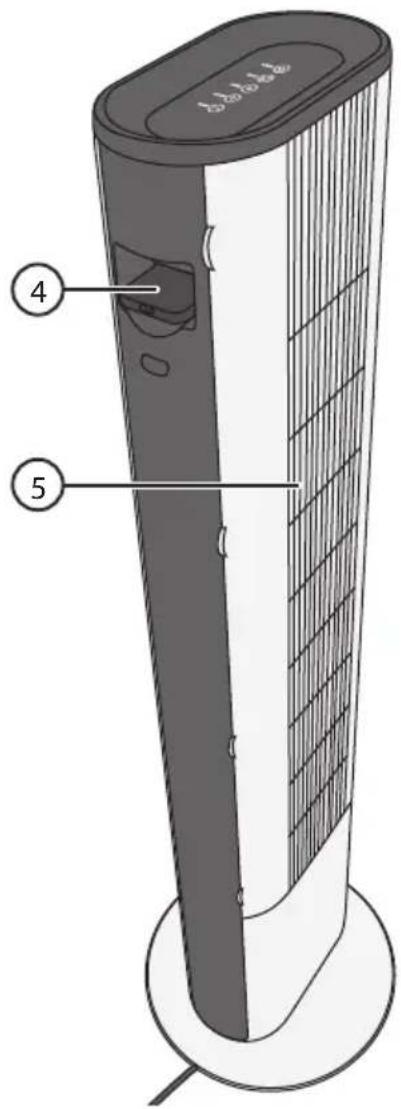
Control panel
- [ ] SWING, switches the oscillating motion on/off.
- [MODE, selects the operating mode: Normal, Interval or Sleep.
- [TIMER, sets the duration of operation before automatic shut-off.
- [■] SPEED, sets the fan speed 1–8.
- [◀] POWER, switches the tower fan on/off.




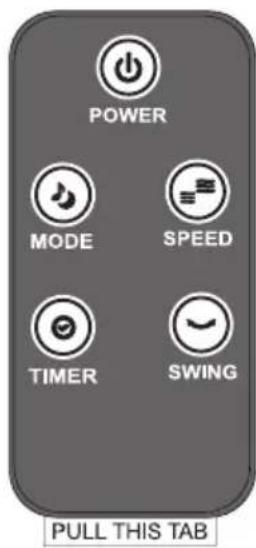
Remote control
The remote control buttons and functions are identical to the ones on the fan as described above.
- Remove the plastic tab to activate the battery.

flowchart
graph LR
    A["Top Left Panel"] --> B["Top Right Panel"]
    B --> C["Bottom Left Panel"]
    C --> D["Bottom Right Panel"]
    D --> E["Bottom Left Panel"]
    style A fill:#f9f,stroke:#333
    style B fill:#ccf,stroke:#333
    style C fill:#cfc,stroke:#333
    style D fill:#fcc,stroke:#333
    style E fill:#cff,stroke:#333
- To change the battery, pull out the battery tray on the bottom of the remote control and replace the old battery with a new one (CR2032). Make sure that the positive (+) terminal faces upwards, towards you (refer to illustration).
Operating instructions
Switching on/off
- Place the fan on a firm, level surface and plug it into a power point.
- Press [⏻] to turn the fan on.
- Press [icon] again to turn it off.
Fan speed
Press [■] (9) repeatedly to select the fan speed 1–8.
Normal, interval or sleep mode
Normal mode
- Turn the fan on.
- Press [💡] (7) until the LED indicators for Interval and Sleep are no longer lit.
Interval mode
- Turn the fan on.
- Press [💡] (7) until the LED indicator for the Interval mode is lit.
- The fan will then automatically change speed at intervals which are programmed in at the factory (cannot be altered). All the fan speeds (1–8) will be used in cycles of 120 seconds. You cannot change the fan speed manually when the fan is in Interval mode.

Sleep mode
- Turn the fan on.
- Press [💡] (7) until the LED indicator for the Sleep mode is lit.
- The fan reduces speed successively by changing to a lower speed setting every 7 minutes until finally staying on fan speed 1. You cannot change the fan speed manually when the fan is in Sleep mode.
Oscillation
-
Press [√] (6) to switch the oscillating action of the fan on.
-
Press the button again to turn off this function.
-
Press [ ] (6) to switch the oscillating action of the fan on.
- Press the button again to turn off this function.


Timer function
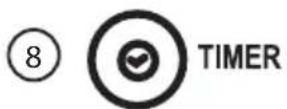
- Press [💡(8) to set the time in 30-minute intervals from 30 minutes to 8 hours.
- The fan will turn off automatically once the set time has passed. The timer function can be used with any of the functions described above. The display panel shows the set timer time for a few seconds before reverting to displaying the temperature. The picture shows that the timer is set for 2 hours.

Care and maintenance
• Always unplug the product from the wall socket before cleaning.
- Wipe the outside of the housing with a clean, damp cloth. Use only mild cleaning agents, never solvents or corrosive chemicals.
- Always unplug the fan and store it in a dry, dust-free environment out of children's reach whenever it is not to be used for an extended period.
Cleaning the air intake filter
If the air intake filter needs cleaning it can be removed and vacuum-cleaned (see fig.).

natural_image
Technical illustration of two views of a vertical air conditioner tower with ventilation grilles (no text or symbols)Responsible disposal
This symbol indicates that this product should not be disposed of with general household waste. This applies throughout the entire EU. In order to prevent any harm to the environment or health hazards caused by incorrect waste disposal, the product must be handed in for recycling so that the material can be disposed of in a responsible manner. When recycling your product, take it to your local collection facility or contact the place of purchase. They will ensure that the product is disposed of in an environmentally sound manner.

natural_image
Symbol of a trash bin crossed with no text or labels, representing no waste or disposal (no text present)Specifications
Rated voltage 220–240 V, 50/60 Hz
Power 25 W
Remote control battery 1 × CR2032 (included)
Height 91 cm
Weight 3.3 kg
| Description Symbol Value Unit | |||
| Max fan flow rate F 28.72 | m^3/min | ||
| Fan power input P 25.20 W | |||
| Service value S | V | 1.14 | (m^3/min)/W |
| Standby power consumption P | SB | 0.67 | W |
| Fan sound power level | L_wA | 61.76 dB(A) | |
| Maximum air velocity | c 2.99 m/s | ||
| Measurement standard for service value: | IEC 60879:1986 (corr.1992) | ||
natural_image
Technical illustration of a vertical air conditioner tower with side views showing internal structure (no text or symbols)Avfallshantering
natural_image
Symbol of a trash bin crossed with no text or numbers, representing waste sorting or disposal (no text present)Specifikationer
Nätanslutning 220–240 V, 50/60 Hz
Effekt 25 W
natural_image
Technical illustration of a vertical tower with internal grid patterns and side panels, showing structural details (no text or symbols)Avfallshändtering
natural_image
Symbol of a trash bin crossed with no text or numbers, representing waste sorting or restriction (no text present)Spesifikasjoner
Strømspenning 220–240 V, 50/60 Hz
Effekt 25 W
Batteri fjernkontroll 1 × CR2032 (inngår)
Høyde 91 cm
Vekt 3,3 kg
| Beskrivelse Symbol Verdi Enhet | |||
| Maks luftstrøm F 28,72 m^3/min | |||
| Viftens effekt inn P 25,20 W | |||
| Driftsverdi | S_V | 1,14 ( m^3 /min)/W | |
| Effektforbruk i standby-modus | P_SB | 0,67 W | |
| Viftens lydeffektnivå | L_WA | 61,76 dB(A) | |
| Maks lufthastighet | c 2,99 m/s | ||
| Standard som er benyttet for måling av driftsverdi | IEC 60879:1986 (corr.1992) | ||
natural_image
Technical illustration of two views of a vertical air conditioner unit with heat sinks and ventilation grilles (no text or symbols)Kierrättäminen
natural_image
Symbol of a trash bin crossed with no text or labels, accompanied by a black rectangular block below (no text or symbols present)Tekniset tiedot
natural_image
Illustration of two views of a vertical electric fan or air conditioner unit, showing internal structure and airflow direction (no text or symbols)natural_image
Symbol of a trash bin crossed with no text or numbers, representing waste sorting or disposal (no text present)Technische Daten
POSTAL 10 – 13 Market Place
Kingston Upon Thames
Surrey
KT1 1JZ
DEUTSCHLAND
KUNDENSERVICE Hotline: 040 2999 78111
E-Mail: kundenservice@clasohlson.de
HOMEPAGE www.clasohlson.de
POSTANSCHRIFT


- Tower Fan with Remote Control
- Safety
- Product description
- Control panel
- Remote control
- Operating instructions
- Switching on/off
- Fan speed
- Normal, interval or sleep mode
- Normal mode
- Interval mode
- Sleep mode
- Oscillation
- Timer function
- Care and maintenance
- Cleaning the air intake filter
- Responsible disposal
- Specifications
- Avfallshantering
- Specifikationer
- Avfallshändtering
- Spesifikasjoner
- Kierrättäminen
- Tekniset tiedot
- Technische Daten
- DEUTSCHLAND
Brand : Cotech
Model : FTD-DC
Category : Fan