
RAZE Neon - Loudspeaker Niceboy - Free user manual and instructions
Find the device manual for free RAZE Neon Niceboy in PDF.


| Product Type | Bluetooth Speaker |
| Brand | Niceboy |
| Model | RAZE Neon |
| Dimensions (approx.) | 200 x 70 x 70 mm |
| Weight (approx.) | 500 g |
| Power Source | Built-in rechargeable battery |
| Charging Port | USB-C |
| Battery Life (approx.) | 10 hours |
| Charging Time (approx.) | 3 hours |
| Bluetooth Version | 5.0 |
| Output Power | 10 W |
| Water Resistance | IPX7 (submersible up to 1m for 30 min) |
| Speaker Type | Mono/Full-range dynamic driver |
| Frequency Response | 100 Hz – 20 kHz |
| Hands-free Calling | Yes (built-in microphone) |
| Controls | Power, Volume, Play/Pause, Next/Previous |
| Warranty | 2 years |
| Cleaning Instructions | Wipe with a soft dry cloth; do not use solvents |
| Safety Recommendations | Do not expose to extreme temperatures; keep away from water when charging |
| Spare Parts / Repairability | Not user-replaceable; contact service center |
Frequently Asked Questions - RAZE Neon Niceboy
User questions about RAZE Neon Niceboy
0 question about this device. Answer the ones you know or ask your own.
Ask a new question about this device
Download the instructions for your Loudspeaker in PDF format for free! Find your manual RAZE Neon - Niceboy and take your electronic device back in hand. On this page are published all the documents necessary for the use of your device. RAZE Neon by Niceboy.
USER MANUAL RAZE Neon Niceboy
User Manual / Wireless Speaker

CZ
OBSAH BALENÍ
Niceboy RAZE Neon wireless speaker
USB-C charging cable
Audio cable
Instruction manual
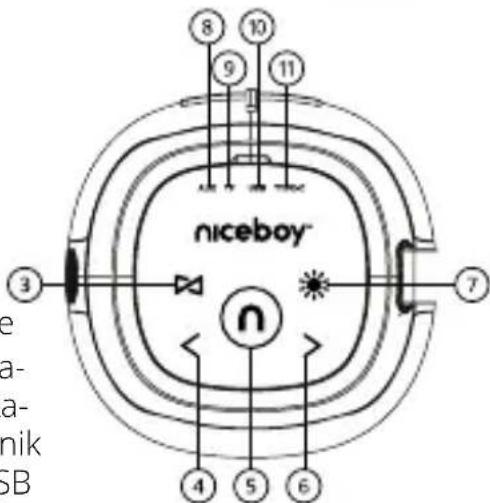
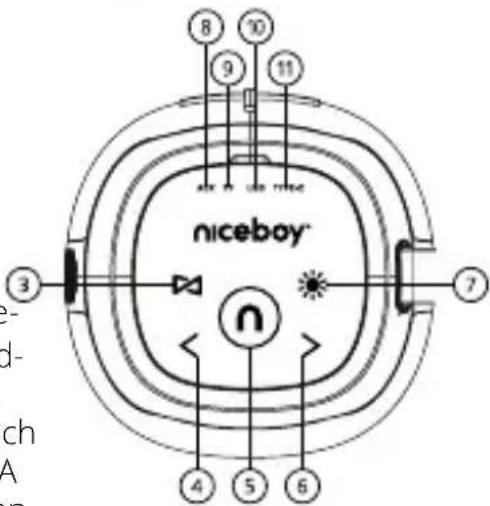
PRODUCT DESCRIPTION
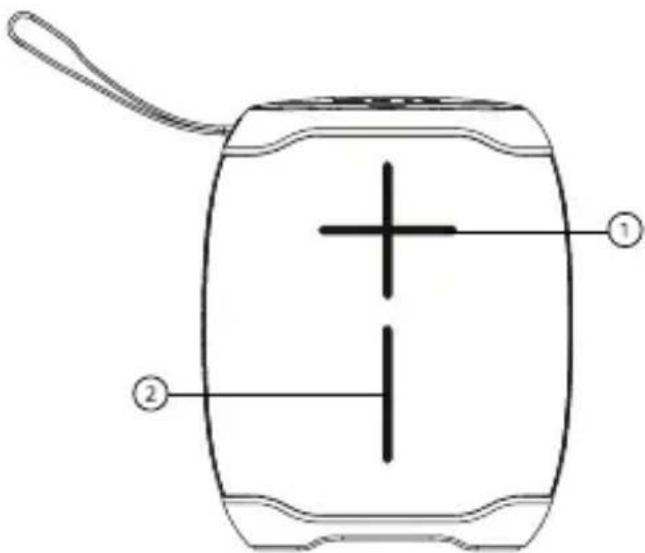
- Volume increase button
- Volume reduction button
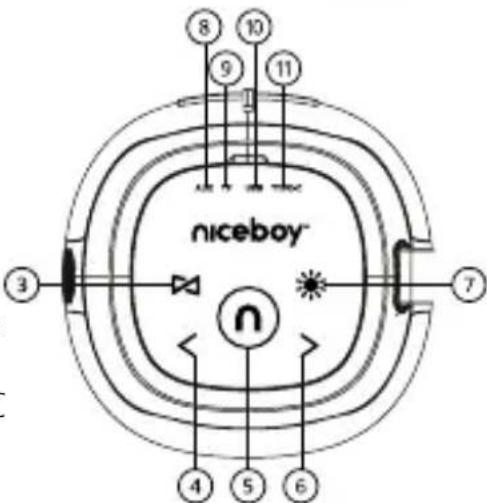
- TWS button / mode switch
- Previous track button
- On / Off Play / Pause
Answer / End / Reject call / Last dialed number - Next track button
- Lighting control
- 3.5 mm AUX jack input
- Micro SD card slot
- Charging USB - output, port for a USB flash disk
- USB-C charging port
CHARGING
We recommend that you fully charge the speaker before using it for the first time to maximize battery life. A full charging takes approximately 3 hours. Low battery is indicated by an audio signal. To charge the speaker's battery, plug the supplied USB-C cable into the charging port (11) and connect it to any charging adapter (5 V voltage and at least 1 A output current) or to a USB port in a PC. Charging is indicated by a red charging LED; the LED turns off once the battery is fully charged.
POWER ON / OFF
To turn the speaker on or off, press and hold button (5) for 3 seconds.
*If the speaker is left inactive, it will turn off automatically after 15 minutes to save power.
CONNECTING TO A DEVICE
- Press and hold the on/off button (5) for 3 seconds to turn the speaker on. The speaker is now in pairing mode for wireless connectivity. Pairing mode is indicated by the flashing of the blue operating LED inside button (5).
- Activate Bluetooth on your device. Select "Niceboy RAZE Neon" in the list of available devices.
- The device will connect to the speaker. A successful pairing is indicated by a tone and the blue operating LED (5) lighting up.
*When switched on again, the speaker automatically connects to the last paired device.
*End pairing by double-pressing button (7).
PLAYBACK
To start or pause a track, short-press button (5). Control the volume by short- or long-pressing button (1) or (2). Short-pressing button (4) or (6) skips to the next or previous track.
AUX MODE
- Plug the enclosed 3.5 mm jack cable into the audio port (8); the speaker will automatically switch to the corresponding mode.
- Control what music the speaker plays using the device the speaker is connected to.
Control the speaker's volume by long-pressing button (1) or (2). Short-pressing button (4) or (6) skips to the next or previous track.
USB FLASH DRIVE AND MICRO SD CARD
Insert a data storage device into the corresponding port (9), (10).
The speaker automatically switches to playback mode, indicated by a tone.
To start or pause a track, short-press button (5). Control the speaker's volume by long-pressing button (1) or (2). Short-pressing button (4) or (6) skips to the next or previous track.
*The device supports data storage devices with a maximum capacity of 32 GB and MP3 audio format.
PHONE CALLS
To answer and afterwards end a phone call, press button (3). Long-press the same button to reject an incoming call. Press the button twice to redial the last number called.
LIGHTING MODES
Pressing button (3) switches between individual colour modes. Long-pressing the button turns the light off, short-pressing turns it back on.
Note: Power consumption increases when a lighting mode is active.
TRUE WIRELESS (TWS) CONNECTION
True Wireless (TWS) technology enables you to connect two Niceboy RAZE Neon speakers and play music simultaneously in stereo.
- Turn both Niceboy RAZE Neon speakers on and make sure they are not connected to any Bluetooth device (mobile, notebook etc.).
- Short-press button (3) on one of the speakers. A tone will indicate a successful interconnection of the speakers.
- You can now open Bluetooth settings on your device. Select "Niceboy RAZE Neon" in the list of available devices. A tone will indicate a successful pairing..
FACTORY SETTINGS
In case of technical problems, reset the speaker to factory settings. The speaker must be turned on. Press and hold button (5) for 8 seconds. The speaker will turn off then back on again. The reset is now complete.
PARAMETERS
BT version: 5.0
Frequency band: 2.4 GHz
Radiofrequency power: ≤ 2.5 mW
Transmission range: 10 meters
Supported codecs: SBC
Supported profiles: A2DP, AVRCP, HFP
Power output: 15 W
Impedance: 4 Ω
Sensitivity: >88 dB
Frequency range: 80 Hz - 15 kHz
Supported data storage devices: USB flash drive, micro SD card, max. 32 GB
Supported audio formats: MP3
Battery: Li-Ion 1,800 mAh
Battery life: 12 hours (at 50% volume)
Waterproofness: IPX6
SAFETY INFORMATION
Listening to music at very high volume can damage your hearing. Do not expose the device to fluids or humidity. Do not expose the device to extreme temperatures or try to disassemble it. Protect the device from sharp objects and falls from height. Batteries – improper handling (prolonged charging, short circuit, breakage by other objects, etc.) may result in fire, overheating or battery leakage.
The battery or accumulator that may be included with the product has a service life of six months, as it is a consumable. The manual is available for download in electronic form at www.niceboy.eu in the support section.
NICEBOY s.r.o. hereby declares that radio device type Niceboy RAZE Neon complies with Directives 2014/53/EU, 2014/30/EU, 2014/35/EU, and 2011/65/EU. The full EU Declaration of Conformity is available at the following website: https://niceboy.eu/en/raze-neon
INFORMATION FOR USERS ON DISPOSAL OF ELECTRICAL AND ELECTRONIC EQUIPMENT (HOUSEHOLDS)
The above symbol on the product or accompanying documentation means that used up electrical or electronic products must not be disposed of as communal waste. To dispose of the product correctly, bring it to designated waste collection points, where it will be disposed of free of charge. Proper disposal of the product helps preserve valuable natural resources and prevent potential negative impact on the environment and human health caused by improper waste disposal. For more information, contact local authorities or the nearest waste collection point. Improper disposal of this type of waste may result in a fine pursuant to national legislation. Information for Users on Disposal of Electrical and Electronic Equipment (Corporate Use). To properly dispose of electrical and electronic equipment for corporate use, contact the manufacturer or importer of the product. They will provide you information on disposal methods for the product and will inform you on who is obligated to fund the disposal of the electrical device based on the date the product was put on the market. Information on Disposal in Countries outside the European Union. The above symbol only applies in EU countries. To properly dispose of electrical and electronic equipment, request more information from your local authority or the seller of the product.
DE
LIEFERUMFANG
UKLJUČIVANJE/ISKLJUČIVANJE
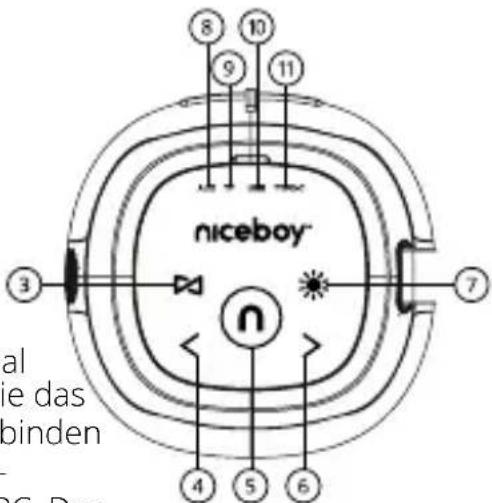
Za uključivanje ili isključivanje zvučnika pritisnite i držite gumb (5) u trajanju od 3 sekunde.
*Ako zvučnik ostane neaktivan, automatski će se isključiti nakon 15 minuta radi uštede energije.
POVEZIVANJE S UREĐAJEM
- Za uključivanje zvučnika pritisnite i držite gumb (5) u trajanju od 3 sekunde. Zvučnik je sada u načinu uparivanja za bežično povezivanje. Način uparivanja označen je treperenjem LED diode plave boje unutar gumba (5).
- Uključite Bluetooth na uređaju. Odaberite „Niceboy RAZE Neon” na popisu dostupnih uređaja.
- Uređaj će se spojiti sa zvučnikom. Uspješno uparivanje označeno je zvučnim tonom i uključivanjem radne LED diode plave boje (5).
*Kada se ponovno uključi, zvučnik se automatski povezuje sa zadnjim uparenim uređajem.
*Završite uparivanje pritiskom gumba (7) dva puta.
REPRODUKCIJA ZVUKA
Za početak ili pauziranje zapisa, kratko pritisnite gumb (5). Kontrolirajte glasnoću kratkim ili dugim pritiskom gumba (1) ili (2). Kratki pritisak gumba (4) ili (6) prelazi na sljedeći ili prethodni zapis.
NAČIN RADA AUX
- Priključite priloženi kabelski priključak od 3,5 mm u audio priključak (8); zvučnik će se automatski prebaciti u odgovarajući način rada.
- Upravljajte glazbom koju reproducira zvučnik pomoću uređaja na koji je zvučnik povezan. Upravljajte glasnoćom zvučnika dugim pritiskom gumba (1) ili (2). Kratki pritisak gumba (4) ili (6) prelazi na sljedeći ili prethodni zapis.
USB IZBRISIVI MEMORIJSKI POGON I MICRO SD KARTICA
Umetnite uređaj za pohranu podataka u odgovarajući priključak (9), (10).
Zvučnik se automatski prebacuje u način rada za reprodukciju, što je označeno zvučnim tonom. Za početak ili pauziranje zapisa, kratko pritisnite gumb (5). Upravljajte glasnoćom zvučnika dugim pritiskom gumba (1) ili (2). Kratki pritisak gumba (4) ili (6) prelazi na sljedeći ili prethodni zapis.
*Uređaj podržava uređaje za pohranu podataka s maksimalnim kapacitetom od 32 GB i MP3 oblik audiozapisa.
TELEFONSKI POZIVI
Da biste odgovorili i nakon toga završili telefonski poziv, pritisnite gumb (3). Dugim pritiskom pritisnite isti gumb za odbijanje dolaznog poziva. Dva puta pritisnite gumb za ponovno biranje posljednjeg pozvanog broja.
NAČINI OSVJETLJENJA
PRAVA BREZŽIČNA POVEZAVA (TWS)
Codecuri acceptate: SBC
Profiluri acceptate: A2DP, AVRCP, HFP
Putere de ieşire: 15 W
Impedanță: 4 Ω
Sensibilitate: >88 dB
STRÖM PÅ / AV
Prague 4, Czech Republic, ID: 294 16 876.
Made in China.
RoHS CE 📧 ✉


- User Manual / Wireless Speaker
- CZ
- OBSAH BALENÍ
- PRODUCT DESCRIPTION
- CHARGING
- POWER ON / OFF
- CONNECTING TO A DEVICE
- PLAYBACK
- AUX MODE
- USB FLASH DRIVE AND MICRO SD CARD
- PHONE CALLS
- LIGHTING MODES
- TRUE WIRELESS (TWS) CONNECTION
- FACTORY SETTINGS
- PARAMETERS
- SAFETY INFORMATION
- INFORMATION FOR USERS ON DISPOSAL OF ELECTRICAL AND ELECTRONIC EQUIPMENT (HOUSEHOLDS)
- DE
- LIEFERUMFANG
- UKLJUČIVANJE/ISKLJUČIVANJE
- POVEZIVANJE S UREĐAJEM
- REPRODUKCIJA ZVUKA
- NAČIN RADA AUX
- USB IZBRISIVI MEMORIJSKI POGON I MICRO SD KARTICA
- TELEFONSKI POZIVI
- NAČINI OSVJETLJENJA
- PRAVA BREZŽIČNA POVEZAVA (TWS)
- STRÖM PÅ / AV
Brand : Niceboy
Model : RAZE Neon
Category : Loudspeaker