
ZI-EBM40V-AKKU - Drill Zipper - Free user manual and instructions
Find the device manual for free ZI-EBM40V-AKKU Zipper in PDF.


| Product Type | Cordless Drill |
| Brand | Zipper |
| Model | ZI-EBM40V-AKKU |
| Voltage | 40 V |
| Battery Type | Li-Ion |
| Chuck Type | Keyless, 1/2" (13 mm) |
| No-Load Speed | 0-1600 RPM (variable) |
| Max Torque | 50 Nm |
| Drilling Capacity (Steel) | 13 mm |
| Drilling Capacity (Wood) | 38 mm |
| Weight (with battery) | 2.1 kg |
| Dimensions (L x W x H) | 250 x 80 x 240 mm |
| Motor Type | Brushed |
| Number of Clutch Settings | 18+1 |
| Side Handle Included | Yes |
| Belt Clip Included | Yes |
| LED Work Light | Yes |
| Charger Included | Yes |
| Battery Capacity | 4.0 Ah |
| Recommended Use | Drilling and screwdriving in wood, metal, plastic |
| Maintenance | Keep vents clean, check carbon brushes periodically |
| Safety Features | Lock-on button, overload protection |
Frequently Asked Questions - ZI-EBM40V-AKKU Zipper
User questions about ZI-EBM40V-AKKU Zipper
0 question about this device. Answer the ones you know or ask your own.
Ask a new question about this device
Download the instructions for your Drill in PDF format for free! Find your manual ZI-EBM40V-AKKU - Zipper and take your electronic device back in hand. On this page are published all the documents necessary for the use of your device. ZI-EBM40V-AKKU by Zipper.
USER MANUAL ZI-EBM40V-AKKU Zipper
natural_image
Green and white electric drill bit with spiral drill (no text or symbols visible)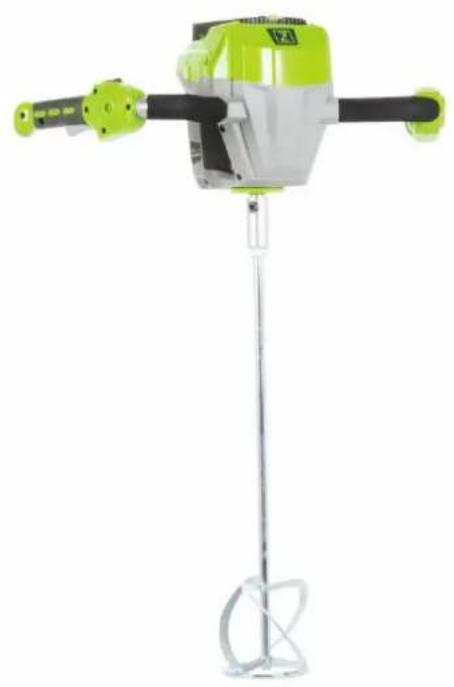
natural_image
Green and white industrial mixing machine with a metal stand (no visible text or symbols)CE
ZI-EBM40V-AKKU
EAN: 9120039232911

1 INHALT / INDEX
1 INHALT / INDEX 2
11.1 Intended use of the machine.... 15
11.1.1 Technical Restrictions 15
11.1.2 Prohibited Use / Forseeable Misuse.... 15
11.2 User Qualification.... 15
11.3 Safety instructions 16
11.4 Special safety instructions for the operation the machine 16
11.5 Safety instruction for battery and charger.... 17
11.6 Hazard Warnings.... 17
12 ASSEMBLY 18
12.1 Assembly steps.... 19
13 OPERATION 19
13.1 Operation instructions....19
14 MAINTENANCE 20
14.1 Cleaning 21
14.2 Storage.... 21
14.3 Disposal....21
15 TROUBLE SHOOTING 21
16 ERSATZTEILE / SPARE PARTS 22
EN EC-CONFORM - This product complies with the EC-directives.

EN READ THE MANUAL! Read the user and maintenance manual carefully and get familiar with the controls in order to use the machine correctly and to avoid injuries and machine defects.

EN ATTENTION! Ignoring the safety signs and warnings applied on the machine as well as ignoring the security and operating instructions can cause serious injuries and even lead to death.

EN Protective clothing!


EN Protect the device from rain and do not leave it outdoors in the rain!!
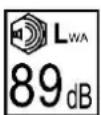
EN Keep third parties away from the danger area! Always maintain a safe distance from the garden tool when it is working!

EN Ejected objects and rotating parts can cause serious injuries.

EN Do not touch rotating parts!

DE Gleichspannung
EN Direct current (DC)
3 TECHNIK / TECHIC
3.1 Lieferumfang / delivery content
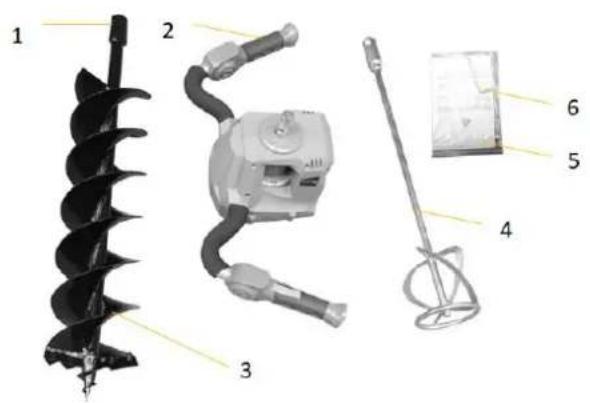
| ZI-EBM40V-AKKU | |
| 1 | Fixierschraube / fixation screw |
| 2 | Maschine / machine |
| 3 | Erdbohrer / earth drill |
| 4 | Mixer / mixer |
| 5 | Bedienungsanleitung / manual |
| 6 | Inbussschlüssel / allen key |
3.2 Komponenten / components
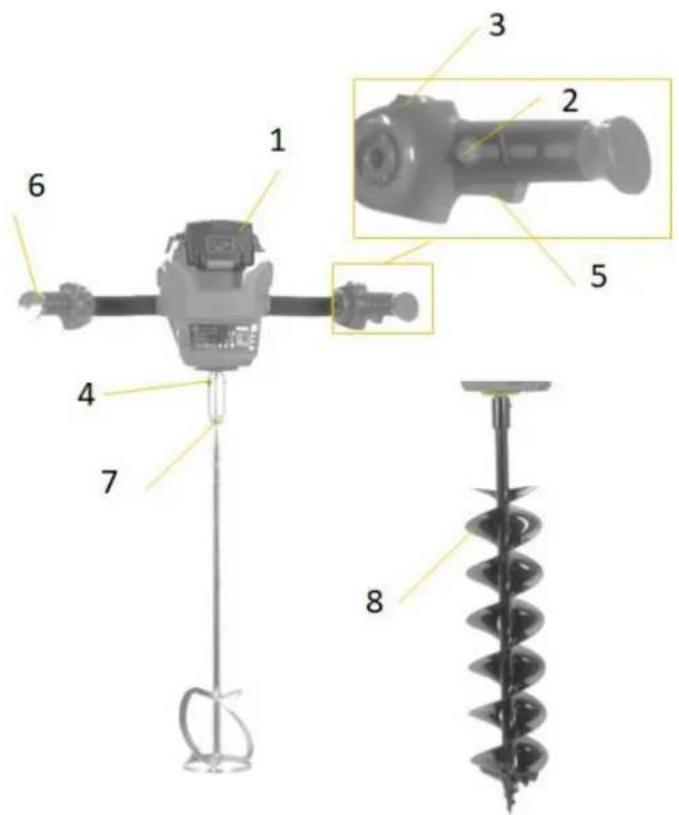
| ZI-EBM40V-AKKU | |||
| 1 | Akku (optional) / battery (optional) | 5 | Aktivierungshebel / operation lever |
| 2 | Einschaltsicherung / interlock switch | 6 | Handgriff / handle |
| 3 | Ein-Aus-Schalter / ON-OFF switch | 7 | Mixer / mixer |
| 4 | Verbindungsbolzen / connection bolt | 8 | Bohrer / drill |
ARBEITS HINWEISE
This manual contains information and important instructions for the installation and correct use of the ZIPPER the of the EARTH DRILL & MIXER 40VOLT AKKU ZI-EBM40V-AKKU.
Following the usual commercial name of the machine (see cover) is substituted in this manual with the name "machine".

This manual is part of the product and shall not be stored separately from the product. Save it for later reference and if you let other people use the product, add this instruction manual to the product.
Please read and obey the security instructions!
Due to constant advancements in product design, construction pictures and content may diverse slightly. However, if you discover any errors, inform us please.
Technical specifications are subject to changes!
Please check the product contents immediately after receipt for any eventual transport damage or missing parts.
Claims from transport damage or missing parts must be placed immediately after initial product receipt and unpacking before putting the product into operation.
Please understand that later claims cannot be accepted anymore.
Copyright
© 2017
This document is protected by international copyright law. Any unauthorized duplication, translation or use of pictures, illustrations or text of this manual will be pursued by law.
Court of jurisdiction is the regional court Linz or the competent court for 4707 Schlüsslberg, Austria
Customer Support
This section contains information and important notices for safe commissioning and handling of machine.

For your own safety, read these operating instructions carefully before putting the machine into operation. This will enable you to handle the machine safely and prevent misunderstandings as well as possible damage to property and persons. Also observe the symbols and pictograms used as well as the safety instructions and hazard warnings!
11.1 Intended use of the machine
The machine is intended exclusively for the following activities:
For drilling round holes in earth (clay, topsoil, sand, etc.). These can be, for example, holes for planting small trees, holes for setting fence posts, etc. and for mixing (stirring) paint and mortar, or similar substances within the specified limits
ZIPPER-MASCHINEN assumes no responsibility or warranty for any other use or use beyond this and for any resulting damage to property or injury.
11.1.1 Technical Restrictions
The machine is intended for use under the following ambient conditions:
relative humidity: max. 70 %
temperature (for operation) +5°C bis +40°C
temperature (for storage and /or transport) 0^ C bis +45^ C
11.1.2 Prohibited Use / Forseeable Misuse
• Operation of the machine without adequate physical and mental aptitude
- Operating the machine without knowledge of the operating instructions
• Changes in the design of the machine
- Operating the machine under explosive conditions
- Operating the machine in wet and rainy conditions
• Operation of the machine indoors or closed areas
• Operation of the machine without functioning or missing guard plates
- Removal of the safety markings attached to the machine
- Changing, bypassing or disabling the safety devices of the machine
- Operating the machine with a damaged/ defective tools
- Operation as an earth auger in earth with many roots and/or stones or in areas where there are electric cables, gas pipes, water pipes or telephone cables.
The prohibited/hazardous use or disregard of the information and instructions presented in this manual will result in the voiding of all warranty and damage claims against ZIPPER Maschinen GmbH.
11.2 User Qualification
Prerequisite for the use / operation of the machine is a corresponding physical and mental aptitude as well as knowledge and understanding of the instruction Manual.
Please note that local laws and regulations may determine the minimum age of the operator and restrict the use of this machine!
Put on your personal protective equipment before working on the machine.
Work on electrical components or equipment may only be carried out by a qualified electrician or carried out under the guidance and supervision of a qualified Electrician.
11.3 Safety instructions
In order to avoid malfunctions, damage and health hazards when working with this machine, in addition to the general rules for safe working, the following measures in particular must be observed UNCONDITIONALLY:
- Check the machine for proper condition before each use. Make sure that all guards are in place and in working condition and make sure that all screws, nuts, etc. are tightened. Do not operate the machine if you notice that parts are missing or damaged!
- Ensure sufficient lighting conditions in the working and surrounding area of the machine.
- Keep your hands and feet away from moving machine parts and always ensure a secure stand when working.
- Remove the setting tool from the machine before switching on.
- Never leave the running machine unattended (always switch the machine off before leaving).
- Ensure that unauthorised persons maintain an appropriate safety distance from the machine, and in particular keep children away from the machine.
- The machine may only be operated, maintained or repaired by persons who are familiar with it and who have been informed of the risks involved in this work.
• Always wear suitable personal protective equipment (hearing protection, safety shoes etc.)! - Do not work on the machine if you are tired, unconcentrated or under the influence of medicines, alcohol or drugs!
- Do not use the machine in areas where vapours from paints, solvents or flammable liquids represent a potential danger (danger of fire or explosion!).
- Do not use a machine whose switch is defective. A machine that can no longer be switched on or off is dangerous and must be repaired
- Do not overload the machine. Use the machine intended for the job. With the right machine you will work better and safer in the specified power range.
- Only use spare parts and accessories recommended by Zipper machines.
11.4 Special safety instructions for the operation the machine
- Wear solid and non-slip shoes when working. Slips/stumps/falls are a major cause of serious or fatal injuries.
- Only use drills or mixers approved for the machine!
- Never use damaged drills or mixers!
- Earth borers/mixers may only be used in the vertical position (borer/mixer down)!
- The machine must be held with both hands while working
- Before each use, check the operational safety of the machine (tight fit of the tool, correct function)
- Before starting, after failure or impact, check the appliance and make sure that it is in good condition
- Do not wear jewellery or loose clothing that could be caught by the machine. Keep long hair away from the air sampling openings.
- Check the area where the machine is used and remove stones and wires that could be caught by the machine to avoid causing danger to persons.
- Do not operate the machine if persons (especially children) or animals are in the immediate vicinity.
- Ensure that there are no electrical cables, water pipes, gas pipes in the ground in the working area.
- Remove tall grass, bushes etc. from the working area. These could otherwise wrap themselves around the drill!
- Disconnect the plug from the socket and/or remove the battery before making machine adjustments, changing accessories or putting the machine away. This precaution prevents the machine from starting unintentionally
- Avoid abnormal posture. Ensure a secure stand and keep your balance at all times. This will give you better control of the machine in unexpected situations and on particularly steep slopes.
11.5 Safety instruction for battery and charger
CHARGER:
- The charger is only suitable for charging the batteries that match the charger. Charging other batteries is not permitted (suitable batteries are described in the operating manual).
- Never use the charger in a damp or wet environment.
- Only disconnect cable connections by pulling the plug. Pulling on the cable could damage the cable and plug and electrical safety would no longer be guaranteed.
- Never use the charger if the cable, plug or the device itself is damaged by external influences. Then take the charger to the next authorised workshop.
• Prevent the cooling function of the unit from being impeded by covering the cooling slots. - Do not operate the unit near heat sources.
- Do not use an extension cable to connect the charger to the power supply unit of the charging station.
- Do not place any metal objects in the area of the charging contacts of the charging station.
• Never open the charger. In the event of a fault, contact a qualified workshop. - Only use the original charger to charge the battery. Using other chargers may cause defects or cause a fire
- Always check that the mains voltage and frequency match the voltage / frequency indicated on the charger's type-plate
BATTERY:
- Vapours may escape if used improperly or if the batteries are damaged. Supply fresh air and consult a doctor if you have any complaints. The vapours can irritate the respiratory system.
- DANGER OF FIRE! Never charge batteries in the vicinity of acids and highly flammable materials.
- Only charge the battery in an ambient temperature between 0^ C and +40^ C. Allow to cool down first after heavy load.
- DANGER OF EXPLOSION! Protect battery from heat and fire.
• Only use the battery in an ambient temperature between 0^ C and +45^ C. - DANGER OF SHORT CIRCUIT! For disposal, transport or storage the battery must be packed (plastic bag, box) or the contacts must be taped.
- Never open the battery
- The battery can be damaged by sharp objects such as a nail or screwdriver or by external force. An internal short circuit may occur and the battery may burn, smoke, explode or overheat
- Only charge the batteries with chargers recommended by the manufacturer. A charger that is suitable for a particular type of battery creates a fire hazard when used with other batteries
11.6 Hazard Warnings
Despite intended use, certain residual risks remain:
- Risk of injury due to noise:
Working for a long time can damage your hearing if you do not have a very good hearing protection.
- Risk of injury due to the working area:
Solid objects, stones, metal parts, or the like can be thrown out!
- Risk to the hands or fingers or food:
Never reach into the rotating parts of the machine during operation.
- Gripping and rewinding:
Wires and cords can be caught by the drill and can both damage the machine and cause injury. When removing such conditions, remove the battery!
- Vibration:
If persons with circulatory disorders expose themselves to strong mechanical vibrations, damage to blood vessels and/or the nervous system may occur. The following symptoms can be caused by vibrations in the fingers, hands or wrists: "falling asleep" of body parts (numbness), tingling, pain, stinging, change in skin colour or skin. If any of these symptoms occur, consult a doctor!
To reduce the risk of "white finger disease", keep your hands warm while working and maintain and care for tools and accessories well.
- Rotating parts
If rotating parts are incorrectly attached, this can lead to serious accidents. Before starting work, check that the auger or mixer is firmly fixed.
- Blocking
Sudden blocking of the drill can cause sudden torsion of the body.
Due to the design and construction of the machine, hazardous situations may occur which are identified as follows in these operating instructions:
| DANGER | |
 | A safety instruction designed in this way indicates an imminently hazardous situation which, if not avoided, will result in death or serious injury. |
| WARNING | |
 | Such a safety instruction indicates a potentially hazardous situation which, if not avoided, may result in serious injury or even death. |
| CAUTION | |
 | A safety instruction designed in this way indicates a potentially hazardous situation which, if not avoided, may result in minor or moderate injury. |
| NOTICE | |
 | A safety note designed in this way indicates a potentially dangerous situation which, if not avoided, may result in property damage. |
WARNING
12 ASSEMBLY
Please check the product contents immediately after receipt for any eventual transport damage or missing parts. Claims from transport damage or missing parts must be placed immediately after initial machine receipt and unpacking before putting the machine into operation. Please understand that later claims cannot be accepted anymore
12.1 Assembly steps
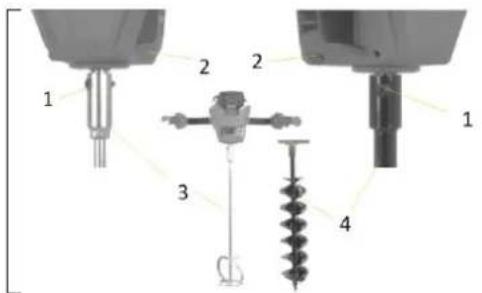
Fix the mixer (3) or auger (2) to the machine with screws (1).
To do this, place the respective tool (2 or 3) on the machine, align the holes on the drive shaft of the machine and the tool, push the screws through and tighten them in the thread of the tool. For disassembly loosen the screw again and remove the tool.
13 OPERATION
NOTICE

The batteries are not fully charged on delivery. Prior to initial operation, charge the batteries fully. See user manual of the battery charger.
13.1 Operation instructions
Device to be operated in a perfect state only. Inspect the device visually every time it is to be used. Check in particular the safety equipment, electrical controls, electric cables and screwed connection for damage and if tightened properly. Replace any damaged parts before operating the device.
WARNING

Unplug battery before all maintenance and settings and cleanings!
Never remove the battery while the machine is running.
If the power tool is damaged or vibrates unusually, it must be repaired by a service centre before it is used again.
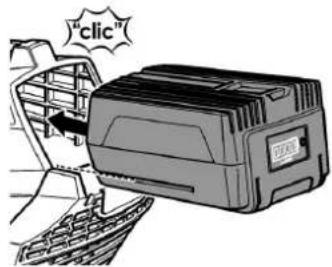
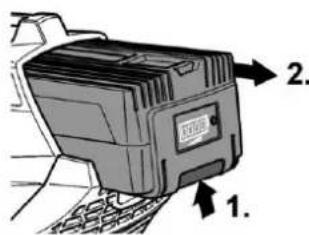
Inserting/replacing the battery:
- Charging the battery as described in the user manual of the charger.
- Press the charged battery into the power tool until it clicks into place.
- To remove, press the release button (1.) and pull out the battery (2.).
Switching on :
- Activate the machine an put the ON-OFF-Switch (1) into Position (I)
- First press and hold the interlock button (2).
- Then press the activation lever (3).
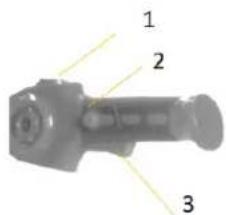
Switching off:
- Release the activation lever (3) or turn the ON-OFF switch (1) to position (0). Release the On/Off switch.
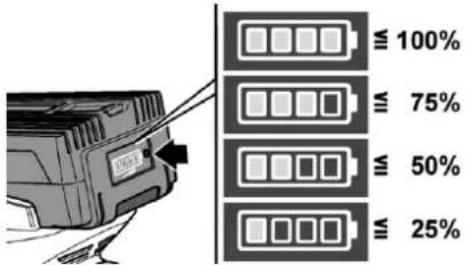
Battery state of charge:
- Press the button on the battery to check the state of charge at the state of charge indicator LEDs.
The indicator goes out after 5 seconds.
If one of the LEDs flashes, the battery must be recharged. If none of the LEDs light up after the button is pressed, the battery is faulty and must be replaced.
WORK INSTRUCTIONS
• The machine is delivered pre-assembled, only the drill / mixer must be fitted before operation.
- If the rotating parts (drill / mixer) are mounted incorrectly, it can lead to serious accidents! Check before starting work the correct mounting of the drill.
- Mount the drill / mixer only with the supplied connecting bolt.
- Drill deeper holes within 2-3 working steps!
- Is the ground with many roots and / or stones keep extreme caution: Be especially careful that you do not meet an unexpected blocking of the drill by jamming in a root or a large stone unprepared.
- Remove loose objects lying around in the immediate working area. They might be winded up by the rotating drill and block it.
• Take a safe position and hold the machine firmly on both handles.
- Put the tip of the drill on the ground and start the process carefully.
- Drill holes without exerting too much body weight on the auger. Allow the auger to advance by its own weight.
14 MAINTENANCE
WARNING

Remove the battery before carrying out maintenance work on the machine! This prevents damage to property and serious injuries due to unintentional switching on of the machine!
The machine does not require extensive maintenance. If malfunctions and defects occur, let it be serviced by trained persons only.
NOTICE

Clean your machine regularly after every usage – it prolongs the machines lifespan and is a pre-requisite for a safe working environment.
Repair jobs shall be performed by respectively trained professionals only!.
Check regularly the condition of the security stickers. Replace them if required.
Check regularly the condition of the machine
14.1 Cleaning
After each use, the machine and all its parts must be thoroughly cleaned.
NOTICE

The usage of certain solutions containing ingredients damaging metal surfaces as well as the use of scrubbing agents will damage the machine surface! Never use running water or a high pressure cleaner to clean the machine.
Clean the machine after each use with a dry cloth or with a brush if it is very dirty.
- Keep the ventilation slots clean and dust-free.
- Remove the soil auger or mixer from the machine and clean it thoroughly before cleaning.
14.2 Storage
- Clean all components thoroughly before storage.
- Store the machine separately in a dry room at not less than -10^ .
- Store the battery and charger separately from the machine.
- Please observe and follow the storage conditions for the battery and charger as described in their instructions.
14.3 Disposal
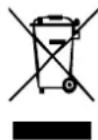
Do not dispose the machine in residual waste. Contact your local authorities for information regarding the available disposal options. When you buy at your local dealer for a replacement unit, the latter is obliged to exchange your old.
15 TROUBLE SHOOTING
WARNING

Danger due to electrical voltage! Manipulating the machine when connected to the power source can cause serious injury or death. Always disconnect the machine from the power supply before troubleshooting and secure it against unintentional restarting! Repair work may only be carried out by qualified personnel!
When you are unable to carry out necessary repairs properly and/or do not have the required skills to do so, always contact a specialist to help you in solving the problem.
| Trouble | Possible cause | Solution |
| Motor does not start | Battery is not plugged in | plug in battery |
| Battery is not charged | Recharge battery | |
| Safety switch is damaged | Check safety switch | |
| Switch is damaged | Check switch | |
| Battery cannot charged anymore | Contact failure | Check contact pins |
| Battery damaged | Change battery |
16 ERSATZTEILE / SPARE PARTS
(EN) With original ZIPPER spare parts you use parts that are attuned to each other shorten the installation time and elongate your machines lifespan.
I MP OR T AN T
The installation of other than original spare parts voids the warranty!
So you always have to use original spare parts
When you place a spare parts order please use the service formula you can find in the last chapter of this manual. Always take a note of the machine type, spare parts number and part name. We recommend to copy the spare parts diagram and mark the spare part you need.
Or use the electronic ordering opportunity via the spare parts catalogue or spare parts request form on our homepage
You find the order address in the preface of this operation manual.
(EN) For electronic spare-parts catalogue please refer to our homepage (spare-parts)
| No. | Name | Qty | No. | Name | Qty |
| 1 | Front cover | 1 | 15 | Power switch | 1 |
| 2 | Self-tapping screw | 23 | 16 | Micro switch | 1 |
| 3 | Right housing | 1 | 17 | Lock button | 1 |
| 4 | Male tab | 4 | 18 | Left handle | 1 |
| 5 | Tab seat | 1 | 19 | Fixing pipe | 1 |
| 6 | Upper cover | 20 | 20 | Left handle | 1 |
| 7 | Battery pack (optional) | 1 | 21 | Right handle | 1 |
| 8 | Brushless motor | 1 | 22 | Reduction gearbox | 1 |
| 9 | Self-tapping screw | 2 | 23 | Bolt | 3 |
| 10 | Switch | 1 | 24 | Knob | 1 |
| 11 | Controller | 1 | 25 | Decorative cover | 1 |
| 12 | Left housing | 1 | 26 | Hexagon bolt | 4 |
| 13 | Right Handle | 1 | 27 | Blade | 1 |
| 14 | Spring | 2 |
Company ZIPPER Maschinen GmbH grants for mechanical and electrical components a warranty period of 2 years for amateur use; and warranty period of 1 year for professional use, starting with the purchase of the final consumer. In case of defects during this period, which are not excluded by paragraph 3, ZIPPER will repair or replace the machine at its own discretion.
2.) Report:
In order to check the legitimacy of warranty claims, the final consumer must contact his dealer. The dealer has to report in written form the occurred defect to ZIPPER. If the warranty claim is legitimate, ZIPPER will pick up the defective machine from the dealer. Returned shippings by dealers which have not been coordinated with ZIPPER, will not be accepted and refused.
3.) Regulations:
a) Warranty claims will only be accepted, when a copy of the original invoice or cash voucher from the trading partner of ZIPPER is enclosed to the machine. The warranty claim expires if the accessories belonging to the machine are missing.
b) The warranty does not include free checking, maintenance, inspection or service works on the machine. Defects due to incorrect usage of the final consumer or his dealer will not be accepted as warranty claims either. Some examples: usage of wrong fuel, frost damages in water tanks, leaving fuel in the tank during the winter, etc.
c) Defects on wear parts are excluded, e.g. carbon brushes, collection bags, knives, cylinders, cutting blades, clutches, sealings, wheels, saw blades, splitting crosses, riving knives, riving knife extensions, hydraulic oils, oil/air/fuel filters, chains, spark plugs, sliding blocks, etc.
d) Also excluded are damages on the machine caused by incorrect or inappropriate usage, if it was used for a purpose which the machine is not supposed to, ignoring the user manual, force majeure, repairs or technical manipulations by not authorized workshops or by the customer himself, usage of non-original ZIPPER spare parts or accessories.
e) After inspection by our qualified personnel, resulted costs (like freight charges) and expenses for not legitimated warranty claims will be charged to the final customer or dealer.
f) In case of defective machines outside the warranty period, we will only repair after advance payment or dealer's invoice according to the cost estimate (incl. freight costs) of ZIPPER.
g) Warranty claims can only be granted for customers of an authorized ZIPPER dealer who directly purchased the machine from ZIPPER. These claims are not transferable in case of multiple sales of the machine.
4.) Claims for compensation and other liabilities:
The liability of company ZIPPER is limited to the value of goods in all cases. Claims for compensation because of poor performance, lacks, damages or loss of earnings due to defects during the warranty period will not be accepted. ZIPPER insists on its right to subsequent improvement of the machine.
PRODUKTBEOBACHTUNG
Product monitoring form
We monitor the quality of our delivered products in the frame of a Quality Management policy.
Your opinion is essential for further product development and product choice. Please let us know about your:
- Impressions and suggestions for improvement.
- experiences that may be useful for other users and for product design
- Experiences with malfunctions that occur in specific operation modes
We would like to ask you to note down your experiences and observations and send them to us via FAX, E-Mail or by post:
Erworben von / purchased from:
E-Mail/ e-mail:
Please describe amongst others in the problem: What has cause the problem/defect, what was the last activity before you noticed the problem/defect? For electrical problems: Have you had checked you electric supply and the machine already by a certified electrician?
3. Bitte beachten
/ Additional information
INCOMPLETELY FILLED SERVICE FORMS CANNOT BE PROCESSED! FOR GUARANTEE CLAIMS PLEASE ADD A COPY OF YOUR ORIGINAL SALES / DELIVERY RECEIPT OTHERWISE IT CANNOT BE ACCEPTED. FOR SPARE PART ORDERS PLEASE ADD TO THIS SERVICE FORM A COPY OF THE RESPECTIVE EXPLODED DRAWING WITH THE REQUIRED SPARE PARTS BEING MARKED CLEARLY AND UNMISTAKABLE. THIS HELPS US TO IDENTIFY THE REQUIRED SPARE PARTS FASTLY AND ACCEL- LERATES THE HANDLING OF YOUR INQUIRY.


- INHALT / INDEX
- INHALT / INDEX 2
- ASSEMBLY 18
- OPERATION 19
- MAINTENANCE 20
- TROUBLE SHOOTING 21
- ERSATZTEILE / SPARE PARTS 22
- TECHNIK / TECHIC
- Lieferumfang / delivery content
- Komponenten / components
- ARBEITS HINWEISE
- Please read and obey the security instructions!
- Copyright
- Customer Support
- Intended use of the machine
- Technical Restrictions
- Prohibited Use / Forseeable Misuse
- User Qualification
- Please note that local laws and regulations may determine the minimum age of the operator and restrict the use of this machine!
- Work on electrical components or equipment may only be carried out by a qualified electrician or carried out under the guidance and supervision of a qualified Electrician.
- Safety instructions
- Special safety instructions for the operation the machine
- Safety instruction for battery and charger
- CHARGER:
- BATTERY:
- Hazard Warnings
- - Gripping and rewinding:
- - Vibration:
- - Rotating parts
- - Blocking
- WARNING
- ASSEMBLY
- Assembly steps
- OPERATION
- NOTICE
- Operation instructions
- Inserting/replacing the battery:
- Switching on :
- Switching off:
- Battery state of charge:
- WORK INSTRUCTIONS
- MAINTENANCE
- Cleaning
- Storage
- Disposal
- TROUBLE SHOOTING
- ERSATZTEILE / SPARE PARTS
- I MP OR T AN T
- The installation of other than original spare parts voids the warranty!
- 2.) Report:
- 3.) Regulations:
- 4.) Claims for compensation and other liabilities:
- PRODUKTBEOBACHTUNG
- Product monitoring form
- Bitte beachten
- / Additional information
Brand : Zipper
Model : ZI-EBM40V-AKKU
Category : Drill