
CDX82-60 - CD Player Clas Ohlson - Free user manual and instructions
Find the device manual for free CDX82-60 Clas Ohlson in PDF.


| Product Type | CD Player with 60-second antishake memory |
| Brand | Clas Ohlson |
| Model | CDX82-60 |
| Dimensions (D x W x H) | 155 x 141 x 27 mm |
| Weight | 270 g (without batteries) |
| Power Supply | 2 x LR6 (AA) batteries (not included) or 4.5 V DC 600 mA adaptor (not included) |
| Playback Media | CD, CD-R, CD-RW, MP3 |
| Anti-shake Memory | 60 seconds (ESP - Electronic Shock Protection) |
| Programmable Tracks | Up to 20 |
| Play Modes | Normal, Repeat (1/All), Random, Intro |
| Bass Boost | Yes (switch ON/OFF) |
| Headphone Output | 20 mW + 20 mW (3.5 mm stereo jack) |
| Line Out | 3.5 mm stereo (with sealing plug) |
| Laser Type | Optical semiconductor, 780 nm, Class 1 |
| Frequency Range | 50 Hz – 15 kHz (+1/-2 dB) |
| Sampling Frequency | 44.1 kHz |
| D/A Converter | 1-bit |
| Error Correction | CIRC |
| Operating Temperature | 5°C – 35°C |
| Safety Certification | Class 1 Laser Product (invisible laser radiation) |
| Accessories Included | Stereo headphones, sealing plug for Line Out |
Frequently Asked Questions - CDX82-60 Clas Ohlson
User questions about CDX82-60 Clas Ohlson
0 question about this device. Answer the ones you know or ask your own.
Ask a new question about this device
Download the instructions for your CD Player in PDF format for free! Find your manual CDX82-60 - Clas Ohlson and take your electronic device back in hand. On this page are published all the documents necessary for the use of your device. CDX82-60 by Clas Ohlson.
USER MANUAL CDX82-60 Clas Ohlson
CD player with 60s antishake memory
natural_image
Line drawing of a computer monitor with buttons and display (no text or symbols)Modell/Malli: CDX82-60
CLAS OHLSON
www.clasohlson.com
CD player with 60s antishake memory
Please read the entire instruction manual before using and save it for future use.
We apologise for any text or photo errors and any changes of technical data.
If you have any questions concerning technical problems please contact our Customer Service Department (see address on reverse.)
Read operating instructions and warning text on the player before you begin using it.
Note the following safety symbols
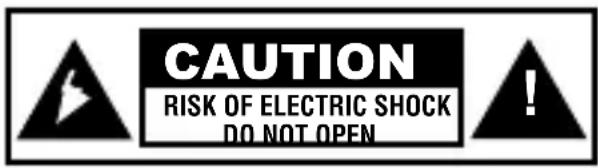
Warning! Do not open the casing! Dangerous current exists in unprotected components within the product's casing. Contact with these can lead to fire or give electric shocks.
On the CD player

CLASS 1 LASER DEVICE
Warning! Do not open the casing! Invisible laser radiation can cause eye damage.
Do not look directly into the laser beam or look directly at it through an optical instrument.
1. Safety Instructions
- The product should only be repaired by qualified service personnel.
- The product should not be taken apart or changed.
- Do not place the product where it could fall into water or another type of liquid. Do not place any objects which contain liquid on the product, e.g. flower vase or soft drink.
- Do not disassemble the player. The laser beam which is used for reading discs can cause eye damage.
- Do not stick in any foreign objects in CD player. Player is equipped with a safety device which automatically shuts of laser beam when CD cover opens. However, it can be inactivated if some type of metal object or other foreign object is driven into player.
- Do not expose the player to impacts or vibrations.
- Do not put the player in places with high temperature. The player's casing can be damaged by high temperature, e.g. in direct sunlight, near heating element or if left in car during summer.
- Use the player only in temperatures between 5^ C and 35^ C and never in places which are damp or dusty, or are exposed to strong vibrations or are unstable.
- Protect your hearing. Do not listen to the CD player with high volume. Listening with high volume for longer periods of time can lead to impaired hearing.
- Do not use the CD player while driving if it causes you to lose your ability to concentrate on the surrounding traffic.
2. This box contains
- CD/MP3 player
- Stereo headphones
- Operating Instructions
- Sealing plug for Line-Out outlet
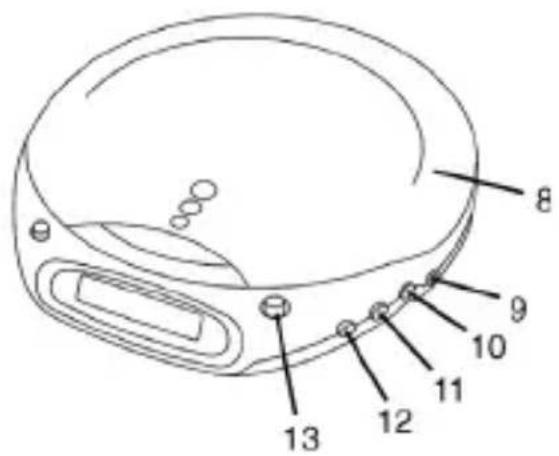
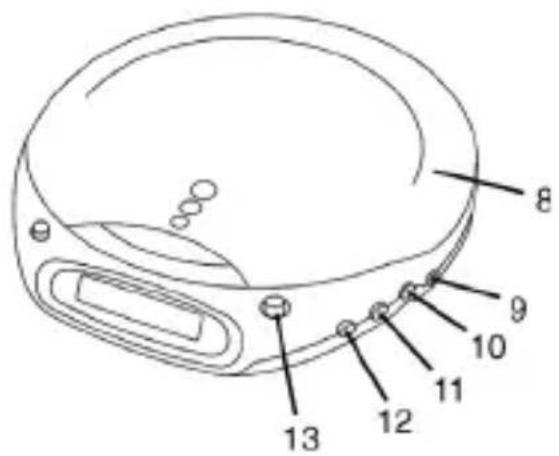
3. Controls and Functions
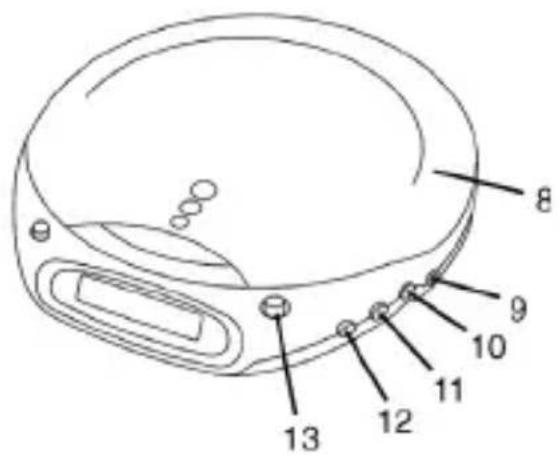
- Display
- [OPEN] opening of CD cover
- [REPEAT] playback
- [PROG] programme
- [RANDOM] random play
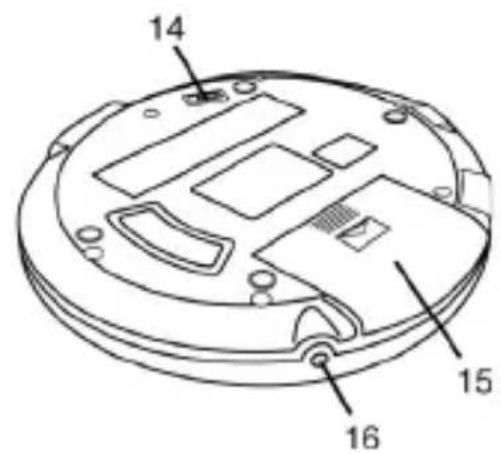
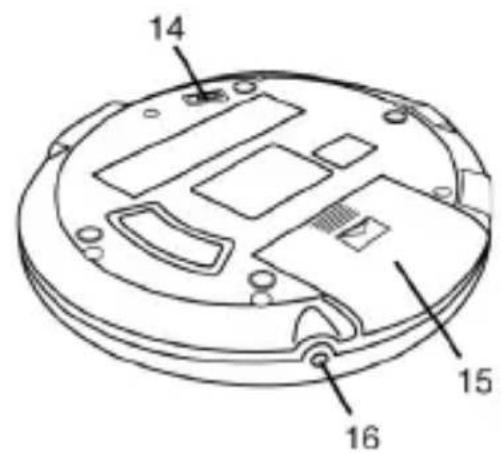
- [LINE OUT] outlet to another audio unit
- [VOLUME] volume control
- CD cover
- [PHONES] earphone jack
- [SKIP +] go to next track/quick search
- [SKIP -] go to next track/quick search
- [BASS BOOST] bass amplification
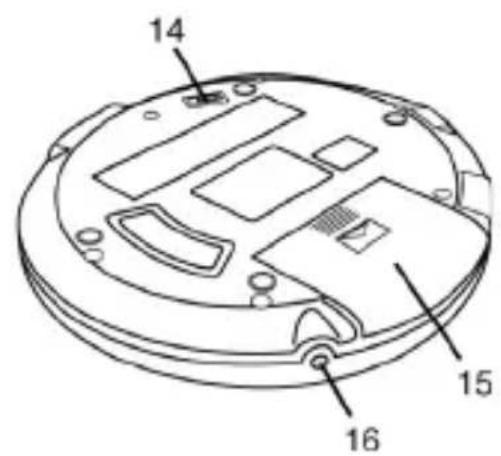
- Battery cover
-
[DC IN 4.5V] connection for AC/DC adaptor
-
[STOP] stop playing, push and hold in once to shut off CD player
-
[PLAY/PAUSE] turn on CD player, start play or pause
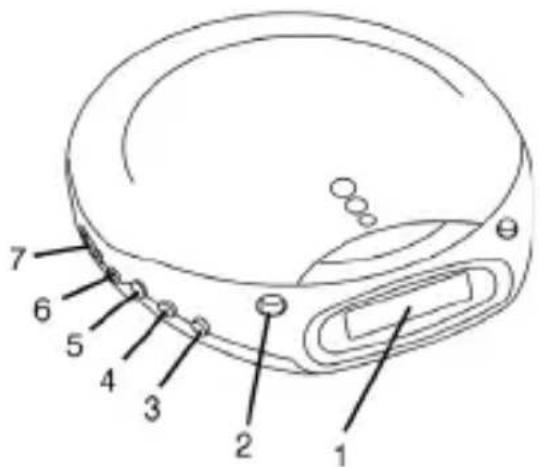
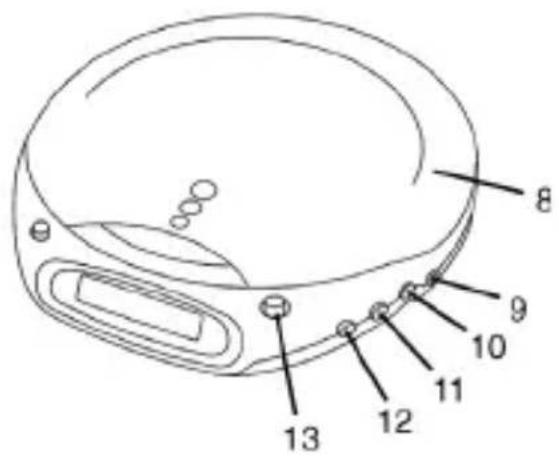
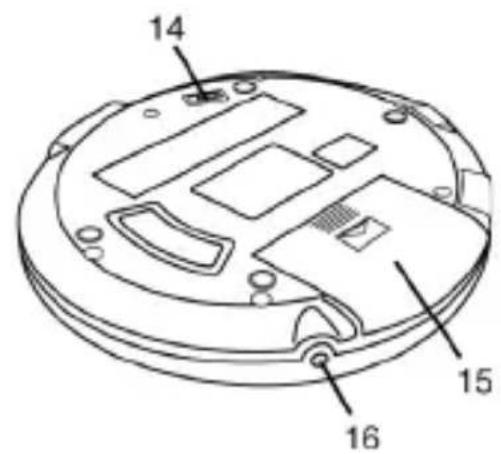
4. Display
Number of track which is currently playing
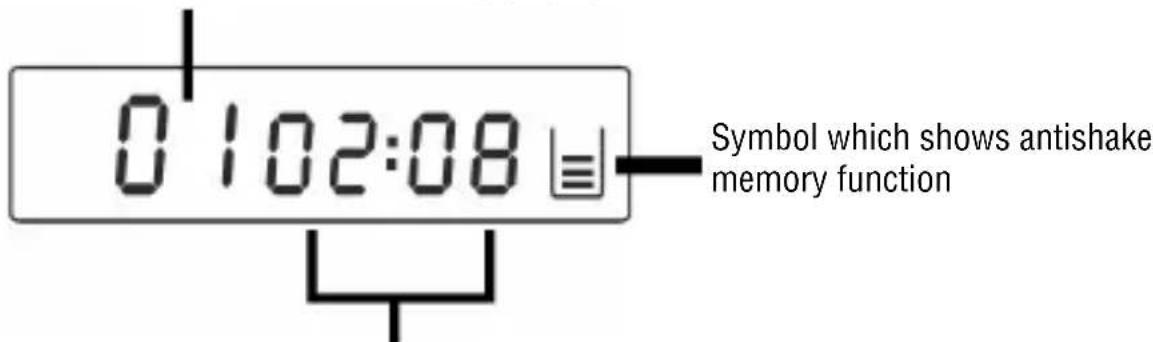
Playing time for track which is currently playing
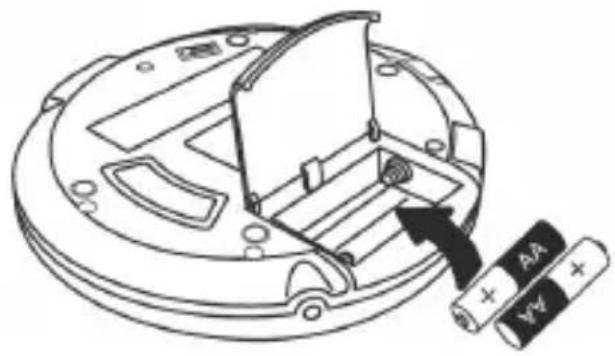
5. Batteries
Insert 2x LR6 (AA) batteries in battery pocket under CD cover according to (+) plus and (-) minus indication in bottom of battery compartment.
natural_image
Technical diagram of a battery pack assembly with a cylindrical component and two batteries (no text or symbols present)Adaptor
Suitable adaptor (not included) 4.5 V DC 600 mA DC plug with + in centre.
Note! Check that the adaptor has the correct current and polarity before connection.
Otherwise the CD/MP3 player and adaptor can be damaged which is not covered in guarantee.
Use alkaline batteries type LR6.
Do not use manganese dioxide batteries due to their low capacity which results in short playing time on CD/MP3 player. Rechargeable batteries yield lower current from the beginning (1.2 V to 1.5 V) and also yield shorter playing time.
Battery warning
- Battery symbol shown on the display indicates low batteries. Change batteries or use adaptor (adaptor not included).
- If display window is empty e.g. no number shows up when you push [PLAY/PAUSE] (13) - means that batteries are uncharged. Change them or use an adaptor. Also check that you have placed batteries in correct position with plus (+) and minus (-) according to marking in battery compartment.
Batteries
- Always use two batteries of same type. Never blend new and used batteries when changing.
- Be careful with polarity when batteries are placed in the battery compartment. If one of the batteries is placed incorrectly it can cause leakage.
- Never recharge disposable batteries (alkaline batteries, dry cell). Do not take apart batteries and do not expose them to high temperature. Do not throw batteries into fire!
6. Connection to other audio equipment
[LINE OUT] on CD player comes with a sealing plug. Take this away before using. Save this and put it back in when [LINE OUT] is not in use.
Connect a cable with 3.5 mm stereo plug to socket [LINE OUT] (6) on CD player and the other end of the cable to [LINE IN] or [AUX] on the other audio equipment.
-
Regulate the volume with volume control on the other audio equipment. Volume control on CD player has no function in this position.
-
Do NOT put headphones in [LINE OUT] outlet. Use only the green [PHONES] outlet.
7. Listen to a CD
- Push [OPEN] (2) to open CD cover.
- Place a CD securely on the spindle with label upward (a clicking sound is heard when the CD glides into correct positon.
- Push CD cover again and connect earphones to [PHONES] socket (9).
![Push here CD Label side up Press to open Stereo earphones To [PHONES]](/content/2026/05/829624/images/d6b1d56ae81c833143901f6a832fd72dfc2b1d0872a8977db7415d468e9d01e2.jpg)
- Push [PLAY/PAUSE] (13) to turn on CD player and begin playing the first track.
- Adjust volume with [VOLUME] (7).
- Push one more time [PLAY/PAUSE] to pause. Push again [PLAY/PAUSE] to continue playing track.
- Push [SKIP -] or [SKIP +] to quickly rewind backward/forward in the current playing track.
- Push [STOP] to stop play. CD player automatically shuts off after 30 seconds.
- Push [STOP] twice to directly shut off CD player.
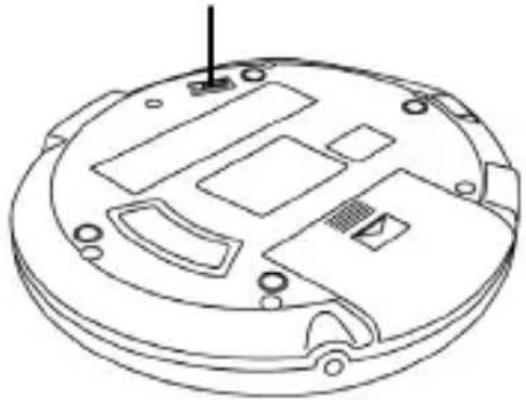
Bass amplification (BASS BOOST)
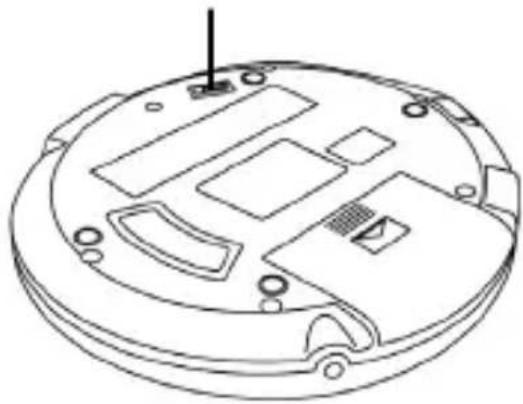
Place control [BASS BOOST] (14) in position ON to activate bass amplification or in position OFF to shut off bass amplification.
BASS BOOST Control position for bass amplification
natural_image
Technical line drawing of a circular electronic device with internal components and mounting holes (no text or symbols)8. Playing functions
Repetition of track in progress
- Push [REPEAT] once to repeat the track in progress over and over again...until you push [STOP] (12) or several times on [REPEAT] until CD player returns to normal play (from original position).
- Push [REPEAT] once to repeat the track in progress over and over again...until you push [STOP] (12) or several times on [REPEAT] until CD player returns to normal play (from original position).
Short introduction for all tracks
Listen to the first 10 seconds on all tracks.
- Push first [REPEAT] three times to choose "Intro". "Intro" blinks on the display.
- Then push [PLAY/PAUSE] to start playing the first 10 seconds on all tracks on the CD. "Intro" is shown on the display.
- For playing a track which you want to listen to in entirety push [PLAY/PAUSE] to start normal playing.
Random playing
Listen to all tracks randomly.
- Push [RANDOM] once during playing to choose random play. "RND" blinks on the display.
- Then push [PLAY/PAUSE] to start randomly playing all tracks on the CD. "RND" is shown on the display.
- Push [SKIP +] to skip to next track.
- Push [RANDOM] to return to normal playing.
9. Programmed playing
Tracks on CD can be programmed for playing in whatever order you desire. You can programme a maximum of 20 tracks.
- Push button [PROG] (4) when player is in stop position. "PROG" and "00" (track number) blinks on the display.
- Choose the track you wish to start with which can be programmed with buttons [SKIP -] and [SKIP +]. Push [PROG] to confirm starting track.
- The first track is now saved in memory. The programme number turns to "02" and waits for your next choice.
- Repeat points 2 and 3 for further programming of other tracks.
- Push button [PLAY/PAUSE] after finished programming of each track.
- "PROG" lights up on the display and playing begins from the first programmed track.
- CD player automatically stops when all the programmed tracks have played. The programmed tracks remain in memory until you open the CD cover or until electric current is turned off.
- Push twice on [REPEAT] if you want to play the same programme again.
10. Digital Buffer Memory (ESP)
- The antishake feature (60 seconds) is built on a semiconductor memory to prevent the sound from skipping when the player is exposed to impact and vibrations during playing.
- When the CD starts to play the indicator shows the shape "U" on the display and buffer memory is automatically connected. The music's digital data is stored in the forward storage buffer memory before it is decoded and starts to play. The "U" shape fills up with bars as the buffer memory becomes full.
- When the player encounters an impact during playing the memory continues to decode and play. This allows time for the pickup to stabilize and continue collecting new data later on. As the player reads data from memory one or more bars from the "U" disappear.
- When the pickup has returned to normal position new data is stored in the memory and the display changes to a "U" completely filled with bars.
- Hold in [10+/ESP/ALBUM] for three seconds to connect or disconnect the ESP function.
11. Cleaning
Cleaning of pickup lens
Dust on the pickup lens can lead to hacking sound and disturbed function.
- Open the CD cover and blow away the dust with help of an aerosol spray filled with air normally used for cameras and objective lens.
- There are also special CDs which can be purchased and used for cleaning the pickup lens.
Cleaning player casing
- Use a soft cloth which is moistened with regular luke-warm water.
- Never use alcohol, petrol or other strong solutions as they can destroy the plastic surface.
- It is important that no liquid comes in contact with the CD player.
Condensation
Condensation on the components within the laser pickup can temporarily impair the player's functions. Condensation can occur during certain circumstances:
- When you bring the player into a warm room from outdoors or if it is stored in a cold room which is warmed up quickly.
- During summer if you take the player to a warm or damp place away from a space with air conditioning (car or room).
If condensation occurs;
- Wait 1 – 2 hours to allow the player to adjust to the surrounding temperature before being used. Open CD cover to quicken process.
Warning! Do not expose the player to drops or splashes of liquids and do not place objects containing liquids on the player, e.g. vases or soft drinks.
Remember that the player needs ventilation to prevent overheating.
12. Troubleshooting
| Symptom Cause Action | ||
| CD player does not start, buttons do not function. | Low batteries. Change batteries. | |
| CD does not play. | CD is incorrectly placed in player. | Turn the CD over. |
| Damaged or wrong type of CD. | Try another CD (the player can not read DVD or Computer CD). | |
| CD cover does not close. Check that the CD cover is locked. | ||
| Condensation on pickup lens. | Take the CD out and leave the cover open for an hour to let the condensation disappear. | |
| No sound from headphones. | Headphones are not correctly plugged in. | Try to put plug in again. |
| Volume control is set at “0”. | Increase volume. | |
| Low batteries. Change batteries. | ||
| Damaged CD. Change CD. | ||
| “00” shows on the display instead of the total amount of tracks. | Damaged CD. Change CD. | |
| Volume control does not function. | Headphones are connected to “LINE OUT”. | Connect headphones to “PHONES” |
| Sound disappears every now and then. | Dust/dirt on pickup lens or CD. | Clean pickup lens with an air spray (camera accessory). Clean or change CD. |
| Strong vibration. Place the CD player on different surface. | ||
| Bad sound. Too high volume. | Lower the volume. | |
| Low battery. Change batteries. Use an adaptor. | ||
| “BASS BOOST” is activated for strong volume. | Lower volume or shut off “BASS BOOST”. | |
| The display gets stuck or shows strange signs. | Temporary error in programme or electronics. | Take out batteries (and also connected adaptor). Wait 15 seconds and put them in again. Check that the batteries in use are charged. |
13. Disposal
- Waste products must not be thrown away with household waste.
- Follow local regulations when disposing product If you are unsure about how to dispose product contact your municipality
- Used or uncharged batteries must be disposed according to the local waste disposal ordinances.
14. Specifications
General
Headphone jack: 20 mW + 20 mW
Power Supply: Batteries: 2x LR6 (not included)
Adaptor: 4.5 VDC 600mA DC plug with (+) in middle. (not included)
Size: 155 x 141 x 27 mm (d x w x h)
Weight: Approx. 270 g (without batteries)
CD player
Frequency range: 50 Hz – 15 kHz (within +1/-2dB)
Sampling frequency: 44.1 kHz
D/A converter: 1-bit
Error correction method: CIRC
Pickup: Optical semiconductor laser with three beams (780 nm wavelength)
LED: GaA1As
Laser output: less than 44.6 μW
KLASS 1 LASERAPPARAT
4. Display
natural_image
Technical diagram of a battery pack assembly with a cylindrical component and two batteries (no text or symbols present)Batterieliminator
natural_image
Technical line drawing of a circular electronic device with internal components and mounting holes (no text or symbols)KLASSE 1 LASERAPPARAT
4. Display
natural_image
Technical diagram of a battery pack assembly with a 4A battery and power supply (no text or symbols)Batterieliminator
BASS BOOST Regulering for bassforsterking
natural_image
Technical line drawing of a circular electronic device with internal components and mounting holes (no text or symbols)LUOKAN 1 LASERLAITE
4. Näyttö
natural_image
Technical diagram of a battery pack assembly with a 4A battery and power supply (no text or symbols)Muuntaja
natural_image
Technical line drawing of a circular electronic device with internal components and mounting holes (no text or symbols)For consumer contact, please visit
www.clasohlson.co.uk and click on
customer service.
INTERNET www.clasohlson.co.uk
CLAS OHLSON

- CD player with 60s antishake memory
- Note the following safety symbols
- On the CD player
- CLASS 1 LASER DEVICE
- Safety Instructions
- This box contains
- Controls and Functions
- Display
- Batteries
- Adaptor
- Battery warning
- Batteries
- Connection to other audio equipment
- Listen to a CD
- Bass amplification (BASS BOOST)
- Playing functions
- Repetition of track in progress
- Short introduction for all tracks
- Random playing
- Programmed playing
- Digital Buffer Memory (ESP)
- Cleaning
- Cleaning of pickup lens
- Cleaning player casing
- Condensation
- If condensation occurs;
- Troubleshooting
- Disposal
- Specifications
- General
- CD player
- KLASS 1 LASERAPPARAT
- Batterieliminator
- KLASSE 1 LASERAPPARAT
- LUOKAN 1 LASERLAITE
- Näyttö
- Muuntaja
Brand : Clas Ohlson
Model : CDX82-60
Category : CD Player