
CA002AB6-BT - Radio Clas Ohlson - Free user manual and instructions
Find the device manual for free CA002AB6-BT Clas Ohlson in PDF.


| Product Type | FM Radio with Bluetooth |
| Model | CA002AB6-BT |
| Art. No. | 38-6908, 38-6909, 38-6910 |
| Power Supply (AC Adaptor) | 100–240 V AC, 50/60 Hz, Output: 7.5 V DC, 2 A |
| Battery Power | 5 × C/LR14 batteries (1.5 V, sold separately) |
| FM Frequency Range | 68–108 MHz |
| Bluetooth Version | Not specified (compatible with standard Bluetooth devices) |
| AUX Input | 3.5 mm stereo jack |
| Speaker | Built-in speaker |
| Controls | Volume, Tuning knob, Power button, Source selection (BT/FM) |
| Indicators | FM and Bluetooth LED indicators |
| FM Aerial | Telescopic antenna |
| Dimensions (approx.) | 250 × 150 × 100 mm (estimated) |
| Weight (approx.) | 1.5 kg (estimated) |
| Safety | Do not disassemble, indoor use only, keep away from water, ensure ventilation |
| Maintenance | Clean with soft dry cloth; do not use solvents |
| Disposal | Dispose according to local regulations |
Frequently Asked Questions - CA002AB6-BT Clas Ohlson
User questions about CA002AB6-BT Clas Ohlson
0 question about this device. Answer the ones you know or ask your own.
Ask a new question about this device
Download the instructions for your Radio in PDF format for free! Find your manual CA002AB6-BT - Clas Ohlson and take your electronic device back in hand. On this page are published all the documents necessary for the use of your device. CA002AB6-BT by Clas Ohlson.
USER MANUAL CA002AB6-BT Clas Ohlson
FM Radio with Bluetooth
FM-radio med Bluetooth
FM-radio jossa Bluetooth
Art.no
38-6908, 38-6909, 38-6910
Model
CA002AB6-BT
Ver. 20150707
FM Radio with Bluetooth
Art.Nr 38-6908, 38-6909, 38-6910 Model CA002AB6-BT
Please read the entire instruction manual before using the product and then save it for future reference. We reserve the right for any errors in text or images and any necessary changes made to technical data. In the event of technical problems or other queries, please contact our Customer Services (see address details on the back).
Safety
- The product should not be taken apart or modified. Certain unshielded components inside the casing carry dangerous voltages. Contact with these can lead to fire or electric shock.
- The product is intended for indoor use only.
- Never subject the product to high temperature, dust, heavy vibration, impacts, humidity or moisture.
- Do not place the product where there is a risk of it falling into water or other liquid. Do not place any objects containing liquid on the product, e.g. flower vases or drinks.
- Do not cover the product. Adequate ventilation with a distance of at least 10 cm between ventilation holes and the surrounding area is necessary to prevent the appliance from becoming too warm.
- Disconnect the product from the power supply by unplugging it from the wall socket. Make sure that the wall socket and plug are easily accessible.
- The on/off switch on the product does not disconnect it from the mains power supply.
- Protect your hearing. Listening on high volume for prolonged periods can lead to permanent hearing loss.
- Repairs and service should only be performed by qualified tradesmen, and only with original spare parts.
Buttons and functions
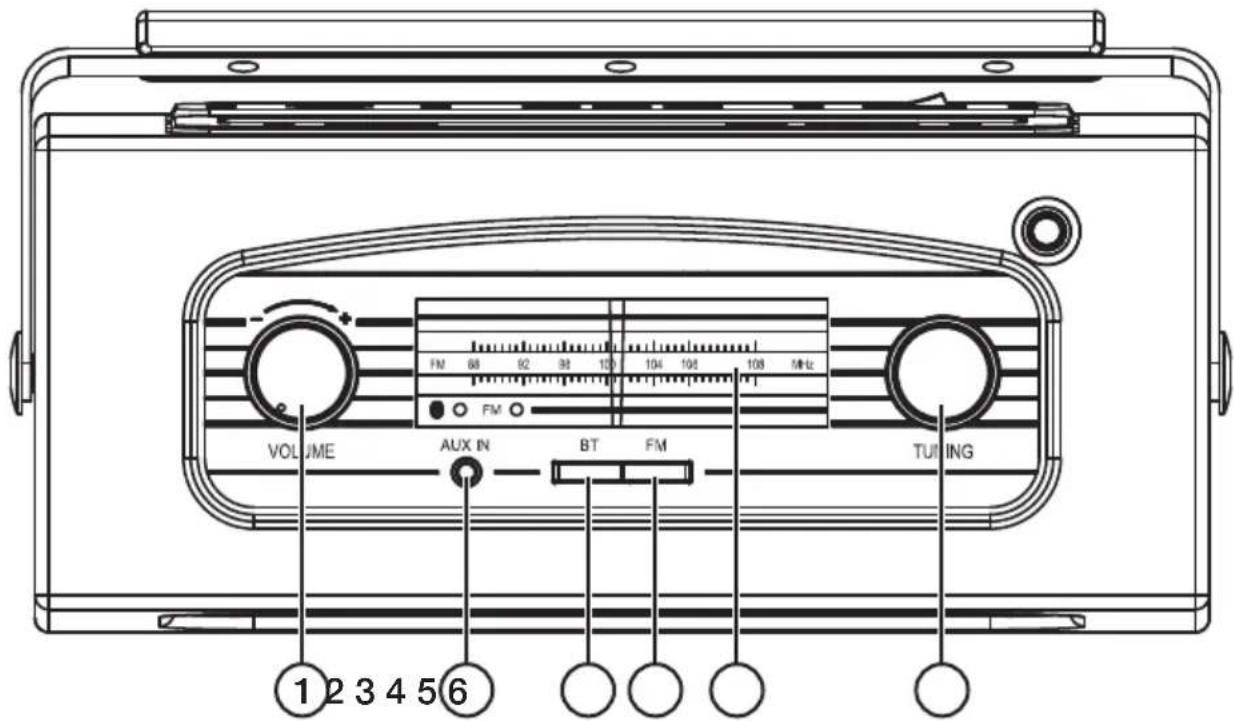
- [VOLUME]
- AUX IN: 3.5 mm socket for external audio devices
- [BT] Select Bluetooth as the input audio source
- [FM] Select FM radio as the audio source
- Window for radio frequency and mode indicators
- [TUNING] Tuning knob
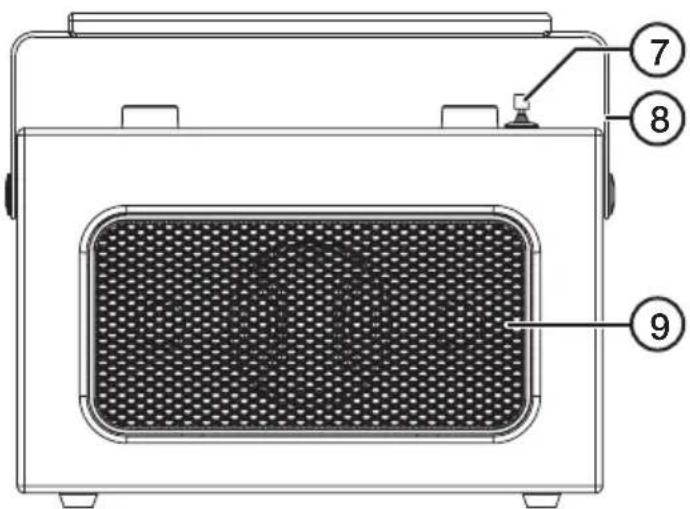
- FM aerial
- Carrying handle
- Speaker
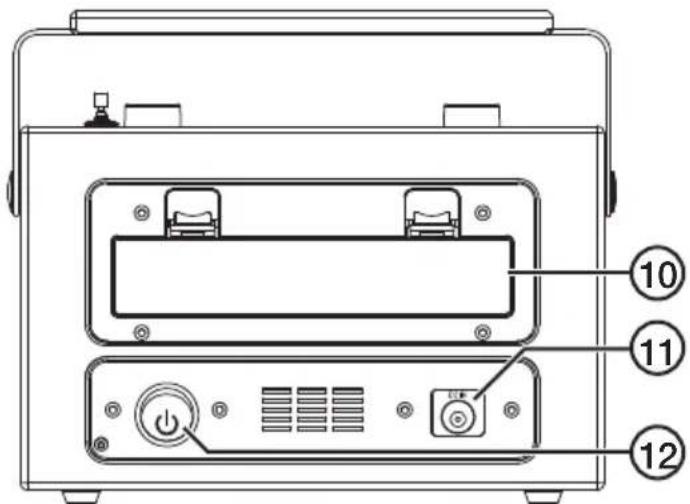
- Battery compartment
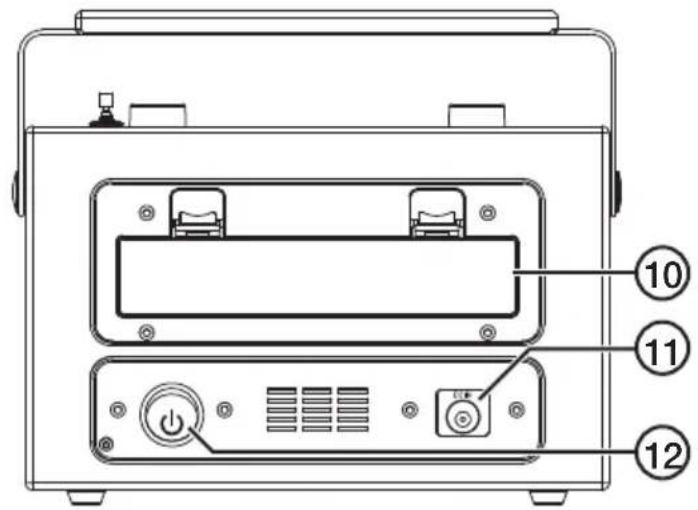
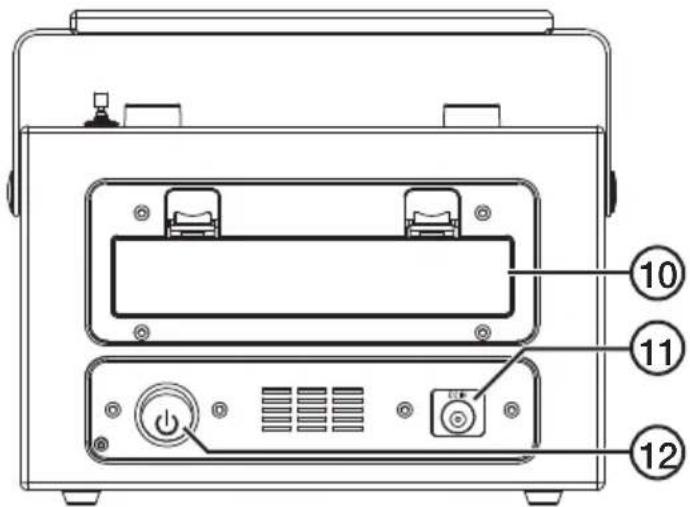
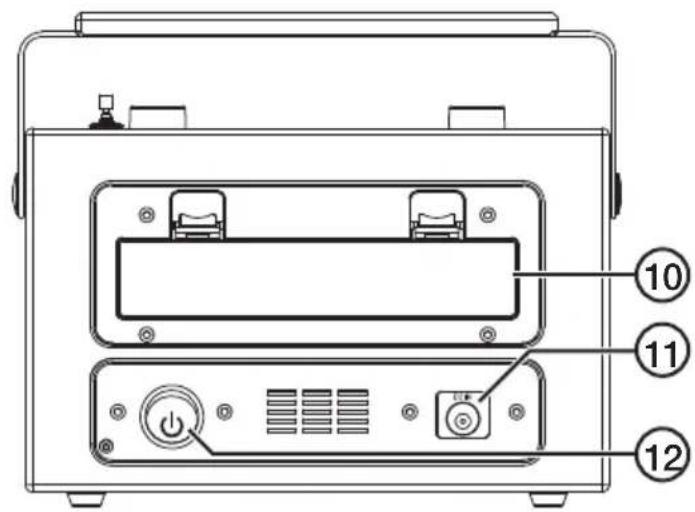
- DC IN: Mains adaptor socket
- [⏻] Power button
Power supply
The radio can be powered either by the mains via the included AC/DC adaptor or by five 1.5 V, LR14 batteries (sold separately).
Mains adaptor power
Connect the adaptor to the adaptor socket (11) and to an available power point.
Battery power
- Open the battery compartment on the back of the radio and insert the batteries in accordance with the polarity markings.
- Refit the battery cover.
Switching on/off
- Push the power button (12) to switch the radio on/off. The radio frequency window will light up.
- Hold the power button in until the light goes out to switch the radio off.
Listening to FM radio
- Press [FM].
- Turn the [TUNING] knob to select the desired station. The FM radio LED indicator lights up when a station with a strong signal reception is found.
- Adjust the volume to a desired level.
Connecting an external Bluetooth device
- Press [BT], the LED indicator for Bluetooth comes on to indicate that the radio is detectable for other Bluetooth devices.
- Activate Bluetooth on the device which is to be paired with the radio.
- The radio will appear on your device as CBT, select it and pair it with your device.
Connecting an external device via the AUX IN jack
Connect a 3.5 mm audio cable (sold separately) between the external audio device and the AUX IN socket (2) on the radio. The radio automatically changes to AUX IN mode when a 3.5 mm cable is plugged in. The playback of FM radio or from a paired Bluetooth device will be shut off.
Troubleshooting guide
| The radio won't turn on. | If the radio is powered by the mains adaptor:Make sure that the power switch (12) on the back of the radio is in the ON position.Make sure that the mains adaptor is intact and is securely connected to both the wall socket and the radio.Is the wall socket live?If the radio is powered by batteries:Check that the batteries are not flat and that they are inserted correctly. |
| No sound. | Adjust the volume on both the external device and the radio.If using BluetoothMake sure that the Bluetooth connection has been properly established.Test the playback from your external device before connecting it to the radio to ensure that it works.Try playback using another file. The file you are attempting to play may be corrupted.Things to consider:Other wireless equipment using the same frequency band can reduce the transmission range.The range of all wireless equipment depends on the type of obstacles located between the transmitter and the receiver (e.g. a concrete wall will interfere with the signal more than a plasterboard wall).If you experience problems, try the following:Turn off any other existing wireless equipment to check whether this is the cause of the problem. Reposition the wireless equipment, shorten the distance between the transmitter and the receiver or reduce the number of obstacles (walls, furniture, etc.) between them.If using the AUX INMake sure that the audio cable is intact and is securely connected to both the audio device and the radio.Test the playback from your external device before connecting it to the radio to ensure that it works.Try playback using another file. The file you are attempting to play may be corrupted. |
| Poor radio signal reception. | Extend the FM aerial completely.Adjust the position of the aerial.Move the radio to another location. |
| If none of the above remedies work. | Remove the batteries or unplug the mains adaptor. Wait for at least 5 minutes. Refit the batteries/reconnect the mains adaptor.Turn the radio on again. |
Care and maintenance
- Clean the product using a soft, dry cloth. Never use solvents or abrasive cleaning agents.
- Remove the batteries if the radio is to be powered by the mains adaptor or not to be used for a long time.
Disposal
This product should be disposed of in accordance with local regulations. If you are unsure how to proceed, contact your local council.
Specifications
Input voltage 100–240 V AC, 50/60 Hz
Output voltage 7.5 V DC, max 2 A
Batteries 5 × C/LR14 batteries (sold separately)
FM-radio med Bluetooth
Art.nr 38-6908, 38-6909, 38-6910 Modell CA002AB6-BT
Strömförsörjning
In 100–240 V AC, 50/60 Hz
Ut 7,5 V DC, max 2 A
Batterier 5 × C/LR14-batterier (säljs separat)
FM-radio med Bluetooth
Art.nr. 38-6908, 38-6909, 38-6910 Modell CA002AB6-BT
Les brukerveiledningen grundig før produktet tas i bruk, og ta vare på den for framtidig bruk. Vi reserverer oss mot eventuelle feil i tekst og bilder, samt endringer av tekniske data. Ved tekniske problemer eller spørsmål, ta kontakt med vårt kundesenter. (Se opplysninger på baksiden).
Sikkerhet
Strømforsyning
Radioen kan drives via den medfølgende strømadapteren eller med 5 × LR14-batterier, 1,5 V (selges separat).
Med strømadapter
In 100–240 V AC, 50/60 Hz
Ut 7,5 V DC, 2 A (maks)
Batterier 5 × C/LR14-batterier (selges separat)
FM-radio jossa Bluetooth
Tuotenro 38-6908, 38-6909, 38-6910 Malli CA002AB6-BT
Virtalähde
Stromversorgung
Declaration of Conformity
CE
Hereby, Clas Ohlson AB declares that following product(s):
38-6908, 38-6909, 38-6910
CA002AB6-BT
is/are in compliance with the essential requirements and other relevant provisions of Directive 1999/5/EC and 2006/95/EC.
Article 3.1a (Health): EMF/SAR 99/519 EC Council
Recommendation
Article 3.1a (Safety): EN 60065
Article 3.1b (EMC): EN 301489-1 EN 301489-17
Article 3.2 (Radio): EN 300328
Insjön, Sweden, June 2015
Klas Balkow
President
Clas Ohlson, 793 85 Insjön, Sweden
Sverige
Postal 10 – 13 Market Place
Kingston Upon Thames
Surrey
KT1 1JZ
Deutschland
- FM Radio with Bluetooth
- Safety
- Buttons and functions
- Power supply
- Mains adaptor power
- Battery power
- Switching on/off
- Listening to FM radio
- Connecting an external Bluetooth device
- Connecting an external device via the AUX IN jack
- Troubleshooting guide
- Care and maintenance
- Disposal
- Specifications
- FM-radio med Bluetooth
- Strömförsörjning
- Sikkerhet
- Strømforsyning
- Med strømadapter
- FM-radio jossa Bluetooth
- Virtalähde
- Stromversorgung
- Declaration of Conformity
- CE
- Sverige
- Deutschland
Brand : Clas Ohlson
Model : CA002AB6-BT
Category : Radio