
ZSB4799B - Blender Zelmer - Free user manual and instructions
Find the device manual for free ZSB4799B Zelmer in PDF.


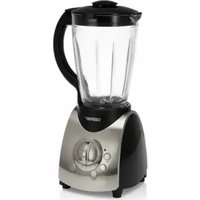
| Product Type | Jar Blender |
| Brand | Zelmer |
| Model | ZSB4799B |
| Bowl Capacity | 1.75 L |
| Bowl Material | Glass |
| Blade Material | Stainless Steel |
| Speed Control | Variable via Start Knob |
| Functions | Pulse, Ice Crushing, Smoothie, Turbo |
| Self-Cleaning Function | Yes |
| Removable Blades | Yes |
| Dishwasher Safe Parts | Jug, lid, measuring cup |
| Safety Lock | Glass bowl must be locked to operate |
| LED Indicator Light | Yes |
| Warranty | 2 years |
| Included Accessories | Measuring cup, lid, glass bowl, blade assembly |
| Intended Use | Domestic only |
| Power Source | Mains (check product label for voltage) |
| Color | Silver |
| Turbo Function | Continuous operation while pressed |
| Ice Crush Cycle Time | 60 seconds |
| Smoothie Cycle Time | 1 minute at near max power |
Frequently Asked Questions - ZSB4799B Zelmer
User questions about ZSB4799B Zelmer
0 question about this device. Answer the ones you know or ask your own.
Ask a new question about this device
Download the instructions for your Blender in PDF format for free! Find your manual ZSB4799B - Zelmer and take your electronic device back in hand. On this page are published all the documents necessary for the use of your device. ZSB4799B by Zelmer.
USER MANUAL ZSB4799B Zelmer
natural_image
Silver zelmer blender with clear glass body and control buttons (no visible text or symbols on the device itself)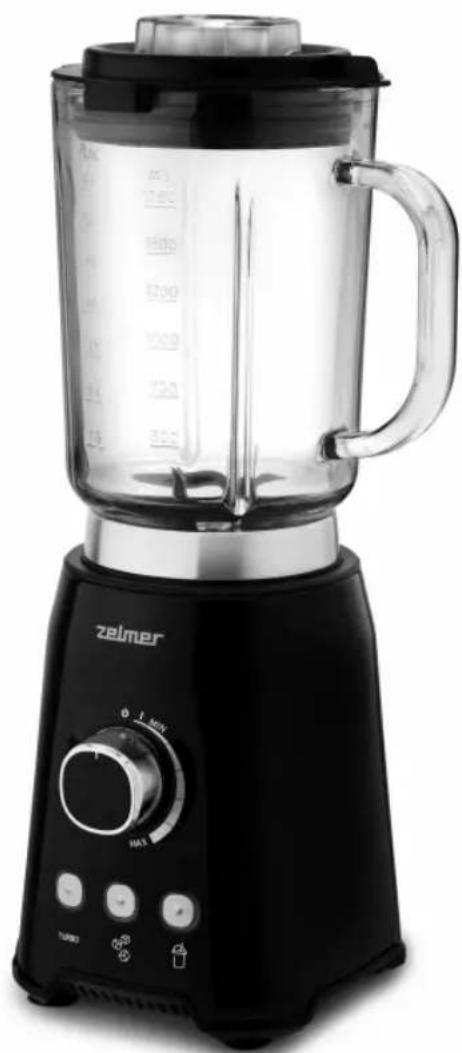
natural_image
Black and white photo of a Zeimer blender with handle, control knob, and kitchen buttons (no visible text or symbols on device body)PL INSTRUKCJE UŻYTKOWANIA
Blender kielichowy
EN USER MANUAL
Jar blender
DE BENUTZERHANDBUCH Mixer
CZ NÁVOD K POUŽITÍ
Stolní mixér
SK NAVODILA ZA UPORABO
Stolový mixér
HU HASZNÁLATI UTASÍTÁS
Turmixgép
RO INSTRUCTIUNI DE UTILIZARE
Blender vas
RU ИНСТРУКЦИЯ ПО ПРИМЕНЕНИЮ
Блендер со стеклянным сосудом
BG ИНСТРУКЦИИ ЗА УПОТРЕБА
Буркан блендер
UA ІНСТРУКЦІЯ ПО ЗАСТОСУВАННЮ
Блендер з чашею
natural_image
Line drawing of a blender with an attached plug, showing the blade and plug connection (no text or symbols)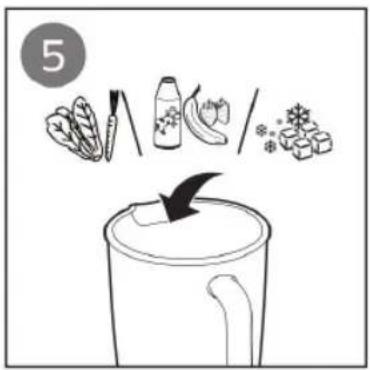
flowchart
graph LR
    A["7"] --> B[" "]
    B --> C[" "]
    C --> D[" "]
    D --> E[" "]
    E --> F[" "]
    F --> G[" "]
    G --> H[" "]
    H --> I[" "]
    I --> J[" "]
    J --> K[" "]
    K --> L[" "]
    L --> M[" "]
    M --> N[" "]
    N --> O[" "]
    O --> P[" "]
    P --> Q[" "]
    Q --> R[" "]
    R --> S[" "]
    S --> T[" "]
    T --> U[" "]
    U --> V[" "]
    V --> W[" "]
    W --> X[" "]
    X --> Y[" "]
natural_image
Illustration of hands using a blender to press or rotate a mixture (no text or symbols)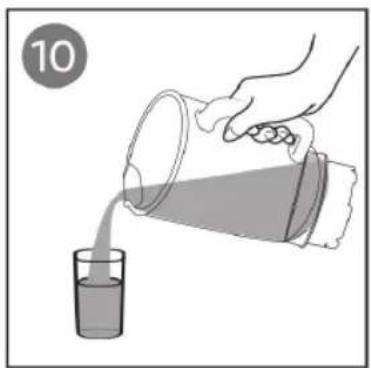
natural_image
Illustration of a hand pouring liquid from a glass into a funnel (no text or symbols)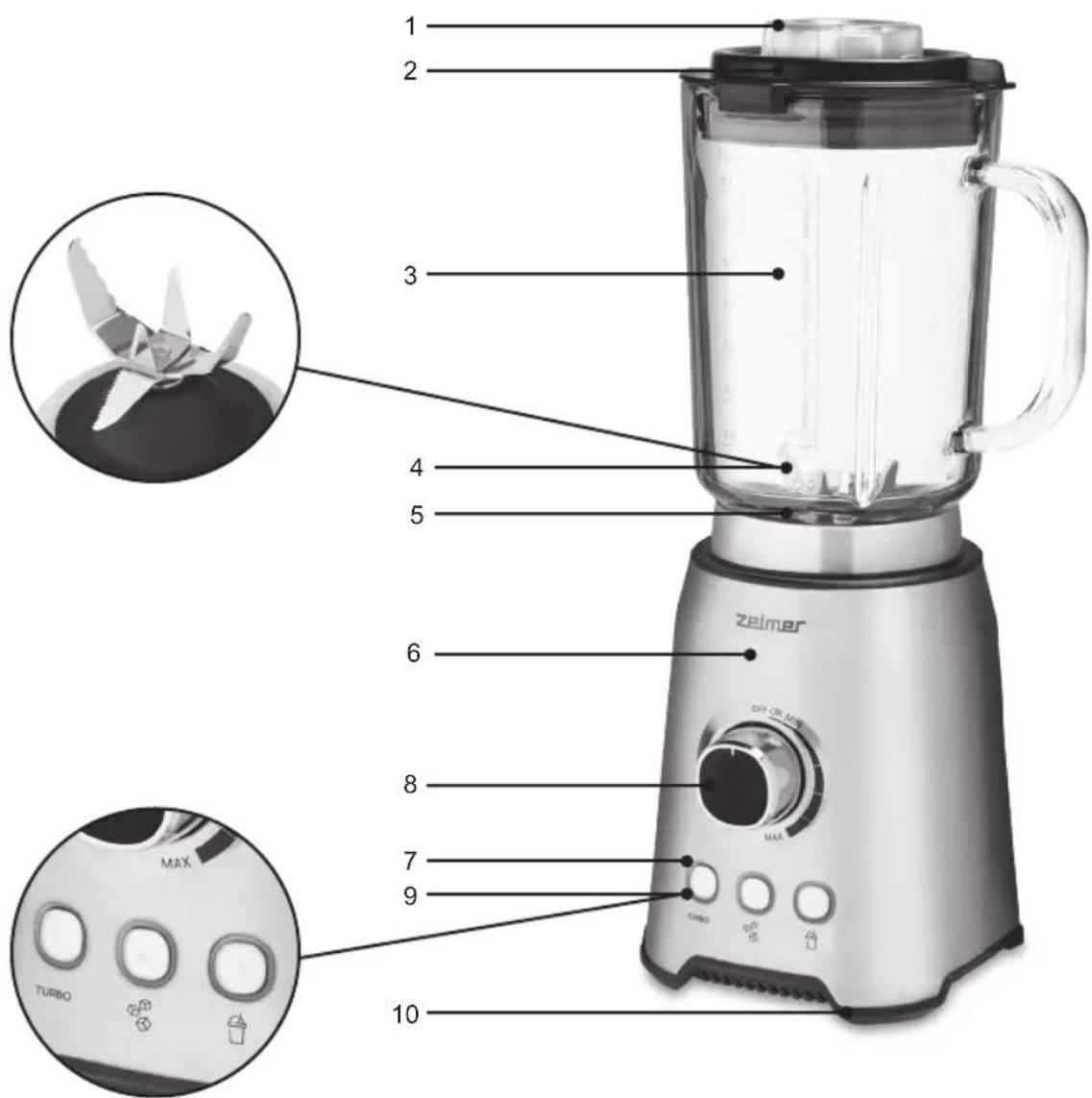
natural_image
Line drawing of a blender with lid and handle (no text or symbols)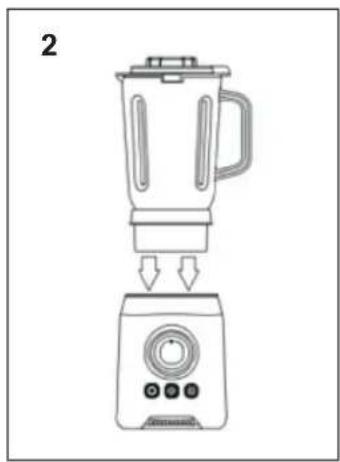
natural_image
Line drawing of a blender with a control panel and base, showing the blade and handle (no text or symbols)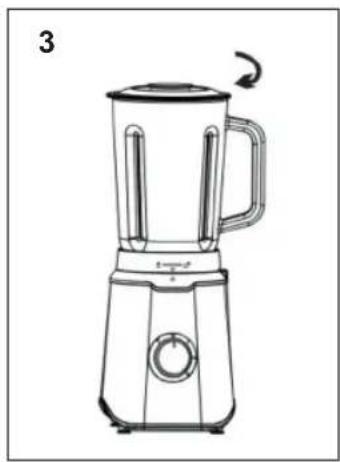
natural_image
Line drawing of a blender with handle and side blades, no text or symbols presentDZIEKUJEMY ZA WYBÓR MARKI ZELMER. MAMY NADZIEJE, ŻE PRODUKT SPEŁNI PAŃSTWA OCZEKIWANIA.
OSTRZEŻENIE
WE WOULD LIKE TO THANK YOU FOR CHOOSING ZELMER. WE WISH THE PRODUCT PERFORMS TO YOUR SATISFACTION AND PLEASURE.
WARNING
Please read the instructions for use carefully prior to using the product. store these in a safe place for future reference.
DESCRIPTION
- Measuring Cup
- Lid
- Glass Bowl
- Blade
- Glass Bowl Holder
- Body
- LED Indicator Light
- Start Knob
- Function Button
- Rubber Feet
SAFETY INSTRUCTIONS
If the supply cord is damaged it must be replaced by the manufacturer, its service agent or similarly qualified persons in order to avoid a hazard.
Respect the operating times of the accessories indicated in their specific sections of the manual.
Proceed according to maintenance and cleaning section of this manual for cleaning.
Warning: potential injury from misuse! Care shall be taken when handling the sharp cutting blades, emptying the bowl and during cleaning.
Be careful if hot liquid is poured into the blender as it can be ejected out of the appliance due to a sudden steaming.
Always disconnect the blender from the supply if it is left unattended and before assembling, disassembling or cleaning.
Switch off the appliance and disconnect from supply before changing accessories or approaching parts that move in use.
This appliance shall not be used by children. Keep the appliance and its cord out of reach of children.
Appliances can be used by persons with reduced physical, sensory or mental capabilities or lack of experience and knowledge if they have been given supervision or instruction concerning use of the appliance in a safe way and if they understand the hazards involved.
Children shall not play with the appliance.
IMPORTANT WARNINGS
This appliance is designed for home use and should never be used for commercial or industrial use under any circumstances. Any incorrect use or improper handling of the product shall render the warranty null and void.
Prior to plugging in the product, check that your mains voltage is the same as the one indicated on the product label.
The mains connection cable must not be tangled or wrapped around the product during use.
Do not use the device, or connect and disconnect to the supply mains with the hands and / or feet wet. In order to ensure the sealing effect of blending blade, please do not allow the blending blade to work without load.
Do not pull on the connection cord in order to unplug it or use it as a handle
Unplug the product immediately from the mains in the event of any breakdown or damage and contact an official technical support service. In order to prevent any risk of danger, do not open the device. Only qualified technical personnel from the brand's Official technical support service may carry out repairs or procedures on the device.
B&B TRENDS, S.L. disclaims all liability for damages that may occur to people, animals or objects, for the non-observance of these warnings.
INSTRUCTIONS FOR USE
When plug in the appliance, three function buttons will with blue flashing light.
After the glass jar is fixed, the light will stop flashing. The start knob allows you use variety speeds from minimum power to max power.
The start knob allows you use variety speeds from minimum power to maximum power.
When you use start knob for your speed control, the function button can not work in the meantime.
Three function buttons for your reference
Pulse function. * Ice Crushing function. * Smoothie function.
When you using function button for your food, you can change the buttons base on your need. Besides
EN
can also choose to use the start knob for speed control, after you do that, you cannot use the function button in the meantime.
The glass jar capacity is 1.75 L.
Blending with Speed Knob
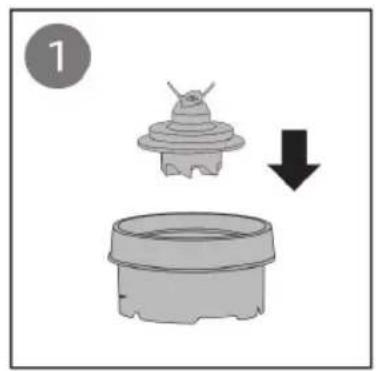
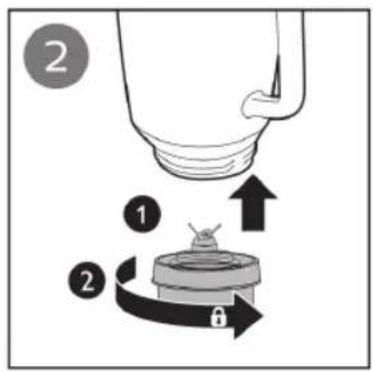
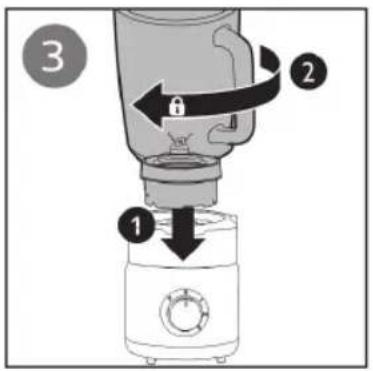
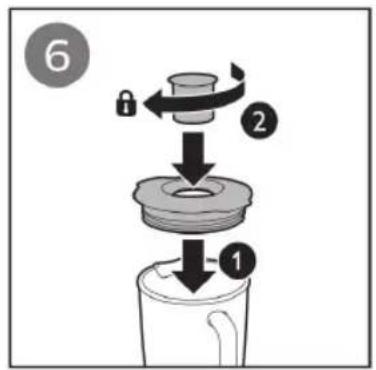
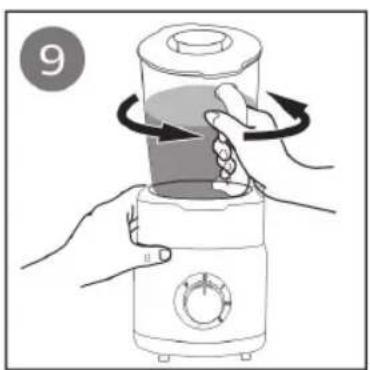
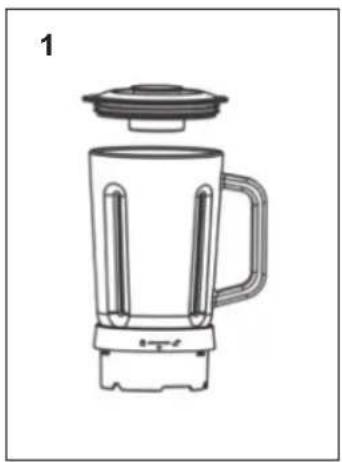
Pour in the ingredients and cover the glass bowl (Fig. 1), and then place the bowl into the host (Fig. 2) and turn clockwise (Fig. 3). Lift the glass bowl to check it is locking whether or not.
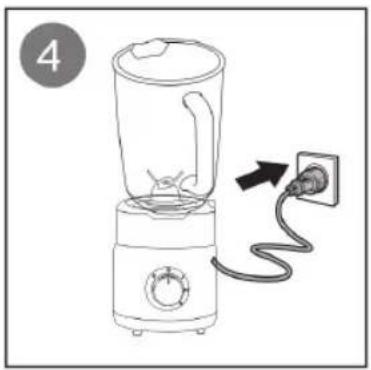
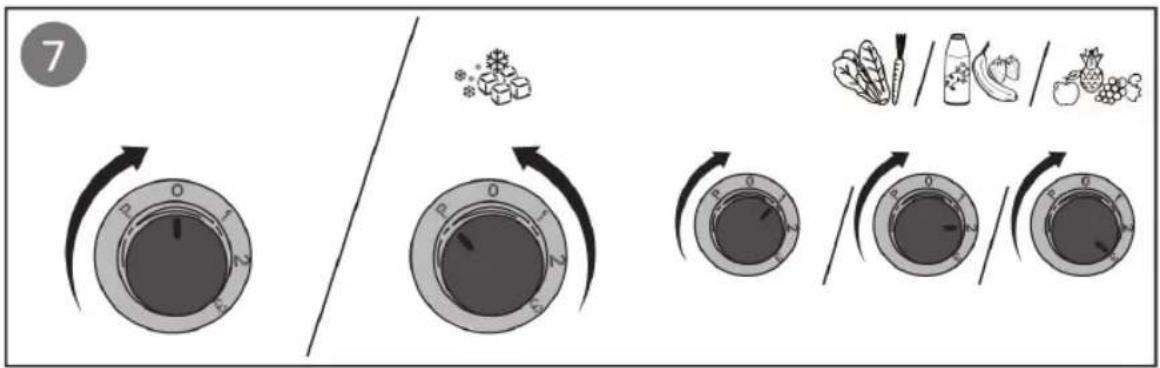
Plug in the appliance and rotate the start knob to which speed you need.
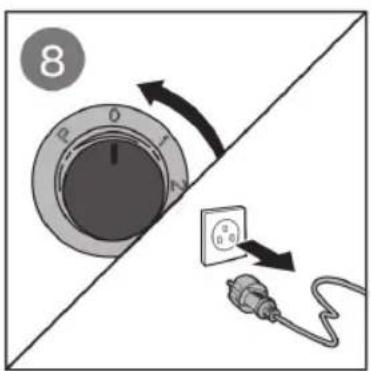
At the end of preparation, rotate the start knob to position ♦unplug the appliance and wait until the blades come to a complete stop...
Turbo function
When you press button "Turbo", you should press it continuously, when the foods are finished, please release it.
Ice Crushing function
When you press this button, a cycle is working and all process will last for 60s.
Smoothie function
When you press this button, it will work close to maximum power for 1min.
MANITENANCE AND CLEANING
Before cleaning, always turn off the appliance and unplug it from the power supply.
Do not immerse the appliance and power cord in water or other liquids or wash them in the dishwasher. Wipe off the toaster with a damp cloth and a little dish washing detergent. Do not use any abrasive scouring agents, steel wool, metal objects, hot cleaning agents or disinfectants, since they can damage the appliance.
During the cleaning process, special care must be taken with the blades and they are very sharp.
It is recommended to clean the appliance regularly and remove all traces of food.
If the appliance is not maintained in good cleaning condition, its surface can degrade and inexorably affect the life of the appliance and lead to a dangerous situation.
The following parts are suitable for cleaning in the dishwasher: Jug. Jar lid, measuring cup.
Self-cleaning function
Introduce water and a small amount of detergent into the jar.
Select the position "Pulse"
Removable blades for effective cleaning
Loosen the fixing ring of the blades by turning it clockwise.
Remove the fixing ring from the blades and clean all the parts.
Once clean, replace the blade assembly and turn the blade fixing ring in the opposite direction.
Table of recipes
| Load Time Speed | ||
| Soaked carrot: 700gWater: 1.050g | 30” MÁX. |
PRODUCT DISPOSAL

This product complies with European Directive 2012/19/EU on electrical and electronic devices, known as WEEE (Waste Electrical and Electronic Equipment), provides the legal framework applicable in the European Union for the disposal and reuse of waste electronic and electrical devices. Do not dispose of this product in the bin, instead going to the electrical and electronic waste collection centre closest to your home.
We hope that you will be satisfied with this product.
WIR MÖCHTEN UNS BEI IHNEN BEDANKEN, DASS SIE SICH FÜR ZELMER ENTSCHIEDEN HABEN. WIR HOFFEN, DASS DAS PRODUKT ZU IHRER ZUFRIEDENHEIT FUNKTIONIERT.
ACHTUNG
ELIMINAREA PRODUSULUI

B&B TRENDS, S.L. guarantees compliance of this product for the use for which it is intended for a period of two years. In the case of breakdown during the term of this warranty, users are entitled to repair or else the replacement of the product at no charge if the former is unavailable, unless one of these options proves impossible to fulfill or is disproportionate. In this case, you can then opt for a reduction in price or cancellation of the sale, which must be dealt with directly with the sales vendor. This also covers replacement of spare parts provided that the product has been used according to the recommendations specified in this manual for both cases, and has not been tampered with by any third party that is not authorised by B&B TRENDS, S.L. The warranty will not cover any parts subject to wear and tear. This warranty does not affect your rights as a consumer in accordance with the provisions in Directive 1999/44/EC for member states of the European Union.
USE OF WARRANTY
Customers must contact a B&B TRENDS, S.L. authorised Technical Service for repair of the product. Since any tampering of the same by anyone not authorised by B&B TRENDS, S.L., or the careless or improper use of the same shall render this warranty null and void. The warranty must be fully completed and delivered along with the receipt or delivery docket for the effective exercise of rights under this warranty.
This warranty should be retained by the user as well as the invoice, receipt or the delivery docket to facilitate the exercise of these rights. For technical service and after-sales care outside the Polish territory, please submit your query to the point of sale where you purchased the item or check for further aftersales information at www.zelmer.com
- OSTRZEŻENIE
- WARNING
- DESCRIPTION
- SAFETY INSTRUCTIONS
- IMPORTANT WARNINGS
- INSTRUCTIONS FOR USE
- EN
- Blending with Speed Knob
- Turbo function
- Ice Crushing function
- Smoothie function
- MANITENANCE AND CLEANING
- Self-cleaning function
- Removable blades for effective cleaning
- PRODUCT DISPOSAL
- ACHTUNG
- ELIMINAREA PRODUSULUI
- USE OF WARRANTY
Brand : Zelmer
Model : ZSB4799B
Category : Blender