
RAC-10 PIROS DIGITAL - Heating Grunkel - Free user manual and instructions
Find the device manual for free RAC-10 PIROS DIGITAL Grunkel in PDF.


| Product Type | Digital Radiator Heater |
| Model | RAC-10 PIROS DIGITAL |
| Brand | Grunkel |
| Category | Heating |
| Dimensions (approx.) | 85 x 60 x 12 cm |
| Weight (approx.) | 12 kg |
| Power Supply | 220-240 V ~ 50/60 Hz |
| Power Output | 1500-2000 W |
| Number of Elements | 10 |
| Thermostat | Digital, adjustable 5-35°C |
| Timer | 24-hour programmable |
| Operating Modes | Comfort, Eco, Anti-frost, Boost |
| Display | LED digital screen |
| Remote Control | Yes, included |
| Safety Features | Overheat protection, tip-over switch, child lock |
| Energy Efficiency Class | A (estimated) |
| Installation | Free-standing or wall-mounted |
| Material | Aluminum + steel |
| Color | White |
| Maintenance | Wipe with damp cloth; clean air vents regularly |
| Spare Parts | Contact manufacturer support |
| Warranty | 2 years |
Frequently Asked Questions - RAC-10 PIROS DIGITAL Grunkel
User questions about RAC-10 PIROS DIGITAL Grunkel
0 question about this device. Answer the ones you know or ask your own.
Ask a new question about this device
Download the instructions for your Heating in PDF format for free! Find your manual RAC-10 PIROS DIGITAL - Grunkel and take your electronic device back in hand. On this page are published all the documents necessary for the use of your device. RAC-10 PIROS DIGITAL by Grunkel.
USER MANUAL RAC-10 PIROS DIGITAL Grunkel
natural_image
White cylindrical solar oil heater with digital display and control buttons, no visible text or symbols on the device itself.natural_image
A couple smiling while looking at a document together, with cardboard boxes in the background (no visible text or symbols)
natural_image
Modern flat-screen TV displaying multiple glossy blue circular objects against a white background, set against a red and white background (no text or symbols visible)
natural_image
Exterior view of a modern kitchen blender with a black handle and blue control knob (no text or symbols visible)
natural_image
White microwave oven with control knobs and a screen, set against an orange background (no text or symbols visible)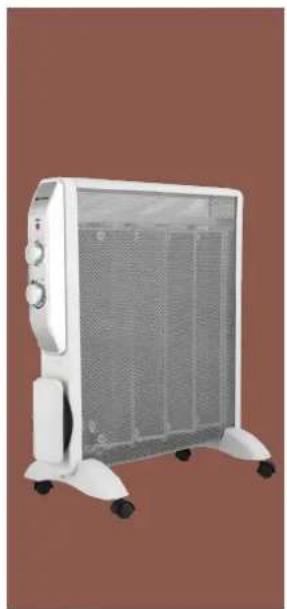
natural_image
White portable electric heater with mesh insulation and wheels, shown against a solid brown background (no text or symbols visible)
natural_image
Black octagonal oven with control knobs and a clear glass interior, set against an orange background (no text or symbols visible)
natural_image
3D rendering of a gray vacuum cleaner with orange internal components (no text or symbols visible)
natural_image
White portable toaster with a black button on the front panel, set against a solid purple background (no text or symbols visible)
natural_image
Close-up of a white and black juicer with green juice being lifted by a green lid, against a solid purple background (no text or symbols visible)
natural_image
Modern stainless steel kettle with black handle against a solid yellow background (no text or symbols visible)
natural_image
Black outdoor fan with visible blades and a black stand against a blue background (no text or symbols)
natural_image
Digital kitchen scale with a digital display showing 650, set against a solid pink background (no text or symbols on the scale itself)
natural_image
Blue and white steam iron with a mesh grille, shown against a solid green background (no text or symbols visible)
natural_image
White kitchen grater with black handle and side slots against purple background (no text or symbols visible)DESCUBRE TODO LO QUE PODEMOS HACER POR TI EN
www.grunkel.com
GRACIAS POR ESCOGER ESTE PRODUCTO GRUNKEL
This instruction manual is an accurate reproduction of the specifications, operation and look of the product you have just bought, except for typographical, print or translation errors. The specifications, operation and features of this product are subject to change without further notice.
natural_image
Technical line drawing of a mechanical assembly with four circular components and directional arrows indicating flow or movement (no text or symbols)Mando a distancia
Mando a distancia
natural_image
Pure electrical circuit lines without any symbolsPila CR2025 3V
Funcionamiento
Encendido
- Please, read carefully the entire instruction manual before using it.
- Pay special attention to the safety indications.
- Keep this instruction manual. If you hand over this application to another person, these instructions must be also be transferred.
- Keep also the guarantee card, purchase ticket or invoice. If possible, keep the original box with all the accessories included for future inquiries.
General safety instructions
Before using the appliance ensure that the main voltage corresponds to the voltage displayed on the rating label. Always plug the appliance into a suitable electrical outlet.
In order to avoid electrical shock risk, please do not inmerse the power cord nor the appliance into water or any other kind of liquid. Check the cleaning instructions.
Do not use unauthorized accessories. This will result in cancellation of the guarantee and could cause accidents.
grunkel
Do not keep the power cording hanging from the table or the shelf. Keep it away from hot sources. Do not allow sharp or blunt objects to touch it. Do not operate the appliance if the power cord or the plug are damaged, or if you notice unusual operation of the appliance.
Do not leave the appliance operating without supervision. Always switch off the appliance and unplug it. Pull the plug, not the power cord.
If any repair is needed, or if the power cord must be replaced, please ask a aqualified professional or contact the Official Technical Support.
CAUTION: to ensure children's safety, keep away packaging material such as plastic bags, carton boxes, etc.
Always watch the appliance when using it near children Never leave the appliance without supervision.
Do not use the appliance near furniture, curtains, sheets or papers.
Do not use the appliance near liquids or flammable materials.
Do not place the appliance near or under an electrical outlet.
Do not let the appliance operating without supervision.
In order to avoid overheating, do not cover the appliance while it is operating.
In case the power cord has been damaged, please get in contact with the Official Technical support.

CAUTION: never cover the appliance as this may use a fire. Do not use as clothesline to dry or warmthes, towels, sheets, etc. If the appliance and its e outlets are covered it may cause a fire.
The appliance must be placed on a plain, stable surface.
Turn off the appliance and unplug it before cleaning. When the appliance is not in use, turn it off and unplug it. Ensure all parts that may cause hazard to children are out of their reach.
Do not place the power cord over the appliance while it is hot.
The appliance must be used in vertical position exclusively.
Do not use the appliance near a bathtub, shower or swimming pool.
grunkel
Keep the appliance clean. Do not allow objects to enter or cover the air outlets. This may cause an electrical shock, fire or damage to the appliance.
Never attempt to open or dismantle the appliance or remove any of its internal parts.
WARNING: some parts of the appliance may reach very hot temperatures and cause burnings. Be extremely careful if the appliance is to be used by children or vulnerable people.
After its use, do not store the appliance until it has cooled down completely. Store the appliance in a dry and clean place while it is not being used.
Accumulated dust and dirt is the most common cause of overheating in the appliance. Ensure they are removed periodically by vacuum or cleaning the air outlets.
Do not place the appliance on a carpet, and do not cover the power cord under a carpet. Place the power cord far from common walking zones in order to avoid tripping.
WARNING: It is recommended not to use the appliance in small rooms occupied by people that can not leave it on their own, unless constant supervision is provided.
The appliance should be place at least 50cm far from any wall while it is operating.
Do not use the appliance outdoors.
Do not handle the appliance with wet hands.
WARNING: In case of improper use, injuries and loss of guarantee may occur.
Children must be supervised so they do not play with the appliance.
Keep the appliance and its cord out of reach of children under 8 years old.
WARNING: This appliance is intended for domestic purposes exclusively. Do not use for commercial applications.
This heater is filled with a precise quantity of special oil. Repairs requiring opening of the oil container are only to be made by the manufacturer or his service agent who should be contacted if there is an oil leak.
When scrapping the heater, follow the regulations concerning the disposal of oil. Do not dispose of the heater in household waste and recycle the heater where local facilities exist for electrical goods and oil.

CAUTION!
CHILDREN UNDER 8 YEARS OLD SHOULD NOT USE NOR CLEAN THIS APPLIANCE WITHOUT THE SUPERVISION OF AN ADULT. NEITHER CAN BE USED NOR CLEAN BY PEOPLE WITH REDUCED PHYSICAL, MENTAL OR SENSORIAL CAPABILITIES, WITHOUT EXPERIENCE OR KNOWLEDGE CONCERNING THE USE OF THE APPLIANCE, OR WITHOUT HAVING RECEIVED PROPER TRAINING UNDER DIRECT SUPERVISION FROM AN EXPERIENCED PERSON RESPONSIBLE FOR THEIR SAFETY.
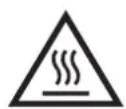
CAUTION Hot surface
Safety guidelines for the use of cells
Do not recharge non-rechargeable batteries.
Do not dismantle, open or shred cells.
Do not expose cells to heat or fire. Avoid storage in direct sunlight.
Do not short-circuit a cell. Do not store cells or batteries haphazardly in a box or drawer where they may short-circuit each other or be short-circuited by other metal objects.
Do not remove a cell from its original packaging until required for use.
grunkel
In the event of a cell leaking, do not allow the liquid to come in contact with the skin or eyes. If contact has been made, wash the affected area with copious amounts of water and seek medical advice.
Observe the plus (+) and minus (−) marks on the cell and equipment and ensure correct use.
Do not use any cell which is not designed for use with the equipment.
Do not mix cells of different manufacture, capacity, size or type within a device.
Cells usage by children should be supervised.
Keep cells clean and dry.
Wipe the cell terminals with a clean dry cloth if they become dirty.
When possible, remove the cell from the equipment when not in use.
Assembly
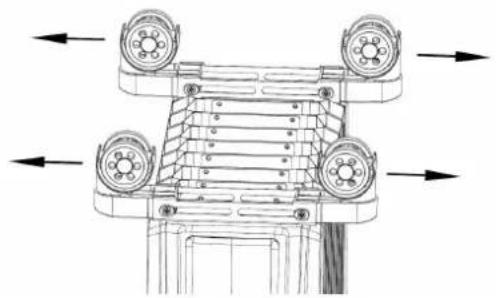
Remove all packaging from the appliance and place it upside down on a soft surface (such as a carpet). Then pull out the wheel bases to both outmost sides. Once they are in pulled out, you can turn over the appliance and place it in horizontal position on its base. The appliance will be ready for use.
natural_image
Technical line drawing of a mechanical assembly with four circular components and directional arrows indicating flow or movement (no text or symbols)Remote control
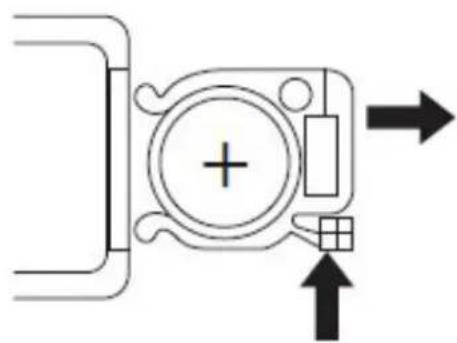
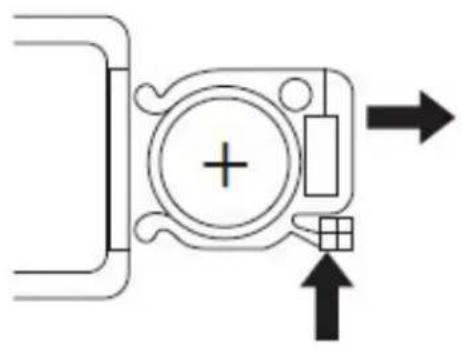
The remote control requires one CR2025 - 3V cell (supplied). Follow the +/- polarity indicated on the remote control. The remote control must be pointed towards the remote sensor on the control panel. If the remote control doesn't operate as expected, replace the cell.
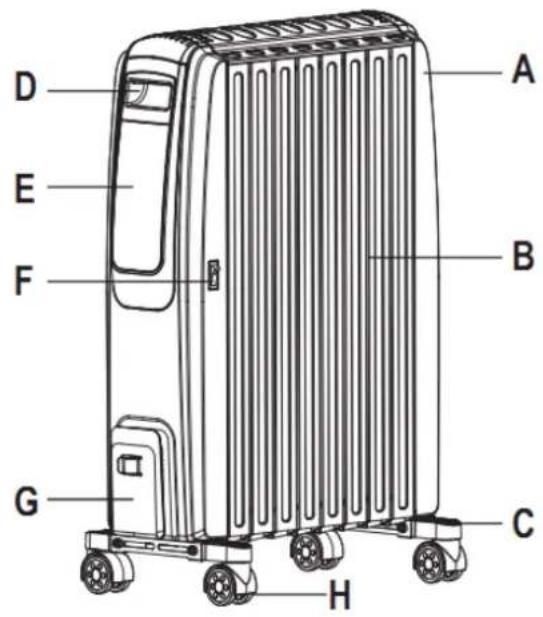
Part identification
| Letter Description | |
| A | Handle and slot for remote control |
| B Body | |
| C Base | |
| D Front handle | |
| E Control panel | |
| F Power switch | |
| G Cord storage | |
| H Wheel | |
| Letter Description | |
| a Thermostat | |
| b Temperature / time increase | |
| c Power / Mode | |
| d Timer | |
| e Temperature / time decrease | |
| f Stand-by | |
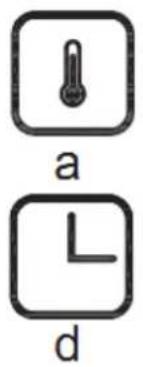
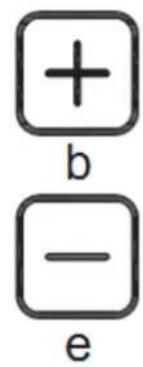
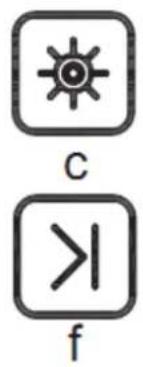
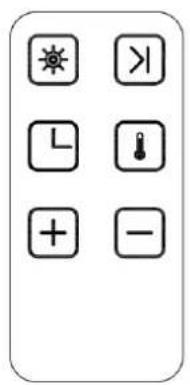
Remote control
natural_image
Pure electrical circuit lines without any symbolsBattery CR2025 3V
Operation
On
Press the on/off power switch [F] to turn the appliance on. The product is now in standby awaiting a mode to be selected via the buttons on the appliance or the remote control. The appliance emits a beep sound. The light on (♀) will turn on.
The following settings can be performed using the touchpad or the remote control. A beep sound is emitted at every key press. Press the stand-by button [f] to exit the stand-by mode and begin selection of the different modes. Heater will start working under low power (—).
Heating power and Eco mode setting
Press the Power/Mode button to select the desired power:
| Position Power | |
| Low | |
| Medium | |
| High | |
| ECO ECO mode | |
Under Low power, Medium power and High power setting, the heater will keep working controlled by thermal cut-out.
NOTE: The higher the power is, the quicker the desired temperature will be achieved but the power consumption will be higher. Lower power levels are recommended when the heater is being used for an extended period of time.
ECO Mode
Press the Power/Mode button (c), until the "ECO" light turn on. Under Eco mode, the heating power will adjust automatically when the room temperature is approaching the setting temperature.
Example: The setting temperature is 25^ C. When the room temperature is less than 22^ C, the heater will work under High power (—). When the room temperature rises to 23^ C, the heater will change to work under Medium power ( ). When the room temperature rises to 24^ C, the heater will change to work under Low power ( ). When the room temperature reaches to the setting temperature 25^ C, the heater will switch off automatically. And when the room temperature is lower than setting temperature, the heater will switch on again under Eco mode.
NOTE: If there is no thermostat setting, the default temperature is 23^ C under Eco mode.
Thermostat setting
NOTE: Thermostat setting is available only in ECO Mode.
- Press the Power/Mode button (c), until the "ECO" light turn on.
- Press the thermostat button (a), the temperature digit will blink.
- Use the "+" and "-" [b] and [e] buttons to set the desired temperature (10-30°C).
- The setting temperature digit will stop blinking and the current room temperature will appear after the desired temperature is set.
- The heater will maintain the air temperature in the room by switching on and off automatically.
Timer : Auto power on
NOTE: This function should only be set if you require the heater to be automatically turned on after a certain period of time (1 to 24 hours from the time the function is set).
- Press the on/off power switch [F] to turn the appliance on. The indicator will turn on. The appliance will be in Stand-by mode.
- Press the Timer button(d), the light on H will turn on, and the start hour digit (0.0) will blink.
- Use the "+" and "-" buttons [b] and [e] to set the heater operation time between 1 and 24 hours.
This function will activate once the hour digit stops blinking. The count down digits will be shown on the display.
WARNING: When using timer modes, consideration should be given to the fact that the heater may come on whilst unattended. Always follow the safety instructions provided.
Timer: Auto power off
NOTE: This function should only be set if you require the heater to be automatically shut off after a certain period of time (1 to 24 hours from the time the function is set).
-
While the heater is working, press the Timer button(d), the indicator (H) will turn on, and the start hour digit (0.0) will blink.
-
- Use the "+" and "-" buttons [b] and [e] to set the heater operation time between 1 and 24 hours.
This function will activate once the hour digit stops blinking. The count down digits will be shown on the display.
Off
Press the stand-by button [f] until sleep mode is selected and the control panel screen goes off. Press the on/off switch [F] to turn the appliance off completely. To disconnect the appliance, remove the plug from the socket.
Overheating protection device
This appliance is equipped with a safety device that turns it off in any overheating is detected. If this device is activated, please turn off the appliance immediately, unplug it from the electrical outlet and allow it to cool down completely. Check if there is any object blocking the air inlets and outlets. Try to turn on the appliance again.
If the appliance is not working or if the safety device turns off the appliance again, please get in contact with the Official Technical Support for its revision and repair.
Tip-over protection device
This heater is protected with a safety switch that turns off the appliance automatically when the heater falls over, or is at an excessive angle from the horizontal. This helps prevent accidents, and the heater will resume operation when it is put back upright.
Cleaning
Before cleaning the appliance, check it is turned off and unplugged from the electrical outlet, and that it has cool down completely after its use.
Clean frequently the dust accumulated in the plates.
Use a dry or slightly moistened cloth for cleaning.
Do not use aggressive or chemical cleaning products directly on the appliance.
Never immerse the unit into water and never allow water to get into the appliance.
Storage
Always disconnect the appliance and allow it to cool down completely before storing it.
If the appliance is not going to be used for a long time, place the unit and the instruction manual in its original packaging box and store it in a dry and well-ventilated place.
Do not place heavy objects on top of the box while it is stored, as this may damage the appliance.
For your safety

WARNING
This appliance is intended for domestic use. Do not use it for commercial purposes. If so, guarantee would be cancelled.
220-240V \~50Hz / 2000W
Product disposal
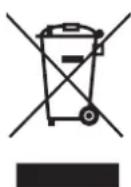
Regulation regarding waste from electronic appliances according to RAEE 2002/96/EC. This symbol means the appliance can not be treated as regular domestic waste; it must be returned to the distributor, handed over the corresponding electronic product collection point or delivered to the collection point empowered for such purpose, so its components are recycled and not mixed within domestic waste.
You can also contact your local waste collection service, so it can be collected and treated accordingly following the environment protection instructions, or to receive proper information about the steps to follow for the correct disposal of the appliance.
The correct disposal of an appliance implies avoiding negative consequences for both environment and health. A proper disposal allows to save a significant amount of energy and resources. As a reminder of the necessity of disposing the appliances separately, the product displays the symbol of a crossed out garbage bin.
natural_image
Technical line drawing of a mechanical assembly with four circular components and directional arrows indicating flow or movement (no text or symbols)Controle remoto
Controle remoto
natural_image
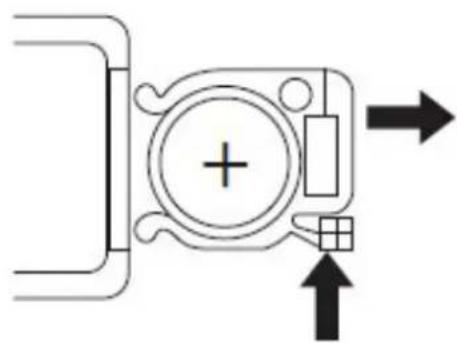
Pure electrical circuit lines without any symbolsBatería CR2025 3V
Ligado
Inflamado

- GRACIAS POR ESCOGER ESTE PRODUCTO GRUNKEL
- Mando a distancia
- Funcionamiento
- Encendido
- General safety instructions
- grunkel
- CAUTION!
- CAUTION Hot surface
- Safety guidelines for the use of cells
- Assembly
- Remote control
- Part identification
- Operation
- On
- Heating power and Eco mode setting
- ECO Mode
- Thermostat setting
- Timer : Auto power on
- Timer: Auto power off
- Off
- Overheating protection device
- Tip-over protection device
- Cleaning
- Storage
- For your safety
- WARNING
- Product disposal
- Controle remoto
- Ligado
- Inflamado
Brand : Grunkel
Model : RAC-10 PIROS DIGITAL
Category : Heating