
P429 - Receiver ARCAM - Free user manual and instructions
Find the device manual for free P429 ARCAM in PDF.


| Product Type | Power Amplifier |
| Brand | Arcam |
| Model | P429 |
| Dimensions (W x D x H) | 433 x 425 x 105 mm |
| Net Weight | 13.5 kg |
| Packaged Weight | 15.5 kg |
| Power Supply Voltage | 110-120 V~ or 220-240 V~, 50-60 Hz |
| Max Power Consumption | 1 kW |
| Output Power (ST/DM mode, 4 Ω) | 125 W per channel |
| Output Power (ST/DM mode, 8 Ω) | 90 W per channel |
| Output Power (Bridged mode, 8 Ω) | 270 W per channel (20 Hz-20 kHz) |
| Harmonic Distortion (THD) | 0.002% |
| Signal-to-Noise Ratio (ST/DM) | 112 dB |
| Signal-to-Noise Ratio (Bridged) | 110 dB |
| Frequency Response | 20 Hz - 20 kHz ± 0.05 dB |
| Input Impedance | 10 kΩ |
| Inputs | 4 unbalanced inputs (RCA), Ethernet, RS232, Trigger, USB (update) |
| Outputs | 4 pairs of speaker terminals, 4 preamplifier outputs (OUT1-OUT4), Trigger out |
| Operating Modes | Stereo (ST), Dual Mono (DM), Bridged (BR) |
| Amplifier Class | Class G |
| Supplied Accessories | Mains power cable |
| Warranty | 2 years (parts and labor) |
| Maintenance | Clean with a soft, dry cloth. Avoid solvents. |
Frequently Asked Questions - P429 ARCAM
User questions about P429 ARCAM
0 question about this device. Answer the ones you know or ask your own.
Ask a new question about this device
Download the instructions for your Receiver in PDF format for free! Find your manual P429 - ARCAM and take your electronic device back in hand. On this page are published all the documents necessary for the use of your device. P429 by ARCAM.
USER MANUAL P429 ARCAM
HANDBOOK Power amplifier
HANDBOOK Power amplifier
ARCAM FMJ
POWER STANDAY
P429

POWER


CAUTION
RISK OF ELECTRIC SHOCK DO NOT OPEN
ATTENTION
RISQUE DE CHOC ELECTRIQUE NE PAS OUVRIR

CAUTION: To reduce the risk of electric shock, do not remove cover (or back). No user serviceable parts inside. Refer servicing to qualified service personnel.

WARNING: To reduce the risk of fire or electric shock, do not expose this apparatus to rain or moisture.
The lightning flash with an arrowhead symbol within an equilateral triangle, is intended to alert the user to the presence of uninsulated 'dangerous voltage' within the product's enclosure that may be of sufficient magnitude to constitute a risk of electric shock to persons.

The exclamation point within an equilateral triangle is intended to alert the user to the presence of important operating and maintenance (servicing) instructions in the literature accompanying the product.
CAUTION: In Canada and the USA, to prevent electric shock, match the wide blade of the plug to the wide slot in the socket and insert the plug fully into the socket.
Class II product

This equipment is a Class II or double insulated electrical appliance. It has been designed in such a way that it does not a safety connection to electrical earth (in the US).
Warning
Mains plug/appliance coupler is used to disconnect device and it shall remain readily operable.
Important safety instructions
- Read these instructions.
- Keep these instructions.
- Heed all warnings.
- Follow all instructions.
- Do not use this apparatus near water.
- Clean only with dry cloth.
- Do not block any ventilation openings. Install in accordance with the manufacturer's instructions.
- Do not install near any heat sources such as radiators, heat registers, stoves, or other apparatus (including amplifiers) that produce heat.
- Do not defeat the safety purpose of the polarized or grounding-type plug.
A polarized plug has two blades with one wider than the other. A grounding type plug has two blades and a third grounding prong. The wide blade or the third prong are provided for your safety. If the provided plug does not fit into your outlet, consult an electrician for replacement of the obsolete outlet.
-
Protect the power cord from being walked on or pinched particularly at plugs, convenience receptacles, and the point where they exit from the apparatus.
-
Only use attachments/accessories specified by the manufacturer.
-
Use only with the cart, stand, tripod, bracket, or table specified by the manufacturer, or sold with the apparatus.
When a cart is used, use caution when moving the cart/apparatus combination to avoid injury from tip-over.
-
Unplug this apparatus during lightning storms or when unused for long periods of time.
-
Refer all servicing to qualified service personnel. Servicing is required when the apparatus has been damaged in any way, such as power-supply cord or plug is damaged, liquid has been spilled or objects have fallen into the apparatus, the apparatus has been exposed to rain or moisture, does not operate normally, or has been dropped.
-
Object or liquid entry
WARNING – Take care that objects do not fall and liquids are not spilled into the enclosure through any openings. The equipment shall not be exposed to dripping or splashing. Liquid-filled objects such as vases should not be placed on the equipment. 16. Climate
The equipment has been designed for use in moderate climates and in domestic situations.

- Cleaning
Unplug the unit from the mains supply before cleaning.
The case should normally only require a wipe with a soft, lint-free cloth. Do not use chemical solvents for cleaning.
We do not advise the use of furniture cleaning sprays or polishes as they can cause permanent white marks. 18. Power sources
Only connect the equipment to a power supply of the type described in the operating instructions or as marked on the equipment.
The primary method of isolating the equipment from the mains supply is to remove the mains plug. The equipment must be installed in a manner that makes disconnection possible.
- Abnormal smell
If an abnormal smell or smoke is detected from the equipment, turn the power off immediately and unplug the equipment from the wall outlet. Contact your dealer and do not reconnect the equipment.
- Damage requiring service
The equipment should be serviced by qualified service personnel when:
A. the power-supply cord or the plug has been damaged, or
B. objects have fallen, or liquid has spilled into the equipment, or
C. the equipment has been exposed to rain, or
D. the equipment does not appear to operate normally or exhibits a marked change in performance, or
E. the equipment has been dropped or the enclosure damaged.
Safety compliance
This equipment has been designed to meet the IEC/EN 60065 international electrical safety standard. This device complies with Part 15 of the FCC Rules. Operation is subject to the following two conditions: (1) This device may not cause harmful interference, and (2) this device must accept any interference received, including interference that may cause undesired operation.
The building installation shall be regarded as providing protection in accordance with the rating of the wall socket outlet.
CAUTIONS ON INSTALLATION
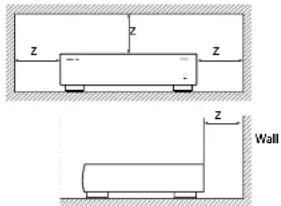
For proper heat dispersal, do not install this unit in a confined space, such as a bookcase or similar enclosure.
- More than 0.3 m (12 in) is recommended
- Do not place any other equipment on this unit
FCC INFORMATION (FOR US CUSTOMERS)
1. PRODUCT
This product complies with Part 15 of the FCC Rules. Operation is subject to the following two conditions: (1) This device may not cause harmful interference, and (2) this device must accept any interference received, including interference that may cause undesired operation.
2. IMPORTANT NOTICE: DO NOT MODIFY THIS PRODUCT
This product, when installed as indicated in the Instructions contained in this manual, meets FCC requirements. Modification not expressly approved by ARCAM may void your authority, granted by the FCC, to use the product.
3. NOTE
This product has been tested and found to comply with the limits for a Class B digital device, pursuant to Part 15 of the FCC Rules. These limits are designed to provide reasonable protection against harmful interference in a residential installation.
This product generates, uses and can radiate radio frequency energy and, if not installed and used in accordance with the instructions, may cause harmful interference to radio communications. However, there is no guarantee that interference will not occur in a particular installation. If this product does cause harmful interference to radio or television reception, which can be determined by turning the product OFF and ON, the user is encouraged to try to correct the interference by one or more of the following measures:
• Reorient or relocate the receiving antenna
- Increase the separation between the equipment and receiver
- Connect the product into an outlet on a circuit different from that to which the receiver is connected
- Consult the local retailer authorized to distribute this type of product or an experienced radio/TV technician for help
SAFETY INFORMATION (FOR EUROPEAN CUSTOMERS)
- Avoid high temperatures. Allow for sufficient heat dispersion when installed in a rack.
- Handle the power cord carefully. Hold the plug when unplugging the cord.
- Keep the unit free from moisture, water, and dust.
- Unplug the power cord when not using the unit for long periods of time.
- Do not obstruct the ventilation holes.
- Do not let foreign objects into the unit.
- Do not let insecticides, benzene, and thinner come in contact with the unit.
- Never disassemble or modify the unit in any way.
- Ventilation should not be impeded by covering the ventilation openings with items, such as newspapers, tablecloths or curtains.
- Naked flame sources such as lighted candles should not be placed on the unit.
-
Observe and follow local regulations regarding battery disposal.
-
Do not expose the unit to dripping or splashing fluids.
- Do not place objects filled with liquids, such as vases, on the unit.
- Do not handle the mains cord with wet hands.
- When the switch is in the OFF position, the equipment is not completely switched off from MAINS.
- The equipment shall be installed near the power supply so that the power supply is easily accessible.
A NOTE ABOUT RECYCLING
This product's packaging materials are recyclable and can be reused. Please dispose of any materials in accordance with the local recycling regulations. When discarding the unit, comply with local rules or regulations.
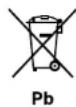
Batteries should never be thrown away or incinerated but disposed of in accordance with the local regulations concerning battery disposal.
This product and the supplied accessories, excluding the batteries, constitute the applicable product according to the WEEE directive.
CORRECT DISPOSAL OF THIS PRODUCT
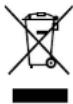
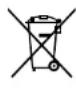
These markings indicate that this product should not be disposed with other household waste throughout the EU.
To prevent possible harm to the environment or human health from uncontrolled waste disposal and to conserve material resources, this product should be recycled responsibly.
To dispose of your product, please use your local return and collection systems or contact the retailer where the product was purchased.

Thank you and congratulations for purchasing your Arcam FMJ Amplifier.
Arcam has been producing specialist audio products of remarkable quality for over three decades and the new P429 power amplifiers is the latest in a long line of award winning Hi-Fi. The design of the FMJ range draws upon all of Arcam's experience as one of the UK's most respected audio companies, to produce Arcam's best performing range of stereo amplifiers yet – designed and built to give you years of listening enjoyment.
This handbook is a guide to installing and using the P429, including information on their more advanced features. Use the contents list shown on this page to guide you to the section of interest.
We hope that your FMJ product will give you years of trouble-free operation. In the unlikely event of any fault, or if you simply require further information about Arcam products, our network of dealers will be happy to help you. Further information can also be found on the Arcam website at www.arcam.co.uk.
The FMJ development team

contents
Contents
safety guidelines....E-2
welcome....E-4
overview....E-6
Placing the unit E-6
Power....E-6 Interconnect cables....E-6
P429 connections E-7
Network connection....E-8
RS232 connection E-8
USB connection E-8
P429 operation....E-9
Switching on E-9
Mode switches E-9
loudspeakers....E-10
Notes on making speaker connections....E-10
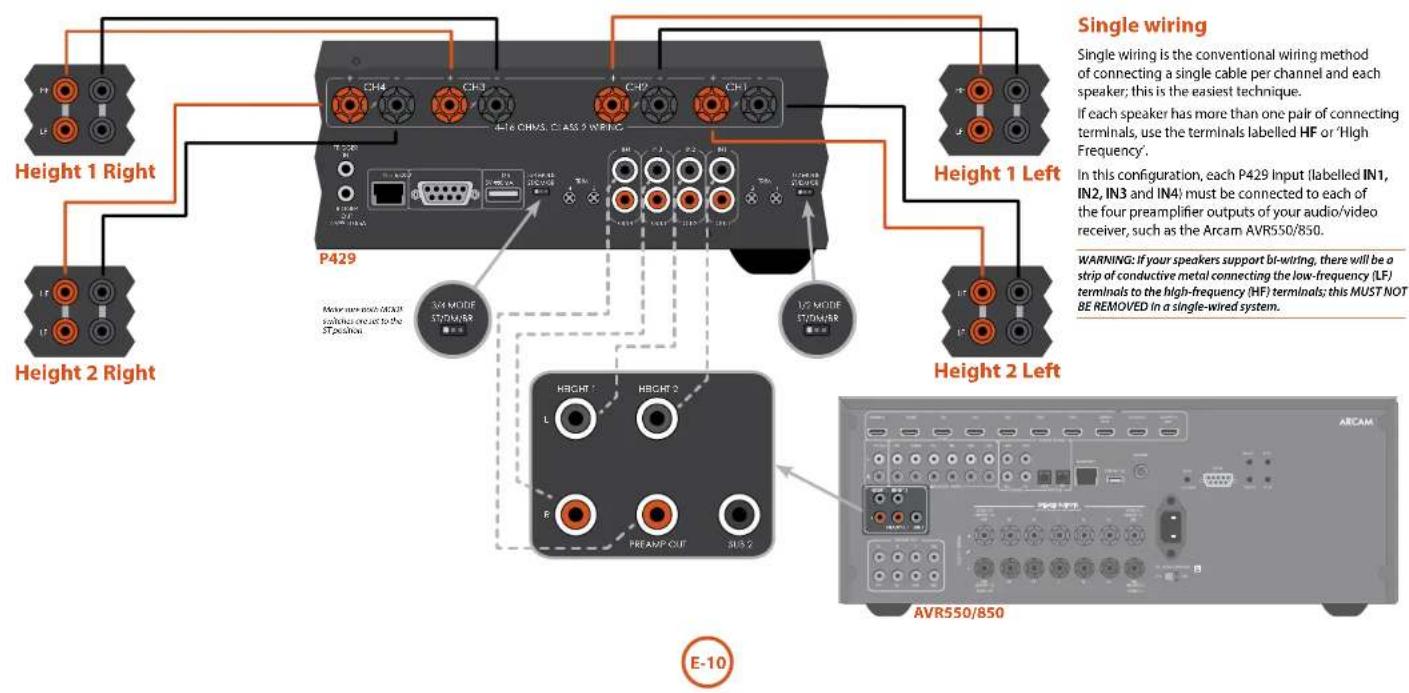
Single wiring E-10
Dual mono / Bi-Amping E-11
Bridged mode E-12
troubleshooting....E-13
P429 specifications....E-14
product guarantee ....E-15

![ARCAM [FM] P429 POWER / SEANL07 8 POWER](/content/2026/05/811659/images/56db7d2548d2b6962e43c22cf83c094f3f46eb559d41e9e4a3a81d799f208b91.jpg)
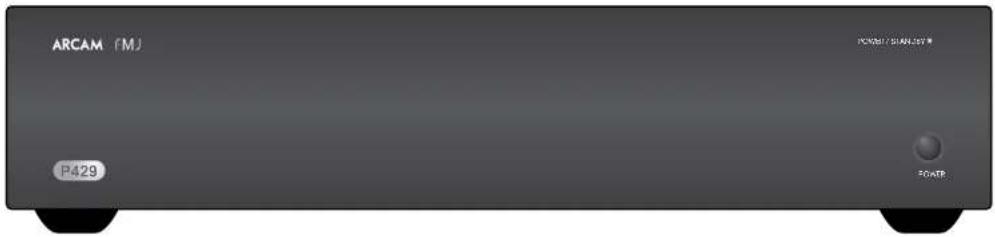
Arcam's P429 power amplifier provides class leading sound quality for the best possible reproduction of your music.
Drawing on the many years of amplifier design experience at Arcam, this product uses the best quality components and engineering practice to produce a product that will give many years of musical pleasure and reliable service.
With a class G amplifier, toroidal based power supply, acoustically damped chassis, parallel transistor output stages and exceptionally low levels of distortion and noise, the P429 is capable of reproducing music with all its original authority and detail. Rest assured you will be hearing the music just as the artist intended. The P429 is designed to produce a level of performance that will truly bring music to life. The amplifier has a multitude of applications, such as bi-amping a two channel audio/video system, adding extra zones to an existing system or adding height channels to an audio/video system.
Placing the unit
■ Place the amplifier on a level, firm surface, avoiding direct sunlight and sources of heat or damp.
■ Do not place the P429 on top of a power amplifier or other source of heat.
Do not place the amplifier in an enclosed space such as a bookcase or closed cabinet unless there is good provision for ventilation. The P429 is designed to run warm during normal operation.
Do not place any other component or item on top of the amplifier as this may obstruct airflow around the heatsink, causing the amplifier to run hot. (The unit placed on top of the amplifier would become hot, too.)
■ Do not place your record deck on top of this unit. Record decks are very sensitive to the noise generated by mains power supplies which will be heard as a background 'hum' if the record deck is too close.
■The normal function of the unit may be disturbed by strong electromagnetic interference. If this occurs, simply reset the unit with the power button, or move the unit to another location.
Power
The amplifier is supplied with a moulded mains plug already fitted to the lead. Check that the plug supplied fits your supply – should you require a new mains lead, please contact your Arcam dealer.
If your mains supply voltage or mains plug is different, please contact your Arcam dealer immediately
Push the IEC plug end of the power cable into the socket on the back of the amplifier, making sure that it is pushed in firmly. Plug the other end of the cable into your mains socket and, if necessary, switch the socket on.
Interconnect cables
We recommend the use of high-quality screened cables that are designed for the particular application. Other cables will have different impedance characteristics that will degrade the performance of your system (for example, do not use cabling intended for video use to carry audio signals). All cables should be kept as short as is practically possible.
It is good practice when connecting your equipment to make sure that the mains power-supply cabling is kept as far away as possible from your audio cables. Failure to do so may result in unwanted noise in the audio signals.

Level Trim and Amplifier Mode switches
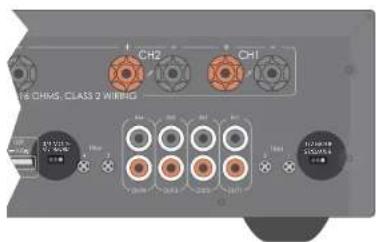
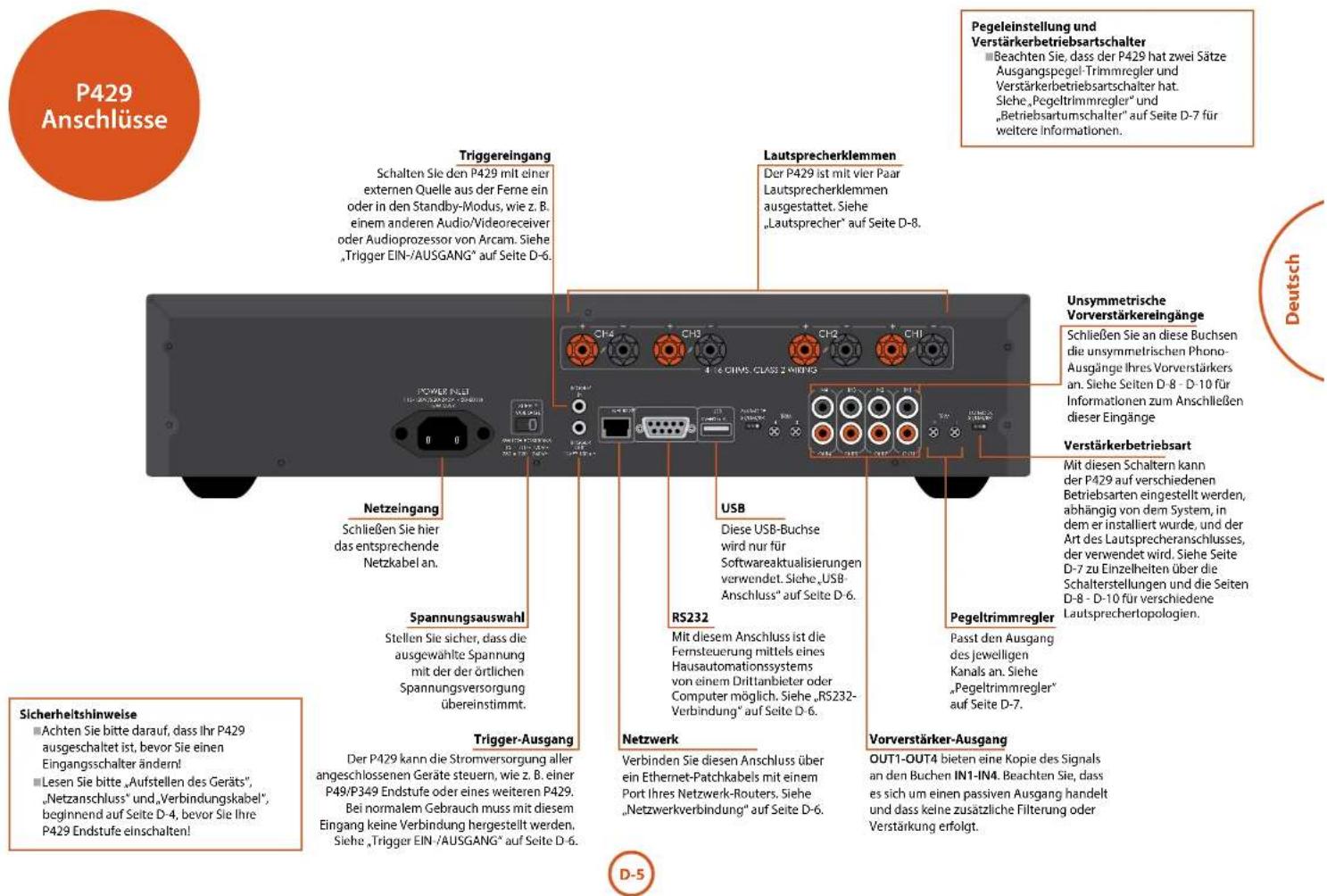
Note that the P429 has two sets of output level trim controls and amplifier mode switches. Please refer to "Level trim" and "Mode switches" on page E-9 for details.
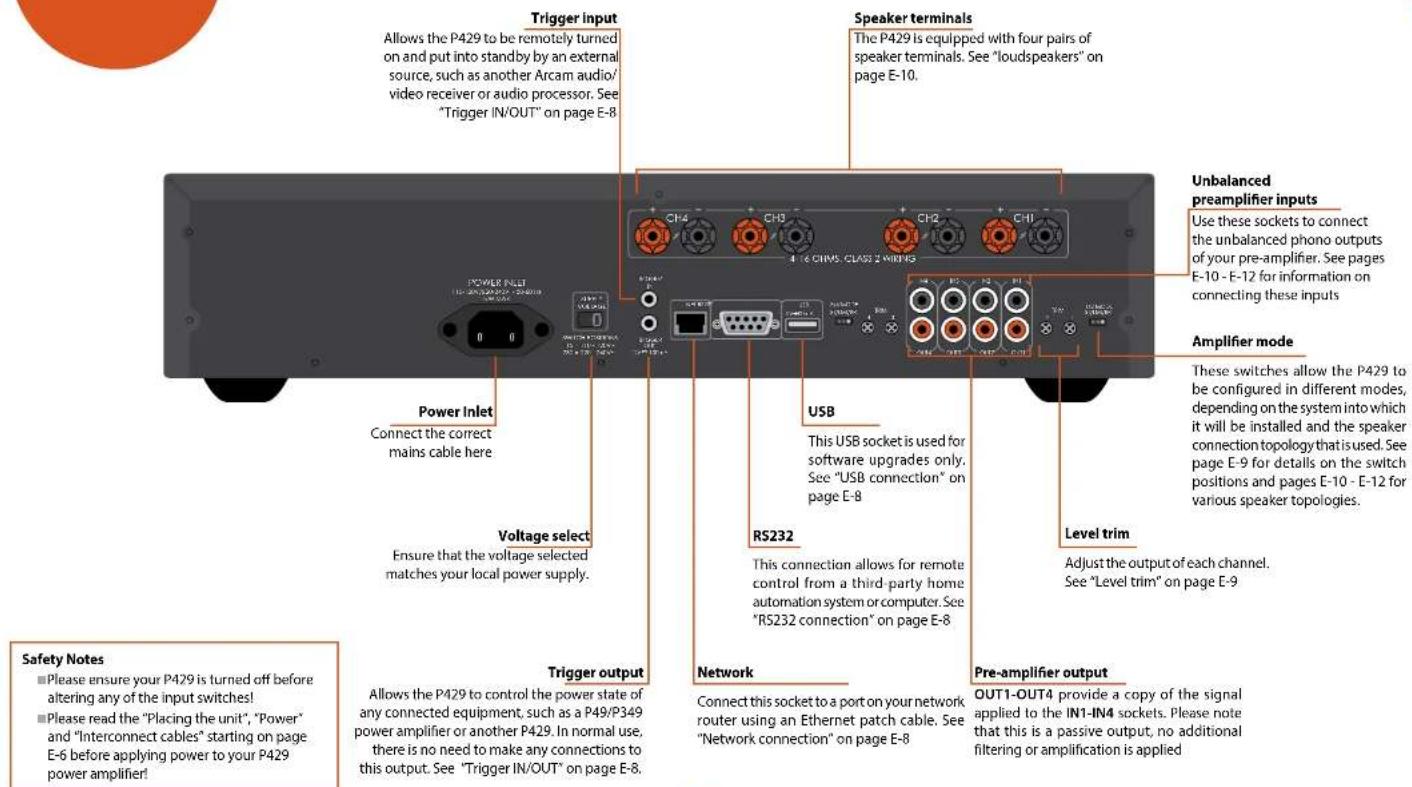
Network connection
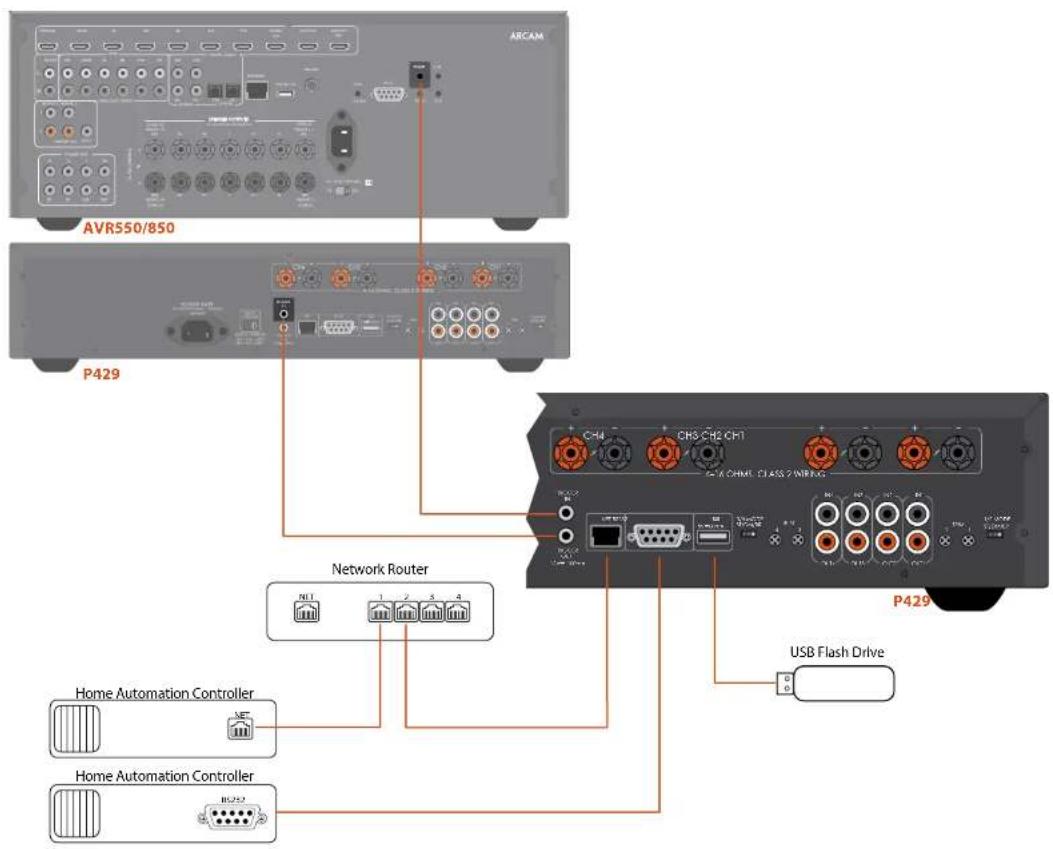
The P429 can be connected to a local network, so that it can be controlled and monitored remotely. Please refer to the control document which can be found at www.arcam.co.uk for further information.
RS232 connection
The RS232 input is for optional connection to a home automation system or personal computer. Various third-party systems are available providing sophisticated control over all your entertainment devices. Contact your dealer or installer for details. The technical details of the remote control protocol are available upon request, by contacting Arcam at support@arcam.co.uk.
USB connection
The USB port is used for software updates only. For the latest software as well as further information, please visit www.arcam.co.uk.
Trigger IN/OUT
The power state of the P429 can be controlled by compatible audio/video sources (such as the Arcam AVR550/850). In this case, connect the TRIGGER OUT of the source to the TRIGGER IN of the P429 using a mono 3.5mm jack lead.
Similarly, the P429 can control the power state of compatible product (such as another P429). In this case, connect the TRIGGER IN of the source to the TRIGGER OUT of the P429 using a mono 3.5mm jack. Note that these leads are not supplied.

Switching on
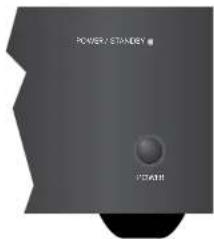
The POWER button switches the unit on and off. The power light (next to the 'POWER / STANDBY' text) indicates the state of the amplifier: if it changes from red to orange then green if mains power is connected and the unit is switched on.
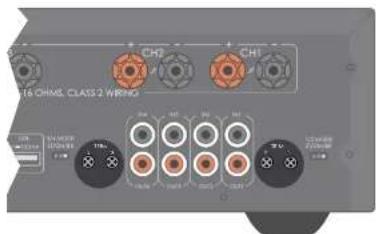
Mode switches
These switches allow the two pair of amplification channels to be independently configured in three different modes.
Level trim
These trims allow each channel output level to be adjusted in order to compensate for differences in speaker output levels due to their position within the listening environment. In normal use, these trims should all be set to the fully clockwise position.
In ST (Stereo) mode, each output channel is fed from its respective input and would be used to drive four independent speakers. As an example, please refer to "Single wiring" on page E-10
In DM (Dual Mono) mode, CH1 and CH2 are fed from the CH1 input only, while CH2 is not used. Similarly, CH3 and CH4 are fed from CH3 only, while CH4 is not used. This would be used to drive two independent speakers in a bi-amped configuration. An example of this is shown in "Dual mono / Bi-Amping" on page E-11
In BR (Bridged) mode, CH1 and CH2 are bridged together and are fed from CH1 only, while CH2 is not used. Similarly, CH3 and CH4 are bridged together and are fed from CH3 only, while CH4 is not used. This would be used to drive two independent speakers in a bridged mono setup. An example of this is shown in "Bridged mode" on page E-12


Connecting loudspeakers
There are many different ways of connecting your loudspeakers to your P429 and the following section describes how to connect and configure the loudspeakers and amplifier for the most common configurations.
Notes on making speaker connections
Do not make any connections to any amplifier while it is switched on. We recommend that your amplifier is completely disconnected from the mains supply before starting.
Before switching your amplifier on for the first time after connecting to speakers, please check all connections thoroughly. Ensure that bare wires or cables are not touching each other or the amplifier's chassis (which could cause short circuits), and that you have connected positive (+) to positive and negative (-) to negative. Be sure to check the wiring for both the amplifier and the speaker.
After making connections: switch the amplifier on, select a source signal, then gradually increase the volume to the required listening level.
If you are unsure as to how your system should be connected, please contact your Arcam dealer who will be happy to help you.
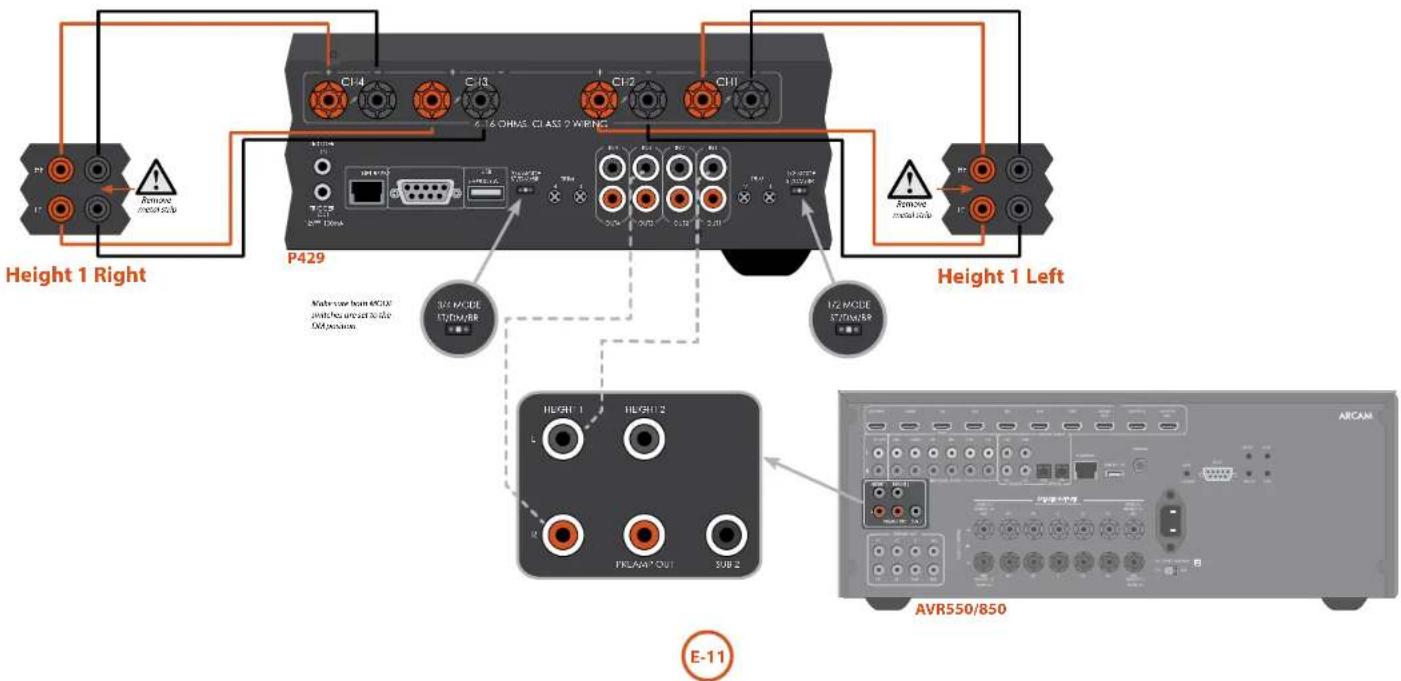
Dual mono / Bi-Amping
Dual mono requires the use of two channels of the P429 for each speaker, as shown in the diagram below.
In this setup, only one interconnect is required for each pair of channels. The L and R output of the two channels of your audio/video device (such as the Arcam 550/850) should be connected to the IN1 and IN3 input of the P429, respectively.
WARNING: the strip of metal on the speakers connecting the low frequency (LF) terminals to the high frequency (HF) terminals MUST BE REMOVED. Failure to do so will result in damage to both amplifiers, which will not normally be covered under warranty.
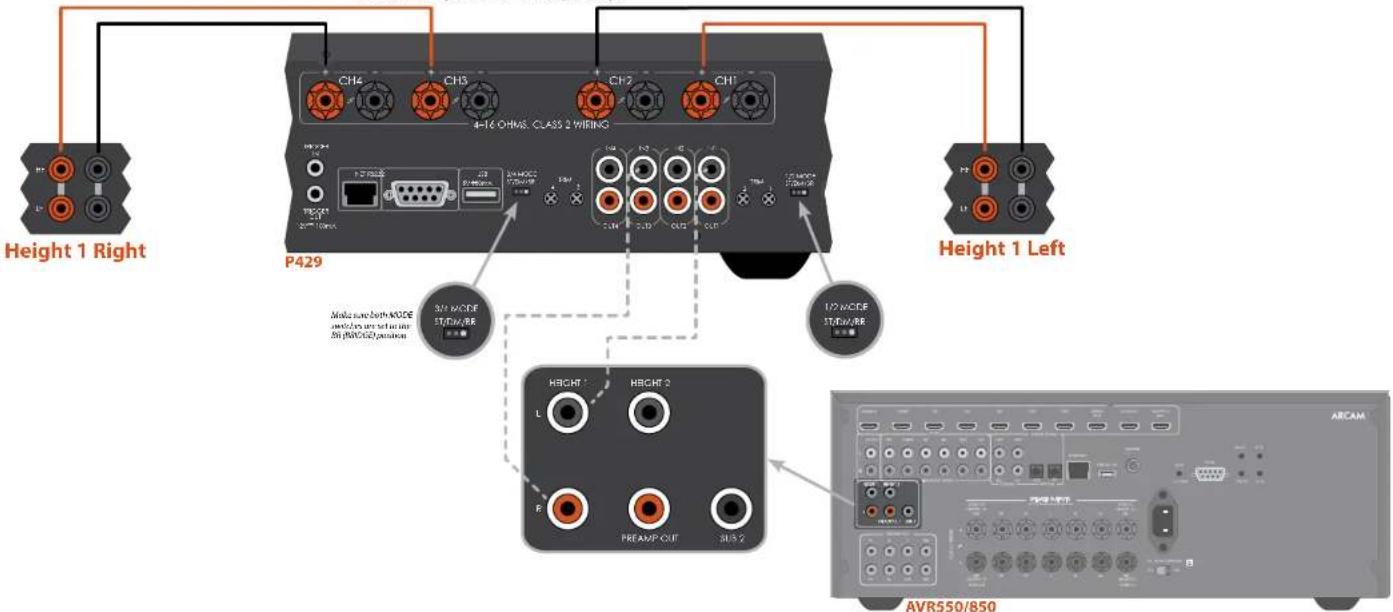
Bridged mode
In bridged mode, only the positive (red) speaker outputs of each P429 channel are active. No connections should be made to the negative (black) speaker terminals.
WARNING: Do not make any connections to the other speaker terminals, doing so will severely damage your amplifier.
If each speaker has more than one pair of connecting terminals, use the terminals labelled HF or 'High Frequency',
In this setup, only one interconnect is required for each pair of channels. The L and R output of the two height channels of your audio/video device (such as the Arcam AVR550/850) should be connected to the IN1 and IN3 input of the P429, respectively.
WARNING: If your speakers support bi-wiring, there will be a strip of conductive metal connecting the low-frequency (LF) terminals to the high-frequency (HF) terminals; this MUST NOT BE REMOVED in a bridged mode system.

If you are having trouble with your amplifier, check the following items.
No sound
Check the following:
■The P429 power amplifier is correctly plugged in and switched on
- Your audio/video source (e.g. preamplifier) is correctly connected, the correct input is selected and it is not muted
■The P429 is not in protection mode, as described in the next section.
Sound cuts-out unexpectedly
The P429 may enter a protection mode, depending on the fault being detected. The front panel LED will indicate the fault type, according to the following list:
ALTERNATE RED/GREEN: The internal
temperature of the unit reached an unsafe level. Allow the P429 to cool off.
- FLASHING RED: The P429 amplifier detected a speaker short circuit. Should this happen, please inspect all the speaker cables to make sure none of them are shorted together. This fault is very common when bare wires are being used to make speaker connections.
■ FLASHING ORANGE: The amplifier detected a DC offset.
Following any of the faults described above, the amplifier will turn itself off and power to the speakers will be removed. To continue using the P429, the fault must be removed and the unit must be turned OFF then back ON.

| Continuous power output (20Hz-20kHz at 0.2% THD), per channel | |
| ST (stereo) and DM (dual mono) modes | |
| Four channels driven, 4Ω / 8Ω, 20Hz-20kHz 125W / 90W | |
| One channel driven, 4Ω / 8Ω, 1kHz 180W / 110W | |
| BR (bridged) mode | |
| Two channels driven, 8Ω, 20Hz-20kHz 270W | |
| One channel driven, 8Ω, 1kHz 320W | |
| Harmonic distortion, 80% power, 8Ω at 1kHz 0.002% | |
| Inputs | |
| ST (stereo) and DM (dual mono) modes | |
| Input sensitivity for 100W / 8Ω 0.8V variable down to 7V | |
| Signal/noise ratio (Awtd) ref 100W / 8Ω 112dB | |
| BR (bridged) mode | |
| Input sensitivity for 300W / 8Ω 0.6V variable down to 5V | |
| Signal/noise ratio (Awtd) ref 100W / 8Ω 110dB | |
| Input impedance 10kΩ | |
| Frequency response 20Hz-20kHz ± 0.05dB | |
| General | |
| Mains voltage 110-120V~ or 220-240V~, 50-60Hz | |
| Power consumption (maximum) 1kW | |
| Dimensions W x D x H (including feet) 433 x 425 x 105mm | |
| Weight (net) 13.5kg | |
| Weight (packed) 15.5kg | |
| Supplied accessories Mains lead | |
| E&OE | |
| NOTE: All specification values are typical unless otherwise stated. |
Continual improvement policy
Arcam has a policy of continual improvement for its products. This means that designs and specifications are subject to change without notice.

Worldwide Guarantee
This entitles you to have the unit repaired free of charge, during the first two years after purchase, provided that it was originally purchased from an authorised Arcam dealer. The Arcam dealer is responsible for all after-sales service. The manufacturer can take no responsibility for defects arising from accident, misuse, abuse, wear and tear, neglect or through unauthorised adjustment and/or repair, neither can they accept responsibility for damage or loss occurring during transit to or from the person claiming under the guarantee.
The warranty covers:
Parts and labour costs for two years from the purchase date. After two years you must pay for both parts and labour costs. The warranty does not cover transportation costs at any time.
Claims under guarantee
This equipment should be packed in the original packing and returned to the dealer from whom it was purchased. It should be sent carriage prepaid by a reputable carrier – not by post. No responsibility can be accepted for the unit whilst in transit to the dealer or distributor and customers are therefore advised to insure the unit against loss or damage whilst in transit.
For further details contact Arcam at support@arcam.co.uk.
Problems?
If your Arcam dealer is unable to answer any query regarding this or any other Arcam product please contact Arcam Customer Support at the above address and we will do our best to help you.
On-line registration
You can register your product on-line at www.arcam.co.uk.

Correct disposal of this product
This marking indicates that this product should not be disposed with other household waste throughout the EU.
To prevent possible harm to the environment or human health from uncontrolled waste disposal
and to conserve material resources, this product should be recycled responsibly.
To dispose of your product, please use your local return and collection systems or contact the retailer where the product was purchased.
ARCAM
MJ CP429
Sélecteurs de mode
P429 Anschlüsse......D-5
WATERBEACH, CAMBRIDGE, CB25 9PB, ENGLAND

- HANDBOOK Power amplifier
- Class II product
- Warning
- Important safety instructions
- Safety compliance
- CAUTIONS ON INSTALLATION
- FCC INFORMATION (FOR US CUSTOMERS)
- PRODUCT
- IMPORTANT NOTICE: DO NOT MODIFY THIS PRODUCT
- NOTE
- SAFETY INFORMATION (FOR EUROPEAN CUSTOMERS)
- A NOTE ABOUT RECYCLING
- CORRECT DISPOSAL OF THIS PRODUCT
- contents
- Placing the unit
- Power
- Interconnect cables
- Level Trim and Amplifier Mode switches
- Network connection
- RS232 connection
- USB connection
- Trigger IN/OUT
- Switching on
- Mode switches
- Level trim
- Connecting loudspeakers
- Notes on making speaker connections
- Dual mono / Bi-Amping
- Bridged mode
- No sound
- Sound cuts-out unexpectedly
- Continual improvement policy
- Worldwide Guarantee
- The warranty covers:
- Claims under guarantee
- Problems?
- On-line registration
- ARCAM
- MJ CP429
- Sélecteurs de mode
Brand : ARCAM
Model : P429
Category : Receiver