
IAN 78446 - Lighting Livarno Lux - Free user manual and instructions
Find the device manual for free IAN 78446 Livarno Lux in PDF.


User questions about IAN 78446 Livarno Lux
0 question about this device. Answer the ones you know or ask your own.
Ask a new question about this device
Download the instructions for your Lighting in PDF format for free! Find your manual IAN 78446 - Livarno Lux and take your electronic device back in hand. On this page are published all the documents necessary for the use of your device. IAN 78446 by Livarno Lux.
USER MANUAL IAN 78446 Livarno Lux
LED UNDER-CABINET SPOTLIGHTS
Operation and Safety Notes
6
Z31357-BS
LIVARNO LUX

natural_image
Color palette bar with grayscale shades and a small crosshair symbol (no text or labels)

GB / IE Operation and Safety Notes Page 4



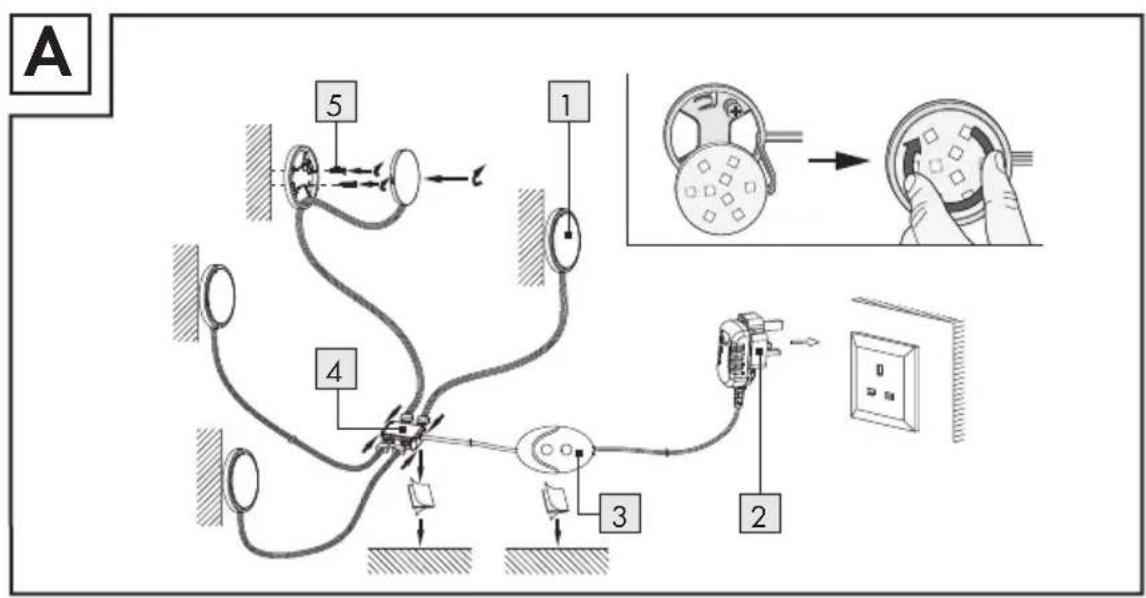
text_image
A 5 1 4 3 2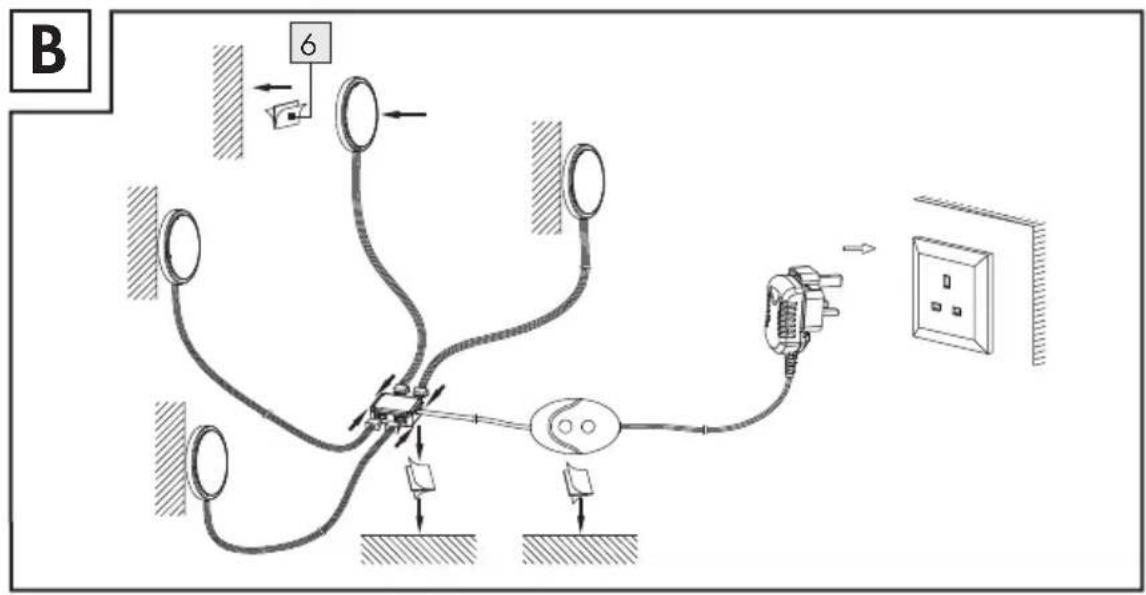
text_image
B 6LED Under-cabinet spotlights
Intendeduse
This product is suitable only for indoor use. This product is intended for use in private, domestic environments only and not for commercial purposes.
- Parts description
1 LED-light dish with removable fitting plate
2 Plug-in mains adapter
3 Controller with On / Off switch and colour controller
4 Distribution box
5 Screw
6 Double-sided adhesive tape
- Technical Data
LED Light dish
Operating voltage: 12V —— (per LED light dish)
Rated power: max. 1.8 W x 4 dishes
(LEDs cannot be
replaced)
Protection category:

Plug-in mains adapter
Nominal voltage
primary: 100-240V\~
50/60Hz
Nominal voltage
secondary: 12V =-, 1A
Rated power: ca. 0.2 W per LED
(LEDs cannot be
replaced)
Protection category:

Modelnumber:
LPS18-120-1000-3
- Scope of delivery
4 LED light dishes with removable fitting plate
1 Plug-in mains adapter with connected controller (On / Off switch and colour controller) and connecting cable
1 Distribution box
8 Screws
6 Pieces of double-sided adhesive tape
1 Operating instructions
4 GB/IE


Safety notes
Before using the product, please familiarise yourself with all of the safety information and instructions for use. When passing this product on to others, please also include all the documents.


RISK ▲ WARNING!
FATAL INJURY! During
installation keep children away
from the area in which you are working. A large number of screws and other small parts are included with delivery. These may prove life-threatening if swallowed or inhaled.
Children or persons lacking knowledge or experience in handling the device or have limited physical, sensory or mental abilities, must not use the device without supervision or instruction by a person responsible for their safety. Children must be supervised at all times to prevent them from playing with the device.

Avoid the danger of death from electric shock!
Before use, ensure that the available mains voltage is the same as the voltage required for operating the appliance (100-240V\~, 50/60Hz).
■ Always check the product for damage before connecting it to the power supply.
■ Never use the product if you find it damaged in any way.
This product does not contain any parts that can be serviced by the user. The LEDs cannot be replaced.
■ Protect the product from sharp edges, mechanical stress and hot surfaces.

Safetyinstructions for assembly
Do not use any sharp and / or pointed objects, such as wire, nails or clamps, to fasten the product in place.
The plug must be plugged into an easily accessible socket, to ensure it can be unplugged easily in an emergency.
- Installation
☐ Install the product as shown in the figures.
Note: You can fit the under cabinet spot lights using either the screws 5 (see Fig. A) or using the double sided adhesive tape 6 (see Fig. B).
☐ If you choose installation using double sided adhesive tape, please remove the protective foil from the back first and stick it to the intended area, pressing firmly.
☐ Make sure that the surface is clean, dry, smooth and free of grease.
●Preparing the product for use
☐ Insert the mains plug into a suitable socket.
☐ Press the ON / OFF switch 3. The LED light dishes light up in the colour which has been chosen before the product was switched off last time.
●Controlling the light effects
☐ Press the light change button once to switch on the colour change effect.
☐ Press the light change button twice to switch on green light.
☐ Press the light change button 3 times to switch on red light.
☐ Press the light change button 4 times to switch on blue light.
☐ Press the light change button 5 times to switch on yellow light.
☐ Press the light change button 6 times to switch on purple light.
☐ Press the light change button 7 times to switch on light blue light.
☐ Press the light change button 8 times to switch on white light.
- Cleaning and Care
CAUTION! DANGER OF ELECTRIC
SHOCK! Before performing any work, first disconnect the light from the mains power. Remove the mains plug from the socket.
☐ Allow the lamp to cool completely.
☐ Only use a dry, lint-free cloth for cleaning.
- Disposal

The packaging is made from environmentally-friendly materials, which may be disposed through your local recycling facilities.
Contact your local authorities for information on how to dispose of the product at the end of product life.

Never dispose of the product in your regular household waste. Dispose of the device / article at an authorised disposal centre or at your local council disposal facility. Observe the applicable regulations. In case of doubt, please contact your waste disposal centre.
EMC CE
7 GB/IE

natural_image
Color palette bar with grayscale shades and a small crosshair symbol (no text or labels)
IAN 78446
OWIM GmbH & Co. KG
Stiftsbergstraße 1
D-74167 Neckarsulm
Model-No.: Z31357-BS
Version: 09/2012
© by ORFGEN Marketing
Last Information Update: 09 / 2012
Ident.-No.: Z31357-BS092012-6
