
PWS 230 B2 - Mill PARKSIDE - Free user manual and instructions
Find the device manual for free PWS 230 B2 PARKSIDE in PDF.


| Product Type | Angle Grinder / Mill |
| Brand | Parkside |
| Model | PWS 230 B2 |
| Power Input | 2300 W |
| Voltage | 230 V ~ 50 Hz |
| No-Load Speed | 6600 rpm |
| Grinding Disc Diameter | 230 mm |
| Spindle Thread | M14 |
| Weight | 5.4 kg |
| Protection Class | II (Double insulated) |
| Protection Rating | IP20 |
| Safety Features | Spindle lock, safety guard, anti-vibration handle |
| Main Functions | Grinding, cutting, descaling, brushing |
| Disc Change | Tool-free with spindle lock |
| Speed Adjustment | Electronic variable speed (optional) |
| Power Cord Length | 2.5 m |
| Accessories Included | Side handle, flange wrench, grinding disc (rough estimate) |
| Maintenance | Regular carbon brush inspection and replacement; clean air vents |
| Repairability | Spare parts available (brushes, switch, armature); user-serviceable |
| Warranty | 3 years (typical Parkside) |
Frequently Asked Questions - PWS 230 B2 PARKSIDE
User questions about PWS 230 B2 PARKSIDE
0 question about this device. Answer the ones you know or ask your own.
Ask a new question about this device
Download the instructions for your Mill in PDF format for free! Find your manual PWS 230 B2 - PARKSIDE and take your electronic device back in hand. On this page are published all the documents necessary for the use of your device. PWS 230 B2 by PARKSIDE.
USER MANUAL PWS 230 B2 PARKSIDE
ANGLE GRINDER PWS 230 B2
GB IE
ANGLE GRINDER
Translation of the original instructions
SE
VINKELSLIP
Before reading, unfold both pages containing illustrations and familiarise yourself with all functions of the device.
FI
GB / IE Translation of the original instructions Page 1
natural_image
Close-up of a mechanical power tool with labeled component (A) and rotation arrow (no text or symbols on the tool itself)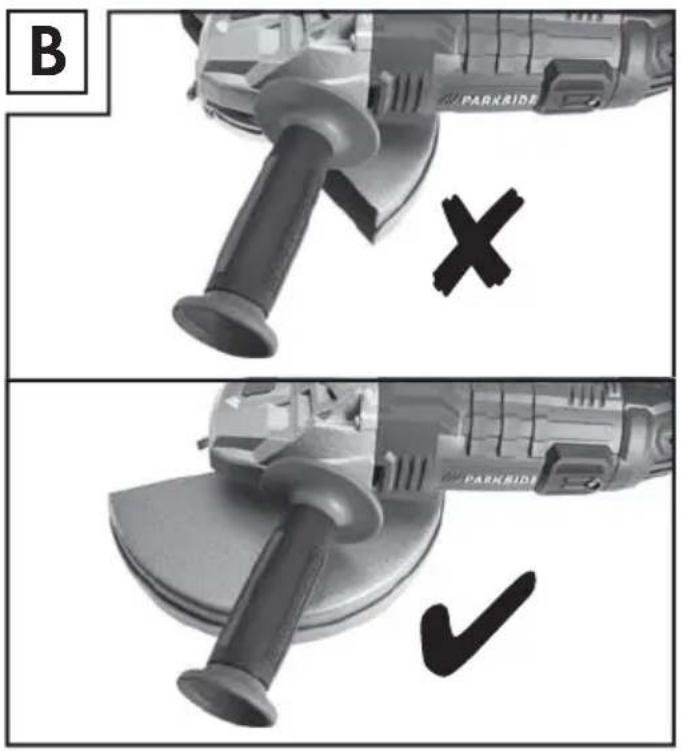
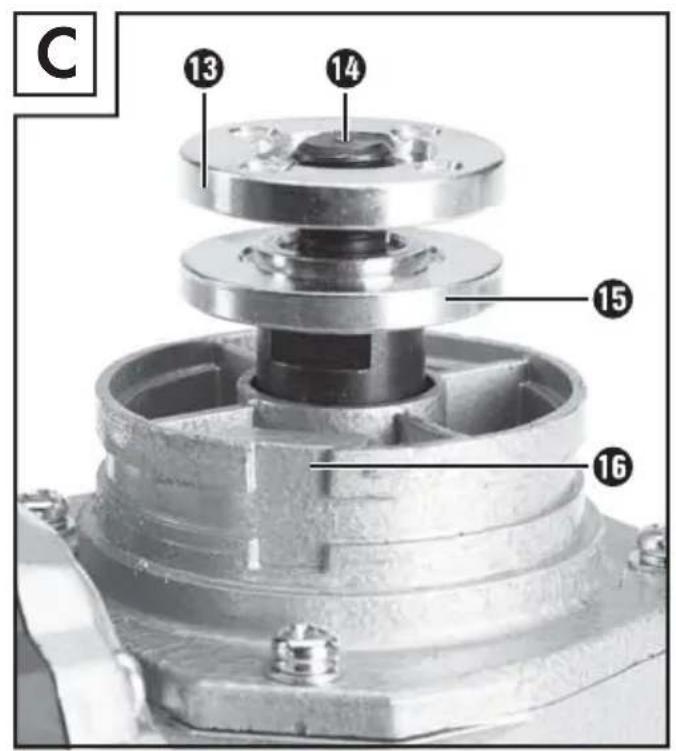
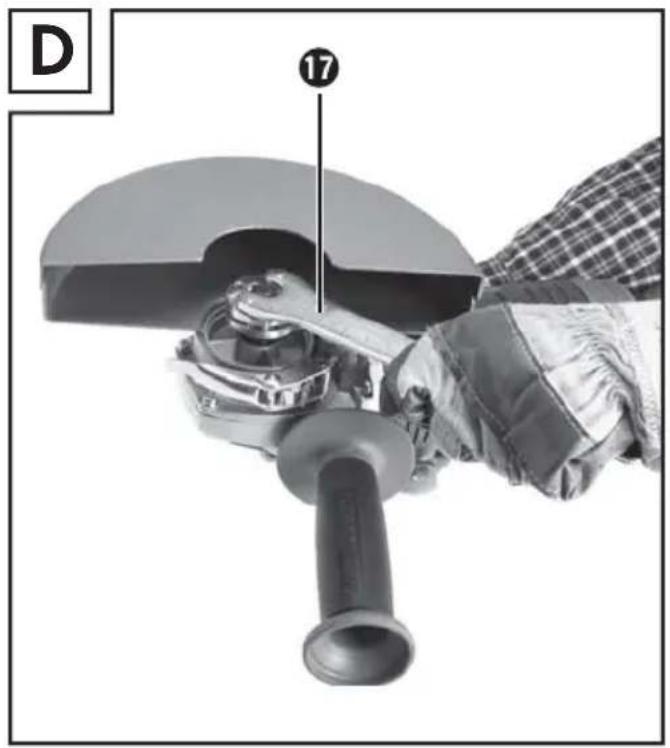
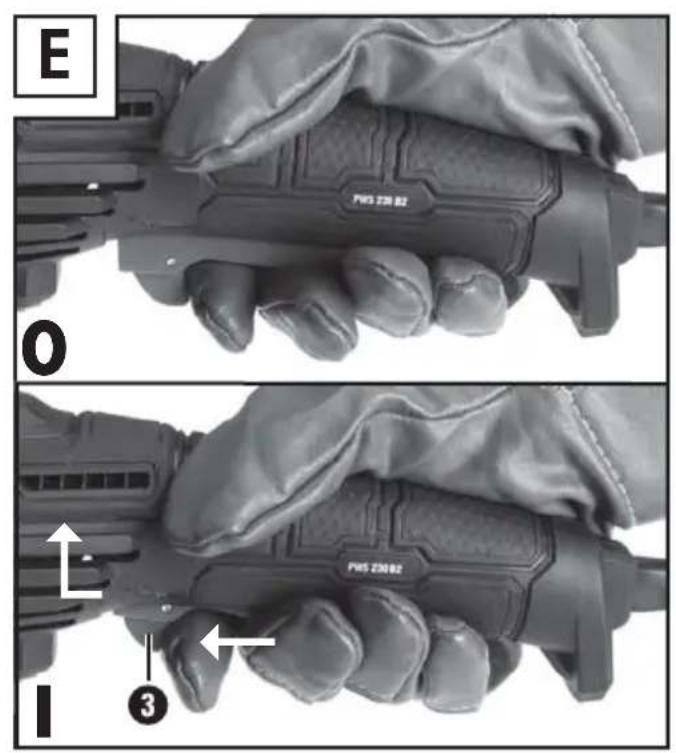
Table of Contents
Introduction....2
Intended use 2
Features 2
Package contents 2
Technical data 2
General Power Tool Safety Warnings 3
- Work area safety 3
- Electrical safety 3
- Personal safety 3
- Power tool use and care 4
- Service 4
Safety advice for all uses 4
Safety advice relating to kickback 6
Special safety advice relating to grinding and disc-cutting 6
Further special safety advice for disc-cutting 7
Permissible Accessories 8
Storing and handling recommended accessories. 8
Working procedures 9
Operation....10
Attaching the disc guard cover using the quick-release fastener 10
Attaching the auxiliary handle 10
Attaching and replacing roughing / grinding / cutting discs 10
Switching on and off 11
Rotating the hand grip 11
Maintenance and cleaning 11
Disposal....11
Warranty....12
Service....12
Importer 12
Translation of the original Conformity Declaration....12
ANGLE GRINDER PWS 230 B2 Introduction

ngratulate you on the purchase of your new device. You have chosen a high quality product. The instructions for use are part of the product. They contain important information concerning safety, use and disposal. Before using the product, please familiarise yourself with all of the safety information and instructions for use. Only use the unit as described and for the specified applications. If you pass the product on to anyone else, please ensure that you also pass on all the documentation with it.
Intended use
The appliance is intended for cutting, rough cutting metal work materials without the use of water. Any other usage of or modification to the appliance is deemed to be improper usage and carries the risk of serious personal injury. The manufacturer accepts no responsibility for damage(s) resulting from improper usage.
The appliance is not meant for commercial use.
Features
① Hand grip (rotatable)
② ON/OFF switch
3 Safety lock-out
4 Unlocking button
5 Carbon brushes cover
6 Auxiliary handle
7 Disc guard cover
8 Clamping lever
9 Coded projection
10 Adjuster screw
⑪ Spindle lock button
12 Threaded hole (3 x) for auxiliary handle
13 Clamping nut (see Fig. C)
14 Mounting spindle (see Fig. C)
15 Mounting flange (see Fig. C)
16 Coded groove (see Fig. C)
⑰ Two-pin spanner
Package contents
1 angle grinder PWS 230 B2
1 auxiliary handle
1 disc guard cover
1 Two-pin spanner
1 operating instructions
Technical data
Rated voltage: 230-240 V \~ 50 Hz (alternating current)
Nominal power: 2000 W
Rated speed: n 6500 min
Grinding disc: ∅ 230 mm
Spindle thread: M14
Protection class: II /
Noise and vibration data:
Noise measurement value determined in accordance with EN 60745 The A-rated noise level of the power tool is typically:
Noise emission value:
Sound pressure level: L_PA = 91.4 dB (A)
Uncertainty: K = 3 dB (A)
Sound power level: L_WA = 102.4 dB (A)
Uncertainty: K = 3 dB (A)

ear protection!
Vibration total value:
Angle grinding: q_h, AG = 7.4 m/s^2
Uncertainty: K = 1,5 m/s^2

WARNING!
The vibration level specified in these instructions has been measured in accordance with the standardised measuring procedure specified in EN 60745 and can be used to make equipment comparisons. The specified vibration emission value can also be used to make an initial exposure estimate. The vibration level varies in accordance with the use of the electric tool and may be higher than the value specified in these instructions in some cases. The vibration load could be underestimated if the electric tool is regularly used in such a way.
NOTE
▶ Try to keep the vibration loads as low as possible. Measures to reduce the vibration load are, e.g. wearing gloves and limiting the working time. Wherein all states of operation must be included (e.g. times when the power tool is switched off and times where the power tool is switched on but running without load).

neral Power Tool Safety Warnings

WARNING!
Read all safety warnings and all instructions. Failure to follow the warnings and instructions may result in electric shock, fire and/or serious injury.
Save all warnings and instructions for future reference.
The term "power tool" in the warnings refers to your mains-operated (corded) power tool or battery-operated (cordless) power tool.
1. Work area safety
a) Keep work area clean and well lit. Cluttered or dark areas invite accidents.
b) Do not operate power tools in explosive atmospheres, such as in the presence of flammable liquids, gases or dust. Power tools create sparks which may ignite the dust or fumes.
c) Keep children and bystanders away while operating a power tool. Distractions can cause you to lose control.
2. Electrical safety
a) Power tool plugs must match the outlet. Never modify the plug in any way. Do not use any adapter plugs with earthed (grounded) power tools. Unmodified plugs and matching outlets will reduce risk of electric shock. b) Avoid body contact with earthed or grounded surfaces, such as pipes, radiators, ranges and refrigerators. There is an increased risk of electric shock if your body is earthed or grounded.
c) Do not expose power tools to rain or wet conditions. Water entering a power tool will increase the risk of electric shock.
d) Do not abuse the cord. Never use the cord for carrying, pulling or unplugging the power tool. Keep cord away from heat, oil, sharp edges or moving parts. Damaged or entangled cords increase the risk of electric shock.
e) When operating a power tool outdoors, use an extension cord suitable for outdoor use. Use of a cord suitable for outdoor use reduces the risk of electric shock.
f) If operating a power tool in a damp location is unavoidable, use a residual current device (RCD) protected supply. Use of an RCD reduces the risk of electric shock.
3. Personal safety
a) Stay alert, watch what you are doing and use common sense when operating a power tool. Do not use a power tool while you are tired or under the influence of drugs, alcohol or medication. A moment of inattention while operating power tools may result in serious personal injury.
b) Use personal protective equipment. Always wear eye protection. Protective equipment such as dust mask, non-skid safety shoes, hard hat, or hearing protection used for appropriate conditions will reduce personal injuries.
c) Prevent unintentional starting. Ensure the switch is in the off-position before connecting
GB IE
to power source and/or battery pack, picking up or carrying the tool. Carrying power tools with your finger on the switch or energising power tools that have the switch on invites accidents.
d) Remove any adjusting key or wrench before turning the power tool on. A wrench or a key left attached to a rotating part of the power tool may result in personal injury.
e) Do not overreach. Keep proper footing and balance at all times. This enables better control of the power tool in unexpected situations.
f) Dress properly. Do not wear loose clothing or jewellery. Keep your hair, clothing and gloves away from moving parts. Loose clothes, jewellery or long hair can be caught in moving parts.
g) If devices are provided for the connection of dust extraction and collection facilities, ensure these are connected and properly used. Use of dust collection can reduce dust-related hazards.
4. Power tool use and care
a) Do not force the power tool. Use the correct power tool for your application. The correct power tool will do the job better and safer at the rate for which it was designed.
b) Do not use the power tool if the switch does not turn it on and off. Any power tool that cannot be controlled with the switch is dangerous and must be repaired.
c) Disconnect the plug from the power source and/or the battery pack from the power tool before making any adjustments, changing accessories, or storing power tools. Such preventive safety measures reduce the risk of starting the power tool accidentally.
d) Store idle power tools out of the reach of children and do not allow persons unfamiliar with the power tool or these instructions to operate the power tool. Power tools are dangerous in the hands of untrained users.
e) Maintain power tools. Check for misalignment or binding of moving parts, breakage of parts and any other condition that may affect the power tool's operation. If damaged, have the
power tool repaired before use. Many accidents are caused by poorly maintained power tools.
f) Keep cutting tools sharp and clean. Properly maintained cutting tools with sharp cutting edges are less likely to bind and are easier to control.
g) Use the power tool, accessories and accessory tools etc. in accordance with these instructions, taking into account the working conditions and the work to be performed. Use of the power tool for operations different from those intended could result in a hazardous situation.
5. Service
a) Have your power tool serviced by a qualified repair person using only identical replacement parts. This will ensure that the safety of the power tool is maintained.
b) Always arrange for the exchange of the plug or the power cord to be carried out by the manufacturer of the appliance or by its approved customer services. This will ensure that the safety of the power tool is maintained.
Safety advice for all uses
General safety advice for grinding polishing and disc-cutting:
a) This electrical power tool is intended for use as a grinding and disc-cutting machine. Observe all the safety advice, instructions, information in figures and all other information you received with this device.
If you do not observe the following advice it could lead to electric shock, fire and/or serious injury.
b) Operations such as sanding, wire brushing or polishing are not recommended to be performed with this power tool Operations for which the power tool was not designed may create a hazard and cause personal injury.
c) Do not use any accessory not specifically intended by the manufacturer for this electrical power tool. Although an accessory may fit on your electrical power tool, this does not on its own guarantee that it can be safely used.
d) The maximum permitted speed of an attachment must be at least as high as the maximum speed indicated for the electrical power tool. An accessory rotating faster than its permitted
speed could disintegrate or fly off.
e) The external diameter and the thickness of the attachment must be compatible with the dimensions of your electrical power tool. Attachments that are not dimensionally compatible cannot be adequately guarded or controlled.
f) Threaded mounting of accessories must match the grinder spindle thread. For accessories mounted by flanges, the arbour hole of the accessory must fit the locating diameter of the flange. Attachments that do not exactly fit on the spindle turn unevenly, vibrate severely and could lead to loss of control.
g) Do not use damaged attachments. Before every use check attachments such as grinding discs for loose fragments and cracks, grinding wheels for cracks, deterioration or excessive wear and wire brushes for loose or broken wires. If the electrical power tool or attachment is dropped, inspect for damage or change the attachment for an undamaged one. When you have inspected and inserted the attachment, position yourself and bystanders away from the plane of the rotating attachment and run the device at maximum speed for one minute. Damaged attachments will usually break apart during this test.
h) Wear personal protective equipment. Use a full face visor, safety goggles or safety glasses, depending on the application. Wear a dust mask, hearing protectors, safety gloves or special apron capable of stopping particles of the grinding medium or workpiece, as appropriate for the task. Eyes must be protected from the flying debris which can arise from some operations. Dust or breathing masks must be capable of filtering out the dust generated by the application. Prolonged exposure to loud noise can lead to hearing loss.
i) Keep bystanders at a safe distance from your work area. Anyone entering the work area must wear personal protective equipment. Fragments of the workpiece or of a broken attachment could fly off and cause injury beyond the immediate working area.
i) Hold the device by the insulated handle surfaces when you are undertaking work where there is the danger of the attachment striking
hidden electricity cables or the device's mains lead. Contact with a live wire could cause metal parts of the device to become live and lead to electric shock.
k) Keep the power cord away from rotating attachments. If you lose control of the device the mains lead may become severed or trapped and your hand or arm may be pulled into the rotating attachment.
1) Never lay the electrical power tool down until after the attachment has come to a complete standstill. The rotating attachment may snag when it comes into contact with the surface and cause you to lose control of the device.
m) Do not have the electrical power tool running while you are carrying it. Your clothing could become trapped by unintentional contact with the rotating attachment and the tool could be pulled into your body.
n) Clean the ventilation slots on your electrical power tool regularly. The motor's fan draws dust into the housing. A build-up of metal dust could give rise to an electrical hazard.
o) Never use the electrical power tool near inflammable materials. Sparks could ignite these materials.
p) Do not use attachments that require the use of coolants. The use of water or other liquid coolants could result in electric shock.
GB IE
Safety advice relating to kickback
Kickback is the sudden reaction to a pinched or snagged rotating attachment, such as a grinding disc, grinding pad, wire brush etc. Pinching or snagging results in the rotating attachment coming to an abrupt stop. This causes the electrical power tool (if not controlled) to move in the opposite direction to the direction of rotation of the attachment at the point of constraint.
If, for example, a grinding disc is pinched or snags in a workpiece, this can cause the edge of the grinding disc to penetrate the workpiece, become trapped there and either free itself or kickback.
The grinding disc moves towards or away from the operator, depending on the direction of movement of the disc at the point of constraint. The grinding disc could also break.
Kickback occurs as a result of incorrect use or misuse of the electrical power tool. It can be prevented by taking the appropriate precautions as described below.
a) Maintain a firm grip on the electrical power tool and position your body and arms to allow you to resist kickback forces. Always use the auxiliary handle, if provided, to exercise the greatest possible control over kickback forces or reaction torques as the device builds up to full speed. By taking suitable precautions the operator can control kickback and reaction forces.
b) Do not place your hands near a rotating attachment. If kickback occurs the attachment could move over your hand.
c) Avoid positioning your body in the area into which the electrical power tool would move in the event of a kickback. A kickback moves the electrical power tool in the opposite direction to the direction of movement of the grinding disc at the point of constraint.
d) Work particularly carefully in the area of corners, sharp edges etc. to avoid the attachment bouncing or snagging on the workpiece. Corners, sharp edges or bouncing have a tendency to snag the rotating attachment. This causes loss of control or kickback.
e) Do not use saw-chain woodcarving discs or toothed discs. Such attachments create frequent kickback and loss of control of the electrical power tool.
Special safety advice relating to grinding and disc-cutting
a) Always use the guard designed for the type of abrasive consumable you are using. Always use abrasive consumables approved for use with your electrical power tool. Abrasive consumables not approved for use with your electrical power tool cannot be adequately guarded and are unsafe.
b) The grinding surface of centre depressed wheels must be mounted below the plane of the guard lip. An improperly mounted wheel that projects through the plane of the guard lip cannot be adequately protected.
c) To ensure the highest level of operational safety, the disc guard cover must be attached to the electrical power tool and set in such a way that the smallest possible area of the abrasive consumable is exposed to the operator. The disc guard cover is there to protect the operator from pieces breaking off and accidental contact with the abrasive consumable.
d) Abrasive consumables must be used only for their recommended purposes, For example: never grind with the side face of a cutting disc. Cutting discs are intended for removing material using the edge of the disc. Sideways forces on these abrasive consumables can cause them to break.
e) Always use an undamaged mounting flange of the correct size and shape for your selected grinding disc. Suitable flanges support the grinding disc and reduce the chance of it breaking. Flanges for cutting discs are different from the flanges for other abrasive discs.
f) Never use worn down abrasive consumables intended for larger electrical power tools. Abrasive consumables intended for larger electrical power tools are not designed for the faster rotational speeds of these smaller electrical power tools and could break.
Further special safety advice for disc-cutting
a) Avoid snagging the cutting disc and do not use too much contact pressure. Do not attempt to make excessively deep cuts. Overloading the cutting disc increases the load and the tendency of the disc to twist or snag in the cut, making kickback or disc breakage more likely.
b) Avoid the area in front of or behind the rotating cutting disc. If the cutting disc is moving away from you at the point of constraint in the workpiece, then, in the event of a kickback, the electrical power tool and the rotating disc may be thrown towards you.
c) If the cutting disc jams or you stop work for a while, switch the device off and hold it until the disc comes to a complete stop. Never attempt to pull the still rotating cutting disc out of the cut as this could cause kickback. Determine and rectify the reason for the jamming.
d) Do not switch on the device if the cutting disc is in the workpiece. Allow the cutting disc to reach full speed before carefully continuing with the cut. Otherwise the disc could snag, jump out of the workpiece or cause a kickback.
e) Support boards or workpieces whilst cutting to reduce the risk of kickback caused by a jammed cutting disc. Large workpieces may bend under their own weight. The workpiece must be supported to both sides of the cutting disc and particularly near the cutting disc and at the workpiece edge.
f) Be particularly careful when pocket cutting in existing walls or other areas where you cannot see what you are cutting into. The cutting disc plunged into the surface could cut through gas or water pipes, electricity cables or other objects and cause kickback.
GB IE
Permissible Accessories
| Max. diameter (mm) | Max. thickness (mm) | Spindle thread (mm) | Rated speed (min^-1) | Rated speed (m/s) | Tool | Protection guard | |
| Cutting disc | 230 3 M | 14 650 | 0 80 | Two-pin spanner | Yes | ||
| Grinding disc | 230 6 M | 14 650 | 0 80 | Two-pin spanner | Yes |
Storing and handling recommended accessories
■ Handle and transport grinding/buffing tools with care.
■ Store grinding/buffing tools so that they are not exposed to mechanical stress or damaging environmental factors (e.g. moisture).
Working procedures
NOTE
▶ Grinding tools should only be used for the recommended applications. Otherwise, they can break, be damaged or cause injuries.
Rough grinding:
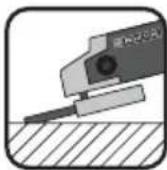
Never use cutting discs for rough grinding!
■ Move the angle grinder with moderate pressure back and forth over the workpiece.
For soft material, move the rough grinding disc at a flat angle over the workpiece; for hard material at a slightly steeper angle.
Abrasive cutting:
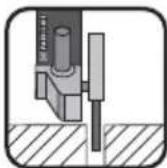
Never use rough grinding discs for cutting!
■ Use only tested fibre-reinforced cutting or grinding discs that are approved for a circumferential speed of no less than 80 m/s.

CAUTION!
The grinder continues running after being turned off. Do not try to brake it by applying lateral counterpressure.
■ Immobilise the workpiece securely. Use clamps/ vices to hold the workpiece firmly in place. This is much safer than simply holding it in your hand.
■ Always switch off the appliance before putting it away and wait for the appliance to come to a complete standstill.
■ Release the ON/OFF switch immediately in the event of a power failure or when the plug is pulled out. Move it into the OFF position. This prevents an uncontrolled restart.
■ Use the appliance only for dry cutting or grinding.
■ The auxiliary handle ^6 must be mounted on the appliance for all work.
■ Materials containing asbestos may NOT be processed. Asbestos is a known carcinogen.

Tip! This symbol indicates proper behaviour!

DANGER! GUIDE THE APPLIANCE THROUGH THE WORKPIECE IN REVERSE ROTATION.
In the opposite direction there is a risk of kickback. The appliance can be pushed out of the cut.
■ Always switch the appliance on before applying it to the workpiece. After completing the task, lift the appliance from the work piece and then switch it off.
■ Always hold the appliance firmly with two hands while working. Ensure that your stance is secure and stable.
For an optimum grinding effect, move the appliance evenly at an angle of 15^ to 30^ (between grinding disc and workpiece) backwards and forwards.
When working on angled surfaces, do not exert great force on the workpiece. If the rotational speed drops significantly, you must reduce the pressure exerted to allow safe and effective working. If the appliance suddenly brakes completely or jams, it must be switched off immediately.
■ Cutting: Work with a moderate feed and do not tilt the cutting disc.
- Roughing and cutting discs become very hot – let them cool down completely before touching them.
■ Never use the appliance for purposes other than the ones for which it was designed.
■ Always make sure that the appliance is turned off before plugging it into the wall socket.
In case of danger, remove the plug from the socket immediately. Ensure that the appliance and the power socket are easily and quickly accessible in the event of an emergency.
■ Always remove the plug from the power socket during work breaks, when adjusting the appliance and when it is no longer in use.
The appliance must always be kept clean, dry and free from oil or grease.
■ Remain alert at all times! Always pay attention to what you are doing and act with common sense. Never use the appliance when you are distracted or don't feel well.

protective glasses!

a dust mask!
Operation
Attaching the disc guard cover using the quick-release fastener

WARNING - RISK OF INJURY!
▶ Pull the mains plug out of the mains socket before you carry out any task on the device.

RISK OF INJURY!
▶ Always use the angle grinder with the blade guard ⑦. The blade guard should be installed securely. Set it so that the highest possible degree of safety is achieved, e.g. the smallest possible part of the grinding disc is exposed to the operator. The blade guard ⑦ is designed to protect the operator from fragments and accidental contact with the grinding tool.

RISK OF INJURY!
▶ Ensure that the guard7 is attached so that its edge is beyond the angle of the auxiliary handle (see Fig. B). Otherwise you could injure yourself against the grinding or cutting disc.
◆ Open the clamping level 8.
♦ Insert the disc cover guide ⑦ with the coded projection ⑨ in the coded groove . ⑯
Turn the disc guard cover 7 into the desired position (working position). The closed side of the disc guard cover 7 must always be facing the operator.
◆ Close the clamping leve 8 to firmly clamp the disc guard cover 7 in place. If necessary
the clamping force of the connection can be adjusted by tightening or loosening the adjuster screw 10. Ensure that the disc guard cover 7 sits firmly on the spindle collar.
Attaching the auxiliary handle

CAUTION!
For safety reasons this device must always be used with the auxiliary handle 6 in place. Otherwise you could become injured. Screw the auxiliary handle 6 on the left, right or on the top of the head of the device.
Attaching and replacing roughing / grinding / cutting discs

Always wear protective gloves when changing cutting/rough grinding discs. Roughing / grinding and cutting discs become hot during use. Do not touch them until after they have cooled down.
Take note of the dimensions of the roughing / grinding or cutting discs. The circular hole must fit on to the mounting flange without play. Do not use a reducer piece or adapter.
- Check the condition of the roughing / grinding or cutting discs. They must be free of damage, moisture or cracks. Otherwise they could break up during use and cause injury.
NOTE
▶ Always ensure the discs are free of dirt before use.
■ Use only abrasive consumables or tools with an allowable speed at least as high as the no-load speed of the device.
■ DANGER OF INJURY! Press the spindle lock button ⑪ only after the mounting spindle ⑭ has reached a standstill.
◆ Press the spindle lock button to block the drive.
◆ Release the clamping nut using the Two-pin spanner (see Fig. D).
Place the roughing / grinding or cutting disc on to the mounting flange 15 with its labelled side facing towards the device.
Then replace the clamping nut ^13 , with its raised side facing upwards, on to the mounting spindle ^14 .
◆ Press the spindle lock button to block the drive.
♦ Tighten the clamping nut again with the Two-pin spanner 17
NOTE
▶ If the disc does not turn smoothly or vibrates after the change, the disc must immediately be replaced.
For safety's sake, run at high idle for 60 seconds after every disc change. Be aware of unusual noises and sparks.
◆ Check whether all the fastening elements are correctly fitted.
Make sure that the arrow showing the direction of rotation (if any) on the cutting or rough grinding discs (including diamond cutting discs) and the direction of rotation of the appliance (arrow showing the direction of rotation on the head) match.
Switching on and off
Check the accessory tool before use. It must be properly installed, may not be damaged or damp, should have no cracks and turn freely. Carry out a 60 second test run. Do not use non-circular or vibrating tools. Be aware of unusual noises and sparks. Check whether all the fastening elements are correctly installed.
Switching on:
◆ Press the safety lock-ou 3 (see Fig. E).
- Then press the ON / OFF switch ^2 .
Switching off:
◆ Release the ON / OFF switch ^2 .
Rotating the hand grip
■ The hand grip ^1 can be rotated by 90° to the right or left (see Fig. A).
This allows the ON / OFF switch ^2 to be brought into the most comfortable position for any working conditions.
◆ Press the unlocking butto.4 and rotate the hand grip 1 to the right or left.
Make sure the hand grip 1 engages.
Maintenance and cleaning

NING! RISK OF INJURY! Switch the appliance off and remove the power plug before starting any work.
Do not use any sharp objects to clean the appliance. Never permit fluids to penetrate inside the appliance. The appliance could be damaged. The carbon brushes should only be replaced by the service centre or an authorized specialist workshop. Apart from this, the appliance is maintenance-free.
■ Clean the appliance regularly, preferably immediately after completion of the work.
- Clean the housing with a dry cloth – do NOT use petrol, solvents or cleaners that can attack the plastic.
■ A vacuum cleaner is required for thorough cleaning of the appliance.
■ Ventilation openings must never be obstructed.
■ Remove any adhering swarf with a brush.
NOTE
▶ Unlisted replacement parts (such as carbon brushes, switch) can be ordered via our service hotline.
Disposal

The packaging consists of environmentally friendly material. It can be disposed of in the local recycling containers.
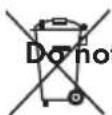
t dispose of power tools in your normal domestic waste!
European Directive 2012/19/EU requires that worn-out power tools be collected separately and fed into an environmentally compatible recycling process.
Your local community or municipal authorities can provide information on how to dispose of the worn-out appliance.
Warranty
You are provided a 3-year warranty on this appliance, valid from the date of purchase. This appliance has been manufactured with care and inspected meticulously prior to delivery. Please retain your receipt as proof of purchase. In the event of a warranty claim, please contact your customer service department by telephone. This is the only way to guarantee free return of your goods.
The warranty only covers claims for material and manufacturing defects, not for damage sustained during transport, components subject to wear and tear or damage to fragile components such as switches or batteries. This appliance is intended solely for private use and not for commercial purposes. The warranty shall be deemed void in the case of misuse or improper handling, use of force and interventions which have not been carried out by one of our authorised service centres. Your statutory rights are not restricted by this warranty. The warranty period is not extended due to repairs effected under the warranty. This also applies to replaced and repaired components. Any damage and defects present at the time of purchase must be reported immediately after unpacking, but no later than two days after the date of purchase. Repairs effected after expiry of the warranty period shall be subject to charge.
Service
GB Service Great Britain
Tel.: 0871 5000 720 (£ 0.10/Min.)
E-Mail: kompernass@lidl.co.uk
IAN 273273
IE Service Ireland
Tel.: 1890 930 034
(0,08 EUR/Min., (peak))
(0,06 EUR/Min., (off peak))
E-Mail: kompernass@lidl.ie
IAN 273273
Hotline availability:
Monday to Friday 08:00 - 20:00 (CET)
Importer
KOMPERNASS HANDELS GMBH
BURGSTRASSE 21 • 44867 BOCHUM
GERMANY
www.kompernass.com
Translation of the original Conformity Declaration
We, KOMPERNASS HANDELS GMBH, Custodian of Documents: Mr. Semi Uguzlu, BURGSTR. 21, 44867 BOCHUM, GERMANY, hereby declare that this product complies with the following standards, normative documents and the EC directives:
Machinery Directive
(2006/42/EC)
EMC (Electromagnetic Compatibility)
(2004/108/EC)
RoHS Directive
(2011/65/EU)
Applied harmonised standards:
EN 60745-1:2009/A11:2010
EN 60745-2-3:2011/A12:2014
EN 55014-1:2006/A2:2011
EN 55014-2:1997/A2:2008
EN 61000-3-2:2014
EN 61000-3-3:2013
Type designation of machine:
Angle grinder PWS 230 B2
Year of manufacture: 10 - 2015
Serial number: IAN 273273
Bochum, 21/08/2015
Semi Uguzlu
- Quality Manager -
Subject to technical changes in the course of further developments.
Sisällysluettelo
Johdanto....14
KOMPERNASS HANDELS GMBH
BURGSTRASSE 21
44867 BOCHUM
GERMANY
www.kompernass.com
Semi Uguzlu
- Laatujohtaja -
KOMPERNASS HANDELS GMBH
BURGSTRASSE 21
44867 BOCHUM
GERMANY
www.kompernass.com
KOMPERNASS HANDELS GMBH
BURGSTRASSE 21
44867 BOCHUM
GERMANY
www.kompernass.com
Semi Uguzlu
KOMPERNASS HANDELS GMBH
BURGSTRASSE 21
44867 BOCHUM
GERMANY
www.kompernass.com
KOMPERNASS HANDELS GMBH
BURGSTRASSE 21
44867 BOCHUM
GERMANY
www.kompernass.com
KOMPERNASS HANDELS GMBH
BURGSTRASSE 21
44867 BOCHUM
DEUTSCHLAND / GERMANY
www.kompernass.com
Last Information Update · Tietojen tila · Informationsstatus



- ANGLE GRINDER PWS 230 B2
- ANGLE GRINDER
- VINKELSLIP
- FI
- Table of Contents
- Introduction....2
- General Power Tool Safety Warnings 3
- Operation....10
- Maintenance and cleaning 11
- Disposal....11
- Warranty....12
- Service....12
- Importer 12
- Translation of the original Conformity Declaration....12
- ANGLE GRINDER PWS 230 B2 Introduction
- Intended use
- Features
- Package contents
- Technical data
- Noise and vibration data:
- Noise emission value:
- ear protection!
- Vibration total value:
- WARNING!
- NOTE
- neral Power Tool Safety Warnings
- Save all warnings and instructions for future reference.
- Work area safety
- Electrical safety
- Personal safety
- GB IE
- Power tool use and care
- Service
- Safety advice for all uses
- General safety advice for grinding polishing and disc-cutting:
- Safety advice relating to kickback
- Special safety advice relating to grinding and disc-cutting
- Further special safety advice for disc-cutting
- Storing and handling recommended accessories
- Working procedures
- Rough grinding:
- Abrasive cutting:
- CAUTION!
- DANGER! GUIDE THE APPLIANCE THROUGH THE WORKPIECE IN REVERSE ROTATION.
- Operation
- Attaching the disc guard cover using the quick-release fastener
- WARNING - RISK OF INJURY!
- RISK OF INJURY!
- Attaching the auxiliary handle
- Attaching and replacing roughing / grinding / cutting discs
- Switching on and off
- Switching on:
- Switching off:
- Rotating the hand grip
- Maintenance and cleaning
- Disposal
- Warranty
- Service
- Importer
- Translation of the original Conformity Declaration
- Sisällysluettelo
- Johdanto....14
Brand : PARKSIDE
Model : PWS 230 B2
Category : Mill