
KV 119 - Kitchen scale ECG - Free user manual and instructions
Find the device manual for free KV 119 ECG in PDF.


| Product Type | Digital Kitchen Scale |
| Brand | ECG |
| Model | KV 119 |
| Maximum Capacity | 3 kg |
| Graduation | 1 g / 1 ml |
| Units of Measure | g, lb:oz, ml, fl'oz, cup |
| Volume Measurement | Water, milk, oil |
| Tare Function | Yes (automatically activates when total weight exceeds 200 g) |
| Auto Power Off | After 30 seconds of inactivity |
| Manual Power Off | Hold ON/OFF button for 3 seconds |
| Power Supply | 1 x 3V lithium battery CR2032 (included) |
| Display | LCD |
| Non-Slip Feet | Yes |
| Removable Measuring Cup | 1000 ml plastic |
| Overload Indication | Displays 'Err' if weight exceeds 3 kg |
| Low Battery Indication | Display shows low battery symbol |
| Weighing Tolerance | 0-20 g: ±2 g; 21-3000 g: ±10 g |
| Cleaning | Wipe with damp cloth; do not immerse in water |
| Intended Use | Household only |
| Safety Compliance | EU directive on electromagnetic compatibility and electrical safety |
Frequently Asked Questions - KV 119 ECG
User questions about KV 119 ECG
0 question about this device. Answer the ones you know or ask your own.
Ask a new question about this device
Download the instructions for your Kitchen scale in PDF format for free! Find your manual KV 119 - ECG and take your electronic device back in hand. On this page are published all the documents necessary for the use of your device. KV 119 by ECG.
USER MANUAL KV 119 ECG
DIGITAL KITCHEN SCALE
INSTRUCTION MANUAL
CZ
SK
PL
HU
DE
EN
BEZPEČNOSTNÍ POKYNY
natural_image
Line drawing of a hand holding a balloon-like object with a handle, no text or symbols present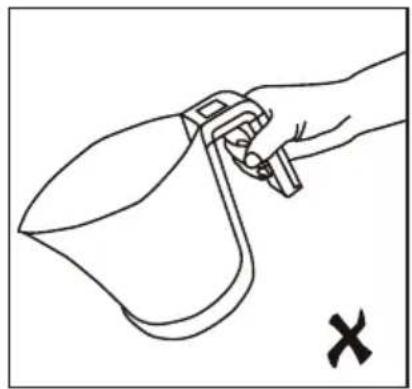
natural_image
Line drawing of a hand holding a spray gun, with a 'X' mark below (no text or symbols on the diagram itself)Upozornění:
Manuální vypnutí

natural_image
Line drawing of a hand holding a curved object with a handle, no text or symbols present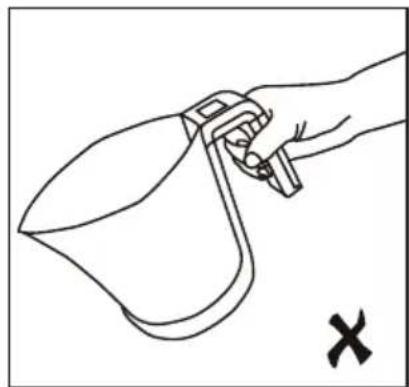
natural_image
Line drawing of a hand holding a spray gun, with a black X mark indicating cancellation (no text or symbols present)
Upozornenie:
REŽIM VÁŽENIA
Manuálne vypnutie
natural_image
Line drawing of a hand holding a curved object with a handle, no text or symbols present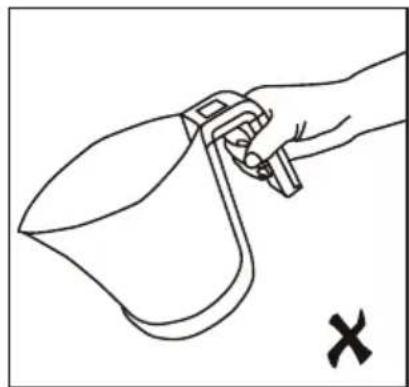
natural_image
Line drawing of a hand holding a spray gun, with a black 'X' mark indicating cancellation (no text or symbols on the diagram itself)Ostrzeżenie:
PL
Funkcja TARE (tara)
Ręczne wyłączenie
natural_image
Line drawing of a hand holding a curved object with a handle, no text or symbols present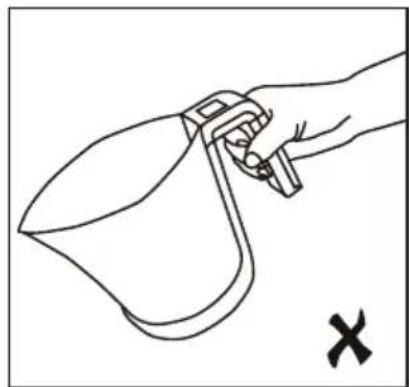
natural_image
Line drawing of a hand holding a spray gun, with a black X mark indicating cancellation (no text or symbols present)Figyelmeztetés!
Kézi kikapcsolás
natural_image
Line drawing of a hand holding a curved object with a handle, no text or symbols present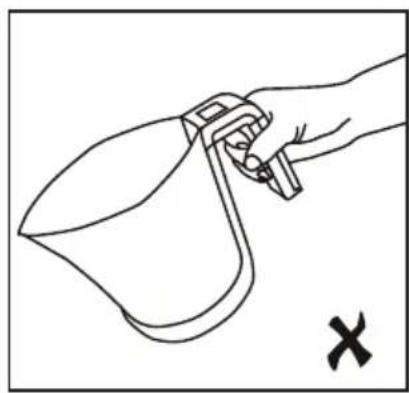
natural_image
Line drawing of a hand holding a spray gun, with a cross mark and letter X (no text or symbols on the diagram itself)Hinweis:
Read carefully and save for future use!
Warning: The safety instructions, contained in this manual, do not include all conditions and situations possible. The user must understand that common sense, caution and care are factors that cannot be integrated into any product. Therefore, these factors shall be ensured by the user/s using and operating this product. We are not liable for damages caused during shipping, by incorrect use, or the modification or adjustment of any part of the appliance.
Fundamental precautions shall be observed when using the product, including the following:
- The KV 119 digital kitchen scale is designated for household use only.
- Refer to an authorized service centre for all necessary repairs!
- Do not use the scale near devices with electromagnetic fields. Place the scale far enough from this type of device to prevent mutual interference.
- The scale is designed to weigh food or liquids.
- The scale should be placed on a flat, hard and stable surface.
- Do not expose the scale to impacts, shocks and do not allow the scale to fall to the ground.
- The scale is an accurate device which must be carefully handled.
- Household pets shall not be weighed with the scale.
- Use the scale only in accordance with the instructions given in this manual.
- This scale is intended for domestic use only. The manufacturer is not liable for damages caused by the improper use of this product.
- This appliance can be used by children ages 8 and older and by the physically and mentally impaired or by individuals with insufficient experience and knowledge, if supervised or trained to use the appliance in a safe manner and understand potential dangers. Children shall not play with the appliance. Cleaning and maintenance operations performed by the user shall not be carried out by children, if they are not older than 8 years and under supervision. Children under the age of 8 shall keep away from the appliance and its power supply.
DESCRIPTION
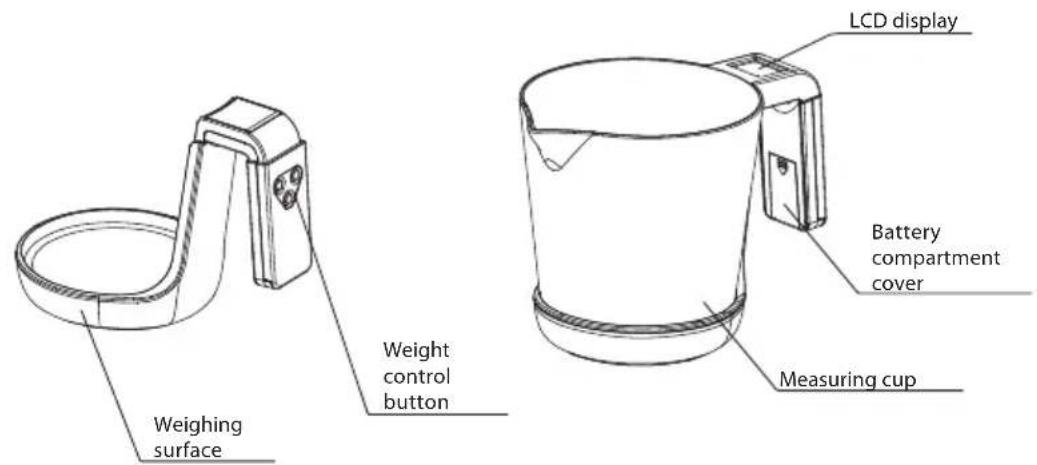
EN
CAUTION
When moving or tilting the scale with a measuring cup on top, hold te measuring cup with your thumb as seen on the image, to avoid pouring/spilling the contents in the measuring cup or the entire measuring cup from falling.
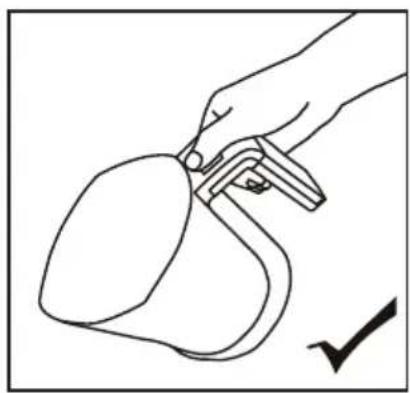
natural_image
Line drawing of a hand holding a curved object with a handle, no text or symbols present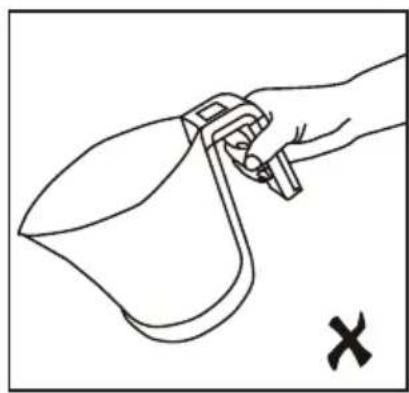
natural_image
Line drawing of a hand holding a spray gun, with a cross mark and letter X (no text or symbols on the diagram itself)Attention:
Before using the device for the first time, remove the isolation tape from the contact of the new battery.
LCD display
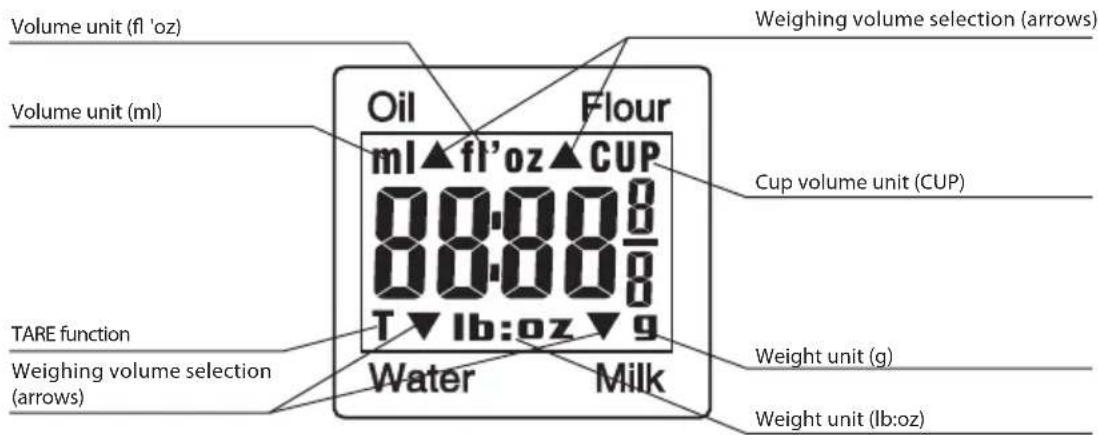
Mode indication:
Oil – displays the volume of oil Flour – displays the volume of fl our Water – displays the volume of water Milk – displays the volume of milk
Control panel
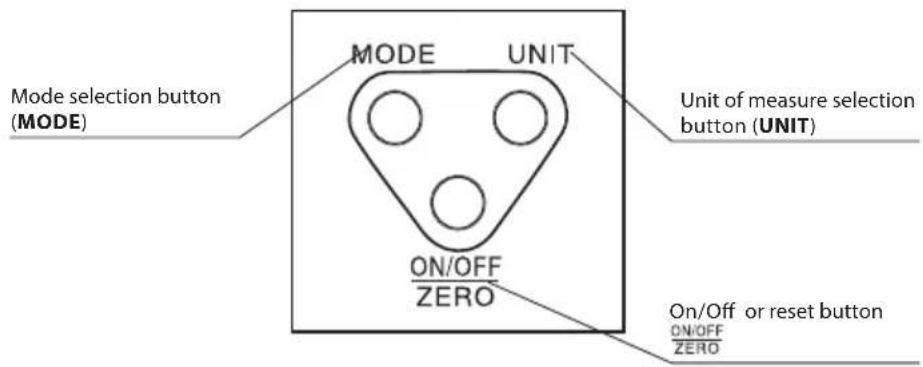

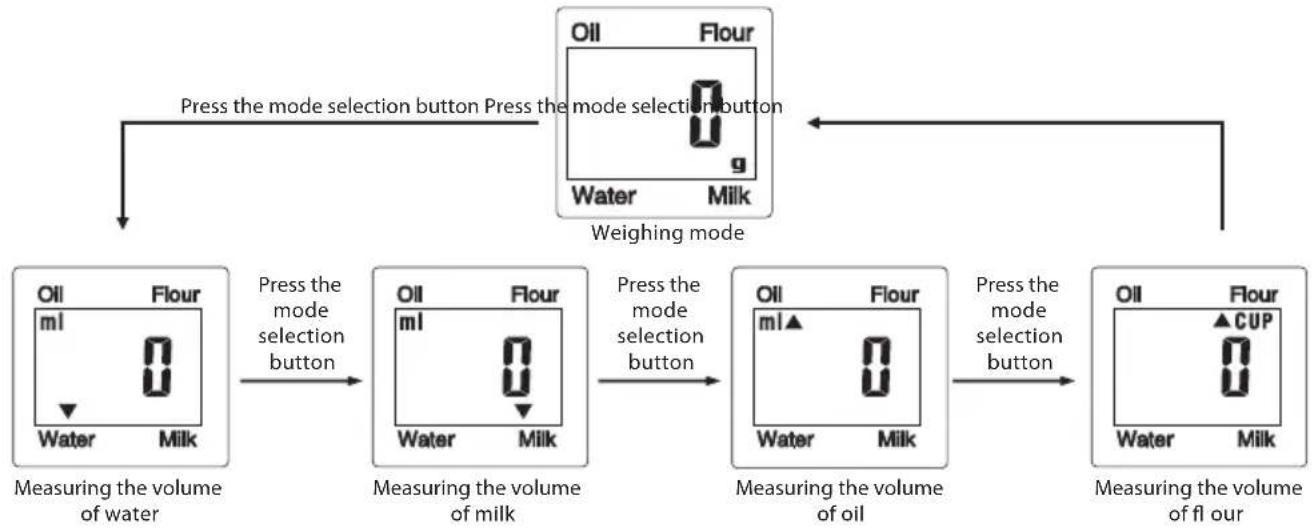
CHANGING THE MODE (MODE)
After switching on the product, the weighing mode is active. To change the mode, press the MODE button (available modes are weighing, measuring the volume of water, milk, oil and milk). Select the desired unit of measure by pressing the UNIT button.
flowchart
graph TD
    A["Press the mode selection button"] --> B["Press the mode selection button"]
    B --> C["Weighing mode"]
    C --> D["Press the mode selection button"]
    D --> E["Press the mode selection button"]
    E --> F["Press the mode selection button"]
    F --> G["Press the mode selection button"]
    G --> H["Press the mode selection button"]
    H --> I["Press the mode selection button"]
    I --> J["Press the mode selection button"]
    J --> K["Press the mode selection button"]
    K --> L["Press the mode selection button"]
    L --> M["Press the mode selection button"]
    M --> N["Press the mode selection button"]
    N --> O["Press the mode selection button"]
    O --> P["Press the mode selection button"]
    P --> Q["Press the mode selection button"]
    Q --> R["Press the mode selection button"]
    R --> S["Press the mode selection button"]
    S --> T["Press the mode selection button"]
    T --> U["Press the mode selection button"]
    U --> V["Press the mode selection button"]
    V --> W["Press the mode selection button"]
    W --> X["Press the mode selection button"]
    X --> Y["Press the mode selection button"]
    Y --> Z["Press the mode selection button"]
    Z --> AA["Press the mode selection button"]
    AA --> AB["Press the mode selection button"]
    AB --> AC["Press the mode selection button"]
    AC --> AD["Press the mode selection button"]
    AD --> AE["Press the mode selection button"]
    AE --> AF["Press the mode selection button"]
    AF --> AG["Press the mode selection button"]
    AG --> AH["Press the mode selection button"]
    AH --> AI["Press the mode selection button"]
    AI --> AJ["Press the mode selection button"]
    AJ --> AK["Press the mode selection button"]
    AK --> AL["Press the mode selection button"]
    AL --> AM["Press the mode selection button"]
    AM --> AN["Press the mode selection button"]
    AN --> AO["Press the mode selection button"]
    AO --> AP["Press the mode selection button"]
    AP --> AQ["Press the mode selection button"]
    AQ --> AR["Press the mode selection button"]
    AR --> AS["Press the mode selection button"]
    AS --> AT["Press the mode selection button"]
    AT --> AU["Press the mode selection button"]
    AU --> AV["Press the mode selection button"]
    AV --> AW["Press the mode selection button"]
    AW --> AX["Press the mode selection button"]
    AX --> AY["Press the mode selection button"]
    AY --> AZ["Press the mode selection button"]
    AZ --> BA["Press the mode selection button"]
    BA --> BB["Press the mode selection button"]
    BB --> BC["Press the mode selection button"]
    BC --> BD["Press the mode selection button"]
    BD --> BE["Press the mode selection button"]
    BE --> BF["Press the mode selection button"]
    BF --> BG["Press the mode selection button"]
    BG --> BH["Press the mode selection button"]
    BH --> BI["Press the mode selection button"]
    BI --> BJ["Press the mode selection button"]
    BJ --> BK["Press the mode selection button"]
    BK --> BL["Press the mode selection button"]
    BL --> BM["Press the mode selection button"]
    BM --> BN["Press the mode selection button"]
    BN --> BO["Press the mode selection button"]
    BO --> BP["Press the mode selection button"]
    BP --> BQ["Press the mode selection button"]
    BQ --> BR["Press the mode selection button"]
    BR --> BS["Press the mode selection button"]
    BS --> BT["Press the mode selection button"]
    BT --> BU["Press the mode selection button"]
    BU --> BV["Press the mode selection button"]
    BV --> BW["Press the mode selection button"]
    BW --> BX["Press the mode selection button"]
    BX --> BY["Press the mode selection button"]
    BY --> BZ["Press the mode selection button"]
    BZ --> CA["Press the mode selection button"]
    CA --> CB["Press the mode selection button"]
    CB --> CC["Press the mode selection button"]
    CC --> CD["Press the mode selection button"]
    CD --> CE["Press the mode selection button"]
    CE --> CF["Press the mode selection button"]
    CF --> CG["Press the mode selection button"]
    CG --> CH["Press the mode selection button"]
    CH --> CI["Press the mode selection button"]
    CI --> CJ["Press the mode selection button"]
    CJ --> CK["Press the mode selection button"]
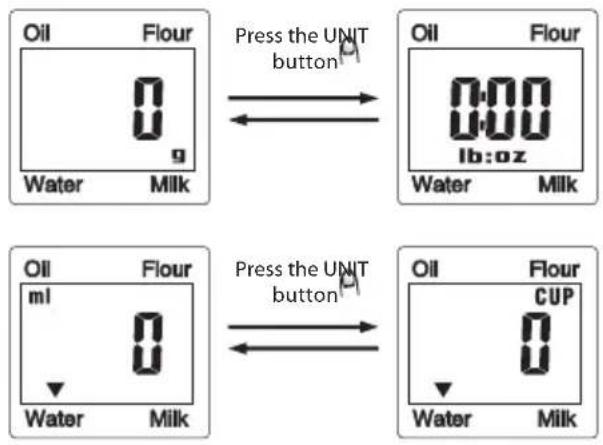
CHANGING THE UNITS (UNIT)
This digital kitchen scale allows weighing in the Metric system (g, ml) or Imperial system (lb:oz, fl'oz), the scale also allows setting cup units (CUP). Select the desired unit of measure by pressing the UNIT button.
flowchart
graph LR
    A["Oil Flour"] -->|Press the UNIT button| B["Oil Flour"]
    B --> C["0:00 lb:oz"]
    C --> D["Water Milk"]
    E["Oil Flour"] -->|Press the UNIT button| F["Oil Flour"]
    F --> G["CUP"]
    G --> H["Water Milk"]
WEIGHING MODE
- The scale should be placed on a flat, hard and stable surface.
- If you prefer using a measuring cup, or another bowl, place it on the scale before switching on.
- Pressing the ON/OFF ZERO button will activate the weighing mode, wait until "0" is shown on the LCD display.
- Place the food you would like to weigh on the scale (or in the measuring cup) and the weight of the food will be shown on the LCD display.
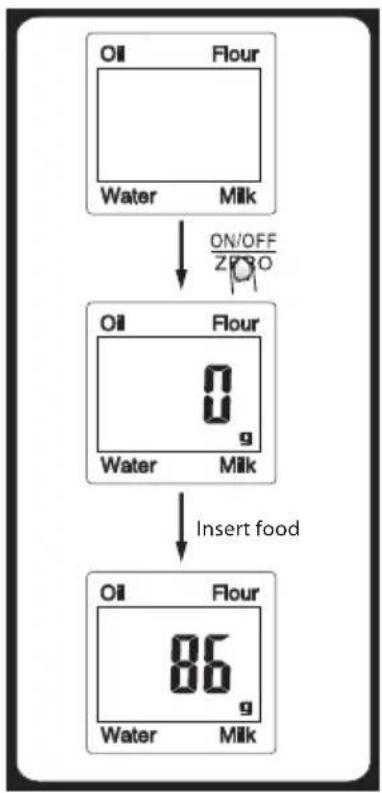
flowchart
graph TD
    A["Oil Flour"] --> B["Water Milk"]
    B --> C["ON/OFF 2/30"]
    C --> D["Oil Flour 0 g"]
    D --> E["Water Milk"]
    E --> F["Insert food"]
    F --> G["Oil Flour 86 g"]
    G --> H["Water Milk"]
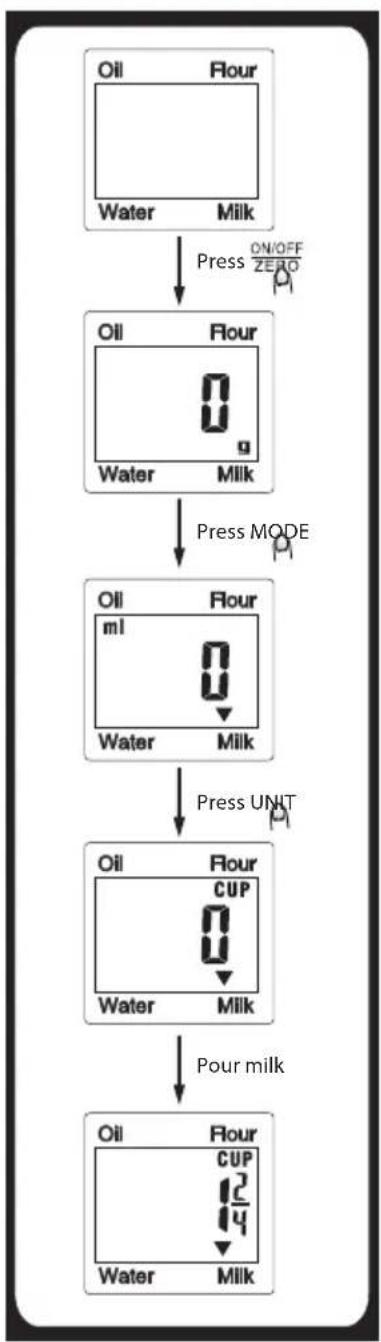
flowchart
graph TD
    A["Oil Flour"] -->|Press ON/OFF ZERO| B["Water Milk"]
    B --> C["Oil Flour 0 g"]
    C -->|Press MODE| D["Oil Flour ml"]
    D --> E["Water Milk"]
    E --> F["Oil Flour CUP 0"]
    F --> G["Pour milk"]
    G --> H["Oil Flour CUP 12 14"]
    H --> I["Water Milk"]
VOLUME MODE
- The scale should be placed on a flat, hard and stable surface.
- If you prefer using a measuring cup, or another bowl, place it on the scale before switching on.
- Pressing the ON/OFF ZERO button will activate the weighing mode, wait until "0" is shown on the LCD display and then select the volume mode, for example MILK, by pressing the MODE button.
- Pour the liquid into the measuring cup and press the UNIT button to set the CUP measuring unit.
- The LCD display will show the volume of the liquid.

ZERO (reset) or TARE functions
These functions are used for measuring the weight of doses, gradually added to the previous amounts that remain on the scale. Place the first dose on the scale and its weight will be shown on the display. Before adding another dose to the scale, press the ON/OFF ZERO button to reset the value on the LCD display ("0"). This action can be performed repeatedly.
ZERO (reset) function
If the total weight for all doses on the scale is lower than 200 g, the ZERO function will be used automatically.
Every time the ON/OFF 200 ton is pressed, the LCD display will show "----", or "0 g". "----" indicates the processing of data. Wait a few seconds before continuing the weighing process. After resetting, the display will show "0 g". The maximum permitted weight will be reduced by the weight of all doses.
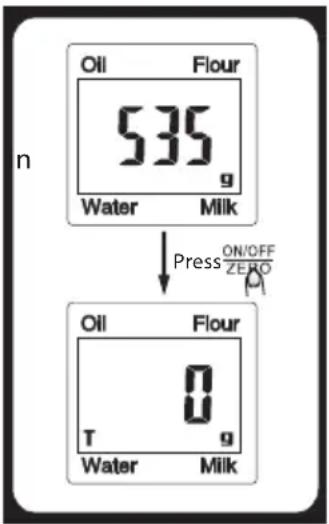
TARE function
If the total weight for all doses on the scale is higher than 200 g, the TARO function will be used automatically.
Every time the ON/OFF ZENOT is pressed, the LCD display will show "----", or "0 g". "----" indicates the processing of data. Wait a few seconds before continuing in the weighing process. The TARE function is active if the display shows "0 g" and a "T" icon appears in the bottom left corner of the display. The maximum permitted weight is reduced by the weight of all doses.
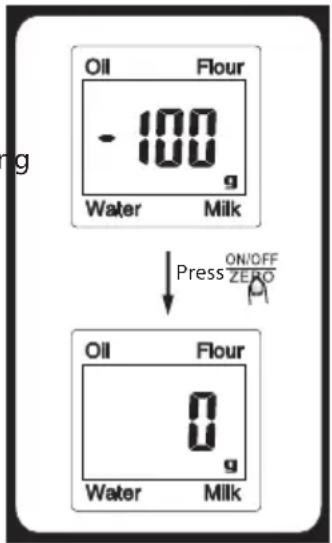
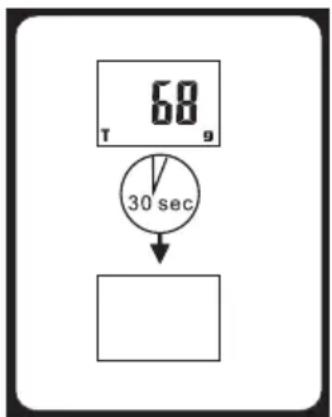
Automatic shut off
If the display shows the same value (or "0") for 30 seconds, the scale will be shut off automatically.
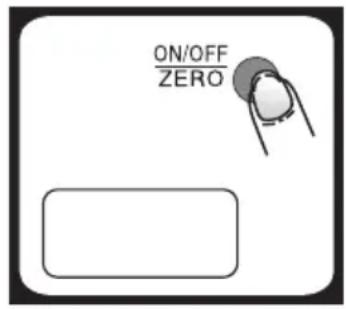
Manual shut off
Manual shut off saves the battery life. After you are finished using the scale, hold the button for 3 seconds.
Warnings
-
The battery is low, replace with a new battery.
-
Err Overloading the scale – max. weight is 3 kg. Remove the weighed dose from the scale to prevent damage.
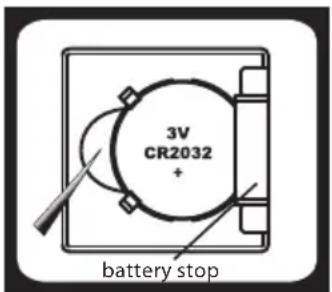
Replacing the battery
- Open the battery compartment cover.
- Using a sharp object, remove the used battery (e.g. using a pair of tweezers).
- Insert the new battery by inserting one side of the battery under the battery stop and push down on the other side.
Make sure the polarity is correct. - Use a CR2032 type 3V lithium battery (included).
Note: If an error appears on the display or you fail to switch off the scale for a longer period of time, please remove the battery for about 3 seconds and insert again. If this does not resolve the problem, please ask your vendor for advice on how to fix your issue.
CLEANING AND MAINTENANCE
- Use a damp towel to clean the scale and make sure no water gets inside the scale.
DO NOT USE chemical cleaning agents/agents with abrasive effect.
Do not immerse the device into water! - All plastic parts that come into contact with greasy substances, such as spices, vinegar or seasoning, shall be cleaned immediately.
Avoid getting citrus acid stains on the scale! - Keep the scale in a level position.
- If you cannot switch on the scale, make sure a charged battery is inserted.
- The product is specified for household use only. For non-commercial use only.
EN
TECHNICAL INFORMATION
Practical removable plastic measure (1000 ml)
LCD display
Maximum capacity 3 kg
Measures in increments of 1 g / 1 ml
Available units of measure (g/lb.oz, ml/fl .oz, cup)
Volume measurement for water, milk and oil
Add and weigh feature with practical TARE function
Auto reset
Automatic and manual power-off
Overload and load battery indication
Non-slip feet
Powered by one 3 V lithium battery (included)
Weighing tolerance:
0–20 g: ±2 g
21-3000 g: ±10 g
USE AND DISPOSAL OF WASTE
Wrapping paper and corrugated paperboard – deliver to scrapyard. Packing foil, PE bags, plastic elements – throw into plastic recycling containers.
DISPOSAL OF PRODUCTS AT THE END OF LIFETIME
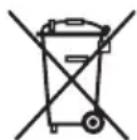
Disposal of electric and electronic equipment (valid in EU member countries and other European countries with an implemented recycling system)
The represented symbol on the product or package means the product shall not be treated as domestic waste. Hand over the product to the specified location for recycling electric and electronic equipment. Prevent negative impacts on human health and the environment by properly recycling your product.
Recycling contributes to preserving natural resources. For more information on the recycling of this product, refer to your local authority, domestic waste processing organization or store, where you purchased the product.
This product complies with EU directive requirements on electromagnetic compatibility and electrical safety.
Changes in text and technical parameters reserved.

08/05

EN
www.ecg.cz

- DIGITAL KITCHEN SCALE
- BEZPEČNOSTNÍ POKYNY
- Upozornění:
- Manuální vypnutí
- Upozornenie:
- REŽIM VÁŽENIA
- Manuálne vypnutie
- Ostrzeżenie:
- Funkcja TARE (tara)
- Ręczne wyłączenie
- Figyelmeztetés!
- Kézi kikapcsolás
- Hinweis:
- Read carefully and save for future use!
- CAUTION
- Attention:
- LCD display
- Mode indication:
- Control panel
- CHANGING THE MODE (MODE)
- CHANGING THE UNITS (UNIT)
- WEIGHING MODE
- VOLUME MODE
- ZERO (reset) or TARE functions
- ZERO (reset) function
- TARE function
- Automatic shut off
- Manual shut off
- Warnings
- Replacing the battery
- CLEANING AND MAINTENANCE
- TECHNICAL INFORMATION
- USE AND DISPOSAL OF WASTE
- DISPOSAL OF PRODUCTS AT THE END OF LIFETIME
- Disposal of electric and electronic equipment (valid in EU member countries and other European countries with an implemented recycling system)
- www.ecg.cz
Brand : ECG
Model : KV 119
Category : Kitchen scale