
KV 117 SLIM - Kitchen scale ECG - Free user manual and instructions
Find the device manual for free KV 117 SLIM ECG in PDF.


| Product Type | Kitchen Scale |
| Brand | ECG |
| Model | KV 117 SLIM |
| Maximum Weight | 5 kg |
| Accuracy | 1 g |
| Measurement Units | g, kg, lb, oz |
| Power | 2 AAA batteries (not included) |
| Dimensions | 20 x 15 x 2 cm |
| Net Weight | 300 g |
| Platform Material | Tempered Glass |
| Tare Function | Yes |
| Auto Shut-off | Yes, after 2 minutes of inactivity |
| Display | LCD Display |
| Low Battery Indicator | Yes |
| Cleaning | Damp cloth, do not immerse |
| Safety | Do not overload, use on flat surface |
| Repairability | Not user repairable |
Frequently Asked Questions - KV 117 SLIM ECG
User questions about KV 117 SLIM ECG
0 question about this device. Answer the ones you know or ask your own.
Ask a new question about this device
Download the instructions for your Kitchen scale in PDF format for free! Find your manual KV 117 SLIM - ECG and take your electronic device back in hand. On this page are published all the documents necessary for the use of your device. KV 117 SLIM by ECG.
USER MANUAL KV 117 SLIM ECG
natural_image
Black ECG digital kitchen scale with LCD display and control buttons (no readable text or symbols beyond branding)KV 117 SLIM
DIGITÁLNÍ KUCHYŇSKÁ VÁHA
NÁVOD K OBSLUZE
DIGITÁLNA KUCHYNSKÁ VÁHA
NÁVOD NA OBSLUHU
CYFROWA WAGA KUCHENNA
INSTRUKCJA OBSŁUGI
DIGITÁLIS KONYHAI MÉRLEG
HASZNÁLATI ÚTMUTATÓ
DIGITALE KÜCHENWAAGE
BEDIENUNGSANLEITUNG
DIGITAL KITCHEN SCALE
INSTRUCTION MANUAL
DIGITALNA KUHINJSKA VAGA
UPUTE ZA UPORABU
DIGITALNA KUHINJSKA TEHTNICA
NAVODILA
DIGITALNA KUHINJSKA VAGA
UPUSTVO ZA UPOTREBU
BALANCE DE CUISINE NUMERIQUE
MODE D'EMPLOI
BILANCIA DA CUCINA DIGITALE
- ZERO/ON/OFF button
- LCD display
-
MODE button
-
Battery compartment cover
- Weighing surface
HR/BIH
Do not immerse in water! – Neponořovat do vody!
LCD displej


natural_image
Simple line drawing of a U-shaped component with two vertical leads (no text or symbols)natural_image
Simple line drawing of a U-shaped object with two vertical extensions (no text or symbols)Zobrazenie objemu tekutín (mlieko, voda)
natural_image
Simple line drawing of a U-shaped component with two leads (no text or symbols)natural_image
Simple line drawing of a U-shaped component with two leads (no text or symbols)natural_image
Simple line drawing of a U-shaped component with two vertical leads (no text or symbols)Read carefully and save for future use!
Warning: The safety instructions in this user's manual do not include all the possible conditions and situations which may arise. The user must understand that a factor that cannot be designed into any product is common sense, caution and care. These factors must therefore come from the user/s using and operating this product.
We do not take responsibility for damages caused during transport, by incorrect use or a change or modification of any part of the product.
During operation basic provisions should always be adhered to, including the following:
GB
- The kitchen scale KV 117 SLIM is designed exclusively for household use.
- Have all repairs done by a qualified technician!
- Do not use the scale in the vicinity of devices with an electromagnetic field. Place the scale sufficiently far away from such a device to prevent the devices from interfering with each other.
- The scale is designed for weighing foods or liquids.
- The scale must be placed on an even, hard and stable surface (not on carpet, the weighing would be inaccurate).
- Do not subject the scale to impacts, shaking and do not drop it on the floor.
- The scale is a precise device requiring careful handling.
- Pets must not be weighed on the scale.
- Use the scale only in accordance to the instructions contained in this user's manual.
- The manufacturer takes no responsibility for damages caused by the incorrect use of this device.
- This device is not designed to be used by persons (including children), who are due to their physical, sense or mental inability or insufficient experience or knowledge prevented from safely using the device, if they are not under supervision or if they were not instructed about the use of this device by a person responsible for their safety. Children must be supervised to ensure that they do not play with the device.
Do not immerse in water!
LCD display

Changing batteries
- First remove the insulation foil from the contact of the new battery.
- Open the battery compartment cover on the underside of the scale.
- Using a sharp object remove the used battery (e.g. using tweezers).
- Insert the new battery so that one side of the battery is inserted under the latch and then press on the other side. Make sure to maintain the correct polarity.
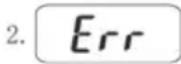
Note: If an error is displayed on the display or if it is not possible to turn off the scale for a long time, please, take out the battery for approximately 3 seconds and then put it back. If you are not successful in solving this problem, please, the store where you bought the device for advice.
WEIGHING MODE
- Place the scale on an even, hard and stable surface.
- Before turning the scale on place a kitchen bowl on it (if you wish to use it).
- By pressing the ZERO/ONOFF button turn on the weighing mode.
- Wait until all the information is displayed on the LCD display.
5 Place the object to be weighed on the scale (into the bowl) and the LCD display will show the measured weight of the object.
Unit conversion
This digital kitchen scale weighs in both metric (g, ml) and imperial (lb:oz, fl'oz) units. Press the conversion button on the bottom side of the scale to set the desired unit of measure.

natural_image
Simple line drawing of a two-loop inductor (no text or symbols)Display of liquid volume (milk, water)
- Place a container on the weighing surface.
- By pressing the ZERO/ON/OFF button reset the weight of the container to zero, so that a "0" is displayed.
- Pour the liquid into the container, the display will show the liquid.
- To display the volume of the liquids, press the MODE button and select on of the options WATER, MILK, then the desired liquid volume will be shown on the display.
ZEROING AND TARE FUNCTION
These functions are used to gradually measure the weight of various portions added to the previous ones, which remain on the scale. Place the first portion on the scale and its weight will be shown on the display. Before adding another portion on to the scale press the ZERO/ON/OFF button and the value on the display will be reset to zero ("0"). This step can be repeated.
Each time the ZERO/ON/OFF button is pressed the LCD display will show "----" or "0g", "----" means that the state is unstable, so please wait a while. When "0g" is displayed an icon "O" or "T" (depending on the weight) will light up in the bottom left corner, indicating that the zeroing function is active. The maximum capacity will not change.
If the total sum of the weights of all the portions on the scale is lower than 200 g then the zeroing function will automatically be used.
If the total sum of the weights of all the portions on the scale is higher than 200 g then the TARE function will automatically be used.
Note: You may turn off the scale using the ZERO/ON/OFF button or it will automatically turn itself off after 2 minutes.
Warning messages

- The battery is flat, replace with a new battery.
- Scale overloaded – the maximum load of 5 kg is displayed on the scale. Please remove the portion being weighed from the scale to prevent damage.
MAINTENANCE AND CLEANING
- To clean the scale use a damp cloth and make sure that no water gets inside the scale. DO NOT USE any chemical cleaning agents / abrasive cleaning agents.
Do not submerge the scale in water!
- All plastic parts that come into contact with greasy substances such as spices, vinegar or flavourings, must be cleaned immediately. Prevent the scale from being stained by citrus juice!
- Always keep the scale in a horizontal position
TECHNICAL DETAILS
Max. weight capacity 5 kg
Graduation to 1 g
Requires 1×3 V lithium battery (included)
Weighing deviation:
$$ 0 \sim 2 0 \mathrm{g}: + / - 2 \mathrm{g} $$
$$ 2 1 \sim 5 0 0 0 \mathrm{g}: + / - 1 0 \mathrm{g} $$
USE AND DISPOSAL OF WASTE
Wrapping paper and corrugated paperboard – deliver to scrapyard. Packing foil, PE bags, plastic elements – throw into plastic recycling containers.
DISPOSAL OF PRODUCTS AT THE END OF LIFETIME
Disposal of electric and electronic equipment (valid in EU member countries and other European countries with an implemented recycling system)
The represented symbol on the product or package means the product shall not be treated as domestic waste. Hand over the product to the specified location for recycling electric and electronic equipment. Prevent negative impacts on human health and the environment by properly recycling your product.
Recycling contributes to preserving natural resources. For more information on the recycling of this product, refer to your local authority, domestic waste processing organization or store, where you purchased the product.
This product complies with EU directive requirements on electromagnetic compatibility and electrical safety.
The instruction manual is available at website www.ecg-electro.eu.
Changes in text and technical parameters reserved.


08/05

SIGURNOSNE UPUTE
natural_image
Simple line drawing of a circular component with two vertical leads, no text or symbols present.natural_image
Simple line drawing of a U-shaped component with two leads (no text or symbols)Prikaz količine (mleko, voda)
- Postavite posodo na površino za tehtanje.
- Z pritiskom na gumb ZERO/ON/OFF postavite težo posode na nulo, tako da se prikaže „0“.
- Vlijte tekočino v posodo, zaslon bo prikazal tekočino.
- Za prikaz količine tekočine, pritisnite gumb MODE in izberite eno od možnosti voda, mleko, in potem se bo prikazala na zaslonu količina tekočine.
FUNKCIJA KALIBRIRANJA IN TARA FUNKCIJA
natural_image
Simple line drawing of a U-shaped component with two leads (no text or symbols)Prikaz trenutne količine (mleko, voda)
- Postavite posudu na površini za merenje.
- Pritiskom na taster ZERO/ON/OFF postavite težinu posude na nulu, tako da se „0“ prikaže.
- Ulijte tečnost u posudu, ekran će prikazati tečnost.
- Za prikaz količine tečnosti, pritisnite taster MODE i odaberite jednu od opcija voda, mleko, nakon toga će se prikazati na ekranu količina tečnosti.
FUNKCIJA KALIBRACIJE I TARE FUNKCIJA
Ove funkcije se koriste kako bi se postepeno merile težine raznih sadržaja dodavanjem onih prethodnih, koje ostaju na vagi. Stavite prvi deo na vagu i njegova težina će biti prikazana na ekranu.
natural_image
Simple line drawing of a circular component with two U-shaped ends, no text or symbols present.natural_image
Simple line drawing of a two-loop inductor (no text or symbols)natural_image
Simple line drawing of a two-loop inductor (no text or symbols)natural_image
Simple line drawing of a U-shaped component (no text or symbols)natural_image
Simple line drawing of a U-shaped object with two vertical extensions (no text or symbols)natural_image
Simple line drawing of a U-shaped component with two vertical leads (no text or symbols)250 69 Klíčany, Czech Rep. e-post: ECG@kbexpert.cz
K+B Progres, a.s.
U Expertu 91 tel.: +420 272 122 111
250 69 Klíčany, Czech Rep. el. paštas: ECG@kbexpert.cz
K+B Progres, a.s.
U Expertu 91 tel.: +420 272 122 111
250 69 Klíčany, Czech Rep. e-pasts: ECG@kbexpert.cz


- KV 117 SLIM
- DIGITÁLNÍ KUCHYŇSKÁ VÁHA
- DIGITÁLNA KUCHYNSKÁ VÁHA
- CYFROWA WAGA KUCHENNA
- DIGITÁLIS KONYHAI MÉRLEG
- DIGITALE KÜCHENWAAGE
- DIGITAL KITCHEN SCALE
- DIGITALNA KUHINJSKA VAGA
- DIGITALNA KUHINJSKA TEHTNICA
- BALANCE DE CUISINE NUMERIQUE
- BILANCIA DA CUCINA DIGITALE
- HR/BIH
- LCD displej
- Zobrazenie objemu tekutín (mlieko, voda)
- Read carefully and save for future use!
- Do not immerse in water!
- LCD display
- Changing batteries
- WEIGHING MODE
- Unit conversion
- Display of liquid volume (milk, water)
- ZEROING AND TARE FUNCTION
- Warning messages
- MAINTENANCE AND CLEANING
- TECHNICAL DETAILS
- USE AND DISPOSAL OF WASTE
- DISPOSAL OF PRODUCTS AT THE END OF LIFETIME
- Disposal of electric and electronic equipment (valid in EU member countries and other European countries with an implemented recycling system)
- SIGURNOSNE UPUTE
- Prikaz količine (mleko, voda)
- FUNKCIJA KALIBRIRANJA IN TARA FUNKCIJA
- Prikaz trenutne količine (mleko, voda)
- FUNKCIJA KALIBRACIJE I TARE FUNKCIJA
Brand : ECG
Model : KV 117 SLIM
Category : Kitchen scale