
32T319SHS - TV TESLA - Free user manual and instructions
Find the device manual for free 32T319SHS TESLA in PDF.


| Product Type | LED TV |
| Screen Size (Diagonal) | 32 inches (81 cm) |
| Resolution | HD (1366 x 768 pixels) |
| Display Technology | Direct LED |
| Aspect Ratio | 16:9 |
| Refresh Rate | 60 Hz |
| Dimensions (without stand) | 73.2 x 43.1 x 8.0 cm |
| Dimensions (with stand) | 73.2 x 46.5 x 18.5 cm |
| Weight (without stand) | 4.5 kg |
| Weight (with stand) | 4.7 kg |
| Power Consumption (max) | 50 W |
| Standby Power Consumption | < 0.5 W |
| Power Supply | AC 100-240V, 50/60 Hz |
| Connectivity | 2x HDMI, 1x USB 2.0, AV, Component, RF, VGA, Audio Out |
| Tuner | DVB-T2/C/S2 |
| Built-in Speakers | 2 x 8 W |
| Wall Mount Pattern | VESA 200 x 100 mm |
| Smart TV Features | No (Basic TV) |
| Remote Control | IR remote included |
| Cleaning | Wipe with soft dry cloth; avoid liquids |
| Safety Features | Automatic shutdown after inactivity, child lock |
| Repairability | Spare parts available through authorized service centers |
Frequently Asked Questions - 32T319SHS TESLA
User questions about 32T319SHS TESLA
0 question about this device. Answer the ones you know or ask your own.
Ask a new question about this device
Download the instructions for your TV in PDF format for free! Find your manual 32T319SHS - TESLA and take your electronic device back in hand. On this page are published all the documents necessary for the use of your device. 32T319SHS by TESLA.
USER MANUAL 32T319SHS TESLA
natural_image
Technical line drawing of a flat-screen TV unit with internal components and mounting feet (no text or symbols)Fig.3a
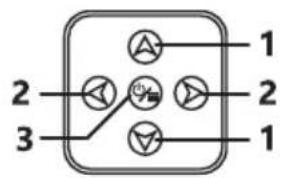
Fig.3b
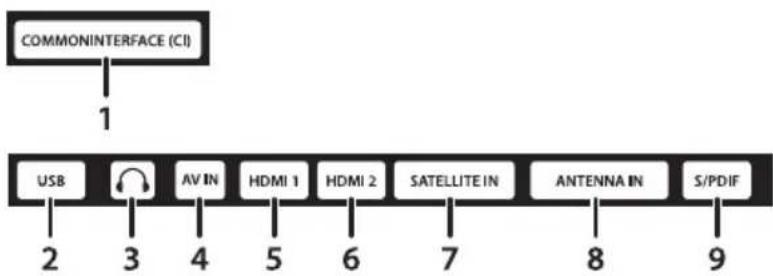
Fig.4
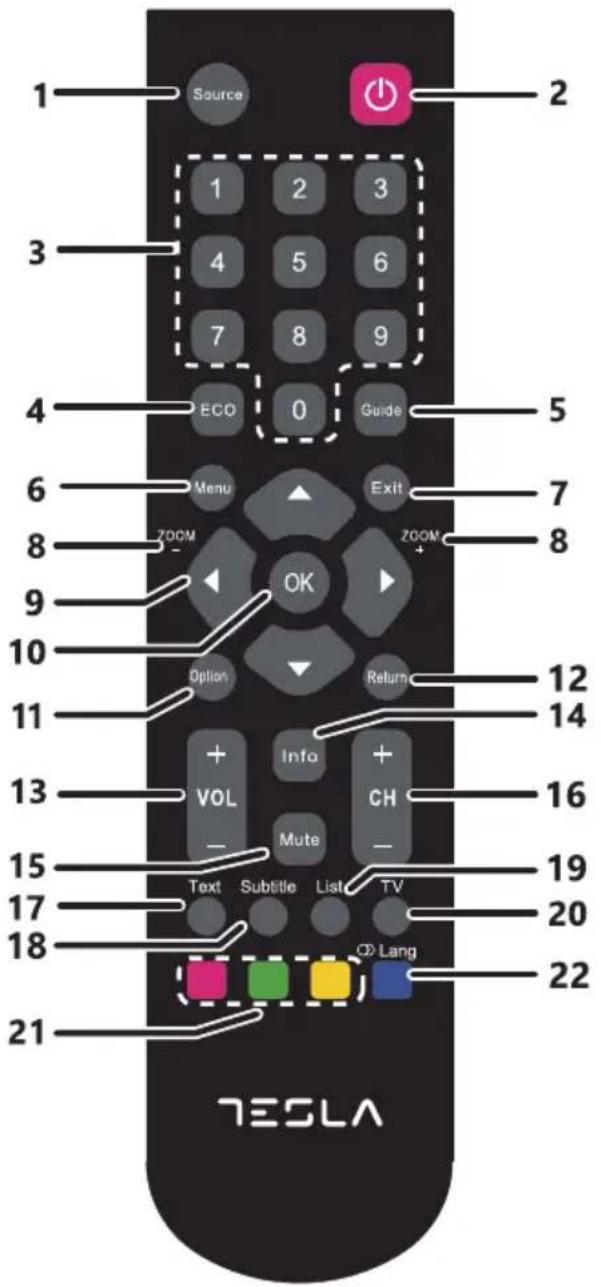
Fig.5
ENG
Please read these instructions before operating your set and retain them for future reference.
BG
Please read these instructions before operating your set and retain them for future reference.
DE
BETRIEBSANLEITUNGEN
Please read these instructions before operating your set and retain them for future reference.
HR
UPUTE ZA KORIŠTENJE
Please read these instructions before operating your set and retain them for future reference.
INSTRUCTION
Accessories
1x safety instructions/warranty cards, 1x remote control, 2x AAA batteries
Equipment set-up

Fig.1 NOTE: The graphics are for representation only.
Install the display on a solid horizontal surface such as a table or desk. For ventilation, leave a space of at least 10 cm free all around the set. To prevent any fault and unsafe situations, please do not place any objects on top of the set. This apparatus can be used in tropical and/or moderate climates.
The symbols serve as follows:
WARNING Indicates warning information.
NOTE Indicates any other additional important or helpful information.
MENU Represents a button on the remote control or the TV. (Bold characters)
Move to Represents a menu item within a window. (Italic characters)
INSTALLATION
Default PIN code: 0000
Front panel/underside

Fig.2 NOTE: The graphics are for representation only.
- Power indicator /remote sensor
- Speakers
- Buttons: VOL-/VOL+, CH-/CH+
- Combo button, Input source, Menu, Standby/ON
Rear panel

Fig.3 NOTE: The graphics are for representation only.
- AC INPUT (FIXED CABLE) Main power cable (180 - 240 V \~ 50/60 Hz)
- Vesa 100 x 100 4 x screws holes to mount TV to the wall

Fig.3a NOTE: The graphics are for representation only.
- ▲▼ Channel up/down button
- ◀ ▶ Volume up/down button
- ⏻/Menu Press to turn the TV on or standby/Enter Menu
Side panel
Fig.3b NOTE: The graphics are for representation only.
- COMMONINTERFACE (CI) Connect a Conditional Access Module (CAM).
- USB Connect a USB device for playback of multimedia les
- EARPHONE Speakers will be muted when earphone is plugged in and headphone selected.
- AV IN 3.5 mm female jack entry for composite video and left/right audio connection.
- HDMI 1 Connect HDMI input signal from a signal source such as DVD, Blu-ray player or game console.
- HDMI 2 (ARC) Connect HDMI input signal from a signal source such as DVD, Blu-ray player or game console.
- SATELLITE IN Connect a satellite dish to the TV for searching programmes.
- ANTENNA IN Connect a terrestrial antenna or cable connection from your provider to the TV for searching programmes.
- S/PDIF Use an RCA cable to connect your TV to a compatible digital amplifier or Home theatre set.
Remote control
Fig.4 NOTE: The graphics are for representation only.
- SOURCE Select the input source mode.
- ⏻ Press to turn the TV on or standby.
3.0 \~ 9 Choose channel directly. - ECO Screen brightness modes for energy saving
- GUIDE Toggles the Electronic Programme Guide between on and off. Only available for digital channels.
- MENU Open the menu options.
- EXIT Exit the current menu.
- ZOOM -/+ Press to select the desired screen format. (In USB mode, it is unavailable.)
- ▲▼◀▶ Navigate the menu.
- OK Confirms your selection. Under the TV source, press the OK key to open the Channel list.
- OPTION Displays the function menu to perform certain operations. Press to enter the Picture mode directly.
- RETURN Returns you to the previous channel in TV mode.
- VOL +/- Adjust the volume up or down.
- INFO Display the status information.
- MUTE Press to mute or restore the volume.
- CH +/- Change programmes up or down.
- TEXT Teletext.
- SUBTITLE Press to display the Subtitle Language menu.
- LIST Press to enter into the channel list.
- TV Goes to the TV mode.
- Red, Green, Yellow button In corresponding mode, press it to enter the right function as hint.
- Blue button In corresponding mode, press it to enter the right function as hint. In USB mode, press to select sound track mode. In DTV mode, press to select Audio Languages. In ATV mode, press to select Sound Type.
Installing the batteries

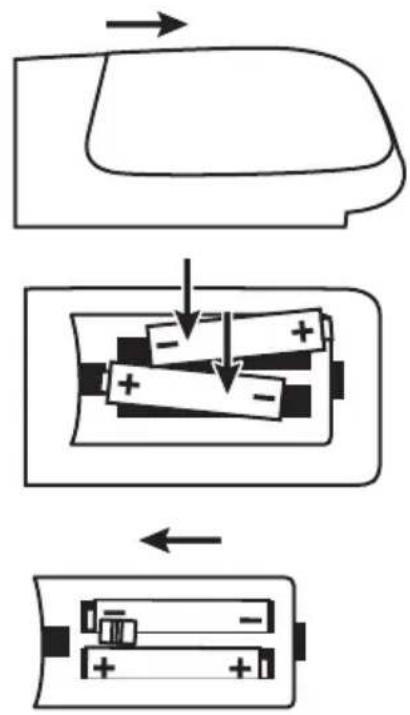
Fig.5 NOTE: Pictures are only for reference. Actual items may differ.
Precautions for using the battery
Improper using of the battery will cause leakage. Carefully follow these instructions.
- Please note the batteries' polarity to avoid short circuit.
- When the battery's voltage is insu cient which a ect the use range, you should replace it wit ha new battery. Remove the batteries from the remote control unit if you do not intend to use it for a long time.
- Do not use different types of batteries (for example Manganese and Alkaline batteries) together.
- Do not put the battery into fire, and charge or decompose the battery.
- Please dispose batteries abide by relevant environmental protection regulation.
Using the remote control
- Use the remote control by pointing it towards the remote sensor. Items between the remote control and the remote sensor could block normal operation.
- Do not cause the remote control to vibrate violently. Also, do not splash liquid on the remote control, also do not put the remote control in a high humidity place.
- Do not place the remote control under direct sunlight which will cause deformation of the unit by heat.
- When the remote sensor is under direct sunlight or strong lighting, the remote control will not work. If so, please change the lighting or TV's position, or operate the remote control closer to the remote sensor.
FIRST TIME INSTALLATION
After all connections have been made properly, switch on your TV. Insert the main power plug into the wall outlet, now the red LED light should light up. Press the ⏻ button on your remote control to wake the TV up. The language and country selection will appear on the screen. Use ◀▶ to select the OSD Language of your preference. Use ▲▼ to select the Country and use ◀▶ again to select the region you are using this TV. This country/region selection is an important setting, it will set the time zone and will try to sort region channels at first or in a specific order.
If all settings are made, confirm with OK on your remote control and follow the next steps.
On the next screen, you can select which tuner you like to use and which channels you'd like to search for. Choose Tuner Type and by pressing ◀▶ you can choose between DTV, ATV or DTV + ATV (DTV to search digital broadcasts; ATV to search analogue broadcasts). After you made your selection, press ▼ to proceed to Digital type. In this menu you can select which input source you would like to use:
- Satellite to receive satellite broadcasts (if you are equipped with a satellite dish)
- DVB-T to receive terrestrial broadcasts (by using indoor or outdoor antenna)
- DVB-C to receive cable broadcasts. (Connection to cable outlet box)
Then the next screen appears depending from the tuner selection you choose.
DVB-S/S2 installation
Satellite Setting
Press ◀▶ to s elect the satellite your dish is aimed at. Use the ◀▶▲▼ buttons to change settings for your satellite installation for each specific satellite.
Channel Search
Press ▲▼◀▶ to highlight the options of choice and press OK to start the channel search.
Scan Mode Choose between Default (recommended), Blind Scan and Network
Channel Type Select Free to search Free-To-Air channels only.
Select Scramble to search Encrypted channels only. All Channels to search FTA and Encrypted channels
Service Type Select DTV to search DTV channels only, RADIO to search radio channels only
or All for a complete search.
It is recommended to use the default settings.
DVB-T/T2 installation
Terrestrial Setting
Here you only need to press OK to start searching.
All settings are automatically set by country selection you made in first step.
NOTE: If you have an active antenna, please check the user manual of the antenna for external power supply.
The TV can NOT supply power used for an active antenna.
DVB-C installation
Cable Setting
Press ▲▼◀▶ to highlight your settings.
Scan type You can select Network Scan or Full. (Default Network Scan for quick search advised)
NOTE: Full scan will have a duration of approximately 20 minutes, depending on your cable network.
Frequency Please enter (with 0 \~ 9) the main frequency used by your provider in KHz.
Network ID Please enter (with 0 \~ 9) the used Network ID from your provider.
Symbol Please enter (with 0 \~ 9) the used Symbol from your provider. (Ks/s)
NOTE: Please check the settings for your cable system used by your provider!
Press OK to continue and to start search process.
Crypted Select FTA Channels to search Free-To-Air channels only or All Channels to search FTA and encrypted channels
Press ▲▼◀▶ to highlight the country that you want to install, then press OK to start searching.
MENU SETTINGS
Menu control (DTV mode)
Press MENU to enter the main menu. Press ◀▶ to select an item. Press ▲▼◀▶ and OK to select the submenus. Press MENU to exit the item.
Picture menu
Picture Mode Select the automatic picture control mode. Available choices are Dynamic, Standard, Mild and Personal.
Colour Temp Select the overall colour tone of the picture. Available choices are Cold, Normal and Warm.
Noise Reduction Eliminates noise in the picture. Available choices are: Off, Low, Middle, High and Default
In the Personal mode, settings can be changed for Brightness, Contrast, Colour, Tint and Sharpness.
Sound menu
Sound Mode Select your favourite sound mode for each input. Choices are Standard, Music, Movie, Sports and Personal.
Treble Adjusts the higher frequency of the sound.
Bass Adjusts the lower frequency of the sound.
Balance Control the sound balance between the right and left loudspeaker (earphone).
Auto Volume Level Adjust the volume corresponding to the input audio level. Options are On and Off.
SPDIF Mode When SPDIF output is connected to digital home audio system you can select Auto to output Dolby audio* automatically. When you choose PCM, stereo audio is selected only and with Off you can switch off this output.
AD Switch Turn on the Audio description, you can activate the setting of AD volume.
When turn on the audio description, a narrator will describe what is happening on the screen for blind or visually impaired viewers. (Only if available in DTV mode.)
*Availability depending on broadcaster
Using PVR
Allows you to record your favourite TV programme to a USB device.
Before you use the function, connect a USB memory device to the set first.
Press Menu to display the Main menu, select "PVR File System" and press OK button to enter.
-
Selects Disk
-
Adjusts the recording ooptions
-
Press RED button to start recording.
To watch the recorded programme, enter the USB mode> Video.
Select the folder MSTPVR, then select the related record file.
Press OK to play. (It is the same if you record a digital radioprogramme).
GENERAL DATA
Operating voltage: 180 \~ 240 V AC 50/60 Hz
Power consumption: 50 W
Power consumption in standby: <0.5 W
Operating temperature: +5 °C \~ +35 °C
Storage temperature: -15 °C \~ +45 °C
Operating humidity: 20% \~ 80% RH, non-condensing
Storage humidity: 10% \~ 90% RH, non-condensing
Dimensions (WxDxH) in mm: 732 x 181 x 482
Net-weight: 4.25 kg
LICENSES
THIS PRODUCT IS LICENSED UNDER THE AVC PATENT PORTFOLIO LICENSE FOR THE PERSONAL AND NONCOMMERCIAL USE OF A CONSUMER TO (i) ENCODE VIDEO IN COMPLIANCE WITH THE AVC STANDARD ("AVC VIDEO") AND/OR (ii) DECODE AVC VIDEO THAT WAS ENCODED BY A CONSUMER ENGAGED IN A PERSONAL AND NON-COMMERCIAL ACTIVITY AND/OR WAS OBTAINED FROM A VIDEO PROVIDER LICENSED TO PROVIDE AVC VIDEO. NO LICENSE IS GRANTED OR SHALL BE IMPLIED FOR ANY OTHER USE. ADDITIONAL INFORMATION MAY BE OBTAINED FROM MPEG LA, L.L.C. SEE HTTP://WWW.MPEGLA.COM
This product contains one or more programs protected under international and U.S. copyright laws as unpublished works. They are confidential and proprietary to Dolby Laboratories. Their reproduction or disclosure, in whole or in part, or the production of derivative works therefrom without the express permission of Dolby Laboratories is prohibited. Copyright 2003-2009 by Dolby Laboratories. All rights reserved.
THIS PRODUCT IS SOLD WITH A LIMITED LICENSE AND IS AUTHORIZED TO BE USED ONLY IN CONNECTION WITH HEVC CONTENT THAT MEETS EACH OF THE THREE FOLLOWING QUALIFICATIONS:
(1) HEVC CONTENT ONLY FOR PERSONAL USE;
(2) HEVC CONTENT THAT IS NOT OFFERED FOR SALE; AND
(3) HEVC CONTENT THAT IS CREATED BY THE OWNER OF THE PRODUCT. THIS PRODUCT MAY NOT BE USED IN CONNECTION WITH HEVC ENCODED CONTENT CREATED BY A THIRD PARTY, WHICH THE USER HAS ORDERED OR PURCHASED FROM A THIRD PARTY, UNLESS THE USER IS SEPARATELY GRANTED RIGHTS TO USE THE PRODUCT WITH SUCH CONTENT BY A LICENSED SELLER OF THE CONTENT. YOUR USE OF THIS PRODUCT IN CONNECTION WITH HEVC ENCODED CONTENT IS DEEMED ACCEPTANCE OF THE LIMITED AUTHORITY TO USE AS NOTED ABOVE.
Tesla declares that the equipment complies with the European Directive 2014/30/EU (EMC) and the Low Voltage Directive 2014/35/EU (LVD) and the ErP Directive 2009/125/EC and Radio Equipment Directive 2014/53/EU and the RoHS Directive 2011/65/EU in accordance with the following technical standards:
ELECTROMAGNETIC COMPATIBILITY
EN 55032:2015 ;EN 5 5020:2007+A12:2016 ;EN 55024:2010+A1:2015 ;EN 61000-3-2:2014 ;EN 61000-3-3:2013
LOW VOLTAGE
EN60065:2014
ENERGY RELATED PRODUCTS
Commission regulation (EC) No 642/2009; EN50564:2011; IEC62087:2011
RED
EN 303 340 V1.1 .2:20 16-09 ;EN 303 372-2 V1.1.1:2016-04
RoHS
EN50581:2012
Subject to alterations. In consequence of continuous research and development technical specifications, design and appearance of products may change. Manufactured under license from Dolby Laboratories. Dolby Audio and the double-D symbol are trademarks of Dolby Laboratories. HDMI, the HDMI logo and High-De nition Multimedia Interface are trademarks or registered trademarks of HDMI Licensing LLC in the United States and other countries. All product names are trademarks or registered trademarks of their respective owners.
© Tesla 2018. All rights reserved.
ИНСТРУКЦИИ
Аксесоари
This product contains one or more programs protected under international and U.S. copyright laws as unpublished works. They are confidential and proprietary to Dolby Laboratories. Their reproduction or disclosure, in whole or in part, or the production of derivative works therefrom without the express permission of Dolby Laboratories is prohibited. Copyright 2003-2009 by Dolby Laboratories. All rights reserved.
THIS PRODUCT IS SOLD WITH A LIMITED LICENSE AND IS AUTHORIZED TO BE USED ONLY IN CONNECTION WITH HEVC CONTENT THAT MEETS EACH OF THE THREE FOLLOWING QUALIFICATIONS:
(1) HEVC CONTENT ONLY FOR PERSONAL USE;
(2) HEVC CONTENT THAT IS NOT OFFERED FOR SALE; AND
(3) HEVC CONTENT THAT IS CREATED BY THE OWNER OF THE PRODUCT. THIS PRODUCT MAY NOT BE USED IN CONNECTION WITH HEVC ENCODED CONTENT CREATED BY A THIRD PARTY, WHICH THE USER HAS ORDERED OR PURCHASED FROM A THIRD PARTY, UNLESS THE USER IS SEPARATELY GRANTED RIGHTS TO USE THE PRODUCT WITH SUCH CONTENT BY A LICENSED SELLER OF THE CONTENT. YOUR USE OF THIS PRODUCT IN CONNECTION WITH HEVC ENCODED CONTENT IS DEEMED ACCEPTANCE OF THE LIMITED AUTHORITY TO USE AS NOTED ABOVE.
If all settings are made, con rm with OK on your remote control and follow the next steps.
This product contains one or more programs protected under international and U.S. copyright laws as unpublished works. They are confidential and proprietary to Dolby Laboratories. Their reproduction or disclosure, in whole or in part, or the production of derivative works therefrom without the express permission of Dolby Laboratories is prohibited. Copyright 2003-2009 by Dolby Laboratories. All rights reserved.
THIS PRODUCT IS SOLD WITH A LIMITED LICENSE AND IS AUTHORIZED TO BE USED ONLY IN CONNECTION WITH HEVC CONTENT THAT MEETS EACH OF THE THREE FOLLOWING QUALIFICATIONS:
(1) HEVC CONTENT ONLY FOR PERSONAL USE;
(2) HEVC CONTENT THAT IS NOT OFFERED FOR SALE; AND
(3) HEVC CONTENT THAT IS CREATED BY THE OWNER OF THE PRODUCT. THIS PRODUCT MAY NOT BE USED IN CONNECTION WITH HEVC ENCODED CONTENT CREATED BY A THIRD PARTY, WHICH THE USER HAS ORDERED OR PURCHASED FROM A THIRD PARTY, UNLESS THE USER IS SEPARATELY GRANTED RIGHTS TO USE THE PRODUCT WITH SUCH CONTENT BY A LICENSED SELLER OF THE CONTENT. YOUR USE OF THIS PRODUCT IN CONNECTION WITH HEVC ENCODED CONTENT IS DEEMED ACCEPTANCE OF THE LIMITED AUTHORITY TO USE AS POZNÁMKAD ABOVE.
This product contains one or more programs protected under international and U.S. copyright laws as unpublished works. They are confidential and proprietary to Dolby Laboratories. Their reproduction or disclosure, in whole or in part, or the production of derivative works therefrom without the express permission of Dolby Laboratories is prohibited. Copyright 2003-2009 by Dolby Laboratories. All rights reserved.
THIS PRODUCT IS SOLD WITH A LIMITED LICENSE AND IS AUTHORIZED TO BE USED ONLY IN CONNECTION WITH HEVC CONTENT THAT MEETS EACH OF THE THREE FOLLOWING QUALIFICATIONS:
(1) HEVC CONTENT ONLY FOR PERSONAL USE;
(2) HEVC CONTENT THAT IS NOT OFFERED FOR SALE; AND
(3) HEVC CONTENT THAT IS CREATED BY THE OWNER OF THE PRODUCT. THIS PRODUCT MAY NOT BE USED IN CONNECTION WITH HEVC ENCODED CONTENT CREATED BY A THIRD PARTY, WHICH THE USER HAS ORDERED OR PURCHASED FROM A THIRD PARTY, UNLESS THE USER IS SEPARATELY GRANTED RIGHTS TO USE THE PRODUCT WITH SUCH CONTENT BY A LICENSED SELLER OF THE CONTENT. YOUR USE OF THIS PRODUCT IN CONNECTION WITH HEVC ENCODED CONTENT IS DEEMED ACCEPTANCE OF THE LIMITED AUTHORITY TO USE AS HINWEISD ABOVE.
This product contains one or more programs protected under international and U.S. copyright laws as unpublished works. They are confidential and proprietary to Dolby Laboratories. Their reproduction or disclosure, in whole or in part, or the production of derivative works therefrom without the express permission of Dolby Laboratories is prohibited. Copyright 2003-2009 by Dolby Laboratories. All rights reserved.
THIS PRODUCT IS SOLD WITH A LIMITED LICENSE AND IS AUTHORIZED TO BE USED ONLY IN CONNECTION WITH HEVC CONTENT THAT MEETS EACH OF THE THREE FOLLOWING QUALIFICATIONS:
(1) HEVC CONTENT ONLY FOR PERSONAL USE;
(2) HEVC CONTENT THAT IS NOT OFFERED FOR SALE; AND
(3) HEVC CONTENT THAT IS CREATED BY THE OWNER OF THE PRODUCT. THIS PRODUCT MAY NOT BE USED IN CONNECTION WITH HEVC ENCODED CONTENT CREATED BY A THIRD PARTY, WHICH THE USER HAS ORDERED OR PURCHASED FROM A THIRD PARTY, UNLESS THE USER IS SEPARATELY GRANTED RIGHTS TO USE THE PRODUCT WITH SUCH CONTENT BY A LICENSED SELLER OF THE CONTENT. YOUR USE OF THIS PRODUCT IN CONNECTION WITH HEVC ENCODED CONTENT IS DEEMED ACCEPTANCE OF THE LIMITED AUTHORITY TO USE AS ΣΗΜΕΙΩΣΗD ABOVE.
This product contains one or more programs protected under international and U.S. copyright laws as unpublished works. They are confidential and proprietary to Dolby Laboratories. Their reproduction or disclosure, in whole or in part, or the production of derivative works therefrom without the express permission of Dolby Laboratories is prohibited. Copyright 2003-2009 by Dolby Laboratories. All rights reserved.
THIS PRODUCT IS SOLD WITH A LIMITED LICENSE AND IS AUTHORIZED TO BE USED ONLY IN CONNECTION WITH HEVC CONTENT THAT MEETS EACH OF THE THREE FOLLOWING QUALIFICATIONS:
(1) HEVC CONTENT ONLY FOR PERSONAL USE;
(2) HEVC CONTENT THAT IS NOT OFFERED FOR SALE; AND
(3) HEVC CONTENT THAT IS CREATED BY THE OWNER OF THE PRODUCT. THIS PRODUCT MAY NOT BE USED IN CONNECTION WITH HEVC ENCODED CONTENT CREATED BY A THIRD PARTY, WHICH THE USER HAS ORDERED OR PURCHASED FROM A THIRD PARTY, UNLESS THE USER IS SEPARATELY GRANTED RIGHTS TO USE THE PRODUCT WITH SUCH CONTENT BY A LICENSED SELLER OF THE CONTENT. YOUR USE OF THIS PRODUCT IN CONNECTION WITH HEVC ENCODED CONTENT IS DEEMED ACCEPTANCE OF THE LIMITED AUTHORITY TO USE AS NOTED ABOVE.
This product contains one or more programs protected under international and U.S. copyright laws as unpublished works. They are confidential and proprietary to Dolby Laboratories. Their reproduction or disclosure, in whole or in part, or the production of derivative works therefrom without the express permission of Dolby Laboratories is prohibited. Copyright 2003-2009 by Dolby Laboratories. All rights reserved.
THIS PRODUCT IS SOLD WITH A LIMITED LICENSE AND IS AUTHORIZED TO BE USED ONLY IN CONNECTION WITH HEVC CONTENT THAT MEETS EACH OF THE THREE FOLLOWING QUALIFICATIONS:
(1) HEVC CONTENT ONLY FOR PERSONAL USE;
(2) HEVC CONTENT THAT IS NOT OFFERED FOR SALE; AND
(3) HEVC CONTENT THAT IS CREATED BY THE OWNER OF THE PRODUCT. THIS PRODUCT MAY NOT BE USED IN CONNECTION WITH HEVC ENCODED CONTENT CREATED BY A THIRD PARTY, WHICH THE USER HAS ORDERED OR PURCHASED FROM A THIRD PARTY, UNLESS THE USER IS SEPARATELY GRANTED RIGHTS TO USE THE PRODUCT WITH SUCH CONTENT BY A LICENSED SELLER OF THE CONTENT. YOUR USE OF THIS PRODUCT IN CONNECTION WITH HEVC ENCODED CONTENT IS DEEMED ACCEPTANCE OF THE LIMITED AUTHORITY TO USE AS MEGJEGYZÉSD ABOVE.
Fig.4 NOTĂ: The graphics are for representation only.
This product contains one or more programs protected under international and U.S. copyright laws as unpublished works. They are confidential and proprietary to Dolby Laboratories. Their reproduction or disclosure, in whole or in part, or the production of derivative works therefrom without the express permission of Dolby Laboratories is prohibited. Copyright 2003-2009 by Dolby Laboratories. All rights reserved.
THIS PRODUCT IS SOLD WITH A LIMITED LICENSE AND IS AUTHORIZED TO BE USED ONLY IN CONNECTION WITH HEVC CONTENT THAT MEETS EACH OF THE THREE FOLLOWING QUALIFICATIONS:
(1) HEVC CONTENT ONLY FOR PERSONAL USE;
(2) HEVC CONTENT THAT IS NOT OFFERED FOR SALE; AND
(3) HEVC CONTENT THAT IS CREATED BY THE OWNER OF THE PRODUCT. THIS PRODUCT MAY NOT BE USED IN CONNECTION WITH HEVC ENCODED CONTENT CREATED BY A THIRD PARTY, WHICH THE USER HAS ORDERED OR PURCHASED FROM A THIRD PARTY, UNLESS THE USER IS SEPARATELY GRANTED RIGHTS TO USE THE PRODUCT WITH SUCH CONTENT BY A LICENSED SELLER OF THE CONTENT. YOUR USE OF THIS PRODUCT IN CONNECTION WITH HEVC ENCODED CONTENT IS DEEMED ACCEPTANCE OF THE LIMITED AUTHORITY TO USE AS NOTÄD ABOVE.
This product contains one or more programs protected under international and U.S. copyright laws as unpublished works. They are confidential and proprietary to Dolby Laboratories. Their reproduction or disclosure, in whole or in part, or the production of derivative works therefrom without the express permission of Dolby Laboratories is prohibited. Copyright 2003-2009 by Dolby Laboratories. All rights reserved.
THIS PRODUCT IS SOLD WITH A LIMITED LICENSE AND IS AUTHORIZED TO BE USED ONLY IN CONNECTION WITH HEVC CONTENT THAT MEETS EACH OF THE THREE FOLLOWING QUALIFICATIONS:
(1) HEVC CONTENT ONLY FOR PERSONAL USE;
(2) HEVC CONTENT THAT IS NOT OFFERED FOR SALE; AND
(3) HEVC CONTENT THAT IS CREATED BY THE OWNER OF THE PRODUCT. THIS PRODUCT MAY NOT BE USED IN CONNECTION WITH HEVC ENCODED CONTENT CREATED BY A THIRD PARTY, WHICH THE USER HAS ORDERED OR PURCHASED FROM A THIRD PARTY, UNLESS THE USER IS SEPARATELY GRANTED RIGHTS TO USE THE PRODUCT WITH SUCH CONTENT BY A LICENSED SELLER OF THE CONTENT. YOUR USE OF THIS PRODUCT IN CONNECTION WITH HEVC ENCODED CONTENT IS DEEMED ACCEPTANCE OF THE LIMITED AUTHORITY TO USE AS NOTED ABOVE.
Fig.4 POZNÁMKA: The graphics are for representation only.
| 1. SOURCE | Vyberiete režim vstupného zdroja:SAT/ DVBT/HDMI. |
| 2. ⏻ | Press to turn the TV on or standby. |
| 3. 0 ~ 9 | Priamy výber kanálov. |
| 4. ECO | Režimy jasu obrazovky na úsporu energie |
| 5. GUIDE | Zapína a vypína elektronický programový sprievodca. K dispozícii iba pre digitálne kanály. |
| 6. MENU | Otvoríte možnosti ponuky. |
| 7. EXIT | Opustíte aktuálnu ponuku. |
| 8. ZOOM -/+ | Stlačením tlačidla vyberte požadovaný formát obrazovky. (V režime USB nie je k dispozícii.) |
| 9. ▲▼◀▶ | Pohybovanie sa v ponuke. |
| 10. OK | Potvrdzuje váš výber. Pod zdrojom TV stlačte tlačidlo OK a otvorte zoznam kanálov. |
| 11. OPTION | Zobrazuje ponuku funkcií na vykonanie určitých operácií. Stlačením tlačidla prejdete priamo do režimu Picture. |
| 12. RETURN | Vráti sa na predchádzajúci kanál v režime TV. |
| 13. VOL +/- | Pridávate alebo uberáte hlasitosť. |
| 14. INFO | Zobrazenie stavových informácií. |
| 15. MUTE | Stlačením tlačidla stíšite zvuk alebo ho obnovíte. |
| 16. CH +/- | Prepínate kanály nahor alebo nadol. |
| 17. TEXT | Teletext. |
| 18. SUBTITLE | Stlačením tlačidla zobrazíte ponuku Jazyk titulkov. |
| 19. LIST | Stlačením vstúpte do zoznamu kanálov. |
| 20. TV | Prejde do režimu TV. |
| 21. Červené, zelené, žlté tlačidlo | V príslušnom režime stlačením tlačidla zadajte správnu funkciu ako nápovedu. |
| 22. Modré tlačidlo | V príslušnom režime stlačením tlačidla zadajte správnu funkciu ako nápovedu. |
This product contains one or more programs protected under international and U.S. copyright laws as unpublished works. They are confidential and proprietary to Dolby Laboratories. Their reproduction or disclosure, in whole or in part, or the production of derivative works therefrom without the express permission of Dolby Laboratories is prohibited. Copyright 2003-2009 by Dolby Laboratories. All rights reserved.
THIS PRODUCT IS SOLD WITH A LIMITED LICENSE AND IS AUTHORIZED TO BE USED ONLY IN CONNECTION WITH HEVC CONTENT THAT MEETS EACH OF THE THREE FOLLOWING QUALIFICATIONS:
(1) HEVC CONTENT ONLY FOR PERSONAL USE;
(2) HEVC CONTENT THAT IS NOT OFFERED FOR SALE; AND
(3) HEVC CONTENT THAT IS CREATED BY THE OWNER OF THE PRODUCT. THIS PRODUCT MAY NOT BE USED IN CONNECTION WITH HEVC ENCODED CONTENT CREATED BY A THIRD PARTY, WHICH THE USER HAS ORDERED OR PURCHASED FROM A THIRD PARTY, UNLESS THE USER IS SEPARATELY GRANTED RIGHTS TO USE THE PRODUCT WITH SUCH CONTENT BY A LICENSED SELLER OF THE CONTENT. YOUR USE OF THIS PRODUCT IN CONNECTION WITH HEVC ENCODED CONTENT IS DEEMED ACCEPTANCE OF THE LIMITED AUTHORITY TO USE AS POZNÁMKAD ABOVE.
- BETRIEBSANLEITUNGEN
- UPUTE ZA KORIŠTENJE
- INSTRUCTION
- Accessories
- Equipment set-up
- Fig.1 NOTE: The graphics are for representation only.
- INSTALLATION
- Front panel/underside
- Fig.2 NOTE: The graphics are for representation only.
- Rear panel
- Fig.3 NOTE: The graphics are for representation only.
- Fig.3a NOTE: The graphics are for representation only.
- Side panel
- Fig.3b NOTE: The graphics are for representation only.
- Remote control
- Fig.4 NOTE: The graphics are for representation only.
- Installing the batteries
- Fig.5 NOTE: Pictures are only for reference. Actual items may differ.
- Precautions for using the battery
- Using the remote control
- FIRST TIME INSTALLATION
- DVB-S/S2 installation
- Satellite Setting
- Channel Search
- DVB-T/T2 installation
- Terrestrial Setting
- DVB-C installation
- Cable Setting
- MENU SETTINGS
- Menu control (DTV mode)
- Picture menu
- Sound menu
- Using PVR
- GENERAL DATA
- LICENSES
- ИНСТРУКЦИИ
- Аксесоари
- Fig.4 NOTĂ: The graphics are for representation only.
- Fig.4 POZNÁMKA: The graphics are for representation only.
Brand : TESLA
Model : 32T319SHS
Category : TV