
SW201 - Smartwatch ACME - Free user manual and instructions
Find the device manual for free SW201 ACME in PDF.


| Product Type | Smartwatch |
| Brand | Acme |
| Model | SW201 |
| Dimensions | 45 mm x 45 mm x 12 mm |
| Weight | 50 g (with standard strap) |
| Display | 1.4 inch AMOLED, 454 x 454 pixels |
| Battery | 300 mAh lithium polymer |
| Battery Life | Up to 7 days (typical use) |
| Charging | Magnetic charging dock, 2 hours to full |
| Connectivity | Bluetooth 5.0, Wi-Fi 2.4 GHz, GPS/GLONASS |
| Sensors | Heart rate, SpO2, accelerometer, gyroscope, barometer |
| Water Resistance | IP68 (up to 1.5 m for 30 minutes) |
| Operating System | AcmeOS (compatible with iOS 12+ & Android 6.0+) |
| Main Functions | Step tracking, heart rate monitor, sleep tracking, notifications, music control, GPS tracking, workout modes |
| Maintenance & Cleaning | Wipe with a soft, damp cloth; avoid solvents. Remove strap before cleaning. |
| Safety | Do not expose to extreme temperatures; remove if skin irritation occurs. |
| Spare Parts & Repairability | Battery, strap, and charging dock available from ACME. User replaceable straps, battery service by authorized center. |
| General Information | Acme SW201 smartwatch with 7-day battery life, AMOLED display, and health tracking features. |
Frequently Asked Questions - SW201 ACME
User questions about SW201 ACME
0 question about this device. Answer the ones you know or ask your own.
Ask a new question about this device
Download the instructions for your Smartwatch in PDF format for free! Find your manual SW201 - ACME and take your electronic device back in hand. On this page are published all the documents necessary for the use of your device. SW201 by ACME.
USER MANUAL SW201 ACME
4 GB User manual
8 LT Vartotojo gidas
12 LV Lietošanas instrukcija
16 EE Kasutusjuhend
20 PL Instrukcja obsługi
24 RU Инструкция пользователя
28 DE Bedienungsanleitung
32 UA Інструкція
36 BG Ръководство за употреба
40 RO Manual de utilizare
44 HU Használati utasítás
48 HR Korisnički priručnik
52 ES Manual de usuario
56 SI Uporabniški priročnik
60 EU Declarations
62 Warranty card
GB Smartwatch
USER MANUAL
Technical specifications
Connection: Bluetooth v4.0 BLE + v3.0
Screen: IPS 1.30"
Control: touchscreen + 1 physical button
Heart rate: automatic and manual
Call functionality: calls with an integrated microphone and speaker via Bluetooth connection
Battery: Li-ion
Charging: via the dedicated USB charging cable
Battery life: up to 2 days
Application: OrunningSW
Compatibility: Android 4.4 and above, iOS 8.0 and above, Bluetooth v4.0 and above
Ingress protection: splash-proof
Strap material: silicone
Sensors: accelerometer, optical heart rate monitor
Wrist size: 17–23 cm
Weight: unit + strap 66 g
This device is designed to provide you with the data of your movements by tracking your daily activities and heart rate. It is not intended to be a medical device, thus, small oversights may occur (in the provided data). Driving, cycling and other physical activities involving movements of hands also may be counted as steps.
Factors that affect heart rate test results
① Non-standard way of wearing (such as display toward wrist inner side) would affect heart rate signal measuring, such as:
• the green light not fully cover your skin
• arm swing and the slight movement of device on wrist
• too tight wearing
- raising the arm high and clenching the fist would affect blood circulation and affect the heart rate signal as well
As with all heart-rate tracking technology, whether a chest heart rate belt or a wrist-based sensor, the accuracy is affected by personal physiology, location of wear, and type of movement.
The data of heart rate meter should not be considered as medical accuracy results and it cannot be used as an accurate indication of your health condition.
Product overview
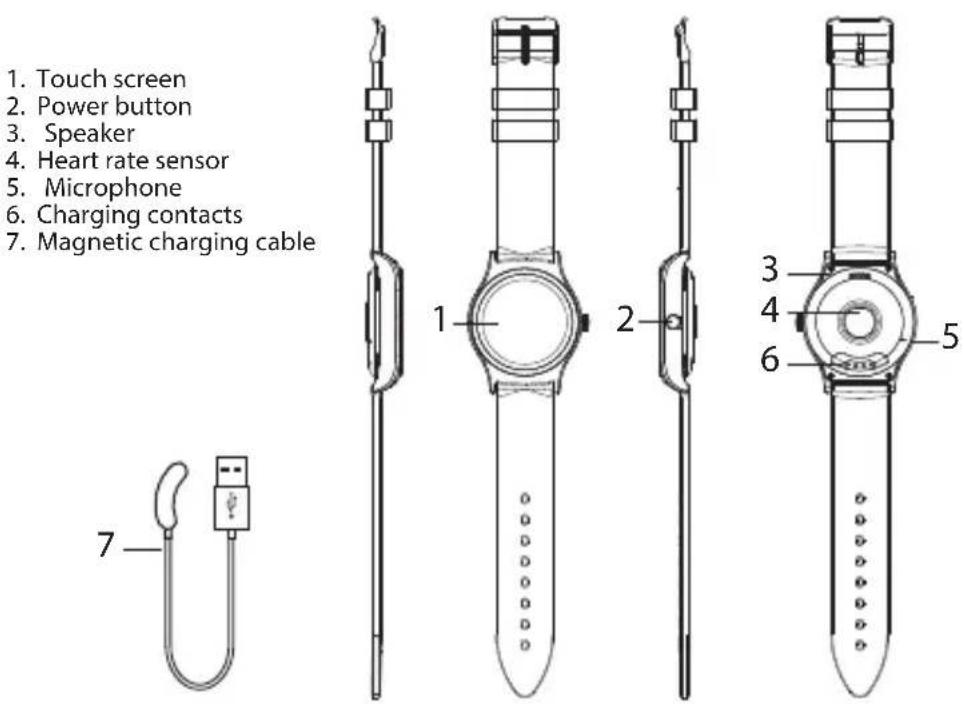
Charging
-
Attach the magnetic charging cable to the watch. Make sure the charging pins of the cable are touching the charging contacts of the smartwatch.
-
Connect the charging cable to a powered USB port – it can be a USB wall charger, computer USB port, power bank, etc.
-
It takes up to 2 hours to fully charge the smartwatch.

natural_image
Line drawing of a mechanical device with labeled 'acme' and cable (no text or symbols beyond label)Pairing with a smartphone

This device is designed to work with smartphones, supporting Bluetooth 4.0 or higher versions. Be sure that your smartphone's Bluetooth hardware and software are working properly; otherwise it may not be able to pair with the smartwatch or the connection may be unstable.
- Download OrunningSW application from App Store or Google Play to your smartphone. (Accept all security requests of the application.)
- Enable Bluetooth on your smartphone. (Be sure that Bluetooth is also enabled on the smartwatch.)
- Open the application and allow all security requests of the application.
- Go to the settings section of the application and create your personal profile.

My Profile
- Tap "Connect the smartwatch" in the settings section, follow on-screen instructions and select the name of the smartwatch in the list of found devices. Now your data and notifications can be synced. In case the smartwatch is not found – restart the application and the smartwatch by turning it off and on.

Connect the smart watch
- An iPhone user has to open the Bluetooth menu of the phone and perform pairing with the smartwatch to enable full functionality of the smartwatch.

Some functionality may not work properly or work differently depending on the smartphone model and software. Such issues not necessarily mean the malfunctioning of the smartwatch.

Time in the smartwatch will be set automatically after synchronisation with a smartphone.
Device controls


Power button – when pressed longer, this button performs power on/off functions, and when pressed shortly, it performs the function of return to the main watch screen.
Turn on/off: Hold and press the power button for 3 seconds.
Enter main menu: Swipe from right to left when on the watch interface.
Switch the submenus: Swipe up/down.
View smartphone notifications: Swipe from left to right when on the watch interface. (Devices must be connected.)
View quick settings menu, weather information and calendar: Swipe down when on the watch interface.
View statistics, sports data, personal sleep information, heart rate mode, reminder alerts: Swipe up when on the watch interface.
Select menu function: Tap the icon.
Exit menu function: Swipe from left to right or shortly press the power button.
Return to watch interface: Press the power button.
Sport mode: Swipe up when on the watch interface until you see the sport mode interface.
Change watch interface: long press the watch display, then swipe left or right to choose the watch interface you like – confirm it by tapping the screen.
Overview of functions
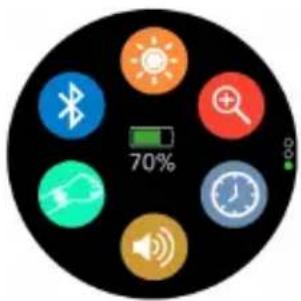
Functions in the quick settings menu
- Brightness adjusting
- Bluetooth options
- Mute ON/OFF
- Find phone
• Change the smartwatch profile
• Screen activation by a wrist movement ON/OFF
natural_image
Circular icon displaying eight smart devices with a 70% battery and speaker symbol (no readable text or numbers)Functions in the main menu
 | Sport mode: Select the type of sports activity and start tracking your sports activity session. |  | Heart rate: Test your heart rate – beats per minute (BPM) value. |
 | Activity records: View the data about the number of steps, burned calories and distance travelled. |  | Sleep monitoring: The device is able to automatically recognise your status and monitor your sleep. |
 | Call logs: View call logs of your phone. |  | Notifications: View notification messages received to your phone. |
 | Messages: View messages received to your phone and make quick replies. |  | Phonebook: Make phone calls and send quick messages. |
 | Voice commands: Use the microphone of the smartwatch for voice assisted services (Siri, Google Now, etc.). |  | Remote music control: Control music playback on your smartphone. |
 | Camera remote: Tap the screen of the smartwatch to take a photo with the camera of your smartphone. |  | Sound recorder: Record audio and check recordings with your smartwatch. |
 | Reminders: Create reminder alarms. |  | Calendar: View the calendar. |
 | Settings: You can view and edit the following settings: Your profile, Bluetooth, sleep monitoring, time and date, units, heart rate measurement, screen activations by wrist movement, sound, display, language, restore to factory settings, watch information. |  | Sedentary alarm: Set the time limit for the alerts of physical inactivity. |

Some functions will only work when Bluetooth connection with the smartphone is active.
Troubleshooting
Li-Ion/Pi-Po batteries exhibit a gradual decrease in performance over their service life, so reduction in the initial battery capacity is not an indication of a faulty battery or device.
| PROBLEMS SOLUTIONS | |
| The smartwatch shuts down automatically | The battery might be empty. |
| The smartwatch cannot be turned on | Press the power button for a longer time.Recharge the smartwatch and try to start it again. |
| Short battery performance | Make sure the battery has been completely charged (at least for two hours).Turn off the needless functions which are causing power consumption: screen activation by wrist movement, high screen brightness, etc. |
| Connectivity problems | To ensure the proper operation of some smartwatch functions, OrunningSW app must be started and working in the background mode of your smartphone operating system. Do no not disable Bluetooth connection and do not close the app in the background applications list.Restart the smartwatch/smartphone.Distance between the devices is too long, get them closer. |
Care and maintenance
- Regularly clean your band and tracker – especially after working out or sweating. Make sure your device is completely dry after cleaning.
- Be sure your skin is dry before you put your tracker on.
• Do not use abrasive solvents to clean the tracker. - Do not expose the tracker to extremely high or low temperatures because this will shorten the life of electronic devices, destroy the battery or distort certain plastic parts.
• Do not dispose of the tracker using fire because this will result in an explosion. - Do not expose the tracker to contact with sharp objects because this will cause scratches and damage.
- Do not attempt to disassemble the tracker because this may damage it if you are not professionally skilled in this area.
Waste Electrical and Electronic Equipment (WEEE) Symbol

The use of the WEEE symbol indicates that this product may not be treated as household waste. By ensuring this product is disposed of correctly, you will help protect the environment. For more detailed information about recycling of this product, please contact your local authority, your household waste disposal service provider or the shop where you purchased the product.
natural_image
Line drawing of a mechanical device with a central circular component and wires (no text or symbols)Connect the smart watch

natural_image
Circular icon displaying eight smart devices including Bluetooth, search, clock, speaker, and battery with 70% speed indicator (no text or symbols beyond icons)Lietotne - "OrunningSW
natural_image
Line drawing of a U-shaped cable with a USB port (no text or symbols)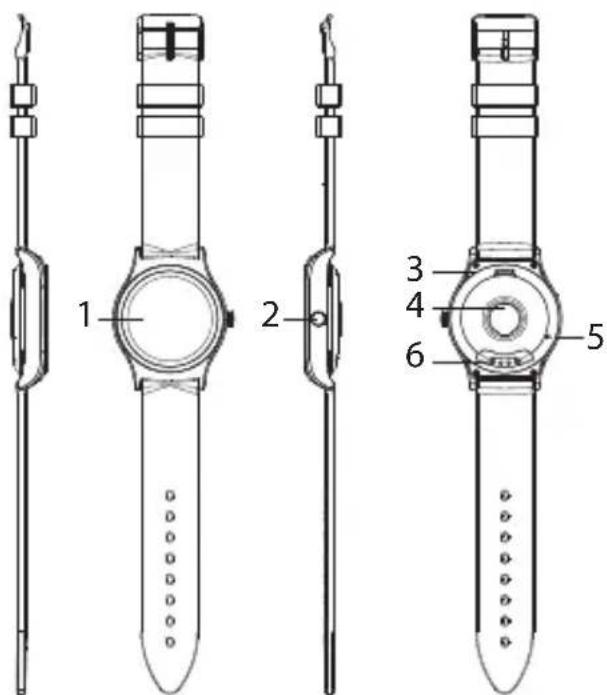
Uzlādēšana
natural_image
Line drawing of a mechanical device with a central hub and cable (no text or symbols)Connect the smart watch
natural_image
Three-step illustration of a hand interacting with a smartwatch, showing finger positioning and bidirectional arrow (no text or symbols)
natural_image
Circular icon displaying eight smart devices with a 70% battery and indicator lights (no text or symbols beyond icons)natural_image
Line drawing of a mechanical device with a central hub and cable (no text or symbols)
Connect the smart watch

natural_image
Circular icon displaying eight smart device icons (band, wireless, sun, magnifying glass, hand gesture, speaker, clock) with a 70% battery indicator and a green progress bar (no readable text or symbols beyond icons)natural_image
Line drawing of a mechanical device with a central hub and cable (no text or symbols)Connect the smart watch
natural_image
Circular icon displaying eight smart device icons including Bluetooth, sun, magnifying glass, clock, speaker, and battery with 70% battery (no text or symbols beyond icons)natural_image
Simple line drawing of a U-shaped connector with a USB symbol (no text or labels)
Зарядка
Connect the smart watch
Application: OrunningSW
natural_image
Line drawing of a mechanical device with a central hub and cable (no text or symbols)natural_image
Circular icon displaying eight smart device icons including Bluetooth, search, clock, speaker, and smart speaker with a 70% battery indicator (no readable text or symbols beyond icons)Connect the smart watch
natural_image
Three-step illustration showing a hand interacting with a smartwatch, displaying the left, side, and up-down views (no text or symbols present)
natural_image
Circular icon displaying eight smart device icons including Bluetooth, sun, search, clock, speaker, and Wi-Fi, with a 70% battery indicator (no text or symbols beyond icons)natural_image
Line drawing of a U-shaped cable with a USB port (no text or symbols)
Зареждане
Connect the smart watch
natural_image
Three-step illustration of a hand interacting with a smartwatch, showing finger positioning and bidirectional arrow (no text or symbols)
natural_image
Circular icon displaying eight smart device icons with a 70% battery and speaker symbol (no readable text or numbers)Material curea: silicon
Senzori: accelerometru, monitor ritm cardiac optic
Connect the smart watch

natural_image
Circular icon displaying eight smart device icons with a 70% battery and speaker symbol, set against a black background (no text or labels beyond icons)natural_image
Line drawing of a U-shaped connector with a USB port (no text or symbols)
Töltés
natural_image
Line drawing of a mechanical device with a circular component and connecting wires (no text or symbols)Connect the smart watch
natural_image
Three-step illustration of a hand interacting with a smartwatch, showing finger positioning and directional arrows (no text or symbols)
natural_image
Circular icon displaying eight smart devices including Bluetooth, sun, search, clock, speaker, and battery with 70% speed indicator (no readable text or symbols beyond icons)natural_image
Simple line drawing of a U-shaped connector with a USB port (no text or symbols)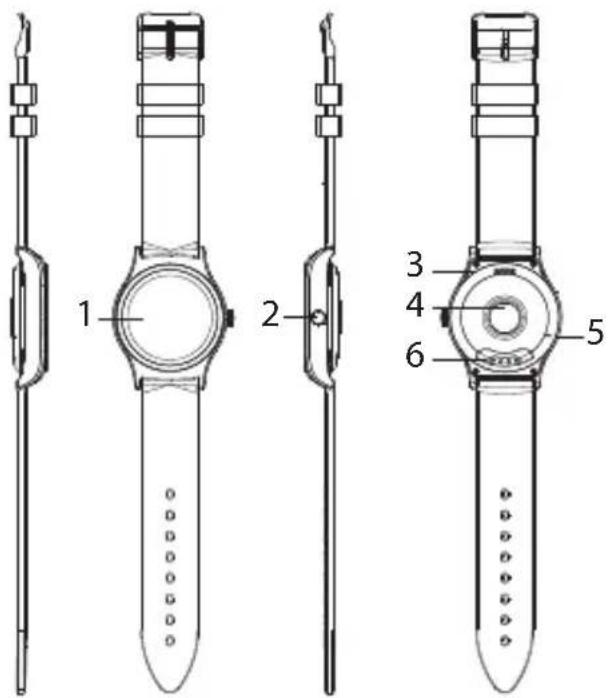
Punjenje
- Spojite magnetski kabel za punjenje. Pinovi za punjenje na kablu trebaju dodirivati kontakte za punjenje na pametnom satu.
- Spojite kabel za punjenje na USB utor – to može biti USB zidni punjač, USB utor računala, prijenosna baterija itd.
- Da bi se pametni sat potpuno napunio, potrebno je 2 sata.

natural_image
Line drawing of a mechanical device with a central circular component and connecting wires (no text or symbols)Uparivanje s pametnim telefonom

Ovaj je uređaj dizajniran za rad s pametnim telefonima koji podržavaju Bluetooth 4.0 ili novije verzije. Provjerite da hardver i softver za Bluetooth vašeg pametnog telefona radi ispravno. U protivnom ga nećete moći upariti s pametnim satom ili veza može biti nestabilna.
Connect the smart watch
- Korisnik iPhonea mora na svojem mobilnom uređaju otvoriti izbornik Bluetooth i upariti uređaj s pametnim satom kako bi se postigla puna funkcionalnost pametnog sata.

Neke funkcije možda neće ispravno raditi ili će raditi drukčije ovisno o modelu i softveru pametnog telefona. U takvim slučajevima ne mora značiti da pametni sat neće ispravno raditi.

Vrijeme pametnog sata automatski će se podesiti nakon sinkronizacije s pametnim telefonom.
natural_image
Three-step illustration of a hand interacting with a smartwatch, showing finger positioning and bidirectional arrow (no text or symbols)
Connect the smart watch
natural_image
Three-step illustration of a hand interacting with a smartwatch, showing finger movement and bidirectional arrow (no text or symbols)
natural_image
Circular icon displaying eight smart device icons including Bluetooth, magnifying glass, and clock with 70% battery (no text or symbols beyond icons)natural_image
Line drawing of a hand holding a circular device with a cable, no text or symbols presentConnect the smart watch
natural_image
Three-step illustration of a hand interacting with a smartwatch, showing finger positioning and bidirectional arrow (no text or symbols)
natural_image
Circular icon displaying eight smart device icons including Bluetooth, sun, search, clock, megaphone, speaker, and Wi-Fi (no text or symbols beyond icons)ACME Europe hereby declares that this equipment is in compliance with the essential requirements and other relevant provisions of:
"RED 2014/53/ES" Directive;
"RoHS 2011/65/EU" Directive.
The declaration of conformity can be accessed at:
http://www.acme.eu/en-us/declarations-conformity

atitikties deklaracija
| Product Product model | |
| Product purchase date Seller name, address | |
| Failures (date, description, position of the person who accepts the product, first name, last name and signature) | |
1. Warranty period
Warranty enters into force starting with the day when the buyer acquires the product from the seller. Warranty period is indicated on the package of the product.
2. Warranty conditions
The warranty is valid only by providing an original document of the product acquisition and this warranty sheet, which includes name of the product model, product purchase date, name and address of the seller.
If it is noticed during the warranty period that the product has faults and these faults where not caused by any of the reasons when the warranty is not applied as indicated in the paragraphs below, manufacturer undertakes to replace the product.
The warranty is not applied to regular testing, maintenance and repair or replacement of the parts which are worn out naturally.
The warranty is not applied if damage or failures occurred due to the following reasons:
- Inappropriate installation of the product, inappropriate usage and/or operating the product without following the manual, technical requirements and safety standards as provided by the manufacturer, and additionally, inappropriate warehousing, falling from heights as well as hard strikes.
• Corrosion, mud, water and sand.
- Repair works, modifications or cleaning, which were performed by a authorised by the manufacturer.
- Usage of the spare parts, software or consumptive materials which do not apply to the product.
- Accidents or events or any other reasons which do not depend on the manufacturer, which includes lightning, water, fire, magnetic field and inappropriate ventilation.
- If the product does not meet standards and specifications of a particular country, in which it was not bought. Any attempt to adjust the product in order to meet technical and safety requirements such as those in the other countries withdraws all the rights to the warranty service.
If no failures are detected in the product, all the expenses in relation to the service are covered by the buyer.


- GB Smartwatch
- USER MANUAL
- Technical specifications
- Product overview
- Charging
- Pairing with a smartphone
- My Profile
- Connect the smart watch
- Device controls
- Overview of functions
- Functions in the quick settings menu
- Troubleshooting
- Care and maintenance
- Waste Electrical and Electronic Equipment (WEEE) Symbol
- Uzlādēšana
- Зарядка
- Зареждане
- Töltés
- Punjenje
- Uparivanje s pametnim telefonom
- atitikties deklaracija
- Warranty period
- Warranty conditions
Brand : ACME
Model : SW201
Category : Smartwatch