ML0585-N - Uncategorized M-life - Free user manual and instructions
Find the device manual for free ML0585-N M-life in PDF.


User questions about ML0585-N M-life
0 question about this device. Answer the ones you know or ask your own.
Ask a new question about this device
Download the instructions for your Uncategorized in PDF format for free! Find your manual ML0585-N - M-life and take your electronic device back in hand. On this page are published all the documents necessary for the use of your device. ML0585-N by M-life.
USER MANUAL ML0585-N M-life
natural_image
White wireless router with 'WiFi N' and 'IT-LIFE' branding, no visible text or symbols on the device body.text_image
Connect to a Network Do you want to set up your network? This is a new router that has not been set up. Click OK to start setup. Connect to the network without setting it up OK Canceltext_image
Wireless Repeater Language English Username Password Remember my password Login Canceltext_image
Network Setting OK Request Close Network Connection (RSD): network_30-100 Access: 0 On/Off Server: Double Data Window: Double Apply Canceltext_image
Network Setting Options Network Setup SDD Security Units SMTP Settings SDD Security Units Language Type Switch Apply Cancel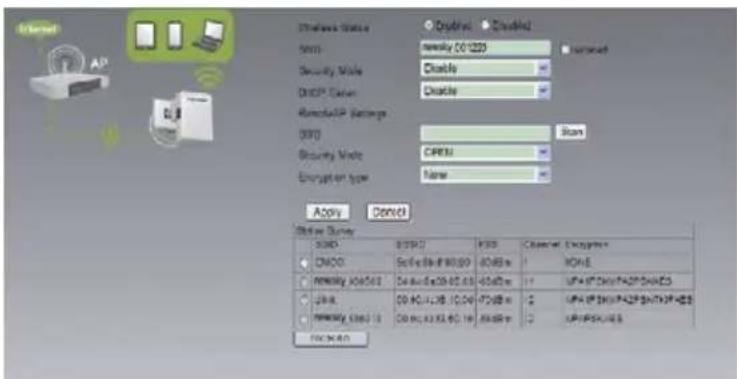
text_image
Network Status Form1 Security Mode DRIP Server Remodular Settings DRIP Security Mode Encryption type Apply Cancel Status Survey S200 CNO2 Remote OK/OK Remote OK/OK Remote OK/OK Remote OK/OK OK/OK OK/OK OK/OK OK/OK OK/OK OK/OK OK/OK OK/OK OK/OK OK/OK OK/OK OK/OK OK/OK OK/OK OK/OK OK/OK OK/OK OK/OK OK/OK OK/OK OK/OK OK/OK OK/OK OK/OK OK/OK Opentext_image
Wireless Status SSO Security Mode: CHSP_Snergy: NE? RemoteAP Settings SSO Security Mode: Encryption Type: Password: Apply Cancel SOD ORCC Protocol: 2019.124 Tel: 86-733566 Recovery: 2019.124 OSI OK/OK/OK/OK/OK OK/OK/OK/OK/OK OK/OK/OK/OK/OK OK/OK/OK/OK/OK OK/OK/OK/OK/OK OK/OK/OK/OK/OK OK/OK/OK/OK/OK OK/OK/OK/OK/OK OK/OK/OK/OK/OK OK/OK/OK/OK/OK OK/OK/OK/OK/Ok OK/OK/OK/OK/Ok OK/OK/OK/OK/Ok OK/OK/OK/OK/Ok OK/OK/OK/OK/Ok OK/OK/OK/OK/Ok OK/OK/OK/OK/Ok OK/OK/OK/OK/Ok OK/OK/OK/OK/Ok OK/OK/OK/OK/Ok OK/OK/OK/OK/OK OK/OK/OK/OK/Ok OK/OK/OK/OK/Ok OK/OK/OK/OK/Ok OK/OK/OK/OK/Ok OK/OK/OK/OK/Ok OK/OK/OK/OK/Ok OK/OK/OK/OK/Ok OK/OK/OK/OK/Ok OK/OK/OK/OK/ok OK/OK/OK/Ok/ok OK/OK/OK/Ok/ OK/OK/OK/ OK/OK/ OK/ OK/ OK/ OK/ OK/ OK/ OK/ OK/ OK/ OK/ OK/ OK/ OK/ OK/ OK/ OK/ OK/ OK/ OK/ OK/ OK/ OK/ OK/ OK/ OK/ OK/ OK/ OK/ OK/ OK/ OK/ OK/ OK/ OK/ OK/ OK/ OK/ OK/ KSC Reserved Engrifocus 1 NONE 0 NONE 11 WORK/SK/SK/SK/Sk/Sk/Sk/Sk/Sk/Sk/Sk/Sk/Sk/Sk/Sk/Sk/Sk/Sk/Sk/Sk/Sk/Sk/Sk/Sk/Sk/Sk/Sk/Sk/Sk/Sk/Sk/Sk/Sk/Sk/Sk/Sk/Sk/Sk/Sk/Sk/Sk/Sk/Sk/Sk/Sk/Sk/Sk/Sk/Sk/Sk/Sk/Sk/Sk/Sk/SnS 11 WORK/SK/SK/SK/Sk/Sk/Sk/Sk/Sk/Sk/Sk/Sk/Sk/Sk/Sk/Sk/Sk/Sk/Sk/Sk/Sk/Sk/Sk/Sk/Sk/Sk/Sk/Sk/Sk/Sk/Sk/Sk/Sk/Sk/Sk/Sk/Sk/Sk/Sk/Sk/Sk/Sk/Sk/Sk/SnS 11 WORK/SK/SK/SK/Sk/Sk/Sk /sknS 12 WORK/SK/SK/SK/Sk /sknStext_image
STATUS NETWORK SETTING STATUS ON Wireless SETTING STATUS ON Login Peripherals Network Setting AP Register Look Send/AP Settings BSS Security Mode OPEN Encryption type None DHCP Setup Disable Apply Cancel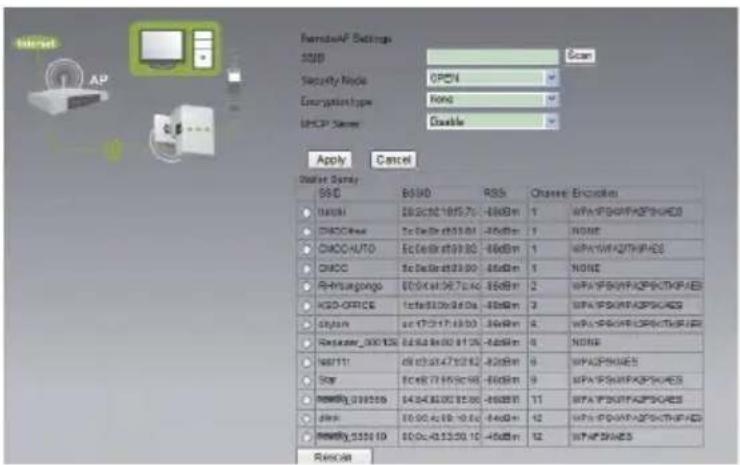
text_image
NetworkAP Settings SDD Scan Security Node: OPM4 EncryptionType: None MCCP Server: Enable Apply Cancel Data Set: S0.0 B0.00 R0.0 Channel Execution 10000 00/00/00/70 -86dBm 1 WPA/PB/WAF/PGN/AE3 CHOC/Hood Te De/Bt 03/01 -86dBm 1 NONE CHOC/AUTO Ec De/Bt 09/00 -86dBm 1 WPA/PB/AST/PH/ES CHOC Te De/Bt 23/00 -86dBm 1 NONE Rhutungongo 00/00/00/97-24-65dBm 2 WPA/PB/WAF/PGN/TKP/AE3 HCO-OFFICE 14a/03/00/8-0a -86dBm 3 WPA/PB/WAF/PGN/AE3 System ac 17/01/17-18/03 -86dBm 4 WPA/PB/WAF/PGN/TKP/AE3 Routamer_000133 04/04/04/02-81-26 -86dBm 5 NONE WAT11 08/03/07-47-22-82 -82dBm 6 WPA/PSN/AE3 Star EC/BT 77/05/06-98 -86dBm 9 WPA/PB/WAF/PGN/AE3 RMBWg_038559 04/04/04/02-81-26 -86dBm 11 WPA/PB/WAF/PGN/AE3 Jink 05/04/05-09-10-84 -84dBm 12 WPA/PB/WAF/PGN/TKP/AE3 RMBWg_535519 05/04/05-23-29-12 -45dBm 12 WPA/PSN/AE3 Rescalltext_image
Form/UP Settings 2001 COMPO Security Code: OPEN Configuration Type: None CHOP Server: Disable Apply Cancel Network Server IP/O 05/05/05 PSS CPU/MPB 87/05/05 CPC: 50.36.98.99.00 48.00% 1 AONE Bode: 28.3c132 14.95 7% E25% 1 HPA-SPN/MPB/SUDES M1011: c5.07.97.97.97.97 E45% 8 HPA/SPN/AES Repeater_001136: Cus-Ba-8x00.01.38 E85% 6 AONE TCLUK_42-0058: x8.17.2x 15.96.58 E85% 11 HPA-SPN/MPB/SUDES Newday_001006: Cus-Ba-8x00.01.38 E85% 11 HPA-SPN/MPB/SUDES MERCY_EEFAB4219.26.20.02 mm/s/s4 E85% 11 HPA-SPN/MPB/SUDES Base: 00.90.4x 04.10.00 E85% 12 HPA-SPN/MPB/SUDES Newday_001016: 00.9c.43.57.02.10 E45% 12 HPA/SPN/AES Relantext_image
Connect to a network Typethe network security key: Security key: Hide characters OK Cancel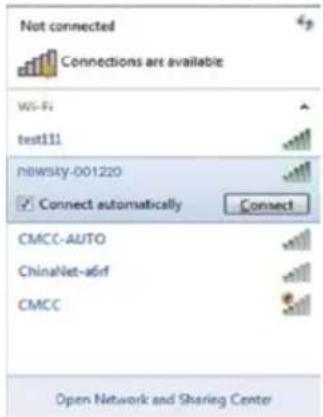
text_image
Not connected Connections are available Wi-Fi test11 nowsky-001220 Connect automatically Connect CMCC-AUTO ChinaNet-aGIF CMCC Open Network and Sharing Centertext_image
System Status Setup Wizard Basic Settings Wireless Settings Wireless Basic Settings Wireless Security Settings WPS Settings Wireless Channels Line System Tools Wireless Network Wireless Status Enabled Disabled HSD newsky_00120 Installed Wireless Mode 11b/gn mixed modes Disabled 6 PDD Broadcast Enabled Disabled HSD 04:04:05:09 12:29 Apply Canceltext_image
YOU ARE IN ADVANCED MODE NOW System Status Setup Wizard Basic Settings Wireless Settings Wireless Basic Settings Wireless Security Settings WPS Settings Wireless Clients List System Tools Wireless Security Settings Security Policy Security Mode: WPA2-Personal WPA2-Personal WPA Encryption: TKIP AES TKIP+HES Password: fast Key Readwall Interval: 1600 seconds Apply Canceltext_image
YOU ARE IN ADVANCED MODE NOW System Status Setup Wizard Basic Settings Wireless Settings System Topics Time and Date System Upgrade Backup and Recovery Restore Factory Settings New Password Change Robust Password Account Management Username admin New Password Repeat New Password Save Canceltext_image
System Status Setup Wizard Basic Settings Wireless Settings System Tools Time and Date System Upgrade Backup and Recovery Restore Factory Settings User Password Change Robust Firmware Upgrade Please Select The Upgrade File: 100% Upgrade Cancel Browse You can upgrade the latest version, please download any recent Firmware up from our website to downloading the file to extract the zip to upgrading the route for the upgrade file. Upgrade button Cadaio! Once you’ll upgrade buttons, interrupt the process power during the user could damage thetext_image
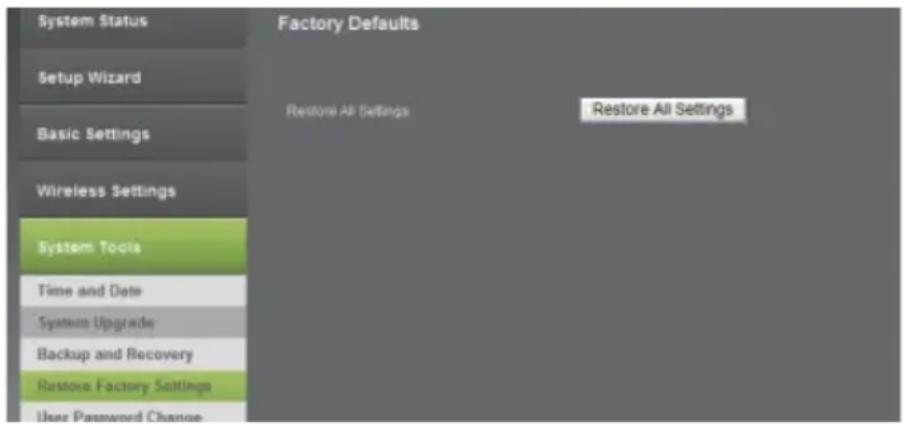
System Status Setup Wizard Basic Settings Wireless Settings System Tools Time and Date System Upgrade Backup and Recovery Restore Factory Settings User Password Change Rohnot Backup and Restore Export Settings Export Button Back up Import Settings Set File Locations Browse Save Cancel System Status Setup Wizard Basic Settings Wireless Settings System Tools Time and Date System Upgrade Backup and Recovery Restore Factory Settings User Password Change Factory Defaults Restore All Settings Restore All SettingsBefore you start to use this device, please check if there's anything missing in the package, and contact your dealer of purchase to claim for missing items:
Package Contents:
1x WiFi Repeater
1x 1m Ethernet cable with RJ45 connector
1x Quick Installation Guide
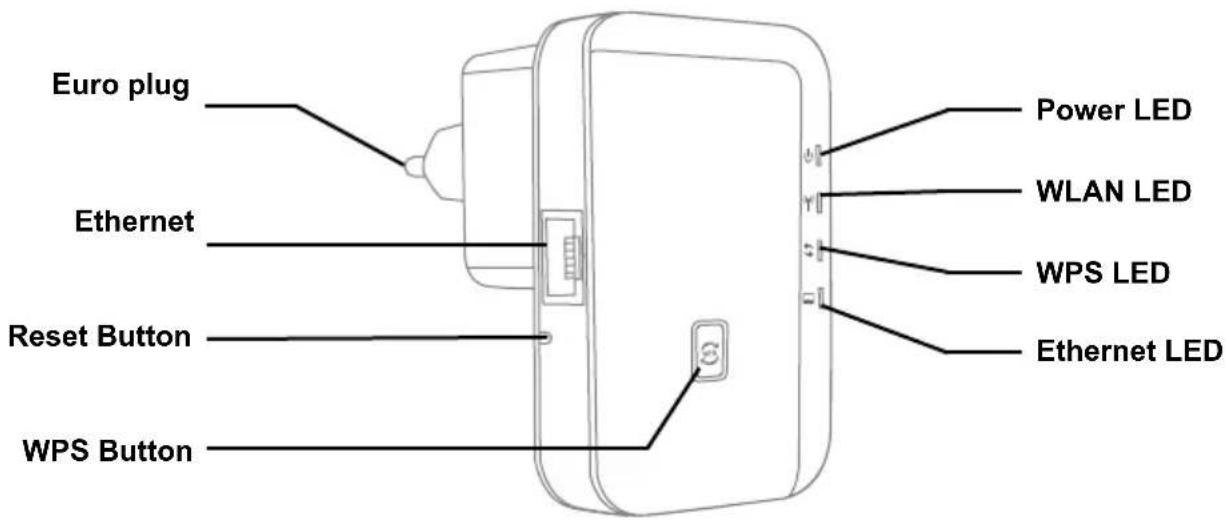
Appearance Introduction
text_image
Euro plug Ethernet Reset Button WPS Button Power LED WLAN LED WPS LED Ethernet LEDReset: If you need to reset the Repeater, press and hold RESET button for 3-5 seconds, release the button when all LEDs are off except of Power LED.
| Indicator | Name Status Description | ||
| Power Status Indicator Green On Get Powered | |||
| Wireless Status Indicator | Green slow blink Wireless Function Launched | ||
| Green fast blink Data Transmission via wireless | |||
| WPS Status Indicator | Green fast blink WPS Function Launched | ||
| Off | Not use or have completed the connection | ||
| Ethernet Status Indicator | Green On Ethernet Connected | ||
| Green fast blink Data Transmission via Ethernet | |||

Cautions:
- Disconnect the device during thunderstorms in case of lightning damage.
- Keep far from heat source and ensure proper ventilation.
- Keep waterproof in the storage, transportation and operating environments
1. Computer Configuration
- Click Start→Control Panel→Network and Internet→Network and Sharing Center→Change adapter settings→Wi-Fi(right click)→Properties.
- Double click Internet Protocol Version 4(TCP/IPv4).
- To set up the computer IP 192.168.2.x (x arbitrary integer between 2\~252), subnet mask of 255.255.255.0, gate of 192.168.2.1 and click OK. Back to the last interface and click OK.
2. Connect To Wireless Network
- Plug the Wi-Fi Repeater to a wall socket.
- Click on the network icon 📁 on the right bottom of your desktop. You will find the signal from the Wi-Fi Repeater. Click on Connect and wait few seconds.
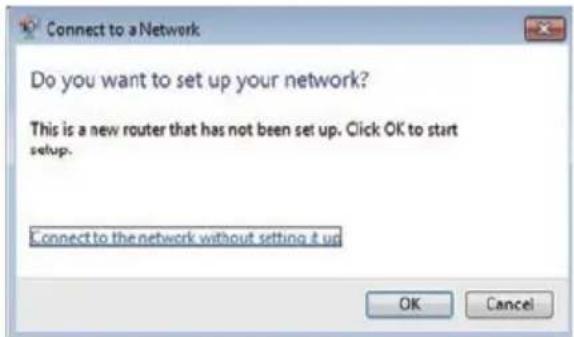
- When shows: Connect to a Network, please insert default password MLIFE2015.
text_image
Connect to a Network Do you want to set up your network? This is a new router that has not been set up. Click OK to start setup. Connect to the network without setting it up OK Cancel- Open web browser and type http://192.168.2.1 in the browser's address box. This number is the default IP address for this devices.

text_image
http://192.168.2.1/ 192.168.2.1
NOTE! If you cannot load http://192.168.2.1, please check whether Wi-Fi repeater is on default settings. If not, or if you cannot verify the reason for lack of connection, restore default settings. Press the reset button for 3-5 seconds and try to install it again.
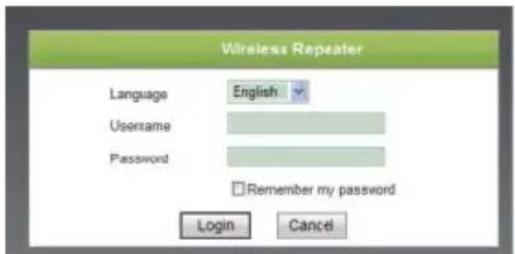
- The login screen below will appear. Enter the Username and Password then click Login to login. The default Username is admin, default password is admin.
text_image
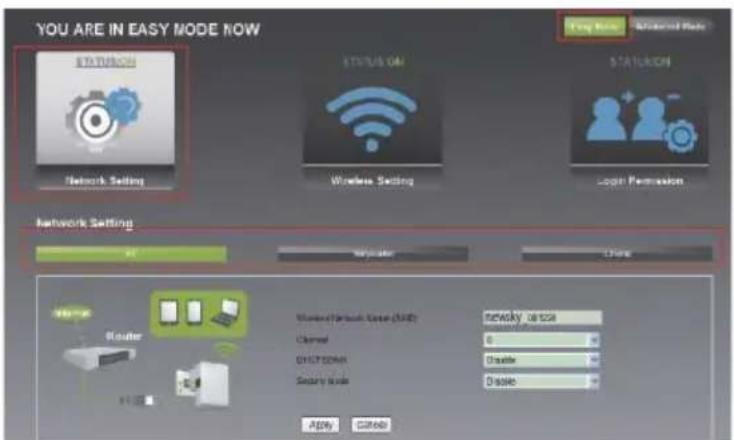
Wireless Repeater Language English Username Password Remember my password Login Cancel- After logging in, click Easy Mode and then click Network Setting, you will see 3 modes: AP Mode, Repeater Mode and Client Mode.

text_image
YOU ARE IN EASY MODE NOW STATUS ON STATUS ON Network Setting Windows Setting Login Permission Network Settings OK MyBlock Close Router Window Default System (SDD) <|vision_start|> Channel 6 DISCSON Disable Security Mode Disable Apply Cancel3. Configuration Mode
- Configure AP Mode.
• Follow process 2.3 to 2.5.
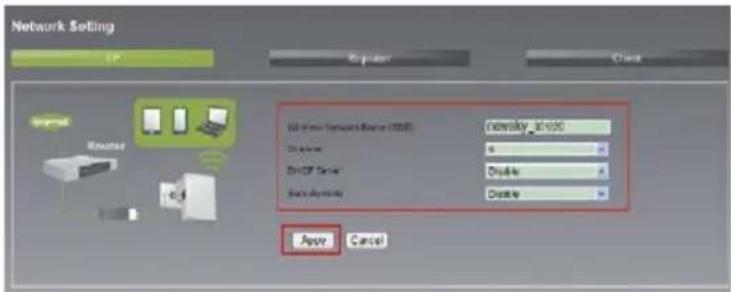
- Select AP and enter necessary information, password and click Apply. Wait for \~3 - 5 seconds until the process is complete.
text_image
Network Setting IP Register Close Imported Loaded With your Network Server (USB) network_30-1000 Disable Delete Delete Paste Options Paste Cancel Paste Cancel-
Configure Repeater Mode.
-
Follow process 2.3 to 2.5.
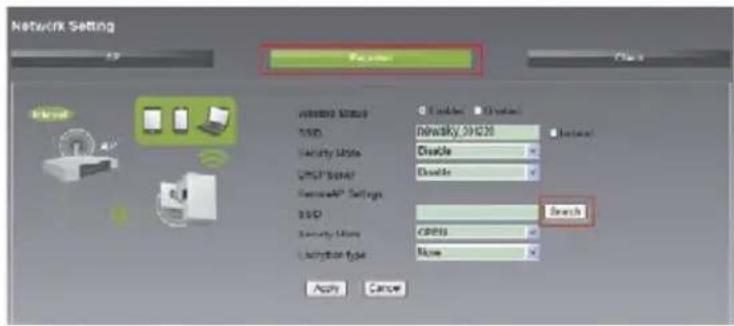
- Select Repeater then click on Search.
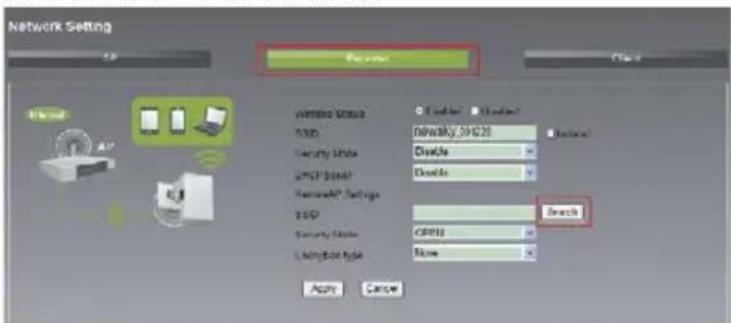
text_image
Network Setting Encoder Network Status USB Security Node XML Server RemodelIP Settings USB Security Node Lockion Type C:\Users\Network\09420 Disable Disable Search Apply Cancel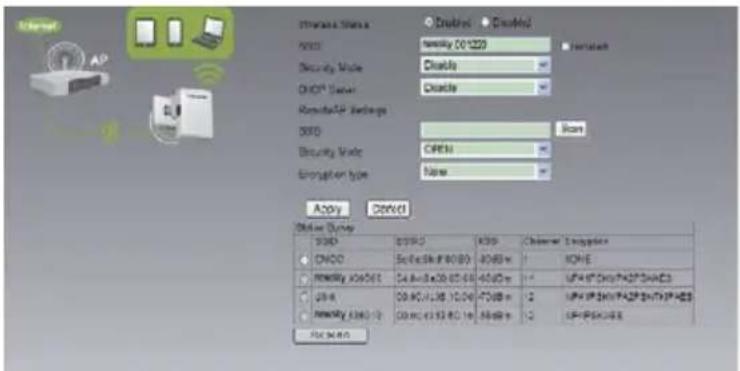
text_image
Internet Status Binary 01229 Security Mode Disable OKP Server Disable RemoteAP Settings SDD Open Security Mode OPEN Enable type Open Apply Cancel Online Options SDD OKP SDD Binary 01229 Binary 01229 Binary 01229 Binary 01229 Binary 01229 Binary 01229 Binary 01229 Binary 01229 Binary 01229 Binary 01229 Binary 01229 Binary 01229 Binary 01229 Binary 163.8.16.8.16.8.16.8.16.8.16.8.16.8.16.8.16.8.16.8.16.8.16.8.16.8.16.8.16.8.16.8.16.8.16.8.16.8.16.8.16.8.15 Binary 01229 Binary 01229 Binary 01229 Binary 01229 Binary 01229 Binary 01229 Binary 01229 Binary 01229 Binary 01229 Binary 01229 Binary 01229 Binary 01229 Binary 34.8.16.8.16.8.16.8.16.8.16.8.16.8.16.8.16.8.16.8.16.8.16.8.16.8.16.8.16.8.16.8.16.8.16.8.16.8.16.8.14 Binary 01229 Binary 01229 Binary 01229 Binary 01229 Binary 01229 Binary 01229 Binary 01229 Binary 01229 Binary 01229 Binary 01229 Binary 01229 Binary 01229 Binary 54.8.16.8.16.8.16.8.16.8.16.8.16.8.16.8.16.8.16.8.16.8.16.8.16.8.16.8.16. Binary 01229 Binary 01229 Binary 01229 Binary 01229 Binary 01229 Binary 01229 Binary 01229 Binary 01229 Binary 01229 Binary 01229 Binary 01229 Binary 01229 Binary 074444444444444444444444444444444444444444444444444444444444444444444444444444444444444444444444444444 Binary 0744444444444444444444444444444444444444444444444444444444444- Select desired network and enter the password if necessary. Then, enter information in the spaces provided.
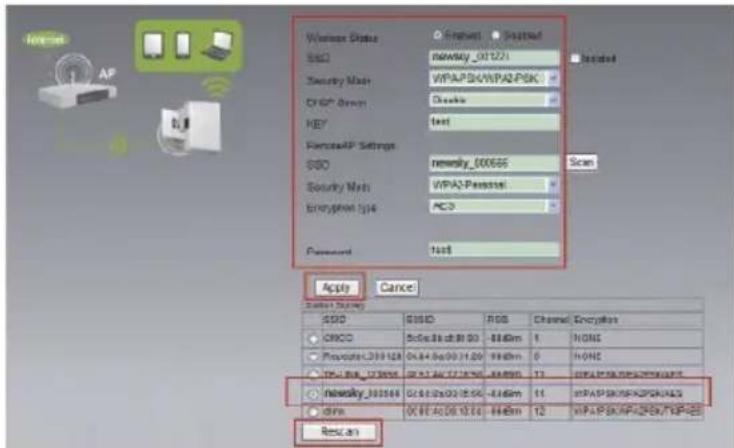
text_image
Wireless Status SDD Security Mask OK? User KEY PersonalAP Settings SDD Security Mask Encryption type Password Apply Cancel SDD SDD RDS Channel Encrypsis ORCC Procuate_039128 IP-100_123066 Necessary_039568 OSI OK? A:00 10.00 448dm 1 NONE NONE 11 IP-100_123066 OSI OK? A:00 10.00 448dm 12 IP-100_123066 OSI OK? A:00 10.00 448dm 11 IP-100_123066 OSI OK? A:00 10.00 448dm 12 IP-100_123066 OSI OK? A:00 10.00 448dm- Click Apply and wait 3-5 seconds until it's complete.
9. Configure Client Mode
- Follow process 2.3 to 2.5
- Select Client then click on Search.
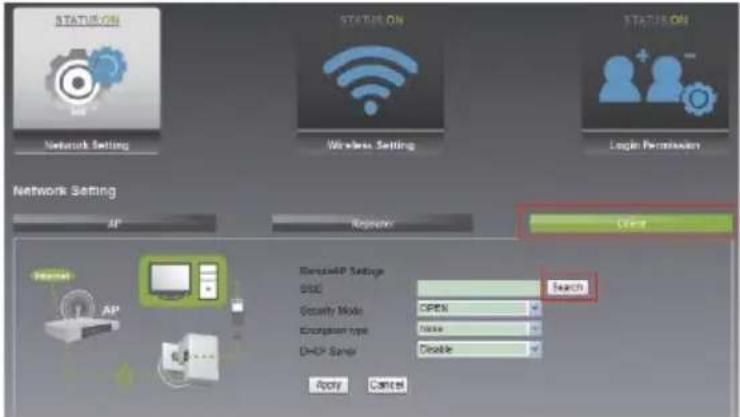
text_image
STATUS ON Status ON STATUS ON Network Setting Wireless Setting Login Peripherals Network Setting AP Requestor Open ResourceAP Settings DSC Search Geography Mode OPEN Encryption type None DHCP Setup Disable Apply Cancel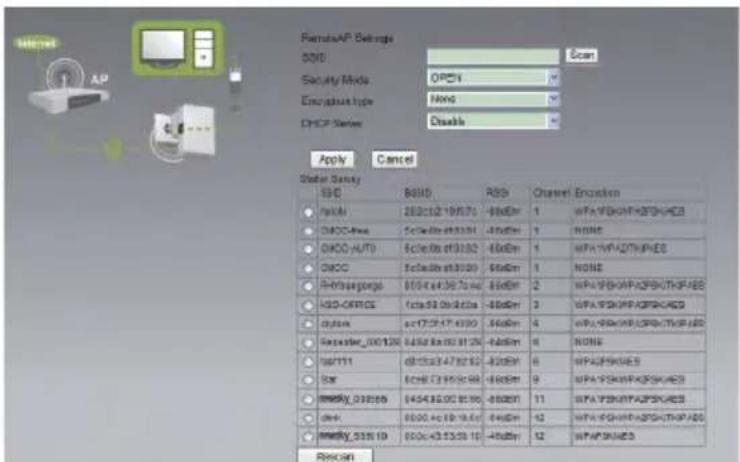
text_image
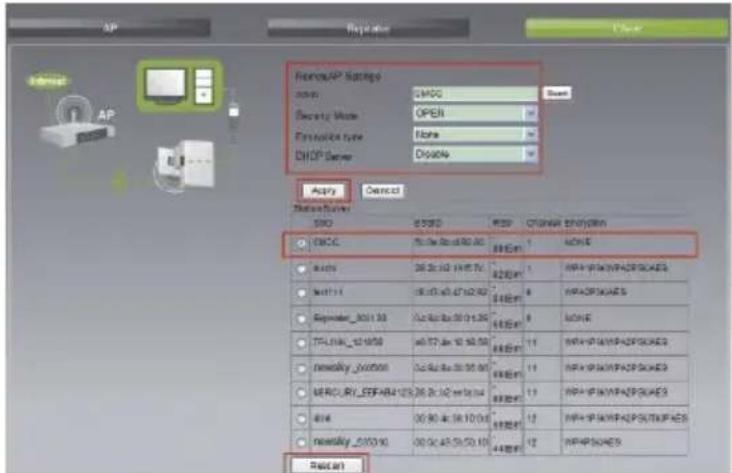
RemoteAP Settings SDD Security Mode: OPEN Encapsule type: None DHCP Status: Disable Apply Cancel Water Supply SSC BSSD RSS Channel Encoders HyDAI 2000102 19/5/73 -80dBm 1 WPA YF6NHPKQPSHAEES DHCC-Free 5c0a0b 4f33381 -80dBm 1 NONE DHCO-AUTO 5c0a0b 4f33382 -80dBm 1 WPA YF6NHPKQPSHAEES DHCC 5c0a0b 4f33380 -80dBm 1 NONE Hydrogurgo 8004x4f36704x -80dBm 2 WPA YF6NHPKQPSHAEES HSD-OFFICE 1c0a0b 09d823a -80dBm 3 WPA YF6NHPKQPSHAEES chitux ac7729171-6990 -80dBm 4 WPA YF6NHPKQPSHAEES September_000128 63568x003129 -80dBm 6 NONE SatTTT 4f33c34782.62 -80dBm 6 WPA YF6NQES Bar ECNB73959c98 -80dBm 9 WPA YF6NHPKQPSHAEES MMSRy_030569 6454360028196 -80dBm 11 WPA YF6NHPKQPSHAEES dshv 8000-4c18-19.6c -80dBm 12 WPA YF6NHPKQPSHAEES MMSRy_531619 800c435329.15 -80dBm 12 WPA YF6NQES Rescan- Select desired network and enter the password if necessary.
text_image
Network/AP Settings Access: D:\MCC Security Mode: OPEN Resource type: None DHCP Server: D:\0004 Apply Control Network Settings SNQ 8350 950 CHINA 2010/01/2011 C#CC 56.0k 62.0k 80.0k 88.0k 1 HCNE Auto 26.2k 10.1k 15.7k 82.0k 1 HP+HP+HP+HP+HP+HP+HP+ Multi 16.1k 40.47k 62.9k 8.0k HP+HP+HP+HP+HP+HP+ Sepimer_3031.30 12.0k 80.0k 13.2k 8.0k HCNE TPL10K_521970 40.72k 10.50k 88.0k 11 HP+HP+HP+HP+HP+HP+ newsky_000000 12.0k 80.0k 13.2k 88.0k 11 HP+HP+HP+HP+HP+HP+ NEWLRY_ESP_484-123.26.2k 10.7m 14.4m 88.0k 11 HP+HP+HP+HP+HP+HP+ 414 30.9k 45.9k 10.0k 88.0k 12 HP+HP+HP+HP+HP+HP+ newsky_0353.90 30.9k 45.9k 10.0k 88.0k 12 HP+HP+HP+HP+ Reset- Click Apply and wait 3-5 seconds until it's complete.
4. Reconnect to Repeater
- Click Start→Control Panel→Network and Internet→Network and Sharing Center→Change adapter settings→Wi-Fi (right click)→Properties.
- Double click Internet Protocol Version 4 (TCP/IPv4).
- Select Obtain an IP address automatically and Obtain DSN server address automatically. Click OK. Back to the last interface and click OK.
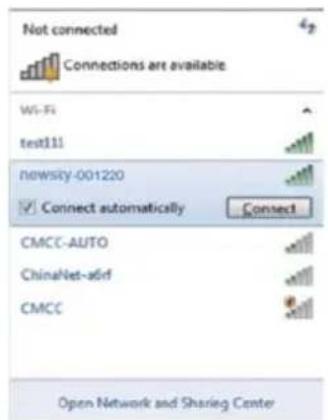
- Select the wireless network name configured in 3 Configuration Mode, click Connect button.
text_image
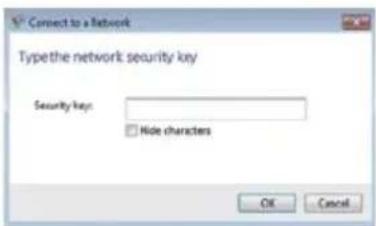
Not connected Connections are available Wi-Fi test111 nowsly-001220 Connect automatically Connect CMCC-AUTO ChinaNet-aSrf CMCC Open Network and Sharing Center- If you encrypted wireless network in 3 Configuration Mode, the following message will be displayed; type in the password and click OK.
text_image
Connect to a Network Typethe network security key Security key: Hide characters OK Cancel5. Configuring via Web Browser
1. KWireless Base Configuration
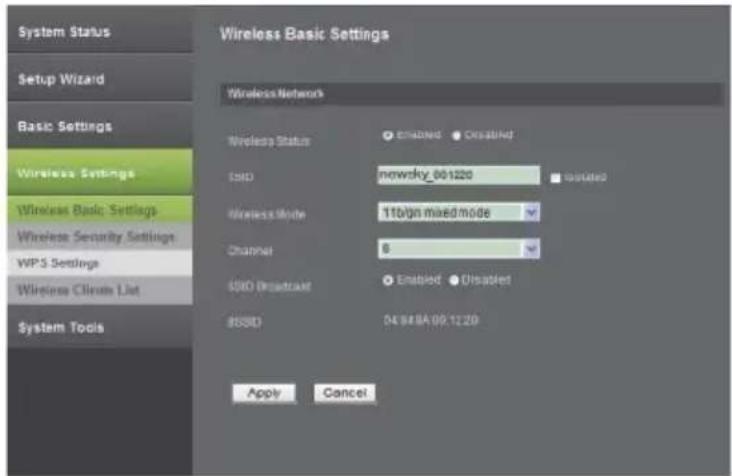
Please click Advanced Mode → Wireless Settings → Wireless Basic Settings located at the web management interface, the following message will be displayed on your web browser:
text_image
System Status Setup Wizard Basic Settings Wireless Settings Wireless Basic Settings Wireless Security Settings WPS Settings Wireless Chrom List System Tools Wireless Network Wireless Status ● Enabled ● Disabled SMD nowcky_001220 Wireless Mode 11bign mixed mode Channel 6 SMD Broadcast ● Enabled ● Disabled 8SSD D4 B#BA 09:12:20 Apply CancelYou could configure the minimum number of Wireless settings for communication, such as SSID and Channel. The Access Point can be set simply with only the minimum setting items.
| Wireless Status Wireless On / Off |
| SSID Service Set Identifier (network name) |
| Wireless Mode Supports 11b/g/n mixed modes |
| Channel 6 (default) |
| SSID Broadcast Wireless Signal On/Off |
Click Apply button, the WiFi Repeater will become effective.
2. Wireless Security Configuration
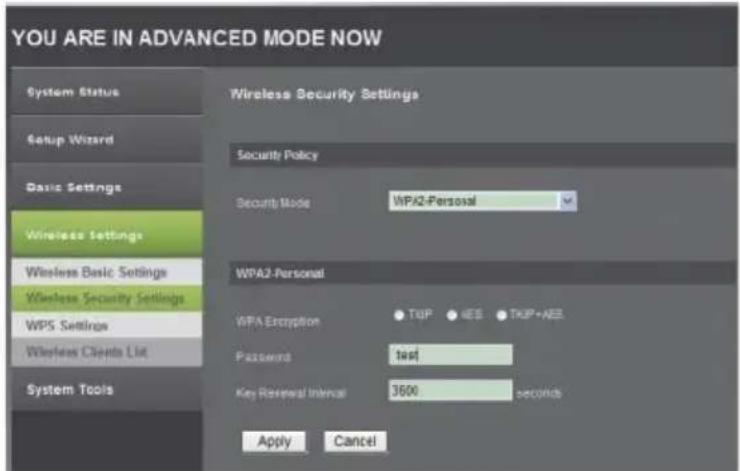
Please click Advanced Mode → Wireless Settings → Wireless Security Settings located at the web management interface, the following message will be displayed on your web browser:
text_image
YOU ARE IN ADVANCED MODE NOW System Status Setup Wizard Basic Settings Wireless Settings Wireless Basic Settings Wireless Security Settings WPS Settings Wireless Clients List System Tools Wireless Security Settings Security Policy Security Mode WPA2-Personal WPA2-Personal WPA Exception TCPP AES TCPP+AES Password test Key Reviewal Interval 3600 seconds Apply CancelSetup the wireless security and encryption to prevent from unauthorized access and monitoring. Supports 64/128-bit WEP, WPA-Personal, WPA2- Personal encryption methods. Click Apply button, the WiFi Repeater will become effective.
3. Change Management password
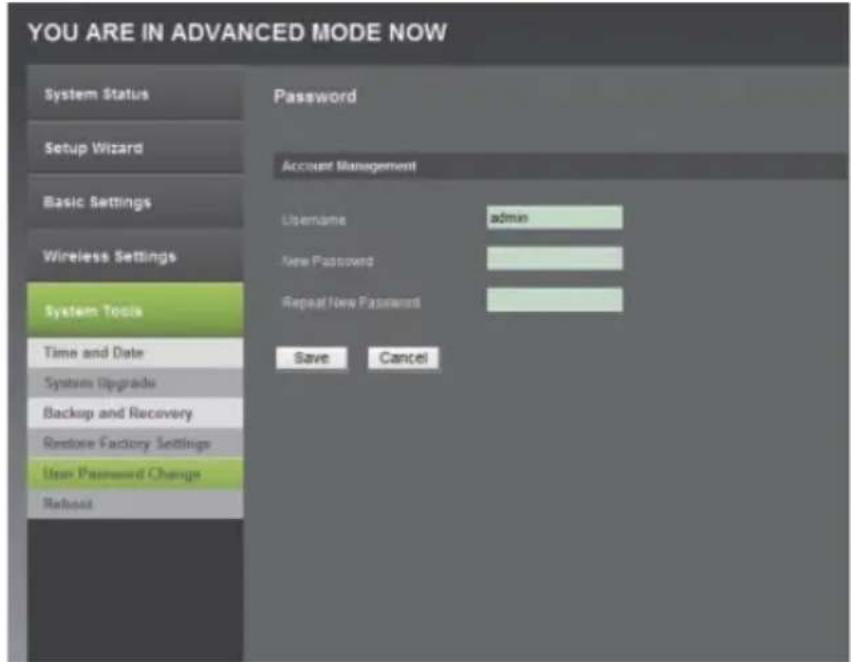
Default password of this Wi-Fi Repeater is admin. Customize the password in order to protect your network connection.
To change password, please follow the instructions below:
Please click Advanced Mode → System Tools → User Password Change menu on the web management interface, the following message will be displayed on your web browser:
text_image
YOU ARE IN ADVANCED MODE NOW System Status Setup Wizard Basic Settings Wireless Settings System Tools Time and Date System Upgrade Backup and Recovery Restore Factory Settings User Password Change Reboot Password Account Management Username admin New Password Repeat New Password Save CancelIf you want to keep original password unchanged, click Cancel. Click Save button, the WiFi Repeater will become effective
4. Firmware Upgrade
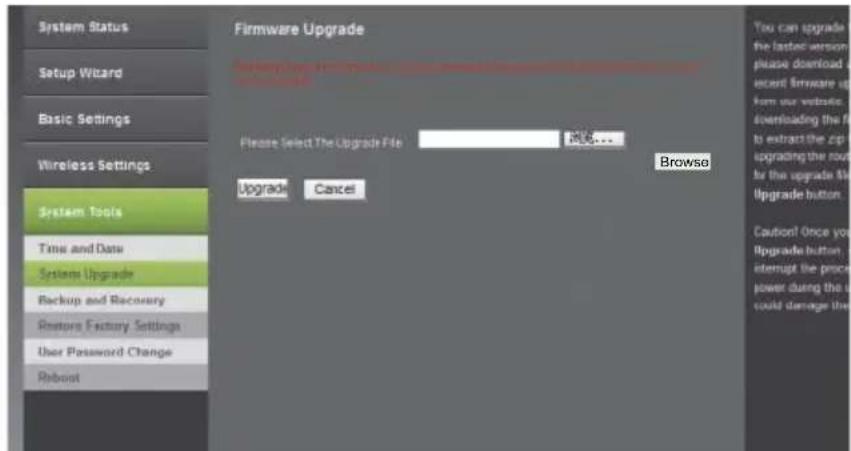
To upgrade FW, click Advanced Mode → System Tools → System Upgrade located at the web management interface, then the following message will be displayed on your web browser:
text_image
System Status Setup Wizard Basic Settings Wireless Settings System Tools Time and Date System Upgrade Backup and Recovery Restore Factory Settings User Password Change Robost Firmware Upgrade Please Select The Upgrade File 满足... Upgrade Cancel Browse You can upgrade the latest version please download a recent firmware up from your website to downloading the file to extract the zip upgrading the route for the upgrade file Upgrade button. Caution! Once you Upgrade button interrupt the process power during the user could damage theClick Browse button first, you'll be prompted to provide the filename of firmware upgrade file. Please download the latest firmware file from our website, and use it to upgrade your repeater. After a firmware upgrade file is selected, click Upgrade button, and the repeater will start firmware upgrade procedure automatically.
The procedure may take several minutes, please be patient.
NOTE! DO NOT interrupt the upgrade procedure by closing the web browser or physically disconnecting your computer from repeater (warranty voids in case of an interrupted upgrade procedure).
5. Settings Backup and Restore, Factory Default.
For security reasons, you can backup all repeater settings.
To back up/restore repeater's settings, please follow the instructions below:
Please click Advanced Mode → System Tools → Backup and Recovery and Advanced Mode → System Tools → Restore Factory Settings located at the web management interface, then the following message will be displayed on your web browser:
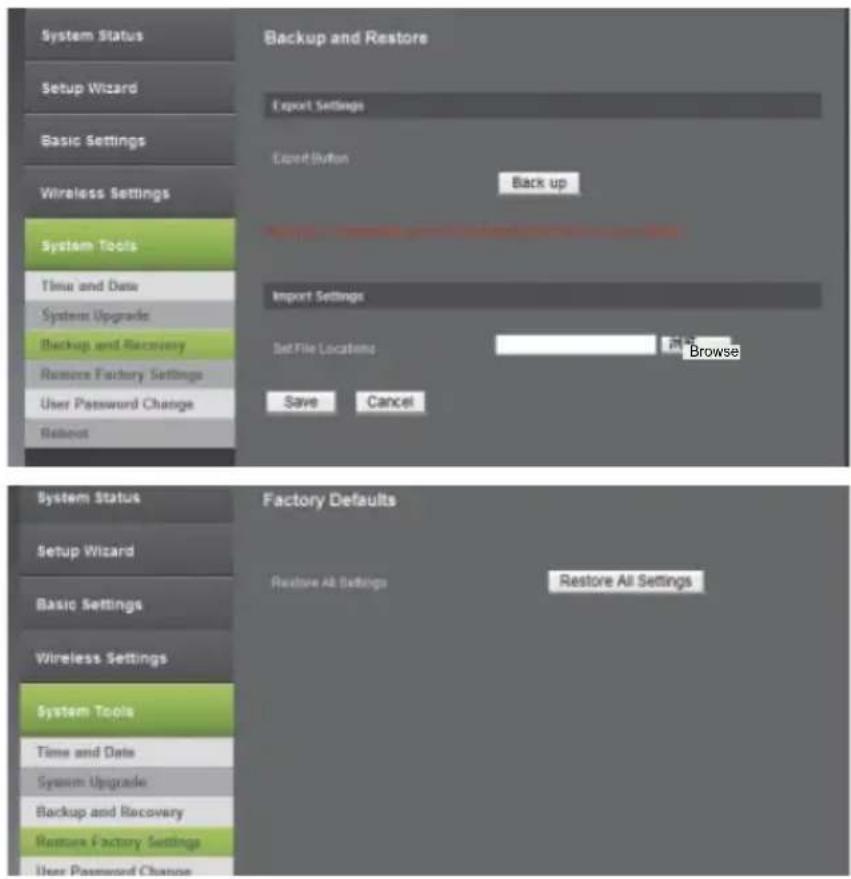
text_image
System Status Setup Wizard Basic Settings Wireless Settings System Tools Time and Date System Upgrade Backup and Recovery Restore Factory Settings User Password Change Risbout Backup and Restore Export Settings Export Button Back up Import Settings Set File Locations: Browse Save Cancel System Status Setup Wizard Basic Settings Wireless Settings System Tools Time and Date System Upgrade Backup and Recovery Restore Factory Settings User Password Change Factory Defaults Restore All Settings Restore All Settings| Back up Press back up | button to save repeater's settings. |
| Browse | Press Browse to pick a previously-saved configuration file from your computer, and click save to replace current settings with the uploaded file. |
| Restore All Settings | Click Restore All Settings button to remove all settings and return to factory settings. |
Click Save and Restore All Settings button. The repeater will restart.
6. Specification
- Improves wireless coverage in all WLAN networks
• Standards IEEE 802.11 b / g / n
• Support WLAN networks
• Frequency Range: 2.4 - 2.4835 GHz
• Security: WPA2, WPA, WEP (64 / 128 bit)
• WPS | Integrated 2dBi PCBA Antennas
• Transmission Rate: up to 300 Mbps
• Power Supply: 110 – 240 V AC
- Modulation type: BPSK, QPSK, 16QAM, 64QAM, OFDM, DQPSK, DBPSK, DSSS, CCK
The Lechpol company declares that product ML0585 is consistent with the essential requirements and other relevant provisions of directive 1999/5/EC. The proper declaration for download from www.lechpol.eu.
7. Appendix: Troubleshooting
What can I do if I forgot my password?
- Restore default settings (with repeater powered on, use a pin to press and hold the Reset button for about 3-5 seconds).
- Configure repeater once again, by following instructions in this manual.
English

Correct Disposal of This Product (Waste Electrical & Electronic Equipment)
(Applicable in the European Union and other European countries with separate collection systems)
This marking shown on the product or its literature, indicates that it should not be disposed with other household wastes at the end of its working life. To prevent possible harm to the environment or human health from uncontrolled waste disposal, please separate this from other types of wastes and recycle it responsibly to promote the sustainable reuse of material resources.
Household users should contact either the retailer where they purchased this product, or their local government office, for details of where and how they can take this item for environmentally safe recycling. Business users should contact their supplier and check the terms and conditions of the purchase contract. This product should not be mixed with other commercial wastes for disposal
Made in China for LECHPOL Zbigniew Leszek, Miętne, 1 Garwolińska Street, 08-400 Garwolin.

text_image
Connect to a Network Do you want to set up your network? This is a new router that has not been set up. Click OK to start setup. Connect to the network without setting it up OK Canceltext_image
Wireless Repeater Language English Username Password Remember my password Login Canceltext_image
Connect to a Network Type the network security key Security key: Hide characters OK Cancel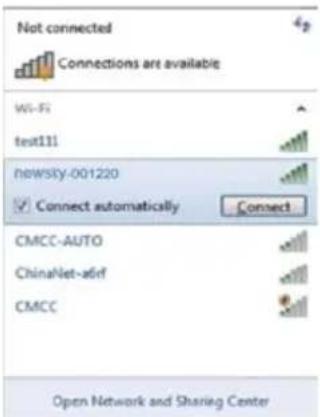
text_image
Not connected Connections are available Wi-Fi test111 newsky-001220 Connect automatically Connect CMCC-AUTO ChinaNet-a6irf CMCC Open Network and Sharing Center5. Konfiguration über Web Browser
text_image
System Status Setup Wizard Basic Settings Wireless Settings Wireless Basic Settings Wireless Security Settings WPS Settings Wireless Cirens Lir System Tools Wireless Network Wireless Status Enabled Disabled ISID=newsky_001220 Isolated Wireless Mode 11bn mixed mode Channel 8 IISID Broadcast Enabled Disabled ISID 04 888A 00 1220 Apply Canceltext_image
YOU ARE IN ADVANCED MODE NOW System Status Setup Wizard Basic Settings Wireless Settings Wireless Basic Settings Wireless Security Settings WPS Settings Wireless Clients List System Tools Wireless Security Settings Security Policy Security Mode WPA2-Personal WPA2-Personal WPA Encryption TDP AES TDP+AES Password test Key Retrieval Interval 3600 seconds Apply Canceltext_image
YOU ARE IN ADVANCED MODE NOW System Status Setup Wizard Basic Settings Wireless Settings System Tools Time and Date System Upgrade Backup and Recovery Restore Factory Settings New Piementard Change Refinit Password Account Management Username admin New Password Repeat New Password Save Canceltext_image
YOU ARE IN ADVANCED MODE NOW System Status Setup Wizard Basic Settings Wireless Settings System Tools Time and Date System Upgrade Backup and Recovery Restore Factory Settings User Password Change Reboot Firmware Upgrade Browse Please Select The Upgrade File Upgrade Cancel Browse You can upgrade the lasted version, please download a recent firmware up from our website downloading the file to extract the zip upgrading the route for the upgrade file Upgrade button. Caution! Once your Upgrade button, I attempt the process power during the user could damage thetext_image
System Status Setup Wizard Basic Settings Wireless Settings System Tools Time and Data System Upgrade Backup and Recovery Restore Factory Settings User Password Change Reload Backup and Restore Expert Settings Export Button Back up Import Settings Set Flat Locations Browse Save Cancel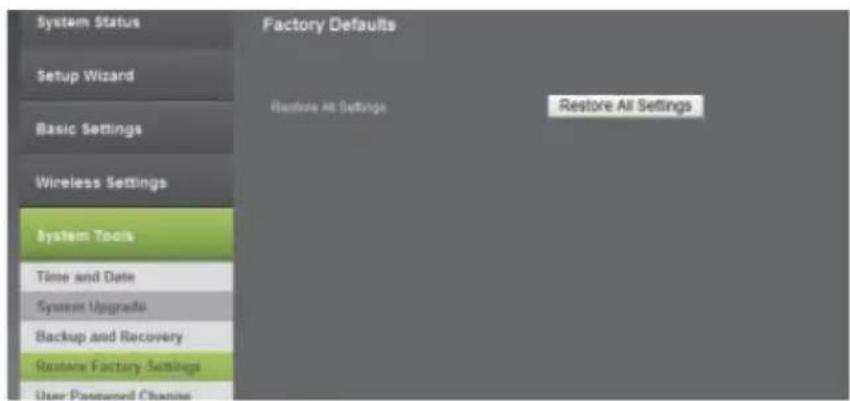
text_image
System Status Setup Wizard Basic Settings Wireless Settings System Tools Time and Date System Upgrade Backup and Recovery Restore Factory Settings User Password Channels Factory Defaults Restore All Settings Restore All Settingstext_image
Connect to a Network Do you want to set up your network? This is a new router that has not been set up. Click OK to start setup. Connect to the network without setting it up OK Canceltext_image
Wireless Repeater Language English Username Password Remember my password Login Cancel- Dupa ce v-ati logat dati click pe Easy Mode si dati click pe Network Setting vor aparea 3 moduri: AP Mode, Repeater Mode si Client Mode.
text_image
YOU ARE IN EASY MODE NOW STATUS STATUS ON STATUS ON Network Setting Wireless Setting Login Permission Network Setting AC Worker China Router Network Network Name (NIP): network address Channel: 0 DISHI SDRAM: Disable Socket Node: Disable Apply Cancel3. Mod de configurare
7. Setare Modul AP
text_image
Network Setting User Register Check Network Name (N): Nemazy_30100 Device: 6 Dial27 Server: Double Double Devices: Double Pays Cancel8. Setare Modul Repetor
• Urmariti pasii 2.3 pana la 2.5.
- Selectati Repeater si dati click Search.
text_image
Network Setting Options Access Newsky 301208 Binary Disable Disable Browse® Settings Browse Browse Browse Browse Apply Cancel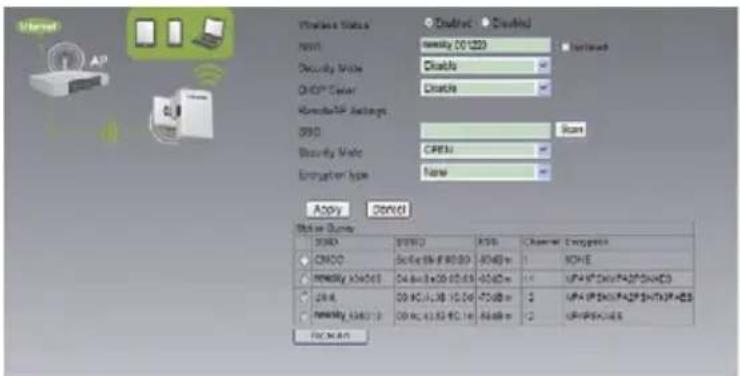
text_image
Microsoft AP Wireless Status Default Default Name: density 001223 Security Mode: Disable DHCP Center: Disable Home/HP Accounts: 0000 Security Mode: CRESU Computer type: None Apply Cancel User Queue SNDQ BNDQ KNS Channel Engrpacta CNCC DCE: 96.67.80.80 A4KB m NCHC Network: A4KB1 D4.8m: 50.67.80 A5KB m UFA: 96.67.80.80 UFA: 96.67.80.80 UFA: 96.67.80.80 UFA: 96.67.80.80 UFA: 96.67.80.80 UFA: 96.67.80.80 UFA: 96.67.80.80 UFA/PSCH/ES RICHMANtext_image
STATUS ON STATUS ON STATUS ON Network Setting Wireless Setting Login Perforation Network Setting AP Register User Send/ASP Settings SSG Search Opacity Mode OPEN Encryption type None DHIP System Disable Apply Cancel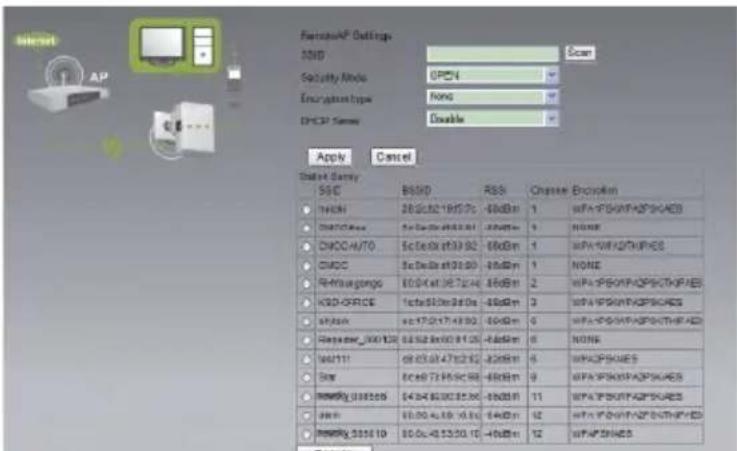
text_image
Network Security Mode Encryption Type DPC37 Server Scan Apply Cancel Select Delay: SSC BSSD RSS Change Encopym 10000 200000-190500 -800000 1 WPA-FPSKAPKSPGAE5 DHSC/CCDC 5c-De6a-4f33.01 -800000 NOME DHCC/AUTO 5c-De6a-4f33.02 -800000 1 WPA-WPSKAPKSPGAE5 DHCC 5c-De6a-4f33.03 -800000 1 WHIP-SHOPKSPGAE5 RH-MSGCGG E:0:4e:3672.44 -800000 2 WPA-FPSKAPKSPGAE5 KSD-GFRCE 1c:4e:3672.46 -800000 3 WPA-FPSKAPKSPGAE5 sRDAA 4c:1721743.92 -800000 4 WPA-FPSKAPKSPGAE5 RyRyRyR_200120 E:52.8x80.81.26 -800000 6 WPA-FPSKAPKSPGAE5 SAR 8c:68.73.95.98 -800000 8 WPA-FPSKAPKSPGAE5 RyRyRy_200266 E:34.96.96.97.98 -800000 11 WPA-FPSKAPKSPGAE5 SAR E:35.96.96.97.98 -800000 12 WPA-FPSKAPKSPGAE5 RyRyRy_201619 E:36.46.96.97.98 -800000 12 WPA-FPSKAPKSPGAE5text_image
Connect to a Network Type the network security key Security key: Hide characters OK Cancel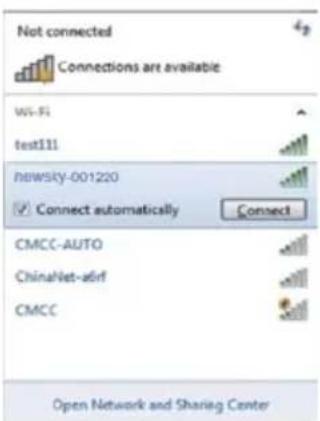
text_image
Not connected Connections are available Wi-Fi test111 newsky-001220 Connect automatically Connect CMCC-AUTO ChinaNet-a6rf CMCC Open Network and Sharing Center5. Configurare prin browser-ul Web
1. Setari de baza Wireless/Setari generale Wireless
Selectati Advanced Mode→ Wireless Settings→ Wireless Basic Settings din interfata de internet.
text_image
System Status Setup Wizard Basic Settings Wireless Settings Wireless Basic Settings Wireless Security Settings WPS Settings Wireless Connection List System Tools Wireless Network Wireless Status Enabled Disabled ISO newsky_001220 Isolated Wireless Mode 11bign mixed mode Channel 6 MBD Broadcast Enabled Disasified BSSID DE:84BA.00-1220 Apply Canceltext_image
YOU ARE IN ADVANCED MODE NOW System Status Setup Wizard Basic Settings Wireless Settings Wireless Basic Settings Wireless Security Settings WPS Settings Wireless Clients List System Tools Wireless Security Settings Security Policy Security Mode NPA2-Personal WPA2-Personal IPFA Encryption TDP AES TGP-NEE Password test Key Retrieval Interval 3600 seconds Apply Canceltext_image
YOU ARE IN ADVANCED MODE NOW System Status Setup Wizard Basic Settings Wireless Settings System Tools Time and Date Systems Upgrade Backup and Recovery Restore Factory Settings Open Password Change Robot Password Accrued Management Username admin New Password Repeat New Password Save Canceltext_image
System Status Setup Wizard Basic Settings Wireless Settings System Tools Time and Date System Upgrades Backup and Recovery Restore Factory Settings User Password Change Robust Firmware Upgrade Please select The Upgrade File: 100% Upgrade Cancel Browse You can upgrade the latest version please download a recent firmware up from our website to downloading the file to extract the zip upgrading the route for the upgrade file Upgrade button. Caudout Once your Upgrade button, I interrupt the process power during the user could damage thetext_image
System Status Setup Wizard Basic Settings Wireless Settings System Tools Time and Date System Upgrade Backup and Recovery Restore Factory Settings User Password Change Reboot Backup and Restore Export Settings Export Button Back up Import Settings Set File Locations Browse Save Cancel