ML0585 - Uncategorized M-life - Free user manual and instructions
Find the device manual for free ML0585 M-life in PDF.


User questions about ML0585 M-life
0 question about this device. Answer the ones you know or ask your own.
Ask a new question about this device
Download the instructions for your Uncategorized in PDF format for free! Find your manual ML0585 - M-life and take your electronic device back in hand. On this page are published all the documents necessary for the use of your device. ML0585 by M-life.
USER MANUAL ML0585 M-life
natural_image
White wireless router with 'WiFi N' and 'IT-LIFE' branding, no visible text or symbols on the device body.text_image
Not connected Connections are available Wi-Fi newsky-01226 Information sent over this network might be visible to others. Connect automatically Connect text11 CMCC-AUTO CMCC Open Network and Sharing Center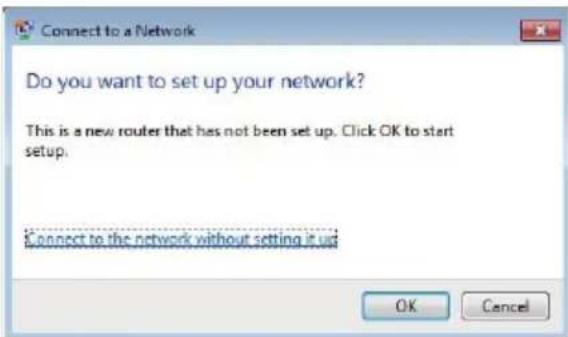
text_image
Connect to a Network Do you want to set up your network? This is a new router that has not been set up. Click OK to start setup. Connect to the network without setting it up OK Canceltext_image
Wireless Repeater Language English Username Password Remember my password Login Canceltext_image
YOU ARE IN EASY MODE NOW STATUS ON Network Setting CHANGE ON Wireless Setting Access ON Login Permission Network Setting Air Resume Clear Router Network Settings Name(10) Change Discharge Send Mode Apply Cancel NewSky ATCO 8 Delete Delete Deletetext_image
Network Setting Engineer Windows Status SSD Security Mode CHCP Server ForwardAP Settings SSD Security Mode Encryption Type Enabled Disabled Disable Open Search None Apply Cancel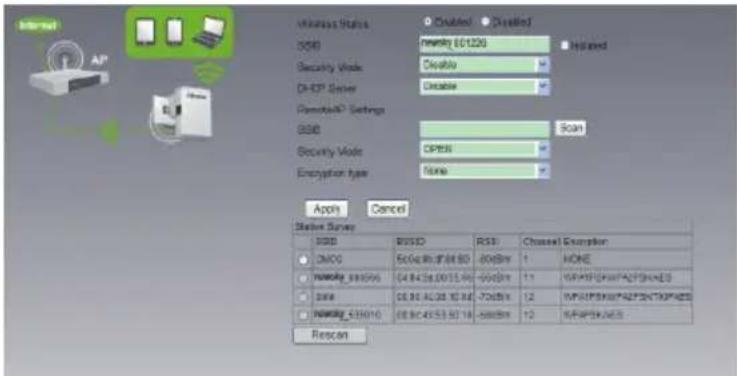
text_image
Internet AP Wireless Status OSIO newing EC120G Updated Security Mode: Accessible DHCP Server Accessible Remodel/SP Settings OSIO Scan Security Mode: OPEN Encryption type: None Apply Cancel Status Survey OSIO POSIO RST Channel Exemption ON/O Set Bus/Off BS -80dBm 1 NONE newing EC10596 04.84.58.00 15.90 -60dBm 11 WPAPSPKXPFALPSNHDXES DSIE 08.90.AC08.10.38 -70dBm 12 WPAPSPKXPFALPSNHDXES newing EC1010 08.80.45.53.50 18 -60dBm 12 WPAPSPKNS Rescantext_image
Windows Status SBO Security Mode: DHCP Server KEY RemoteAP Settings SBO Security Mode: Encryption type: Password Chase Chased newsky_001020 WPA-PGK/WPA2-PGK Enable Text Newsky_000655 Scan AES Apply Cancel Button Survey SSD COSO Repower_300128 TP-196_127850 newsky_300144 code Rescan BOSO BOSO BOSO Channel Description NOME NONE NOME 11 11 11 11 11 11 11text_image
STATUS ON STATUS ON STATUS ON Network Setting Wireless Setting Login Permission Network Setting AP Register Cancel Remove AP Settings MRC: Security Mode: OPEN Exemption Type: None DHCV Sensor: Disable Apply Cancel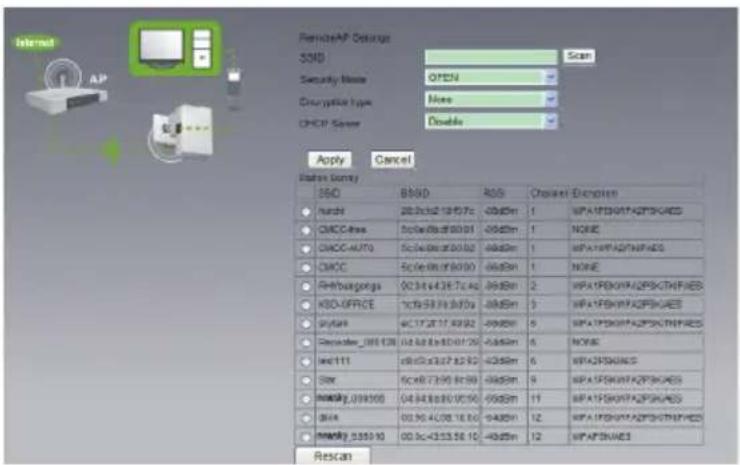
text_image
RemoteAP Settings SSD Scan Security Name: OPEN Description type: None CHOP Sensor: Double Apply Cancel Status/Comay ISO BSID ROS Channel Options Huntel 20.6x12 19:07c 0x85m 1 WPATFSKNYA2PSKHAES CMCC-free 50x8x8x8x8x91 0x85m 1 NONE CMCC-AUTO 50x8x8x8x9002 0x85m 1 WPATFSKNYA2PSKHAES CMCC 50x8x8x8x9003 0x85m 1 NONE Antifungangs 0x34 x43 x57 x40 0x85m 2 WPATFSKNYA2PSKTHFRES KSO-UFRCX 1x19 x91 x970a 0x85m 3 WPATFSKNYA2PSKHAES Sytain 6x17 x87 x992 0x85m 5 WPATFSKNYA2PSKTHFRES December_001128 0x44 x6 x8 x10 x20 0x85m 6 NONE latc111 0x30 x32 x37 x39 0x85m 6 WPATFSKNUAIS Star 50x8 x72 x9 x8 x99 0x85m 9 WPATFSKNYA2PSKHAES MMS(0.09)00 04:44:46:00:00:00 0x85m 11 WPATFSKNYA2PSKHAES Black 00:30:40:08:16:30 0x85m 12 WPATFSKNYA2PSKTHFRES MMS(0.55)10 00:3c+33:58:10 0x85m 12 WPATFSNAES Rescantext_image
Connect to a Network Type the network security key Security key: Hide character OK Cancel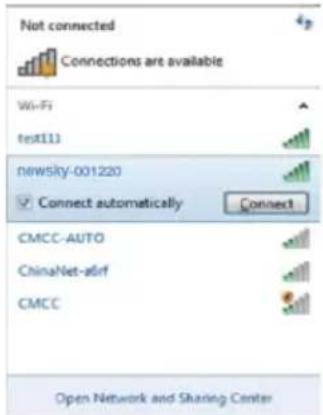
text_image
Not connected Connections are available Wi-Fi test113 newsky-001220 Connect automatically Connect CMCC-AUTO ChinaNet-atirf CMCC Open Network and Sharing Centertext_image
System Status Setup Wizard Basic Settings Wireless Settings Wireless Basic Settings Wireless Security Settings WP5 Settings Wireless Clients List System Tools Wireless Network Wireless Status Enabled Disabled sidD nowsky_001220 Isolated Wireless Mode 11high mixed mode Channel 6 ISRD Broadcast Enabled Disabled B950 04:04:3A:00:12:20 Apply Canceltext_image
YOU ARE IN ADVANCED MODE NOW System Status Setup Wizard Basic Settings Wireless Settings Wireless Basic Settings Wireless Security Settings WPS Settings Wireless Clients List System Tools Wireless Security Settings Security Policy Security Mode: WPAZ-Personal WPAZ Personal WPA Enchoption: TKIF AES TKIF+AES Password: test Key Renewal Interval: 3600 seconds Apply Canceltext_image
YOU ARE IN ADVANCED MODE NOW System Status Setup Wizard Basic Settings Wireless Settings System Tools Time and Date System Upgrade Backup and Recovery Restore Factory Settings User Password Change Reboot Password Account Management Username admin New Password Repeat New Password Save Canceltext_image
System Status Setup Wizard Basic Settings Wireless Settings System Tools Time and Data Systems Upgrade Backup and Recovery Restore Factory Settings User Password Change Reboot Firmware Upgrade Please Select The Upgrade File 浏览... Upgrade Cancel Browse You can upgrade the latest version of the installed software, please download a recent firmware up from our website. Downloading the file to extract the zip to upgrading the route for the upgrade file. Upgrade button. Caution! Once you Upgrade button, or interrupt the product power during the code could damage thetext_image
System Status Setup Wizard Basic Settings Wireless Settings System Tools Time and Date System Upgrade Backup and Recovery Restore Factory Settings User Password Change Robout Backup and Restore Export Settings Export Button Back up Import Settings Set File Locations Browse Save Cancel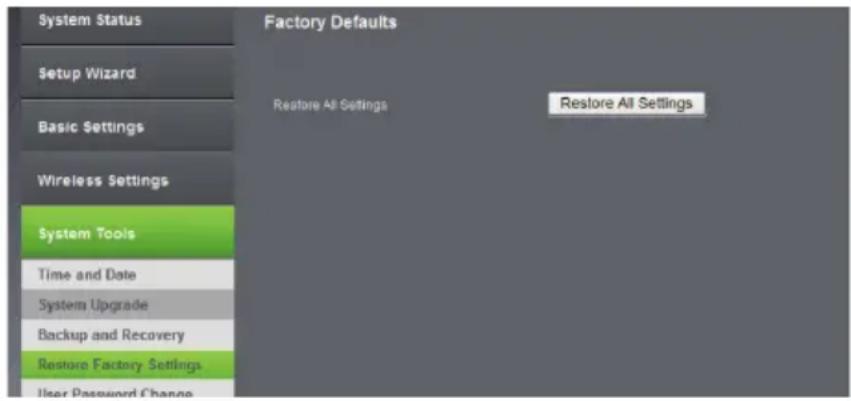
text_image
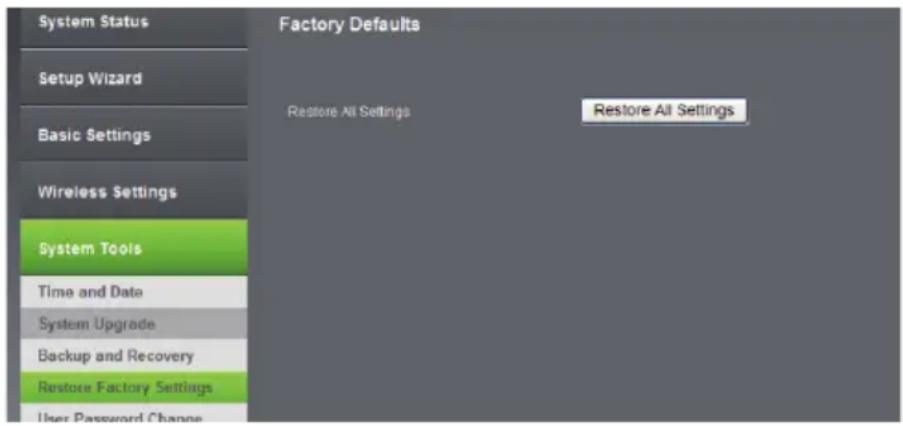
System Status Setup Wizard Basic Settings Wireless Settings System Tools Time and Date System Upgrade Backup and Recovery Restore Factory Settings. User Password Change Factory Defaults Restore All Settings Restore All SettingsBefore you start to use this device, please check if there's anything missing in the package, and contact your dealer of purchase to claim for missing items:
Package Contents:
1x WiFi Repeater
1x 1m Ethernet cable with RJ45 connector
1x Quick Installation Guide
Appearance Introduction
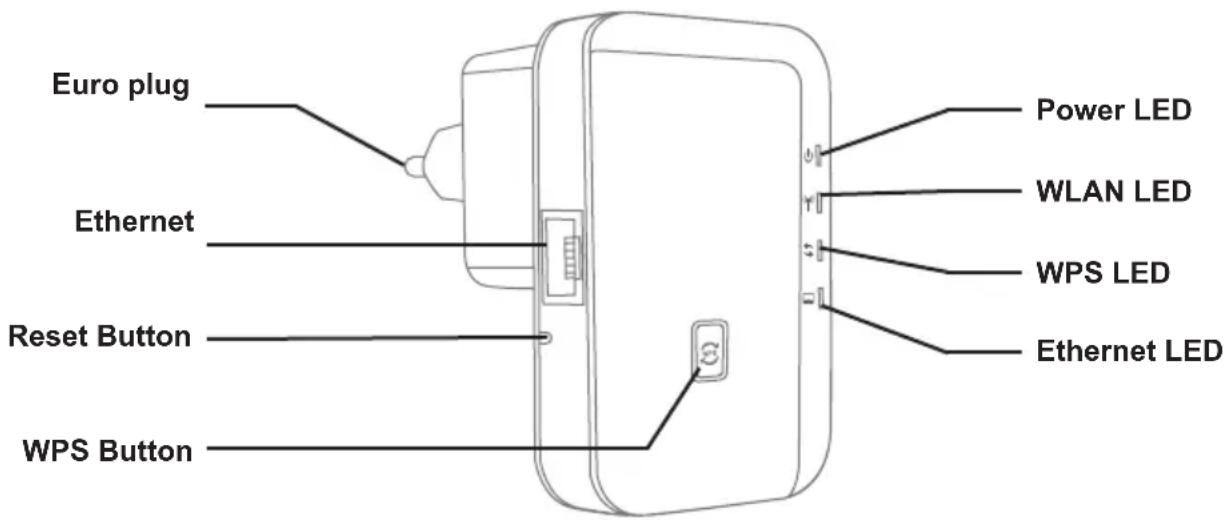
text_image
Euro plug Ethernet Reset Button WPS Button Power LED WLAN LED WPS LED Ethernet LEDReset: If you need to reset the Repeater, press and hold RESET button for 3-5 seconds, release the button when all LEDs are off except of Power LED.
| Indicator | Name Status Description | ||
| Power Status Indicator Green On Get Powered | |||
| Wireless Status Indicator | Green slow blink Wireless Function Launched | ||
| Green fast blink Data Transmission via wireless | |||
| WPS Status Indicator | Green fast blink WPS Function Launched | ||
| Off | Not use or have completed the connection | ||
| Ethernet Status Indicator | Green On Ethernet Connected | ||
| Green fast blink Data Transmission via Ethernet | |||

Cautions:
- Disconnect the device during thunderstorms in case of lightning damage.
- Keep far from heat source and ensure proper ventilation.
- Keep waterproof in the storage, transportation and operating environments
1. Computer Configuration
- Click Start→Control Panel→Network and Internet→Network and Sharing Center→Change adapter settings→Wi-Fi(right click)→Properties.
- Double click Internet Protocol Version 4(TCP/IPv4).
- To set up the computer IP 192.168.2.x (x arbitrary integer between 2\~252), subnet mask of 255.255.255.0, gate of 192.168.2.1 and click OK. Back to the last interface and click OK.
2. Connect To Wireless Network
- Plug the Wi-Fi Repeater to a wall socket.
- Click on the network icon 📁 on the right bottom of your desktop. You will find the signal from the Wi-Fi Repeater. Click on Connect and wait few seconds.
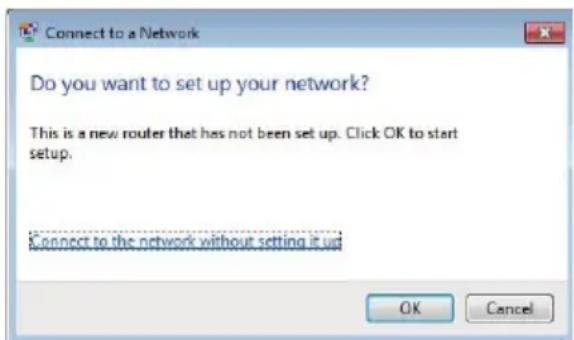
- When shows: Connect to a Network, please insert default password MLIFE2015.
text_image
Connect to a Network Do you want to set up your network? This is a new router that has not been set up. Click OK to start setup. Connect to the network without setting it up OK Cancel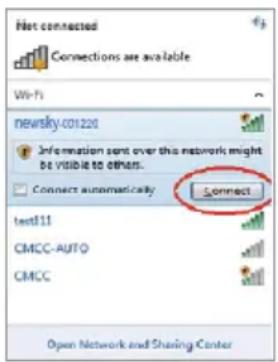
text_image
First connected Connections are available Wi-Fi newsky-001220 Information sent over this network might be visible to others. Connect automatically Connect test11 CMCC-AUTO CMCC Open Network and Sharing Center- Open web browser and type http://192.168.2.1 in the browser's address box. This number is the default IP address for this devices.

text_image
http://192.168.2.1/ 192.168.2.1
NOTE! If you cannot load http://192.168.2.1, please check whether Wi-Fi repeater is on default settings. If not, or if you cannot verify the reason for lack of connection, restore default settings. Press the reset button for 3-5 seconds and try to install it again.
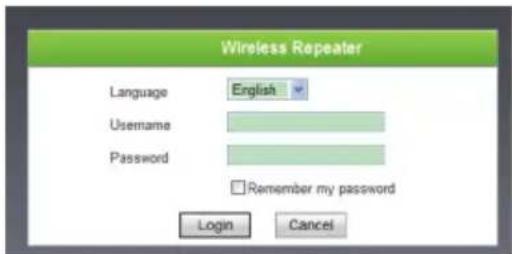
- The login screen below will appear. Enter the Username and Password then click Login to login. The default Username is admin, default password is admin.
text_image
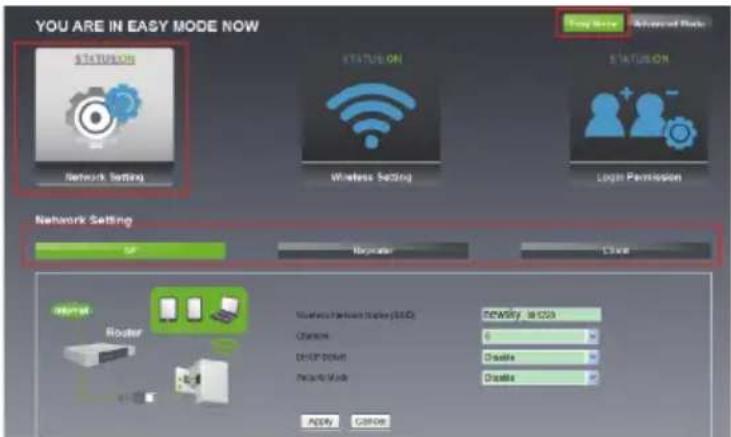
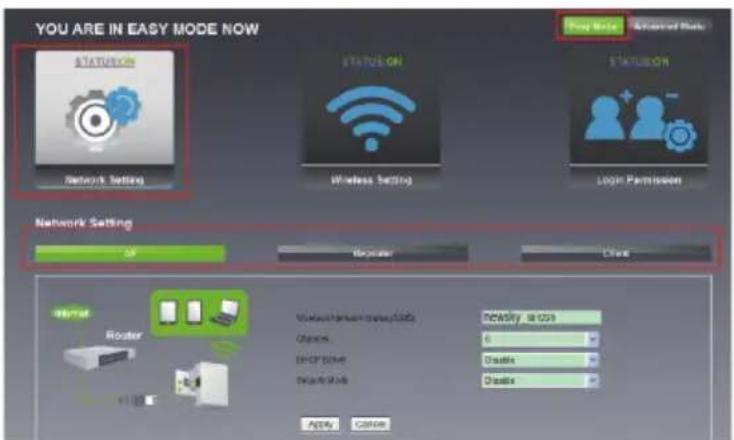
Wireless Repeater Language English Username Password Remember my password Login Cancel- After logging in, click Easy Mode and then click Network Setting, you will see 3 modes: AP Mode, Repeater Mode and Client Mode.
text_image
YOU ARE IN EASY MODE NOW STATUS ON NETWORK SETTING STATUS ON WIRELESS SETTING STATUS ON Login PERMISSION Network Setting MF Requester C204 Router Nordless network display (LED) Newcity: 1.000 Chancs 0 Device Setup Disable Pre-Mode Disable Apply Cancel3. Configuration Mode
- Configure AP Mode.
• Follow process 2.3 to 2.5.
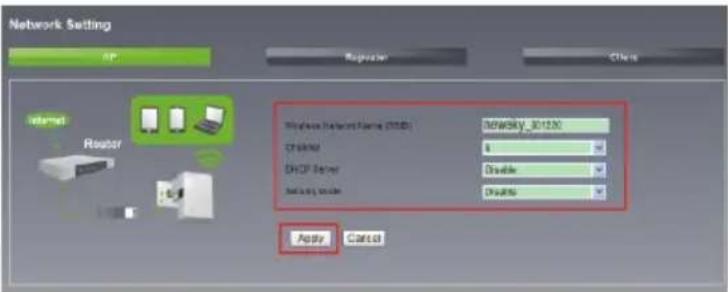
- Select AP and enter necessary information, password and click Apply. Wait for \~3 - 5 seconds until the process is complete.
text_image
Network Setting AP Reporter Other Internet Router Wireless Network Name (NTB) D Driver DHCP Server Double Double Apply Cancel- Configure Repeater Mode.
• Follow process 2.3 to 2.5.
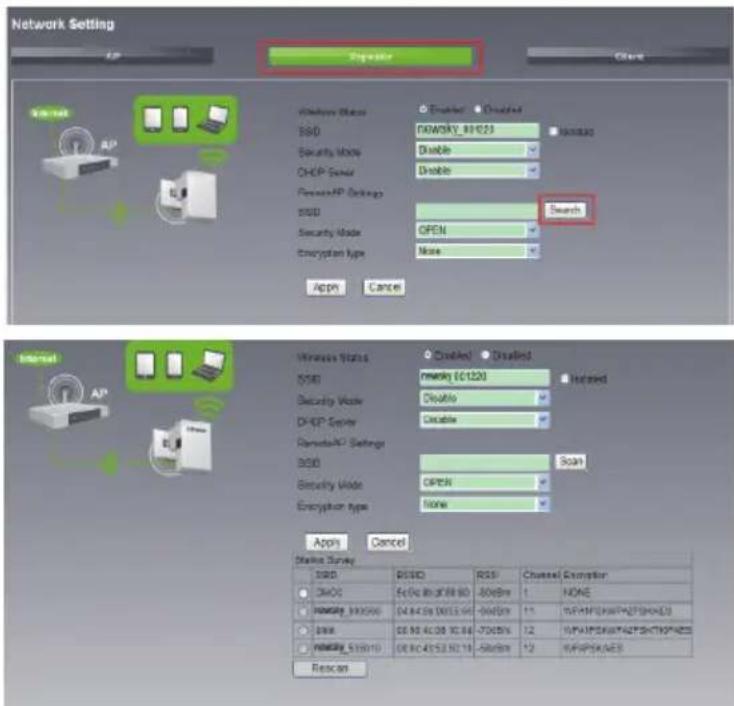
- Select Repeater then click on Search.
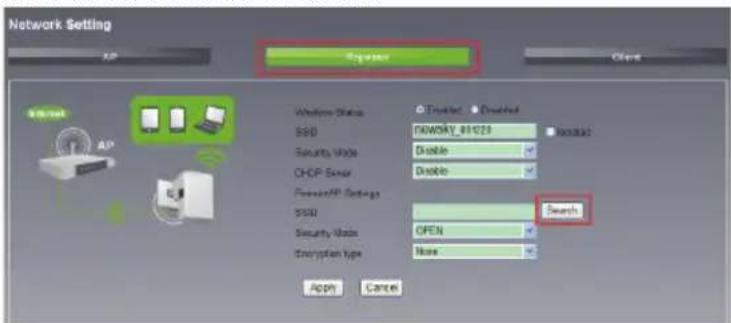
text_image
Network Setting XP Register Client Wireless Status SSD NEWKTY_81023 Security Mode Disable CHCP Server Disable Power/PP Settings SSD Security Mode OPEN Description Type None Search Apply Cancel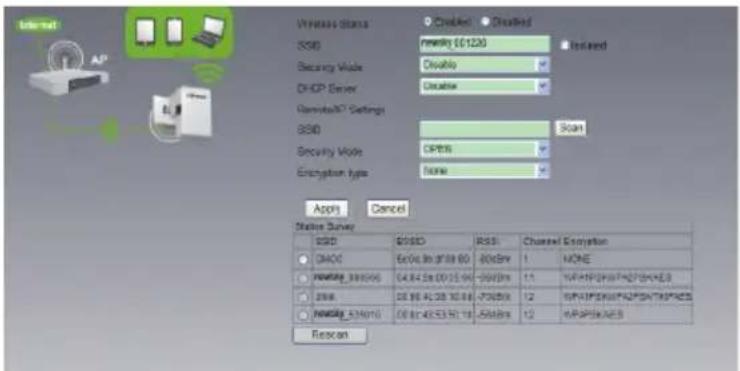
text_image
Internet AP Windows Status Disabled Disabled SSD mmency $0120 Installed Security Mode Disable DHCP Server Escape Gaming37 Settings SSD Scan Security Mode OPEN Encryption type None Apply Cancel Status Survey SSD SSD RSS Channel Exception DHCD Exlc 8x D18 60 80x8x 1 NONE Newing_340006 04.84.58.00 15.94 -9600x 11 IP/ATP/SP/ATP/SP/ATP/ATP/ATP/ATP/ATP/ATP/ATP/ATP/ATP/ATP/ATP/ATP/ATP/ATP/ATP/ATP/ATP/ATP/ATP/ATP/ATP/ATP/ATP/ATP/ATP/ATP/ATP/ATP/ATP/ATP/ATP/ATP/ATP/ATP/ SNR DE 86.40.38.10.86 -7000x 12 IP/ATP/SP/ATP/SP/ATP/ATP/ATP/ATP/ATP/ATP/ATP/ATP/ATP/ATP/ATP/ATP/ATP/ATP/ATP/ATP/ATP/ATP/ATP/ATP/ATP/ATP/ATP/ATP/ATP/ATP/ATP/ATP/ATP/ Newing_A34000 00.82.48.53.57.15 -5600x 12 IP/ATP/SP/A340006 Reexon- Select desired network and enter the password if necessary. Then, enter information in the spaces provided.
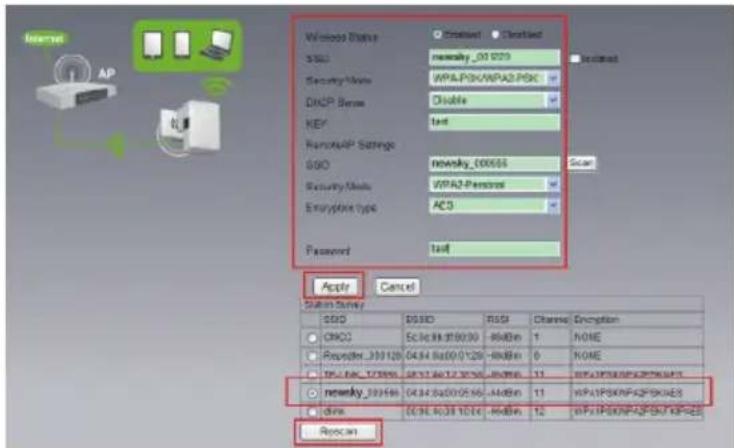
text_image
Internal AP Wireless Status S500 Security Mode: DHCP Sense: KEY: RemoteAP Settings S500 Security Mode: Encryption Type: Password: Apply Cancel System Survey S500 CRC0 Responder_300120 IP-ADC_127890 newsky_300160 drive: Repack Enabling: 001000 WPA2-Personal AC3 R4800 R4800 R4800 R4800 R4800 R4800 R4800 R4800 R4800 R4800 R4800 R4800 R4800 R4800 R4800 R4800 R4800 R4600 R4600 R4600 R4600 R4600 R4600 R4600 R4600 R4600 R4600 R4600 R4600 R4600 R4600 R4600 R4600 R4600 RPSCN RPSCN RPSCN RPSCN RPSCN RPSCN RPSCN RPSCN RPSCN RPSCN RPSCN RPSCN RPSCN RPSCN RPSCN RPSCN RPSCN RPSCN RPSCN RPSCN RPSCN RPSCN RPSCN RPSCN RPSCN RPSCS- Click Apply and wait 3-5 seconds until it's complete.
3. Configure Client Mode
• Follow process 2.3 to 2.5
- Select Client then click on Search.
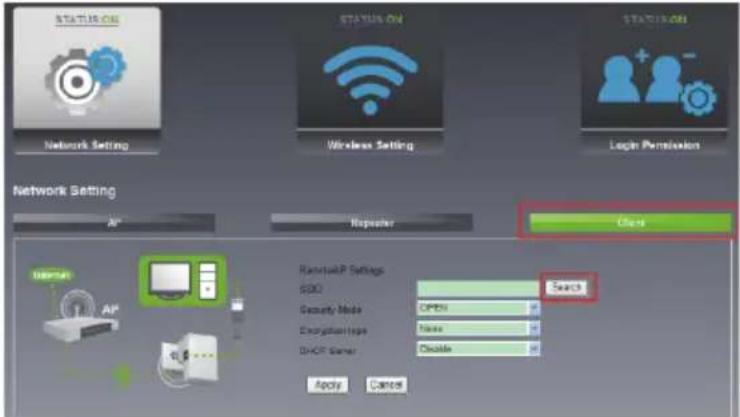
text_image
NETWORK SETTING NETWORK SETTING NETWORK SETTING AP Repeater Close RemoteAP Settings SDD Security Mode OPEN Encryption Type None DHCP Server Disable Apply Cancel Search
text_image
RemoveAP Settings SSID Scan Security Note OPEN Encryption type None DHCP Status Disable Apply Cancel Sensor Settings SSID POSID RISK Channel Enrolution Inscale 20.0x1.2 19:05:01 -86dBm 1 WPA\PSKMPA\PSKHAES CHOC-Box 5c.0x.0xbd.03.01 -95dBm 1 NONE CHOC-AUTO 5c.0x.0xbd.03.02 -96dBm 1 WPA\PSKMPA\PHSHRES CHOC 5c.0x.0xbd.03.03 -97dBm 1 NONE RHyhangangsi 80.54 x4.37 x7.74 -86dBm 2 WPA\PSKMPA\PHSHRES KSD-OFFICE 1c4.58 x3.81 x4 -86dBm 3 WPA\PSKMPA\PHSHRES HAPP 4C.17.21 17:49:02 -96dBm 6 WPA\PSKMPA\PHSHRES December_00/12/06 2d.58 x30 x11:34 -92dBm 6 NONE med111 6e.0x3.2x7.9x43 -82dBm 6 WPA\PHSHRES Star 8c.6x 73.5x9c.58 -86dBm 9 WPA\PSKMPA\PHSHRES nanking_000006 84.54 x9x82.55x -96dBm 11 WPA\PSKMPA\PHSHRES BIPk 80.55 44.08 10:30 -94dBm 12 WPA\PSKMPA\PHSHRES nanking_5200 10 80.0x43.53.59 10 -95dBm 12 WPA\PHSHRES Rescan- Select desired network and enter the password if necessary.

text_image
Remode/XP Settings SMD: TMCC Scan Security Mode: OPEN Enterprise Type: None DHCP Owner: Disable Acqn Cancel Resource Name: SMC SMD Mask CP0000000000000000000000000000000000000000000000000000000000000000000000000000000000000000000000000000 OK OK OK OK OK OK OK OK OK OK OK OK OK OK OK OK OK OK OK OK OK OK OK OK OK OK OK OK OK OK OK OK OK OK OK OK OK OK OK OK OK OK OK OK OK OK OK OK OK OK Ok OK OK OK OK OK OK OK OK OK OK OK OK OK OK OK OK OK OK OK OK OK OK OK OK OK OK OK OK OK OK OK OK OK OK OK OK OK OK OK OK OK OK OK OK OK OK OK OK OK OKEI 23761898 1645898 1645898 1645898 1645898 1645898 1645898 1645898 1645898 1645898 1645898 1645898 1645898 1645898- Click Apply and wait 3-5 seconds until it's complete.
4. Reconnect to Repeater
- Click Start→Control Panel→Network and Internet→Network and Sharing Center→Change adapter settings→Wi-Fi (right click)→Properties.
- Double click Internet Protocol Version 4 (TCP/IPv4).
- Select Obtain an IP address automatically and Obtain DSN server address automatically. Click OK. Back to the last interface and click OK.
- Select the wireless network name configured in 3 Configuration Mode, click Connect button.
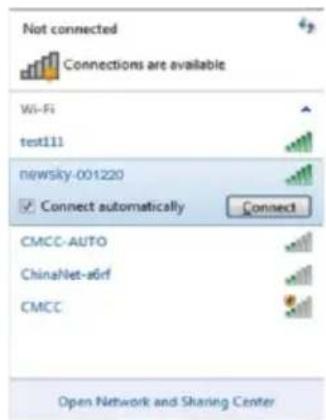
text_image
Not connected Connections are available Wi-Fi test111 newsky-001220 Connect automatically Connect CMCC-AUTO ChinaNet-sörf CMCC Open Network and Sharing Center- If you encrypted wireless network in 3 Configuration Mode, the following message will be displayed; type in the password and click OK.
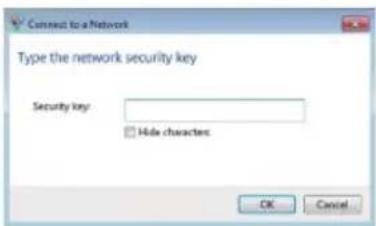
text_image
Connect to a Network Type the network security key Security key: Hide characters OK Cancel5. Configuring via Web Browser
1. KWireless Base Configuration
Please click Advanced Mode → Wireless Settings → Wireless Basic Settings located at the web management interface, the following message will be displayed on your web browser:
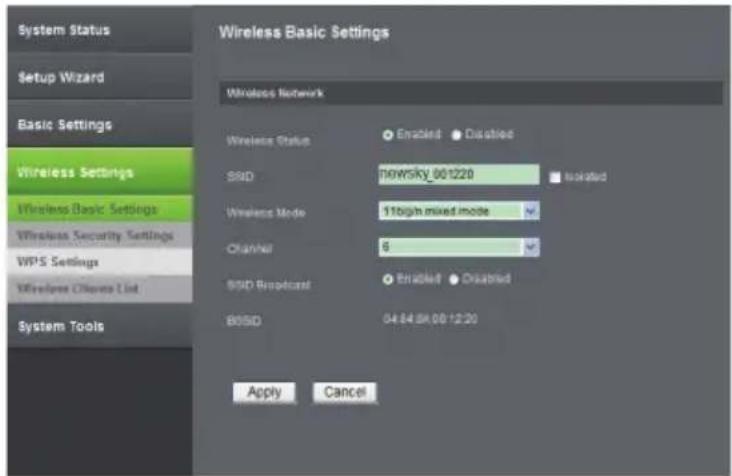
text_image
System Status Setup Wizard Basic Settings Wireless Settings Wireless Basic Settings Wireless Security Settings WPS Settings Wireless Channels List System Tools Wireless Network Wireless Status Enabled Disabled SSD 90WSky_001220 Isolated Wireless Mode 11high mixed mode Channel 6 SSD Broadcast Enabled Disabled BSSD 04:84:84 00:12:20 Apply CancelYou could configure the minimum number of Wireless settings for communication, such as SSID and Channel. The Access Point can be set simply with only the minimum setting items.
| Wireless Status Wireless On / Off |
| SSID Service Set Identifier (network name) |
| Wireless Mode Supports 11b/g/n mixed modes |
| Channel 6 (default) |
| SSID Broadcast Wireless Signal On/Off |
Click Apply button, the WiFi Repeater will become effective.
2. Wireless Security Configuration
Please click Advanced Mode → Wireless Settings → Wireless Security Settings located at the web management interface, the following message will be displayed on your web browser:
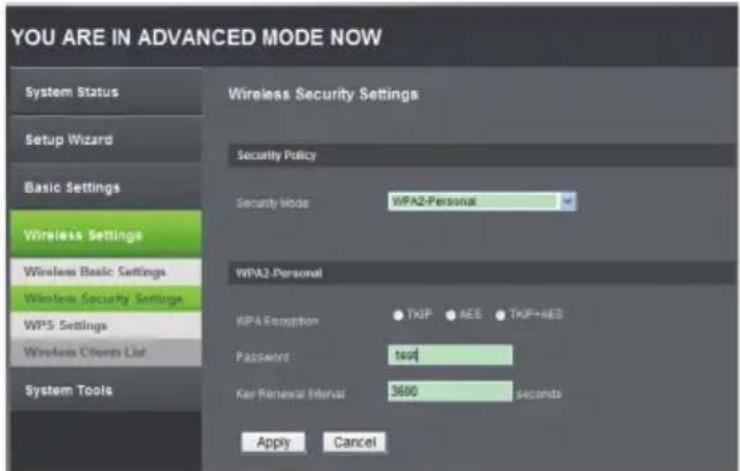
text_image
YOU ARE IN ADVANCED MODE NOW System Status Setup Wizard Basic Settings Wireless Settings Wireless Basic Settings Wireless Security Settings WPS Settings Wireless Clients List System Tools Wireless Security Settings Security Policy Security Mode: WPA2-Personal WPA2-Personal WPA Recognition: TKIP AES TKIP+AES Password test Key Renewal Interval 3600 seconds Apply CancelSetup the wireless security and encryption to prevent from unauthorized access and monitoring. Supports 64/128-bit WEP, WPA-Personal, WPA2- Personal encryption methods. Click Apply button, the WiFi Repeater will become effective.
3. Change Management password
Default password of this Wi-Fi Repeater is admin. Customize the password in order to protect your network connection.
To change password, please follow the instructions below:
Please click Advanced Mode → System Tools → User Password Change menu on the web management interface, the following message will be displayed on your web browser:
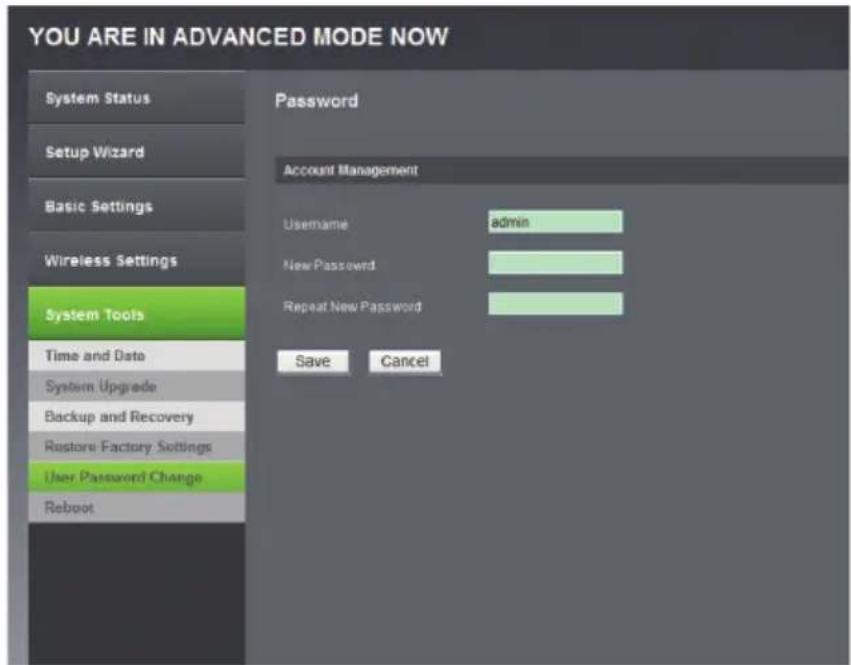
text_image
YOU ARE IN ADVANCED MODE NOW System Status Setup Wizard Basic Settings Wireless Settings System Tools Time and Date System Upgrade Backup and Recovery Restore Factory Settings User Password Change Reboot Password Account Management Username admin New Password Repeat New Password Save CancelIf you want to keep original password unchanged, click Cancel. Click Save button, the WiFi Repeater will become effective
4. Firmware Upgrade
To upgrade FW, click Advanced Mode → System Tools → System Upgrade located at the web management interface, then the following message will be displayed on your web browser:
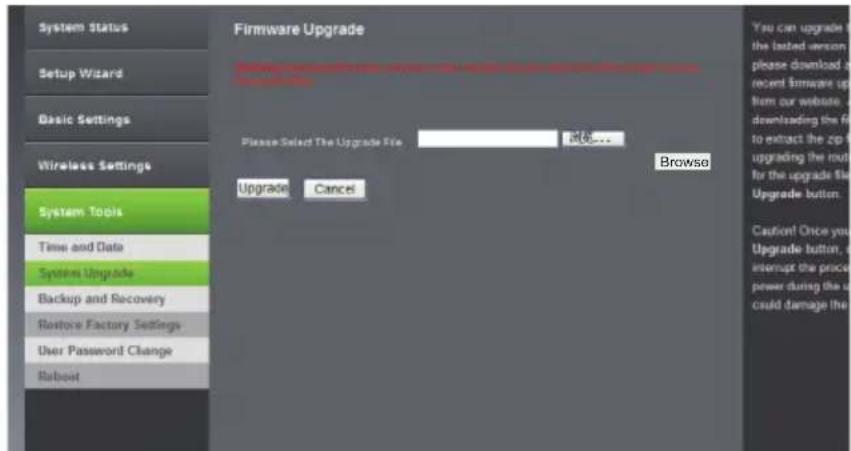
text_image
System Status Setup Wizard Basic Settings Wireless Settings System Tools Time and Date System Upgrade Backup and Recovery Restore Factory Settings User Password Change Robot Firmware Upgrade Please Select The Upgrade File Browse... Upgrade: Cancel Browse You can upgrade the latest version please download a recent firmware up from our website. It is downloading the file to extract the zip to upgrading the route for the upgrade file. Upgrade button. Cauton! Once you Upgrade button, it is interrupt the price power during the user could damage theClick Browse button first, you'll be prompted to provide the filename of firmware upgrade file. Please download the latest firmware file from our website, and use it to upgrade your repeater. After a firmware upgrade file is selected, click Upgrade button, and the repeater will start firmware upgrade procedure automatically.
The procedure may take several minutes, please be patient.
NOTE! DO NOT interrupt the upgrade procedure by closing the web browser or physically disconnecting your computer from repeater (warranty voids in case of an interrupted upgrade procedure).
5. Settings Backup and Restore, Factory Default.
For security reasons, you can backup all repeater settings.
To back up/restore repeater's settings, please follow the instructions below:
Please click Advanced Mode → System Tools → Backup and Recovery and Advanced Mode → System Tools → Restore Factory Settings located at the web management interface, then the following message will be displayed on your web browser:
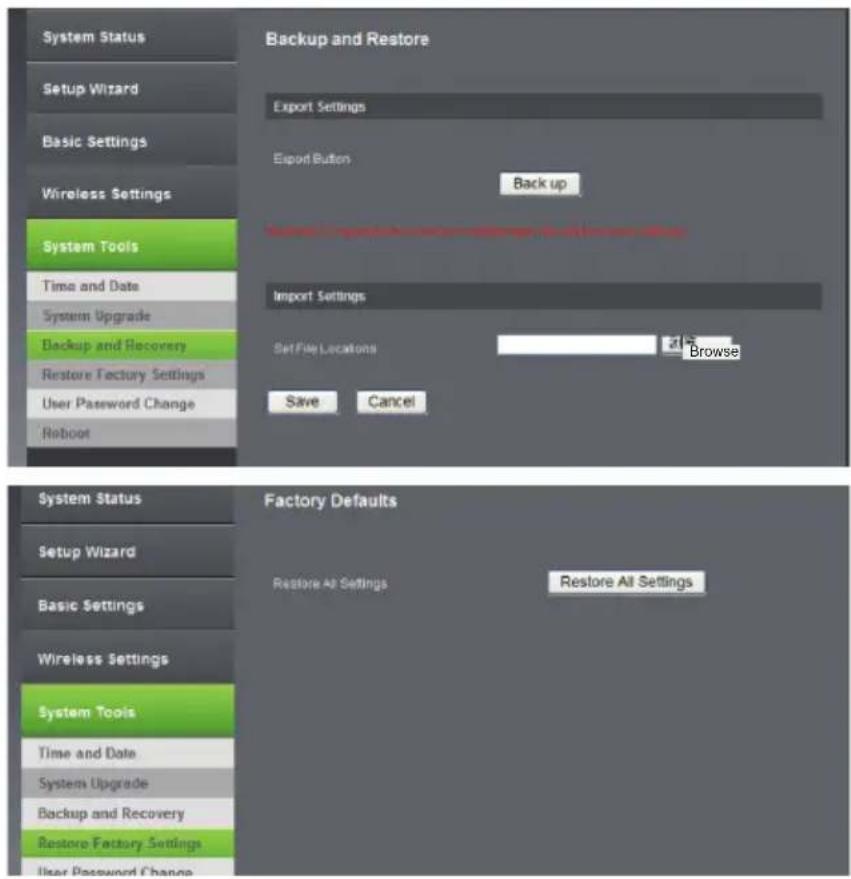
text_image
System Status Setup Wizard Basic Settings Wireless Settings System Tools Time and Date System Upgrade Backup and Recovery Restore Factory Settings User Password Change Reboot Backup and Restore Export Settings Export Button Back up Save As specified to store all systems Import Settings Set File Locations Browse Save Cancel System Status Setup Wizard Basic Settings Wireless Settings System Tools Time and Date System Upgrade Backup and Recovery Restore Factory Settings User Password Change Factory Defaults Restore All Settings Restore All Settings| Back up Press back up | button to save repeater's settings. |
| Browse | Press Browse to pick a previously-saved configuration file from your computer, and click save to replace current settings with the uploaded file. |
| Restore All Settings | Click Restore All Settings button to remove all settings and return to factory settings. |
Click Save and Restore All Settings button. The repeater will restart.
6. Specification
- Improves wireless coverage in all WLAN networks
• Standards IEEE 802.11 b / g / n
• Support WLAN networks
• Frequency Range: 2.4 - 2.4835 GHz
• Security: WPA2, WPA, WEP (64 / 128 bit)
• WPS | Integrated 2dBi PCBA Antennas
• Transmission Rate: up to 300 Mbps
• Power Supply: 110 – 240 V AC
- Modulation type: BPSK, QPSK, 16QAM, 64QAM, OFDM, DQPSK, DBPSK, DSSS, CCK
The Lechpol company declares that product ML0585 is consistent with the essential requirements and other relevant provisions of directive 1999/5/EC. The proper declaration for download from www.lechpol.eu.
7. Appendix: Troubleshooting
What can I do if I forgot my password?
- Restore default settings (with repeater powered on, use a pin to press and hold the Reset button for about 3-5 seconds).
- Configure repeater once again, by following instructions in this manual.
English

Correct Disposal of This Product (Waste Electrical & Electronic Equipment)
(Applicable in the European Union and other European countries with separate collection systems)
This marking shown on the product or its literature, indicates that it should not be disposed with other household wastes at the end of its working life. To prevent possible harm to the environment or human health from uncontrolled waste disposal, please separate this from other types of wastes and recycle it responsibly to promote the sustainable reuse of material resources.
Household users should contact either the retailer where they purchased this product, or their local government office, for details of where and how they can take this item for environmentally safe recycling. Business users should contact their supplier and check the terms and conditions of the purchase contract. This product should not be mixed with other commercial wastes for disposal
Made in China for LECHPOL Zbigniew Leszek, Miętne, 1 Garwolińska Street, 08-400 Garwolin.

text_image
Connect to a Network Do you want to set up your network? This is a new router that has not been set up. Click OK to start setup. Connect to the network without setting it us! OK Cancel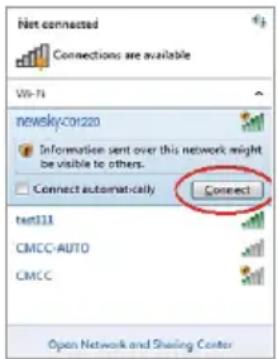
text_image
Net connected Connections are available Wi-Fi newsky-201220 Information sent over this network might be visible to others. Connect automatically Connect test111 CMCC-AUTO CMCC Open Network and Sharing Centertext_image
Wireless Repeater Language English Username Password Remember my password Login Canceltext_image
YOU ARE IN EASY MODE NOW STATUS ON STATUS ON Network Setting Wireless Setting Login Permission Network Setting AP Register Check POWER Router User broadband access (USB) Change 6 DHCP User Delete Delete Newday 5:00:00 Delete Delete Apply Cancel3. Konfigurationsmodus
text_image
STATUS ON STATUS ON STATUS ON Network Setting Wireless Setting Login Permission Network Setting AP Repeater Check RemoteAP Settings SDD Search Security Mode OPEN External Type None Device DyneG Server Disable Apply Cancel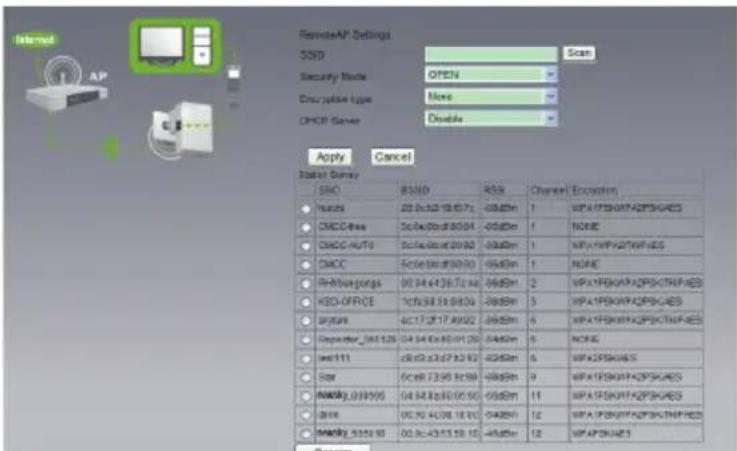
text_image
RemoteAP Settings SSID Scan Security Mode OPEN Description Type None CHOP Server Disable Apply Cancel SISD Survey SISD R3MD RSK Channel Encoders Nokia 20.2x32.19.67.x -05dBm 1 WPA1PSK0142PSHARES CMOS-Delta 50.4x30.8x8.0x91 -05dBm 1 NONE CDCC-AUTO 50.4x30.8x8.0x92 -05dBm 1 WPA1PSK0142PSHARES CMCC 50.4x30.8x8.0x93 -05dBm 1 NONE RMMusgongs 00.34x436.7x44x -05dBm 2 WPA1PSK0142PSHARES KED-OFFICE 10x38.19.68.04 -28dBm 3 WPA1PSK0142PSHARES aytura 4x17.2x17.4x902 -28dBm 6 WPA1PSK0142PSHARES September_061528 04.34x85.0x120 -54dBm 5 NONE set111 26.2x32.7x8.62 -42dBm 6 WPA2PSHARES Star 0x38.73.95.8x98 -68dBm 9 WPA1PSK0142PSHARES MADY_038905 04.34x85.0x150 -55dBm 11 WPA1PSK0142PSHARES Juniy 05.30.43.08.18.65 -54dBm 12 WPA1PSK0142PSHARES MADY_5350 95 05.30.43.53.58.16 -45dBm 12 WPA2PSHAREStext_image
Connect to a Network Type the network security key Security key: Hide characters OK Cancel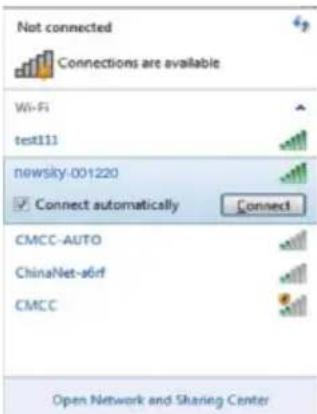
text_image
Not connected Connections are available Wi-Fi test111 newsky-001220 Connect automatically Connect CMCC-AUTO ChinaNet-s6rf CMCC Open Network and Sharing Center5. Konfiguration über Web Browser
text_image
System Status Setup Wizard Basic Settings Wireless Settings Wireless Basic Settings Wireless Security Settings WPS Settings Wireless C:\Bios List System Tools Wireless Network Wireless Status Enabled Disabled SBID NEWSKY_001220 Installed Wireless Mode 11bign mixed mode Channel 6 SBID Broadcast Enabled Disabled BSSID 04.84 8A 00:12:26 Apply Canceltext_image
YOU ARE IN ADVANCED MODE NOW System Status Setup Wizard Basic Settings Wireless Settings Wireless Basic Settings Wireless Security Settings WPS Settings Wireless Clients List System Tools Wireless Security Settings Security Policy Security Mode WPA2-Personal WPA2-Personal WPA Encryption TKIP AES TKIF+AES Password test Key Renewal Interval 3600 seconds Apply Canceltext_image
YOU ARE IN ADVANCED MODE NOW System Status Setup Wizard Basic Settings Wireless Settings System Tools Time and Date System Upgrade Backup and Recovery Restore Factory Settings User Password Change Reboot Password Account Management Username admin New Password Repeat New Password Save Canceltext_image
YOU ARE IN ADVANCED MODE NOW System Status Setup Wizard Basic Settings Wireless Settings System Tools Time and Date System Upgrade Backup and Recovery Restore Factory Settings User Password Change Reboot Firmware Upgrade Please choose following up your new server drive or local firmware access to the website. Browse Please Select The Upgrade File Upgrade Cancel Easy Mode - Adv You can upgrade the lasted version of this software, please download a recent firmware up from our website. It is downloading the file to extract the router to the upgraded route for the upgrade file. Upgrade button. Caution! Once you upgrade button, it is interrupt the process power during the user could damage thetext_image
System Status Setup Wizard Basic Settings Wireless Settings System Tools Time and Date System Upgrade Backup and Recovery Restore Factory Settings User Password Change Reboot Backup and Restore Export Settings Export Button Back up Import Settings Set File Locations Browse Save Cancel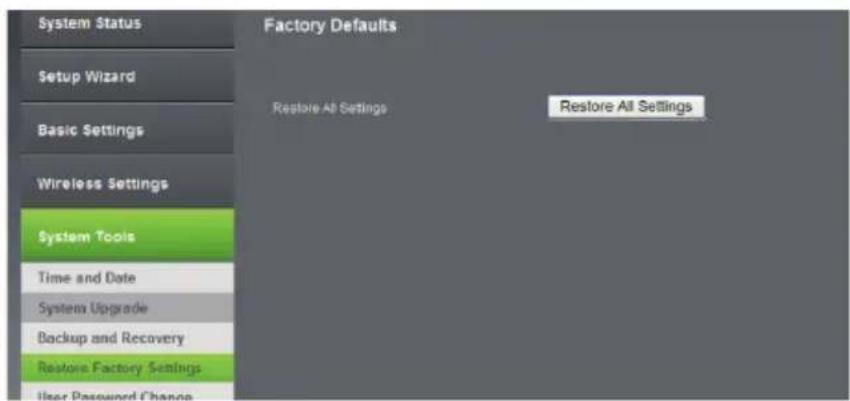
text_image
System Status Setup Wizard Basic Settings Wireless Settings System Tools Time and Date System Upgrade Backup and Recovery Restore Factory Settings User Password Change Factory Defaults Restore All Settings Restore All Settingstext_image
Connect to a Network Do you want to set up your network? This is a new router that has not been set up. Click OK to start setup. Connect to the network without setting it up OK Cancel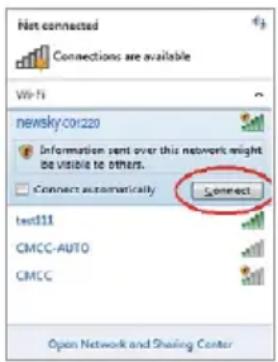
text_image
Net connected Connections are available Wi-Fi newsky:01220 Information sent over this network might be visible to others. Connect automatically Connect test111 CMCC-AUTO CMCC Open Network and Sharing Centertext_image
Wireless Repeater Language English Username Password Remember my password Login Cancel- Dupa ce v-ati logat dati click pe Easy Mode si dati click pe Network Setting vor aparea 3 moduri: AP Mode, Repeater Mode si Client Mode.
text_image
YOU ARE IN EASY MODE NOW STATUS ON STATUS ON Network Setting Wireless Setting Login Permission Network Setting AP Register Check Router Use broadband access电话 Enable Stop Now Disable Disable Apply Cancel Newday 8:00 6 Disable Disable3. Mod de configurare
1. Setare Modul AP
text_image
Network Setting AR Reporter Other Internet Router Ritikos Network Name (RSN): Networky_30/1280 Driver: 5 DHCP User: Disable Security Node: Disable Apply Cancel2. Setare Modul Repetor
• Urmariti pasii 2.3 pana la 2.5.
- Selectati Repeater si dati click Search.
Bedienungsanleitung
text_image
Network Setting IP Registrar Close Startbox AP Windows Status Disable Disabled SSD R000KY_891023 Message Security Info Disable CHCP Server Disable PowerAPI Settings SBSD Search Security Archive OPEN Encryption type None Appn Cancel Internet AP VMware Status Disabled Disabled SSD ncmty (6120) Isolated Security Info Disable DHCP Server Disable GenestoftC2 Settings SBSD Scan Security Info Disable Encryption type None Apply Cancel Marker Survey SBSD BSSD RGB Channel Explorer CMOC FeOx Biot 5.0 GB -80GBm 1 NONE NOMOY_890000 DA 84.5% (WES 94) -80GBm 11 WAFMFSKATP2FSHOKED3 SNX8 DS 80 4C08 1C 84 -70GBm 12 WAFMFSKATP2FSTROPHES NOMOY_510010 DE 80 4E5.8 GB 75 -80GBm 13 WAFMFSKATS Rescantext_image
Connect to a Network Type the network security key Security key: Hide characters OK Cancel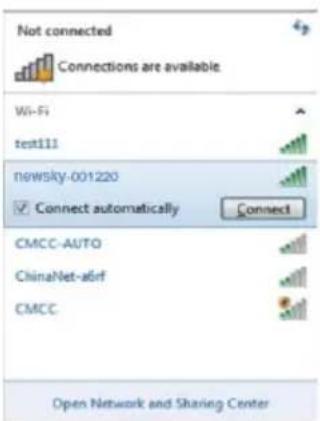
text_image
Not connected Connections are available Wi-Fi test111 newsky-001220 Connect automatically Connect CMCC-AUTO ChinaNet-aBrf CMCC Open Network and Sharing Center5. Configurare prin browser-ul Web
1. Setari de baza Wireless/Setari generale Wireless
Selectati Advanced Mode→ Wireless Settings→ Wireless Basic Settings din interfata de internet.
text_image
System Status Setup Wizard Basic Settings Wireless Settings Wireless Basic Settings Wireless Security Settings WPS Settings Wireless Clients List System Tools Wireless Network Wireless Status Enabled Displaced S80 newsky_001220 Isolated Wireless Mode 11high mixed mode Channel 6 S80 Broadcast Enabled Displaced B80D 04:04:00:00:12:20 Apply Canceltext_image
YOU ARE IN ADVANCED MODE NOW System Status Setup Wizard Basic Settings Wireless Settings Wireless Basic Settings Wireless Security Settings WPS Settings Wireless Clients List System Tools Wireless Security Settings Security Policy Security Mode: WPA2-Personal WPA2 Personal WPA2Enunciation: TKIF KES TKIP+AES Password: test Key Renewal Interval: 3600 seconds Apply Canceltext_image
YOU ARE IN ADVANCED MODE NOW System Status Setup Wizard Basic Settings Wireless Settings System Tools Time and Date System Upgrade Backup and Recovery Restore Factory Settings User Password Change Reboot Password Account Management Username admin New Password Repeat New Password Save Canceltext_image
System Status Setup Wizard Basic Settings Wireless Settings System Tools Time and Date System Upgrade Backup and Recovery Restore Factory Settings User Password Change Reboot Firmware Upgrade Please Select The Upgrade File 浏览... Upgrade Cancel Browse You can upgrade the lasted version, please download a recent firmware up from our website. To extract the zip to upgrading the route for the upgrade file. Upgrade button. Caution! Once you Upgrade button, or interrupt the process power during the user could damage thetext_image
System Status Setup Wizard Basic Settings Wireless Settings System Tools Time and Date System Upgrade Backup and Recovery Restore Factory Settings User Password Change Reboot Backup and Restore Export Settings Export Button Back up Offshore TV program, File written on Division File and two ports. Import Settings Set File Locations Browse Save Cancel