ML0585-5 - Uncategorized M-life - Free user manual and instructions
Find the device manual for free ML0585-5 M-life in PDF.


User questions about ML0585-5 M-life
0 question about this device. Answer the ones you know or ask your own.
Ask a new question about this device
Download the instructions for your Uncategorized in PDF format for free! Find your manual ML0585-5 - M-life and take your electronic device back in hand. On this page are published all the documents necessary for the use of your device. ML0585-5 by M-life.
USER MANUAL ML0585-5 M-life
text_image
Router AP Universal Repeater wireless-isp AP-Client Connection Type PPPoE DHCP STATIC IP PPPoE Username (Offer by ISP) PPPoE Password (Offer by ISP) WAN MAC Clone b0c0c0002d32 (Options) Auto Clean This Router SSID Wifi_2D2E (1-32 Characters or Digits) his Router WPA2-PSK 88888888 (8-63 Characters or Digits)
text_image
Router AP Universal Repeater wireless-isp AP-Client This Router SSID Wifi_2D2E (1-32 Characters or Digits) his Router WPA2-PSK 88888888 (8-63 Characters or Digits) Save/Apply Cancel| SSID | Auth. and Encryption | Channel Number | Signal quality | select | |
| MikroTik-195877 [4c:5e:0c:19:58:77] | Not set security wireless network | Channel 1 | 44% | ||
| hotspot2 [00:0a:00:00:08:02] | WPA-PSK/WPA2-PSK AES | Channel 6 | 12% | ||
| Remote AP SSID | |||||
| Remote AP Key | |||||
Save/Apply
Cancel
text_image
SSID Auth. and Encryption Channel Number Signal quality select MikroTik-195877 [ 4c:5e.0c:19:58:77 ] Not set security wireless network Channel 1 44% Remote AP SSID Remote AP KeySave/Apply
Cancel
| SSID | Auth. and Encryption | Channel Number | Signal quality | select | |
| MikroTik-195877 [4c:5e 0c:19:58:77] | Not set security wireless network | Channel 1 | 40% | ||
| hotspot2 [00:0a:00:00:08:02] | WPA-PSK/WPA2-PSK AES | Channel 6 | 12% | ||
| Remote AP SSID | |||||
| Remote AP Key | |||||
Save/Apply Cancel
Before you start to use this device, please check if there's anything missing in the package, and contact your dealer of purchase to claim for missing items:
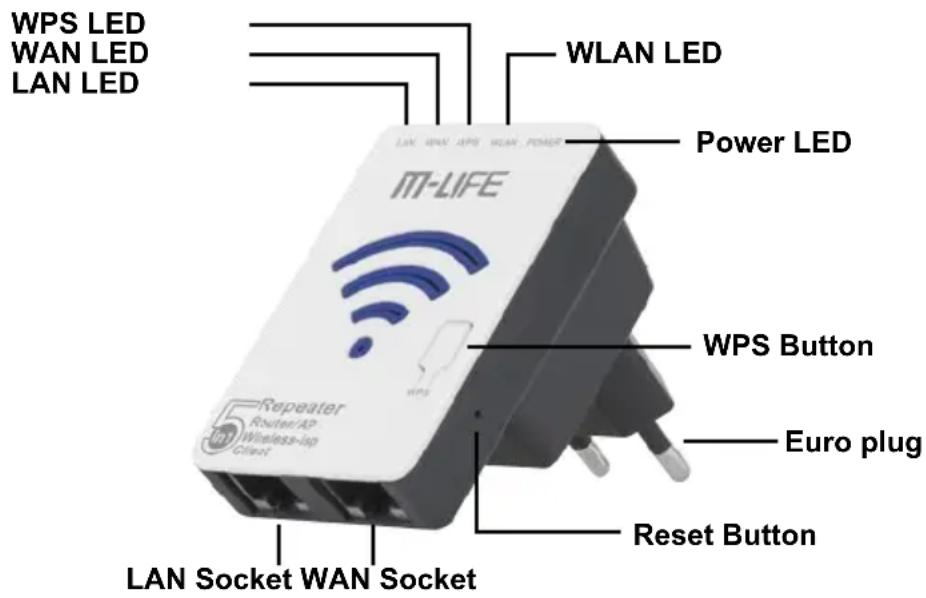
Product description
text_image
WPS LED WAN LED LAN LED WLAN LED Power LED IT-LIFE Repeater Router/AP Wireless-up Client WPS Button Euro plug Reset Button LAN Socket WAN SocketReset: If you need to reset the Repeater, press and hold RESET button for about 10 seconds.
Safety instructions:
- Disconnect the device during thunderstorms in case of lightning damage.
- Keep far from heat source and ensure proper ventilation.
- Keep waterproof in the storage, transportation and operating environments.
1. Computer Configuration
Below is how-to configure Windows 7. It is recommended to configure repeater when it is connected to LAN socket with network cable (RJ45).
1.1. Computer configuration via LAN (recommended)
- Click Start → Control Panel → Network and Internet → Network and Sharing Center → Change adapter settings → Local connection (right click) → Properties.
- Double click Internet Protocol Version 4 (TCP/IPv4).
- To set up the computer IP 192.168.10.x (x arbitrary integer between 2\~252), subnet mask of 255.255.255.0, gate of 192.168.10.1 and click OK. Back to the last interface and click OK.
1.2. Computer configuration via Wi-Fi
- Click Start → Control Panel → Network and Internet → Network and Sharing Center → Change adapter settings → Wi-Fi (right click) → Properties.
- Double click Internet Protocol Version 4 (TCP/IPv4).
- To set up the computer IP 192.168.10.x (x arbitrary integer between 2\~252), subnet mask of 255.255.255.0, gate of 192.168.10.1 and click OK. Back to the last interface and click OK.
- Plug the Wi-Fi Repeater to a wall socket.
- Click on the network icon 📁 on the right bottom of your desktop. You will find the signal from the Wi-Fi Repeater. Click on Connect and wait few seconds.
- Connect to a Network will appear on the screen.
NOTE! When configuring via Wi-Fi, enter all required advanced settings (e.g. broadcasted network security) before launching selected configuration mode. After launching selected mode (e.g. repeater), it would be possible to access settings only when configuring via LAN cable (see point 1.1).
2. Connection
- Open web browser and type http://192.168.10.1 in the browser's address box. This number is the default IP address for this device.
NOTE! If you cannot load http://192.168.10.1, please check whether Wi-Fi repeater is on default settings. If not, or if you cannot verify the reason for lack of connection, restore default settings. Press the reset button for about 10 seconds and try to install it again.
- The login screen will appear. Enter the Username and Password then click Login to login. The default Username is admin, default password is admin.
- After logging in, you will see 5 modes: Router Mode, AP Mode, Repeater Mode, WISP Mode and Client Mode.
3. Configuration Mode
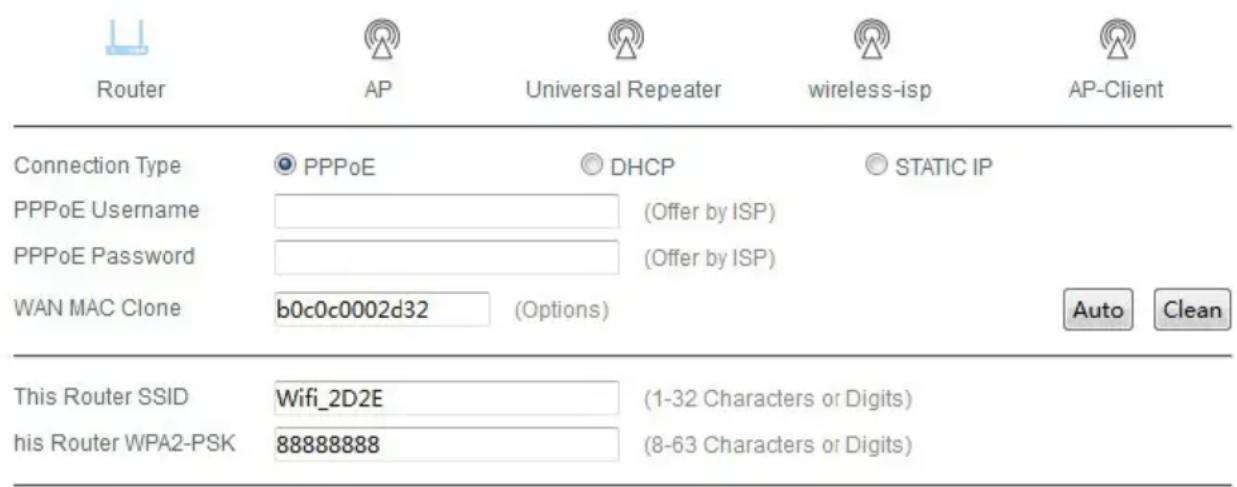
1. Configure Router Mode
text_image
Router AP Universal Repeater wireless-isp AP-Client Connection Type PPPoE DHCP STATIC IP PPPoE Username (Offer by ISP) PPPoE Password (Offer by ISP) WAN MAC Clone b0c0c0002d32 (Options) Auto Clean This Router SSID Wifi_2D2E (1-32 Characters or Digits) his Router WPA2-PSK 88888888 (8-63 Characters or Digits)Save/Apply Cancel
Select one of three possible options:
- PPoE- input user name and password provided by your ISP.
- DHCP- your ISP uses a DHCP service. An IP adress will be assigned automatically.
- Static IP- an IP adress is provided by ISP. Enter acquired data manually in designated places.
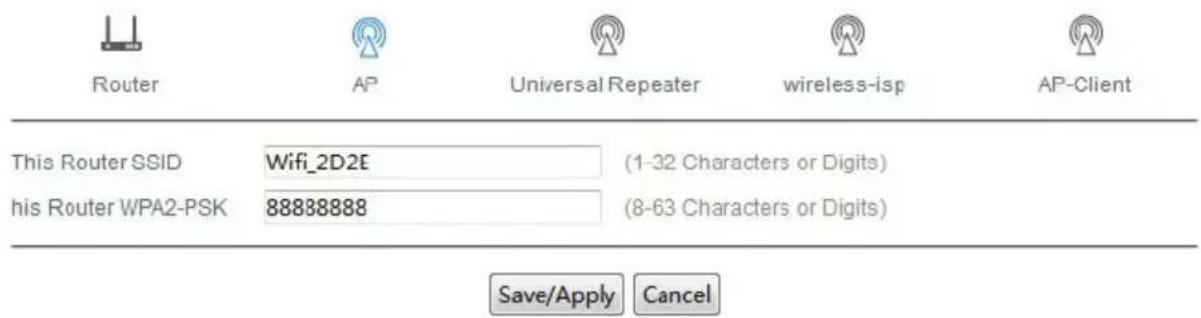
2. Configure AP Mode
text_image
Router AP Universal Repeater wireless-isp AP-Client This Router SSID Wifi_2D2E (1-32 Characters or Digits) his Router WPA2-PSK 88888888 (8-63 Characters or Digits) Save/Apply Cancel- Select AP and enter necessary information, password and click Save/Apply. Wait until the process is complete.
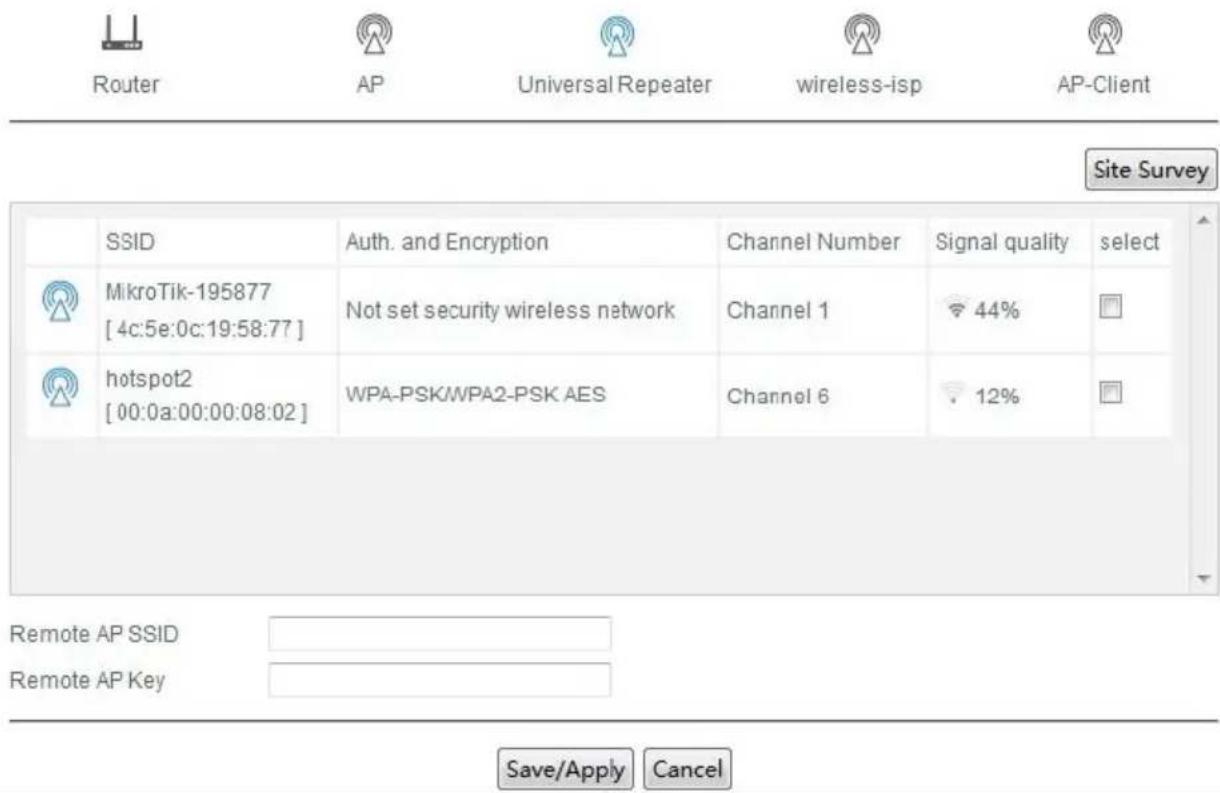
3. Configure Repeater Mode
text_image
Router AP Universal Repeater wireless-isp AP-Client Site Survey SSID Auth. and Encryption Channel Number Signal quality select MikroTik-195877 [4c:5e:0c:19:58:77] Not set security wireless network Channel 1 44% hotspot2 [00:0a:00:00:08:02] WPA-PSK/WPA2-PSK AES Channel 6 12% Remote AP SSID Remote AP Key Save/Apply Cancel- Select Universal Repeater then click on Site Survey.
- Select desired network and enter the password if necessary. Then, enter information in the spaces provided.
- Click Save/Apply and wait until it's complete.
4. Configure WISP Mode

Router

AP

Universal Repeater

wireless-isp

AP-Client
Site Survey
text_image
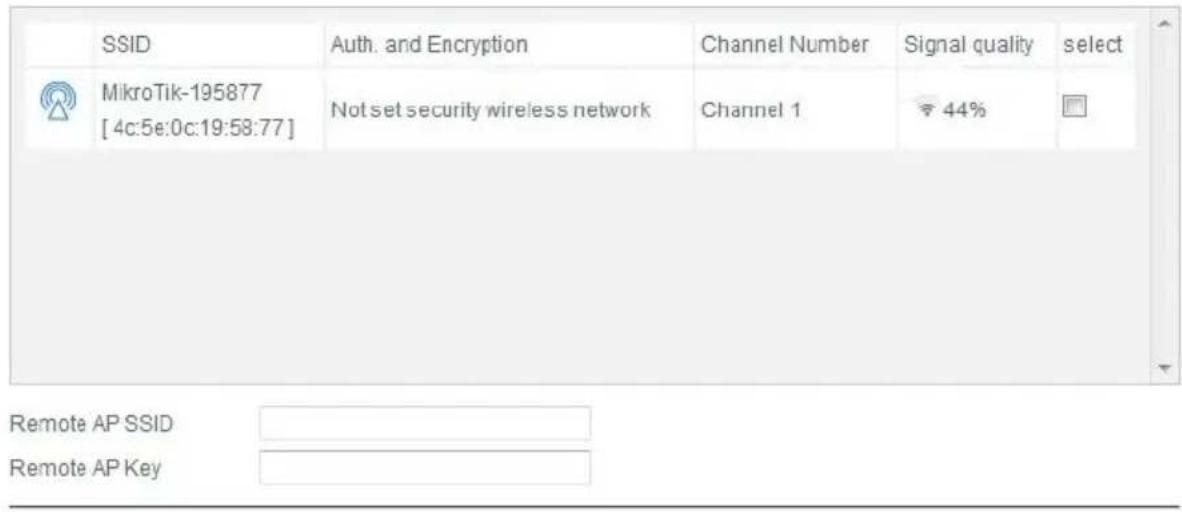
SSID Auth. and Encryption Channel Number Signal quality select MikroTik-195877 [4c:5e:0c:19:58:77] Not set security wireless network Channel 1 44% Remote AP SSID Remote AP KeySave/Apply
Cancel
- Select WISP then click on Site Survey.
- Select desired network and enter the password if necessary.
- Then enter information in the spaces provided. Click Save/Apply and wait until it's complete.
5. Configure Client Mode

Router

AP

Universal Repeater

wireless-isp

AP-Client
Site Survey
text_image
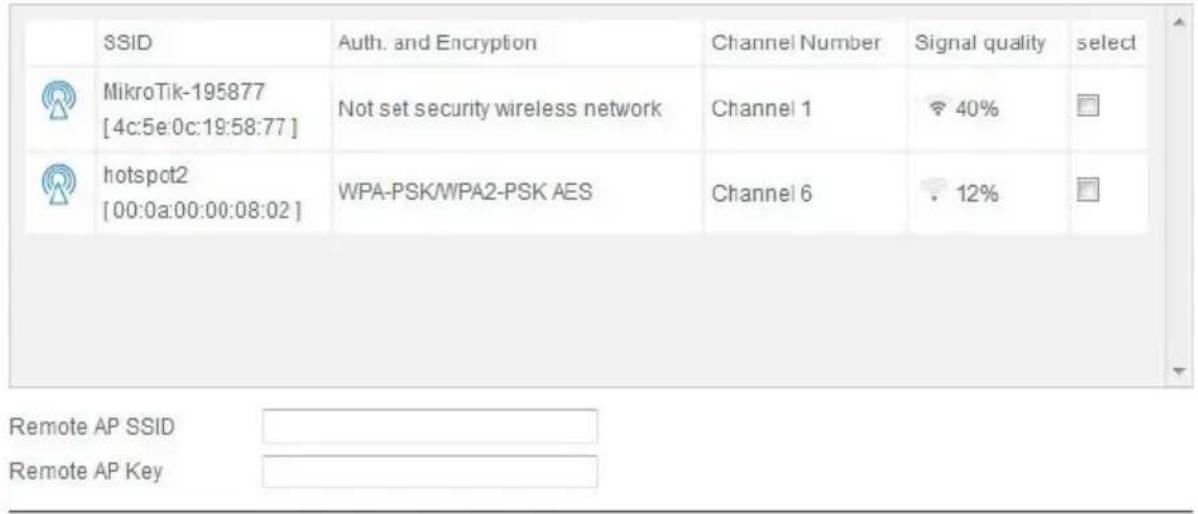
SSID MikroTik-195877 [4c:5e:0c:19:58:77] hotspot2 [00:0a:00:00:08:02] Auth. and Encryption Not set security wireless network WPA-PSK/WPA2-PSK AES Channel Number Channel 1 Channel 6 Signal quality 40% 12% select Remote AP SSID Remote AP KeySave/Apply Cancel
- Select Client then click on Site Survey.
- Select desired network and enter the password if necessary.
- Click Save/Apply and wait until it's complete.
4. Troubleshooting
What can I do if I forgot my password?
- Restore default settings (with repeater powered on, use a pin to press and hold the Reset button for about 10 seconds).
- Configure repeater once again, by following instructions in this manual.
5. Specification
- Chipset: MT7620N Chipset
• Standards: IEEE 802.11 b / g / n
• Frequency range: 2.4 – 2.4835 GHz
• Security: WEP/ WPA/ WPA2, WPA-PSK/ WPA2-PSK (TKIP/AES) (64 / 128 bit) - Internal antenna
• Transmission rate: up to 300 Mb/s - Ports: LAN/ WLAN
- Wireless range: up to 300 m (depending on the environment conditions)
- Working temperature: 0^ 40^
• Storage temperature: -40°C \~ 70°C
• Relative humidity: 10% \~ 90%
• Storage humidity: 5% \~ 95% - Modulation type: DBPSK, DQPSK, CCK, OFDM
- Power supply:
- Input: AC 100 \~ 240 V
• Output: DC 12 V / 1 A
Please read this operation instruction carefully before use, and keep it for future reference.
Distributor does not take responsibility for damages caused by inappropriate handling and use of the product.
The Lechpol company declares that product ML0585-5 is consistent with the essential requirements and other relevant provisions of directive 2014/53/UE. The proper declaration for download from www.lechpol.eu.

English
Correct Disposal of This Product
(Waste Electrical & Electronic Equipment)



(Applicable in the European Union and other European countries with separate collection systems) This marking shown on the product or Its literature, indicates that It should not be disposed with other household wastes at the end of its working life. To prevent possible harm to the environment or human health from uncontrolled waste disposal, please separate this from other types of wastes and recycle it responsibly to promote the sustainable reuse of material resources. Household users should contact either the retailer where they purchased this product, or their local government office, for details of where and how they can take this item for environmentally safe recycling. Business users should contact their supplier and check the terms and conditions of the purchase contract This product should not be mixed with other commercial wastes for disposal.
Made in China for LECHPOL, Miętne, 1 Garwolińska Street, 08-400 Garwolin.
text_image
Router AP Universal Repeater wireless-isp AP-Client Connection Type PPPoE DHCP STATIC IP PPPoE Username (Offer by ISP) PPPoE Password (Offer by ISP) WAN MAC Clone b0c0c0002d32 (Options) Auto Clean This Router SSID Wifi_2D2E (1-32 Characters or Digits) his Router WPA2-PSK 88888888 (8-63 Characters or Digits) Save/Apply Cancel| SSID | Auth. and Encryption | Channel Number | Signal quality | select | |
| MikroTik-195877 [4c:5e:0c:19:58:77] | Not set security wireless network | Channel 1 | 44% | ||
| hotspot2 [00:0a:00:00:08:02] | WPA-PSK/WPA2-PSK AES | Channel 6 | 12% | ||
| Remote AP SSID | |||||
| Remote AP Key | |||||
Save/Apply Cancel
text_image
Router AP Universal Repeater wireless-lop AP Client Site Survey SSID Auth. and Encryption Channel Number Signal quality select MikroTik-195877 [4c:5e:0c:19:50:77] Not set security wireless network Channel 1 44% Remote AP SSID Remote AP Key Save/Apply Cancel| SSID | Auth. and Encryption | Channel Number | Signal quality | select | |
| MikroTik-195877 [4c:5e:0c:19:58:77] | Not set security wireless network | Channel 1 | 40% | ||
| hotspot2 [00:0a:00:00:08:02] | WPA-PSK/WPA2-PSK AES | Channel 6 | 12% |
Remote AP SSID
Remote AP Key
Save/Apply Cancel
text_image
LED WPS LED WAN LED LAN LED WLAN LED Alimentare M-LIFE Repeater RouterAP Wireless-lip Client Buton WPS Stecher alimentare Buton resetare Priza LAN Priza WANtext_image
Router AP Universal Repeater wireless-isp AP-Client Connection Type PPPoE DHCP STATIC IP PPPoE Username (Offer by ISP) PPPoE Password (Offer by ISP) WAN MAC Clone b0c0c0002d32 (Options) Auto Clean This Router SSID Wifi_2D2E (1-32 Characters or Digits) his Router WPA2-PSK 88888888 (8-63 Characters or Digits)Save/Apply Cancel
text_image
Router AP Universal Repeater wireless-isp AP-Client This Router SSID Wifi_2D2E (1-32 Characters or Digits) his Router WPA2-PSK 88888888 (8-63 Characters or Digits) Save/Apply Canceltext_image
Router AP Universal Repeater wireless-isp AP-Client Site Survey SSID Auth. and Encryption Channel Number Signal quality select MikroTik-195877 [4c:5e:0c:19:58:77] Not set security wireless network Channel 1 44% hotspot2 [00:0a:00:00:08:02] WPA-PSK/WPA2-PSK AES Channel 6 12% Remote AP SSID Remote AP Key Save/Apply Canceltext_image
Site Survey SSID Auth. and Encryption Channel Number Signal quality select MikroTik-195877 [4c:5e.0c:19:58:77] Not set security wireless network Channel 1 44% Remote AP SSID Remote AP KeySave/Apply
Cancel
text_image
SSID MikroTik-195877 [4c:5e:0c:19:58:77] hotspot2 [00:0a:00:00:08:02] Auth. and Encryption Not set security wireless network WPA-PSK/WPA2-PSK AES Channel Number Channel 1 Channel 6 Signal quality 40% 12% select Remote AP SSID Remote AP KeySave/Apply Cancel