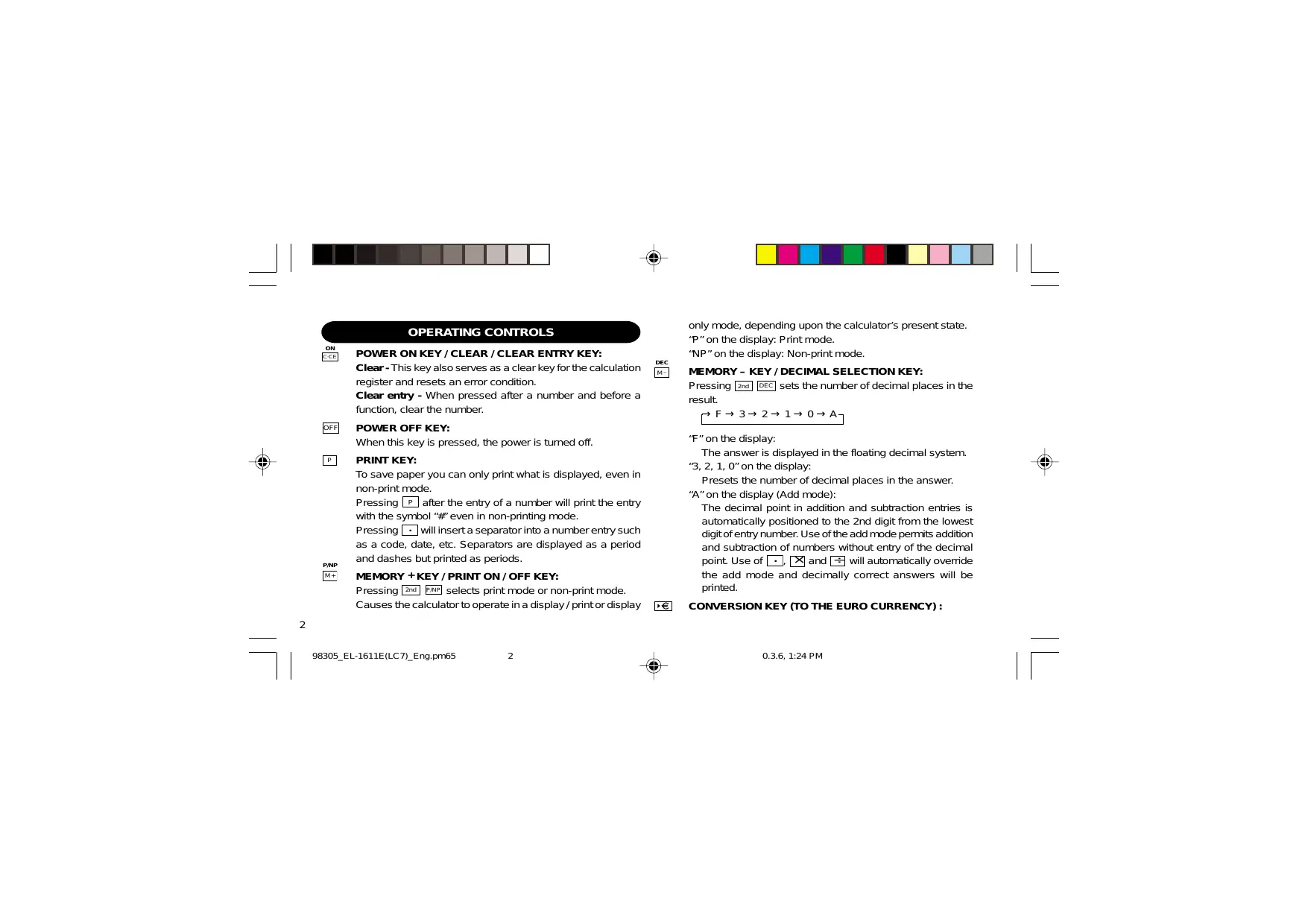
USER MANUAL EL-1611E SHARP
This equipment complies with the requirements of Directive 89/336/EEC as amended by 93/68/EEC.
Thank you for your purchase of the SHARP electronic printing calculator, model EL-1611E.
To ensure trouble-free operation of your SHARP calculator, we recommend the following:
- The calculator should be kept in areas free from extreme temperature changes, moisture, and dust.
- A soft, dry cloth should be used to clean the calculator. Do not use solvents or a wet cloth.
- Since this product is not waterproof, do not use it or store it where fluids, for example water, can splash onto it. Raindrops, water spray, juice, coffee, steam, perspiration, etc. will also cause malfunction.
- If service should be required, use only a SHARP servicing dealer, a SHARP approved service facility or SHARP repair service.
- If you pull out the power cord to cut electricity completely or replace the batteries, the presently stored exchange rate will be cleared.
CONTENTS
Page
OPERATING CONTROLS 2 INK ROLLER REPLACEMENT 3 PAPER ROLL REPLACEMENT 5 POWER SUPPLY 7 ERRORS 9 SPECIFICATIONS 10 RESETTING THE UNIT 11 CALCULATION EXAMPLES 78 EURO CURRENCY TABLE 86





OPERATING CONTROLS

POWER ON KEY / CLEAR / CLEAR ENTRY KEY:
Clear - This key also serves as a clear key for the calculation register and resets an error condition.
Clear entry - When pressed after a number and before a function, clear the number.

POWER OFF KEY:
When this key is pressed, the power is turned off.

PRINT KEY:
To save paper you can only print what is displayed, even in non-print mode.
Pressing P after the entry of a number will print the entry with the symbol “#” even in non-printing mode.
Pressing ☐ will insert a separator into a number entry such as a code, date, etc. Separators are displayed as a period and dashes but printed as periods.

MEMORY + KEY / PRINT ON / OFF KEY:
Pressing 2nd P/NP selects print mode or non-print mode.
Causes the calculator to operate in a display / print or display

only mode, depending upon the calculator's present state.
"P" on the display: Print mode.
"NP" on the display: Non-print mode.
MEMORY – KEY / DECIMAL SELECTION KEY:
Pressing 2nd DEC sets the number of decimal places in the result.
→ F → 3 → 2 → 1 → 0 → A
"F" on the display:
The answer is displayed in the floating decimal system.
"3, 2, 1, 0" on the display:
Presets the number of decimal places in the answer.
"A" on the display (Add mode):
The decimal point in addition and subtraction entries is automatically positioned to the 2nd digit from the lowest digit of entry number. Use of the add mode permits addition and subtraction of numbers without entry of the decimal point. Use of , × and ÷ will automatically override the add mode and decimally correct answers will be printed.
CONVERSION KEY (TO THE EURO CURRENCY) :




RATE SET

CONVERSION KEY (TO A NATIONAL CURRENCY) / CONVERSION RATE SETTING KEY:
You can set the exchange rate by pressing 2nd RATE SET. (A maximum of 6 digits excluding the decimal point can be stored as the exchange rate.)

2nd FUNCTION KEY :
To use the functions shown above the keys, such as “DEC”, press the 2nd key first. (When the 2nd key is pressed, “2nd” will appear at the top of the display.)
Example: To change decimal place setting from F to 2


PAPER FEED KEY:
When pressed, the paper tape advances.
DISPLAY:
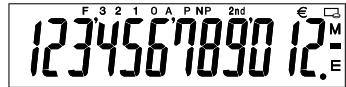
F: Floating decimal mode
3, 2, 1, 0: Preset decimal mode
A: Add mode
P: Print mode
NP: Non-print mode
2nd: 2nd functions are available
€ : Euro Currency Symbol
: National Currency Symbol
M: Memory
-: Minus
E: Error
- For illustration purposes, all the relevant symbols are visible in the display above. However, in actual use, this would never happen.
INK ROLLER REPLACEMENT
If printing is blurry even when the ink roller is in the proper position, replace the roller.
Ink roller: Type EA-732R
WARNING
APPLYING INK TO WORN INK ROLLER OR USE OF UNAPPROVED INK ROLLER MAY CAUSE SERIOUS DAMAGE TO PRINTER.
1) Turn the power off. 2) Remove the printer cover. (Fig. 1) 3) Remove the ink roller by turning it counterclockwise and pulling it upward (Fig. 2) 4) Install new ink roller and press it in the correct position. Make sure that the ink roller is securely in place. (Fig. 3) 5) Put back the printer cover.
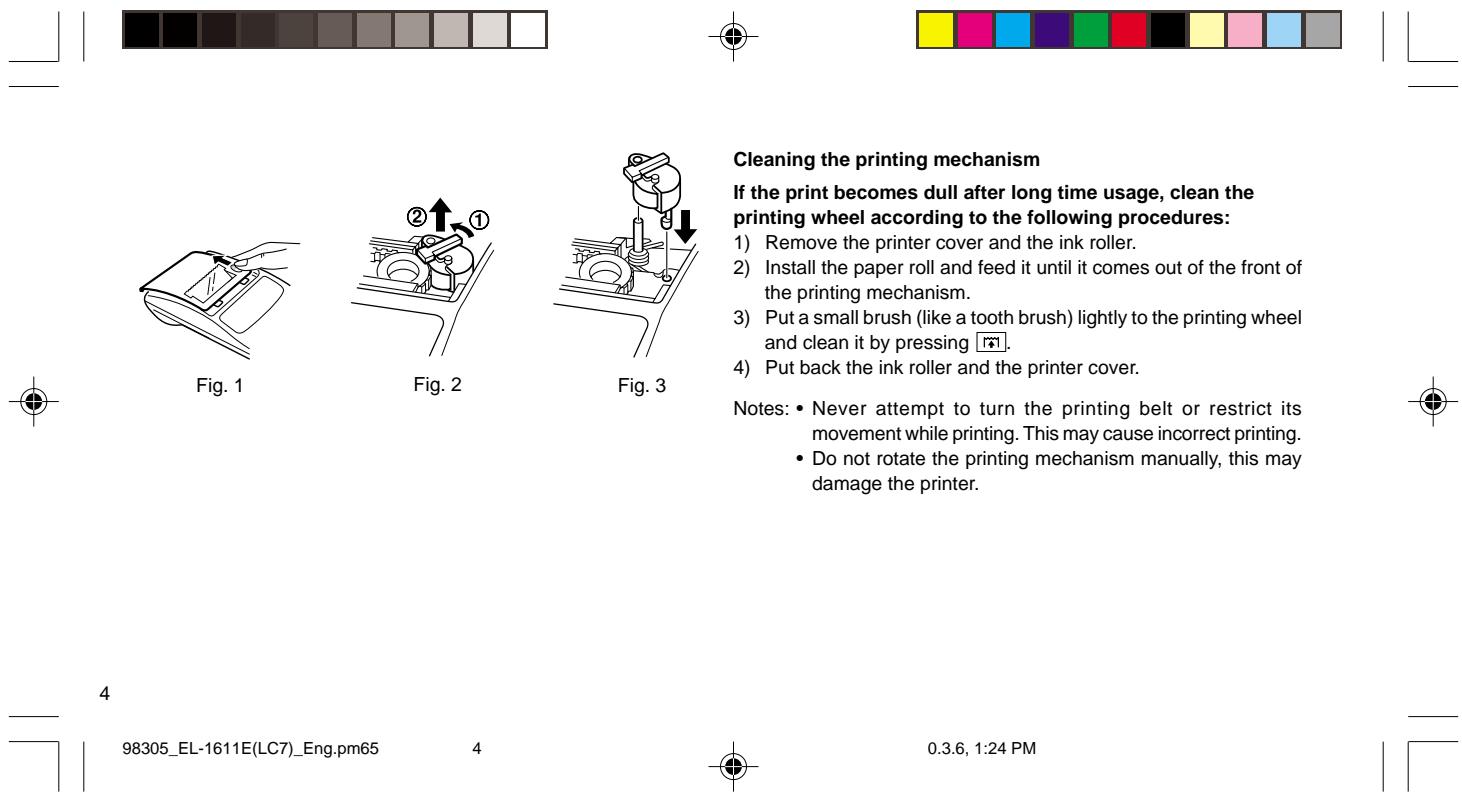
Cleaning the printing mechanism
If the print becomes dull after long time usage, clean the printing wheel according to the following procedures:
1) Remove the printer cover and the ink roller. 2) Install the paper roll and feed it until it comes out of the front of the printing mechanism. 3) Put a small brush (like a tooth brush) lightly to the printing wheel and clean it by pressing 📂. 4) Put back the ink roller and the printer cover.
Notes: • Never attempt to turn the printing belt or restrict its movement while printing. This may cause incorrect printing. - Do not rotate the printing mechanism manually, this may damage the printer.



PAPER ROLL REPLACEMENT
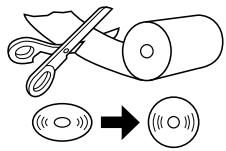
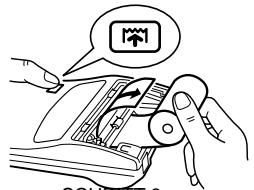
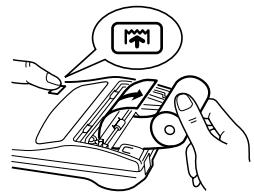
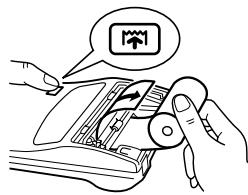
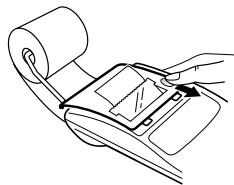
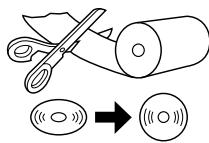
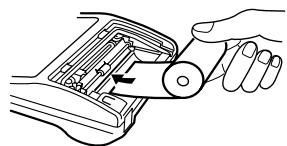
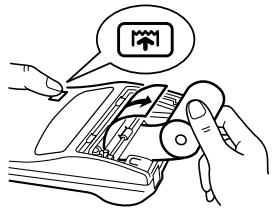
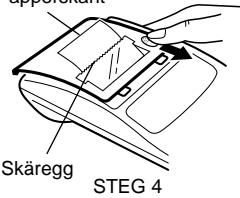
Never insert paper roll if torn. Doing so will cause paper to jam. Always cut leading edge with scissors first.
When using the paper that is less than or equals to 25 mm (31/32") in outside diameter:
Paper roll : Type EA-7100P
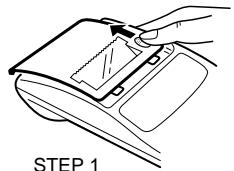
STEP 1
leading edge
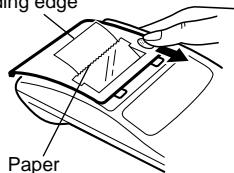
cutter
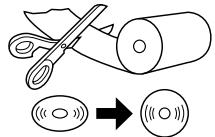
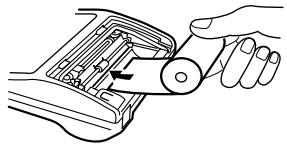
STEP 2
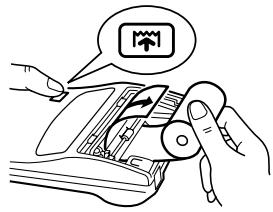
STEP 3
Note: Paper tape replacement rolls are available where the EL-1611E calculator is sold.



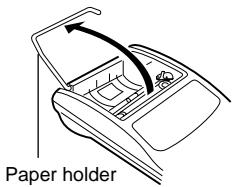
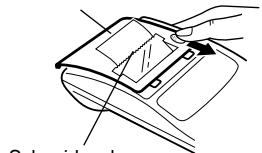
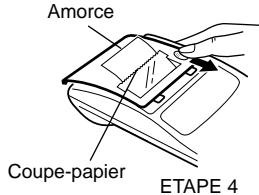
When using paper that is 12 mm (15/32") in inside diameter and up to 80 mm (3-5/32") in outside diameter:
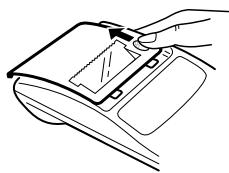
STEP 1
STEP 2
STEP 3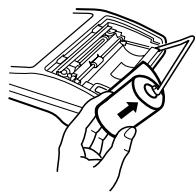
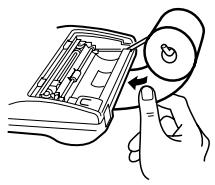
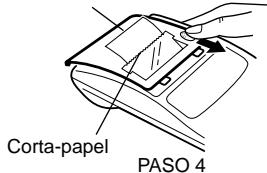
STEP 4
STEP 5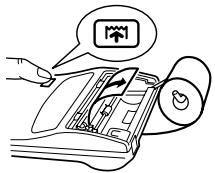
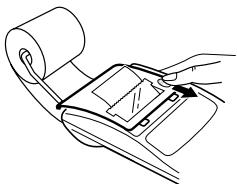
STEP 6
Caution: • Never use the supplied paper (25 mm (31/32") in outside diameter) in the holder.
- When replacing the paper, touching the inside of the printer may damage it.
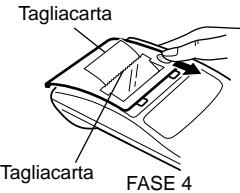
- The calculator has a free-paper mechanism. When drawing out the paper tape, pull it straight forward on the paper cutter side.



POWER SUPPLY
This calculator operates on dry batteries.
The calculator can also be operated on AC power through use of an AC adaptor.
BATTERY OPERATION
If the display becomes dim or the printer stops before or during printing, the batteries should be replaced.
- After the replacement, press OFF and ON in this order to clear the calculator.
When the batteries are correctly installed "0." will be displayed. (If the display is blank, displays any other symbol or the keys become inoperative, remove the batteries and install them again. Press OFF and ON in this order and check the display again.)
Note: Due to solvent leakage of the battery, keeping a used battery in the battery compartment may result in damage to the calculator. Remove a used battery promptly.

Battery: Heavy-duty manganese battery (AA or R6) × 4
- Turn off the power by pressing OFF.
- Remove the battery cover by sliding it in the direction of the arrow on the cover.
- Replace the batteries. Be sure that the “+” and “−” marks on the battery correspond to the “+” and “−” marks in the calculator. Always put back the 4 batteries at the same time.
- Put back the battery cover.
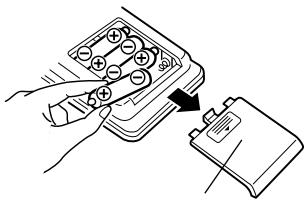
Battery cover



AC adaptor: Model EA-28A
When the AC adaptor is connected to the calculator, the power source is automatically switched over from dry batteries to AC power source.
HOW TO CONNECT THE AC ADAPTOR
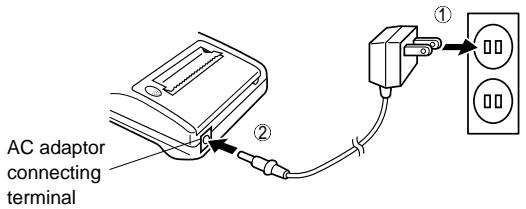
Notes: • When the calculator is not in use, be sure to remove the adaptor from the calculator and the wall outlet.
- Never use any other AC adaptor except EA-28A.
CAUTION
Use of other than the AC adaptor EA-28A may apply improper voltage to your SHARP calculator and will cause damage.
Make sure that you turn the calculator's power off when connecting or disconnecting the AC adaptor.
To connect the AC adaptor, follow steps ① and ②.
To disconnect the AC adaptor, simply reverse the procedure.




SPECIFICATIONS
Operating capacity:
Power supply:
12 digits
6V ≡ (DC): Heavy-duty manganese battery, size AA (or R6) × 4
AC: Local voltage with AC adaptor EA-28A (Option)
Operation:
Heavy-duty manganese battery, size AA (or R6)
Approx. 5,000 hours (in non-print mode, displaying 555'555 at 25°C (77°F) ambient temperature)
Operating time depends on the type of battery and type of use.
Automatic Power-Off
Function (APO):
Calculations:
To save your batteries, this function automatically turns off the machine approximately 12 minutes after the last key operation.
Four arithmetic, constant, square, chain, power, percentage, reciprocal, add-on, discount, memory, conversion between a national and the euro currency, etc.





PRINTING SECTION
Printing speed:
Approx. 1.4 lines/sec. (Printing speed changes slightly depending upon the printed digits per line.)
Printing paper:
57 mm (2-1/4") – 58 mm (2-9/32") wide 80 mm (3-5/32") in diameter (max.)
Operating temperature:
0°C - 40°C (32°F - 104°F)
Power consumption:
6V ... (DC): W
Dimensions:
Approx. 315 g (0.69 lb.) (with batteries)
Accessories:
Ink roller × 1 (installed), Paper roll × 1, Dry battery (R6) × 4 and Operation manual
RESETTING THE UNIT
Strong impacts, exposure to electrical fields, or other unusual conditions may render the unit inoperative, and pressing the keys will have no effect. If this occurs, you will have to press the RESET switch on the bottom of the unit. The RESET switch should be pressed only when:
- an abnormal event occurs and all keys are disabled.
- you install or replace the batteries. Notes:
- Pressing the RESET switch will clear the stored exchange rate and other data stored in the memory.
- Use only a ballpoint pen to press the RESET switch. Do not use anything breakable or anything with a sharp tip, such as a needle.
- After pressing the RESET switch, press ON C-CE to make sure that "0." is indicated.





DEUTSCH
BEDIENUNGSHINWEISE
SCHRITT 2
STEP 3

Battery compartment cover



TECHNICAL DATA
Operating capacity:
Power supply:
12 digits
6V —— (DC): 4
2nd FUNCTION KEY:
STEP 3

Cover




MAINS OPERATION (OPTIONAL)
ERRORS
TECHNICAL DATA SHEET
STEP 3
Front edge
38
Battery cover



6V ... (DC): 4 batteries
43

0.3.6, 1:36 PM
1 2 3 4 5 6 7 8 9 0 . , 1 2 3 4 5 6 7 8 9 0 . , 1 2 3 4 5 6 7 8 9 0 . , 1 2 3 4 5 6 7 8 9 0 . , 1 2 3 4 5 6 7 8 9 0 . , 1 2 3 4 5 6 7 8 9 0 . ,



PRINTER SECTION
PHASE 2
PHASE 3

PHASE 1
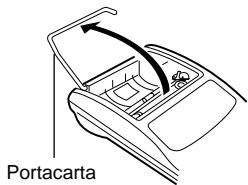
PHASE 2
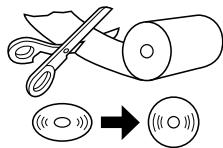
PHASE 3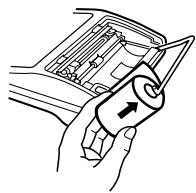
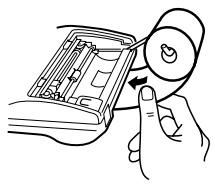
PHASE 4
PHASE 5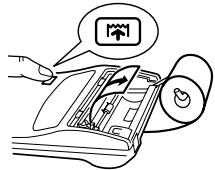
PHASE 6
Attention:
ERRORS
TECHNICAL DATA
54

0.3.6, 1:32 PM
1 2 3 4 5 6 7 8 9 0 . ,
1 2 3 4 5 6 7 8 9 0 . ,
1 2 3 4 5 6 7 8 9 0 . ,
1 2 3 4 5 6 7 8 9 0 . ,
1 2 3 4 5 6 7 8 9 0 . ,
1 2 3 4 5 6 7 8 9 0 . ,



PRINT SECTION
Print speed:
Print media:
Operating temperature:
Power consumption:
Dimensions:
Weight:
Accessories:
MEMORY MINUS / DECIMAL SELECTOR KEY:
STEP 2
STEP 3
Paper edge
Battery cover
62
62
AC ADAPTER (EXTRA ACCESSORY)




AC adapter: Model EA-28A
ERROR
TECHNICAL DATA
Capacity: 12 digits
Power source: 6V: Durable manganese batteries, type AA (or R6) × 4
2nd KEY FOR SECOND FUNCTION:
STEP 3

STEP 6

Battery cover




OPERATION VIA AC POWER (OPTIONAL)
AC adapter: Model EA-28A
Connection point for
AC adapter
ERRORS
TECHNICAL SPECIFICATIONS
- To ensure that each calculation is performed correctly, press C-CE C-CE firmly before starting the calculation.
- Press 2nd /NP to select print mode or non-print mode. "P" appears in print mode and "NP" appears in non-print mode. Unless otherwise stated, it is assumed the calculator is in print mode.
- Example procedures are listed in the following manner unless otherwise specified.
Decimal position
(F, 3, 2, 1, 0, A)
Operation
Display
Print

CALCULATION EXAMPLES
CALCULATION EXAMPLES

| A | C:CE C:CE 250 + 450 -300 = | 4.00 | 4.00 * |
Note: □ was not used in the entries.
12 × 45 ÷ 4 =
POWER / EXPONENTIATION / PUISSANCE / POTENCIA / CALCOLI DELLE POTENZE / POTENSRÄKNING / MACHTSVERHEFFEN
22 = 2 × 2 = ①
23 = 2 × 2 × 2 = ②
| (Non-print mode /Nicht-Drucken-Betriebsart /Mode non-impression /Modalidad de no-impresión /Modo senza stampa /Ingen utskrift /Niet printen-modus) | | |
| 0 | 2nd P/NP 2 ☒ = | 4. 1 | |
| = P | 8. 2 | 8·2 |

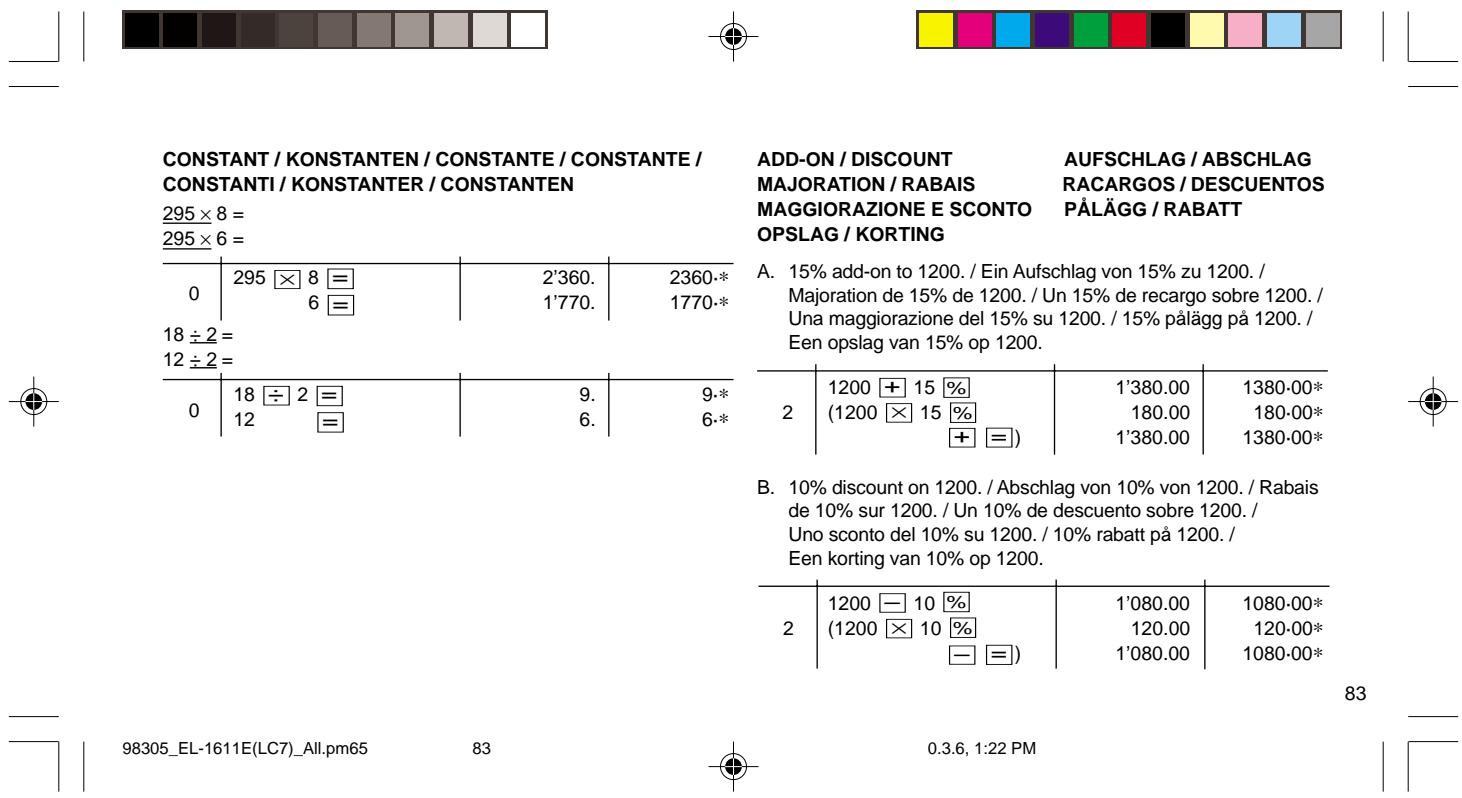

CONSTANT / CONSTANTS / CONSTANT / CONSTANT / CONSTANT / CONSTANTS / CONSTANTS
| 295 × 8 = |
| 295 × 6 = |
| 0 | 295 × 8 = 6 = | 2'360.1'770. | 2360.*1770.* |
| 18 ÷ 2= |
| 12 ÷ 2= |
| 0 | 18 ÷ 2 = 12 = | 9.6. | 9.*6.* |
ADD-ON / DISCOUNT
SURCHARGE / DISCOUNT
EXAMPLE 1: Set the following rate provisionally: 1 euro = 1.95583 DM. Convert 1,000 euro to DM.
Euro Currency Rates (as of January 1, 1999)
Country
Belgium
France
Germany
Ireland
Italy
Netherlands
Portugal
Spain
Finland
Austria
Luxembourg
Euro currency conversion rate
1 Euro = 40.3399 Belgian Franc (BF)
1 Euro = 6.55957 French Franc (F)
1 Euro = 1.95583 Deutsche Mark (DM)
1 Euro = 0.787564 Irish Pound (IEP)
1 Euro = 1936.27 Italian Lire (Lit)
1 Euro = 2.20371 Dutch Guilder (f.)
1 Euro = 200.482 Portuguese Escudos (Esc)
1 Euro = 166.386 Spanish Pesetas (Ptas)
1 Euro = 5.94573 Markkaa (mk)
1 Euro = 13.7603 Austrian Schilling (S)
1 Euro = 40.3399 Luxembourg Franc (LuxF)