
DAI 9 - Iron TEAM - Free user manual and instructions
Find the device manual for free DAI 9 TEAM in PDF.


| Product type | Iron |
| Brand | TEAM |
| Model | DAI 9 |
| Functions | Steam ironing, dry ironing, spray function, self-cleaning |
| Supported fabric types | Synthetic, silk, wool, cotton, linen |
| Temperature adjustment | Yes, by dial with markings for each fabric type |
| Steam adjustment | Yes, by dial with low to high flow positions |
| Heating indicator | Yes (indicator light turns off when temperature is reached) |
| Integrated spray nozzle | Yes, for spray function |
| Filling opening | Yes, with MAX mark |
| Water tank | Integrated, capacity not specified, max level indicated |
| Dry use | Yes, turn off steam |
| Iron rest | Stable, place vertically on heel |
| Safety | Do not immerse, unplug before filling/cleaning, do not touch hot surfaces, do not leave unattended |
| Maintenance | Regular descaling with specific iron cleaner, soleplate cleaning with special cleaner, self-cleaning every two months |
| Self-cleaning | Integrated procedure to remove impurities |
| Environmental protection | Do not dispose of with household waste, comply with WEEE directive (2002/96/EC) |
| Storage position | Vertical on heel, tank emptied, thermostat on MIN, steam off |
Frequently Asked Questions - DAI 9 TEAM
User questions about DAI 9 TEAM
0 question about this device. Answer the ones you know or ask your own.
Ask a new question about this device
Download the instructions for your Iron in PDF format for free! Find your manual DAI 9 - TEAM and take your electronic device back in hand. On this page are published all the documents necessary for the use of your device. DAI 9 by TEAM.
USER MANUAL DAI 9 TEAM
natural_image
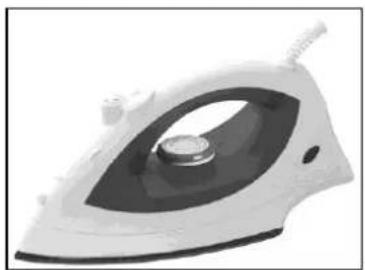
Exterior view of a white steam iron with a black cover and handle (no text or symbols visible)Dampfbügeleisen
Steam Iron
Fer à Vapeur
Stoomstrijkijzer
Plancha a Vapor
Ferro a Vapor
Ferro a Vapore
Fier de calcat cu aburi si spray
Парна ютия
CE
I/B Version 100210
TEAM DAI 9
230-240V\~50Hz 1800-2000W
D
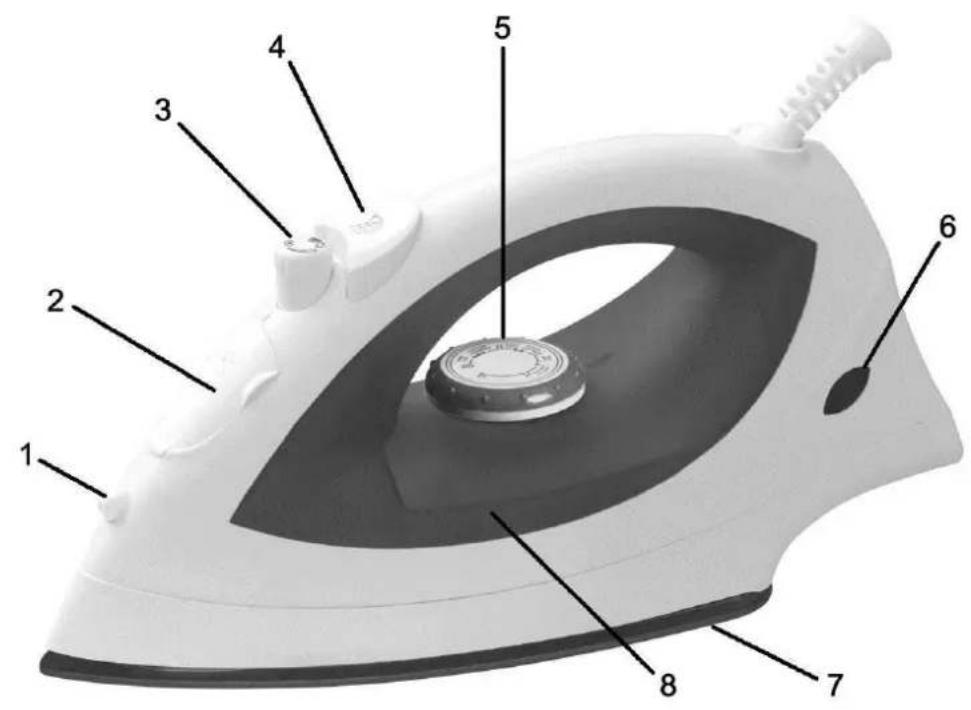
- Spray nozzle
- Filling opening
- Steam control knob
- Spray button
- Temperature dial
- Temperature indicator
- Soleplate
- Water tank
F
Please read these instructions carefully before using the appliance, and always follow the safety and operating instructions.
Important: People (including children) who are not able to use the appliance in a safe way, due to their physical, sensorial or mental capacity or their lack of experience or knowledge, must never use the appliance except if they are supervised by a person responsible for their safety or if they previously received instructions concerning the safe use of the appliance. Close supervision is necessary to prevent children from using the appliance as a toy.
☐ Check that your mains voltage corresponds to that stated on the appliance.
☐ Never leave the appliance unsupervised when in use.
From time to time check the appliance for damages. If it is damaged, it should be repaired by a competent qualified electrician(*). Should the cord be damaged, it must be replaced by a competent qualified electrician(*).
☐ Only use the appliance for domestic purposes and in the way indicated in these instructions.
☐ Never immerse the appliance in water or any other liquid for any reason whatsoever. Never place it into the dishwasher.
□ Never use the appliance near hot surfaces.
Before cleaning, always unplug the appliance from the power supply.
□ Never use the appliance outside and always place it in a dry environment.
☐ Never use accessories that are not recommended by the producer. They could constitute a danger to the user and risk to damage the appliance.
☐ Never move the appliance by pulling the cord. Make sure the cord cannot get caught in any way. Do not wind the cord around the appliance and do not bend it.
☐ The temperature of the accessible surfaces may be very high when the appliance is in use. Never touch these surfaces, always use the handle.
☐ Make sure the cord does not come into contact with the hot parts of the appliance.
Before using the appliance for the first time, remove all labels and remainders from the sole plate and carefully wipe it dry.
□ Always let the appliance cool down before cleaning, storing or filling it (model with spray and/or steam).
☐ To fill the tank it is absolutely necessary to unplug the cord (model with spray and/or steam).
☐ Never put your appliance in horizontal position, but preferably in vertical position.
☐ Make sure its soleplate does not touch inflammable materials (e.g. plastic, textile) during use.
☐ If you have a special heat-resistant base, make sure you put the steam dial in
position
□ Always unplug the iron when not in use.
☐ The iron shall be used and placed on a stable level surface.
☐ When the steam iron is put on its base, ensure that the surface on which the appliance stands is also stable.
☐ The filling opening should not be opened during use.
☐ Do not use the iron if it has fallen, if it shows any visible signs of damage or if it leaks.
(*) Competent qualified electrician: after-sales department of the producer or importer or any person who is qualified, approved and competent to perform this kind of repairs in order to avoid all danger. In case of need you should return the appliance to this electrician.
8 TEAM DAI 9 - 100210
! BEFORE USING THE IRON, remove any labels from the soleplate and wipe any manufacturing residue from the soleplate using a soft cloth.
FILLING THE WATER TANK
You can use demineralised water or tap water. If you use tap water, make sure you descale the appliance regularly according to the amount of scale the water contains. If you want to use the steam dial, fill the water tank as follows:
1) Unplug the iron from the outlet to let it cool down and set it horizontally on a stable level surface.
2) Turn the temperature dial to "MIN" and the variable steam dial to the setting.
3) To fill the water tank, pour water through the fill opening using a measuring cup. Never exceed the MAX mark of the water tank.
4) When ironing, unplug the appliance before refilling. Fill the water tank by holding the appliance in horizontal position without putting down the hot soleplate, unless you have a heat-resistant base.
TEMPERATURE SETTINGS
• You can choose the temperature setting in function with the cloth to iron.
- In order to turn the iron on, please turn the temperature knob clockwise into the required position (see table below). If you are in doubt, take a look at the garment label.
DRY PRESSING
• Turn the variable steam dial to position

- Plug in the iron.
- Set the temperature dial for the desired fabric. Always check the label of the garment before choosing the temperature setting.
- Set the iron on its heel rest and wait until the temperature indicator light goes out.
STEAM PRESSING
| Kind of textile | Temperature dial | Steam ironing |
| Synthetic (e.g. acetate, acrylic, viscose, polyamide, polyester...) | [DBYH] |  |
| | | ||
| Silk Wool |  |  |
| | | ||
| Cotton Linen |  |  |
| | | ||
| MAX |
• Fill the water tank (variable steam dial on position × ).
- Plug in the appliance.
- Turn the temperature dial clockwise into the required position.

- Turn the variable steam dial between X and W for minimum steam or on the position

for a larger amount of steam.
- Set the iron on its heel and wait until the temperature indicator goes out.
Caution: Set the temperature dial within the steam range ('●●' or '●●●'). If the temperature setting is too low, water may drip from the soleplate.
Check the garment label before ironing because some cloths may be damaged when exposed to steam or water.
SPRAY
- Produces a mist for removing stubborn creases.
- Spray • can be used at any temperature setting and during either dry or steam pressing. Press down the spray button to spray.
DESCALING
To descale your appliance, use products made especially for this purpose that you will find in shops and follow their instruction manual carefully.
CARE AND CLEANING
• Always unplug the appliance and let it cool down before cleaning.
• To clean the plastic parts of the iron, use a damp cloth.
- To clean the soleplate, make sure you use a product made especially for this purpose. Never use abrasive products.
WHEN YOU HAVE FINISHED IRONING
- Turn the temperature dial to "MIN" and the steam dial to ✕ and unplug the iron from the electrical outlet.
• With the soleplate facing away from you, turn the iron upside down to empty the water.
• Then store the hot iron on its heel rest so that any remaining moisture will evaporate.
SELF CLEANING
It is important to apply "self-cleaning" at least every two months to remove impurities, etc. The harder the water, the more the iron should be self-cleaned.
- Open the filling opening and fill the water tank up to the MAX level, then gently close the filling opening.
- Set the temperature dial to MAX.
- Insert the mains plug into the wall socket.
- Put the iron heel up until the temperature indicator light goes out. Then set the temperature dial to position MIN.
- Hold the appliance horizontally over a sink, then remove the steam control knob enabling the iron to self clean.
- Boiling water, steam and impurities will be ejected from the holes in the sole plate. Move the iron forwards and backwards while doing so, so that every hole of the sole plate is cleaned.
10 TEAM DAI 9 - 100210

- Set the steam dial to position as soon as the water tank is empty.
- Do not hesitate to repeat the operation of self-cleaning if impurities still remain.
- Unplug the iron and let it cool down completely before storing it.
PROTECTION OF THE ENVIRONMENT - DIRECTIVE 2002/96/EC
In order to preserve our environment and protect human health, the waste electrical and electronic equipment should be disposed of in accordance with specific rules with the

implication of both suppliers and users. For this reason, as indicated by the symbol — the rating label or on the packaging, your appliance should not be disposed of as unsorted municipal waste. The user has the right to bring it to a municipal collection point performing waste recovery by means of reuse, recycling or use for other applications in accordance with the directive.
FR MODE D'EMPLOI
POUR VOTRE SECURITE
REPASSAGE AVEC VAPEUR
PENTRU CALCARE USCATA
- Rotiti selectorul de aburi in pozitia

Team International Romania Srl;
Str. Industriilor 56A, sector 3, Bucuresti CUI 16991287; R.C. J40/19685/29.11.2004
BG УПЪТВАНЕ
Brand : TEAM
Model : DAI 9
Category : Iron