P 3211 - Headphones Pentagram - Free user manual and instructions
Find the device manual for free P 3211 Pentagram in PDF.


| Product Type | Over-ear wireless headphones |
| Brand | Pentagram |
| Model | P 3211 |
| Dimensions | Approx. 200 x 180 x 80 mm |
| Weight | Approx. 250 g |
| Power Source | Built-in rechargeable lithium-ion battery (500 mAh) |
| Charging | Micro USB charging cable (included) |
| Battery Life | Up to 20 hours of playback |
| Connectivity | Bluetooth 5.0, 3.5 mm audio cable (included) |
| Driver Unit | 40 mm dynamic driver |
| Frequency Response | 20 Hz – 20 kHz |
| Impedance | 32 Ω |
| Microphone | Built-in omnidirectional microphone |
| Controls | On-ear buttons for volume, playback, and calls |
| Main Functions | Wireless music streaming, hands-free calling, voice assistant support |
| Cleaning and Maintenance | Wipe with a soft, dry cloth. Do not use liquids or abrasive cleaners. |
| Safety Precautions | Do not use at high volume for extended periods to prevent hearing damage. Keep away from water and heat sources. |
| Spare Parts and Repairability | Replacement ear cushions and charging cables available from authorized service centers. Do not attempt to open the device. |
| General Information | User manual available in multiple languages. Check Pentagram support for updates. |
Frequently Asked Questions - P 3211 Pentagram
User questions about P 3211 Pentagram
0 question about this device. Answer the ones you know or ask your own.
Ask a new question about this device
Download the instructions for your Headphones in PDF format for free! Find your manual P 3211 - Pentagram and take your electronic device back in hand. On this page are published all the documents necessary for the use of your device. P 3211 by Pentagram.
USER MANUAL P 3211 Pentagram
NOTE! All information and technical data are subject to change without previous notice and/or indication of such changes in this manual.
Copyright © 2007 PENTAGRAM
All rights reserved, duplication and copying forbidden.

Copyright © 2007 PENTAGRAM
Copyright © 2007 PENTAGRAM
Copyright © 2007 PENTAGRAM
Copyright © 2007 PENTAGRAM
Copyright © 2007 PENTAGRAM
natural_image
Geometric star symbol enclosed in a pentagon, no text or labels presentPENTAGRAM
THE PERFECT SIMPLICITY
The most up-to-date versions of manuals, drivers and software are available at www.pentagram.eu
Introduction
Thank you for purchasing our wireless PENTAGRAM Bluetooth Headset. We believe it will meet your expectations and will serve you well.
In this manual we will describe the most important issues related to the device and its operation – we recommend that you read the instructions carefully.
The Bluetooth headset works with mobile phones which are equipped with Bluetooth module. You can also use it with a PC, a laptop or a PDA (such a device must support Bluetooth).
Box contents
- PENTAGRAM Bluetooth Headset (P3211)
- Operation manual
- Charger, cable included
Requirements
- Mobile phone – supporting Bluetooth standard version V1.1 or V1.2, and supporting headsets and/or car handsfree systems.
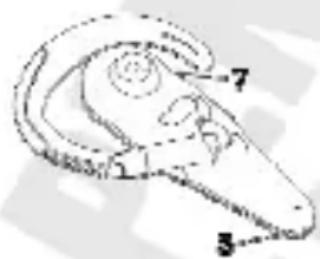
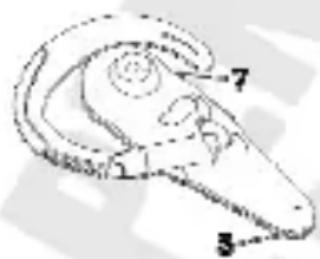
Device presentation
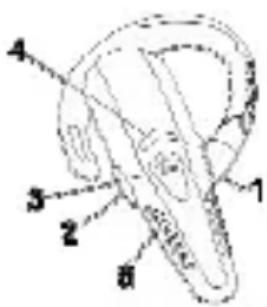
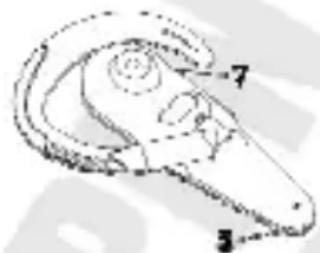
natural_image
Line drawing of a mechanical component with numbered annotations (7, 3) indicating parts of the handle and neck (no text or symbols beyond labels)- Key +
- Key -
- Function key
- Diode
- Microphone
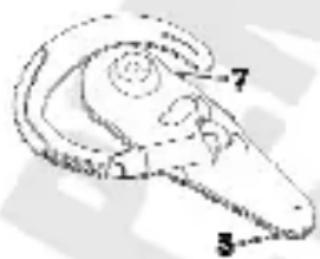
- Charger socket
- Loudspeaker
Cautions
• Prior to starting using this device, read this manual very carefully and follow its instructions.
• Do not store the headset in dusty places or in places with excessive hot or cold temperatures.
- Keep the headset out of children's reach, so as to avoid accidental swallowing or breaking the device.
- Only clean the headset with a soft dry cloth, do not use liquid or spray cleaning agents.
- Do not clean the headset while charging its battery.
- Do not disassemble or mend the headset yourself – it may break its internal components and make the warranty void!
• Using unauthorized trimmings and accessories may break the headset and make the warranty void!
- The included charger is suitable only for indoor use.
- Do not take out the charger from the socket by dragging the cable – it may break the charger and/or the cable.
Preparing for use
Charging the headset
- Connect the included charger to an electric socket,
- Connect the charger cable plug to the charger socket in the headset,
- While charging the battery, the diode will light red. When it finishes charging, the diode will stop lighting or it will blink red.

natural_image
Simple line drawing of an insect-like shape with no text or symbolsCharger socket
- The headset battery normally charges for approx. 90\~120 minutes.
- The first charging should last approx. \~4 hours.
- If you do not use the headset for a long time, the diode may start lighting only after several/about a dozen seconds.
- Using the headset while charging the battery is not recommended.
- You should only use the original charger included with the headset.
- When the battery is almost dead, the diode will start blinking red. It is recommended to charge the battery as soon as possible.
- The recommended charging temperature is: -10^ +45^ .
Switching the headset on and off
- To switch on the headset, press and hold the function key for approx. 2-3 seconds – the diode will blink blue 3 times and the loudspeaker will play a double sound.
- To switch off the headset, press and hold the function key for approx. 2-3 seconds – the diode will blink red 3 times and the loudspeaker will play a beep, and then a double sound.
Pairing the headset (with another Bluetooth device)
Before you start using the headset, you must pair it with a phone or another device using Bluetooth.
- Make sure the headset is off.
- Press and hold the function key for approx. 5 second. The diode will start blinking red – the headset is in pairing mode.
- Switch on Bluetooth in the phone and turn on the accessory discovery function. In case of problems, consult the phone manual.
- When discovering, the phone should find "PENTAGRAM 3211".
- Select the "PENTAGRAM 3211" and confirm the selection.
- Enter "0000" as the headset password and confirm the selection. The headset diode will start blinking blue. In some phone models, another headset choice confirmation may be needed. In case of problems, consult the phone manual.
-
The headset is in ready mode – you may make and answer calls.
-
If the pairing failed, the headset will switch into ready mode – perform the pairing again.
- When pairing, the recommended distance between the headset and the paired device should be between 0.3 ft (10 cm) and 3.2 ft (1 m).
- When pairing the headset with another Bluetooth device, enter "0000" as the headset password. In case of problems, consult the device manual.
- The pairing is maintained even after one of the paired devices is switched off, the Bluetooth module in a device is switched off and after one of the paired devices is switched on again.
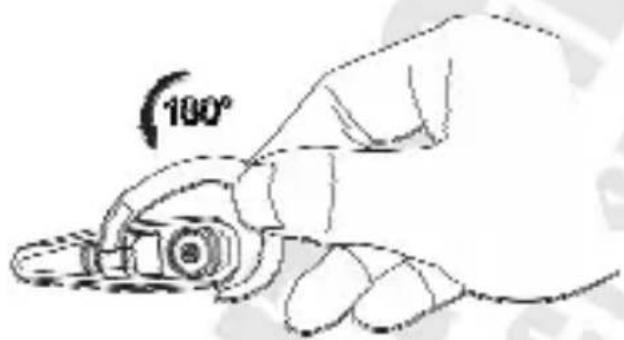
Putting the headset on
Depending on your personal preferences, the headset may be adjusted to the right or the left ear.
Operating the device
Answering calls
- When there is an incoming call, wait until you can hear the ring in the headset loudspeaker and press the function key to answer the call.
- If the phone starts ringing first, wait until you can hear the ring in the headset loudspeaker and only then press the function key to answer the call.
- When answering calls, the headset diode blinks blue four times per second.
- If the phone starts ringing and the headset is off, first switch the headset on and then press the function key to answer the call.
Depending on the manufacturer and the mobile phone model, the ring sound in the headset loudspeaker may be different from or the same as the sound set in the phone.
Rejecting calls
To reject an incoming call, wait until you can hear the ring in the headset loudspeaker, then press and hold the function key for 2-3 seconds and depress it after hearing a single sound.
Ending calls
- When you have finished the conversation, press the function key to end the call.
- Wait until the other side ends the call.
Voice dialling
If your phone supports the voice dialling function and it is activated, you may use it through the headset. In ready mode, press the function key and then follow the phone manufacturer's instruction related to voice dialling.
The activation manner of voice dialling may differ depending on the phone manufacturer and model.
Redialling
If your phone supports the redialling function, you may use it through the headset. In ready mode, press and hold the "-" key for 2-3 seconds and depress it after hearing a single sound, to connect with the number dialled most recently.
Muting
During a call, press and hold keys "+" and "-" simultaneously, and depress them after hearing a single sound. The microphone will be muted and the other party will not hear anything said into the headset. When the microphone is muted, you will hear a single sound from time to time. To turn off the muting, press the "+" or "-" key.
Call transferring
If the call is through the headset, press and hold the "+" key for 2-3 seconds and depress it after hearing a single sound – the call will be transferred to the mobile phone.
If the call is through the phone, you may transfer it to the headset by pressing its function key – on the displays of some phone models, call transferring to the headset will be marked with additional symbol.
To activate this function, the phone must support car handsfree systems. For more information, consult the phone manual.
Call managing
- When a call is through the headset, press and hold the "-" key for 2-3 seconds and depress it after hearing a single sound – the call will be put on hold. If there is another call waiting, it will be answered automatically.
- Press and hold the "-" key for 2-3 seconds and depress it after hearing a single sound, to resume the held call – thus you may easily switch between two calls.
- During a call, when another call is put on hold, press the function key to end the active call and resume the held one.
Before you start using this function, make sure that the functions of waiting calls and putting calls on hold are supported by your mobile network provider, and that your mobile phone supports them.
Ending call 1 and answering call 2
During call 1, incoming call 2 is indicated by a double sound. Press and hold the "-" key for 4-5 seconds and depress it after hearing the second single sound and music. Call 1 will be ended, and call 2 will be answered.
Before you start using this function, make sure that the functions of waiting calls and putting calls on hold are supported by your mobile network provider, and that your mobile phone supports them.
Tripartite call
- During call 1, incoming call 2 is indicated by a double sound. Press and hold the "-" key for 2-3 seconds and depress it after hearing a single sound – call 1 will be put on hold, and call 2 answered.
- To start a tripartite call, when call 2 is active, press and hold the "+" key for 2-3 seconds and depress it after hearing a single sound – call 1 will be resumed and a call between three parties will be possible.
- To end a tripartite call, press the function key.
- Before you start using this function, make sure that the functions of waiting calls and putting calls on hold are supported by your mobile network provider, and that your mobile phone supports them.
- During a tripartite call, it is impossible to return to a normal call (1 or 2).
Adjusting volume
You may adjust the headset volume using keys "-" (reduce volume) and "+" (increase volume).
Reaching the quietest or the loudest volume will be indicated by a double sound.
Specifications
| Model: P3211 | |
| Standard Bluetooth V1.2, Class II | |
| Frequency 2.4 GHz ~ 2.4835 GHz, band ISM | |
| Standby time up to 9 h/up to 300 h | |
| Data encryption 128-bit encryption | |
| Power Built-in li-poly battery | |
| Charger Input 100-240 V AC, output 5 V DC | |
| Operating temperature -10°C ~ +55°C | |
| Charging temperature -10°C ~ +45°C | |
| Operating humidity | 10% - 90% (no condensation) |
| Weight | 14,5 g (including battery) |
| Dimensions | 69,6 x 20,8 x 11,8 mm |

Bedienungsanleitung
PENTAGRAM Bluetooth Headset (P3211)

natural_image
Geometric star symbol enclosed in a pentagon, no text or labels presentPENTAGRAM
THE PERFECT SIMPLICITY
natural_image
Pure electrical circuit lines without any symbolsnatural_image
Geometric star symbol enclosed in a pentagon, no text or labels presentPENTAGRAM
THE PERFECT SIMPLICITY
Вступление
natural_image
Geometric star symbol enclosed in a pentagon, no text or labels presentPENTAGRAM
THE PERFECT SIMPLICITY
natural_image
Simple line drawing of an insect-like shape with no text or symbolsGniazdo ładowarki
natural_image
Geometric star symbol enclosed in a pentagon, no text or labels presentPENTAGRAM
THE PERFECT SIMPLICITY
natural_image
Geometric star symbol enclosed in a pentagon, no text or labels presentPENTAGRAM
THE PERFECT SIMPLICITY
- Copyright © 2007 PENTAGRAM
- Introduction
- Box contents
- Requirements
- Device presentation
- Cautions
- Preparing for use
- Charging the headset
- Charger socket
- Switching the headset on and off
- Pairing the headset (with another Bluetooth device)
- Putting the headset on
- Operating the device
- Answering calls
- Rejecting calls
- Ending calls
- Voice dialling
- Redialling
- Muting
- Call transferring
- Call managing
- Ending call 1 and answering call 2
- Tripartite call
- Adjusting volume
- Bedienungsanleitung
- PENTAGRAM Bluetooth Headset (P3211)
- Вступление
- Gniazdo ładowarki
Brand : Pentagram
Model : P 3211
Category : Headphones