
CTV 652 - TV AEG - Free user manual and instructions
Find the device manual for free CTV 652 AEG in PDF.


| Product Type | CRT Television |
| Brand | AEG |
| Model | CTV 652 |
| Screen Size | 21 inches |
| Dimensions (W x H x D) | 594 mm x 462 mm x 448 mm |
| Weight | 22 kg |
| Power Supply | ~170-245 V, 50 Hz |
| Power Consumption | Not specified (typical for 21" CRT: ~60-80 W) |
| TV Standard | PAL/SECAM, BG/DK A2 NICAM Stereo |
| Video Input | PAL/SECAM/NTSC |
| Channel Coverage | VHF-L (E2-S6), VHF-H (S7-S41), UHF (E21-E69) |
| Aerial Socket | 75 Ohm |
| Program Memory | 100 programs |
| Sound Output | 2 x 2 W |
| Remote Control | Yes, with full function keys |
| Teletext | Yes, with sub-page and reveal functions |
| AV Inputs | SCART1, SCART2, Front AV, S-Video, RGB |
| Sleep Timer | Up to 90 minutes, adjustable in 15-min steps |
| Child Lock | Yes, via menu option |
| Cleaning | Unplug and use lightly dampened soft cloth; no chemicals |
| Safety Features | Ventilation clearance (10 cm), no liquids near device, battery disposal caution |
| Spare Parts / Repairability | Contact qualified service engineer; guarantee 24 months |
Frequently Asked Questions - CTV 652 AEG
User questions about CTV 652 AEG
0 question about this device. Answer the ones you know or ask your own.
Ask a new question about this device
Download the instructions for your TV in PDF format for free! Find your manual CTV 652 - AEG and take your electronic device back in hand. On this page are published all the documents necessary for the use of your device. CTV 652 by AEG.
USER MANUAL CTV 652 AEG
natural_image
Front view of a vintage CRT television with blank screen and ventilation grille (no visible text or symbols)CTV 652 ST/VT (N)
| Operating tips | 19 |
| Remote control (RC) | 20-21 |
| Switching on | 21 |
| Control of TV set by using MENU tables | 21 |
| Selecting the menu language | 22 |
| Automatic search of programmes | 22 |
| Automatic update of programmes | 23 |
| Manual tune up of programmes | 23-24 |
| Customizing your stored programmes | 24 |
| Individual setting of programmes | 25 |
| Quick adjust of sound and picture parameters | 26 |
| Regulation of sound parameters | 26-27 |
| Regulation of picture parameters | 27-28 |
| Review of tuning programmes | 28 |
| Special functions | 28-29 |
| Setting the time for automatic switching on and off | 29-30 |
| AV modes | |
| Using teletext | 30 |
| Television package | 31 |
| General specifications | 31 |
| Quick start guide | 31 |
| Garantee | 32 |
A távirányító
Thank you for purchase of this colour TV set. Please read this instruction carefully. You will learn how to use TV set and what to do to prolong its service life.
Operating tips
Safety:
- Do not place anything on the television and ensure a minimum distance 10 cm around the apparatus for sufficient ventilation.
- If your television mains lead or plug becomes damaged or requires replacement, switch off your television, remove the plug from the socket and call a qualified service engineer.
• Always situate your television on a solid and steady surface. - Never use a make-shift stand fixed with wood screws.
- This television is meant to be used in the home in moderate climates (not in tropical climates). Other use might be dangerous.
- Do not expose the apparatus to dripping or splashing.
- Never let anyone, especially children, push small objects into ventilation slots.
- Route the mains lead where it will not be walked on, crushed, chafed, cut or damaged in any way.
• Pull the mains plug out of the wall socket and disconnect the aerial during thunderstorms. - Do not use the television near water, for example near a bath, sink, and pool or in any damp environment. Do not place objects filled with liquids, such as flower vases, on top of the television.
- If you have spilt liquid into your television, or it fails to operate correctly, switch it off, disconnect the plug and call a qualified service engineer. Never remove the back cover.
- Ensure that the ventilation is not be impeded by covering the ventilation openings with items, such as newspapers, table-cloths, curtains etc.
- Do not place naked flame sources, such as lighted candles on the apparatus.
• Take attention to the environmental aspects of battery disposal - Unequal battery types or new and used batteries may not be used together.
Caution
Danger of explosion if battery is incorrectly replaced. Replace only with the same or equivalent type.
Your television is in conformity with the safety requirements of standard EN 60065.
Position:
For best results, choose a position where light does not fall directly on the screen and away from sources of heat. Do not put objects with magnetic field nearby the television or it could affect the quality of the colours.
Cleaning:
Switch off and unplug the television and use only a lightly dampened soft cloth to clean it. Do not use chemically active substances as these may damage the cabinet finish.
Standby:
For convenience your television can be switched to standby with the remote control. To preserve optimum picture quality (by de-magnetising the picture tube), we advise you to switch off your television at the on/off switch regularly.
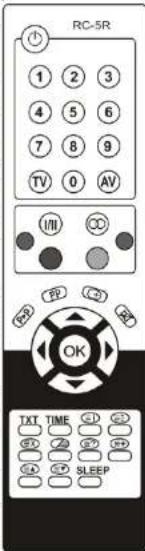
Remote control (RC)
POWER The key for switching TV to standby. Switches your TV partly off. Then, the screen fades, the red lamp starts to light on the front panel of television. If you want to switch TV on, you must pres the RC buttons A.V., 0, 1, ..., 9, or the buttons P+, P- on front panel. Switches the sound off. Pres the key again or <; > to restore the sound.
0,1,...,9 Using the 0, 1, ..., 9 keys, the required programs or Teletext pages are selected.
PP Normalise key. Press to cycle through four sets of picture settings: "PERSONAL" (it is set by regulators in the table PICTURE), "STANDARD", "SOFT" (the contrast is reduced) and "DYNAMIC" (the contrast is enlarged).
Selection of five fixed volume parameter values: "INDIVIDUAL" (set with controls in table VOLUME), "STANDARD", "LANGUAGE", "MUSIC" and "FILM".
P>P A key for return to the previous programme.
OK Press it to select MENU. If you want to switch the menu off, press this key one or two times more.
AV Programme selection keys. Selects the next or the previous stored programme. Also used to highlight the function you wish to use within menu.
<,> The keys of the next or the previous page in Teletext mode. Volume keys. Adjust sound volume. These buttons also are used for selection and adjust the settings of parameters in the MENU tables.
A direct key to switch on a dimensional effect of the volume. Press this key once again switches off this dimensional effect.
A direct key to switch on tone compensation. Press this key once again switches off tone compensation.
Coloured keys - RED, GREEN, YELLOW and BLUE keys are used for quick access to the adequate MENU tables.
TXT Teletext key. Press it to select Teletext. Press again to restore TV picture.
TV mode key. When you press this key, the TV set is switched to television mode from the teletext or video mode.
AV AV modes' key. By pressing this key the AV1, AV2, RGB, S-VIDEO, FRONT AV, TV are selected in series.
Teletext/picture mix key. In Teletext mode press to show TV picture and Teletext together. Press again to return to Teletext.
TIME Sub-page key. In Teletext mode press to select sub-pages. Some pages may be multiple in Teletext. The sub-page key allows accessing any of these pages directly. Press sub-page key and enter four digits for the page you need, e.g. page 2 would be entered as 0002. When the sub-page has been found it will be displayed. Press the sub-page key again to return to normal page sequence.
It turns on the real time clock in the television mode. In order to turn of it, it is need once more to push this button.
Stop key. In Teletext mode press to stop and start the automatic alternation of sub-pages. Interrupt key. In Teletext mode press to watch TV while waiting for a Teletext page to be found. At this time the number of page is flashing. When page is found, the number stops flashing. Press the interrupt key again to display the page.
Tartalom
The device has been tested according to all relevant CE guidelines, such as electromagnetic compatibility and low voltage directives, and has been constructed in accordance with the latest safety regulations.
Subject to technical changes without prior notice!
Guarantee
The device supplied by our Company is covered by a 24 month guarantee starting on the date of purchase (receipt).
During the life of the guarantee any fault of the device or its accessories *) ascribable to material or manufacturing defects will be eliminated free of charge by repairing or, at our discretion, by replacing it. The guarantee services do not entail an extension of the life of the guarantee nor do they give rise to any right to a new guarantee!
Proof of the guarantee is provided by the proof of purchase. Without proof of purchase no free replacement or repair will be carried out.
For repairs or replacement during the life of the guarantee return the device in its original packing together with the proof of purchase to your dealer.
*) Damage to accessories does not mean automatic free replacement of the whole machine. In such cases please contact our hotline. Broken glass or breakage of plastic parts are always subject to a charge.
Defects to consumables or parts subject to wearing (e.g. motor pistons, kneading blades, drive shafts, spare remote control, spare toothbrushes, saw blades, etc.) as well cleaning, maintenance or the replacement of said parts are not covered by the guarantee and hence are to be paid!
The guarantee lapses in case of unauthorized tampering.
After the expiry of the guarantee
After the expiry of the guarantee repairs can be carried by the competent dealer or repair service against the payment of the ensuing costs.
| SLEEP | Sleep Timer key. Press to set the time after which the TV set automatically switches into standby mode. Each pressing of the key increments the time by 15 minutes up to 90 minutes. To disable, repeatedly press the key until the set time returns to zero. The set time is displayed on the screen for a short time after each key press.In Teletext mode press to start the search of displayed page again. |
| I | In Teletext mode press to reveal hidden text (e.g. answers). Press again to hide this text. |
| ? | In the television mode - a key of DUALI/DUALII volume mode selection. |
| I/II | The key which choose the groups of teletext languages. |
| + | Page expand key. In Teletext mode, press to enlarge top half of the page. Press again to enlarge the bottom half. Press again to return to normal size. |
| + | When this button is pressed, the number of the program being received, the current time (if set), status of the shut down timer, settings of fixed picture parameters are shown. |
Switching on
Switching on of TV
- Remove the battery cover from the remote control unit and install two AAA type batteries according to the diagram inside the battery compartment. Replace the battery cover.
- Connect your aerial to the TV set.
- Connect your TV to a 230 VAC power socket.
- Switch on your TV with the ① switch on the front panel. The red light will be illuminated. If the screen doesn't light up, push the button P- or P+ on the front panel of the television, or any of the keys A, VA, V, 1, ..., 9 on the remote control.
Notes:
- After switching the television set on by using ① front panel button, the set switches to the mode, what is set in the line POWER ON of the menu table OPTIONS:
- it turns on the standby mode, if it is selected. In this mode, lights up the red lamp.
- it turns on to the working state, if the LAST STATE is selected and TV was turned of by using ① front panel button from the working state.
- it turns on to the standby mode, if the LAST STATE is selected and TV was turned of by using ① front panel button from the standby mode.
- When you turn on the TV from the standby mode to the working mode, the red lamp fades on the front panel of television.
Control of TV set by using MENU tables
Your television is controls using the MENU tables SOUND, PICTURE, VIEW, CLOCK, AUTOSEARCH, MANUAL SEARCH, EDIT, OPTIONS, PROGRAM TUNE, which are shown in the screen when you push RC button OK longer than 2 second. There are written to the separate lines the titles of the TV parameters and their ways of the tune up and selection in the MENU tables.
When you push the colour RC buttons, you can go directly to MENU tables: SOUND-red, PICTURE-green, VIEW-yellow, CLOCK-blue. MENU table or the line of table in which is written wanting to change or tune the parameter, is chosen by RC buttons A, V, and the active
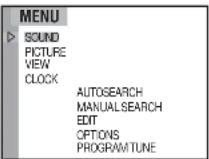
or regulation of this parameter is done by RC buttons < or >. The MENU tables have gone from the TV screen, when you push RC button OK or TV one or two times. Note: the chosen line in the table is marked by cursor and the text's colour changes.
Selecting the menu language
The notes of television control graphic can be in different languages. The graphic's language is selected by this order:
- Push the RC button OK and keep it about 2 seconds, until the MENU table will show on the screen.
- Using RC buttons A.V select the function OPTIONS and push RC button < or >. The table OPTIONS will appear on the screen.
- Pushing the RC button < or >, select the preferred graphic's language.
- If you want to leave the MENU tables, push the RC button OK twice.
MENU
| SOUND | |
| PICTURE | |
| VIEW | |
| CLOCK | |
| AUTOSEARCH | |
| MANUAL SEARCH | |
| EDIT | |
| OPTIONS | |
| PROGRAM TUNE |
OPTIONS
| LANGUAGE | ENGLISH |
| PROGRAM NUMBER | OFF |
| POWER ON | LAST STATE |
| AV SOURCE | VCR |
| MENU BRIGHTNESS | 0...15 |
| BLUE SCREEN | ON |
| CHILD LOCK | OFF |
Automatic search of programmes
Automatic search of programmes is for tuning up and automatic to writing all broadcasted programmes into the memory.
- Push the RC button OK and keep it about 2 seconds, until the MENU table will appear in the screen.
- Using RC buttons A, V select the line AUTOSEARCH and push RC button < or >. The table AUTOSEARCH will appear in the screen.
- Push the RC button < or >. The table AUTOSEARCH will appear on the screen with warning: WARNING! ALL PROGRAMS WILL BE REMOVED!
- If you want to continue this process, select the line YES using RC buttons A, V and then push RC button < or >. All broadcasted TV programmes will be tuned up automatically and will be written in to the memory. It takes few minutes. When the writing will be finished, the first written programme and table EDIT will appear in the screen. This function is used to customizing the programmes. How to use this table, read in the head "Customizing your stored programmes".
- If you want to leave the MENU tables, push the RC button OK twice.
- You can switch the programmes using the RC buttons A, V, 0, 1, ..., 9 or P+, P- on the front panel of TV.
MENU
| SOUND |
| PICTURE |
| VIEW |
| CLOCK |
| AUTOSEARCH |
| MANUAL SEARCH |
| EDIT |
| OPTIONS |
| PROGRAM TUNE |
AUTOSEARCH
| AUTOMATIC INSTALLATION |
| AUTOMATIC UPDATE |
| WARNING! |
| ALL PROGRAMS WILL BE REMOVED! |
| CONTINUE? |
| NO |
| YES |
Television package
| TV set | -1pc. | ||
| Operating instruction | -1pc. | ||
| Remote control | -1pc. | ||
| Packing box | -1pc. |
General specifications
| TV standard | PAL/SECAM | BG/DK A2 NICAM STEREO |
| Video input | PAL/SECAM/NTSC | |
| TV channels | VHF-L-E2-S6 (metric band)VHF-H-S7-S41 (metric band)UHF-E21-E69 (decimetric band) | |
| Aerial socket | 75 Ohm | |
| Programmes memory | 100 | |
| Maximum sound output | 2X2 W | |
| Power requirement | ~170 - 245 V, 50Hz | |
| Normal used power | ||
| Dimensions / Weight | 21": 594 mm x 462 mm x 448mm / 22 kg |
Quick start guide
- Fit the Batteries into the Remote Control according to the diagram in the battery compartment.
- Plug your main home aerial into the TV set.
- Plug your TV into the mains and switch ON using the ① button on the front panel. If your TV screen does not light up, press the A.v button or any number button on the RC to cancel standby mode.
- Push the RC button OK and keep it about 2 seconds, until the MENU table will appear on the screen.
- Using RC buttons A.v select the line AUTOSEARCH and push RC button < or>. The table AUTOSEARCH will appear on the screen.
- Push RC button < or >. Using RC buttons A.V select the line YES and push RC button < or >. Your TV will now automatically tune and store your local TV stations. This may take a few minutes. When the writing will be finished, the first written programme and table EDIT will appear in the screen. This function is used to customizing the programmes. How to use this table, read in the head "Customizing your stored programmes".
- If you want to leave the MENU tables, push the RC button OK twice.
- You can switch the programmes using the RC buttons ∧, ∨, 0, 1, ..., 9 or P+, P- on the front panel of TV.

Meaning of the "Dustbin" Symbol
Protect our environment: do not dispose of electrical equipment in the domestic waste.
Please return any electrical equipment that you will no longer use to the collection points provided for their disposal.
This helps avoid the potential effects of incorrect disposal on the environment and human health.
This will contribute to the recycling and other forms of reutilisation of electrical and electronic equipment.
Information concerning where the equipment can be disposed of can be obtained from your local authority.
- Using RC buttons A, V as select the line PROGRAM. Using RC buttons 0, 1, ..., 9 in the line PROGRAM set the number of programme in which the TV has to switch automatically.
- Using RC buttons A, V select the line SLEEP TIMER. Using RC buttons < or >, you can set the time after which the television will turn into the standby mode. The time interval is between 15 and 90 minutes. If you want to turn off the timer, select the variant OFF.
- If you want to leave the MENU tables, push the RC button OK twice.
| CLOCK | |
| CURRENT TIME | 09:51 |
| TIME FROM PROG. | 04 |
| TURN OFF TIME | — |
| TURN ON TIME | —;— |
| PROGRAM | — |
| SLEEP TIMER | OFF |
Notes:
- When you turn off your television using the power button, you have to enter the time meanings anew, if there is no automatic scan of real time from the teletext.
- If you turned off your television using the power button, you have to enter the fixed time of switching off/switching on anew.
AV modes
Push RC button AV one or few times to select the desired modes of external signal sources:
AV1 – selects picture and sound inputs in the SCART1 socket. It is used to connect VCR, satellite receiver or other equipment.
AV2 – selects picture and sound inputs in the SCART2 socket. It is used to connect the video, satellite receiver or other equipment.
RGB - selects the inputs of red, green and blue color signals in the SCART1 socket. It is used to connect up the games or other signals.
S-VIDEO - selects the inputs of sound, picture's sharpness and colour signals in the SCART2 socket. It is used to connect the video, satellite receiver or other equipment.
FRONT AV- Is used to select the picture and tone input at the FRONT AV connections. Is used for the connection of video recorder, satellite receiver or another appliance.
Using teletext
- Turn on the programme, which broadcasts the information of teletext.
- Push RC button TXT and turn on the teletext mode.
- Using RC buttons 0, 1, ..., 9 select the desired page (3 numbers).
Your television will start to search the selected page of teletext. After a while, you will see your selected page with teletext information on the screen. - If some symbols are reproduced incorrectly in the teletext page,
it can be that wrong group of teletext languages is selected. Push
the RC button I/II and select the best-suited group: R/W, R/E, E/W, E/E, GRE. - If you want to come back to TV mode, push RC button TV or TXT.
| 100 | 100 | TV3 | 01/05 | 09:48:07 |
| TELETEXT INFORMATION | ||||
Notes:
- If there are no teletext in your chosen programme, you will see the note NO TELETEXT when you switch the TV to the teletext mode.
- The control of teletext information using other buttons is written in the chapter "Remote control".
Automatic update of programmes
If you want to add new programs to already written programs, you can use the function of automatic renewal.
- Push the RC button OK and keep it about 2 seconds, until the MENU table will appear on the screen.
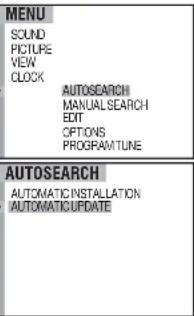
- Using RC buttons A, V select the line AUTOSEARCH and push RC button < or >. The table AUTOSEARCH will appear on the screen.
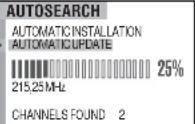
- Select the line AUTOMATIC UPDATE by using RC buttons A, V and then push RC button < or >. All broadcasted TV programs will be tuned up automatically and will be written into the memory. It takes few minutes. When the writing will be finished, the first written program and table EDIT will appear on the screen. This function is used to customizing the programmes. How to use this table, read in the head "Customizing your stored programmes".
- If you want to leave the MENU tables, push the RC button OK twice.
- You can switch the programmes using the RC buttons A, V, 0, 1, ..., 9 or P+, P- on the front panel of TV.
 |
 |
Manual tune up of programmes
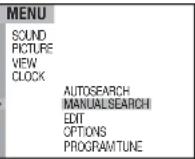
- Push the RC button OK and keep it about 2 seconds, until the MENU table will appear in the screen.
- Using RC buttons A, V select the line MANUAL SEARCH and push RC button < or >. The table MANUAL SEARCH will appear on the screen.
- Using RC buttons <, >, 0, 1, ..., 9 select the number of programme, into which you want to write tuned programme. If selected number of programme is red, it shows, that the programme is written in the selected position and will be deleted when you will write the new programme.
- Using RC buttons A, V select the line BAND and push RC button < or > to select desirable band of channels: VHF-L, VHF-H or UHF. (VHF-L/L1, VHF-H/L (optional)).
- Using RC buttons <, >, 0, 1, , 9 to select the line SEARCH. If you want to start the search, push the RC button < or > (it depends on the direction of search). When the programme is founded, the farther tuning stops. If you want to find and tune up other programme, it is necessary to push RC button < or > . It should be repeated until the desirable programme will be found.
 |
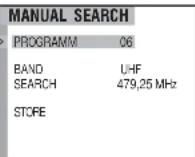
If you know the TV channel frequency, you can enter it directly by using RC buttons 0, 1, ..., 9.
It is necessary to write this programme in to the memory.
-
Using RC buttons A, V select the line STORE and push RC button < or >. You will see the strip in the screen, which shows that the programme is written into the memory.
-
If you want to tune up more programmes, using RC buttons A, VA select the line PROGRAM and
repeat this procedure, like is written in the 3-6 steps, until you will tune up all programmes which you want.
- If you want to leave the MENU tables, push the RC button OK twice.
Customizing your stored programmes
You can give the names for the programmes (NAME), to mask the programmes (HIDE), to change the succession of tuned up programmes (CHANGE), also to delete unwanted programmes (DELETE).
-
Push the RC button OK and keep it about 2 seconds, until the MENU table will appear on the screen.
-
Using RC buttons A, V select the line EDIT and push RC button < or >. The table EDIT will appear on the screen.
-
Using RC buttons <, >, 0, 1, ..., 9 select the programme, which you want to edit.
Name's conferment
- Using RC buttons A.V select the line NAME. Using RC button
select the symbol position of name, which you want to install, and using RC buttons A.V select one of symbols A-Z, 0-9, ./, +,-, space. The name can have up to five symbols.
When you have selected the name's symbol, using RC button > go to the next position or using RC button < go to the former position. Push the RC button OK, when you finish selecting the name.
The mask of programmes.
- Using RC buttons , V select the line HIDE. Using RC button < or > turn on (ON) or turn off (OFF) the mask of concrete programme. If you choose ON, your television will skip selected programme, switching the programmes using RC buttons , V . You will be able turn on this programme only using RC buttons 0, 1, ..., 9 or from the table VIEW.
The shift of programmes.
- Using RC buttons A, V select the line CHANGE and using RC button
< or > activate the function of change.
- Using RC buttons < or >, select the position of programme into which you want to transfer the turned on programme. Push the RC button OK. You will see the strip and the new number of programme in the screen. It shows that the programme is transferred.
The deletion of programmes.
-
Using RC buttons A, V select the line DELETE and push RC button < or >. The turned on programme will be deleted and television will switch to the next programme.
-
If you want to perform this procedure with other programmes, then select the line PROGRAM by using RC buttons A, VA and repeat procedure, like it is written in the 3-8 items.
-
If you want to leave the MENU tables, push the RC button OK twice.
| MENU | |
| SOUND | |
| PICTURE | |
| VIEW | |
| CLOCK | |
| AUTOSEARCH | |
| MANUAL SEARCH | |
| EDIT | |
| OPTIONS | |
| PROGRAM TUNE | |
| EDIT | |
| PROGRAM | 0G |
| NAME | ---- |
| HIDE CHANGE | OFF |
| DELETE | |
-
If you want that number of broadcasting programme would be shown constantly, select the ON by using RC button < or >.
-
If you want that the number of broadcasting program would be shown just when you switch the program, using RC button < or > select the variant OFF.
Switching on.
-
Using RC buttons A, V, select the line POWER ON.
-
If you want, that television at switching on after it was switched off by power button will turn into the slate it was before the switching off (to working mode – if it was turned off at the working mode, or to the standby mode – if it was turned off at the standby mode), select the variant LAST STATE by using RC button < or >.
-
If you want, that television after the disconnection always would turn into the standby mode, select the variant STANDBY by using RC button < or >.
Signal source.
-
Using RC buttons A, V select the line AV SOURCE.
-
If the TV signal goes from the VCR, using RC button < or > select variant VCR.
-
If the TV signal goes from the DVD, satellite tuner etc., select variant TUNER by using RC button < or >.
Menu brightness
-
Using RC buttons A,V select the line MENU BRIGHTNESS.
-
Push RC button < or > and set the desired graphic brightness of the menu tables. The range of regulation is from 0 to 15.
The blue screen.
-
Using RC buttons A,Y select the line BLUE SCREEN.
-
If you want that the screen would shine in blue then there is no signal push RC button < or > and turn on this function (select ON).
-
If you want to see the noise then there is no signal, push RC button < or > to turn off this function (select OFF).
Child lock.
-
Using RC buttons A, V select the line CHILD LOCK.
-
If you want to lock your television, push RC button < or > and turn on this function by selecting the ON. If you want to unlock your television, push RC button < or > and turn off this function by selecting the OFF.
-
If you want to leave the MENU tables, push the RC button OK twice.
Setting the time for automatic switching on and off
-
Push the RC button OK and keep it about 2 seconds, until the MENU table will appear on the screen.
-
Using RC buttons A.V select the line CLOCK.
-
Push RC button < or >. The table CLOCK will appear on the screen.
-
Using RC buttons 0, 1, ..., 9 set the real time in the line CURRENT TIME.
-
The TV can scan the real time from the programme, in which the teletext is translating.
Using RC buttons A, V select the line TIME FROM PROG. Using RC buttons 0, 1, ..., 9 set the number of teletext programme in the line
TIME FROM PROG. This enables automatically renew data of real time after the TV is switched on in programme.
-
Using RC buttons A, V select the line TURN OFF TIME. Using RC buttons 0, 1, ..., 9 set the time, when the TV has to turn on from working mode to the standby mode.
-
Using RC buttons A, V select the line TURN ON TIME. Using RC buttons 0, 1, ..., 9 set the time, when the TV has to turn on from standby mode to the working mode.
| OPTIONS | |
| LANGUAGE | ENGLISH |
| PROGRAM NUMBER | OFF |
| POWER ON | LAST STATE |
| AV SOURCE | VCR |
| MENU BRIGHTNESS | 0...15 |
| BLUE SCREEN | ON |
| CHILD LOCK | OFF |
| MENU | |
| SOUND | |
| PICTURE | |
| VIEW | |
| CLOCK | |
| AUTOSEARCH | |
| MANUALSEARCH | |
| EDIT | |
| OPTIONS | |
| PROGRAMTUNE | |
-
You have to write the parameters into memory. Using RC buttons A, V select the line STORE. Push RC button < or >. You will see the green bar. It means that everything was written successfully in the memory.
-
If you want to leave the MENU tables, push the RC button OK twice.
Notes: 1. You can go directly to the table PICTURE, if you push the green RC button.
- The fixed picture parameters you can select directly by RC button PP.
The line HUE can only be selected, if you have chosen the system NTSC.
Review of tuning programmes
All tuned programmes you can review in the table VIEW.
-
Push the RC button OK and keep it about 2 seconds, until the MENU table will appear on the screen.
-
Using RC buttons A, V, select the line VIEW.
-
Push RC button < or >. The table VIEW will appear on the screen.
-
Using RC buttons A,V (in the column), or using RC buttons < or
(in the row) you can switch the TV to any programme which is in the list. The programme will turn on approximately after 1 second.
- If you want to leave the MENU tables, push the RC button OK twice.
Notes:
-
You can go directly to the table VIEW, if you push the yellow RC button.
-
The hidden programmes are marked in red colour.
MENU
| SOUND |
| PICTURE |
| VIEW |
| CLOCK |
VIEW
| 01 TV3 | 11 |
| 02 TV4 | 12 |
| 03 | 13 |
| 04 | 14 |
| 05 | 15 |
| 06 | |
| 07 | |
| 08 | |
| 09 | |
| 10 |
Special functions
-
Push the RC button OK and keep it about 2 seconds, while the MENU table will appear on the screen.
-
Using RC buttons A, V, select the line OPTIONS.
-
Push RC button < or >. The table OPTIONS will appear on the screen.
Languages.
- Push RC button < or > and select the proper language for control graphic.
Program number.
- Using RC buttons A, V, select the line PROGRAM NUMBER.
MENU
| SOUND |
| PICTURE |
| VIEW |
| CLOCK |
Individual setting of programmes
-
Push the RC button OK and keep it about 2 seconds, until the MENU table will appear on the screen.
-
Using RC buttons A, VA elect the line PROGRAM TUNE and push RC button < or > . The table PROGRAM TUNE will appear on the screen.
-
Using RC buttons <, >, 0, 1, ..., 9 select the programme, for which you want to perform the individual settings.
The correction of sound.
- Sometimes the sound level of various programmes is different. This function lets you to correct the sound for every programme individually, and you wouldn't need to correct volume when switching the programmes.
Using RC buttons A, V select the line VOLUME. Pushing RC button < or > you can change the sound's level from -7 to +7.
The correction of the picture lightness.
- Sometimes the picture brightness of various programmes is different. This function lets you to correct the brightness for every programme individually, and you wouldn't need to correct brightness, when switching the programmes.
Using RC buttons A.V select the line BRIGHTNESS. Pushing RC button < or > you can change the level of brightness from -7 till +7.
Format.
-
Using RC buttons A, V select the line ASPECT RATIO. Pushing RC button < or > you can select the picture format: 4:3 (it is usual format for most television stations) or 16:9 (DVD movies format). System.
-
Using RC buttons A.V select the line SYSTEM. Push RC button < or > and you can select the colours system: AUTO, SECAM and PAL. The recommendation is to leave AUTO system. To select the concrete system can be useful unless the identification of colours is unstable for bad quality of signal. Standard.
-
Using RC buttons A.V select the line STANDARD. Push RC button < or > and select the standard of sound: AUTO, BG, DK, I. The recommendation is to leave AUTO. If you select wrong standard of sound, the sound will be gone.
Fine tuning
- If depending on bad air conditions or other reasons, the view quality is bad, you can get better results using the fine tuning.
Using RC buttons A, V select the line FINE TUNING. Push RC button < or > and try to get better results using the fine tuning. When you will finish the tuning, your TV automatically will be back to the previous table.
Automatic readjustment of frequency.
-
Using RC buttons A, V select the line AFC. Using RC button < or > you can turn on (ON) or turn off (OFF) the automatic readjustment of frequency. Turned on this function, the television automatically seeks the frequency of transmitter.
-
You have to write the parameters in to memory. Using RC buttons A,V select the line STORE. Push RC button < or > . You will see the blue bar. It means that everything was written successfully in the memory.
-
If you want to perform the same operation with other programs, using RC buttons A,V select the line PROGRAMM and repeat this procedure, like it is written in the 3-11 steps.
-
If you want to leave the MENU tables, push the RC button OK twice.
| MENU | |
| SOUND | |
| PICTURE | |
| VIEW | |
| CLOCK | |
| AUTOSEARCH | |
| MANUALSEARCH | |
| EDIT | |
| OPTIONS | |
| PROGRAMTUNE | |
| PROGRAM TUNE | |
| PROGRAM | 06 |
| VOLUME | +1 |
| BRIGHTNESS | -2 |
| ASPECT RATIO | 4:3 |
| SYSTEM | AUTO |
| STANDARD | AUTO |
| FINE TUNING | 575.19 MHz |
| AFC | ON |
| STORE | |
Quick adjust of sound and picture parameters
- Push RC button OK or MENU which is on the front of TV panel. You will see the regulation's bar VOLUME on the screen. Using the RC button OK
VOLUME 15
or TV button MENU, you can select the picture parameters: BRIGHTNESS, CONTRAST, SATURATION and SHARPNESS.
BRIGHTNESS 15
- Push RC button
, or buttons P+, P- which are in the front of TV panel, set the parameter which you want.
CONTRAST 15
Notes:
SATURATION 15
- It is possible to regulate the sound just pushing RC button < or >, when there is no selected any sound or picture parameter.
SHARPNESS 15
- The regulation bars of parameters turn of approximately in 3 seconds after the last action.
Regulation of sound parameters
- Push the RC button OK and keep it about 2 seconds, until the MENU table will appear on the screen.
| MENU | |
| SOUND | |
| PICTURE | |
| VIEW | |
| CLOCK | |
| AUTOSEARCH | |
| MANUAL SEARCH | |
| EDIT | |
| OPTIONS | |
| PROGRAM TUNE | |
- Push RC button
. The table SOUND will appear on the screen. -
Push RC button
and set the sound's level which you want. -
Select parameter BALANCE with RC keys A,V . By pressing R keys < or > set a desirable volume balance between volume channels.
-
Select parameter AVL (automatic volume level) with RC keys A, VA, Mf pressing RC keys < or > you select version OPERATE
during translation a fixed volume level will be maintained automatically. If you select version STANDARD - AVL this function will be disabled.
-
Select parameter EFFECT with RC keys , V . If pressing RC keys < or > you select version WIDE, the volume will be reproduced with a dimensional effect. If you select version OFF this function will be disabled.
-
Select parameter SOUND AV with RC keys A.VA.By pressing RC keys < or > you may select what volume signal -MONO or STEREO - you will receive from exterior signal sources via AV inputs.
-
If the receiving channel is broadcast with two language volume, select parameter LANGUAGE with RC keys A,V , while by pressing RC key < or > select a desirable language LANGUAGE1 or LANGUAGE2.
-
The set parameters must be memorised. Select line MEMORY with keys A, V and press RC key < or >. A red bar will appear what means a successful memorisation.
Equaliser.
-
To set a desirable characteristic of the volume channel you may use an equaliser function. Select line EQUALISER with RC keys , V . Press RC key < or > . Table SOUND/EQUALISER will appear on the TV screen. Select one of live available modes: PERSONAL (values are set in the table of frequencies hereunder by selecting certain frequency with RC keys , V , while a desirable value is set with RC keys < or > ), STANDARD, VOICE, MUSIC and FILM.
-
The set parameters must be memorised. Select line STORE with keysA.V and press RC key < or >. A red bar will appear what means a successful memorisation.
-
To return to table VOLUME, press RC key OK.
Headphones.
-
The TV set (if appropriate to a certain model) has a possibility of an independent volume control. Select line HEADPHONES with RC keys A, V. Press RC key < or >. Table SOUND/HEADPHONES will appear on the TV screen.
-
Select the parameter to be adjusted: volume, balance, high or low frequency strengthening, language with RC keys A,V, a two language volume signal is broadcast, while set a desirable volume with RC key < or >.
-
The set parameters must be memorised. Select line STORE with keys A, V and press RC key < or >. A red bar will appear what means a successful memorisation.
-
To exit from MENU table press RC key OK three times.
Note: The red button of the remote control is used to get directly into the VOLUME menu.
Remote control button
Selection of five defined settings: "PERSONAL" (to be set in VOLUME menu), "STANDARD", "LANGUAGE", "MUSIC" and "MOVIE".
Remote control button I/II in TV mode- button to select DUALI/DUALII for two-channel transmissions.
In teletext - button to select the teletext languages.
| SOUND | |
| VOLUME | 20 |
| BALANCE | 00 |
| SOUND AV EFFECT | STEREO OFF |
| AVL | STANDARD |
| LANGUAGE STORE | LANGUAGE1 |
| EQUALIZER HEADPHONES | |
| SOUND / EQUALIZER | |
| MODE | PERSONAL |
| EQUALIZER | 00 |
| 100 Hz | +31 |
| 330 Hz | +23 |
| 1000 Hz | +15 |
| 3300 Hz | +25 |
| 6600 Hz | +31 |
| STORE | |
| SOUND/HEADPHONES | |
| VOLUME | 31 |
| BALANCE | 00 |
| BASS | + 15 |
| TREBLE | + 20 |
| SOUND LANGUAGE | LANGUAGE1 |
| STORE | |
Regulation of picture parameters
-
Push the RC button OK and keep it about 2 seconds, until the MENU table will appear on the screen.
-
Using RC buttons A, V select the line PICTURE.
-
Push RC button < or >. The table PICTURE will appear on the screen.
-
Using RC buttons A, V select the line with desired picture parameter for regulation: BRIGHTNESS, CONTRAST, SATURATION or SHARPNESS.
-
Using RC button < or > set desired value for adjustable parameter.
- Using RC buttons A, V select the line TINT. Using RC button < or
you can select desired colour of picture: NORMAL (neutral, grey), WARM (pink), COLD (bluish).
-
Using RC buttons A, V select the line NOISE REDUCION. Using RC button < or > you can select desired level of noise reduction: OFF, WEAK, MIDDLE, STRONG.
-
You can select one of four fixed modes of picture parameters. Using RC buttons A.V. select the line MODE. Using RC button < or > you can select desired modes of picture parameters: PERSONAL, (it suits the fixed meanings in the table PICTURE), STANDARD, DYNAMIC (enlarged contrast), SOFT (reduced contrast).
| MENU | |
| SOUND | |
| PICTURE | |
| VIEW | |
| CLOCK | |
| AUTOSEARCH | |
| MANUAL SEARCH | |
| EDIT | |
| OPTIONS | |
| PROGRAMTUNE | |
| PICTURE | |
| MODE | PERSONAL |
| BRIGHTNESS | 20 |
| CONTRAST | 40 |
| SATURATION | 32 |
| SHARPNESS | 20 |
| HUE | 00 |
| TINT | NORMAL |
| NOISE REDUCION | OFF |
| STORE | |
- A távirányító
- Operating tips
- Safety:
- Caution
- Position:
- Cleaning:
- Standby:
- Remote control (RC)
- Tartalom
- Guarantee
- After the expiry of the guarantee
- Switching on
- Switching on of TV
- Notes:
- Control of TV set by using MENU tables
- Selecting the menu language
- Automatic search of programmes
- Quick start guide
- Meaning of the "Dustbin" Symbol
- AV modes
- Using teletext
- Automatic update of programmes
- Manual tune up of programmes
- Customizing your stored programmes
- Name's conferment
- The mask of programmes.
- The shift of programmes.
- The deletion of programmes.
- Switching on.
- Signal source.
- Menu brightness
- The blue screen.
- Child lock.
- Setting the time for automatic switching on and off
- Special functions
- Individual setting of programmes
- Format.
- Fine tuning
- Automatic readjustment of frequency.
- Quick adjust of sound and picture parameters
- Regulation of sound parameters
- Equaliser.
- Headphones.
- Remote control button
- Regulation of picture parameters
Brand : AEG
Model : CTV 652
Category : TV