
Care Q6 - Thermometer TrueLife - Free user manual and instructions
Find the device manual for free Care Q6 TrueLife in PDF.


| Product Type | Infrared forehead thermometer |
| Brand / Model | TrueLife Care Q6 |
| Dimensions | 153 x 41 x 44 mm |
| Weight (with batteries) | 84 g |
| Power Supply | 2 x 1.5 V AAA batteries |
| Measurement Range (Body) | 34.0 °C – 43.0 °C (93.2 °F – 109.4 °F) |
| Measurement Range (Surface) | 0 °C – 100 °C (32 °F – 212 °F) |
| Accuracy (Body) | ±0.2 °C (0.4 °F) within 35.0-42.0 °C; otherwise ±0.3 °C (0.5 °F) |
| Accuracy (Surface) | ±4 % or ±2 °C (±4 °F), whichever is greater |
| Measurement Distance | Body: 2-3 cm; Surface: 1-2 cm |
| Measurement Time | ≤ 2 seconds |
| Measurement Modes | Body mode (forehead), Surface mode (objects/liquids) |
| Memory Capacity | 10 readings with date, time and mode |
| Display Features | Backlight (green/yellow/red) and smiley/sad face for fever indication |
| Temperature Units | °C or °F (selectable) |
| Auto Power Off | After 1 minute of inactivity |
| Operating Conditions | 10 °C – 40 °C (50 °F – 104 °F); ≤85 % RH |
| Storage Conditions | -25 °C – 55 °C (-13 °F – 131 °F); ≤95 % RH |
| Package Contents | Thermometer, 2 x AAA alkaline batteries, user manual, safety instructions |
| Cleaning and Maintenance | Wipe the sensor and housing with a soft, dry cloth. Do not immerse in water. Use a mild disinfectant if needed. |
| Safety Certifications | CE 0197, RoHS compliant |
| Intended Use | Household and similar environments; not for professional medical use without regular safety inspection |
Frequently Asked Questions - Care Q6 TrueLife
User questions about Care Q6 TrueLife
0 question about this device. Answer the ones you know or ask your own.
Ask a new question about this device
Download the instructions for your Thermometer in PDF format for free! Find your manual Care Q6 - TrueLife and take your electronic device back in hand. On this page are published all the documents necessary for the use of your device. Care Q6 by TrueLife.
USER MANUAL Care Q6 TrueLife
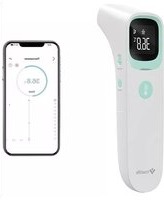
The TrueLife Care Q6 thermometer uses infrared technology to deliver a highly accurate result in an instant. The Care Q6 thermometer measures body temperature from the surface of the body or from objects and liquids.
2. PRODUCT DESCRIPTION
- Sensor (infrared probe)
- Display
- Measurement button
- Change mode button
- Power button
- Back cover

Display description
- Time and date
- Low battery indicator
- Memory mode
- Body mode
- Surface mode
- Temperature indicator
- Units (degrees Celsius/Fahrenheit)
- Temperature reading

3. INSTALLING THE BATTERIES
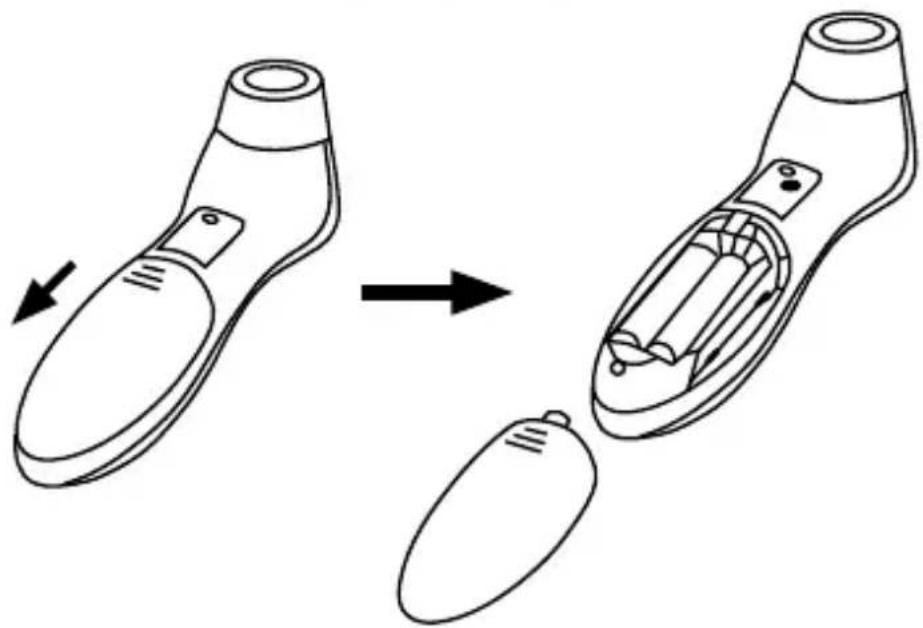
Slide off the battery cover at the back of the thermometer and insert 2 x AAA batteries. Make sure that the batteries are inserted with the correct polarity as indicated in the battery compartment. Do not use batteries after their expiration date.
If the low battery indicator appears on the display after the thermometer is switched on, the batteries must be replaced. When battery power is critically low, the device will not take a reading.
If you will not be using the device for an extended period of time, remove the batteries.

4. SETTINGS
Setting the date and time
Set the date and time the first time you use the thermometer. Setting the date and time will help you monitor the readings later.
When the thermometer is off, press and hold the power button for 3 seconds to enter the settings mode.
The date, hour, minute, year, month and day are set sequentially. The values are set/changed using the measurement button and are always confirmed with the power button.
Setting the temperature units
The thermometer allows the measured values to be displayed in degrees Celsius (°C) or Fahrenheit (°F).
When the thermometer is off press and hold the measurement button for 3 seconds. The thermometer will enter the temperature unit change mode. Use the measurement button to select the desired units. Use the power button to confirm the selection.
5. GUIDELINES FOR MEASURING TEMPERATURE
To ensure that the reading always shows your body temperature accurately, you must take into account the following factors that may affect the measurement.
- It is important to know the normal healthy temperature of each individual. This is the only way to accurately diagnose fever. To determine normal temperature, take several temperature measurements when the individual is healthy. Measure the temperature with a standard digital thermometer to confirm.
- Users must be indoors for 30 minutes before taking a reading. Note: Users and the thermometer should be in the same temperature environment for at least 10 minutes before taking a reading.
- Users should not drink, eat or be physically active before taking a reading, including bathing, showering, shampooing or drying their hair. Before each measurement, remove any head covering, remove hair from the forehead and wait 10 minutes.
- Oils or cosmetics on the forehead may lead to a lower reading than the actual body temperature.
- Keeping your hand on your forehead for any length of time will effect the reading.
- Do not measure the temperature on scarred skin, open wounds or abrasions.
- Do not measure the temperature on a sweaty forehead. The resulting reading may be distorted.
- Do not take readings while breastfeeding or immediately after breastfeeding.
- Do not use this thermometer outdoors.
- Do not leave the thermometer near places that are very hot, such as fireplaces and stoves.
- The thermometer sensor is the most sensitive part of the device. Do not touch the sensor. Reading accuracy may be affected if the sensor is damaged or dirty.
- If the thermometer is stored in an environment with a significantly different temperature than where you will take the reading, keep it in the reading location for approximately 30 minutes before use.
- It is not intended for use in an oxygen-rich environment or in the presence of a flammable anesthetic mixtures of air, oxygen or nitrogen dioxide.
6. TAKING A READING
The thermometer offers two temperature measurement modes.
a) Body mode
b) Surface mode
You can switch between modes using the change mode button.
Taking a reading is simple. Follow the instructions below.
- Press the power button. The thermometer will turn on.
- The display will shows all parameters and the thermometer will beep twice. The thermometer is now ready to measure temperature.
- In body mode, aim the thermometer at the centre of the forehead at a distance of 2 to 3 cm and then press the measurement button. In surface mode, point the thermometer at the centre of the object you want to measure at a distance of 1 to 2 cm.
- A beep will sound to signal the start of the measurement and a second beep signals the end of the measurement.
Caution: Do not remove the thermometer from the forehead or object until you hear the last beep. A waiting time between 3 seconds of testing is recommended to ensure complete accuracy.
-
The display will show the reading.
-
To extend battery life, the thermometer automatically shuts off if idle for more than 1 minute.
Backlight and temperature indicator
In the body mode, the reading is accompanied by a coloured backlight and a temperature indicator as follows:
a) Green backlight and smiley face - when the temperature is below 37.3°C (99.1°F).
b) Yellow backlight and smiley face - when the temperature is above 37.3° C ( 99.1° F) but below 37.8° C ( 100° F).
c) Red backlight and sad face - when the temperature is above 37.8°C (100°F).
7. DISPLAYING THE READINGS
The thermometer can store 10 readings. When the memory capacity is exceeded, the oldest stored entry will be overwritten.
For each value it also stores date, time and measurement mode.
Follow the instructions below to display the readings.
- Turn on the thermometer.
- Press and hold the power button for 3 seconds. The memory mode symbol – the letter „M“ will appear on the display.
- Use the power button to switch between the stored readings. Number 1 shows the last measurement, while number 10 shows the oldest.
8. ERROR MESSAGES AND TROUBLESHOOTING
If any of the following problems occur when taking a reading, please refer to the table below.
| Problem | Probable Cause | Remedy |
| Nothing appears on the display when the thermometer is turned on | The batteries are low. | Replace all batteries with new ones. |
| The batteries are inserted incorrectly. | Check and, if necessary, insert the batteries correctly so that their polarity matches the markings in the battery compartment. | |
| Error message 1 (E1) | Taking a reading before the thermometer is set. | Do not take a reading until the thermometer beeps. |
| Error message 2 (E2) | The ambient temperature is not between 10 and 40°C (50°F~104°F). | Place the thermometer in a room for at least 30 minutes at a room temperature between 10 and 40°C (50°F~104°F). |
| Error message 3 (E3) | The thermometer is positioned incorrectly or not stable. | Follow the instructions for taking a reading and repeat. |
| Error message 4 (E4) | The thermometer shows a rapid change in ambient temperature. | Leave the thermometer in the room for at least 30 minutes at a room temperature between 10 and 40°C (50°F~104°F). |
| Error message 5 (E5) | The thermometer is not working properly. | Remove the battery, wait 1 minute, put it back in the device as described in the manual and switch it on. If the message reappears, contact your dealer for repair. |
| "Hi" message | In body mode: the temperature is higher than 43.0°C (109.4°F). In surface mode: the temperature is higher than 100°C (212°F). | Carefully read the instructions on how to take a reading and then take another reading. |
| "Lo" message | In body mode: the measured temperature is lower than 34.0°C (93.2°F). In surface mode: the temperature is lower than 0°C (32°F). | Carefully read the instructions on how to take a reading, make sure the sensor is clean, and then take another reading. |
9. SPECIFICATIONS
| Measurement range | Body temperature: 34.0°C-43.0°C (93.2°F -109.4°F)Surface temperature: 0°C-100°C (32°F -212°F) |
| Measurement deviation | Physical temperature: ± 0.2°C (0.4°F) in the range 35.0°C -42.0°C (95.0°F -107.6°F), ± 0.3°C (0.5°F) at other temperaturesSurface temperature: greater of ± 4% or ± 2°C (± 4°F) |
| Measurement distance | Body temperature: 2-3 cmSurface temperature: 1-2 cm |
| Measurement time | ≤2 s |
| Battery | 2 x 1.5V AAA |
| Operating conditions | Temperature: 10°C -40°C (50°F -104°F)Humidity: ≤ 85% RH |
| Storage conditions | Temperature: -25°C -55°C (-13°F -131°F)Humidity: ≤ 95% RH |
| Dimensions | 153 x 41 x 44 mm |
| Weight | 84 g (with batteries) |
SAFETY WHEN WORKING WITH THE DEVICE:
- Read the attached safety instructions carefully.
- For proper handling of the product, read the latest version of the manual available for download at: www.truelife.eu.
Printing errors and information changes reserved.
Caution: This product is intended for use in households and similar environments. We declare that if the TrueLife Care Q6 product is to be used as a professional medical device, a safety inspection (BTK) must be performed regularly at the following intervals: 24 months after the purchase of the product, then every 12 months.

Importer:
elem6 s.r.o., Braškovská 15, 16100 Praha 6, Czech Republic

CE0197
RoHS
REF.: DET-306
Made in P.R.C.
Shanghai International Holding Corp. GmbH (Europe) Eiffestrasse 80, 20537 Hamburg, Germany

JOYTECH HEALTCARE CO. LTD.
No.365, Wuzhou Road, Yuhang Economic Development Zone, Hangzhou city, Zheijiang province, 311100, China
Last revision date: 2021-08
Care Q6
INHALT
3. EINBAU DER BATTERIEN

No.365, Wuzhou Road, Yuhang Economic Development Zone, Hangzhou city, Zheijiang province, 311100, China
3. INSTALACE BATERIÍ

No.365, Wuzhou Road, Yuhang Economic Development Zone, Hangzhou city, Zheijiang province, 311100, China
3. INŠTALÁCIA BATÉRIÍ
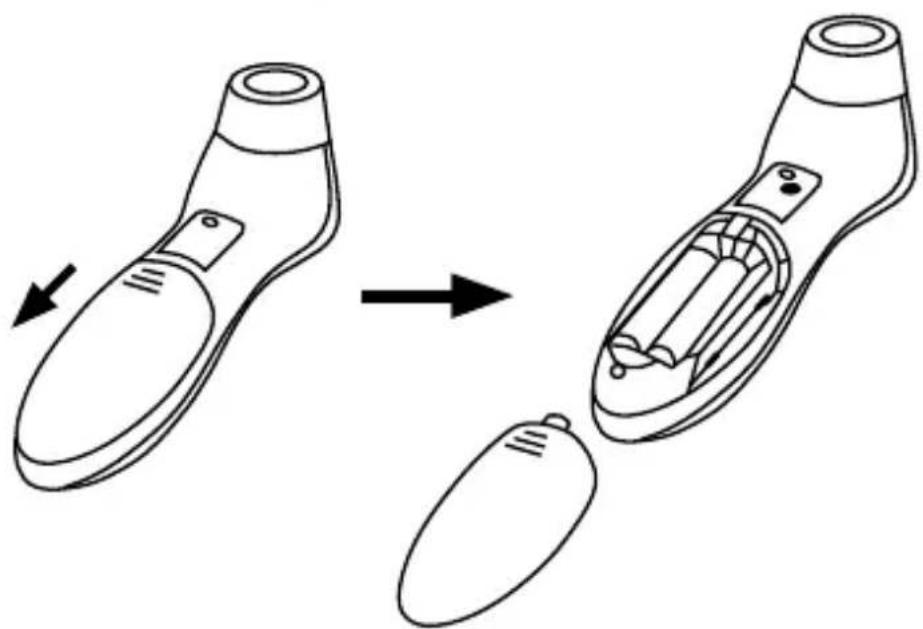
5. POKYNY PRE MERANIE TEPLOTY
No.365, Wuzhou Road, Yuhang Economic Development Zone, Hangzhou city, Zheijiang province, 311100, China
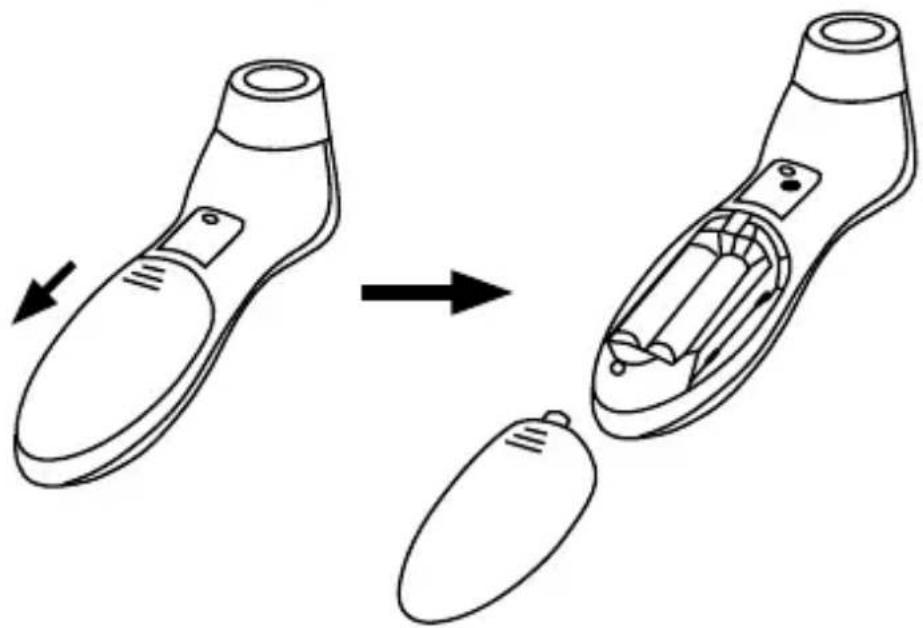
3. INSTALACJA BATERII
No.365, Wuzhou Road, Yuhang Economic Development Zone, Hangzhou city, Zheijiang province, 311100, China
3. AZ ELEMEK BEHELYEZÉSE

No.365, Wuzhou Road, Yuhang Economic Development Zone, Hangzhou city, Zheijiang province, 311100, China
Opis zaslona
- Čas in datum
- Kazalec prazne baterije
- Način pomnilnika
- Način merjenja oseb
- Način merjenja predmetov
- Kazalec temperature
- Enote (stopinje Celzija/Fahrenheit)
- Rezultat merjenja

3. NAMESTITEV BATERIJ

Odstranite pokrov baterij na hrbtni strani termometra in vstavite 2× baterijo AAA. Prepričajte se, da sta bateriji vstavljeni pravilno glede na označbe v prostoru za baterije. Ne uporabljajte baterij po preteku roka za uporabo.
No.365, Wuzhou Road, Yuhang Economic Development Zone, Hangzhou city, Zheijiang province, 311100, China
Datum zadnje revizije: 2021-08
Care Q6
SADRŽAJ
- SADRŽAJ PAKOVANJA....2
- OPIS PROIZVODA 2
- INSTALACIJA BATERIJA 3
- POSTAVKE 4
- UPUTE ZA MJERENJE TEMPERATURE....4
- MJERENJE TEMPERATURE 5
- PRIKAZ IZMJERENIH VRIJEDNOSTI 5
- DOJAVE POGREŠAKA I RJEŠAVANJE PROBLEMA 6
- SPECIFIKACIJE 7
1. SADRŽAJ PAKOVANJA
1× Toplomjer TrueLife Care Q6
2× Alkalna baterija AAA
1× Priručnik
1× Sigurnosne upute
3. INSTALACIJA BATERIJA

Skinite poklopac prostora za baterije na stražnjoj strani toplomjera te umetnite 2× AAA bateriju. Uvjerite se da su baterije umetnute u ispravnom smjeru polariteta prema crtežu u prostoru za baterije. Ne upotrebljavajte baterije kojima je istekao vijek trajanja.
No.365, Wuzhou Road, Yuhang Economic Development Zone, Hangzhou city, Zheijiang province, 311100, China
Datum zadnje revizije: 2021-08


- PRODUCT DESCRIPTION
- DISPLAY DESCRIPTION
- INSTALLING THE BATTERIES
- SETTINGS
- SETTING THE DATE AND TIME
- SETTING THE TEMPERATURE UNITS
- GUIDELINES FOR MEASURING TEMPERATURE
- TAKING A READING
- BACKLIGHT AND TEMPERATURE INDICATOR
- DISPLAYING THE READINGS
- ERROR MESSAGES AND TROUBLESHOOTING
- SPECIFICATIONS
- SAFETY WHEN WORKING WITH THE DEVICE
- IMPORTER
- CARE Q6
- INHALT
- EINBAU DER BATTERIEN
- INSTALACE BATERIÍ
- INŠTALÁCIA BATÉRIÍ
- POKYNY PRE MERANIE TEPLOTY
- INSTALACJA BATERII
- AZ ELEMEK BEHELYEZÉSE
- OPIS ZASLONA
- NAMESTITEV BATERIJ
- SADRŽAJ
- SADRŽAJ PAKOVANJA
- INSTALACIJA BATERIJA
Brand : TrueLife
Model : Care Q6
Category : Thermometer