
RAZE 3 Atom - Loudspeaker Niceboy - Free user manual and instructions
Find the device manual for free RAZE 3 Atom Niceboy in PDF.


| Product Type | Wireless Bluetooth Speaker |
| Brand | Niceboy |
| Model | RAZE 3 Atom |
| Dimensions | 169 x 75 x 71 mm |
| Weight | 380 g |
| Power Output | 6 W |
| Driver Size | 2 x 45 mm |
| Impedance | 4 Ω |
| Sensitivity | >80 dB |
| Frequency Range | 80 Hz - 15 kHz |
| Bluetooth Version | 5.0 |
| Supported Codecs | HSP, A2DP, AVRCP, HFP |
| Bluetooth Range | 10 m |
| Battery Type | Li-Ion 1200 mAh |
| Battery Life | Up to 10 hours (at 50% volume) |
| Charging Time | Approx. 3 hours |
| Charging Input | Micro USB (5V, 1A) |
| Memory Card Support | Micro SD up to 32 GB |
| USB Drive Support | USB flash drive up to 32 GB |
| Supported Audio Formats | MP3, WMA, WAV, APE, FLAC |
| FM Radio | Yes, 87.5 - 108 MHz |
| True Wireless Stereo (TWS) | Yes, pair two speakers |
| Hands-Free Calling | Yes, with built-in microphone |
| Controls | Physical buttons: Mode, Volume/Track, Play/Pause/Call, Power switch |
| Included Accessories | Micro USB charging cable, User manual |
Frequently Asked Questions - RAZE 3 Atom Niceboy
User questions about RAZE 3 Atom Niceboy
0 question about this device. Answer the ones you know or ask your own.
Ask a new question about this device
Download the instructions for your Loudspeaker in PDF format for free! Find your manual RAZE 3 Atom - Niceboy and take your electronic device back in hand. On this page are published all the documents necessary for the use of your device. RAZE 3 Atom by Niceboy.
USER MANUAL RAZE 3 Atom Niceboy
natural_image
Pure diagram of five electronic components with arrows pointing to them (no text or symbols)NABÍJENÍ
natural_image
Pure diagram of five electronic components with circular connectors at the bottom (no text or symbols)NABÍJANIE
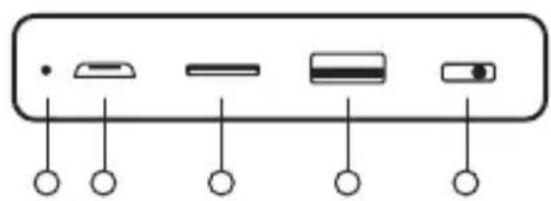
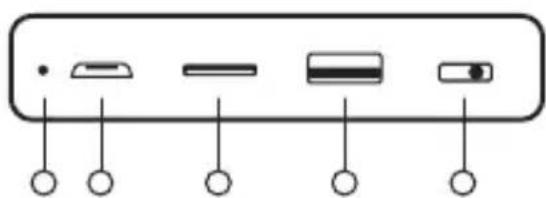
Pred prvým použitím odporúčame reproduktor plne nabit pre maximalizáciu životnosti batérie. Plné nabitie trvá približne 3 hodiny. Nízky stav batérie ohlási akustický signál. Pre nabíjanie batérie reproduktora pripojte dodávaný micro USB kábel do nabíjacieho portu (6) a pripojte k ľubovoľnému nabíjaciemu adaptéru (napätie 5 V a výstupný prúd minimálne 1 A) alebo do USB v PC. Priebeh nabíjania sa signalizuje červeným svetlom LED indikátora (5), po úplnom nabití dióda zhasne.
ZAPNUTIE/VYPNUTIE
Micro USB charging cable
Instructions for Use
PRODUCT DESCRIPTION
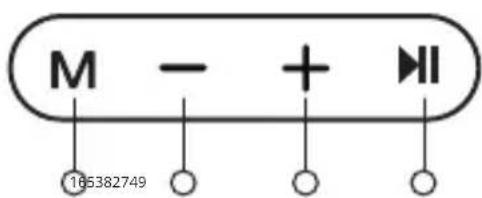
- Mode changer / TWS pairing
- Turn down volume / previously played track
- Turn up volume / next track
- Play / pause / accept call / end call / FM search
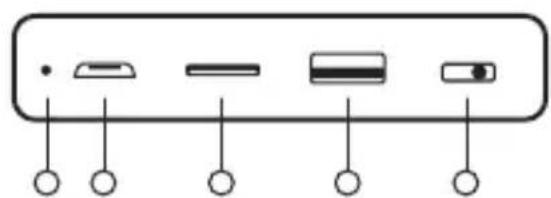
- LED indicator
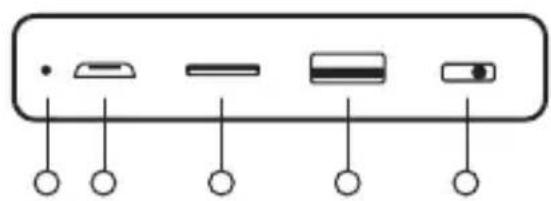
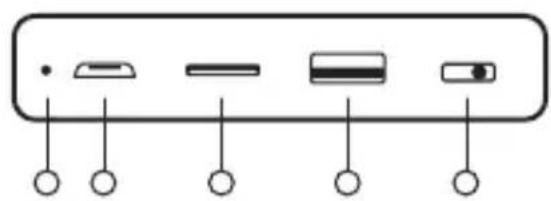
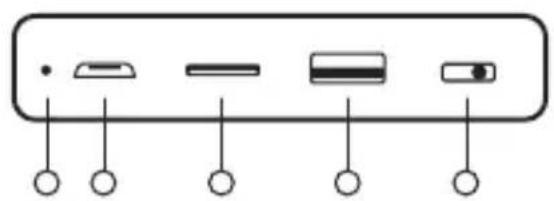
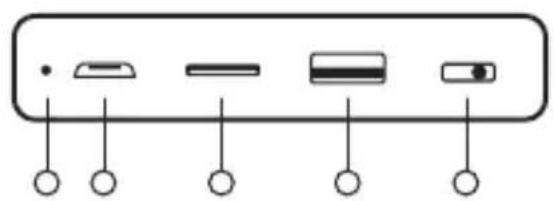
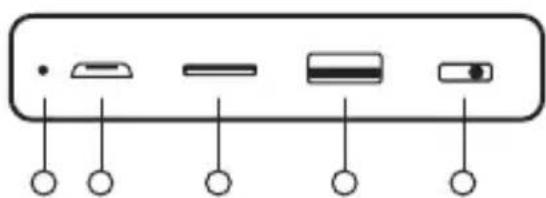
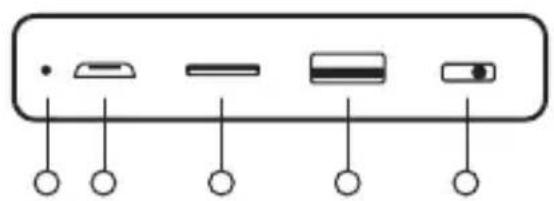
- Micro USB charging port
- Micro SD card slot
- USB port
- Power on / off
natural_image
Diagram of a device panel with five labeled buttons (no text or symbols beyond basic labels)CHARGING
We recommend fully charging the speaker before its first use to maximize the battery's lifespan. The speaker takes approximately 3 hours to fully charge. Low battery is announced by an audible signal. To charge the speaker's battery, connect the micro USB cable included in the packaging to the charging port (6), then connect to any charging adapter (5V voltage and output current minimum of 1A) or to a USB port on a PC. Charging is signalled by the LED indicator (5) shining red, the diode will stop shining when charging is complete.
POWERING ON/OFF
Flip the switch (9) to power the speaker on or off.
Powering on is announced via an audio signal.
CONNECTING TO BLUETOOTH
- Flip the switch (9) to power on the speaker. The speaker will automatically enter pairing mode. The LED diode (5) will flash red.
- Find and select "Niceboy RAZE 3 Atom" from the Bluetooth list of available options on your device.
- Your device will now connect to the speaker. Successful pairing is announced by an audio signal and the LED diode (5) will continuously shine blue.
BASIC CONTROLS
Press button (1) to choose between the individual modes. Press and hold buttons (2) and (3) to set the volume (available while in any mode) and press again to choose between individual tracks (available while in Bluetooth, USB, and Micro SD modes). Press button (4) to play or pause the selected track (available while in any mode).
Press button (4) to accept a call, then press again to end the call. Press and hold the same button to decline a telephone call. Press the same button twice to call the last number in your call list.
FM RADIO MODE
Insert the enclosed USB cable, which serves as an antenna, into the micro USB port (6). Power on the speaker and press button (1) to switch over to FM radio mode. Press button (4) to power on the automatic station search function. Press the same button again to stop searching for a station. You may then choose between stations by pressing buttons (2) and (3).
PLAYBACK MODE VIA USB AND MICRO SD CARD
The speaker will automatically switch over to the relevant mode and begin playing music after you insert a micro SD card into its slot (7) or into the USB flash disk (8).
TRUE WIRELESS (TWS) CONNECTION
With the help of True Wireless (TWS) you can connection two Niceboy RAZE 3 Atom speakers to one device and simultaneously play music through both.
- Power on both Niceboy RAZE 3 Atom speakers and ensure they are not connected any other Bluetooth device (mobile, laptop, etc.)
- Press and hold button (1) on one of the speakers. An audio signal will announce the successful connection of both speakers and both speakers' LED diodes will shine blue.
- Now you may open the Bluetooth settings on your own device. Select "Niceboy RAZE 3 Atom" from the list of available devices. Successful pairing is announced by an audio signal.
To disconnect the speakers, press and hold button (1).
PARAMETERS
Dimensions: 169*75*71mm
Weight: 380g
Bluetooth version: 5.0
Supported codecs: HSP, A2DP, AVRCP, HFP
Power: 6W
Changer size: 2 x 45mm
Electrical impedance: 4Ω
Sensitivity: >80dB
Frequency range: 80 Hz - 15 kHz
Bluetooth transmission distance: 10 meters
FM frequency: 87.5MHz \~ 108MHz
Supported data carrier: micro SD card, USB flash disk, max. 32GB
Supported audio formats: MP3, WMA, WAV, APE, FLAC
Battery: Li-Ion 1200 mAh
Charging: micro USB
Battery life: 10 hours (at 50% volume)
This product meets all basic EU regulation requirements placed upon it.
DE
LIEFERUMFANG
Kabelloser Lautsprecher Niceboy RAZE 3 Atom
Micro-USB-Ladekabel
Bedienungsanleitung
natural_image
Pure diagram of five electronic components with arrows pointing to them (no text or symbols)LADEN
natural_image
Pure electrical connector pinout diagram without any text or symbolsTÖLTÉS
natural_image
Diagram of electronic component ports with circular connectors (no text or labels)PUNJENJE
Preporučljivo je prije prve uporabe potpuno napuniti zvučnik radi maksimiziranja životnog vijeka baterije. Punjenje do kraja traje oko 3 sata. Uređaj zvučnim signalom signalizira nisku napunjenost baterije. Kako biste napunili bateriju u zvučniku, priključite USB kabel na ulaz za punjenje (6) i povežite ga s bilo kojim adapterom za punjenje (napon 5V i bar 1A izlazne struje) odnosno na USB priključak u vašem računalu. Režim punjenja signaliziraju LED diode za punjenje (5). Kada je baterija napunjena do kraja, dioda se ugasi.
UKLJUČIVANJE/ISKLJUČIVANJE
Kako biste uključili ili isključili zvučnik, promijenite položaj prekidača (9).
Uključivanje se signalizira zvučnim signalom.
POVEZIVANJE PREKO OPCIJE BLUETOOTH
- Pomoću prekidača (9) uključite zvučnik. Zvučnik automatski ulazi u režim uparivanja. LED dioda (5) treperi plavom bojom.
- Zatim potražite i odaberite „Niceboy RAZE 3 Atom“ u Bluetooth postavkama vašeg uređaja.
- Uređaj se sada priključuje na zvučnik. Uspješno uparivanje se najavljuje akustičnim upozorenjem, a LED dioda (5) počinje neprekidno svijetliti plavom bojom.
OSNOVNO UPRAVLJANJE
Kratkim pritiskanjem gumba (1) prelazite između pojedinih načina rada. Dugim pritiskanjem (2) i (3) podešavate glasnoću (u svim načinima rada), dok kratkim pritiskanjem prelazite između pjesama (u načinima rada preko opcija Bluetooth, USB i MicroSD). Kratkim pritiskanjem gumba (4) pokrećete ili zaustavljate reproduciranje (u svim načinima rada).
Za odgovaranje i prekidanje dolaznog poziva, kratko pritisnite gumb (4). Dugo pritisnite istu tipku da biste odbacili dolazni poziv. Dvostrukim pritiskanjem istog gumba birate posljednji zvani broj.
NAČIN RADA SA AKTIVACIJOM FM RADIO PRIJEMNIKA
U microUSB ulaz (6) umetnite priloženi kabel USB koji se koristi kao antena. Uključite zvučnik pritiskanjem gumba (1) i pređite u način rada u kojem se aktivira radio FM. Kratkim pritiskanjem gumba (4) uključite automatsko postavljanje stanica. Kratkim pritiskanjem istog gumba gasite (brišete) postavljanje stanica. Za prebacivanje između stanica, kratko pritisnite gumb (2) i gumb (3).
NAČIN REPRODUCIRANJA PREKO USB I KARTICE MICRO SD
Nakon umetanja microSD kartice u utor (7) ili USB flash disc (8), zvučnik se automatski prebacuje na odgovarajući način rada i započinje reproduciranje glazbe.
TRUE WIRELESS (TWS) POVEZIVANJE
Pomoću tehnologije True Wireless (TWS) možete povezati dva zvučnika Niceboy RAZE 3 Atom i istovremeno reproducirati glazbu.
- Uključite oba zvučnika Niceboy RAZE 3 Atom i provjerite da nisu eventualno povezani na bilo koji Bluetooth uređaj (mobitel, laptop i slično).
- Kratkim pritiskanjem gumba (1) na jednom od zvučnika: ako su oba zvučnika uspješno povezana, čuje se akustički signal i LED dioda (5) na oba zvučnika svijetli plavim svjetlom.
- Sada možete otvoriti Bluetooth postavke na vašem uređaju. Zatim iz popisa dostupnih uređaja odaberite „Niceboy RAZE 3 Atom“. Uspješno uparivanje signalizirano se zvučnim signalom.
Kako biste isključili zvučnike, pritisnite i držite pritisnutom tipku (1).
PARAMETRI
Dimenzije: 169*75*71mm
Težina: 380g
Verzija Bluetooth: 5.0
Podržani kodeci: HSP, A2DP, AVRCP, HFP
Snaga: 6W
natural_image
Diagram of electronic component ports with circular connectors (no text or labels)ŁADOWANIE
Akumulator: Li-Ion 1200 mAh
natural_image
Pure diagram of five electronic components with circular connectors at the bottom (no text or symbols)POLNJENJE
TRUE WIRELESS (TWS) POVEZAVA
natural_image
Diagram of electronic component ports with circular connectors (no text or labels)ÎNCĂRCAREA
CONEXIUNEA BLUETOOTH
Codecuri acceptate: HSP, A2DP, AVRCP, HFP
Putere: 6W
Formate audio acceptate: MP3, WMA, WAV, APE, FLAC
Baterie: Li-Ion 1200 mAh
Importer to EU: RTB media s.r.o., Pretlucka 16, Prague 10, 100 00, Czech Republic, ID: 294 16 876.
RoHS CE
Made in China.


- NABÍJENÍ
- NABÍJANIE
- ZAPNUTIE/VYPNUTIE
- PRODUCT DESCRIPTION
- CHARGING
- POWERING ON/OFF
- CONNECTING TO BLUETOOTH
- BASIC CONTROLS
- FM RADIO MODE
- PLAYBACK MODE VIA USB AND MICRO SD CARD
- TRUE WIRELESS (TWS) CONNECTION
- PARAMETERS
- DE
- LIEFERUMFANG
- LADEN
- TÖLTÉS
- PUNJENJE
- UKLJUČIVANJE/ISKLJUČIVANJE
- POVEZIVANJE PREKO OPCIJE BLUETOOTH
- OSNOVNO UPRAVLJANJE
- NAČIN RADA SA AKTIVACIJOM FM RADIO PRIJEMNIKA
- NAČIN REPRODUCIRANJA PREKO USB I KARTICE MICRO SD
- TRUE WIRELESS (TWS) POVEZIVANJE
- PARAMETRI
- ŁADOWANIE
- POLNJENJE
- TRUE WIRELESS (TWS) POVEZAVA
- ÎNCĂRCAREA
- CONEXIUNEA BLUETOOTH
Brand : Niceboy
Model : RAZE 3 Atom
Category : Loudspeaker