
GZ 1226S - Drink cooler Guzzanti - Free user manual and instructions
Find the device manual for free GZ 1226S Guzzanti in PDF.


| Product Type | Drink Cooler |
| Brand | Guzzanti |
| Model | GZ 1226S |
| Net Capacity | 38 L |
| Bottle Capacity | 12 standard 750 ml bottles (approximate) |
| Dimensions (W x D x H) | 273 x 547 x 740 mm |
| Packaging Dimensions (W x D x H) | 323 x 600 x 777 mm |
| Net Weight | 16.85 kg |
| Gross Weight | 18.35 kg |
| Rated Voltage | 100-240 V |
| Rated Frequency | 50/60 Hz |
| Rated Power | 55 W |
| Cooling System | Thermoelectric with automatic defrost |
| Temperature Range | 10 °C to 18 °C |
| Recommended Ambient Temperature | 14 °C (optimal performance 20-25 °C) |
| Refrigerant | R600a (flammable) |
| Control Panel | Digital touch with lock function, temperature adjustment, interior light control |
| Interior Light | Automatic shut-off after 10 minutes |
| Ventilation Requirements | Min 200 cm³ air volume, 20 mm from wall sides, 50 mm bottom clearance |
| Energy Consumption (at 17°C) | 0.252 kWh/24 h |
| Number of Shelves | 6 (factory configuration for energy efficiency) |
| Certifications | CB, CE |
| Suitable Use | Household and similar applications (not for food or freezing) |
| Cleaning and Maintenance | Clean with soft cloth and mild detergent; defrost by switching off for 10 minutes every 24 hours |
Frequently Asked Questions - GZ 1226S Guzzanti
User questions about GZ 1226S Guzzanti
0 question about this device. Answer the ones you know or ask your own.
Ask a new question about this device
Download the instructions for your Drink cooler in PDF format for free! Find your manual GZ 1226S - Guzzanti and take your electronic device back in hand. On this page are published all the documents necessary for the use of your device. GZ 1226S by Guzzanti.
USER MANUAL GZ 1226S Guzzanti
GZ-1535
GZ-1427
GZ-1226
Nastavení teploty
natural_image
Line drawing of a hand cleaning the interior of an open oven with wavy shelves (no text or symbols)natural_image
Symbol of a trash bin crossed with no text or numbers, representing waste sorting or disposal (no text present)GZ-1535
GZ-1427
GZ-1226
Nastavenie teploty
natural_image
Illustration of a hand cleaning the interior of an open oven with wavy insulation and a lid (no text or symbols)5. Popis funkcií produktu
natural_image
Symbol of a trash bin crossed with two diagonal lines, representing no waste or discharge (no text or labels)
GZ-1535
GZ-1427
GZ-1226
natural_image
Illustration of a hand cleaning the interior of an open oven with wavy insulation layers (no text or symbols)5. Opis cech produktu
natural_image
Symbol of a trash bin crossed with no text or numbers, representing environmental protection (no text present)GZ-1535
GZ-1427
GZ-1226
natural_image
Illustration of a hand cleaning or removing a rack inside an open oven (no text or symbols visible)natural_image
Symbol of a trash bin crossed with no text or numbers, representing environmental hazard (no text present)GZ-1535
GZ-1427
GZ-1226
Nastavitev temperature
natural_image
Illustration of a hand cleaning or removing a rack inside an open oven (no text or symbols)Pozor: nevarnost požara.
natural_image
Symbol of a trash bin crossed with no text or numbers, representing environmental protection (no text present)Temperatureinstellung
natural_image
Line drawing of a hand cleaning the interior of an open oven with wavy shelves and a lid (no text or symbols)natural_image
Symbol of a trash bin crossed with no text or numbers, representing environmental restriction (no text present)Thank you very much for buying this product. Before using your new cooler, please read this operation manual to ensure that you again the maximum benefit from it.
WARNINGS
- This appliance is not intended for use by persons (including children) with reduced physical, sensory or mental capabilities, or lack of experience and knowledge, unless they have been given supervision or instruction concerning use of the appliance by a person responsible for their safety.
- Children should be supervised to ensure that they do not play with the appliance.
- This appliance can be used by children aged from 8 years and above and persons with reduced physical, sensory or mental capabilities or lack of experience and knowledge if they have been given supervision or instruction concerning use of the appliance in a safe way and understand the hazards involved. Children shall not play with the appliance. Cleaning and user maintenance shall not be made by children without supervision.
- If the supply cord is damaged, it must be replaced by the manufacturer, its service agent or similarly qualified persons in order to avoid a hazard.
- When positioning the appliance, ensure the supply cord is not trapped or damaged.
- Do not locate multiple portable socket-outlets or portable power supplies at the rear of the appliance.
- Keep ventilation openings, in the appliance enclosure or in the built-in structure, clear of obstruction.
- Do not use mechanical devices or other means to accelerate the defrosting process, other than those recommended by the manufacturer.
- Do not damage the refrigerant circuit.
- Do not use electrical appliances inside the drink storage compartments of the appliance, unless they are of the type recommended by the manufacturer.
- Do not store explosive substances such as aerosol cans with a flammable propellant in this appliance.
- Children aged from 3 to 8 years are allowed to load and unload refrigerating appliances.
- This appliance is intended to be used in household and similar applications such as
- staff kitchen areas in shops, offices and other working environments;
- farm houses and by clients in hotels, motels and other residential type environments;
- bed and breakfast type environments;
-
catering and similar non-retail applications.
-
To avoid contamination of drink, please respect the following instructions:
- Opening the door for long periods can cause a significant increase of the temperature in the compartments of the appliance.
- Clean regularly surfaces that can come in contact with drink and accessible drainage systems.
- Clean water tanks if they have not been used for 48 h, flush the water system connected to a water supply if water has not been drawn for 5 days.
- If the refrigerating appliance is left empty for long periods, switch off, defrost, clean, dry, and leave the door open to prevent mould developing within the appliance.
Note
This appliance contains flammable refrigerant R600a and foaming agent cyclopentane.
Please avoid contact fire when you transport and use it.
Please ask professional for servicing when the machine broke down.
Please send it to your local appointed disposal station when you discard it.
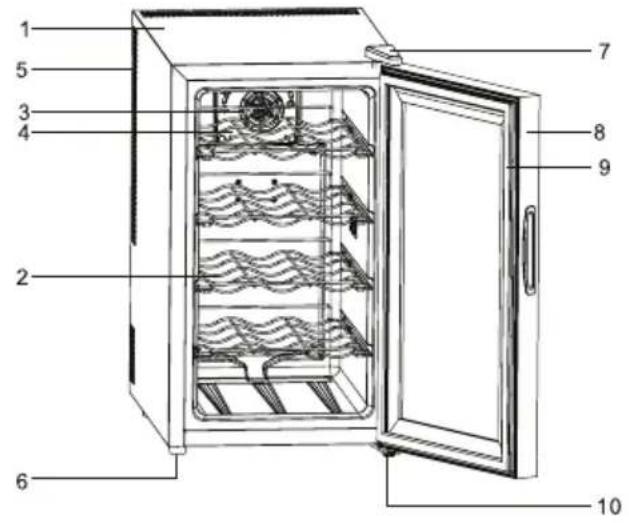
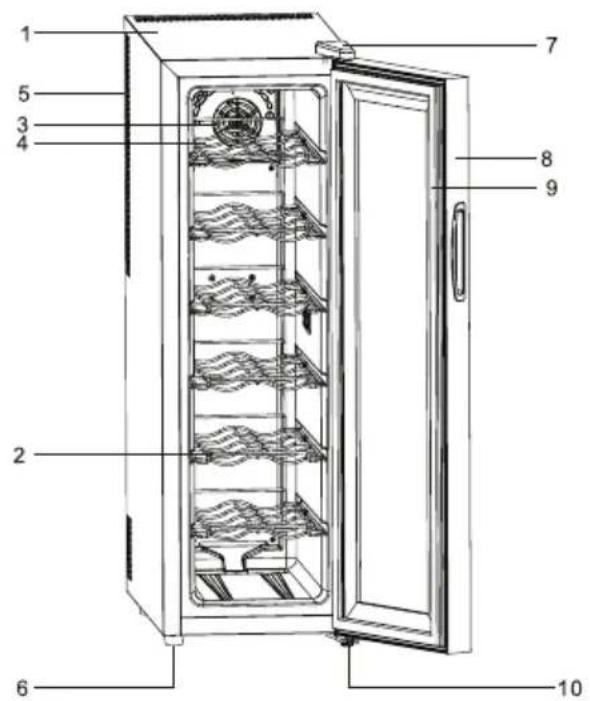
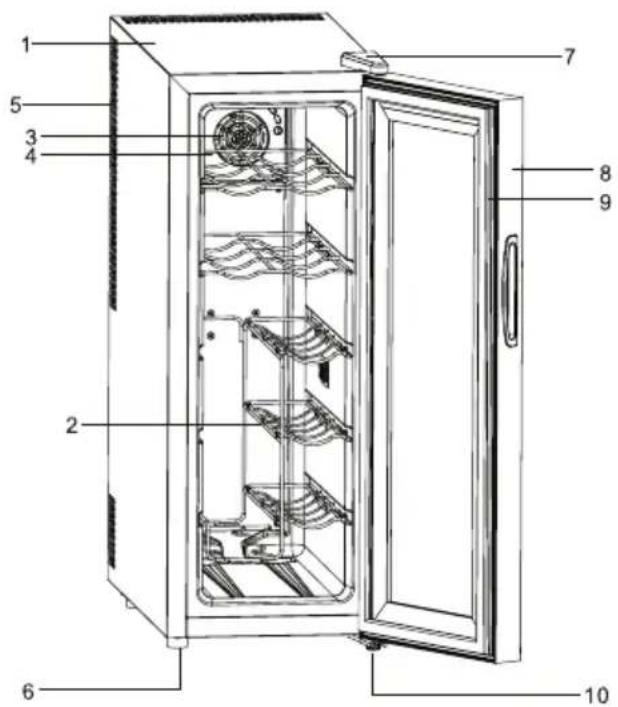
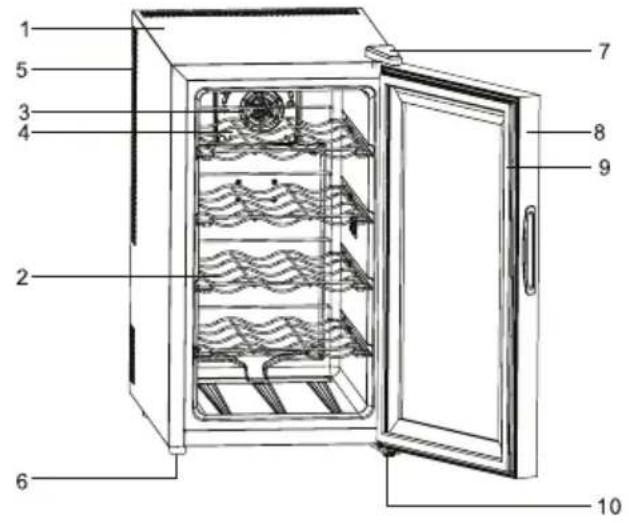
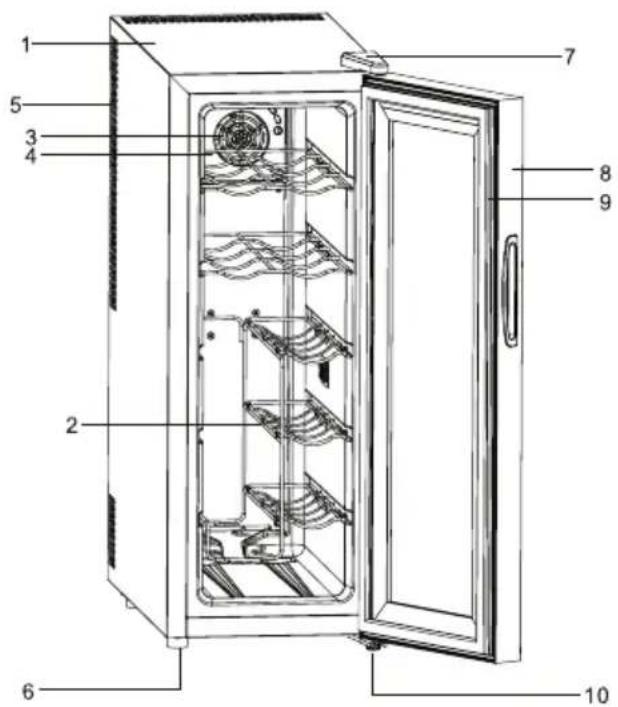
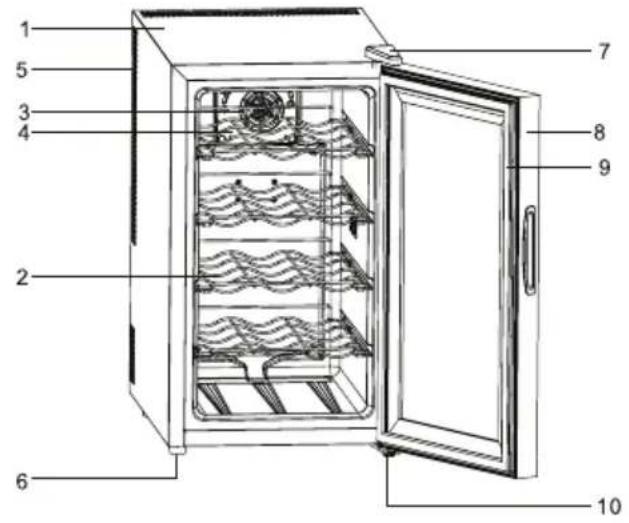
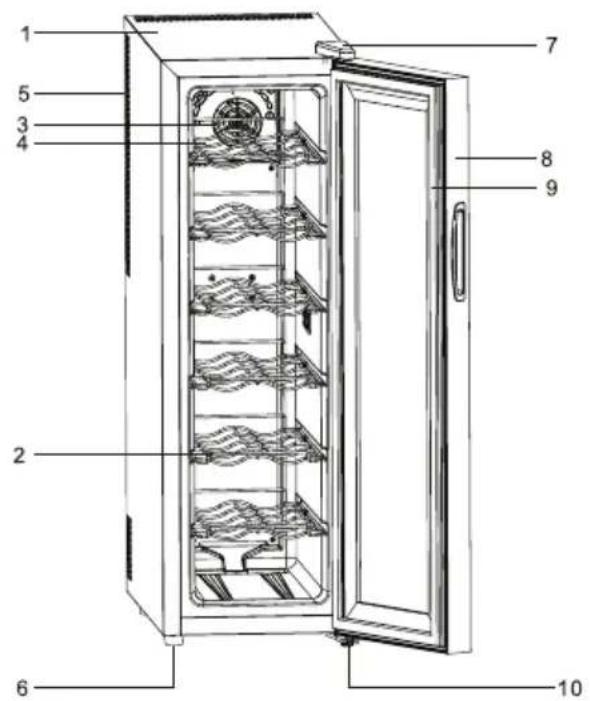
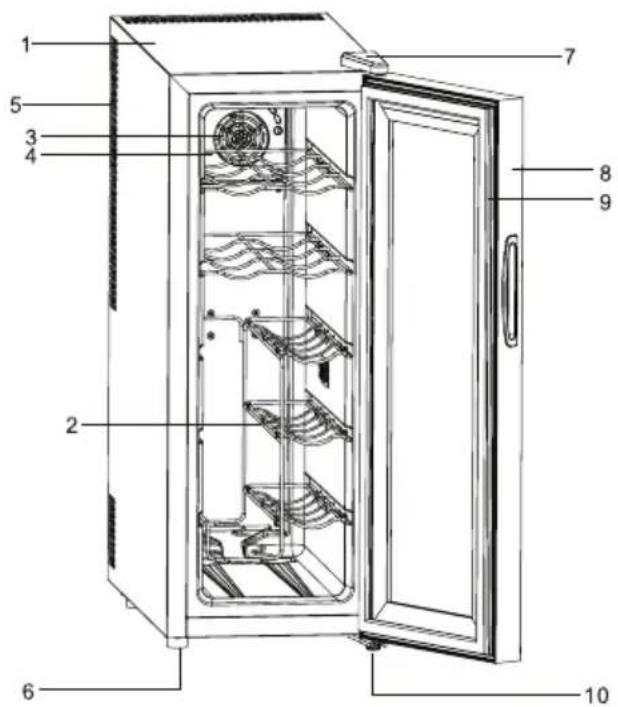
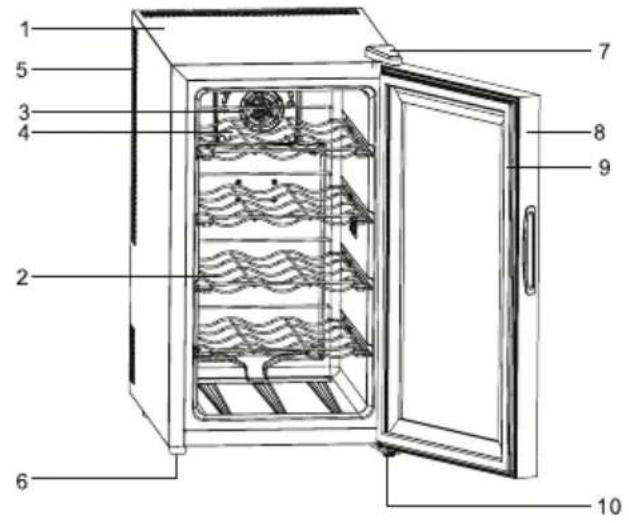
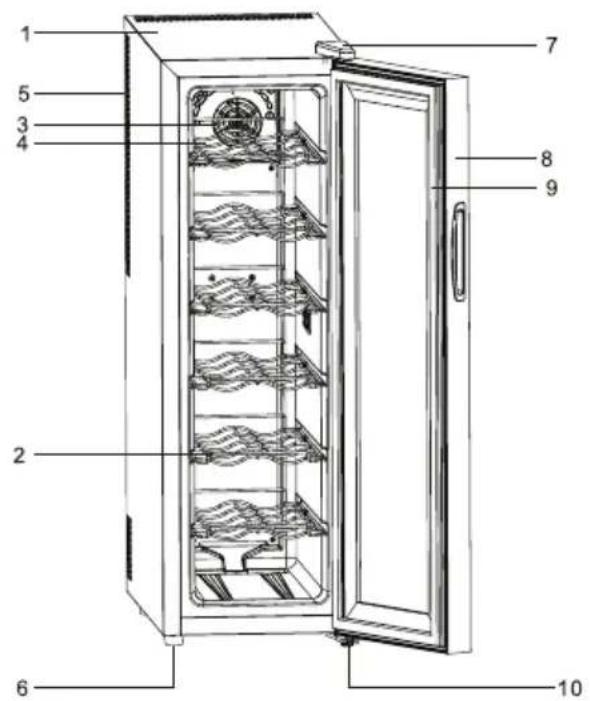
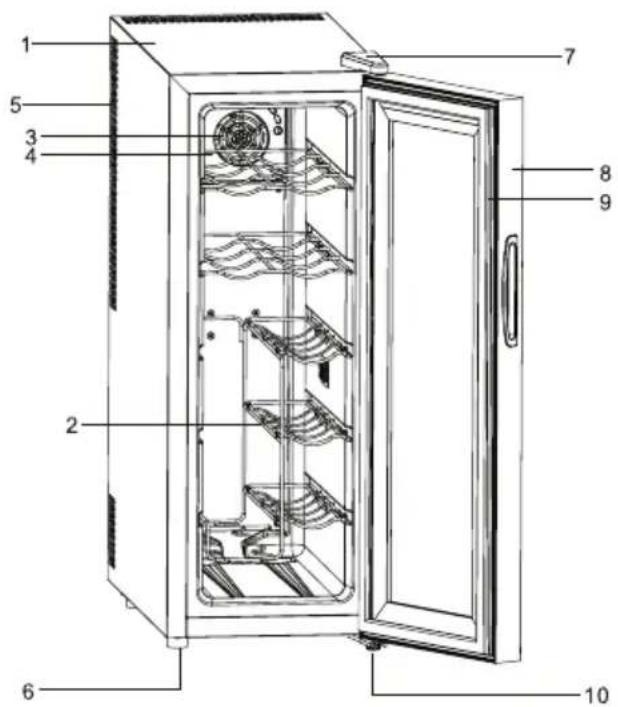
INDICATION OF PARTS
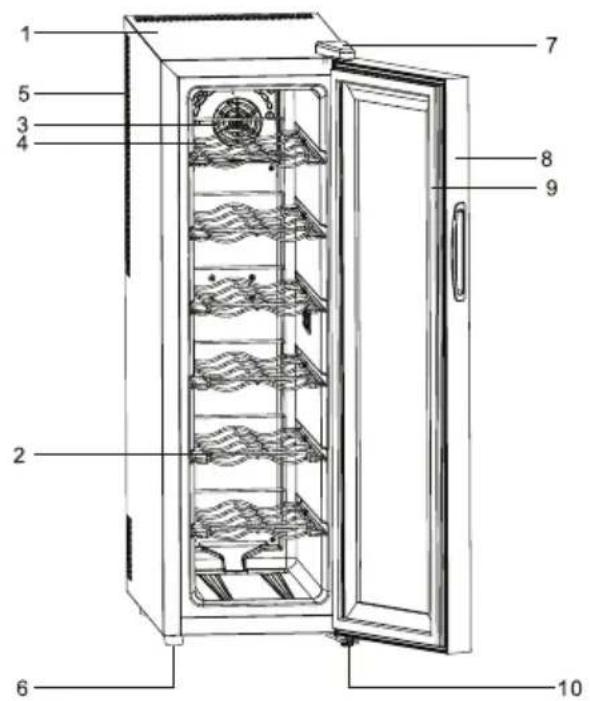
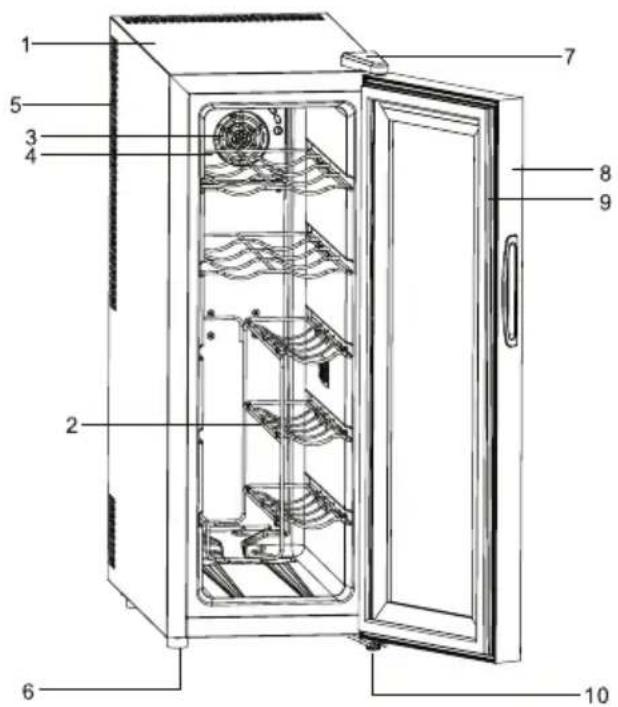
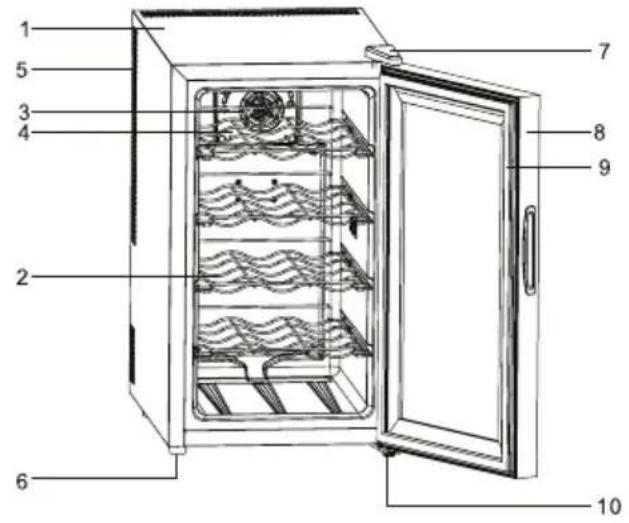
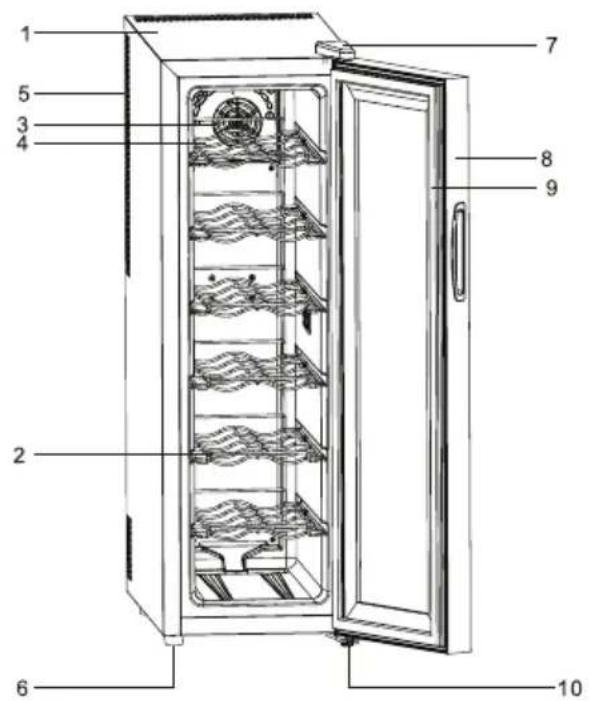
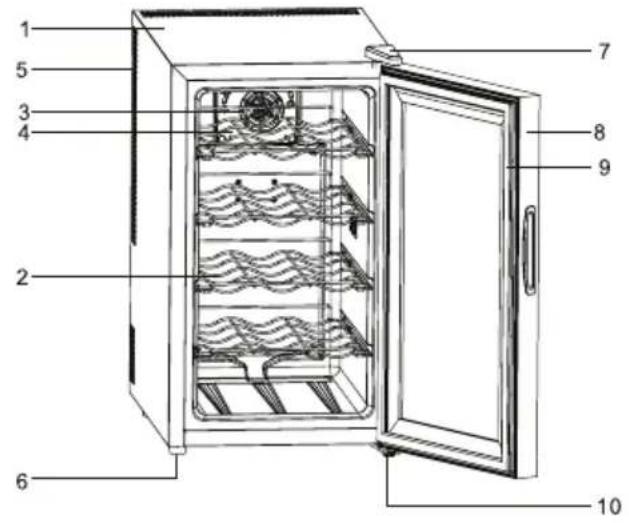
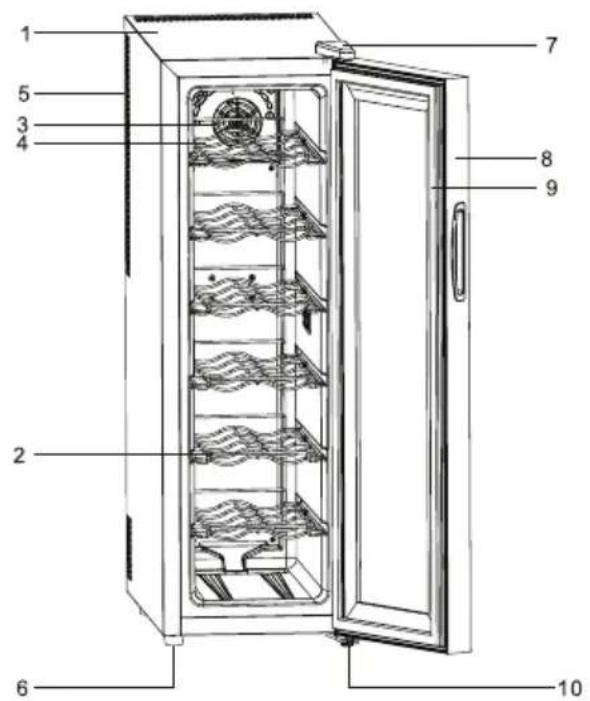
GZ-1234
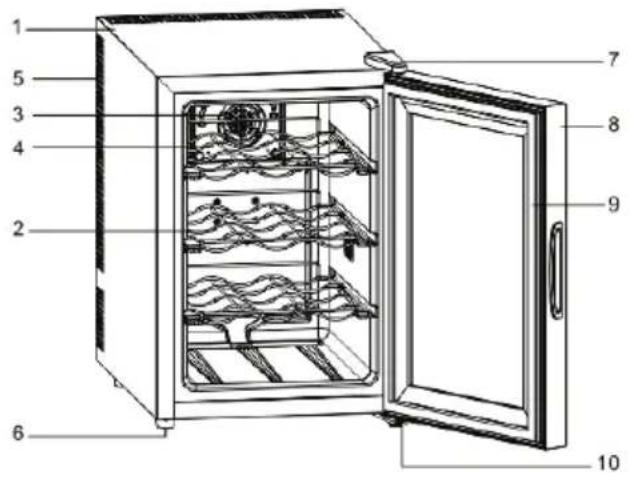
GZ-1535
GZ-1427
GZ-1226
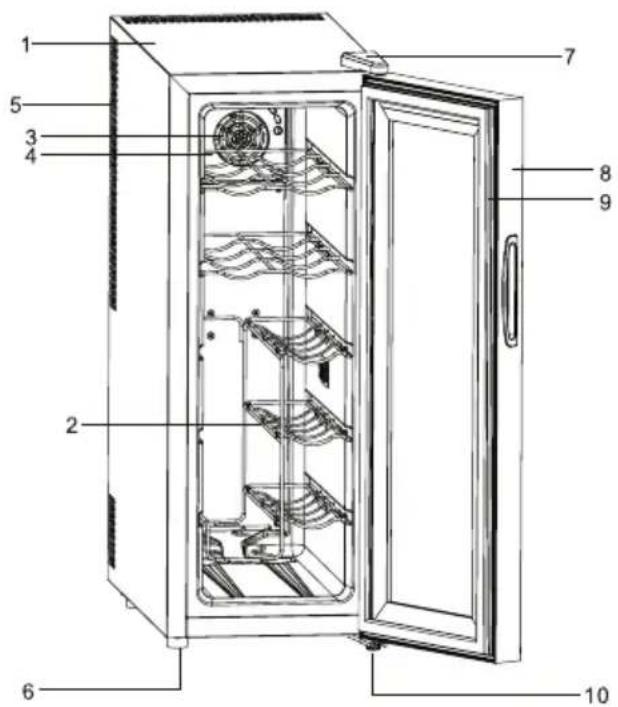
| 1. Cabinet 6. Levelina leas | |
| 2. Shelf 7. UDDer Door Hinae w/ Cover | |
| 3. Cold sink fan 8. Glass Door | |
| 4. Cold sink Fan Cover 9. Gasket | |
| 5. Ventilation Holes 10. Bottom hinge |
TEMPERATURE CONTROL
It is recommended you install the Chiller in a place where the ambient temperature is between 23 °C - 26 °C / 72 - 78 °F. If the ambient temperature is above or below recommended temperatures, the performance of the unit may be affected. For example, placing your unit in extreme cold or hot conditions may ca use interior temperatures to fluctuate. The range of (12 - 18 °C (GZ-1427), 10 - 18 °C (GZ-1234, GZ-1226, GZ-1535)) may not be reached. The recommended ambient temperature is 14 °C.
Temperature Ranges for your cooler
| Model No. Temperature Range |
| GZ-1234 10 - 18 °C |
| GZ-1226 10 - 18 °C |
| GZ-1427 12 - 18 °C |
| GZ-1535 10 - 18 °C |
CONTROL PANEL
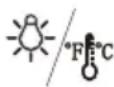
You can select temperature display setting from Fahrenheit to Celsius degree by pushing this button for two seconds. Fahrenheit or Celsius degrees indicator will appear in white color in the LCD temperature display window with blue background.

Temperature control
- You can turn the interior light ON or OFF by pushing the 🎨 button once. The light will be turned off automatically if it remains ON for 10 minutes. You have to push the 🎨 button again and the light will turn back on.
-
You can select temperature display setting from Celsius to Fahrenheit degree by pushing the ✦/ ✦ button for 2 seconds.
-
Your Cooler has been equipped with an "automatic" control panel lock, that will activate 20 seconds after the last time a button has been touched.
Push the 📋 button for 2 seconds to unlock the control panel. You will hear a "BEEP" sound to alert you that the control is now active.
- You can set the temperature as you desire by pushing the ∧ or ∨ button on the control panel. The temperature that you desire to set will increase 1 °C if you push the ∧ button once, on the contrary the temperature will decrease 1 °C if you push the ∨ button once.
Note
When you use the cooler for the first time or restart the cooler after having been shut off for a long time, there could be a few degrees variance between the temperature you select and the one indicated on the LED readout. This is normal and it is due to the length of the activation time. Once the cooler is running for a few hours everything will be back to normal.
Storage Capacity
Note
You can place 12 standard bottles in model of GZ-1234. You can place 12 standard bottles in model of GZ-1226. You can place 14 standard bottles in model of GZ-1427. You can place 15 standard bottles in model of GZ-1535.
Many bottles may differ in size and dimensions. As such the actual number of bottles you may be able to store may vary. Bottle capacities are approximate maximums when storing traditional Bordeaux 750 ml bottles and include bulk storage.
Interior Light
You can turn the interior light ON or OFF by pushing the button marked with the "Light" symbol ⏻. The light will be turned off automatically if it remains ON for 10 minutes. You have to push the button marked with the "Light" symbol ⏻ again and the light will turn back on.
ELECTRIC DIAGRAM
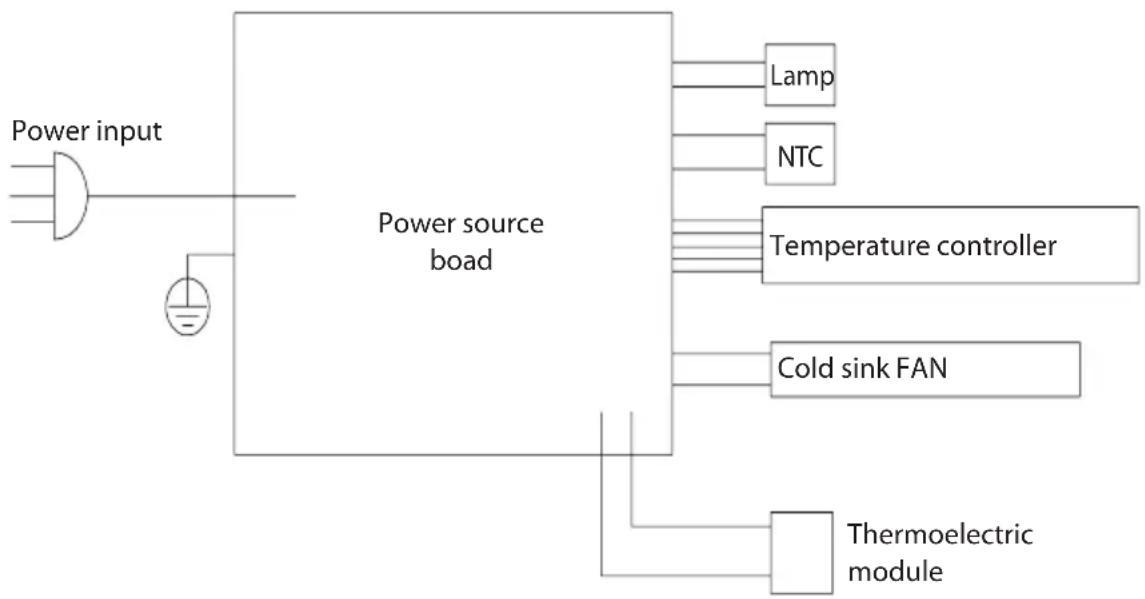
flowchart
graph TD
    A["Power input"] --> B["Power source board"]
    B --> C["Lamp"]
    B --> D["NTC"]
    B --> E["Temperature controller"]
    B --> F["Cold sink FAN"]
    B --> G["Thermoelectric module"]
INSTRUCTION FOR USES
1. Note
1.1 Position your cooler so that the plug is accessible.
1.2 Keep your cooler out of direct sunlight.
1.3 Do not place next to heat generating appliance.
1.4 Do not place directly on the ground. Provide suitable stand.
1.5 This refrigerating appliance is not suitable for freezing foodstuffs.
1.6 The storage box is not suitable for storing food, which may cause food deterioration.
2. Very important
2.1 The cooler will have better performance at ambient of 20 - 25 degree. We suggest the cooler be powered off if the ambient temperature is lower than 10 degree.
2.2 After plugging the appliance, allow the unit to cool down for 2-3 hours before placing beverage into the cooler compartment.
2.3 Ventilation is very important for this kind thermoelectric cooler. The inside PCB will be broken easily if the ventilation is bad. It will also reduce the life of the cooler.
2.4 If leakage occurs (which can be easily detected due to the unpleasant smell), please
A: Switch off the cooler immediately
B: Ventilate the room thoroughly
C: Call for the after sales service department
2.5 These models use a thermoelectric cooling system with automatic defrosting system, so there is no need to defrost it manually.
2.6 This refrigerating appliance is not intended to be used as a built in appliance.
2.7 The recommended temperature control for this product is 14 degree.
3. Power supply
3.1 The cooler must be connected to a properly earthed socket in line with relevant valid country regulations before operating.
3.2 Check the data label (which is on the side of the cooler) for voltage and frequency corresponds to your local one. If not, don't plug your cable into the socket.
4. Product cleaning
First, please use this for the first time, please remove The tape for fixing the fixture in the box, and wipe with soft cloth. Please rinse the water thoroughly and remove the moisture.
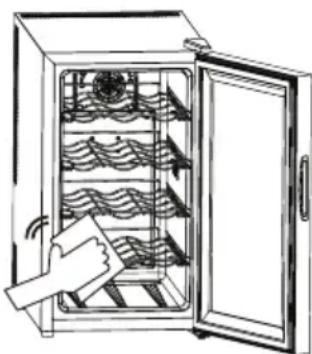
natural_image
Line drawing of a hand cleaning the interior of an open oven with wavy insulation racks (no text or symbols)5. Product function description
5.1 This refrigerating appliance not suitable for storing food.
5.2 This refrigerating appliance is not suitable for the freezing foodstuffs.
5.3 This refrigerating appliance is recommended to be designed at 17 °C.
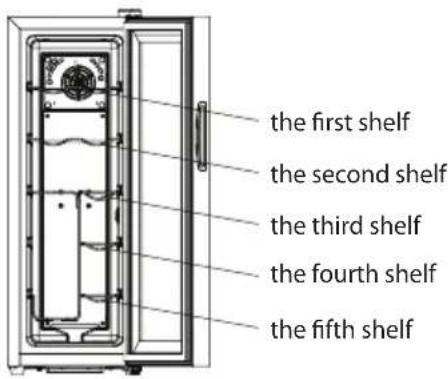
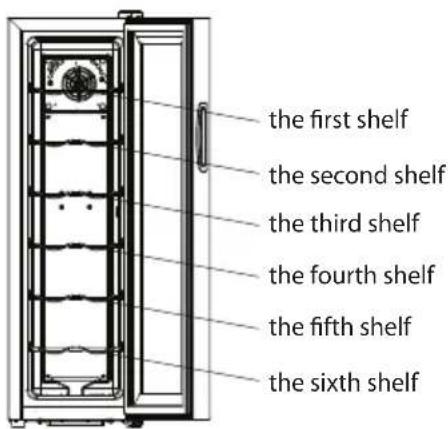
5.4 The shelves placed in factory mode is the most efficient use of energy for the refrigerating appliances.
5.5 The following combination of shelves is recommended for energy to be used as efficiently as possible by the refrigeration unit.
GZ-1234
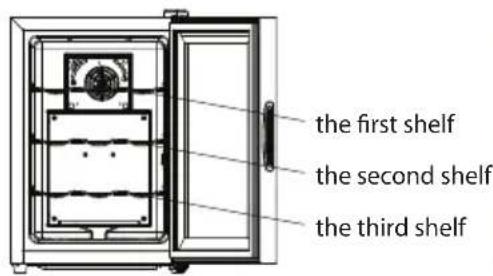
GZ-1535
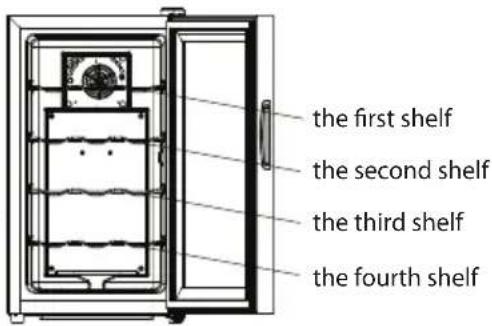
GZ-1427
GZ-1226
5.6. When the surrounding temperature is 25^ C and the pantry has no load, it will take around 60 minutes to decrease the pantry ^1 s temperature from 25^ C to 17^ C.
5.7. This refrigerating appliance is recommended to be designed at 17^ C . The energy consumption is shown in the table below. If the setting temperature is higher than 17^ C , the energy consumption will be lower. If the setting temperature is lower than 17^ C , the energy consumption will be higher.
| Model No. Energy consumption |
| GZ-1234 0.211 kWh / 24 h |
| GZ-1226 0.252 kWh / 24 h |
| GZ-1427 0.273 kWh / 24 h |
| GZ-1535 0.252 kWh / 24 h |
5.8 Defrosting procedure: When the semiconductor refrigeration piece works for 24 hours, power off and stop defrosting for 10 minutes.
VENTILATION
When putting a TE cooler, ventilation should be considered seriously, please refer to the following:
- there should be left at least 200 cm ^3 for ventilation
- the distance between wall and cooler side should be at least 20 mm
- the bottom should be left at least 50 mm for air flowing
- air passing through must not be preheated
- entire cooling system should be considered in the ventilation
TROUBLE SHOOTING GUILDS
Failure: no cooling
| Possible reason Action | |
| No power Check the electricity | supply, or change a new plug. |
| PCB broken Replace a new PCB. | |
| Fan broken Replace a new fan. | |
| Leakage Replace a new heat pump. | |
| Cooling module broken Replace | a new cooling module with silicone. |
Failure: poor cooling performance
| Possible reason Action | |
| High ambient temperature The | room temperature is hotter than normal. |
| Poor instruction The door is opened too often. | |
| Poor ventilation Install cooler according to our ventilation instruction. | |
| Poor gasket Replace a new door gaske. | |
| Poor silicone Change the silicone module on the surface of the cooling module. | |
Failure: noisy
| Possible reason Action | |
| Dust | Clean the dust from the fan. |
| Fan broken Change to a new fan. | |
| Poor heat pump | Replace a new heat pump. |
| Possible reason Action | |
| No defrost Stop working for at least one hour, then restart it. | |
| Low ambient temperature Adjust the air-conditioner to be around 25 degree. | |
TECHNICAL DATA
| Model No. GZ-1234 GZ-1226 GZ-1427 GZ-1535 | ||||
| Net Capacity (liters) 37 38 46 48 | ||||
| Voltage (V) 100 - 240 V | ||||
| Frequency (Hz) 50 / 60 | ||||
| Rated Power (W) 55 | ||||
| Dimension (mm) | 359 x 547 x 530 | 273 x 547 x 740 | 273 x 547 x 845 | 359 x 547 x 635 |
| Packing (mm) | 410 x 600 x 567 | 323 x 600 x 777 | 323 x 600 x 882 | 410 x 600 x 672 |
| Net Weight (kg) | 15 | 16.85 | 7.5 | 16.4 |
| Gross Weight (kg) | 16.3 | 18.35 | 20.3 | 19.5 |
| Approval | CB / CE | |||
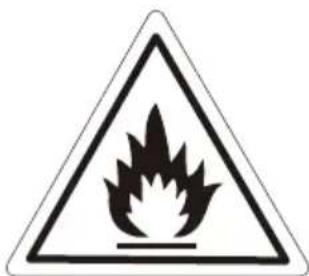
Caution: risk of fire
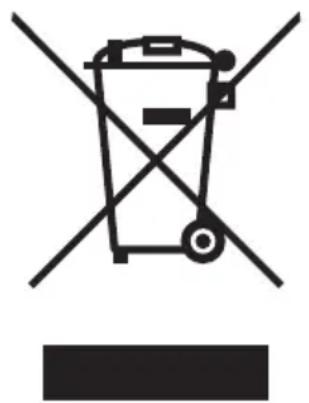
DISPOSAL OF USED ELECTRICAL AND ELECTRONIC EQUIPMENT
natural_image
Symbol of a trash bin crossed with no text or numbers, representing environmental restriction (no text present)This symbol on products or original documents means that used electric or electronic products must not be added to ordinary municipal waste. For proper disposal, renewal and recycling hand over these appliances to determined collection points. Alternatively, in some European Union states or other European countries you may return your appliances to the local retailer when buying an equivalent new appliance. Correct disposal of this product helps save valuable natural resources and prevents potential negative effects on the environment and human health, which could result from improper waste disposal. Ask your local authorities or collection facility for more details. In accordance with national regulations penalties may be imposed for the incorrect disposal of this type of waste.
For business entities in European Union states
If you want to dispose of electric or electronic appliances, ask your retailer or supplier for the necessary information.
Disposal in other countries outside the European Union.
This symbol is valid in the European Union. If you wish to dispose of this product, request the necessary information about the correct disposal method from the local council or from your retailer.


- Nastavení teploty
- Nastavenie teploty
- Popis funkcií produktu
- Opis cech produktu
- Nastavitev temperature
- Temperatureinstellung
- Thank you very much for buying this product. Before using your new cooler, please read this operation manual to ensure that you again the maximum benefit from it.
- WARNINGS
- Note
- INDICATION OF PARTS
- TEMPERATURE CONTROL
- CONTROL PANEL
- Storage Capacity
- Interior Light
- INSTRUCTION FOR USES
- Note
- Very important
- Power supply
- Product cleaning
- Product function description
- VENTILATION
- TROUBLE SHOOTING GUILDS
- DISPOSAL OF USED ELECTRICAL AND ELECTRONIC EQUIPMENT
- For business entities in European Union states
- Disposal in other countries outside the European Union.
Brand : Guzzanti
Model : GZ 1226S
Category : Drink cooler