
C3 - Dash cam Lamax - Free user manual and instructions
Find the device manual for free C3 Lamax in PDF.


| Product Type | Full HD Dashcam |
| Brand | Lamax |
| Model | C3 |
| Video Resolution | 1920×1080 30FPS (interpolated), 1280×720 30FPS |
| Viewing Angle | 140° |
| Display | 2.4" HD LCD |
| Memory Type | MicroSDHC up to 32 GB (Class 10 or higher recommended) |
| Video Format | MJPEG |
| Photo Resolution | 12 Mpx |
| Photo Format | JPG |
| Connectivity | miniUSB |
| Grid Frequency | 50/60 Hz |
| Dimensions (W×H×D) | 65×72×33 mm |
| Weight | Approx. 80 g (est.) |
| Power Source | Cigarette lighter adapter (12V); built-in rechargeable battery for parking mode |
| Battery | Built-in, non-removable; primarily for parking mode |
| Main Functions | Loop recording, G-sensor impact detection, parking mode, motion detection, audio recording, file lock, screensaver |
| Package Contents | Dashcam, cigarette lighter adapter, USB data cable, suction cup mount, adhesive pad holder, user manual |
| Care & Cleaning | Clean with a soft, dry cloth. Avoid liquids; do not disassemble. |
| Safety Warnings | Do not install in driver's line of sight; use only Class 10 or higher microSDHC; format card monthly; insert/remove card only when off |
| Spare Parts & Repairability | No user-serviceable parts; battery non-removable; contact manufacturer for support |
| General Information | Menu languages: EN, DE, CS, SK, PL, HU, SL, LT, LV, FR; manufacturer: elem6 s.r.o., Prague |
Frequently Asked Questions - C3 Lamax
User questions about C3 Lamax
0 question about this device. Answer the ones you know or ask your own.
Ask a new question about this device
Download the instructions for your Dash cam in PDF format for free! Find your manual C3 - Lamax and take your electronic device back in hand. On this page are published all the documents necessary for the use of your device. C3 by Lamax.
USER MANUAL C3 Lamax
natural_image
Exterior view of a LiMAX D GPS navigation device displaying a highway scene with vehicles (no text or symbols on the device itself)EN USER MANUAL
DE BENUTZERHANDBUCH
CS UŽIVATELSKÁ PŘÍRUČKA
SK UŽÍVATEL'SKÝ MANUÁL
PL INSTRUKCJA OBSŁUGI
HU HASZNÁLATI ÚTMUTATÓ
SL NAVODILA ZA UPORABO
LT NAUDOJIMO INSTRUKCIJA
HR PRIRUČNIK ZA KORISNIKA
LAMAX
ELECTRONICS
C3
FULLHD DASHCAM

natural_image
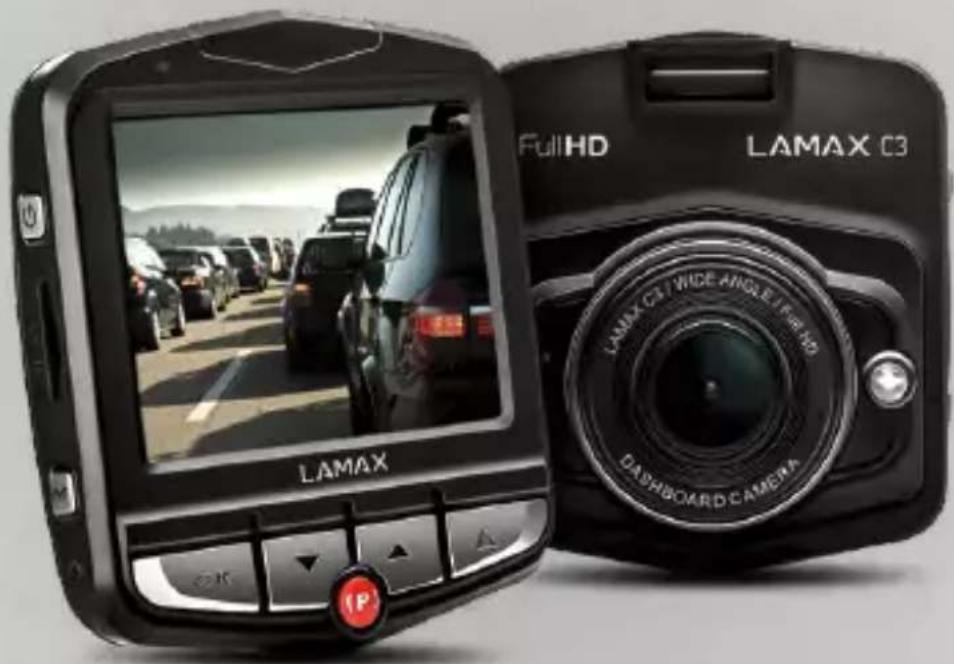
Two LAMAX 3D navigation cameras displayed side by side, showing front and rear views with a highway scene (no text or symbols on the devices themselves)EN
USER MANUAL
CONTENTS
- PACKAGE CONTENTS....2
- PRODUCT LAYOUT 2
- PRODUCT INSTALLATION....3
- QUICK FUNCTIONS....3
- ICONS EXPLANATION....3
- OPERATING THE DASHCAM 4
- SETTINGS MENU 5
- CONNECT WITH US! 6
- DASHCAM PARAMETERS....7
① PACKAGE CONTENTS
LAMAX C3 dashcam
Cigarette lighter adapter
USB data cable
Suction cup camera mount
Holder with 3M adhesive pad
User Manual
② PRODUCT LAYOUT
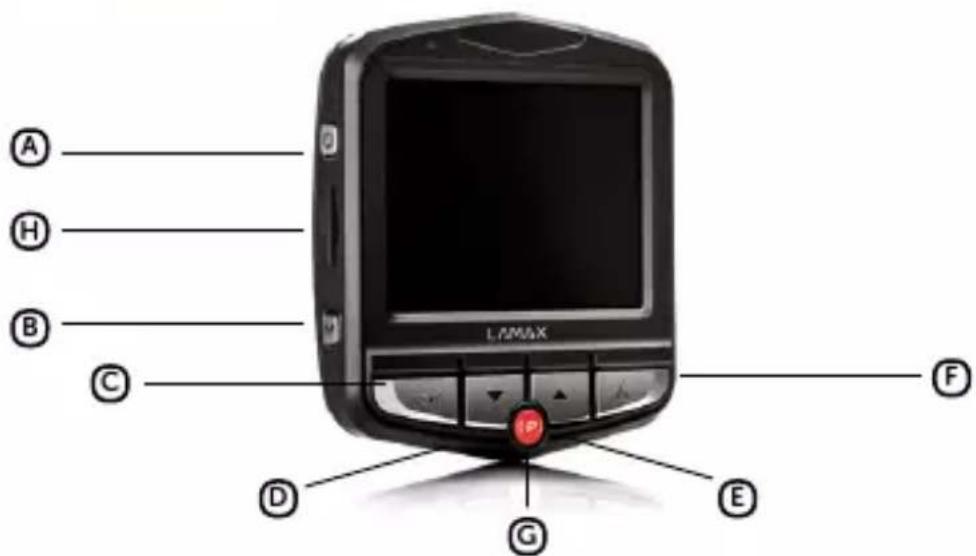
A ON/OFF
B MENU
© OK (shutter)
D DOWN arrow
E UP arrow
F MODE
© Parking mode
H MicroSD card slot
3 PRODUCT INSTALLATION
Connect the power cable to the cigarette lighter. Ensure the cable is placed around the windscreen so as not to obstruct the driver's view and then fix it securely in place. Attach the device between the glass and the mirror. This will give you the optimal picture.
Do not install in a position which obstructs the driver's view or distracts them.
Use only a high-quality microSDHC card of class 10 or higher. For optimal recording use, we recommend cards with a capacity of at least 8 GB up to a maximum of 32 GB. If this is the first use of the card, we recommend formatting it first.
4 QUICK FUNCTIONS
LED light – tap the "ON/OFF" button.
Parking mode – hold the "PARKING MODE" button.
Switch OFF screen – tap the "PARKING MODE" button.
Audio recording – tap the "UP" arrow button.
File lock – when recording video, lock the current recording by tapping the "MENU" button.
5 ICONS EXPLANATION
| Battery status | Motion detection enabled | ||
| Power connected | Shot protected | ||
| Microphone on | Flashlight on | ||
| Microphone off | Flashlight off | ||
| Memory card detected | Parking mode on | ||
| Memory card not detected | Parking mode off |
Insert or remove the microSDHC card from the card slot only when the camera is turned off and not connected to a computer or power supply.
POWER
Plug the adapter into the cigarette lighter and with a USB cable, connect it to the camera mount.
Camera is designed to be powered continuously. Built-in battery cannot be removed or replaced.
Integrated battery is primarily for use in parking mode.
TURNING THE CAMERA ON/OFF
To switch on the camera, press the ON/OFF button.
Camera automatically turns on when connected to a power supply.
To switch off the camera, press and hold the ON/OFF button for 3-5 seconds.
Camera automatically turns off after disconnecting the power supply.
CHANGING THE SETTINGS
Press the "MENU" button to enter the settings menu. Use the "UP" and "DOWN" buttons to scroll through the menu. Click "OK" to confirm your choice.
To exit the settings menu, press the "MENU" button.
VIDEO MODE
Recording starts automatically when the dashcam is turned on.
Press the "OK" button to start / stop the recording.
PHOTO MODE
Press the "OK" button to take a photo.
PLAYBACK MODE
Press the "OK" button to start / pause playback of the recording.
To delete the selected recording, press the "MENU" button and confirm with the "OK" button.
CHANGING MODES
Use the "MODE" button to switch between video / photo / playback modes.
CONNECTING TO A PC
You can also view the recordings by connecting the dashcam to a PC using the data cable that comes included.
7 SETTINGS MENU
Video resolution – Higher resolutions ensure better recording, but also larger file sizes.
Loop length – Sets the length of each individual recording. The camera records a 1, 3 or 5 minutes video in a loop. If the memory card becomes full, the dashcam will start overwriting the oldest recordings. The individual videos follow each other smoothly.
G-sensor – Thanks to the G-sensor, the camera can detect an impact, for example in a traffic accident. As soon as the camera detects an impact, it immediately protects the shot currently being recorded against being overwritten. The sensitivity can be set from 2G (lowest) to 8G (highest).
Parking mode – If an impact is detected by the G-sensor, the camera automatically turns on and starts recording. After 20 seconds the recording will be saved, protected and the camera will turn off again. When parking mode is activated, the display is turned off so as not to attract attention. The sensitivity can be set from 2G (lowest) to 8G (highest). Use the parking mode function with the power supply disconnected!
Motion detection – The camera automatically starts recording when it detects movement in the lens field of view and stops recording after about 10 seconds. If you stop recording manually or turn off the camera, motion detection is disabled. The function is for monitoring a parked vehicle, do not use whilst driving. To use the motion detection function, the camera must be turned on and connected to the power supply.
Audio recording – Allows you to mute or unmute the microphone when recording video. This can be done quickly by pressing the UP button.
Backlight – Allows you to turn on the LED backlight. Do not use in the car while driving, but e.g. when an accident is recorded outside the car.
▶ Screensaver – Sets the screen to turn off automatically when you are not operating the camera. The time intervals are 3, 5 or 10 minutes, or the screensaver can be switched off completely.
Auto Power Off – Allows you to set the dashcam to turn off automatically when idle after 1 or 3 minutes.
Photo resolution – Higher resolutions ensure better recording but larger file sizes.
Exposure – Adjusts the camera exposure to optimize video and photo brightness.
Date Stamp – Sets whether to display date on the video.
Language – Sets the preferred language of the camera operating system.
System Sounds – Allows you to switch ON or OFF the key sound and the welcome tone.
Time / Date – Allows you to manually set the current date and time.
Format SD-Card – This feature deletes all photos and videos on the camera. Attention, this even includes protected files! We recommend formatting at least once a month.
Default Settings – Allows you to reset the camera settings to factory settings.
FW Version – Learn about the currently installed firmware version.
8 CONNECT WITH US!


Scan the QR code below or visit us at
https://www.lamax-electronics.com/c3
for complete instructions and the latest firmware.

Do not forget to register your product on our website:
https://www.lamax-electronics.com/productupdate
We'll let you know as soon as the firmware is updated! By registering, you will also have access to news and information about great discounts!
9 DASHCAM PARAMETERS
| Video resolution: | 1920×1080 30FPS (interpolated), 1280×720 30FPS |
| Viewing angle: | 140° |
| Display: | 2,4" HD LCD |
| Memory type: | MicroSDHC up to 32 GB |
| Video format: | MJPEG |
| Photo resolution: | 12 Mpx |
| Photo format: | JPG |
| Connectivity: | miniUSB |
| Grid frequency: | 50/60 Hz |
| Menu languages: | English, German, Czech, Slovak, Polish, Hungarian, Slovenian, Lithuanian, Latvian, French |
| Dimensions: | 65×72×33 mm |
Specifications may change due to the replacement of any part of the device or software updates.
MANUFACTURER:
elem6 s.r.o., Braškovská 308/158, 161 00 Prague 6
https://www.lamax-electronics.com
Subject to printing errors and changes to the manual.

CE

LAMAX
ELECTRONICS
C3
FULLHD DASHCAM

natural_image
Two LAMAX 3D navigation cameras displayed side by side, showing front and rear views with a highway scene (no text or symbols on the devices themselves)DE
BENUTZERHANDBUCH
INHALT
3 PRODUKTINSTALLATION
https://www.lamax-electronics.com
natural_image
Two black LAMAX 3D navigation camera displays showing a highway driving scene with vehicles (no text or symbols on device body)CS
UŽIVATELSKÁ PŘÍRUČKA
OBSAH
- OBSAH BALENÍ 2
- NÁKRES PRODUKTU 2
- INSTALACE PRODUKTU....3
- FUNKCE OVLÁDANÉ RYCHLOU VOLBOU....3
- VYSVĚTLIVKY K IKONÁM 3
- POUŽÍVÁNÍ AUTOKAMERY 4
- NASTEVENÍ AUTOKAMERY 5
- SPOJTE SE S NÁMI! 6
- PARAMETRY AUTOKAMERY 7
① OBSAH BALENÍ
3 INSTALACE PRODUKTU
https://www.lamax-electronics.com
natural_image
Two black LAMAX 3D navigation camera displays showing a highway driving scene with vehicles (no text or symbols on device body)SK
UŽÍVATEL'SKÝ MANUÁL
OBSAH
- OBSAH BALENIA 2
- NÁKRES PRODUKTU 2
- INSTALÁCIA PRODUKTU 3
- FUNKCIE OVLÁDANÉ RÝCHLOU VOL'BOU 3
- VYSVETLIVKY K IKONÁM 3
- POUŽIVANIE AUTOKAMERY 4
- NASTAVENIE AUTOKAMERY 5
- SPOJTE SA S NAMI! 6
- PARAMETRE AUTOKAMERY....7
① OBSAH BALENIA
Nezabudnite svoj produkt zaregistrovat' na našich stránkach: https://www.lamax-electronics.com/productupdate
https://www.lamax-electronics.com
natural_image
Two black LAMAX 3D navigation camera displays showing a highway driving scene with vehicles (no text or symbols on device body)PL
INSTRUKCJA OBSŁUGI
SPIS TREŚCI
- ZAWARTOŚĆ ZESTAWU 2
- ZARYS PRODUKTU 2
- INSTALACJA KAMERY DO SAMOCHODU 3
- FUNKCJE SZYBKIEGO WYBORU....3
- WYJAŚNIENIA DO IKON 3
- OBSŁUGA KAMERY SAMOCHODOWEJ....4
- USTAWIENIA KAMERY SAMOCHODOWEJ 5
- POŁACZ SIĘ Z NAMI! 6
- PARAMETRY WIDEOREJESTRATORA 7
① ZAWARTOŚĆ ZESTAWU
https://www.lamax-electronics.com/c3,
https://www.lamax-electronics.com
natural_image
Two black LAMAX 3D navigation camera displays showing a highway driving scene with vehicles (no text or symbols on device body)HU
HASZNÁLATI ÚTMUTATÓ
TARTALOM
- A CSOMAG TARTALMA 2
- TERMÉKRAJZ 2
- A KAMERA TELEPÍTÉSE AZ AUTÓBAN....3
- GYORS VÁLASZTÁSSAL VEZÉRELT FUNKCIÓK 3
- IKONOK MAGYARÁZATA....3
- AZ AUTÓKAMERA HASZNÁLATA....4
- AZ AUTÓKAMERA BEÁLLÍTÁSA 5
- VEGYE FEL VELÜNK KAPCSOLATOT! 6
- AUTÓS KAMERA PARAMÉTEREK 7
① A CSOMAG TARTALMA
LAMAX C3 Autókamera
https://www.lamax-electronics.com/c3
https://www.lamax-electronics.com
natural_image
Two black LAMAX 3D navigation camera displays showing a highway driving scene with vehicles (no text or symbols on device body)SL
NAVODILA ZA UPORABO
KAZALO
- VSEBINA EMBALAŽE 2
- SKICA IZDELKA 2
- INSTALACIJA IZDELKA....3
- FUNKCIJA UPRAVLJANJA PREKO HITRE IZBIRE 3
- POJASNILA K IKONAM 3
- UPORABA AUTOKAMERE 4
- POVEŽITE SE Z NAMI! 5
- DASHCAM PARAMETERS 6
① VSEBINA EMBALAŽE
Autokamera LAMAX C3
Adapter za cigaretni vžigalnik
Podatkovni USB kabel
Prisesalnik za kamera
Držalo s 3M samolepilno nalepko
Navodila
② SKICA IZDELKA

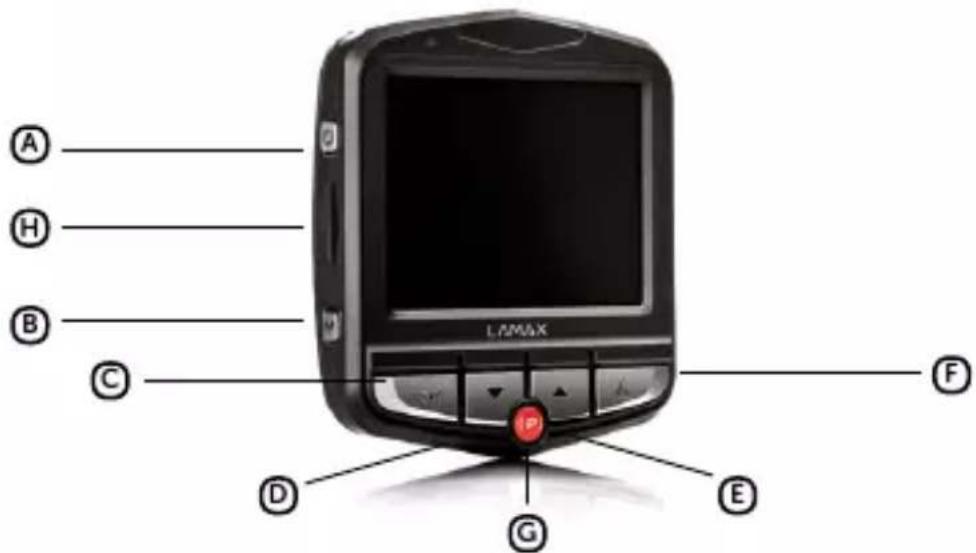
Naskenirajte spodnjo QR kodo ali pa nas obiščite na naslovu https://www.lamax-electronics.com/c3, kjer boste našli cela navodila in aktualno strojno programsko opremo.

Ne pozabite registrirati svojega izdelka na našem spletnem mestu: https://www.lamax-electronics.com/productupdate
https://www.lamax-electronics.com
Pridružujemo si pravico do napak v tisku in sprememb v teh navodilih.

CE
RoHS
LAMAX
ELECTRONICS
C3
FULLHD DASHCAM
natural_image
Two black LAMAX 3D navigation camera displays showing a highway driving scene with vehicles (no text or symbols on device body)LT
NAUDOJIMO INSTRUKCIJA
TURINYS
- RINKINIO TURINYS....2
- PRODUKTO SCHEMA 2
- PRODUKTO INSTALIACIJA....3
- FUNKCE OVLÁDANÉ RYCHLOU VOLBOU....3
- PIKTOGRAMU AIŠKINIMAS 3
- AUTOMOBILINES KAMEROS NAUDOJIMAS 4
- JUNGTIS SU MUMS! 5
- PARAMETRAI 6
① RINKINIO TURINYS
Ⓐ [J./IŠ].
B MENU
© OK (paleidimas)
© Rodyklé ŽEMYN
E Rodyklé AUKŠTYN
F Režimas (MODE)
© Parkavimo režimas
© MicroSDHC kortelès lizdas
3 PRODUKTO INSTALIACIJA
https://www.lamax-electronics.com
natural_image
Two black LAMAX 3D navigation camera displays showing a highway driving scene with vehicles (no text or symbols on device body)HR
PRIRUČNIK ZA KORISNIKA
SADRŽAJ
- SADRŽAJ PAKOVANJA 2
- NACRT PRODUKTA....2
- NAMJEŠTANJE PROIZVODA 3
- BRZE FUNKCIJE 3
- POJAŠNJENJA UZ IKONE....3
- UPOTREBA AUTO KAMERE....4
- POVEŽI SE S NAMA! 5
- PARAMETRI AUTOKAMERE....6
① SADRŽAJ PAKOVANJA
Autokamera LAMAX C3
Adapter za auto utičnicu
Podatkovni USB kabel
Vakumski nosač za kameru
Nosač s 3M naljepnicom
Priručnik
② NACRT PRODUKTA

Ⓐ UKLJ/ISKLJ.
B Izbornik (MENU)
© OK (okidač)
© Strelica DOLJE
E Strelica GORE
F Režim (MODE)
© Režim parkiranja
H Ulaz za microSDHC karticu
3 NAMJEŠTANJE PROIZVODA
Kabel za napajanje za automobilski upaljač postavite oko vjetrobrana tako da ne ograničava vidljivost vozača, a zatim ga sigurno pričvrstite. Uređaj montirajte između vjetrobrana i retrovizora. Tako ćete postići najbolji kadar.
Nemojte instalirati uređaj na mjestu na kojem bi mogao dekoncentrirati vozača ili ometati dobru Vidljivost.
Preporučuje se korištenje visokokvalitetne microSDHC kartice 10. ili višeg razreda. Za optimalno korištenje duljine snimke preporučujemo korištenje kartica s minimalnim kapacitetom od 8 GB, ali maksimalno neka bude do 32 GB. Kod prve upotrebe memorijske kartice preporučuje se njeno formatiranje.
4 BRZE FUNKCIJE
Učitajte dolje navedeni QR kod ili nas posjetite na adresi https://www.lamax-electronics.com/c3, gdje možete naći kompletne upute i ažuran firmware.

Ne zaboravite registrirati svoj proizvod na našoj web stranici: https://www.lamax-electronics.com/productupdate
Čim ažuriramo firmware, odmah ćemo Vas izvijestiti! Registracijom ćete imati i vijesti i informacije o velikim popustima!
8 PARAMETRI AUTOKAMERE
| Rezolucija video: | 1920×1080 30FPS (interpolacijskom), 1280×720 30FPS |
| Kut snimanja: | 140° |
| Displej: | 2,4" HD LCD |
| Tip memorije: | MicroSDHC do 32 GB |
| Video format: | MJPEG |
| Rezolucija foto: | 12 Mpx |
| Format fotografije: | JPG |
| Priključivanje preko: | miniUSB |
| Frekvencija: | 50/60 Hz |
| Jezici izbornika: | Engleski, Njemački, Češki, Slovački, Poljski, Madžarski, Slovenski, Litavski, Letonski, Francuski |
| Dimenzije: | 65×72×33 mm |
Specifikacija se može promijeniti zamjenom nekih dijelova uređaja ili aktualizacijom softvera.
PROIZVOĐAČ:
https://www.lamax-electronics.com



- LAMAX
- ELECTRONICS
- C3
- FULLHD DASHCAM
- CONTENTS
- ① PACKAGE CONTENTS
- ② PRODUCT LAYOUT
- PRODUCT INSTALLATION
- QUICK FUNCTIONS
- ICONS EXPLANATION
- POWER
- TURNING THE CAMERA ON/OFF
- CHANGING THE SETTINGS
- VIDEO MODE
- PHOTO MODE
- PLAYBACK MODE
- CHANGING MODES
- CONNECTING TO A PC
- SETTINGS MENU
- CONNECT WITH US!
- MANUFACTURER:
- INHALT
- PRODUKTINSTALLATION
- OBSAH
- ① OBSAH BALENÍ
- INSTALACE PRODUKTU
- ① OBSAH BALENIA
- SPIS TREŚCI
- ① ZAWARTOŚĆ ZESTAWU
- TARTALOM
- ① A CSOMAG TARTALMA
- KAZALO
- ① VSEBINA EMBALAŽE
- ② SKICA IZDELKA
- TURINYS
- ① RINKINIO TURINYS
- PRODUKTO INSTALIACIJA
- SADRŽAJ
- ① SADRŽAJ PAKOVANJA
- ② NACRT PRODUKTA
- NAMJEŠTANJE PROIZVODA
- BRZE FUNKCIJE
- PROIZVOĐAČ:
Brand : Lamax
Model : C3
Category : Dash cam